
The Essentials of Building Cloud-
Based Web Apps with Azure
Ido Flatow
Senior Architect, Sela Group
Microsoft MVP & RD
Level: Intermediate
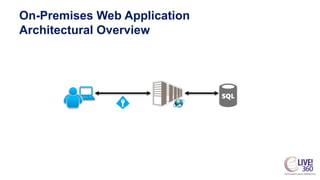
On-Premises Web Application
Architectural Overview
ON-PREMISES WEB APPLICATION
DEMO
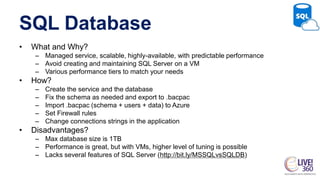
SQL Database
• What and Why?
– Managed service, scalable, highly-available, with predictable performance
– Avoid creating and maintaining SQL Server on a VM
– Various performance tiers to match your needs
• How?
– Create the service and the database
– Fix the schema as needed and export to .bacpac
– Import .bacpac (schema + users + data) to Azure
– Set Firewall rules
– Change connections strings in the application
• Disadvantages?
– Max database size is 1TB
– Performance is great, but with VMs, higher level of tuning is possible
– Lacks several features of SQL Server (http://bit.ly/MSSQLvsSQLDB)
AZURE SQL DATABASE
DEMO
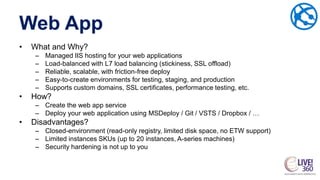
Web App
• What and Why?
– Managed IIS hosting for your web applications
– Load-balanced with L7 load balancing (stickiness, SSL offload)
– Reliable, scalable, with friction-free deploy
– Easy-to-create environments for testing, staging, and production
– Supports custom domains, SSL certificates, performance testing, etc.
• How?
– Create the web app service
– Deploy your web application using MSDeploy / Git / VSTS / Dropbox / …
• Disadvantages?
– Closed-environment (read-only registry, limited disk space, no ETW support)
– Limited instances SKUs (up to 20 instances, A-series machines)
– Security hardening is not up to you
AZURE WEB APPS
DEMO
Blob Storage
• What and Why?
– Secured, shared storage for resources instead of a file server
– Durable, highly-available, with 99.9% SLA
– Accessible through HTTP(S) for browsers and back-ends
– Blobs can be either public or private
– Store up to 500TB (!!), per account (!!)
• How?
– Move resources from file servers to blob storage
– Use the client SDK to retrieve/store blobs
– Make public resources available with HTTP(S)
• Disadvantages?
– Requires changing your server-side [+client-side] code
– No IP restriction / VNET support
AZURE BLOB STORAGE
DEMO
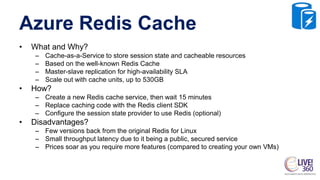
Azure Redis Cache
• What and Why?
– Cache-as-a-Service to store session state and cacheable resources
– Based on the well-known Redis Cache
– Master-slave replication for high-availability SLA
– Scale out with cache units, up to 530GB
• How?
– Create a new Redis cache service, then wait 15 minutes
– Replace caching code with the Redis client SDK
– Configure the session state provider to use Redis (optional)
• Disadvantages?
– Few versions back from the original Redis for Linux
– Small throughput latency due to it being a public, secured service
– Prices soar as you require more features (compared to creating your own VMs)
AZURE REDIS CACHE
DEMO
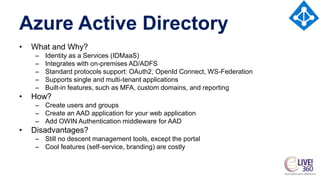
Azure Active Directory
• What and Why?
– Identity as a Services (IDMaaS)
– Integrates with on-premises AD/ADFS
– Standard protocols support: OAuth2, OpenId Connect, WS-Federation
– Supports single and multi-tenant applications
– Built-in features, such as MFA, custom domains, and reporting
• How?
– Create users and groups
– Create an AAD application for your web application
– Add OWIN Authentication middleware for AAD
• Disadvantages?
– Still no descent management tools, except the portal
– Cool features (self-service, branding) are costly
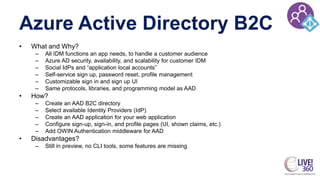
Azure Active Directory B2C
• What and Why?
– All IDM functions an app needs, to handle a customer audience
– Azure AD security, availability, and scalability for customer IDM
– Social IdPs and “application local accounts”
– Self-service sign up, password reset, profile management
– Customizable sign in and sign up UI
– Same protocols, libraries, and programming model as AAD
• How?
– Create an AAD B2C directory
– Select available Identity Providers (IdP)
– Create an AAD application for your web application
– Configure sign-up, sign-in, and profile pages (UI, shown claims, etc.)
– Add OWIN Authentication middleware for AAD
• Disadvantages?
– Still in preview, no CLI tools, some features are missing
AZURE ACTIVE DIRECTORY
DEMO
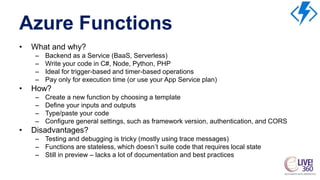
Azure Functions
• What and why?
– Backend as a Service (BaaS, Serverless)
– Write your code in C#, Node, Python, PHP
– Ideal for trigger-based and timer-based operations
– Pay only for execution time (or use your App Service plan)
• How?
– Create a new function by choosing a template
– Define your inputs and outputs
– Type/paste your code
– Configure general settings, such as framework version, authentication, and CORS
• Disadvantages?
– Testing and debugging is tricky (mostly using trace messages)
– Functions are stateless, which doesn’t suite code that requires local state
– Still in preview – lacks a lot of documentation and best practices
AZURE FUNCTIONS
DEMO
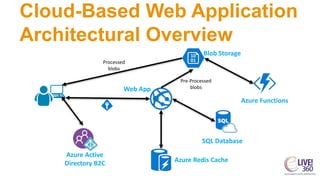
Cloud-Based Web Application
Architectural Overview
Web App
Azure Active
Directory B2C
Blob Storage
Processed
blobs
SQL Database
Azure Redis Cache
Azure Functions
Pre-Processed
blobs
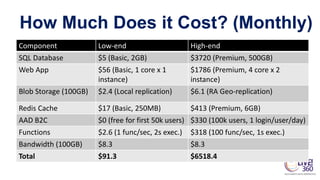
How Much Does it Cost? (Monthly)
Component Low-end High-end
SQL Database $5 (Basic, 2GB) $3720 (Premium, 500GB)
Web App $56 (Basic, 1 core x 1
instance)
$1786 (Premium, 4 core x 2
instance)
Blob Storage (100GB) $2.4 (Local replication) $6.1 (RA Geo-replication)
Redis Cache $17 (Basic, 250MB) $413 (Premium, 6GB)
AAD B2C $0 (free for first 50k users) $330 (100k users, 1 login/user/day)
Functions $2.6 (1 func/sec, 2s exec.) $318 (100 func/sec, 1s exec.)
Bandwidth (100GB) $8.3 $8.3
Total $91.3 $6518.4
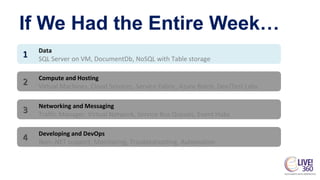
If We Had the Entire Week…
Data
SQL Server on VM, DocumentDb, NoSQL with Table storage
1
Compute and Hosting
Virtual Machines, Cloud Services, Service Fabric, Azure Batch, Dev/Test Labs
2
Networking and Messaging
Traffic Manager, Virtual Network, Service Bus Queues, Event Hubs
3
Developing and DevOps
Non-.NET support, Monitoring, Troubleshooting, Automation
4
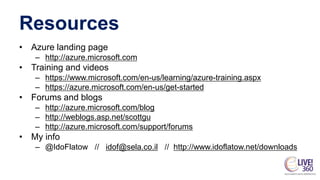
Resources
• Azure landing page
– http://azure.microsoft.com
• Training and videos
– https://www.microsoft.com/en-us/learning/azure-training.aspx
– https://azure.microsoft.com/en-us/get-started
• Forums and blogs
– http://azure.microsoft.com/blog
– http://weblogs.asp.net/scottgu
– http://azure.microsoft.com/support/forums
• My info
– @IdoFlatow // idof@sela.co.il // http://www.idoflatow.net/downloads

The Essentials of Building Cloud-Based Web Apps with Azure

  • 1.
    The Essentials ofBuilding Cloud- Based Web Apps with Azure Ido Flatow Senior Architect, Sela Group Microsoft MVP & RD Level: Intermediate
  • 2.
  • 3.
  • 4.
    SQL Database • Whatand Why? – Managed service, scalable, highly-available, with predictable performance – Avoid creating and maintaining SQL Server on a VM – Various performance tiers to match your needs • How? – Create the service and the database – Fix the schema as needed and export to .bacpac – Import .bacpac (schema + users + data) to Azure – Set Firewall rules – Change connections strings in the application • Disadvantages? – Max database size is 1TB – Performance is great, but with VMs, higher level of tuning is possible – Lacks several features of SQL Server (http://bit.ly/MSSQLvsSQLDB)
  • 5.
  • 6.
    Web App • Whatand Why? – Managed IIS hosting for your web applications – Load-balanced with L7 load balancing (stickiness, SSL offload) – Reliable, scalable, with friction-free deploy – Easy-to-create environments for testing, staging, and production – Supports custom domains, SSL certificates, performance testing, etc. • How? – Create the web app service – Deploy your web application using MSDeploy / Git / VSTS / Dropbox / … • Disadvantages? – Closed-environment (read-only registry, limited disk space, no ETW support) – Limited instances SKUs (up to 20 instances, A-series machines) – Security hardening is not up to you
  • 7.
  • 8.
    Blob Storage • Whatand Why? – Secured, shared storage for resources instead of a file server – Durable, highly-available, with 99.9% SLA – Accessible through HTTP(S) for browsers and back-ends – Blobs can be either public or private – Store up to 500TB (!!), per account (!!) • How? – Move resources from file servers to blob storage – Use the client SDK to retrieve/store blobs – Make public resources available with HTTP(S) • Disadvantages? – Requires changing your server-side [+client-side] code – No IP restriction / VNET support
  • 9.
  • 10.
    Azure Redis Cache •What and Why? – Cache-as-a-Service to store session state and cacheable resources – Based on the well-known Redis Cache – Master-slave replication for high-availability SLA – Scale out with cache units, up to 530GB • How? – Create a new Redis cache service, then wait 15 minutes – Replace caching code with the Redis client SDK – Configure the session state provider to use Redis (optional) • Disadvantages? – Few versions back from the original Redis for Linux – Small throughput latency due to it being a public, secured service – Prices soar as you require more features (compared to creating your own VMs)
  • 11.
  • 12.
    Azure Active Directory •What and Why? – Identity as a Services (IDMaaS) – Integrates with on-premises AD/ADFS – Standard protocols support: OAuth2, OpenId Connect, WS-Federation – Supports single and multi-tenant applications – Built-in features, such as MFA, custom domains, and reporting • How? – Create users and groups – Create an AAD application for your web application – Add OWIN Authentication middleware for AAD • Disadvantages? – Still no descent management tools, except the portal – Cool features (self-service, branding) are costly
  • 13.
    Azure Active DirectoryB2C • What and Why? – All IDM functions an app needs, to handle a customer audience – Azure AD security, availability, and scalability for customer IDM – Social IdPs and “application local accounts” – Self-service sign up, password reset, profile management – Customizable sign in and sign up UI – Same protocols, libraries, and programming model as AAD • How? – Create an AAD B2C directory – Select available Identity Providers (IdP) – Create an AAD application for your web application – Configure sign-up, sign-in, and profile pages (UI, shown claims, etc.) – Add OWIN Authentication middleware for AAD • Disadvantages? – Still in preview, no CLI tools, some features are missing
  • 14.
  • 15.
    Azure Functions • Whatand why? – Backend as a Service (BaaS, Serverless) – Write your code in C#, Node, Python, PHP – Ideal for trigger-based and timer-based operations – Pay only for execution time (or use your App Service plan) • How? – Create a new function by choosing a template – Define your inputs and outputs – Type/paste your code – Configure general settings, such as framework version, authentication, and CORS • Disadvantages? – Testing and debugging is tricky (mostly using trace messages) – Functions are stateless, which doesn’t suite code that requires local state – Still in preview – lacks a lot of documentation and best practices
  • 16.
  • 17.
    Cloud-Based Web Application ArchitecturalOverview Web App Azure Active Directory B2C Blob Storage Processed blobs SQL Database Azure Redis Cache Azure Functions Pre-Processed blobs
  • 18.
    How Much Doesit Cost? (Monthly) Component Low-end High-end SQL Database $5 (Basic, 2GB) $3720 (Premium, 500GB) Web App $56 (Basic, 1 core x 1 instance) $1786 (Premium, 4 core x 2 instance) Blob Storage (100GB) $2.4 (Local replication) $6.1 (RA Geo-replication) Redis Cache $17 (Basic, 250MB) $413 (Premium, 6GB) AAD B2C $0 (free for first 50k users) $330 (100k users, 1 login/user/day) Functions $2.6 (1 func/sec, 2s exec.) $318 (100 func/sec, 1s exec.) Bandwidth (100GB) $8.3 $8.3 Total $91.3 $6518.4
  • 19.
    If We Hadthe Entire Week… Data SQL Server on VM, DocumentDb, NoSQL with Table storage 1 Compute and Hosting Virtual Machines, Cloud Services, Service Fabric, Azure Batch, Dev/Test Labs 2 Networking and Messaging Traffic Manager, Virtual Network, Service Bus Queues, Event Hubs 3 Developing and DevOps Non-.NET support, Monitoring, Troubleshooting, Automation 4
  • 20.
    Resources • Azure landingpage – http://azure.microsoft.com • Training and videos – https://www.microsoft.com/en-us/learning/azure-training.aspx – https://azure.microsoft.com/en-us/get-started • Forums and blogs – http://azure.microsoft.com/blog – http://weblogs.asp.net/scottgu – http://azure.microsoft.com/support/forums • My info – @IdoFlatow // idof@sela.co.il // http://www.idoflatow.net/downloads