Azure Data Platform
Jesus Aguilar
Sr Technical Evangelist Microsoft
@giventocode Microsoft Azure
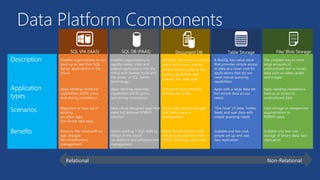
Data Platform Components
A NoSQL document store that
offers fast time to market,
differentiated querying and
tuning capabilities with
schema-less web scale
Relational Non-Relational
SQL DB (PAAS) Table Storage File/ Blob StorageDocument DBSQL VM (IAAS)
SQL Database
Starting With
The Basics
SQL Database
The Basics
SQL Server database technology as a service
Fully Managed
Enterprise-ready with automatic support for HA
Designed to scale out elastically with demand
Ideal for simple and complex applications
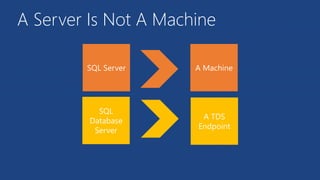
A Server Is Not A Machine
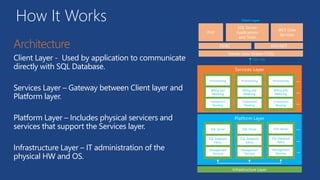
How It Works
Client Layer - Used by application to communicate
directly with SQL Database.
Services Layer – Gateway between Client layer and
Platform layer.
Platform Layer – Includes physical servicers and
services that support the Services layer.
Infrastructure Layer – IT administration of the
physical HW and OS.
PHP
WCF Data
Services
SQL Server
Applications
and Tools
ODBC ADO.NET
Tabular Data Stream (TDS)
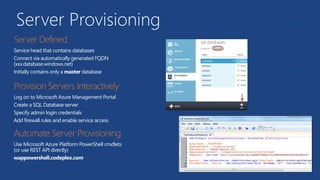
Server Provisioning
Service head that contains databases
Connect via automatically generated FQDN
(xxx.database.windows.net)
Initially contains only a master database
Log on to Microsoft Azure Management Portal
Create a SQL Database server
Specify admin login credentials
Add firewall rules and enable service access
Use Microsoft Azure Platform PowerShell cmdlets
(or use REST API directly)
wappowershell.codeplex.com
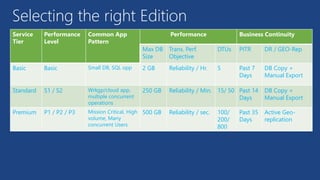
Selecting the right Edition
Service
Tier
Performance
Level
Common App
Pattern
Performance Business Continuity
Max DB
Size
Trans. Perf.
Objective
DTUs PITR DR / GEO-Rep
Basic Basic Small DB, SQL opp 2 GB Reliability / Hr. 5 Past 7
Days
DB Copy +
Manual Export
Standard S1 / S2 Wrkgp/cloud app,
multiple concurrent
operations
250 GB Reliability / Min. 15/ 50 Past 14
Days
DB Copy +
Manual Export
Premium P1 / P2 / P3 Mission Critical, High
volume, Many
concurrent Users
500 GB Reliability / sec. 100/
200/
800
Past 35
Days
Active Geo-
replication
Demo
Creating A SQL Database Server
Create And Deploy
Your Database
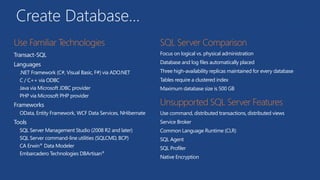
Create Database…
Transact-SQL
Languages
.NET Framework (C#, Visual Basic, F#) via ADO.NET
C / C++ via ODBC
Java via Microsoft JDBC provider
PHP via Microsoft PHP provider
Frameworks
OData, Entity Framework, WCF Data Services, NHibernate
Tools
SQL Server Management Studio (2008 R2 and later)
SQL Server command-line utilities (SQLCMD, BCP)
CA Erwin® Data Modeler
Embarcadero Technologies DBArtisan®
Focus on logical vs. physical administration
Database and log files automatically placed
Three high-availability replicas maintained for every database
Tables require a clustered index
Maximum database size is 500 GB
Use command, distributed transactions, distributed views
Service Broker
Common Language Runtime (CLR)
SQL Agent
SQL Profiler
Native Encryption
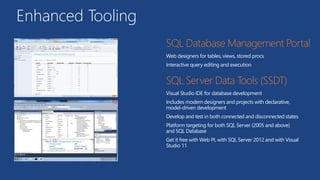
Enhanced Tooling
Web designers for tables, views, stored procs
Interactive query editing and execution
Visual Studio IDE for database development
Includes modern designers and projects with declarative,
model-driven development
Develop and test in both connected and disconnected states
Platform targeting for both SQL Server (2005 and above)
and SQL Database
Get it free with Web PI, with SQL Server 2012 and with Visual
Studio 11
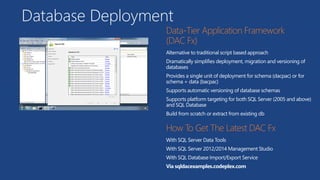
Database Deployment
Alternative to traditional script based approach
Dramatically simplifies deployment, migration and versioning of
databases
Provides a single unit of deployment for schema (dacpac) or for
schema + data (bacpac)
Supports automatic versioning of database schemas
Supports platform targeting for both SQL Server (2005 and above)
and SQL Database
Build from scratch or extract from existing db
With SQL Server Data Tools
With SQL Server 2012/2014 Management Studio
With SQL Database Import/Export Service
Via sqldacexamples.codeplex.com
Secure Your
Database
SQL Database
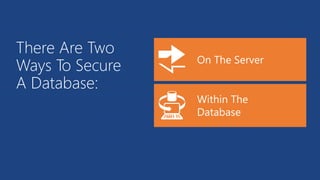
There Are Two
Ways To Secure
A Database:
Server Benefits
SQL authentication supported (No Integrated authentication)
The Admin login is similar to sa
Connect to master to administer logins
loginmanager: Server-Level security role for creating logins
dbmanager: Server-Level security role for creating databases
Database Benefits
Logins require an associated user account
The Admin login is automatically associated with dbo
The dbo has full rights in the database
Manage users with CREATE / ALTER / DROP USER commands
Add users to roles via sp_add_rolemember to grant privileges
Utilize schemas where appropriate
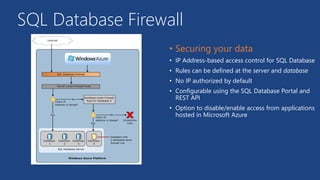
SQL Database Firewall
• IP Address-based access control for SQL Database
• Rules can be defined at the server and database
• No IP authorized by default
• Configurable using the SQL Database Portal and
REST API
• Option to disable/enable access from applications
hosted in Microsoft Azure
Application Connectivity
1. TDS (Tabular Data Stream) protocol over TCP/IP supported
2. SSL required
3. Use firewall rules to connect from outside Microsoft data center
ASP.NET EXAMPLE:
1. login: [login]@[server]
2. Idle connections
3. Long running transactions
4. DoS guard
5. Failover events
6. Throttling
7. Connection pooling and Retry logic
8. Latency introduced for updates
9. No cross-database dependencies
<connectionStrings>
<addname="AdventureWorks"connectionString=
"Data
Source=[server].database.windows.net;
Integrated Security=False;
Initial Catalog=ProductsDb;
User Id=[login];
Password=[password];
Trusted_Connection=False;
Encrypt=true;"
providerName="System.Data.SqlClient"/>
</connectionStrings>
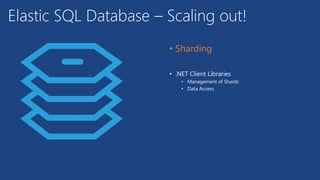
Elastic SQL Database – Scaling out!
• .NET Client Libraries
• Management of Shards
• Data Access
SQL on IaaS
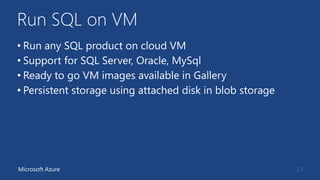
Run SQL on VM
• Run any SQL product on cloud VM
• Support for SQL Server, Oracle, MySql
• Ready to go VM images available in Gallery
• Persistent storage using attached disk in blob storage
23Microsoft Azure
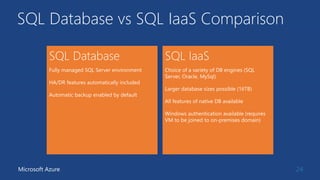
SQL Database vs SQL IaaS Comparison
24Microsoft Azure
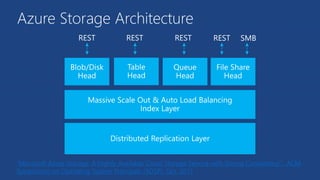
Azure Storage Architecture
“Microsoft Azure Storage: A Highly Available Cloud Storage Service with Strong Consistency”, ACM
Symposium on Operating System Principals (SOSP), Oct. 2011
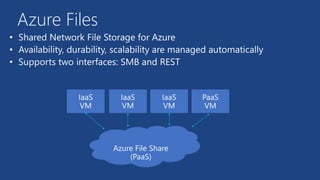
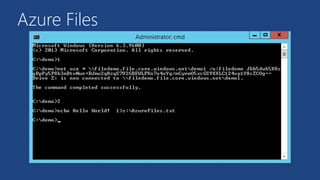
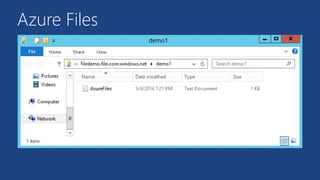
Azure Files
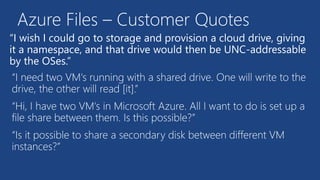
“I wish I could go to storage and provision a cloud drive, giving
it a namespace, and that drive would then be UNC-addressable
by the OSes.”
Azure Files – Customer Quotes
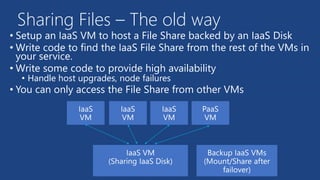
• Setup an IaaS VM to host a File Share backed by an IaaS Disk
• Write code to find the IaaS File Share from the rest of the VMs in
your service.
• Write some code to provide high availability
• Handle host upgrades, node failures
• You can only access the File Share from other VMs
Sharing Files – The old way
Azure Files
•
•
•
Azure Files
Azure Files
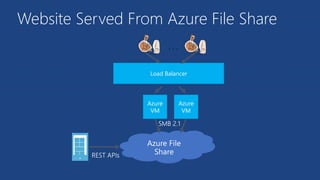
Website Served From Azure File Share
Load Balancer
Azure
VM
Azure
VM
…
Blob Storage
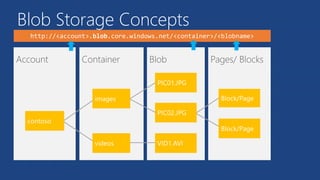
Blob Storage Concepts
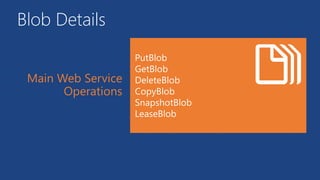
Blob Details
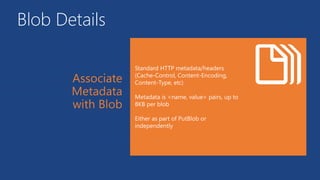
Blob Details
Blob Details
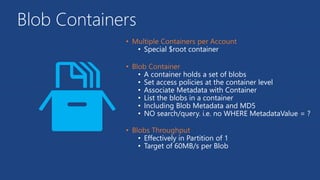
Blob Containers
• Special $root container
• A container holds a set of blobs
• Set access policies at the container level
• Associate Metadata with Container
• List the blobs in a container
• Including Blob Metadata and MD5
• NO search/query. i.e. no WHERE MetadataValue = ?
• Effectively in Partition of 1
• Target of 60MB/s per Blob
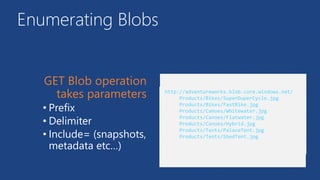
Enumerating Blobs
• Prefix
• Delimiter
• Include= (snapshots,
metadata etc…)
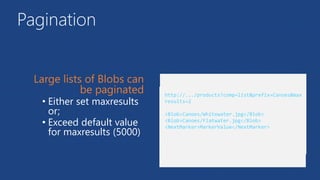
Pagination
• Either set maxresults
or;
• Exceed default value
for maxresults (5000)
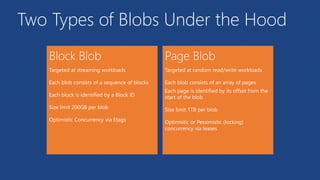
Two Types of Blobs Under the Hood
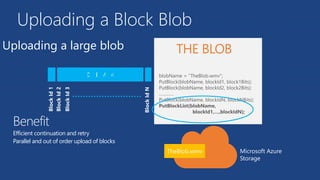
Uploading a Block Blob
Uploading a large blob
Benefit
Efficient continuation and retry
Parallel and out of order upload of blocks
Microsoft Azure
Storage
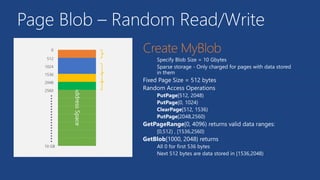
Page Blob – Random Read/Write
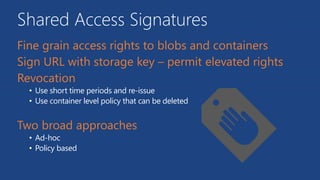
Shared Access Signatures
• Use short time periods and re-issue
• Use container level policy that can be deleted
• Ad-hoc
• Policy based
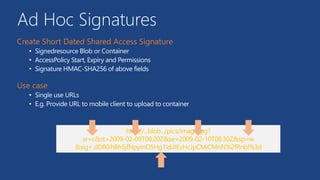
Ad Hoc Signatures
• Signedresource Blob or Container
• AccessPolicy Start, Expiry and Permissions
• Signature HMAC-SHA256 of above fields
• Single use URLs
• E.g. Provide URL to mobile client to upload to container
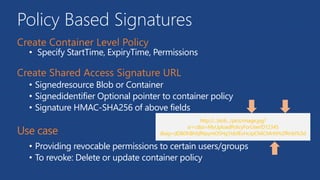
Policy Based Signatures
• Specify StartTime, ExpiryTime, Permissions
• Signedresource Blob or Container
• Signedidentifier Optional pointer to container policy
• Signature HMAC-SHA256 of above fields
• Providing revocable permissions to certain users/groups
• To revoke: Delete or update container policy
NoSQL
48
Generally scales more easily
• The storage engines of NoSQL stores are designed to minimize
contentions enabling higher throughput and therefore more
scalable
• Lower transaction capability in NoSQL results in less contention
and therefore more scalable
• Less complex query processor means that a single query can’t
degrade service
• Built-in replication capability means that store can scale out which
better aligns to other application tiers (e.g. websites)
• No fixed schema or lower schema requirements
49Microsoft Azure
NoSQL on Azure
• Azure Tables service is NoSQL row store
• DocumentDB born in the cloud document database (JSON) and JS
(PAAS).
• HBase is a Big Data (Hadoop) NoSQL store available in HDInsight
• MongoDB is a document (JSON) store
• Cassandra is a columnar store with excellent replication
50Microsoft Azure
Tables
51
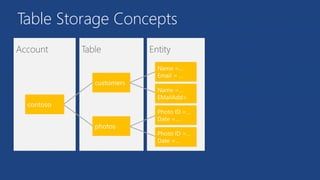
Table Storage Concepts
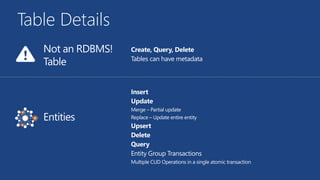
Table Details
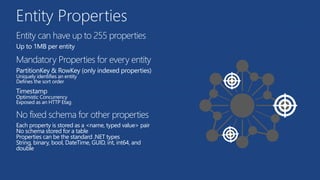
Entity Properties
Entity can have up to 255 properties
Up to 1MB per entity
Mandatory Properties for every entity
PartitionKey & RowKey (only indexed properties)
Uniquely identifies an entity
Defines the sort order
Timestamp
Optimistic Concurrency
Exposed as an HTTP Etag
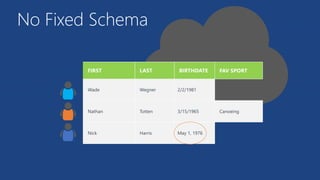
No fixed schema for other properties
Each property is stored as a <name, typed value> pair
No schema stored for a table
Properties can be the standard .NET types
String, binary, bool, DateTime, GUID, int, int64, and
double
No Fixed Schema
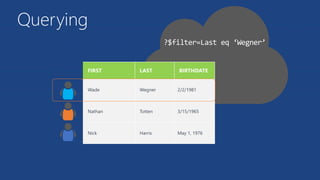
Querying
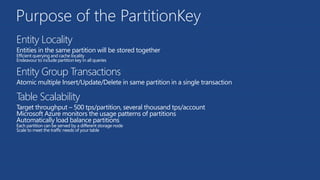
Purpose of the PartitionKey
Entity Locality
Entities in the same partition will be stored together
Efficient querying and cache locality
Endeavour to include partition key in all queries
Entity Group Transactions
Atomic multiple Insert/Update/Delete in same partition in a single transaction
Table Scalability
Target throughput – 500 tps/partition, several thousand tps/account
Microsoft Azure monitors the usage patterns of partitions
Automatically load balance partitions
Each partition can be served by a different storage node
Scale to meet the traffic needs of your table
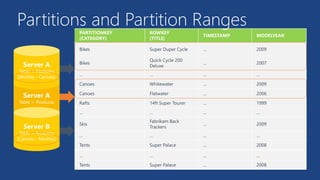
Partitions and Partition Ranges
DocumentDB
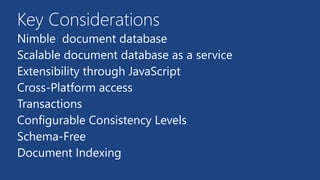
Key Considerations
Nimble document database
Scalable document database as a service
Extensibility through JavaScript
Cross-Platform access
Transactions
Configurable Consistency Levels
Schema-Free
Document Indexing
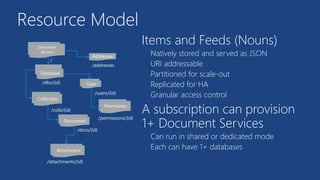
Resource Model
Database
TenantCollection
Document
Attachment
User
/users/{id}
Permission
/dbs/{id}
/colls/{id}
/docs/{id}
/attachments/{id}
/permissions/{id}
Document
Service
/
Addresses
/addresses
Items and Feeds (Nouns)
Natively stored and served as JSON
URI addressable
Partitioned for scale-out
Replicated for HA
Granular access control
A subscription can provision
1+ Document Services
Can run in shared or dedicated mode
Each can have 1+ databases
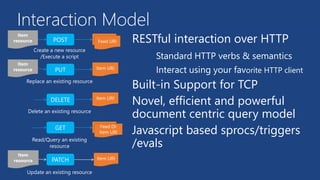
Interaction Model
RESTful interaction over HTTP
Standard HTTP verbs & semantics
Interact using your favorite HTTP client
Built-in Support for TCP
Novel, efficient and powerful
document centric query model
Javascript based sprocs/triggers
/evals
POST
Item
resource TenantFeed URI
PUT
Item
resource Item URI
DELETE Item URI
GET TenantFeed Or
Item URI
Create a new resource
/Execute a script
Replace an existing resource
Delete an existing resource
Read/Query an existing
resource
Update an existing resource
PATCH Item URI
Item
resource
location headquarters exports
Belgium 0 1
city
Moscow
city
Athens
0
country city
Germany Berlin
1
country city
France Paris
0
headquarters exports
country city
Italy 0 1
Germany Bonn
city dealers
Berlin 0
city
Amsterdam
name
Hans
location
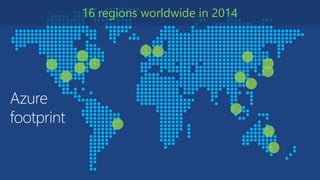
Azure
footprint
16 regions worldwide in 2014
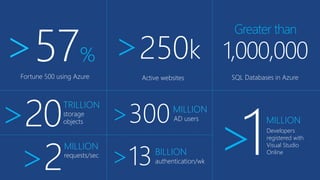
Fortune 500 using Azure
>57% >250k
Active websites
Greater than
1,000,000
SQL Databases in Azure
>20TRILLION
storage
objects >300MILLION
AD users
>13BILLION
authentication/wk
>2
MILLION
requests/sec >1MILLION
Developers
registered with
Visual Studio
Online
Get started
Visit azure.microsoft.com
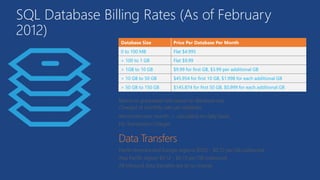
SQL Database Billing Rates (As of February
2012)
Database Size Price Per Database Per Month
0 to 100 MB Flat $4.995
> 100 to 1 GB Flat $9.99
> 1GB to 10 GB $9.99 for first GB, $3.99 per additional GB
> 10 GB to 50 GB $45.954 for first 10 GB, $1.998 for each additional GB
> 50 GB to 150 GB $145.874 for first 50 GB, $0.999 for each additional GB
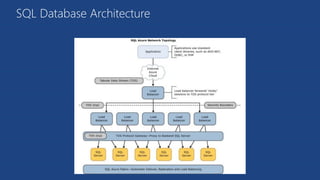
SQL Database Architecture

Azure - Data Platform

  • 1.
    Azure Data Platform JesusAguilar Sr Technical Evangelist Microsoft @giventocode Microsoft Azure
  • 2.
    Data Platform Components ANoSQL document store that offers fast time to market, differentiated querying and tuning capabilities with schema-less web scale Relational Non-Relational SQL DB (PAAS) Table Storage File/ Blob StorageDocument DBSQL VM (IAAS)
  • 3.
  • 4.
  • 5.
    The Basics SQL Serverdatabase technology as a service Fully Managed Enterprise-ready with automatic support for HA Designed to scale out elastically with demand Ideal for simple and complex applications
  • 6.
    A Server IsNot A Machine
  • 7.
    How It Works ClientLayer - Used by application to communicate directly with SQL Database. Services Layer – Gateway between Client layer and Platform layer. Platform Layer – Includes physical servicers and services that support the Services layer. Infrastructure Layer – IT administration of the physical HW and OS. PHP WCF Data Services SQL Server Applications and Tools ODBC ADO.NET Tabular Data Stream (TDS)
  • 8.
    Server Provisioning Service headthat contains databases Connect via automatically generated FQDN (xxx.database.windows.net) Initially contains only a master database Log on to Microsoft Azure Management Portal Create a SQL Database server Specify admin login credentials Add firewall rules and enable service access Use Microsoft Azure Platform PowerShell cmdlets (or use REST API directly) wappowershell.codeplex.com
  • 9.
    Selecting the rightEdition Service Tier Performance Level Common App Pattern Performance Business Continuity Max DB Size Trans. Perf. Objective DTUs PITR DR / GEO-Rep Basic Basic Small DB, SQL opp 2 GB Reliability / Hr. 5 Past 7 Days DB Copy + Manual Export Standard S1 / S2 Wrkgp/cloud app, multiple concurrent operations 250 GB Reliability / Min. 15/ 50 Past 14 Days DB Copy + Manual Export Premium P1 / P2 / P3 Mission Critical, High volume, Many concurrent Users 500 GB Reliability / sec. 100/ 200/ 800 Past 35 Days Active Geo- replication
  • 10.
    Demo Creating A SQLDatabase Server
  • 11.
  • 12.
    Create Database… Transact-SQL Languages .NET Framework(C#, Visual Basic, F#) via ADO.NET C / C++ via ODBC Java via Microsoft JDBC provider PHP via Microsoft PHP provider Frameworks OData, Entity Framework, WCF Data Services, NHibernate Tools SQL Server Management Studio (2008 R2 and later) SQL Server command-line utilities (SQLCMD, BCP) CA Erwin® Data Modeler Embarcadero Technologies DBArtisan® Focus on logical vs. physical administration Database and log files automatically placed Three high-availability replicas maintained for every database Tables require a clustered index Maximum database size is 500 GB Use command, distributed transactions, distributed views Service Broker Common Language Runtime (CLR) SQL Agent SQL Profiler Native Encryption
  • 13.
    Enhanced Tooling Web designersfor tables, views, stored procs Interactive query editing and execution Visual Studio IDE for database development Includes modern designers and projects with declarative, model-driven development Develop and test in both connected and disconnected states Platform targeting for both SQL Server (2005 and above) and SQL Database Get it free with Web PI, with SQL Server 2012 and with Visual Studio 11
  • 14.
    Database Deployment Alternative totraditional script based approach Dramatically simplifies deployment, migration and versioning of databases Provides a single unit of deployment for schema (dacpac) or for schema + data (bacpac) Supports automatic versioning of database schemas Supports platform targeting for both SQL Server (2005 and above) and SQL Database Build from scratch or extract from existing db With SQL Server Data Tools With SQL Server 2012/2014 Management Studio With SQL Database Import/Export Service Via sqldacexamples.codeplex.com
  • 15.
  • 16.
    There Are Two WaysTo Secure A Database:
  • 17.
    Server Benefits SQL authenticationsupported (No Integrated authentication) The Admin login is similar to sa Connect to master to administer logins loginmanager: Server-Level security role for creating logins dbmanager: Server-Level security role for creating databases
  • 18.
    Database Benefits Logins requirean associated user account The Admin login is automatically associated with dbo The dbo has full rights in the database Manage users with CREATE / ALTER / DROP USER commands Add users to roles via sp_add_rolemember to grant privileges Utilize schemas where appropriate
  • 19.
    SQL Database Firewall •IP Address-based access control for SQL Database • Rules can be defined at the server and database • No IP authorized by default • Configurable using the SQL Database Portal and REST API • Option to disable/enable access from applications hosted in Microsoft Azure
  • 20.
    Application Connectivity 1. TDS(Tabular Data Stream) protocol over TCP/IP supported 2. SSL required 3. Use firewall rules to connect from outside Microsoft data center ASP.NET EXAMPLE: 1. login: [login]@[server] 2. Idle connections 3. Long running transactions 4. DoS guard 5. Failover events 6. Throttling 7. Connection pooling and Retry logic 8. Latency introduced for updates 9. No cross-database dependencies <connectionStrings> <addname="AdventureWorks"connectionString= "Data Source=[server].database.windows.net; Integrated Security=False; Initial Catalog=ProductsDb; User Id=[login]; Password=[password]; Trusted_Connection=False; Encrypt=true;" providerName="System.Data.SqlClient"/> </connectionStrings>
  • 21.
    Elastic SQL Database– Scaling out! • .NET Client Libraries • Management of Shards • Data Access
  • 22.
  • 23.
    Run SQL onVM • Run any SQL product on cloud VM • Support for SQL Server, Oracle, MySql • Ready to go VM images available in Gallery • Persistent storage using attached disk in blob storage 23Microsoft Azure
  • 24.
    SQL Database vsSQL IaaS Comparison 24Microsoft Azure
  • 25.
    Azure Storage Architecture “MicrosoftAzure Storage: A Highly Available Cloud Storage Service with Strong Consistency”, ACM Symposium on Operating System Principals (SOSP), Oct. 2011
  • 26.
  • 27.
    “I wish Icould go to storage and provision a cloud drive, giving it a namespace, and that drive would then be UNC-addressable by the OSes.” Azure Files – Customer Quotes
  • 28.
    • Setup anIaaS VM to host a File Share backed by an IaaS Disk • Write code to find the IaaS File Share from the rest of the VMs in your service. • Write some code to provide high availability • Handle host upgrades, node failures • You can only access the File Share from other VMs Sharing Files – The old way
  • 29.
  • 30.
  • 31.
  • 32.
    Website Served FromAzure File Share Load Balancer Azure VM Azure VM …
  • 33.
  • 34.
  • 35.
  • 36.
  • 37.
  • 38.
    Blob Containers • Special$root container • A container holds a set of blobs • Set access policies at the container level • Associate Metadata with Container • List the blobs in a container • Including Blob Metadata and MD5 • NO search/query. i.e. no WHERE MetadataValue = ? • Effectively in Partition of 1 • Target of 60MB/s per Blob
  • 39.
    Enumerating Blobs • Prefix •Delimiter • Include= (snapshots, metadata etc…)
  • 40.
    Pagination • Either setmaxresults or; • Exceed default value for maxresults (5000)
  • 41.
    Two Types ofBlobs Under the Hood
  • 42.
    Uploading a BlockBlob Uploading a large blob Benefit Efficient continuation and retry Parallel and out of order upload of blocks Microsoft Azure Storage
  • 43.
    Page Blob –Random Read/Write
  • 44.
    Shared Access Signatures •Use short time periods and re-issue • Use container level policy that can be deleted • Ad-hoc • Policy based
  • 45.
    Ad Hoc Signatures •Signedresource Blob or Container • AccessPolicy Start, Expiry and Permissions • Signature HMAC-SHA256 of above fields • Single use URLs • E.g. Provide URL to mobile client to upload to container
  • 46.
    Policy Based Signatures •Specify StartTime, ExpiryTime, Permissions • Signedresource Blob or Container • Signedidentifier Optional pointer to container policy • Signature HMAC-SHA256 of above fields • Providing revocable permissions to certain users/groups • To revoke: Delete or update container policy
  • 47.
  • 48.
    Generally scales moreeasily • The storage engines of NoSQL stores are designed to minimize contentions enabling higher throughput and therefore more scalable • Lower transaction capability in NoSQL results in less contention and therefore more scalable • Less complex query processor means that a single query can’t degrade service • Built-in replication capability means that store can scale out which better aligns to other application tiers (e.g. websites) • No fixed schema or lower schema requirements 49Microsoft Azure
  • 49.
    NoSQL on Azure •Azure Tables service is NoSQL row store • DocumentDB born in the cloud document database (JSON) and JS (PAAS). • HBase is a Big Data (Hadoop) NoSQL store available in HDInsight • MongoDB is a document (JSON) store • Cassandra is a columnar store with excellent replication 50Microsoft Azure
  • 50.
  • 51.
  • 52.
  • 53.
    Entity Properties Entity canhave up to 255 properties Up to 1MB per entity Mandatory Properties for every entity PartitionKey & RowKey (only indexed properties) Uniquely identifies an entity Defines the sort order Timestamp Optimistic Concurrency Exposed as an HTTP Etag No fixed schema for other properties Each property is stored as a <name, typed value> pair No schema stored for a table Properties can be the standard .NET types String, binary, bool, DateTime, GUID, int, int64, and double
  • 54.
  • 55.
  • 56.
    Purpose of thePartitionKey Entity Locality Entities in the same partition will be stored together Efficient querying and cache locality Endeavour to include partition key in all queries Entity Group Transactions Atomic multiple Insert/Update/Delete in same partition in a single transaction Table Scalability Target throughput – 500 tps/partition, several thousand tps/account Microsoft Azure monitors the usage patterns of partitions Automatically load balance partitions Each partition can be served by a different storage node Scale to meet the traffic needs of your table
  • 57.
  • 58.
  • 59.
    Key Considerations Nimble documentdatabase Scalable document database as a service Extensibility through JavaScript Cross-Platform access Transactions Configurable Consistency Levels Schema-Free Document Indexing
  • 60.
    Resource Model Database TenantCollection Document Attachment User /users/{id} Permission /dbs/{id} /colls/{id} /docs/{id} /attachments/{id} /permissions/{id} Document Service / Addresses /addresses Items andFeeds (Nouns) Natively stored and served as JSON URI addressable Partitioned for scale-out Replicated for HA Granular access control A subscription can provision 1+ Document Services Can run in shared or dedicated mode Each can have 1+ databases
  • 61.
    Interaction Model RESTful interactionover HTTP Standard HTTP verbs & semantics Interact using your favorite HTTP client Built-in Support for TCP Novel, efficient and powerful document centric query model Javascript based sprocs/triggers /evals POST Item resource TenantFeed URI PUT Item resource Item URI DELETE Item URI GET TenantFeed Or Item URI Create a new resource /Execute a script Replace an existing resource Delete an existing resource Read/Query an existing resource Update an existing resource PATCH Item URI Item resource
  • 62.
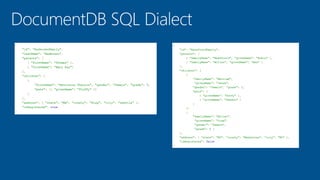
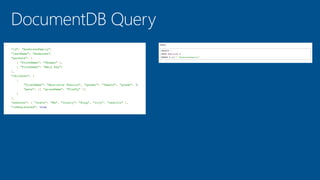
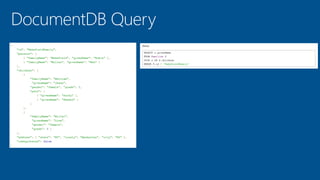
    location headquarters exports Belgium0 1 city Moscow city Athens 0 country city Germany Berlin 1 country city France Paris 0 headquarters exports country city Italy 0 1 Germany Bonn city dealers Berlin 0 city Amsterdam name Hans location
  • 67.
  • 68.
    Fortune 500 usingAzure >57% >250k Active websites Greater than 1,000,000 SQL Databases in Azure >20TRILLION storage objects >300MILLION AD users >13BILLION authentication/wk >2 MILLION requests/sec >1MILLION Developers registered with Visual Studio Online
  • 70.
  • 71.
    SQL Database BillingRates (As of February 2012) Database Size Price Per Database Per Month 0 to 100 MB Flat $4.995 > 100 to 1 GB Flat $9.99 > 1GB to 10 GB $9.99 for first GB, $3.99 per additional GB > 10 GB to 50 GB $45.954 for first 10 GB, $1.998 for each additional GB > 50 GB to 150 GB $145.874 for first 50 GB, $0.999 for each additional GB
  • 72.