


Windows Azure for Developers

      Service Management API


    Wednesday, January 11th 2012
About Me

Michael S. Collier
National Architect,
Windows Azure


michael.collier@neudesic.com
@MichaelCollier
www.MichaelSCollier.com
Today’s Agenda

•   Windows Azure Overview
•   Service Management REST API
•   PowerShell Cmdlets
•   Scenarios
•   Q&A
Windows Azure Primer

• Flexible and powerful platform for developers
• Build, deploy, and manage applications
    – Microsoft’s world-class datacenters
    – Application management
    – Developer SDK
• On-demand services
    –   Compute
    –   Storage
    –   Networking
    –   Identity Management
    –   Caching
• Ideal situations
    – Scalability
    – Availability
    – Fault Tolerance
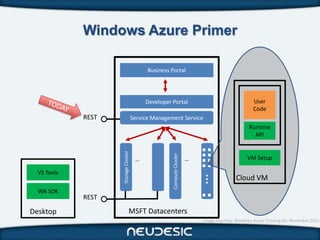
Windows Azure Primer

                                            Business Portal


                                           Developer Portal                                         User
                                                                                                    Code
             REST                     Service Management Service
                                                                                                  Runtime
                                                                                                    API
                    Storage Cluster


                                                      Compute Cluster
                                       …                                …                        VM Setup

  VS Tools


                                                                            …
                                                                                            Cloud VM
  WA SDK
             REST

Desktop                          MSFT Datacenters
                                                                            Image courtesy: Windows Azure Training Kit, November 2011
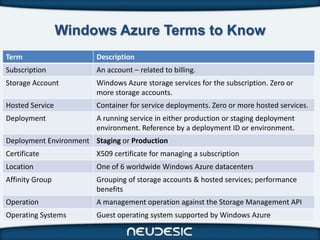
Windows Azure Terms to Know
Term                    Description
Subscription            An account – related to billing.
Storage Account         Windows Azure storage services for the subscription. Zero or
                        more storage accounts.
Hosted Service          Container for service deployments. Zero or more hosted services.
Deployment              A running service in either production or staging deployment
                        environment. Reference by a deployment ID or environment.
Deployment Environment Staging or Production
Certificate             X509 certificate for managing a subscription
Location                One of 6 worldwide Windows Azure datacenters
Affinity Group          Grouping of storage accounts & hosted services; performance
                        benefits
Operation               A management operation against the Storage Management API
Operating Systems       Guest operating system supported by Windows Azure
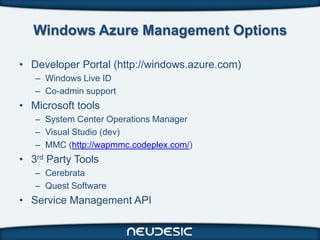
Windows Azure Management Options

• Developer Portal (http://windows.azure.com)
   – Windows Live ID
   – Co-admin support
• Microsoft tools
   – System Center Operations Manager
   – Visual Studio (dev)
   – MMC (http://wapmmc.codeplex.com/)
• 3rd Party Tools
   – Cerebrata
   – Quest Software
• Service Management API
Understanding the

SERVICE MANAGEMENT API
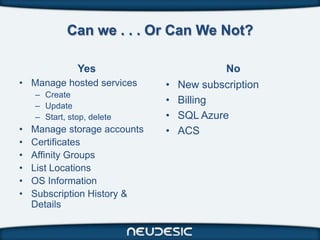
Can we . . . Or Can We Not?

               Yes                         No
• Manage hosted services      •   New subscription
    – Create
    – Update
                              •   Billing
    – Start, stop, delete     •   SQL Azure
•   Manage storage accounts   •   ACS
•   Certificates
•   Affinity Groups
•   List Locations
•   OS Information
•   Subscription History &
    Details
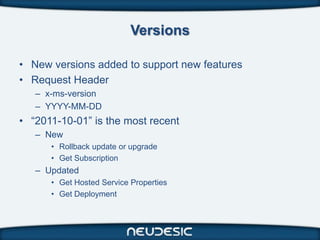
Versions

• New versions added to support new features
• Request Header
   – x-ms-version
   – YYYY-MM-DD
• “2011-10-01” is the most recent
   – New
      • Rollback update or upgrade
      • Get Subscription
   – Updated
      • Get Hosted Service Properties
      • Get Deployment
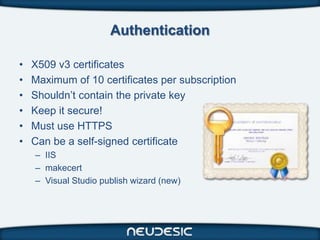
Authentication

•   X509 v3 certificates
•   Maximum of 10 certificates per subscription
•   Shouldn’t contain the private key
•   Keep it secure!
•   Must use HTTPS
•   Can be a self-signed certificate
    – IIS
    – makecert
    – Visual Studio publish wizard (new)
Exploring the Windows Azure Service Management

REST API
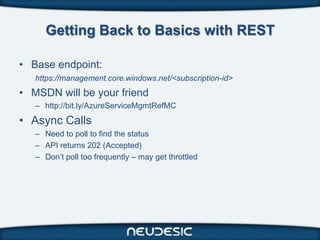
Getting Back to Basics with REST

• Base endpoint:
   https://management.core.windows.net/<subscription-id>
• MSDN will be your friend
   – http://bit.ly/AzureServiceMgmtRefMC
• Async Calls
   – Need to poll to find the status
   – API returns 202 (Accepted)
   – Don’t poll too frequently – may get throttled
Create a New Hosted Service

DEMO
Exploring the Windows Azure

POWERSHELL CMDLETS
Cmdlets are your friend

• Windows Azure PowerShell Cmdlets
   – http://wappowershell.codeplex.com
   – Setup scripts install the 64bit version by default!
   – Working with Visual Studio or Team Build? Need the 32bit
     version
• Cerebrata’s Azure Management Cmdlets
   – http://www.cerebrata.com/Products/AzureManagementCmdlets


• Ideal for
   – IT Pros
   – Developers
   – TFS
Deploy a Hosted Service with PowerShell

DEMO
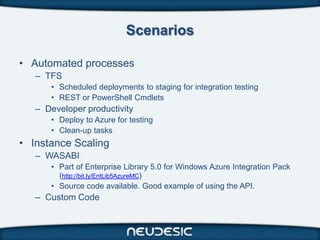
Scenarios

• Automated processes
   – TFS
      • Scheduled deployments to staging for integration testing
      • REST or PowerShell Cmdlets
   – Developer productivity
      • Deploy to Azure for testing
      • Clean-up tasks
• Instance Scaling
   – WASABI
      • Part of Enterprise Library 5.0 for Windows Azure Integration Pack
        (http://bit.ly/EntLib5AzureMC)
      • Source code available. Good example of using the API.
   – Custom Code
Resources

• Windows Azure Training Kit
   – http://bit.ly/AzureTrainingKitMC
• Mackenzie, Neil. Microsoft Windows Azure Development
  Cookbook, Packt, 2011.
   – http://www.packtpub.com/microsoft-windows-azure-
     development-cookbook/book
• Michael Washam’s blog
   – http://michaelwasham.com
• Tom Hollander’s blog
   – http://blogs.msdn.com/b/tomholl
• MSDN
   – http://bit.ly/AzureServiceMgmtRefMC
Windows Azure for Developers - Service Management

Windows Azure for Developers - Service Management

  • 1.
    Windows Azure forDevelopers Service Management API Wednesday, January 11th 2012
  • 2.
    About Me Michael S.Collier National Architect, Windows Azure michael.collier@neudesic.com @MichaelCollier www.MichaelSCollier.com
  • 3.
    Today’s Agenda • Windows Azure Overview • Service Management REST API • PowerShell Cmdlets • Scenarios • Q&A
  • 4.
    Windows Azure Primer •Flexible and powerful platform for developers • Build, deploy, and manage applications – Microsoft’s world-class datacenters – Application management – Developer SDK • On-demand services – Compute – Storage – Networking – Identity Management – Caching • Ideal situations – Scalability – Availability – Fault Tolerance
  • 5.
    Windows Azure Primer Business Portal Developer Portal User Code REST Service Management Service Runtime API Storage Cluster Compute Cluster … … VM Setup VS Tools … Cloud VM WA SDK REST Desktop MSFT Datacenters Image courtesy: Windows Azure Training Kit, November 2011
  • 6.
    Windows Azure Termsto Know Term Description Subscription An account – related to billing. Storage Account Windows Azure storage services for the subscription. Zero or more storage accounts. Hosted Service Container for service deployments. Zero or more hosted services. Deployment A running service in either production or staging deployment environment. Reference by a deployment ID or environment. Deployment Environment Staging or Production Certificate X509 certificate for managing a subscription Location One of 6 worldwide Windows Azure datacenters Affinity Group Grouping of storage accounts & hosted services; performance benefits Operation A management operation against the Storage Management API Operating Systems Guest operating system supported by Windows Azure
  • 7.
    Windows Azure ManagementOptions • Developer Portal (http://windows.azure.com) – Windows Live ID – Co-admin support • Microsoft tools – System Center Operations Manager – Visual Studio (dev) – MMC (http://wapmmc.codeplex.com/) • 3rd Party Tools – Cerebrata – Quest Software • Service Management API
  • 8.
  • 9.
    Can we .. . Or Can We Not? Yes No • Manage hosted services • New subscription – Create – Update • Billing – Start, stop, delete • SQL Azure • Manage storage accounts • ACS • Certificates • Affinity Groups • List Locations • OS Information • Subscription History & Details
  • 10.
    Versions • New versionsadded to support new features • Request Header – x-ms-version – YYYY-MM-DD • “2011-10-01” is the most recent – New • Rollback update or upgrade • Get Subscription – Updated • Get Hosted Service Properties • Get Deployment
  • 11.
    Authentication • X509 v3 certificates • Maximum of 10 certificates per subscription • Shouldn’t contain the private key • Keep it secure! • Must use HTTPS • Can be a self-signed certificate – IIS – makecert – Visual Studio publish wizard (new)
  • 12.
    Exploring the WindowsAzure Service Management REST API
  • 13.
    Getting Back toBasics with REST • Base endpoint: https://management.core.windows.net/<subscription-id> • MSDN will be your friend – http://bit.ly/AzureServiceMgmtRefMC • Async Calls – Need to poll to find the status – API returns 202 (Accepted) – Don’t poll too frequently – may get throttled
  • 14.
    Create a NewHosted Service DEMO
  • 15.
    Exploring the WindowsAzure POWERSHELL CMDLETS
  • 16.
    Cmdlets are yourfriend • Windows Azure PowerShell Cmdlets – http://wappowershell.codeplex.com – Setup scripts install the 64bit version by default! – Working with Visual Studio or Team Build? Need the 32bit version • Cerebrata’s Azure Management Cmdlets – http://www.cerebrata.com/Products/AzureManagementCmdlets • Ideal for – IT Pros – Developers – TFS
  • 17.
    Deploy a HostedService with PowerShell DEMO
  • 18.
    Scenarios • Automated processes – TFS • Scheduled deployments to staging for integration testing • REST or PowerShell Cmdlets – Developer productivity • Deploy to Azure for testing • Clean-up tasks • Instance Scaling – WASABI • Part of Enterprise Library 5.0 for Windows Azure Integration Pack (http://bit.ly/EntLib5AzureMC) • Source code available. Good example of using the API. – Custom Code
  • 19.
    Resources • Windows AzureTraining Kit – http://bit.ly/AzureTrainingKitMC • Mackenzie, Neil. Microsoft Windows Azure Development Cookbook, Packt, 2011. – http://www.packtpub.com/microsoft-windows-azure- development-cookbook/book • Michael Washam’s blog – http://michaelwasham.com • Tom Hollander’s blog – http://blogs.msdn.com/b/tomholl • MSDN – http://bit.ly/AzureServiceMgmtRefMC

Editor's Notes

  • #4 Windows Azure National ArchitectWindows Azure MVPHelp customers nationwide with their Windows Azure projects. This can include architectural design sessions, training, development, evangelism, etc.Reach me via email, Twitter, or my blog.
  • #5 Leave time at the end for a few questions.
  • #6 6 worldwide datacenters
  • #8 http://msdn.microsoft.com/en-us/library/windowsazure/ee460786.aspx
  • #12 Request header must be specified
  • #13 Keep it secure – anyone with the private key for the cert can use the Svc Mgmt APISelf-signedUsed for private communication between client app and Azure Svc Mgmt APICertificate image from WATK (November 2011) – “Managing, Debugging, and Monitoring Windows Azure.pptx”