Topic: internet banking
Made by: sneha shetty
contents
 History
 Definition
 Types
 Services
 Working
 Advantages
 Disadvantages
 Security
 Conclusion
history
Online services started in New York in
1981 when four of the city’s major
banks :
 Citibank
 Chase Manhattan
 Chemical
 Manufacturers Hanover
offered home banking services using
the videotext system.
What is internet banking
o Internet Banking allows you to conduct
bank transactions online, instead of
finding a bank and interacting with a
teller.
o In a broad sense, it is the use of
electronic means to transfer
funds directly from one account
to another, rather than by
cheque or cash.
definition
 A system of banking in which customers
can view their account details, pay bills, and
transfer money by means of the internet.
 The remote delivery of new and traditional
banking products and services through
electronic delivery channels.
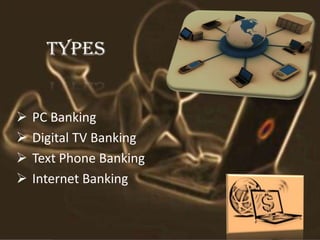
TYPES
 PC Banking
 Digital TV Banking
 Text Phone Banking
 Internet Banking
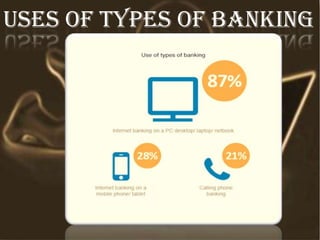
Uses of types of banking
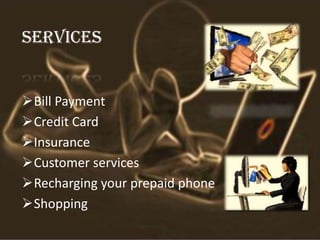
SERVICES
Bill Payment
Credit Card
Insurance
Customer services
Recharging your prepaid phone
Shopping
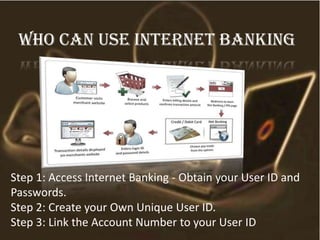
Step 1: Access Internet Banking - Obtain your User ID and
Passwords.
Step 2: Create your Own Unique User ID.
Step 3: Link the Account Number to your User ID
Who can use internet banking
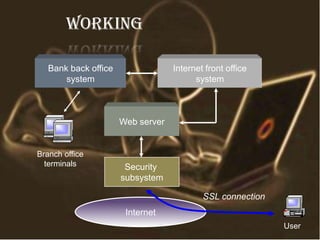
working
Web server
Internet front office
system
Bank back office
system
Internet
Security
subsystem
Branch office
terminals
User
SSL connection
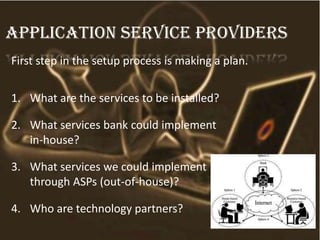
First step in the setup process is making a plan.
1. What are the services to be installed?
2. What services bank could implement
in-house?
3. What services we could implement
through ASPs (out-of-house)?
4. Who are technology partners?
Application Service Providers
advantages
 Cost less
 Transaction speed
 Efficiency
 Speed banking
 Vast coverage
Issues in internet banking
 Security
 Learning difficulties
 Lack of skilled personnel
 Technical breakdowns
 Long start up time
 inexpensive
Security risks
 Increasing number of fraudulent
websites
 Fake emails purporting to be sent from
banks
 Use of trojan horse programs to
capture user ids and password
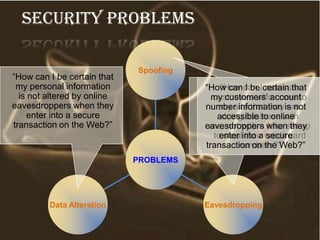
PROBLEMS
Spoofing
“How can I reassure
customers who come to
my site that they are
doing business with
me, not with a fake set up
to steal their credit card
numbers?”
EavesdroppingData Alteration
“How can I be certain that
my personal information
is not altered by online
eavesdroppers when they
enter into a secure
transaction on the Web?”
“How can I be certain that
my customers’ account
number information is not
accessible to online
eavesdroppers when they
enter into a secure
transaction on the Web?”
Security Problems
security
• Ensuring security while banking online, is to
keep your password and pin number a secret.
• The security of your personal computer is
very important for safe internet banking.
Therefore, always install antivirus software
and software to remove spyware.
• Checking your bank statements regularly will
help you detect any transaction that has taken
place without your knowledge.
 While banking through the internet, make
sure that the banking session is secure.
 In addition, always remember to
completely log off, after completing the
banking session.
 Nowadays, the banking institutions have
come up with a number of safety measures
for ensuring secure internet banking.
conclusion
 The strategy of bank is to provide
value added services and products to
the consumer, utilizing the internet
extensively.
 The main aim of E-banking is to
making transactions through online
poses and make customer more
beneficial
Bibliography
1. www.en.wikipedia.org
2. www.bing.com
3. www.bankersonline.com
4. www.ehow.com
5. www.shareslide.net
6. www.hdfcbank.com
Any
questions???
Internet Banking

Internet Banking

  • 1.
  • 2.
    contents  History  Definition Types  Services  Working  Advantages  Disadvantages  Security  Conclusion
  • 3.
    history Online services startedin New York in 1981 when four of the city’s major banks :  Citibank  Chase Manhattan  Chemical  Manufacturers Hanover offered home banking services using the videotext system.
  • 4.
    What is internetbanking o Internet Banking allows you to conduct bank transactions online, instead of finding a bank and interacting with a teller. o In a broad sense, it is the use of electronic means to transfer funds directly from one account to another, rather than by cheque or cash.
  • 5.
    definition  A systemof banking in which customers can view their account details, pay bills, and transfer money by means of the internet.  The remote delivery of new and traditional banking products and services through electronic delivery channels.
  • 6.
    TYPES  PC Banking Digital TV Banking  Text Phone Banking  Internet Banking
  • 7.
    Uses of typesof banking
  • 8.
    SERVICES Bill Payment Credit Card Insurance Customerservices Recharging your prepaid phone Shopping
  • 9.
    Step 1: AccessInternet Banking - Obtain your User ID and Passwords. Step 2: Create your Own Unique User ID. Step 3: Link the Account Number to your User ID Who can use internet banking
  • 10.
    working Web server Internet frontoffice system Bank back office system Internet Security subsystem Branch office terminals User SSL connection
  • 11.
    First step inthe setup process is making a plan. 1. What are the services to be installed? 2. What services bank could implement in-house? 3. What services we could implement through ASPs (out-of-house)? 4. Who are technology partners? Application Service Providers
  • 12.
    advantages  Cost less Transaction speed  Efficiency  Speed banking  Vast coverage
  • 13.
    Issues in internetbanking  Security  Learning difficulties  Lack of skilled personnel  Technical breakdowns  Long start up time  inexpensive
  • 14.
    Security risks  Increasingnumber of fraudulent websites  Fake emails purporting to be sent from banks  Use of trojan horse programs to capture user ids and password
  • 15.
    PROBLEMS Spoofing “How can Ireassure customers who come to my site that they are doing business with me, not with a fake set up to steal their credit card numbers?” EavesdroppingData Alteration “How can I be certain that my personal information is not altered by online eavesdroppers when they enter into a secure transaction on the Web?” “How can I be certain that my customers’ account number information is not accessible to online eavesdroppers when they enter into a secure transaction on the Web?” Security Problems
  • 16.
    security • Ensuring securitywhile banking online, is to keep your password and pin number a secret. • The security of your personal computer is very important for safe internet banking. Therefore, always install antivirus software and software to remove spyware. • Checking your bank statements regularly will help you detect any transaction that has taken place without your knowledge.  While banking through the internet, make sure that the banking session is secure.  In addition, always remember to completely log off, after completing the banking session.  Nowadays, the banking institutions have come up with a number of safety measures for ensuring secure internet banking.
  • 17.
    conclusion  The strategyof bank is to provide value added services and products to the consumer, utilizing the internet extensively.  The main aim of E-banking is to making transactions through online poses and make customer more beneficial
  • 18.
    Bibliography 1. www.en.wikipedia.org 2. www.bing.com 3.www.bankersonline.com 4. www.ehow.com 5. www.shareslide.net 6. www.hdfcbank.com
  • 19.