3ds Max 2015 Essentials
Chapter 10: Textures and UV
Workflow: The Alien
3ds Max topics covered in this
chapter include the following:
• Define UVs on the alien’s body
• Unwrap UVs on the alien’s body
• Build the materials and apply it to
the alien.
2
Define UVs on the alien’s body
3
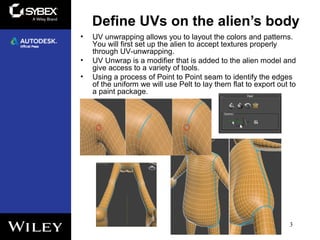
• UV unwrapping allows you to layout the colors and patterns.
You will first set up the alien to accept textures properly
through UV-unwrapping.
• UV Unwrap is a modifier that is added to the alien model and
give access to a variety of tools.
• Using a process of Point to Point seam to identify the edges
of the uniform we will use Pelt to lay them flat to export out to
a paint package.
Unwrap UVs on the alien’s body
4
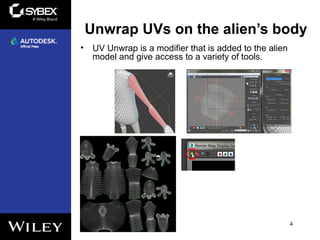
• UV Unwrap is a modifier that is added to the alien
model and give access to a variety of tools.
Build the materials and
apply it to the alien
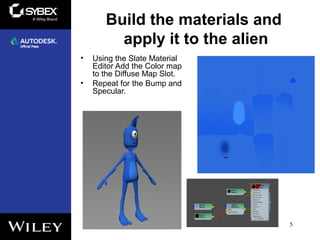
• Using the Slate Material
Editor Add the Color map
to the Diffuse Map Slot.
• Repeat for the Bump and
Specular.
5
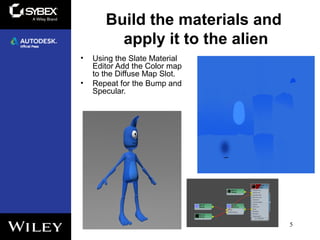
Build the materials and
apply it to the alien
• Using the Slate Material
Editor Add the Color map
to the Diffuse Map Slot.
• Repeat for the Bump and
Specular.
5

Max2015 ch10

  • 1.
    3ds Max 2015Essentials Chapter 10: Textures and UV Workflow: The Alien
  • 2.
    3ds Max topicscovered in this chapter include the following: • Define UVs on the alien’s body • Unwrap UVs on the alien’s body • Build the materials and apply it to the alien. 2
  • 3.
    Define UVs onthe alien’s body 3 • UV unwrapping allows you to layout the colors and patterns. You will first set up the alien to accept textures properly through UV-unwrapping. • UV Unwrap is a modifier that is added to the alien model and give access to a variety of tools. • Using a process of Point to Point seam to identify the edges of the uniform we will use Pelt to lay them flat to export out to a paint package.
  • 4.
    Unwrap UVs onthe alien’s body 4 • UV Unwrap is a modifier that is added to the alien model and give access to a variety of tools.
  • 5.
    Build the materialsand apply it to the alien • Using the Slate Material Editor Add the Color map to the Diffuse Map Slot. • Repeat for the Bump and Specular. 5
  • 6.
    Build the materialsand apply it to the alien • Using the Slate Material Editor Add the Color map to the Diffuse Map Slot. • Repeat for the Bump and Specular. 5