With TFS and Visual Studio
Angela Dugan
ALM Practice Manager
Polaris Solutions
Angela Dugan
Continuous integrations
Build | Deploy | Test

Testing toolbox

Manual testing
 User testing
 Ad-hoc exploratory testing
 Planned manual testing

Role tailored tools

User
Interface

Automated testing
 Keyword testing
 UI automation testing
 Performance testing

Services
Business Processes
Business Rules and Logic
Service integrations
Data access
Identity

Data

Automated testing
 Unit testing
 Integration testing
 Performance testing
 Load testing
Lab
manager

Lab management
services

Test runners

Diagnostic data
collectors

Test execution
services

Build engines

Pluggable components

Build
services

Lab
environments
Virtualization reduces cost to
provision environments
Modern apps run in diverse
environments
Difficult to repro issues found
Replicating environments for
test is time-consuming, costly

Dramatically reduced hardware
and maintenance expenses

Templates allow a wide range
of baselines to be spun up
quickly and on demand

Improved quality and reliability
of apps across platforms

Snapshots capture states for
reproducing test conditions
and verifying defects

Operations engaged in earlier
phases of testing
On-premise | Cloud
Create and manage virtual or physical environments for
Dev/Test
Take snapshots or revert to existing snapshots for any
virtual machine
Deploy current or any build to environment
Interact with virtual machines through the environment
viewer
Define test settings for environments
Test Controllers and Agents

Test agent controller
manages test agents

Web Server
Test Agent
Test Agent
Controller

Collect Intellitrace
Information

Client

Test Agent
Run Tests

Test Agent

Test Agent
Run Tests
Collect Test Impact
Data

Team
Foundation
Server

Collect System
Information

Network Emulation

Client

Register with Team
Project Collection

Database Server

Where to
run Tests?

Collect
Data?

Test agents run tests and collect
data or impact the system

Affect
Machine
Installed on the “client” machines
Three types of agents
Test Agent-Enables automated testing
Build Agent-Enables automated
deployment
Lab Agent-Enables network isolation

Install from the Lab Management
or TFS media
Can be installed/maintained using
the VMPrepTool
Create new multi-machine
environment choices
Create a new
environment using virtual
machine templates in
SCVMM

Create new
environments on
existing machines

Create an
environment using
machines running on
SCVMM
Quickly choose multiple
test suites to run after
deployment

Choose your environment,
and build, deploy and test in
that environment from a
single dialog
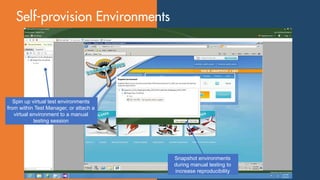
Spin up virtual test environments
from within Test Manager, or attach a
virtual environment to a manual
testing session

Snapshot environments
during manual testing to
increase reproducibility
Thumbnail view of each
machine in the environment
Developers can quickly debug
issues on the exact same
testing environment

Environment snapshot
taken and attached as a
link with bug
Test run results are attached to
specific builds and environments

Collect all the data required
to recreate bugs from virtual
environments
SCVMM Environment
Build-Deploy-Test
Snapshot / Restore
Share Bug Snapshots

Network Fencing
3rd Party Virtualization
Physical Machines

Standard Environment
Lab Management is included with Visual Studio Premium/Test
Pro
SCVMM license for dev/test is included

MSDN
Headless Hyper-V as the host OS
Guest OS license is part of MSDN subscription
Each person accessing the Virtual Machine Host (or accessing
a virtual machine on that host) must have an MSDN
subscription
ULTIMATE
Premium
Professional

Office
Web Access
SharePoint
Team Explorer
Everywhere

Test
Professional
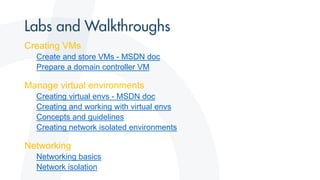
Creating VMs
Create and store VMs - MSDN doc
Prepare a domain controller VM

Manage virtual environments
Creating virtual envs - MSDN doc
Creating and working with virtual envs
Concepts and guidelines
Creating network isolated environments

Networking
Networking basics
Network isolation
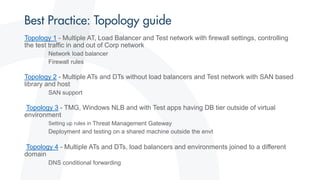
Topology 1 - Multiple AT, Load Balancer and Test network with firewall settings, controlling
the test traffic in and out of Corp network
Network load balancer
Firewall rules

Topology 2 - Multiple ATs and DTs without load balancers and Test network with SAN based
library and host
SAN support

Topology 3 - TMG, Windows NLB and with Test apps having DB tier outside of virtual
environment
Setting up rules in Threat Management Gateway

Deployment and testing on a shared machine outside the envt

Topology 4 - Multiple ATs and DTs, load balancers and environments joined to a different
domain
DNS conditional forwarding
Microsoft Testing Tour - Setting up a Test Environment

Microsoft Testing Tour - Setting up a Test Environment

  • 1.
    With TFS andVisual Studio Angela Dugan ALM Practice Manager Polaris Solutions
  • 2.
  • 3.
    Continuous integrations Build |Deploy | Test Testing toolbox Manual testing  User testing  Ad-hoc exploratory testing  Planned manual testing Role tailored tools User Interface Automated testing  Keyword testing  UI automation testing  Performance testing Services Business Processes Business Rules and Logic Service integrations Data access Identity Data Automated testing  Unit testing  Integration testing  Performance testing  Load testing
  • 4.
    Lab manager Lab management services Test runners Diagnosticdata collectors Test execution services Build engines Pluggable components Build services Lab environments
  • 5.
    Virtualization reduces costto provision environments Modern apps run in diverse environments Difficult to repro issues found Replicating environments for test is time-consuming, costly Dramatically reduced hardware and maintenance expenses Templates allow a wide range of baselines to be spun up quickly and on demand Improved quality and reliability of apps across platforms Snapshots capture states for reproducing test conditions and verifying defects Operations engaged in earlier phases of testing
  • 6.
  • 7.
    Create and managevirtual or physical environments for Dev/Test Take snapshots or revert to existing snapshots for any virtual machine Deploy current or any build to environment Interact with virtual machines through the environment viewer Define test settings for environments
  • 9.
    Test Controllers andAgents Test agent controller manages test agents Web Server Test Agent Test Agent Controller Collect Intellitrace Information Client Test Agent Run Tests Test Agent Test Agent Run Tests Collect Test Impact Data Team Foundation Server Collect System Information Network Emulation Client Register with Team Project Collection Database Server Where to run Tests? Collect Data? Test agents run tests and collect data or impact the system Affect Machine
  • 10.
    Installed on the“client” machines Three types of agents Test Agent-Enables automated testing Build Agent-Enables automated deployment Lab Agent-Enables network isolation Install from the Lab Management or TFS media Can be installed/maintained using the VMPrepTool
  • 11.
  • 12.
    Create a new environmentusing virtual machine templates in SCVMM Create new environments on existing machines Create an environment using machines running on SCVMM
  • 13.
    Quickly choose multiple testsuites to run after deployment Choose your environment, and build, deploy and test in that environment from a single dialog
  • 14.
    Spin up virtualtest environments from within Test Manager, or attach a virtual environment to a manual testing session Snapshot environments during manual testing to increase reproducibility
  • 15.
    Thumbnail view ofeach machine in the environment
  • 16.
    Developers can quicklydebug issues on the exact same testing environment Environment snapshot taken and attached as a link with bug
  • 17.
    Test run resultsare attached to specific builds and environments Collect all the data required to recreate bugs from virtual environments
  • 20.
    SCVMM Environment Build-Deploy-Test Snapshot /Restore Share Bug Snapshots Network Fencing 3rd Party Virtualization Physical Machines Standard Environment
  • 21.
    Lab Management isincluded with Visual Studio Premium/Test Pro SCVMM license for dev/test is included MSDN Headless Hyper-V as the host OS Guest OS license is part of MSDN subscription Each person accessing the Virtual Machine Host (or accessing a virtual machine on that host) must have an MSDN subscription
  • 22.
  • 24.
    Creating VMs Create andstore VMs - MSDN doc Prepare a domain controller VM Manage virtual environments Creating virtual envs - MSDN doc Creating and working with virtual envs Concepts and guidelines Creating network isolated environments Networking Networking basics Network isolation
  • 25.
    Topology 1 -Multiple AT, Load Balancer and Test network with firewall settings, controlling the test traffic in and out of Corp network Network load balancer Firewall rules Topology 2 - Multiple ATs and DTs without load balancers and Test network with SAN based library and host SAN support Topology 3 - TMG, Windows NLB and with Test apps having DB tier outside of virtual environment Setting up rules in Threat Management Gateway Deployment and testing on a shared machine outside the envt Topology 4 - Multiple ATs and DTs, load balancers and environments joined to a different domain DNS conditional forwarding