GETTING READY TO TEST YOUR
WEB APPLICATION
A Guide for the Business Team in preparation for
User Acceptance Testing.
UAT for the Business Team
OVERVIEW
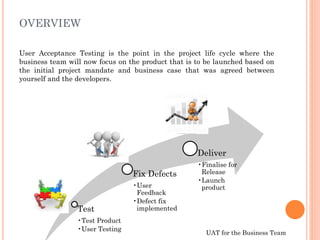
User Acceptance Testing is the point in the project life cycle where the
business team will now focus on the product that is to be launched based on
the initial project mandate and business case that was agreed between
yourself and the developers.
Test
•Test Product
•User Testing
Fix Defects
•User
Feedback
•Defect fix
implemented
Deliver
•Finalise for
Release
•Launch
product
UAT for the Business Team
OVERVIEW
Testing your web application is vital to ensuring that you will
launch a business product that meets all of the technical and
quality requirements you agreed to at the beginning of the project
User Acceptance Testing (UAT) acts as a final
verification of the required business functionality and
proper functioning of the system, emulating real-world
usage conditions. This allows the product to be moved
to a live environment with the knowledge that your
product will perform in line with the business
objectives and vision.
Purpose
Please note
UAT for the Business Team
TECHNICAL TESTING
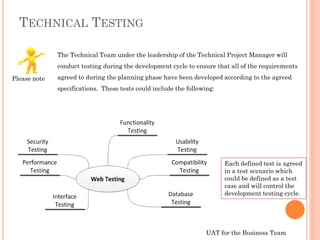
The Technical Team under the leadership of the Technical Project Manager will
conduct testing during the development cycle to ensure that all of the requirements
agreed to during the planning phase have been developed according to the agreed
specifications. These tests could include the following:
Each defined test is agreed
in a test scenario which
could be defined as a test
case and will control the
development testing cycle.
Please note
UAT for the Business Team
TECHNICAL TESTING
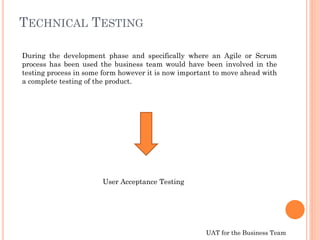
During the development phase and specifically where an Agile or Scrum
process has been used the business team would have been involved in the
testing process in some form however it is now important to move ahead with
a complete testing of the product.
User Acceptance Testing
UAT for the Business Team
PLANNING UAT
 It is important that the technical project manager ensures that the
technical tests have been concluded successfully. The business
team should verify that each test conducted by the technical team
has been approved and released for UAT testing.
 Keep in mind that the web application should not be released for
User Testing if there are still fundamental errors during the
development cycle as this will impact on the agreed timeframe for
UAT and could have a cost impact.
Please note
UAT for the Business Team
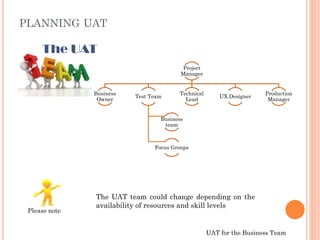
Project
Manager
Business
Owner
Test Team
Business
team
Focus Groups
Technical
Lead
UX Designer
Production
Manager
PLANNING UAT
The UAT
Please note
The UAT team could change depending on the
availability of resources and skill levels
UAT for the Business Team
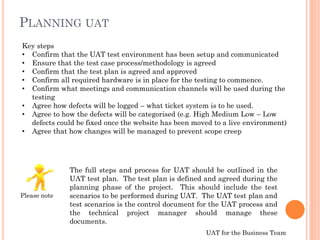
The full steps and process for UAT should be outlined in the
UAT test plan. The test plan is defined and agreed during the
planning phase of the project. This should include the test
scenarios to be performed during UAT. The UAT test plan and
test scenarios is the control document for the UAT process and
the technical project manager should manage these
documents.
Key steps
• Confirm that the UAT test environment has been setup and communicated
• Ensure that the test case process/methodology is agreed
• Confirm that the test plan is agreed and approved
• Confirm all required hardware is in place for the testing to commence.
• Confirm what meetings and communication channels will be used during the
testing
• Agree how defects will be logged – what ticket system is to be used.
• Agree to how the defects will be categorised (e.g. High Medium Low – Low
defects could be fixed once the website has been moved to a live environment)
• Agree that how changes will be managed to prevent scope creep
PLANNING UAT
Please note
UAT for the Business Team
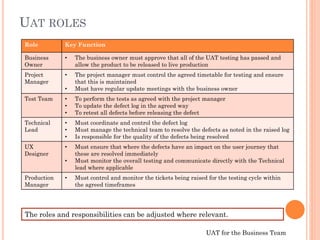
Role Key Function
Business
Owner
• The business owner must approve that all of the UAT testing has passed and
allow the product to be released to live production
Project
Manager
• The project manager must control the agreed timetable for testing and ensure
that this is maintained
• Must have regular update meetings with the business owner
Test Team • To perform the tests as agreed with the project manager
• To update the defect log in the agreed way
• To retest all defects before releasing the defect
Technical
Lead
• Must coordinate and control the defect log
• Must manage the technical team to resolve the defects as noted in the raised log
• Is responsible for the quality of the defects being resolved
UX
Designer
• Must ensure that where the defects have an impact on the user journey that
these are resolved immediately
• Must monitor the overall testing and communicate directly with the Technical
lead where applicable
Production
Manager
• Must control and monitor the tickets being raised for the testing cycle within
the agreed timeframes
The roles and responsibilities can be adjusted where relevant.
UAT ROLES
UAT for the Business Team
GUIDELINES FOR THE UAT TEST TEAM
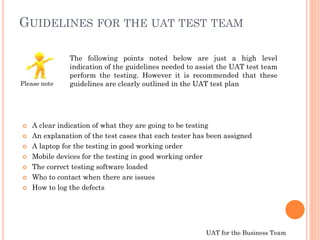
 A clear indication of what they are going to be testing
 An explanation of the test cases that each tester has been assigned
 A laptop for the testing in good working order
 Mobile devices for the testing in good working order
 The correct testing software loaded
 Who to contact when there are issues
 How to log the defects
The following points noted below are just a high level
indication of the guidelines needed to assist the UAT test team
perform the testing. However it is recommended that these
guidelines are clearly outlined in the UAT test planPlease note
UAT for the Business Team
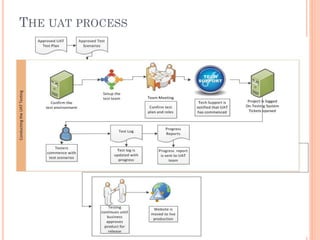
THE UAT PROCESS
UAT for the Business Team
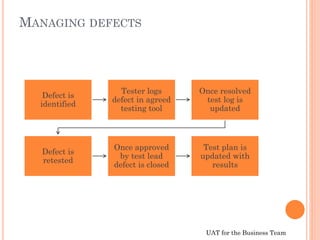
MANAGING DEFECTS
Defect is
identified
Tester logs
defect in agreed
testing tool
Once resolved
test log is
updated
Defect is
retested
Once approved
by test lead
defect is closed
Test plan is
updated with
results
UAT for the Business Team
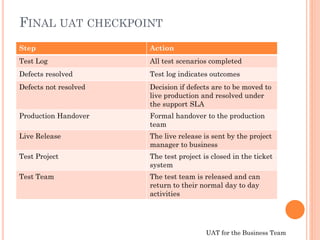
FINAL UAT CHECKPOINT
Step Action
Test Log All test scenarios completed
Defects resolved Test log indicates outcomes
Defects not resolved Decision if defects are to be moved to
live production and resolved under
the support SLA
Production Handover Formal handover to the production
team
Live Release The live release is sent by the project
manager to business
Test Project The test project is closed in the ticket
system
Test Team The test team is released and can
return to their normal day to day
activities
UAT for the Business Team
MOVING TO LIVE PRODUCTION
Once the testing has been signed off by the business team the project
manager will prepare the release notification to handover the project to the
support team. This will be managed by your supplier who is hosting your
system.
The supplier is also responsible to ensure that all of the migration of data as
agreed in the data mapping plan is moved over to the new website.
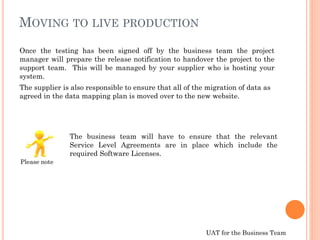
The business team will have to ensure that the relevant
Service Level Agreements are in place which include the
required Software Licenses.
Please note
UAT for the Business Team
THE LIVE WEBSITE
Congratulations you have now reached the stage where you are ready to
launch your website.
Communication of the live release should be sent to the marketing and
business teams
All of the information, logs and documentation should be
stored in your project folder and used for lessons learnt for
future developments
Please note

Getting Ready for UAT

  • 1.
    GETTING READY TOTEST YOUR WEB APPLICATION A Guide for the Business Team in preparation for User Acceptance Testing.
  • 2.
    UAT for theBusiness Team OVERVIEW User Acceptance Testing is the point in the project life cycle where the business team will now focus on the product that is to be launched based on the initial project mandate and business case that was agreed between yourself and the developers. Test •Test Product •User Testing Fix Defects •User Feedback •Defect fix implemented Deliver •Finalise for Release •Launch product
  • 3.
    UAT for theBusiness Team OVERVIEW Testing your web application is vital to ensuring that you will launch a business product that meets all of the technical and quality requirements you agreed to at the beginning of the project User Acceptance Testing (UAT) acts as a final verification of the required business functionality and proper functioning of the system, emulating real-world usage conditions. This allows the product to be moved to a live environment with the knowledge that your product will perform in line with the business objectives and vision. Purpose Please note
  • 4.
    UAT for theBusiness Team TECHNICAL TESTING The Technical Team under the leadership of the Technical Project Manager will conduct testing during the development cycle to ensure that all of the requirements agreed to during the planning phase have been developed according to the agreed specifications. These tests could include the following: Each defined test is agreed in a test scenario which could be defined as a test case and will control the development testing cycle. Please note
  • 5.
    UAT for theBusiness Team TECHNICAL TESTING During the development phase and specifically where an Agile or Scrum process has been used the business team would have been involved in the testing process in some form however it is now important to move ahead with a complete testing of the product. User Acceptance Testing
  • 6.
    UAT for theBusiness Team PLANNING UAT  It is important that the technical project manager ensures that the technical tests have been concluded successfully. The business team should verify that each test conducted by the technical team has been approved and released for UAT testing.  Keep in mind that the web application should not be released for User Testing if there are still fundamental errors during the development cycle as this will impact on the agreed timeframe for UAT and could have a cost impact. Please note
  • 7.
    UAT for theBusiness Team Project Manager Business Owner Test Team Business team Focus Groups Technical Lead UX Designer Production Manager PLANNING UAT The UAT Please note The UAT team could change depending on the availability of resources and skill levels
  • 8.
    UAT for theBusiness Team The full steps and process for UAT should be outlined in the UAT test plan. The test plan is defined and agreed during the planning phase of the project. This should include the test scenarios to be performed during UAT. The UAT test plan and test scenarios is the control document for the UAT process and the technical project manager should manage these documents. Key steps • Confirm that the UAT test environment has been setup and communicated • Ensure that the test case process/methodology is agreed • Confirm that the test plan is agreed and approved • Confirm all required hardware is in place for the testing to commence. • Confirm what meetings and communication channels will be used during the testing • Agree how defects will be logged – what ticket system is to be used. • Agree to how the defects will be categorised (e.g. High Medium Low – Low defects could be fixed once the website has been moved to a live environment) • Agree that how changes will be managed to prevent scope creep PLANNING UAT Please note
  • 9.
    UAT for theBusiness Team Role Key Function Business Owner • The business owner must approve that all of the UAT testing has passed and allow the product to be released to live production Project Manager • The project manager must control the agreed timetable for testing and ensure that this is maintained • Must have regular update meetings with the business owner Test Team • To perform the tests as agreed with the project manager • To update the defect log in the agreed way • To retest all defects before releasing the defect Technical Lead • Must coordinate and control the defect log • Must manage the technical team to resolve the defects as noted in the raised log • Is responsible for the quality of the defects being resolved UX Designer • Must ensure that where the defects have an impact on the user journey that these are resolved immediately • Must monitor the overall testing and communicate directly with the Technical lead where applicable Production Manager • Must control and monitor the tickets being raised for the testing cycle within the agreed timeframes The roles and responsibilities can be adjusted where relevant. UAT ROLES
  • 10.
    UAT for theBusiness Team GUIDELINES FOR THE UAT TEST TEAM  A clear indication of what they are going to be testing  An explanation of the test cases that each tester has been assigned  A laptop for the testing in good working order  Mobile devices for the testing in good working order  The correct testing software loaded  Who to contact when there are issues  How to log the defects The following points noted below are just a high level indication of the guidelines needed to assist the UAT test team perform the testing. However it is recommended that these guidelines are clearly outlined in the UAT test planPlease note
  • 11.
    UAT for theBusiness Team THE UAT PROCESS
  • 12.
    UAT for theBusiness Team MANAGING DEFECTS Defect is identified Tester logs defect in agreed testing tool Once resolved test log is updated Defect is retested Once approved by test lead defect is closed Test plan is updated with results
  • 13.
    UAT for theBusiness Team FINAL UAT CHECKPOINT Step Action Test Log All test scenarios completed Defects resolved Test log indicates outcomes Defects not resolved Decision if defects are to be moved to live production and resolved under the support SLA Production Handover Formal handover to the production team Live Release The live release is sent by the project manager to business Test Project The test project is closed in the ticket system Test Team The test team is released and can return to their normal day to day activities
  • 14.
    UAT for theBusiness Team MOVING TO LIVE PRODUCTION Once the testing has been signed off by the business team the project manager will prepare the release notification to handover the project to the support team. This will be managed by your supplier who is hosting your system. The supplier is also responsible to ensure that all of the migration of data as agreed in the data mapping plan is moved over to the new website. The business team will have to ensure that the relevant Service Level Agreements are in place which include the required Software Licenses. Please note
  • 15.
    UAT for theBusiness Team THE LIVE WEBSITE Congratulations you have now reached the stage where you are ready to launch your website. Communication of the live release should be sent to the marketing and business teams All of the information, logs and documentation should be stored in your project folder and used for lessons learnt for future developments Please note