Using Blogs
for
Online
and
Classroom Teaching
Jana Ciobanu
Dr. Sally Zhao
TESL Canada Conference 2014
Using Blogs for Online and Classroom
Teaching
• What is a blog ?
• Types of blogs used in teaching ESL
• Tutor Blog
• Using a blog in teaching online and in the
classroom
• How to create a blogger blog
• How to upload: links, pictures, videos, PPT, etc.
WHAT IS A BLOG?
A blog is:
• short for web log
• a personal website or web page on which an
individual records opinions, links to other sites, etc.
on a regular basis.(Google Blogger)
Why blog?
• to share information
• to teach Ss English
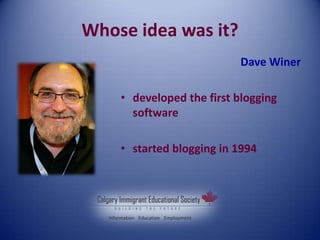
Whose idea was it?
Dave Winer
• developed the first blogging
software
• started blogging in 1994
TYPES OF BLOGS USED IN
TEACHING
Aaron Campbell (2003): identified 3 blogs to use in the
ESL classroom:
• The Tutor Blog-run by the tutor for the learners
• The Class Blog- the whole class collaborates
• The Learner Blog-either run by individual learners themselves
or by small collaborative groups of learners
TUTOR BLOG
• a new teaching and learning tool
• motivates students to explore the Internet
• run by the teacher of the class
• gives students access to different online web-sites
appropriate for their level
• a resource of links for self-study
• provides syllabus information and an up-date on the
daily news of the class/school
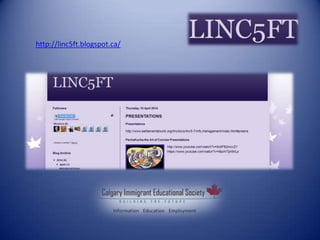
http://linc5ft.blogspot.ca/
Using Tutor Blogs in the Classroom
Use it for teaching:
• Listening
• Speaking
• Reading
• Writing
• Grammar
• Pronunciation
Listening
http://linc5ft.blogspot.ca/2012/01/themes.html
• Listen to different conversations and do some cloze activities
• Listen to other students’ presentations and do a peer assessment as
well as a self-assessment
• Listen to the recent news and take notes
• Listen to songs and stories and answer either multiple-choice
questions or comprehension ones
• Watch videos and write summaries
• Watch movie trailers and answer multiple-choice questions
Speaking
http://linc5ft.blogspot.ca/
• Give presentations
• Have Ss watch their peers’ presentations
• Have Ss do a peer assessment
• Use online conversation q-s and practice speaking
• Ss record their conversation using the online voice
recorder
READING
http://linc5ft.blogspot.ca/search?q=reading
• Read stories, articles, the latest news, etc.
• Learn new words
• Do individual reading at home
• Listen and read along
• Learn idioms and use an idiomatic dictionary
• Use different dictionaries
WRITING
http://linc5ft.blogspot.ca/search?q=writing
• Write dictations
• Practice spelling
• Use PPt-s to teach new concepts
• Learn how to write paragraphs, essays,
reports, etc.
• Chat with Tutor Mike(the online robot)
PRONUNCIATION
http://linc5ft.blogspot.ca/search?q=pronunciation
• Ss practice pronunciation with an online tutor
• Record students' short presentations, role-plays,
speeches, etc. using the online voice recorder
• Ss watch pronunciation videos on YouTube
GRAMMAR
http://linc5ft.blogspot.ca/search?q=grammar
• teach grammar using the available Power-Point Presentations
• have students practice grammar using online exercises
• assess Ss with the help of different quizzes, tests, etc.
• practice grammar and spelling by chatting with Tutor Mike
• play grammar games
• write dictations
Using a Blog in Teaching
Online
• Provide online resources appropriate for their
level
• Create an online portfolio of students’ written
work
• Post handouts, notices, homework assignments,
etc.
• Use the blog for independent study
• Use the blog for peer assessment
Where to start?
Sites where you can set up a blog for free:
• Blogger-www.blogger.com
• Weebly- http://www.weebly.com
• WordPress- http://wordpress.com/
• Blogtery- http://blogetery.com/
How to create a blog?
Blogger Getting Started Guide
https://support.google.com/blogger/answer/1623800?hl=en
Creating a Blogger Blog in under 5 Minutes
https://www.youtube.com/watch?v=HP68-mIpBO0
How to Publish a Blog Post
http://www.youtube.com/watch?v=wX4KSiQbVW4
http://www.youtube.com/watch?v=TJ5uFPBtyhU
How to upload stuff?
• Videos
• Pictures
• PPT-s
• Texts
• Audio Files
• Files
Any Questions?
THANK YOU
Contact Info
Jana Ciobanu
janaciobanu@yahoo.com
Dr. Sally Zhao
linc@immigrant-education.ca

TESL Canada 2014

  • 1.
    Using Blogs for Online and Classroom Teaching JanaCiobanu Dr. Sally Zhao TESL Canada Conference 2014
  • 2.
    Using Blogs forOnline and Classroom Teaching • What is a blog ? • Types of blogs used in teaching ESL • Tutor Blog • Using a blog in teaching online and in the classroom • How to create a blogger blog • How to upload: links, pictures, videos, PPT, etc.
  • 3.
    WHAT IS ABLOG? A blog is: • short for web log • a personal website or web page on which an individual records opinions, links to other sites, etc. on a regular basis.(Google Blogger) Why blog? • to share information • to teach Ss English
  • 4.
    Whose idea wasit? Dave Winer • developed the first blogging software • started blogging in 1994
  • 5.
    TYPES OF BLOGSUSED IN TEACHING Aaron Campbell (2003): identified 3 blogs to use in the ESL classroom: • The Tutor Blog-run by the tutor for the learners • The Class Blog- the whole class collaborates • The Learner Blog-either run by individual learners themselves or by small collaborative groups of learners
  • 6.
    TUTOR BLOG • anew teaching and learning tool • motivates students to explore the Internet • run by the teacher of the class • gives students access to different online web-sites appropriate for their level • a resource of links for self-study • provides syllabus information and an up-date on the daily news of the class/school http://linc5ft.blogspot.ca/
  • 7.
  • 8.
    Using Tutor Blogsin the Classroom Use it for teaching: • Listening • Speaking • Reading • Writing • Grammar • Pronunciation
  • 9.
    Listening http://linc5ft.blogspot.ca/2012/01/themes.html • Listen todifferent conversations and do some cloze activities • Listen to other students’ presentations and do a peer assessment as well as a self-assessment • Listen to the recent news and take notes • Listen to songs and stories and answer either multiple-choice questions or comprehension ones • Watch videos and write summaries • Watch movie trailers and answer multiple-choice questions
  • 10.
    Speaking http://linc5ft.blogspot.ca/ • Give presentations •Have Ss watch their peers’ presentations • Have Ss do a peer assessment • Use online conversation q-s and practice speaking • Ss record their conversation using the online voice recorder
  • 11.
    READING http://linc5ft.blogspot.ca/search?q=reading • Read stories,articles, the latest news, etc. • Learn new words • Do individual reading at home • Listen and read along • Learn idioms and use an idiomatic dictionary • Use different dictionaries
  • 12.
    WRITING http://linc5ft.blogspot.ca/search?q=writing • Write dictations •Practice spelling • Use PPt-s to teach new concepts • Learn how to write paragraphs, essays, reports, etc. • Chat with Tutor Mike(the online robot)
  • 13.
    PRONUNCIATION http://linc5ft.blogspot.ca/search?q=pronunciation • Ss practicepronunciation with an online tutor • Record students' short presentations, role-plays, speeches, etc. using the online voice recorder • Ss watch pronunciation videos on YouTube
  • 14.
    GRAMMAR http://linc5ft.blogspot.ca/search?q=grammar • teach grammarusing the available Power-Point Presentations • have students practice grammar using online exercises • assess Ss with the help of different quizzes, tests, etc. • practice grammar and spelling by chatting with Tutor Mike • play grammar games • write dictations
  • 15.
    Using a Blogin Teaching Online • Provide online resources appropriate for their level • Create an online portfolio of students’ written work • Post handouts, notices, homework assignments, etc. • Use the blog for independent study • Use the blog for peer assessment
  • 16.
    Where to start? Siteswhere you can set up a blog for free: • Blogger-www.blogger.com • Weebly- http://www.weebly.com • WordPress- http://wordpress.com/ • Blogtery- http://blogetery.com/
  • 17.
    How to createa blog? Blogger Getting Started Guide https://support.google.com/blogger/answer/1623800?hl=en Creating a Blogger Blog in under 5 Minutes https://www.youtube.com/watch?v=HP68-mIpBO0 How to Publish a Blog Post http://www.youtube.com/watch?v=wX4KSiQbVW4 http://www.youtube.com/watch?v=TJ5uFPBtyhU
  • 18.
    How to uploadstuff? • Videos • Pictures • PPT-s • Texts • Audio Files • Files
  • 19.
  • 20.
  • 21.
    Contact Info Jana Ciobanu janaciobanu@yahoo.com Dr.Sally Zhao linc@immigrant-education.ca