Campus
Commitment for
Equal Access

Lokesh Mehra
mlokesh@microsoft.com
Some Disability Statistics
More than 1 billion people in the World and

Estimated 70 million in India

• 1 in 4 have a visual difficulty or impairment
• 1 in 4 have a dexterity difficulty or impairment
• 1 in 5 have a hearing difficulty or impairment

• 1 in 7 have a cognitive difficulty or impairment
and many more….

Research Study Commissioned by Microsoft & Conducted by Forester “The Wide Range of Abilities and Its Impact on Computer Technology”
What is Accessibility?
The ease with which one can reach a certain place,
access information, use technology

Civil right - Right to participate within a society on an equal
footing with everyone else

Products should be designed and developed such that
it can be used by people with or without disabilities
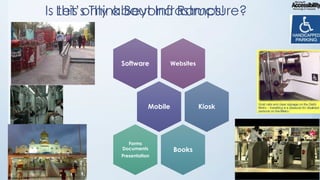
Is Let’s Think Beyond Ramps!
this only about Infrastructure?

Software

Websites

Mobile

Forms
Documents
Presentation

Kiosk

Books
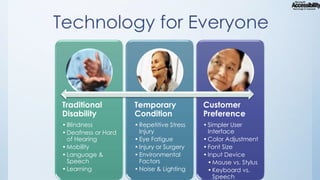
Technology for Everyone

Traditional
Disability

Temporary
Condition

Customer
Preference

• Blindness
• Deafness or Hard
of Hearing
• Mobility
• Language &
Speech
• Learning

• Repetitive Stress
Injury
• Eye Fatigue
• Injury or Surgery
• Environmental
Factors
• Noise & Lighting

• Simpler User
Interface
• Color Adjustment
• Font Size
• Input Device
• Mouse vs. Stylus
• Keyboard vs.
Speech
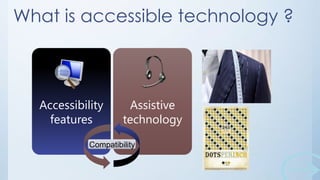
What is accessible technology ?

Accessibility
features

Assistive
technology

Compatibility
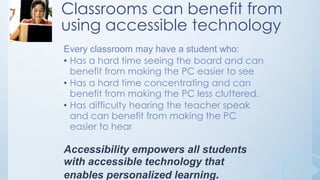
Classrooms can benefit from
using accessible technology
Every classroom may have a student who:
• Has a hard time seeing the board and can
benefit from making the PC easier to see
• Has a hard time concentrating and can
benefit from making the PC less cluttered.
• Has difficulty hearing the teacher speak
and can benefit from making the PC
easier to hear

Accessibility empowers all students
with accessible technology that
enables personalized learning.
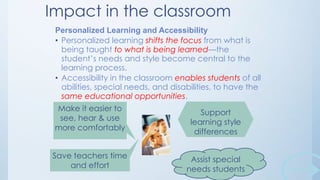
Impact in the classroom
Personalized Learning and Accessibility
• Personalized learning shifts the focus from what is
being taught to what is being learned—the
student’s needs and style become central to the
learning process.
• Accessibility in the classroom enables students of all
abilities, special needs, and disabilities, to have the
same educational opportunities.
Make it easier to
Personalize& use
see, hear the PC
more comfortably
Save teachers time
and effort

Support
learning style
differences

Assist special
needs students
Personalized Learning & Accessibility
• Every child learns in a unique way

• Technology is key
• There is a need for accessible technology in campuses
• The Challenge: Inclusive classrooms with equal access for all
students
• Providing accessible technology is an institute responsibility
– Enables all students to have the same educational opportunities
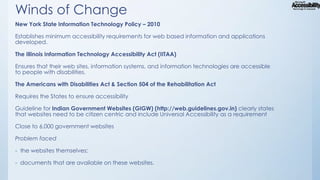
Winds of Change
New York State Information Technology Policy – 2010
Establishes minimum accessibility requirements for web based information and applications
developed.

The Illinois Information Technology Accessibility Act (IITAA)
Ensures that their web sites, information systems, and information technologies are accessible
to people with disabilities.
The Americans with Disabilities Act & Section 504 of the Rehabilitation Act
Requires the States to ensure accessibility
Guideline for Indian Government Websites (GIGW) (http://web.guidelines.gov.in) clearly states
that websites need to be citizen centric and include Universal Accessibility as a requirement
Close to 6,000 government websites
Problem faced
- the websites themselves;
- documents that are available on these websites.
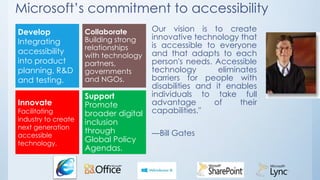
Microsoft’s commitment to accessibility
Develop
Integrating
accessibility
into product
planning, R&D
and testing.
Innovate

Facilitating
industry to create
next generation
accessible
technology.

Collaborate
Building strong
relationships
with technology
partners,
governments
and NGOs.

Support
Promote
broader digital
inclusion
through
Global Policy
Agendas.

Our vision is to create
innovative technology that
is accessible to everyone
and that adapts to each
person's needs. Accessible
technology
eliminates
barriers for people with
disabilities and it enables
individuals to take full
advantage
of
their
capabilities."
—Bill Gates
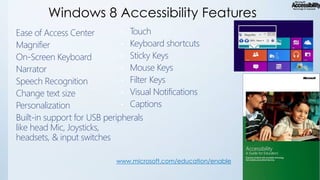
Windows 8 Accessibility Features
• Touch
Ease of Access Center
• Keyboard shortcuts
Magnifier
• Sticky Keys
On-Screen Keyboard
• Mouse Keys
Narrator
• Filter Keys
Speech Recognition
• Visual Notifications
Change text size
• Captions
Personalization
Built-in support for USB peripherals
like head Mic, Joysticks,
headsets, & input switches
www.microsoft.com/education/enable
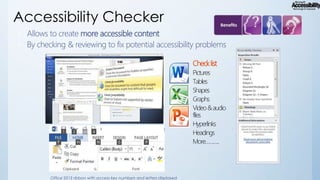
Accessibility Checker
Allows to create more accessible content
• By checking & reviewing to fix potential accessibility problems
•

Check list
Pictures
Tables
Shapes
Graphs
Video & audio
files
Hyperlinks
Headings
More………..

Office 2013 ribbon with access key numbers and letters displayed
Word Web App Accessibility At Its Core
Fundamentally, Office Web Apps provide a representation of
each document using native browser objects
•
•

Highly simplified view – just a conversion
Word <> Images, HTML, and JavaScriptCore accessibility

investments
•
•
•
•
•
•

Well-formed Strict XHTML with CSS for the layouts
HTML elements primarily used on their semantic value
WAI-ARIA markup so that browsers and assistive technologies can
provide a much clearer interpretation of the interface
Keyboard navigation with preserved familiar shortcuts from the Word
desktop application
CTRL+B, CTRL+S, CTR+C, CTRL+F6, etc.
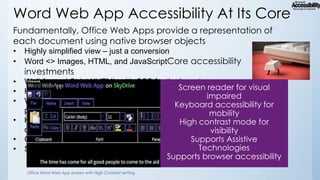
Support of High Contrast and High DPI (zoom) modes
Office Word Web App screen with High Contrast setting
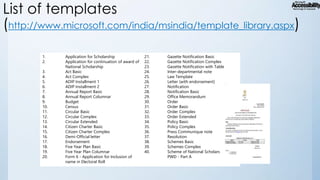
List of templates
(http://www.microsoft.com/india/msindia/template_library.aspx)
1.
2.

3.
4.
5.
6.
7.
8.
9.
10.
11.
12.
13.
14.
15.
16.
17.
18.
19.
20.

Application for Scholarship
Application for continuation of award of
National Scholarship
Act Basic
Act Complex
ADIP Installment 1
ADIP Installment 2
Annual Report Basic
Annual Report Columnar
Budget
Census
Circular Basic
Circular Complex
Circular Extended
Citizen Charter Basic
Citizen Charter Complex
Demi-Official letter
Endorsement
Five Year Plan Basic
Five Year Plan Columnar
Form 6 - Application for Inclusion of
name in Electoral Roll

21.
22.
23.
24.
25.
26.
27.
28.
29.
30.
31.
32.
33.
34.
35.
36.
37.
38.
39.
40.

Gazette Notification Basic
Gazette Notification Complex
Gazette Notification with Table
Inter-departmental note
Law Template
Letter (with endorsement)
Notification
Notification Basic
Office Memorandum
Order
Order Basic
Order Complex
Order Extended
Policy Basic
Policy Complex
Press Communique note
Resolution
Schemes Basic
Schemes Complex
Scheme of National Scholarship for
PWD - Part A
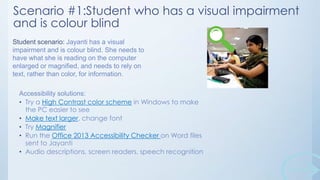
Scenario #1:Student who has a visual impairment
and is colour blind
Student scenario: Jayanti has a visual
impairment and is colour blind. She needs to
have what she is reading on the computer
enlarged or magnified, and needs to rely on
text, rather than color, for information.
Accessibility solutions:
• Try a High Contrast color scheme in Windows to make
the PC easier to see
• Make text larger, change font
• Try Magnifier
• Run the Office 2013 Accessibility Checker on Word files
sent to Jayanti
• Audio descriptions, screen readers, speech recognition
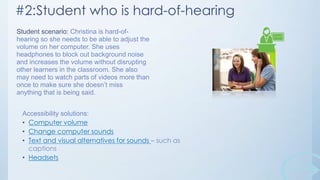
#2:Student who is hard-of-hearing
Student scenario: Christina is hard-ofhearing so she needs to be able to adjust the
volume on her computer. She uses
headphones to block out background noise
and increases the volume without disrupting
other learners in the classroom. She also
may need to watch parts of videos more than
once to make sure she doesn’t miss
anything that is being said.
Accessibility solutions:
• Computer volume
• Change computer sounds
• Text and visual alternatives for sounds – such as
captions
• Headsets
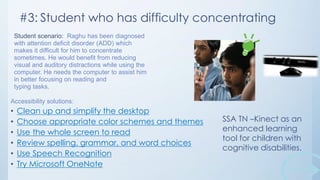
#3: Student who has difficulty concentrating
Student scenario: Raghu has been diagnosed
with attention deficit disorder (ADD) which
makes it difficult for him to concentrate
sometimes. He would benefit from reducing
visual and auditory distractions while using the
computer. He needs the computer to assist him
in better focusing on reading and
typing tasks.
Accessibility solutions:

•
•
•
•
•
•

Clean up and simplify the desktop
Choose appropriate color schemes and themes
Use the whole screen to read
Review spelling, grammar, and word choices
Use Speech Recognition
Try Microsoft OneNote

SSA TN –Kinect as an
enhanced learning
tool for children with
cognitive disabilities.
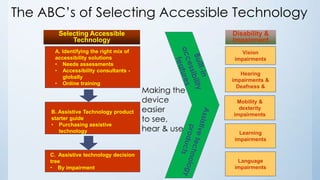
The ABC’s of Selecting Accessible Technology
Selecting Accessible
Technology

Disability &
Impairment

A. Identifying the right mix of
accessibility solutions
• Needs assessments
• Accessibility consultants globally
• Online training

Vision
impairments

B. Assistive Technology product
starter guide
• Purchasing assistive
technology

C. Assistive technology decision
tree
• By impairment

Making the
device
easier
to see,
hear & use

Hearing
impairments &
Deafness &
Mobility &
dexterity
impairments

Learning
impairments

Language
impairments
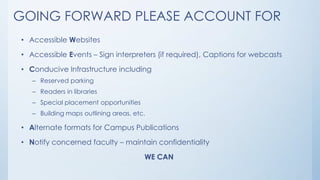
GOING FORWARD PLEASE ACCOUNT FOR
• Accessible Websites

• Accessible Events – Sign interpreters (if required), Captions for webcasts
• Conducive Infrastructure including
– Reserved parking

– Readers in libraries
– Special placement opportunities
– Building maps outlining areas, etc.

• Alternate formats for Campus Publications
• Notify concerned faculty – maintain confidentiality
WE CAN
thank you and let’s
continue
our conversation
Twitter @lokesh_mehra
www.microsoft.com/enable/

Campus Commitment for Equal Access_Techshare India 2014

  • 1.
    Campus Commitment for Equal Access LokeshMehra mlokesh@microsoft.com
  • 2.
    Some Disability Statistics Morethan 1 billion people in the World and Estimated 70 million in India • 1 in 4 have a visual difficulty or impairment • 1 in 4 have a dexterity difficulty or impairment • 1 in 5 have a hearing difficulty or impairment • 1 in 7 have a cognitive difficulty or impairment and many more…. Research Study Commissioned by Microsoft & Conducted by Forester “The Wide Range of Abilities and Its Impact on Computer Technology”
  • 3.
    What is Accessibility? Theease with which one can reach a certain place, access information, use technology Civil right - Right to participate within a society on an equal footing with everyone else Products should be designed and developed such that it can be used by people with or without disabilities
  • 4.
    Is Let’s ThinkBeyond Ramps! this only about Infrastructure? Software Websites Mobile Forms Documents Presentation Kiosk Books
  • 5.
    Technology for Everyone Traditional Disability Temporary Condition Customer Preference •Blindness • Deafness or Hard of Hearing • Mobility • Language & Speech • Learning • Repetitive Stress Injury • Eye Fatigue • Injury or Surgery • Environmental Factors • Noise & Lighting • Simpler User Interface • Color Adjustment • Font Size • Input Device • Mouse vs. Stylus • Keyboard vs. Speech
  • 6.
    What is accessibletechnology ? Accessibility features Assistive technology Compatibility
  • 7.
    Classrooms can benefitfrom using accessible technology Every classroom may have a student who: • Has a hard time seeing the board and can benefit from making the PC easier to see • Has a hard time concentrating and can benefit from making the PC less cluttered. • Has difficulty hearing the teacher speak and can benefit from making the PC easier to hear Accessibility empowers all students with accessible technology that enables personalized learning.
  • 8.
    Impact in theclassroom Personalized Learning and Accessibility • Personalized learning shifts the focus from what is being taught to what is being learned—the student’s needs and style become central to the learning process. • Accessibility in the classroom enables students of all abilities, special needs, and disabilities, to have the same educational opportunities. Make it easier to Personalize& use see, hear the PC more comfortably Save teachers time and effort Support learning style differences Assist special needs students
  • 9.
    Personalized Learning &Accessibility • Every child learns in a unique way • Technology is key • There is a need for accessible technology in campuses • The Challenge: Inclusive classrooms with equal access for all students • Providing accessible technology is an institute responsibility – Enables all students to have the same educational opportunities
  • 10.
    Winds of Change NewYork State Information Technology Policy – 2010 Establishes minimum accessibility requirements for web based information and applications developed. The Illinois Information Technology Accessibility Act (IITAA) Ensures that their web sites, information systems, and information technologies are accessible to people with disabilities. The Americans with Disabilities Act & Section 504 of the Rehabilitation Act Requires the States to ensure accessibility Guideline for Indian Government Websites (GIGW) (http://web.guidelines.gov.in) clearly states that websites need to be citizen centric and include Universal Accessibility as a requirement Close to 6,000 government websites Problem faced - the websites themselves; - documents that are available on these websites.
  • 11.
    Microsoft’s commitment toaccessibility Develop Integrating accessibility into product planning, R&D and testing. Innovate Facilitating industry to create next generation accessible technology. Collaborate Building strong relationships with technology partners, governments and NGOs. Support Promote broader digital inclusion through Global Policy Agendas. Our vision is to create innovative technology that is accessible to everyone and that adapts to each person's needs. Accessible technology eliminates barriers for people with disabilities and it enables individuals to take full advantage of their capabilities." —Bill Gates
  • 12.
    Windows 8 AccessibilityFeatures • Touch Ease of Access Center • Keyboard shortcuts Magnifier • Sticky Keys On-Screen Keyboard • Mouse Keys Narrator • Filter Keys Speech Recognition • Visual Notifications Change text size • Captions Personalization Built-in support for USB peripherals like head Mic, Joysticks, headsets, & input switches www.microsoft.com/education/enable
  • 13.
    Accessibility Checker Allows tocreate more accessible content • By checking & reviewing to fix potential accessibility problems • Check list Pictures Tables Shapes Graphs Video & audio files Hyperlinks Headings More……….. Office 2013 ribbon with access key numbers and letters displayed
  • 14.
    Word Web AppAccessibility At Its Core Fundamentally, Office Web Apps provide a representation of each document using native browser objects • • Highly simplified view – just a conversion Word <> Images, HTML, and JavaScriptCore accessibility investments • • • • • • Well-formed Strict XHTML with CSS for the layouts HTML elements primarily used on their semantic value WAI-ARIA markup so that browsers and assistive technologies can provide a much clearer interpretation of the interface Keyboard navigation with preserved familiar shortcuts from the Word desktop application CTRL+B, CTRL+S, CTR+C, CTRL+F6, etc. Support of High Contrast and High DPI (zoom) modes Office Word Web App screen with High Contrast setting
  • 15.
    List of templates (http://www.microsoft.com/india/msindia/template_library.aspx) 1. 2. 3. 4. 5. 6. 7. 8. 9. 10. 11. 12. 13. 14. 15. 16. 17. 18. 19. 20. Applicationfor Scholarship Application for continuation of award of National Scholarship Act Basic Act Complex ADIP Installment 1 ADIP Installment 2 Annual Report Basic Annual Report Columnar Budget Census Circular Basic Circular Complex Circular Extended Citizen Charter Basic Citizen Charter Complex Demi-Official letter Endorsement Five Year Plan Basic Five Year Plan Columnar Form 6 - Application for Inclusion of name in Electoral Roll 21. 22. 23. 24. 25. 26. 27. 28. 29. 30. 31. 32. 33. 34. 35. 36. 37. 38. 39. 40. Gazette Notification Basic Gazette Notification Complex Gazette Notification with Table Inter-departmental note Law Template Letter (with endorsement) Notification Notification Basic Office Memorandum Order Order Basic Order Complex Order Extended Policy Basic Policy Complex Press Communique note Resolution Schemes Basic Schemes Complex Scheme of National Scholarship for PWD - Part A
  • 17.
    Scenario #1:Student whohas a visual impairment and is colour blind Student scenario: Jayanti has a visual impairment and is colour blind. She needs to have what she is reading on the computer enlarged or magnified, and needs to rely on text, rather than color, for information. Accessibility solutions: • Try a High Contrast color scheme in Windows to make the PC easier to see • Make text larger, change font • Try Magnifier • Run the Office 2013 Accessibility Checker on Word files sent to Jayanti • Audio descriptions, screen readers, speech recognition
  • 18.
    #2:Student who ishard-of-hearing Student scenario: Christina is hard-ofhearing so she needs to be able to adjust the volume on her computer. She uses headphones to block out background noise and increases the volume without disrupting other learners in the classroom. She also may need to watch parts of videos more than once to make sure she doesn’t miss anything that is being said. Accessibility solutions: • Computer volume • Change computer sounds • Text and visual alternatives for sounds – such as captions • Headsets
  • 19.
    #3: Student whohas difficulty concentrating Student scenario: Raghu has been diagnosed with attention deficit disorder (ADD) which makes it difficult for him to concentrate sometimes. He would benefit from reducing visual and auditory distractions while using the computer. He needs the computer to assist him in better focusing on reading and typing tasks. Accessibility solutions: • • • • • • Clean up and simplify the desktop Choose appropriate color schemes and themes Use the whole screen to read Review spelling, grammar, and word choices Use Speech Recognition Try Microsoft OneNote SSA TN –Kinect as an enhanced learning tool for children with cognitive disabilities.
  • 20.
    The ABC’s ofSelecting Accessible Technology Selecting Accessible Technology Disability & Impairment A. Identifying the right mix of accessibility solutions • Needs assessments • Accessibility consultants globally • Online training Vision impairments B. Assistive Technology product starter guide • Purchasing assistive technology C. Assistive technology decision tree • By impairment Making the device easier to see, hear & use Hearing impairments & Deafness & Mobility & dexterity impairments Learning impairments Language impairments
  • 21.
    GOING FORWARD PLEASEACCOUNT FOR • Accessible Websites • Accessible Events – Sign interpreters (if required), Captions for webcasts • Conducive Infrastructure including – Reserved parking – Readers in libraries – Special placement opportunities – Building maps outlining areas, etc. • Alternate formats for Campus Publications • Notify concerned faculty – maintain confidentiality WE CAN
  • 22.
    thank you andlet’s continue our conversation Twitter @lokesh_mehra www.microsoft.com/enable/