
Accessible Web
Components
Nawaz & Srini, PayPal / @PayPalInclusive

Copyright © 1999-2014 PayPal. All rights reserved
0
About Speakers

Srinivasu – An accessibility evangelist, technologist, believes in
inclusion
Nawaz – An accessibility evangelist, geek, loves social innovation
PayPal Accessibility Team

Team with thought leaders in the industry
Committed to help our product teams
Come up with solutions not only for the company but also for
the community
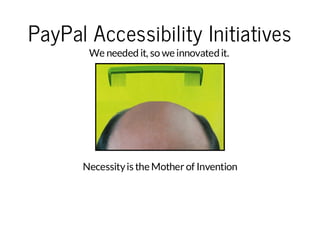
PayPal Accessibility Initiatives
We needed it, so we innovated it.

Necessity is the Mother of Invention
The state of today's web
Everyone wants

To see web as an application
Richness and responsiveness
On multiple devices (mobile, tablets etc.,)
Problem: InAccessible Libraries

With too many things in focus like speed, adaptive and
responsive, Accessibility takes a backseat before it is released to
the public
Inaccessible components are repeatedly incorporated into every
new project which leaves behind many inaccessible websites
Innovate-Adapt-Evolve

A walk-through of our Innovation Journey:
Bootstrap Plug-in
SkipTo Plug-in
amCharts Plug-in
Skip Navigation Links

Are a way to ByBass Blocks of content (WCAG 2.4)
Without using this link
Keyboard user needs to tab through approximately 40 links
to reach the main story
Screen reader user have to listen to 200 words
Screen magnifier user must search around for the location
of the main body
Has been for a long time and Accessible websites use it
SkipTo Plugin

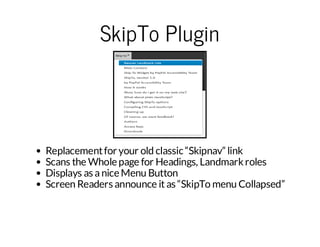
Replacement for your old classic “Skipnav” link
Scans the Whole page for Headings, Landmark roles
Displays as a nice Menu Button
Screen Readers announce it as “SkipTo menu Collapsed”
SkipTo Plugin - How to operate
Spacebar or Enter Key to activate
Down/up arrows to navigate
Esc to close the Menu
Access key “0” to go back to SkipTo
SkipTo Plugin - How to
implement

Just add the JavaScript plugin to your HTML file
< ci tt p=tx / aa ci t sc "t p/ p ya .i hb i /k po dw la s j/ kp om nj " < s rp >
s rp ye"e tj vs r p" r =h t: /a pl g tu .o Si T/ o no d/ sS i T. i. s>/c i t
SkipTo Plugin - How to
Configure
< ci t
s rp >
v rs iT Cn i =
a k p oo fg
{
" et ns :{
s t ig "
" kp o: {
s i T"
" ed ns :" 1 ,2 h "
h a ig " h h, 3,
" ad ak " "r l= a ia in ,r l= a n, rl =e r h"
l n mr s: [ oe nv gt o ][ oe mi ][ o es ac ],
" ce se " ""
a c sk y: 0 ,
" rp :" re ,
w a " tu "
" ii ii y:" no u"
v s bl t" o fc s
}
}
}
;
<sr p >
/ci t

Also available as Wordpress plugin from wordpress repository
and as Drupal plugin from Drupal repository
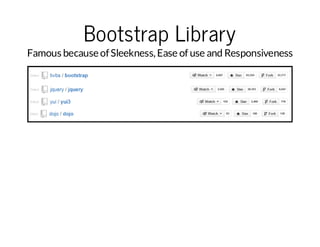
Bootstrap Library

Famous because of Sleekness, Ease of use and Responsiveness
Bootstrap Plugin
Pros

Makes many of the components of Bootstrap library
accessible for keyboard and screen reader users
Experiment with Bootstrap without having to modify the
original code
Independent of Bootstrap's release timeliness
Avoid other people having to hack Bootstrap code if they just
want to get accessibility features

Cons

Another JavaScript file and CSS files need to be loaded on the
page (but wait! you can Lazy Load)
Bootstrap Plugin (TabPanel) What it does?
v r$ al s =$'n vt b '
a t b it
(. a- as )
, $i = $a ls . hl rn 'i )
ls
t bi tc id e (l '
, $a s= $ al s. id ' dt -o ge "a " ,[ aa tg l= p l" '
tb
t bi t fn ([ aa tg l =t b] d t -o ge "i l] )
$ al s. tr ' oe ,' al s '
t b it at (r l' tb it )
$ i. tr 'o e , ' rs na i n)
l s at (r l' p e et to '
$ asat ( r l ' ' a '
t b.t r ' oe , tb)
$ a s e c ( u c i n i d x ){
t b.a h f nt o( n e
vr tb ae = $$ t i) at (h e' )
a a pn l
( (h s. t r' rf )
, tb =$ t i)
a
(h s
, tb d= t ba t( i' | ' it b+ Mt . lo (M t. ad m )1 0+ )
ai
a .t r 'd ) | u -a ' a hf or ( ah rn o( *0 ) 1
t ba t( i ' t b d
a. tr 'd , ai )

i( a.ae t )h sl s(a tv ')
f tbpr n ( .a C as'c ie ){
t ba t( { 'a Id x :' ' 'r ae pn e ': 'r e , 'r a sl ce ': ' re , ' r
a. tr
tb n e'
0, ai - xa dd
t u' a i- ee t d
t u' a
t ba e. t r{ 'o e :' ap nl , 'a Id x :' ' 'r ah de ' :' as ' 'r a
ap nl at ( r l'
tb ae ' tb n e'
0, ai - id n
f l e, ai
}l e
e s{
t ba t( { 'a Id x :' 1, 'r a ep ne ': ' as ' ' r as lc e': 'a s'
a. tr
tb n e'
-' a i- xa d d
f le , ai -e e td
fl e ,
t ba e. t r { ' oe : 'a pn l , 'a I dx : '1 , ' ra hd e ': 'r e , 'r
ap nl at (
r l'
tb ae ' t bn e'
-' a i -i dn
t u' a i
}
}
)
$ f. a. os r co .r tt p .e dw = fn to ( ){
. n tb Cn tu tr p oo ye ky on
uc i n e
vr $h s= $ti )
a ti
(hs
,$ tm
ie s
Bootstrap Plugin - Alert

Adds role of Alert to Alert, Warning, and Success Bootstrap
messages
Increases the color contrast as the foreground to background
color contrast ratio for the message was too low
Adds instructions in message dialog so that the developer
using the alert knows to manage keyboard focus on alert
dismissal
Bootstrap Plugin Tooltip/PopOver

Add role of Tooltip to tooltip div
Generates a random id, assign it to the tooltip div, and
reference it from the Tooltip element with the ARIA attribute
“aria-describedby”
Removes aria-describedby when the tooltip is hidden
Bootstrap Plug-in - Modal
Dialog

Adds role of Document to content div inside dialog so that
NVDA can force document mode and read contents inside
Dialog.
When the Modal is closed, returns the focus to the element
which opened the dialog
Changes the focus outline of Close button to visible
Dropdown

Adds aria-haspopup and and aria-expanded attributes to
dropdown toggle link
Dynamically changes aria-expanded when the dropdown
closes or opens
Focuses to first item on activating dropdown
Adds ability to open dropdown with spacebar
Close dropdown when tabbing out from dropdown
Changes the focus outline of dropdown to visible
Collapse

Adds tab role, aria-selected, aria-expanded, aria-controls, and
tabIndex for collapse tab
Adds ARIA roles of tabPanel, tabIndex, aria-hidden, and arialabelledBy for collapsible panel
Adds role of tabList and aria-multiselectable for collapse
container div
Dynamically flips tabIndex, aria-selected, and aria-expanded
for tab when it is activated and add aria-hidden to hide the
previously visible collapse tabpanel
Closes dropdown when tabbing out from dropdown
Adds keydown event listener for the collapse component to
work with keyboard
Carousel

Prevents automatic cycling of the carousel.
Prevents wrapping to first item on Next button navigation or
wrapping to last item on Previous button navigation
Adds role of listbox for carousel div
Adds ARIA role of option, aria-selected, and tabIndex for
individual carousel items
Adds keydown event listener for the carousel to work with
keyboard
Carousel (Contd.)

Dynamically changes tabIndex and aria-selected property of
active and inactive tabs
Removes display:none and hide (offscreen) of the inactive
carousel items so that screen readers can count the total
number of carousel items.
visit http://shouldiuseacarousel.com/
Bootstrap Plugin - How to
implement

Download and include Bootstrap.js from getbootstrap.com.
Download and include the bootstrap accessibility plugin js.
Download and include the bootstrap accessibility plugin css to
override css styles.
Optional: Lazily load the JavaScript plugin after the page is
loaded.
GITHUB Repo : https://github.com/paypal/bootstrapaccessibility-plugin/
Demo :http://paypal.github.io/bootstrap-accessibilityplugin/demo.html
Reasons for amCharts
Accessibility Plugin

To Solve the problem of Lack of accessible charts for blind and
keyboard users
Usual ways to make Chart
Accessible

Chart data duplicated in a table and hidden off-screen
Alt text
LongDesc Attribute
Problems with usual ways

Data is duplicated as in Hidden table
Too much text to describe the Chart
Only Basic textual information available to Screen reader
users
Lot of maintenance
amCharts
Made of SVG
Interactive
Dynamic Data
amCharts accessibility Plugin
For keyboard users

Can navigate with Left and Right arrow keys
Cursor tooltip is shown when the arrow keys are pressed
Tab key to navigate within chart, left and right sliders
Applies aria-label, aria-valuemin, aria-valuemax, aria-valuetext
and aria-valuenow for left and right sliders
amCharts accessibility Plugin
For Screen Readers

Applies role of Application to the chart
Creates a hidden status Div to announce the Tooltips
displayed
Applies aria-label, aria-valuemin, aria-valuemax, aria-valuetext
and aria-valuenow for left and right sliders
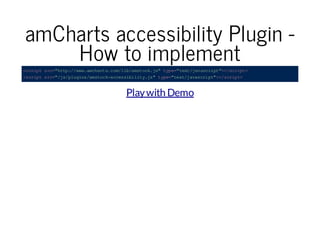
amCharts accessibility Plugin How to implement
< ci ts c " tp / ww ac at . o/ i/ mt c. s tp = tx /a ac it > /c it
s rp r= ht :/ w. m hr sc ml ba s ok j" y e " et jv s rp "< sr p >
< ci ts c" j/ l gn /m tc - ce sb lt .s t p=t x/ aa ci t >/ ci t
s rp r= /s pu is a so ka cs ii i yj " ye "e tj vs r p" < s rp >

Play with Demo
Contact

PayPal Accessibility
Follow us on Twitter / @PayPalInclusive
Accessible Web Components_Techshare India 2014

Accessible Web Components_Techshare India 2014

  • 1.
    Accessible Web Components Nawaz &Srini, PayPal / @PayPalInclusive Copyright © 1999-2014 PayPal. All rights reserved 0
  • 2.
    About Speakers Srinivasu –An accessibility evangelist, technologist, believes in inclusion Nawaz – An accessibility evangelist, geek, loves social innovation
  • 3.
    PayPal Accessibility Team Teamwith thought leaders in the industry Committed to help our product teams Come up with solutions not only for the company but also for the community
  • 4.
    PayPal Accessibility Initiatives Weneeded it, so we innovated it. Necessity is the Mother of Invention
  • 5.
    The state oftoday's web Everyone wants To see web as an application Richness and responsiveness On multiple devices (mobile, tablets etc.,)
  • 6.
    Problem: InAccessible Libraries Withtoo many things in focus like speed, adaptive and responsive, Accessibility takes a backseat before it is released to the public Inaccessible components are repeatedly incorporated into every new project which leaves behind many inaccessible websites
  • 7.
    Innovate-Adapt-Evolve A walk-through ofour Innovation Journey: Bootstrap Plug-in SkipTo Plug-in amCharts Plug-in
  • 8.
    Skip Navigation Links Area way to ByBass Blocks of content (WCAG 2.4) Without using this link Keyboard user needs to tab through approximately 40 links to reach the main story Screen reader user have to listen to 200 words Screen magnifier user must search around for the location of the main body Has been for a long time and Accessible websites use it
  • 9.
    SkipTo Plugin Replacement foryour old classic “Skipnav” link Scans the Whole page for Headings, Landmark roles Displays as a nice Menu Button Screen Readers announce it as “SkipTo menu Collapsed”
  • 10.
    SkipTo Plugin -How to operate Spacebar or Enter Key to activate Down/up arrows to navigate Esc to close the Menu Access key “0” to go back to SkipTo
  • 11.
    SkipTo Plugin -How to implement Just add the JavaScript plugin to your HTML file < ci tt p=tx / aa ci t sc "t p/ p ya .i hb i /k po dw la s j/ kp om nj " < s rp > s rp ye"e tj vs r p" r =h t: /a pl g tu .o Si T/ o no d/ sS i T. i. s>/c i t
  • 12.
    SkipTo Plugin -How to Configure < ci t s rp > v rs iT Cn i = a k p oo fg { " et ns :{ s t ig " " kp o: { s i T" " ed ns :" 1 ,2 h " h a ig " h h, 3, " ad ak " "r l= a ia in ,r l= a n, rl =e r h" l n mr s: [ oe nv gt o ][ oe mi ][ o es ac ], " ce se " "" a c sk y: 0 , " rp :" re , w a " tu " " ii ii y:" no u" v s bl t" o fc s } } } ; <sr p > /ci t Also available as Wordpress plugin from wordpress repository and as Drupal plugin from Drupal repository
  • 13.
    Bootstrap Library Famous becauseof Sleekness, Ease of use and Responsiveness
  • 14.
    Bootstrap Plugin Pros Makes manyof the components of Bootstrap library accessible for keyboard and screen reader users Experiment with Bootstrap without having to modify the original code Independent of Bootstrap's release timeliness Avoid other people having to hack Bootstrap code if they just want to get accessibility features Cons Another JavaScript file and CSS files need to be loaded on the page (but wait! you can Lazy Load)
  • 15.
    Bootstrap Plugin (TabPanel)What it does? v r$ al s =$'n vt b ' a t b it (. a- as ) , $i = $a ls . hl rn 'i ) ls t bi tc id e (l ' , $a s= $ al s. id ' dt -o ge "a " ,[ aa tg l= p l" ' tb t bi t fn ([ aa tg l =t b] d t -o ge "i l] ) $ al s. tr ' oe ,' al s ' t b it at (r l' tb it ) $ i. tr 'o e , ' rs na i n) l s at (r l' p e et to ' $ asat ( r l ' ' a ' t b.t r ' oe , tb) $ a s e c ( u c i n i d x ){ t b.a h f nt o( n e vr tb ae = $$ t i) at (h e' ) a a pn l ( (h s. t r' rf ) , tb =$ t i) a (h s , tb d= t ba t( i' | ' it b+ Mt . lo (M t. ad m )1 0+ ) ai a .t r 'd ) | u -a ' a hf or ( ah rn o( *0 ) 1 t ba t( i ' t b d a. tr 'd , ai ) i( a.ae t )h sl s(a tv ') f tbpr n ( .a C as'c ie ){ t ba t( { 'a Id x :' ' 'r ae pn e ': 'r e , 'r a sl ce ': ' re , ' r a. tr tb n e' 0, ai - xa dd t u' a i- ee t d t u' a t ba e. t r{ 'o e :' ap nl , 'a Id x :' ' 'r ah de ' :' as ' 'r a ap nl at ( r l' tb ae ' tb n e' 0, ai - id n f l e, ai }l e e s{ t ba t( { 'a Id x :' 1, 'r a ep ne ': ' as ' ' r as lc e': 'a s' a. tr tb n e' -' a i- xa d d f le , ai -e e td fl e , t ba e. t r { ' oe : 'a pn l , 'a I dx : '1 , ' ra hd e ': 'r e , 'r ap nl at ( r l' tb ae ' t bn e' -' a i -i dn t u' a i } } ) $ f. a. os r co .r tt p .e dw = fn to ( ){ . n tb Cn tu tr p oo ye ky on uc i n e vr $h s= $ti ) a ti (hs ,$ tm ie s
  • 16.
    Bootstrap Plugin -Alert Adds role of Alert to Alert, Warning, and Success Bootstrap messages Increases the color contrast as the foreground to background color contrast ratio for the message was too low Adds instructions in message dialog so that the developer using the alert knows to manage keyboard focus on alert dismissal
  • 17.
    Bootstrap Plugin Tooltip/PopOver Addrole of Tooltip to tooltip div Generates a random id, assign it to the tooltip div, and reference it from the Tooltip element with the ARIA attribute “aria-describedby” Removes aria-describedby when the tooltip is hidden
  • 18.
    Bootstrap Plug-in -Modal Dialog Adds role of Document to content div inside dialog so that NVDA can force document mode and read contents inside Dialog. When the Modal is closed, returns the focus to the element which opened the dialog Changes the focus outline of Close button to visible
  • 19.
    Dropdown Adds aria-haspopup andand aria-expanded attributes to dropdown toggle link Dynamically changes aria-expanded when the dropdown closes or opens Focuses to first item on activating dropdown Adds ability to open dropdown with spacebar Close dropdown when tabbing out from dropdown Changes the focus outline of dropdown to visible
  • 20.
    Collapse Adds tab role,aria-selected, aria-expanded, aria-controls, and tabIndex for collapse tab Adds ARIA roles of tabPanel, tabIndex, aria-hidden, and arialabelledBy for collapsible panel Adds role of tabList and aria-multiselectable for collapse container div Dynamically flips tabIndex, aria-selected, and aria-expanded for tab when it is activated and add aria-hidden to hide the previously visible collapse tabpanel Closes dropdown when tabbing out from dropdown Adds keydown event listener for the collapse component to work with keyboard
  • 21.
    Carousel Prevents automatic cyclingof the carousel. Prevents wrapping to first item on Next button navigation or wrapping to last item on Previous button navigation Adds role of listbox for carousel div Adds ARIA role of option, aria-selected, and tabIndex for individual carousel items Adds keydown event listener for the carousel to work with keyboard
  • 22.
    Carousel (Contd.) Dynamically changestabIndex and aria-selected property of active and inactive tabs Removes display:none and hide (offscreen) of the inactive carousel items so that screen readers can count the total number of carousel items. visit http://shouldiuseacarousel.com/
  • 23.
    Bootstrap Plugin -How to implement Download and include Bootstrap.js from getbootstrap.com. Download and include the bootstrap accessibility plugin js. Download and include the bootstrap accessibility plugin css to override css styles. Optional: Lazily load the JavaScript plugin after the page is loaded. GITHUB Repo : https://github.com/paypal/bootstrapaccessibility-plugin/ Demo :http://paypal.github.io/bootstrap-accessibilityplugin/demo.html
  • 24.
    Reasons for amCharts AccessibilityPlugin To Solve the problem of Lack of accessible charts for blind and keyboard users
  • 25.
    Usual ways tomake Chart Accessible Chart data duplicated in a table and hidden off-screen Alt text LongDesc Attribute
  • 26.
    Problems with usualways Data is duplicated as in Hidden table Too much text to describe the Chart Only Basic textual information available to Screen reader users Lot of maintenance
  • 27.
  • 28.
    amCharts accessibility Plugin Forkeyboard users Can navigate with Left and Right arrow keys Cursor tooltip is shown when the arrow keys are pressed Tab key to navigate within chart, left and right sliders Applies aria-label, aria-valuemin, aria-valuemax, aria-valuetext and aria-valuenow for left and right sliders
  • 29.
    amCharts accessibility Plugin ForScreen Readers Applies role of Application to the chart Creates a hidden status Div to announce the Tooltips displayed Applies aria-label, aria-valuemin, aria-valuemax, aria-valuetext and aria-valuenow for left and right sliders
  • 30.
    amCharts accessibility PluginHow to implement < ci ts c " tp / ww ac at . o/ i/ mt c. s tp = tx /a ac it > /c it s rp r= ht :/ w. m hr sc ml ba s ok j" y e " et jv s rp "< sr p > < ci ts c" j/ l gn /m tc - ce sb lt .s t p=t x/ aa ci t >/ ci t s rp r= /s pu is a so ka cs ii i yj " ye "e tj vs r p" < s rp > Play with Demo
  • 31.
    Contact PayPal Accessibility Follow uson Twitter / @PayPalInclusive