technology in the classroom 2.notebook                                      October 26, 2010


                             Technology Infusion in the Classroom
                                     Kelly Schermerhorn
                 October 26, November 2, December 2, 2010 3:15 PM­5:15 PM

             When I think of "technology infusion in the classroom...


               How do I infuse technology right now into my classroom...


                                  Oct 26­11:47 AM


     College Ready


                                  Oct 26­11:38 AM


     Does the technology you use…..
      •   provide a learning opportunity that didn’t exist before?
      •   enable independent learning?
      •   provide a unique form of collaboration?
      •   create an authentic context for learning?
      •   capture and sustain students’ participation?
      •   help students to achieve success?
      •   enable students to assess the extent of their learning?
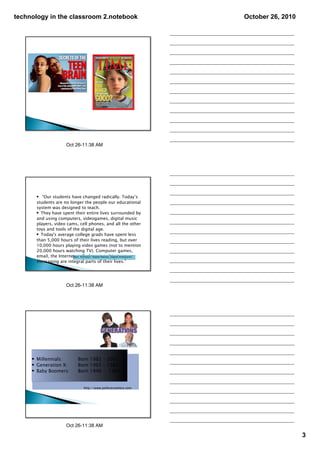
      •   promote higher order thinking processes?
      •   promote a constructivist approach to learning?


                                  Oct 26­11:38 AM

                                                                                               1
technology in the classroom 2.notebook                                                October 26, 2010


                               Oct 26­11:38 AM


     High School Students Want More
     Technology in College
     July 19th 2010 Converge Magazine
           Student college selection criteria
           • 63 percent of current college students say technology
           on campus was important in their college search.
           •  
           • 93 percent of today's high school students say campus
           technology is important in their college criteria.
           •  
           • 95 percent of today's high school students expect to
           use technology in their college classes. -High school
           students want to use this technology to do class
           assignments, communicate with classmates and
           professors, and prepare for the technology expectations
           in their field.
                                         An online survey of 1,019 college students
                                         - CDW-G 2010 21st-Century Campus Report


                               Oct 26­11:38 AM


      Students Lack Opportunities
      to Use Tech in Class
    • June 18, 2010students sayTechnology
      60 percent of Classroom their teachers regularly use technology to
    teach, but only 26 percent of the students say they can use technology
    to learn.
    •  
    • 84 percent of students say technology is important to their education,
    and more than half of them say they will be ready to use technology in
    college or the work force (57 percent).
    •  
    • 18 percent of faculty members say they've fully integrated technology
    into their classes, but 9 percent of students say their teachers have fully
    integrated technology into their classes
    •  
    • 64 percent of faculty members don't usually talk to students about
    21st-century skills including creativity, innovation, critical thinking,
    problem solving, digital citizenship and communication.
    •  
    • 47 percent of teachers do not design lesson plans that allow students
                                     CDW-G 2010 21st-Century Classroom Report


                               Oct 26­11:38 AM

                                                                                                         2
technology in the classroom 2.notebook                               October 26, 2010


                       Oct 26­11:38 AM


      • “Our students have changed radically. Today’s
      students are no longer the people our educational
      system was designed to teach.
      • They have spent their entire lives surrounded by
      and using computers, videogames, digital music
      players, video cams, cell phones, and all the other
      toys and tools of the digital age.
      • Today's average college grads have spent less
      than 5,000 hours of their lives reading, but over
      10,000 hours playing video games (not to mention
      20,000 hours watching TV). Computer games,
      email, the Internet, cell phonesNatives, Digital Immigrants"
                        Marc Prensky's "Digital and instant

      messaging are integral parts of their lives.”


                       Oct 26­11:38 AM


     • Millennials:          Born 1982 – 2002
     • Generation X:         Born 1965 – 1982
     • Baby Boomers:         Born 1946 - 1964


                                 http://www.polleverywhere.com


                       Oct 26­11:38 AM

                                                                                        3
technology in the classroom 2.notebook                  October 26, 2010


             Millennials


      •   born after 1980
      •   always connected, multitasking
      •   team-oriented, collaborative
      •   expect structure/fairness
      •   community-oriented
      •   drawn to new technologies
      •   optimistic & confident
      •   goal & achievement-focused


                      Oct 26­11:38 AM


      • grew up in a time of economic prosperity –
      how times have changed!
      • went to “play groups” and played soccer from
      the age of 3
      • the most protected generation in terms of
      government regulations on consumer safety
      • often indulged as a result of changing child-
      rearing practices


                      Oct 26­11:38 AM


     • used to being consulted in decision-making
     by their parents
     • typically strong bonds between these
     students and their parents, particularly with
     their mothers, and they stay very connected
     even when they go away to school
     • expected to excel by their parents
     • highly scheduled and sheltered in childhood


                      Oct 26­11:38 AM

                                                                           4
technology in the classroom 2.notebook                         October 26, 2010


         • constant social contact with friends via e-mail,
         Instant Messaging, cell phones, and video games
         • digital natives (Prensky, 2001)
         • raised in a technological environment
         • accepts that environment as the norm
         • grown up surrounded by digital devices and
         regularly uses these devices to interact with other
         people and the outside world.

         • Adapted From Digital Native website –
         www.digitalnative.org/wiki


                              Oct 26­11:38 AM


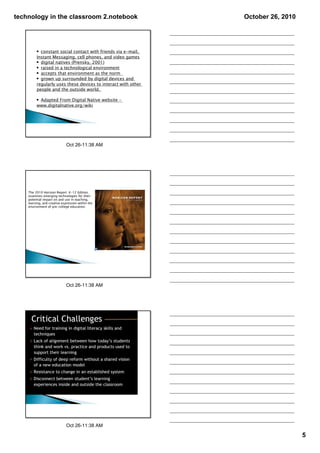
    The 2010 Horizon Report: K-12 Edition,
    examines emerging technologies for their
    potential impact on and use in teaching,
    learning, and creative expression within the
    environment of pre-college education.


                              Oct 26­11:38 AM


                              Oct 26­11:38 AM

                                                                                  5
technology in the classroom 2.notebook                      October 26, 2010

    • Technology is increasingly a means for empowering
    students, a method for communication and
    socializing and is a ubiquitous, transparent part of
    their lives.
    • Technology continues to profoundly affect the way
    we work, collaborate, communicate and succeed.
    • The perceived value of innovation and creativity is
    increasing.
    • There is increasing interest in just-in-time,
    alternate or non-formal avenues of education, such
    as online learning, mentoring and independent
    study.
    • The way we think of learning and environments is
    changing.


                     Oct 26­11:38 AM


      All students need to be actively engaged with
      the material we are trying to teach them
      Active engagement promotes deeper levels of
      cognitive processing and learning because it
      creates stronger connections
      Active learning facilitates long-term memory
      through the process of elaborative rehearsal
      that uses meaning rather than rote
      memorization


                     Oct 26­11:38 AM


      Provide High, Clear Expectations

      Offer individual feedback

      Engage with/through technology where
      appropriate

      Utilize group work: collaborative learning
      techniques

      Incorporate reflection and metacognition


                     Oct 26­11:38 AM

                                                                               6
technology in the classroom 2.notebook                         October 26, 2010


      • Ask thought provoking open-ended
      questions rather than questions aimed at
      eliciting rote memory responses
      • Find ways to get students working with a
      partner
      • Design collaborative learning exercises that
      encourage students to hear each other’s
      diverse viewpoints and then to reach
      consensus on an issue using the “round-
      robin” process


                   Oct 26­11:38 AM


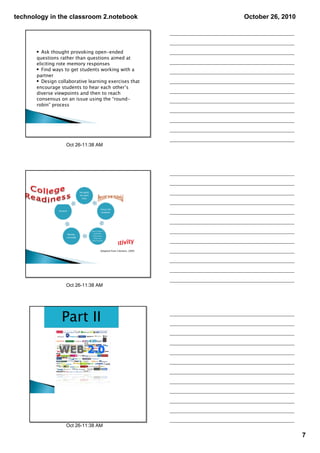
                                  Adapted from Clement, 2009


                   Oct 26­11:38 AM


                 Part II


                   Oct 26­11:38 AM

                                                                                  7
technology in the classroom 2.notebook      October 26, 2010
      • www.befunky.com
      • Creative photo editing tool

      • http://www.capzles.com
      • social networking site that
      allows users to tell a story
      using pictures, video clips,
      audio tracks and text.

      • http://www.toondoo.com
      • comic-creating tool that
      allows you to create your
      own cool comic strips with
      just a few drag ‘n drops ‘n
      mouse clicks


                          Oct 26­11:38 AM


    • www.wordle.net
    • graphic representation of
    the most frequently used
    words in a blog, free write,
    or speech


    • www.technorati.com
    • Internet search engine for
    searching blogs

    • www.polleverywhere.com
    • Instant audience feedback
    tool


                          Oct 26­11:38 AM


     • www.prezi.com
     • web-based presentation tool
     using a map layout and zooming
     to show contextual relationships


     • www.voki.com
     • free service that allows your
     students to create personalized
     speaking avatars and embed them
     on a blog or wiki or send them via
     e-mail.

     • www.xtranormal.com
     • is a text-to-movie website
     which allows you and your
     students to create short films
     with your own scripts using very
     clever text-to speech technology.


                          Oct 26­11:38 AM

                                                               8
technology in the classroom 2.notebook                                                              October 26, 2010


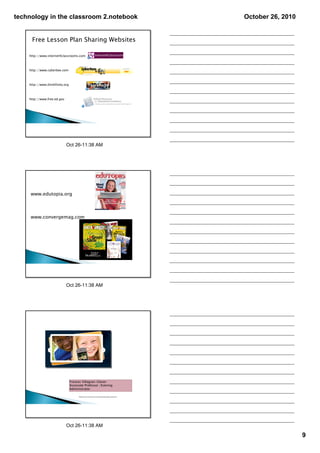
     Free Lesson Plan Sharing Websites

    http://www.internet4classrooms.com


    http://www.cyberbee.com


    http://www.thinkfinity.org


    http://www.free.ed.gov


                             Oct 26­11:38 AM


     www.edutopia.org


     www.convergemag.com


                             Oct 26­11:38 AM


                                 Frances Villagran-Glover
                                 Associate Professor /Evening
                                 Administrator

                                       Thank you to Frances for her presentation‐great resources!


                             Oct 26­11:38 AM

                                                                                                                       9

Technology in the classroom 2

  • 1.
    technology in the classroom 2.notebook October 26, 2010 Technology Infusion in the Classroom Kelly Schermerhorn October 26, November 2, December 2, 2010 3:15 PM­5:15 PM When I think of "technology infusion in the classroom... How do I infuse technology right now into my classroom... Oct 26­11:47 AM College Ready Oct 26­11:38 AM Does the technology you use….. • provide a learning opportunity that didn’t exist before? • enable independent learning? • provide a unique form of collaboration? • create an authentic context for learning? • capture and sustain students’ participation? • help students to achieve success? • enable students to assess the extent of their learning? • promote higher order thinking processes? • promote a constructivist approach to learning? Oct 26­11:38 AM 1
  • 2.
    technology in the classroom 2.notebook October 26, 2010 Oct 26­11:38 AM High School Students Want More Technology in College July 19th 2010 Converge Magazine Student college selection criteria • 63 percent of current college students say technology on campus was important in their college search. •   • 93 percent of today's high school students say campus technology is important in their college criteria. •   • 95 percent of today's high school students expect to use technology in their college classes. -High school students want to use this technology to do class assignments, communicate with classmates and professors, and prepare for the technology expectations in their field. An online survey of 1,019 college students - CDW-G 2010 21st-Century Campus Report Oct 26­11:38 AM Students Lack Opportunities to Use Tech in Class • June 18, 2010students sayTechnology 60 percent of Classroom their teachers regularly use technology to teach, but only 26 percent of the students say they can use technology to learn. •   • 84 percent of students say technology is important to their education, and more than half of them say they will be ready to use technology in college or the work force (57 percent). •   • 18 percent of faculty members say they've fully integrated technology into their classes, but 9 percent of students say their teachers have fully integrated technology into their classes •   • 64 percent of faculty members don't usually talk to students about 21st-century skills including creativity, innovation, critical thinking, problem solving, digital citizenship and communication. •   • 47 percent of teachers do not design lesson plans that allow students CDW-G 2010 21st-Century Classroom Report Oct 26­11:38 AM 2
  • 3.
    technology in the classroom 2.notebook October 26, 2010 Oct 26­11:38 AM • “Our students have changed radically. Today’s students are no longer the people our educational system was designed to teach. • They have spent their entire lives surrounded by and using computers, videogames, digital music players, video cams, cell phones, and all the other toys and tools of the digital age. • Today's average college grads have spent less than 5,000 hours of their lives reading, but over 10,000 hours playing video games (not to mention 20,000 hours watching TV). Computer games, email, the Internet, cell phonesNatives, Digital Immigrants" Marc Prensky's "Digital and instant messaging are integral parts of their lives.” Oct 26­11:38 AM • Millennials: Born 1982 – 2002 • Generation X: Born 1965 – 1982 • Baby Boomers: Born 1946 - 1964 http://www.polleverywhere.com Oct 26­11:38 AM 3
  • 4.
    technology in the classroom 2.notebook October 26, 2010 Millennials • born after 1980 • always connected, multitasking • team-oriented, collaborative • expect structure/fairness • community-oriented • drawn to new technologies • optimistic & confident • goal & achievement-focused Oct 26­11:38 AM • grew up in a time of economic prosperity – how times have changed! • went to “play groups” and played soccer from the age of 3 • the most protected generation in terms of government regulations on consumer safety • often indulged as a result of changing child- rearing practices Oct 26­11:38 AM • used to being consulted in decision-making by their parents • typically strong bonds between these students and their parents, particularly with their mothers, and they stay very connected even when they go away to school • expected to excel by their parents • highly scheduled and sheltered in childhood Oct 26­11:38 AM 4
  • 5.
    technology in the classroom 2.notebook October 26, 2010 • constant social contact with friends via e-mail, Instant Messaging, cell phones, and video games • digital natives (Prensky, 2001) • raised in a technological environment • accepts that environment as the norm • grown up surrounded by digital devices and regularly uses these devices to interact with other people and the outside world. • Adapted From Digital Native website – www.digitalnative.org/wiki Oct 26­11:38 AM The 2010 Horizon Report: K-12 Edition, examines emerging technologies for their potential impact on and use in teaching, learning, and creative expression within the environment of pre-college education. Oct 26­11:38 AM Oct 26­11:38 AM 5
  • 6.
    technology in the classroom 2.notebook October 26, 2010 • Technology is increasingly a means for empowering students, a method for communication and socializing and is a ubiquitous, transparent part of their lives. • Technology continues to profoundly affect the way we work, collaborate, communicate and succeed. • The perceived value of innovation and creativity is increasing. • There is increasing interest in just-in-time, alternate or non-formal avenues of education, such as online learning, mentoring and independent study. • The way we think of learning and environments is changing. Oct 26­11:38 AM All students need to be actively engaged with the material we are trying to teach them Active engagement promotes deeper levels of cognitive processing and learning because it creates stronger connections Active learning facilitates long-term memory through the process of elaborative rehearsal that uses meaning rather than rote memorization Oct 26­11:38 AM Provide High, Clear Expectations Offer individual feedback Engage with/through technology where appropriate Utilize group work: collaborative learning techniques Incorporate reflection and metacognition Oct 26­11:38 AM 6
  • 7.
    technology in the classroom 2.notebook October 26, 2010 • Ask thought provoking open-ended questions rather than questions aimed at eliciting rote memory responses • Find ways to get students working with a partner • Design collaborative learning exercises that encourage students to hear each other’s diverse viewpoints and then to reach consensus on an issue using the “round- robin” process Oct 26­11:38 AM Adapted from Clement, 2009 Oct 26­11:38 AM Part II Oct 26­11:38 AM 7
  • 8.
    technology in the classroom 2.notebook October 26, 2010 • www.befunky.com • Creative photo editing tool • http://www.capzles.com • social networking site that allows users to tell a story using pictures, video clips, audio tracks and text. • http://www.toondoo.com • comic-creating tool that allows you to create your own cool comic strips with just a few drag ‘n drops ‘n mouse clicks Oct 26­11:38 AM • www.wordle.net • graphic representation of the most frequently used words in a blog, free write, or speech • www.technorati.com • Internet search engine for searching blogs • www.polleverywhere.com • Instant audience feedback tool Oct 26­11:38 AM • www.prezi.com • web-based presentation tool using a map layout and zooming to show contextual relationships • www.voki.com • free service that allows your students to create personalized speaking avatars and embed them on a blog or wiki or send them via e-mail. • www.xtranormal.com • is a text-to-movie website which allows you and your students to create short films with your own scripts using very clever text-to speech technology. Oct 26­11:38 AM 8
  • 9.
    technology in the classroom 2.notebook October 26, 2010 Free Lesson Plan Sharing Websites http://www.internet4classrooms.com http://www.cyberbee.com http://www.thinkfinity.org http://www.free.ed.gov Oct 26­11:38 AM www.edutopia.org www.convergemag.com Oct 26­11:38 AM Frances Villagran-Glover Associate Professor /Evening Administrator Thank you to Frances for her presentation‐great resources! Oct 26­11:38 AM 9