© Copyright 2011. Aruba Networks, Inc.
All rights reserved
© Copyright 2011. Aruba Networks, Inc.
All rights reserved
Wireless Security
Myths and Realities
Jon Green, CISSP
jgreen@arubanetworks.com
© Copyright 2011. Aruba Networks, Inc.
All rights reserved2
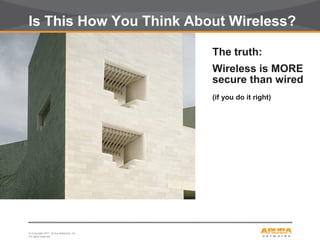
Is This How You Think About Wireless?
The truth:
Wireless is MORE
secure than wired
(if you do it right)
© Copyright 2011. Aruba Networks, Inc.
All rights reserved3
Wired Network Security Questions
On your wired network...
Do you authenticate all users and devices?
Do you encrypt all traffic?
Do you control access to network resources
based on user identity?
Wireless lets you do all of this – by design
© Copyright 2011. Aruba Networks, Inc.
All rights reserved
CONFIDENTIAL
© Copyright 2011. Aruba Networks, Inc.
All rights reserved
The Myths...
© Copyright 2011. Aruba Networks, Inc.
All rights reserved5
Doing Nothing
Wireless LAN equipment is cheap and
easily available
–If the IT department doesn’t deploy wireless,
someone else will
Where is the “security perimeter” today?
How do you enforce “No Wireless”
policies?
© Copyright 2011. Aruba Networks, Inc.
All rights reserved6
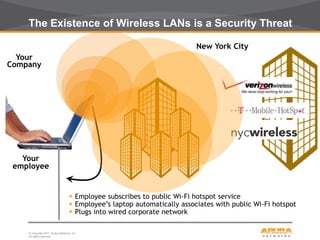
The Existence of Wireless LANs is a Security Threat
Your
Company
Your
employee
New York City
 Employee subscribes to public Wi-Fi hotspot service
 Employee’s laptop automatically associates with public Wi-Fi hotspot
 Plugs into wired corporate network
© Copyright 2011. Aruba Networks, Inc.
All rights reserved7
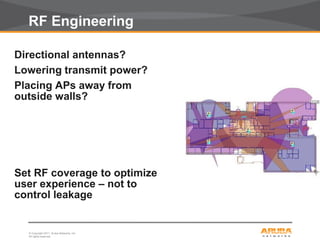
RF Engineering
Directional antennas?
Lowering transmit power?
Placing APs away from
outside walls?
Set RF coverage to optimize
user experience – not to
control leakage
© Copyright 2011. Aruba Networks, Inc.
All rights reserved8
SSID Cloaking
• Best practice?
– “Configure APs to not broadcast the SSID”
• At best, this can discourage a bad guy
• At worst, this is downright dangerous
• The SSID is not the same as a password
© Copyright 2011. Aruba Networks, Inc.
All rights reserved9
Discovering Cloaked SSIDs
linux:~# ./essid_jack -h
Essid Jack: Proof of concept so people will stop calling an ssid a password.
Usage: ./essid_jack -b <bssid> [ -d <destination mac> ] [ -c <channel number> ] [ -i
ccc.gif <interface name> ]
-b: bssid, the mac address of the access point (e.g. 00:de:ad:be:ef:00)
-d: destination mac address, defaults to broadcast address.
-c: channel number (1-14) that the access point is on,
defaults to current.
-i: the name of the AirJack interface to use (defaults to
aj0).
linux:~# essid_jack -b 00:03:2d:de:ad: -c 11
Got it, the essid is (escape characters are c style):
“s3kr1t_wl4n"
© Copyright 2011. Aruba Networks, Inc.
All rights reserved10
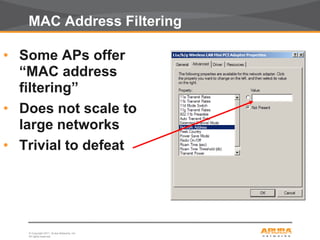
MAC Address Filtering
• Some APs offer
“MAC address
filtering”
• Does not scale to
large networks
• Trivial to defeat
© Copyright 2011. Aruba Networks, Inc.
All rights reserved11
WEP
• WEP stands for “Wired Equivalent
Privacy”
• Part of original 802.11
specification
• Horribly broken
• Weak cipher
• No anti-replay protection
• Weak integrity
• Vulnerable to very rapid cracking
© Copyright 2011. Aruba Networks, Inc.
All rights reserved12
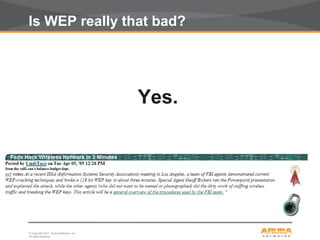
Is WEP really that bad?
Yes.
© Copyright 2011. Aruba Networks, Inc.
All rights reserved13
Other things to Avoid...
• Cisco LEAP (vulnerable to dictionary
attacks)
• EAP-FAST (doesn’t securely provide
mutual authentication)
• Use caution with WPA-Personal/WPA-PSK
(more later...)
• “WEP Cloaking” (doesn’t work)
• Proprietary “shielding” or
“scrambling” (easy to defeat)
© Copyright 2011. Aruba Networks, Inc.
All rights reserved
CONFIDENTIAL
© Copyright 2011. Aruba Networks, Inc.
All rights reserved
The Reality...
© Copyright 2011. Aruba Networks, Inc.
All rights reserved15
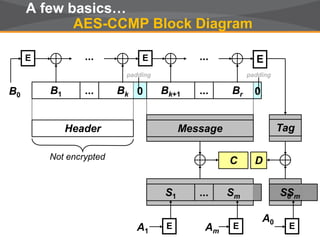
Sm
Br
A few basics…
AES-CCMP Block Diagram
E
B0
E...
B1 Bk
Header Message Tag
A1 Am
E E
A0
E
...
Not encrypted
0
padding
0
padding
Bk+1...
... E
Sm...S1 SmS0
DC
© Copyright 2011. Aruba Networks, Inc.
All rights reserved16
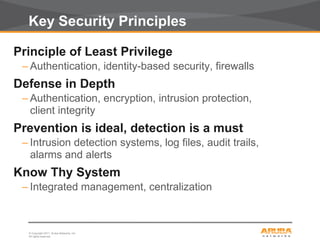
Key Security Principles
Principle of Least Privilege
– Authentication, identity-based security, firewalls
Defense in Depth
– Authentication, encryption, intrusion protection,
client integrity
Prevention is ideal, detection is a must
– Intrusion detection systems, log files, audit trails,
alarms and alerts
Know Thy System
– Integrated management, centralization
© Copyright 2011. Aruba Networks, Inc.
All rights reserved17
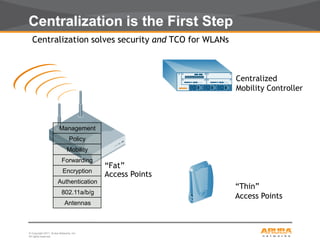
Centralization solves security and TCO for WLANs
“Thin”
Access Points
Centralized
Mobility Controller
802.11a/b/g
Antennas
Policy
Mobility
Forwarding
Encryption
Authentication
Management
“Fat”
Access Points
Centralization is the First Step
© Copyright 2011. Aruba Networks, Inc.
All rights reserved18
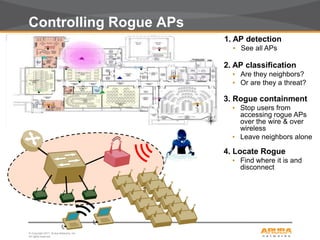
Controlling Rogue APs
1. AP detection
• See all APs
2. AP classification
• Are they neighbors?
• Or are they a threat?
3. Rogue containment
• Stop users from
accessing rogue APs
over the wire & over
wireless
• Leave neighbors alone
4. Locate Rogue
• Find where it is and
disconnect
© Copyright 2011. Aruba Networks, Inc.
All rights reserved19
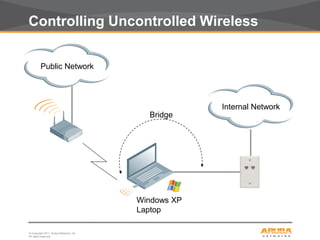
Windows XP
Laptop
Internal Network
Public Network
Bridge
Controlling Uncontrolled Wireless
© Copyright 2011. Aruba Networks, Inc.
All rights reserved20
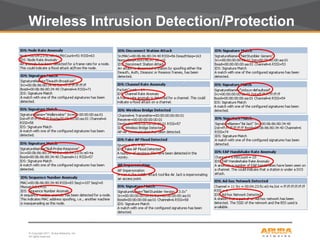
Wireless Intrusion Detection/Protection
© Copyright 2011. Aruba Networks, Inc.
All rights reserved21
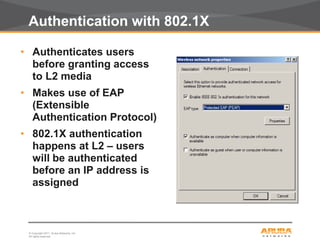
Authentication with 802.1X
• Authenticates users
before granting access
to L2 media
• Makes use of EAP
(Extensible
Authentication Protocol)
• 802.1X authentication
happens at L2 – users
will be authenticated
before an IP address is
assigned
© Copyright 2011. Aruba Networks, Inc.
All rights reserved22
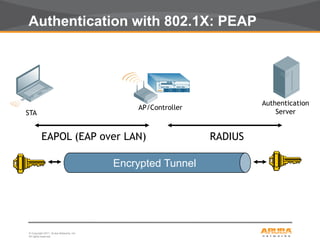
Authentication with 802.1X: PEAP
EAPOL (EAP over LAN) RADIUS
Encrypted Tunnel
Authentication
Server
AP/Controller
STA
© Copyright 2011. Aruba Networks, Inc.
All rights reserved23
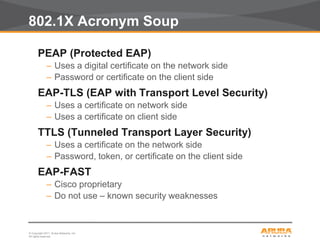
802.1X Acronym Soup
PEAP (Protected EAP)
– Uses a digital certificate on the network side
– Password or certificate on the client side
EAP-TLS (EAP with Transport Level Security)
– Uses a certificate on network side
– Uses a certificate on client side
TTLS (Tunneled Transport Layer Security)
– Uses a certificate on the network side
– Password, token, or certificate on the client side
EAP-FAST
– Cisco proprietary
– Do not use – known security weaknesses
© Copyright 2011. Aruba Networks, Inc.
All rights reserved24
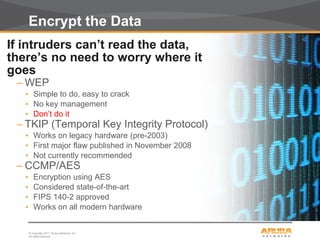
Encrypt the Data
If intruders can’t read the data,
there’s no need to worry where it
goes
– WEP
• Simple to do, easy to crack
• No key management
• Don’t do it
– TKIP (Temporal Key Integrity Protocol)
• Works on legacy hardware (pre-2003)
• First major flaw published in November 2008
• Not currently recommended
– CCMP/AES
• Encryption using AES
• Considered state-of-the-art
• FIPS 140-2 approved
• Works on all modern hardware
© Copyright 2011. Aruba Networks, Inc.
All rights reserved25
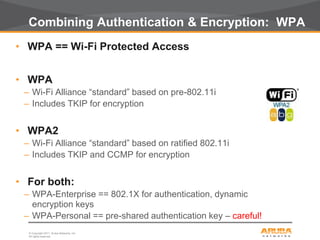
Combining Authentication & Encryption: WPA
• WPA == Wi-Fi Protected Access
• WPA
– Wi-Fi Alliance “standard” based on pre-802.11i
– Includes TKIP for encryption
• WPA2
– Wi-Fi Alliance “standard” based on ratified 802.11i
– Includes TKIP and CCMP for encryption
• For both:
– WPA-Enterprise == 802.1X for authentication, dynamic
encryption keys
– WPA-Personal == pre-shared authentication key – careful!
© Copyright 2011. Aruba Networks, Inc.
All rights reserved26
WPA-Personal? Be careful..
• WPA Personal does not use 802.1X
• Pre-shared key
• Easier
• But less secure
• Problem 1: Scalability
• Need to re-key any time an employee/user leaves
the organization
• Problem 2: Using weak keys
• WPA-PSK keys that are weak can be cracked
(dictionary attack)
© Copyright 2011. Aruba Networks, Inc.
All rights reserved27
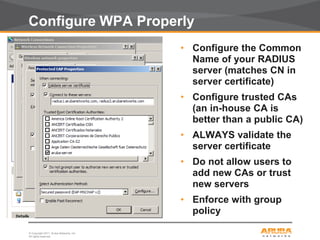
Configure WPA Properly
• Configure the Common
Name of your RADIUS
server (matches CN in
server certificate)
• Configure trusted CAs
(an in-house CA is
better than a public CA)
• ALWAYS validate the
server certificate
• Do not allow users to
add new CAs or trust
new servers
• Enforce with group
policy
© Copyright 2011. Aruba Networks, Inc.
All rights reserved28
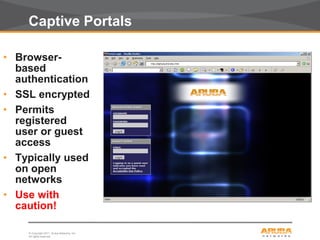
Captive Portals
• Browser-
based
authentication
• SSL encrypted
• Permits
registered
user or guest
access
• Typically used
on open
networks
• Use with
caution!
© Copyright 2011. Aruba Networks, Inc.
All rights reserved29
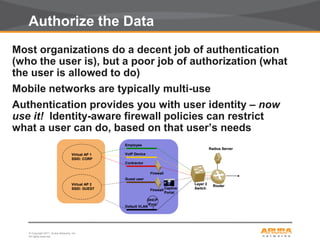
Authorize the Data
Most organizations do a decent job of authentication
(who the user is), but a poor job of authorization (what
the user is allowed to do)
Mobile networks are typically multi-use
Authentication provides you with user identity – now
use it! Identity-aware firewall policies can restrict
what a user can do, based on that user’s needs
Virtual AP 1
SSID: CORP
Virtual AP 2
SSID: GUEST
Guest user
Employee
VoIP Device
Contractor
Default VLAN
Layer 2
Switch
Router
Firewall
Captive
Portal
Radius Server
DHCP
Pool
Firewall
Virtual AP 1
SSID: CORP
Virtual AP 2
SSID: GUEST
Guest user
Employee
VoIP Device
Contractor
Default VLAN
Layer 2
Switch
Router
Firewall
Captive
Portal
Radius Server
DHCP
Pool
Firewall
© Copyright 2011. Aruba Networks, Inc.
All rights reserved30
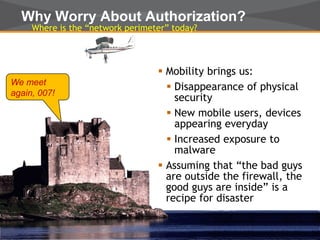
Why Worry About Authorization?
Where is the “network perimeter” today?
 Mobility brings us:
 Disappearance of physical
security
 New mobile users, devices
appearing everyday
 Increased exposure to
malware
 Assuming that “the bad guys
are outside the firewall, the
good guys are inside” is a
recipe for disaster
We meet
again, 007!
© Copyright 2011. Aruba Networks, Inc.
All rights reserved31
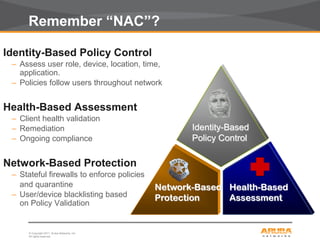
Remember “NAC”?
Identity-Based Policy Control
– Assess user role, device, location, time,
application.
– Policies follow users throughout network
Health-Based Assessment
– Client health validation
– Remediation
– Ongoing compliance
Network-Based Protection
– Stateful firewalls to enforce policies
and quarantine
– User/device blacklisting based
on Policy Validation
Network-Based
Protection
Identity-Based
Policy Control
Health-Based
Assessment
© Copyright 2011. Aruba Networks, Inc.
All rights reserved32
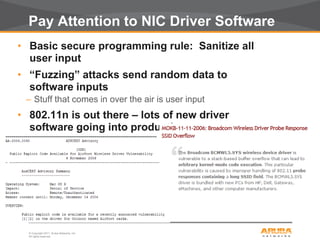
Pay Attention to NIC Driver Software
• Basic secure programming rule: Sanitize all
user input
• “Fuzzing” attacks send random data to
software inputs
– Stuff that comes in over the air is user input
• 802.11n is out there – lots of new driver
software going into production
– Are these well written? Well tested? Secure?
© Copyright 2011. Aruba Networks, Inc.
All rights reserved33
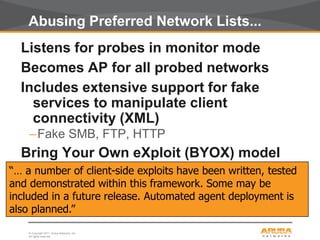
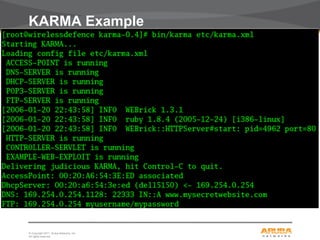
Abusing Preferred Network Lists...
Listens for probes in monitor mode
Becomes AP for all probed networks
Includes extensive support for fake
services to manipulate client
connectivity (XML)
–Fake SMB, FTP, HTTP
Bring Your Own eXploit (BYOX) model
“… a number of client-side exploits have been written, tested
and demonstrated within this framework. Some may be
included in a future release. Automated agent deployment is
also planned.”
© Copyright 2011. Aruba Networks, Inc.
All rights reserved34
KARMA Example
© Copyright 2011. Aruba Networks, Inc.
All rights reserved35
Today’s Wireless Gold Standard
• Centralized wireless
• Keep clients updated – drivers too!
• Wireless intrusion detection
– Control uncontrolled wireless
– Locate and protect against rogue APs
• WPA-2
– Authentication using 802.1X and EAP-TLS
– AES for link-layer encryption
• Strong passwords
– SecureID or other token-card products
– Strong password policies
• Authorization with identity-aware firewalls
– Enforce principle of least privilege
– Provide separation of user/device classes
© Copyright 2011. Aruba Networks, Inc.
All rights reserved
CONFIDENTIAL
© Copyright 2011. Aruba Networks, Inc.
All rights reserved
Jon Green
jgreen@arubanetworks.com

Airheads dallas 2011 wireless security

  • 1.
    © Copyright 2011.Aruba Networks, Inc. All rights reserved © Copyright 2011. Aruba Networks, Inc. All rights reserved Wireless Security Myths and Realities Jon Green, CISSP jgreen@arubanetworks.com
  • 2.
    © Copyright 2011.Aruba Networks, Inc. All rights reserved2 Is This How You Think About Wireless? The truth: Wireless is MORE secure than wired (if you do it right)
  • 3.
    © Copyright 2011.Aruba Networks, Inc. All rights reserved3 Wired Network Security Questions On your wired network... Do you authenticate all users and devices? Do you encrypt all traffic? Do you control access to network resources based on user identity? Wireless lets you do all of this – by design
  • 4.
    © Copyright 2011.Aruba Networks, Inc. All rights reserved CONFIDENTIAL © Copyright 2011. Aruba Networks, Inc. All rights reserved The Myths...
  • 5.
    © Copyright 2011.Aruba Networks, Inc. All rights reserved5 Doing Nothing Wireless LAN equipment is cheap and easily available –If the IT department doesn’t deploy wireless, someone else will Where is the “security perimeter” today? How do you enforce “No Wireless” policies?
  • 6.
    © Copyright 2011.Aruba Networks, Inc. All rights reserved6 The Existence of Wireless LANs is a Security Threat Your Company Your employee New York City  Employee subscribes to public Wi-Fi hotspot service  Employee’s laptop automatically associates with public Wi-Fi hotspot  Plugs into wired corporate network
  • 7.
    © Copyright 2011.Aruba Networks, Inc. All rights reserved7 RF Engineering Directional antennas? Lowering transmit power? Placing APs away from outside walls? Set RF coverage to optimize user experience – not to control leakage
  • 8.
    © Copyright 2011.Aruba Networks, Inc. All rights reserved8 SSID Cloaking • Best practice? – “Configure APs to not broadcast the SSID” • At best, this can discourage a bad guy • At worst, this is downright dangerous • The SSID is not the same as a password
  • 9.
    © Copyright 2011.Aruba Networks, Inc. All rights reserved9 Discovering Cloaked SSIDs linux:~# ./essid_jack -h Essid Jack: Proof of concept so people will stop calling an ssid a password. Usage: ./essid_jack -b <bssid> [ -d <destination mac> ] [ -c <channel number> ] [ -i ccc.gif <interface name> ] -b: bssid, the mac address of the access point (e.g. 00:de:ad:be:ef:00) -d: destination mac address, defaults to broadcast address. -c: channel number (1-14) that the access point is on, defaults to current. -i: the name of the AirJack interface to use (defaults to aj0). linux:~# essid_jack -b 00:03:2d:de:ad: -c 11 Got it, the essid is (escape characters are c style): “s3kr1t_wl4n"
  • 10.
    © Copyright 2011.Aruba Networks, Inc. All rights reserved10 MAC Address Filtering • Some APs offer “MAC address filtering” • Does not scale to large networks • Trivial to defeat
  • 11.
    © Copyright 2011.Aruba Networks, Inc. All rights reserved11 WEP • WEP stands for “Wired Equivalent Privacy” • Part of original 802.11 specification • Horribly broken • Weak cipher • No anti-replay protection • Weak integrity • Vulnerable to very rapid cracking
  • 12.
    © Copyright 2011.Aruba Networks, Inc. All rights reserved12 Is WEP really that bad? Yes.
  • 13.
    © Copyright 2011.Aruba Networks, Inc. All rights reserved13 Other things to Avoid... • Cisco LEAP (vulnerable to dictionary attacks) • EAP-FAST (doesn’t securely provide mutual authentication) • Use caution with WPA-Personal/WPA-PSK (more later...) • “WEP Cloaking” (doesn’t work) • Proprietary “shielding” or “scrambling” (easy to defeat)
  • 14.
    © Copyright 2011.Aruba Networks, Inc. All rights reserved CONFIDENTIAL © Copyright 2011. Aruba Networks, Inc. All rights reserved The Reality...
  • 15.
    © Copyright 2011.Aruba Networks, Inc. All rights reserved15 Sm Br A few basics… AES-CCMP Block Diagram E B0 E... B1 Bk Header Message Tag A1 Am E E A0 E ... Not encrypted 0 padding 0 padding Bk+1... ... E Sm...S1 SmS0 DC
  • 16.
    © Copyright 2011.Aruba Networks, Inc. All rights reserved16 Key Security Principles Principle of Least Privilege – Authentication, identity-based security, firewalls Defense in Depth – Authentication, encryption, intrusion protection, client integrity Prevention is ideal, detection is a must – Intrusion detection systems, log files, audit trails, alarms and alerts Know Thy System – Integrated management, centralization
  • 17.
    © Copyright 2011.Aruba Networks, Inc. All rights reserved17 Centralization solves security and TCO for WLANs “Thin” Access Points Centralized Mobility Controller 802.11a/b/g Antennas Policy Mobility Forwarding Encryption Authentication Management “Fat” Access Points Centralization is the First Step
  • 18.
    © Copyright 2011.Aruba Networks, Inc. All rights reserved18 Controlling Rogue APs 1. AP detection • See all APs 2. AP classification • Are they neighbors? • Or are they a threat? 3. Rogue containment • Stop users from accessing rogue APs over the wire & over wireless • Leave neighbors alone 4. Locate Rogue • Find where it is and disconnect
  • 19.
    © Copyright 2011.Aruba Networks, Inc. All rights reserved19 Windows XP Laptop Internal Network Public Network Bridge Controlling Uncontrolled Wireless
  • 20.
    © Copyright 2011.Aruba Networks, Inc. All rights reserved20 Wireless Intrusion Detection/Protection
  • 21.
    © Copyright 2011.Aruba Networks, Inc. All rights reserved21 Authentication with 802.1X • Authenticates users before granting access to L2 media • Makes use of EAP (Extensible Authentication Protocol) • 802.1X authentication happens at L2 – users will be authenticated before an IP address is assigned
  • 22.
    © Copyright 2011.Aruba Networks, Inc. All rights reserved22 Authentication with 802.1X: PEAP EAPOL (EAP over LAN) RADIUS Encrypted Tunnel Authentication Server AP/Controller STA
  • 23.
    © Copyright 2011.Aruba Networks, Inc. All rights reserved23 802.1X Acronym Soup PEAP (Protected EAP) – Uses a digital certificate on the network side – Password or certificate on the client side EAP-TLS (EAP with Transport Level Security) – Uses a certificate on network side – Uses a certificate on client side TTLS (Tunneled Transport Layer Security) – Uses a certificate on the network side – Password, token, or certificate on the client side EAP-FAST – Cisco proprietary – Do not use – known security weaknesses
  • 24.
    © Copyright 2011.Aruba Networks, Inc. All rights reserved24 Encrypt the Data If intruders can’t read the data, there’s no need to worry where it goes – WEP • Simple to do, easy to crack • No key management • Don’t do it – TKIP (Temporal Key Integrity Protocol) • Works on legacy hardware (pre-2003) • First major flaw published in November 2008 • Not currently recommended – CCMP/AES • Encryption using AES • Considered state-of-the-art • FIPS 140-2 approved • Works on all modern hardware
  • 25.
    © Copyright 2011.Aruba Networks, Inc. All rights reserved25 Combining Authentication & Encryption: WPA • WPA == Wi-Fi Protected Access • WPA – Wi-Fi Alliance “standard” based on pre-802.11i – Includes TKIP for encryption • WPA2 – Wi-Fi Alliance “standard” based on ratified 802.11i – Includes TKIP and CCMP for encryption • For both: – WPA-Enterprise == 802.1X for authentication, dynamic encryption keys – WPA-Personal == pre-shared authentication key – careful!
  • 26.
    © Copyright 2011.Aruba Networks, Inc. All rights reserved26 WPA-Personal? Be careful.. • WPA Personal does not use 802.1X • Pre-shared key • Easier • But less secure • Problem 1: Scalability • Need to re-key any time an employee/user leaves the organization • Problem 2: Using weak keys • WPA-PSK keys that are weak can be cracked (dictionary attack)
  • 27.
    © Copyright 2011.Aruba Networks, Inc. All rights reserved27 Configure WPA Properly • Configure the Common Name of your RADIUS server (matches CN in server certificate) • Configure trusted CAs (an in-house CA is better than a public CA) • ALWAYS validate the server certificate • Do not allow users to add new CAs or trust new servers • Enforce with group policy
  • 28.
    © Copyright 2011.Aruba Networks, Inc. All rights reserved28 Captive Portals • Browser- based authentication • SSL encrypted • Permits registered user or guest access • Typically used on open networks • Use with caution!
  • 29.
    © Copyright 2011.Aruba Networks, Inc. All rights reserved29 Authorize the Data Most organizations do a decent job of authentication (who the user is), but a poor job of authorization (what the user is allowed to do) Mobile networks are typically multi-use Authentication provides you with user identity – now use it! Identity-aware firewall policies can restrict what a user can do, based on that user’s needs Virtual AP 1 SSID: CORP Virtual AP 2 SSID: GUEST Guest user Employee VoIP Device Contractor Default VLAN Layer 2 Switch Router Firewall Captive Portal Radius Server DHCP Pool Firewall Virtual AP 1 SSID: CORP Virtual AP 2 SSID: GUEST Guest user Employee VoIP Device Contractor Default VLAN Layer 2 Switch Router Firewall Captive Portal Radius Server DHCP Pool Firewall
  • 30.
    © Copyright 2011.Aruba Networks, Inc. All rights reserved30 Why Worry About Authorization? Where is the “network perimeter” today?  Mobility brings us:  Disappearance of physical security  New mobile users, devices appearing everyday  Increased exposure to malware  Assuming that “the bad guys are outside the firewall, the good guys are inside” is a recipe for disaster We meet again, 007!
  • 31.
    © Copyright 2011.Aruba Networks, Inc. All rights reserved31 Remember “NAC”? Identity-Based Policy Control – Assess user role, device, location, time, application. – Policies follow users throughout network Health-Based Assessment – Client health validation – Remediation – Ongoing compliance Network-Based Protection – Stateful firewalls to enforce policies and quarantine – User/device blacklisting based on Policy Validation Network-Based Protection Identity-Based Policy Control Health-Based Assessment
  • 32.
    © Copyright 2011.Aruba Networks, Inc. All rights reserved32 Pay Attention to NIC Driver Software • Basic secure programming rule: Sanitize all user input • “Fuzzing” attacks send random data to software inputs – Stuff that comes in over the air is user input • 802.11n is out there – lots of new driver software going into production – Are these well written? Well tested? Secure?
  • 33.
    © Copyright 2011.Aruba Networks, Inc. All rights reserved33 Abusing Preferred Network Lists... Listens for probes in monitor mode Becomes AP for all probed networks Includes extensive support for fake services to manipulate client connectivity (XML) –Fake SMB, FTP, HTTP Bring Your Own eXploit (BYOX) model “… a number of client-side exploits have been written, tested and demonstrated within this framework. Some may be included in a future release. Automated agent deployment is also planned.”
  • 34.
    © Copyright 2011.Aruba Networks, Inc. All rights reserved34 KARMA Example
  • 35.
    © Copyright 2011.Aruba Networks, Inc. All rights reserved35 Today’s Wireless Gold Standard • Centralized wireless • Keep clients updated – drivers too! • Wireless intrusion detection – Control uncontrolled wireless – Locate and protect against rogue APs • WPA-2 – Authentication using 802.1X and EAP-TLS – AES for link-layer encryption • Strong passwords – SecureID or other token-card products – Strong password policies • Authorization with identity-aware firewalls – Enforce principle of least privilege – Provide separation of user/device classes
  • 36.
    © Copyright 2011.Aruba Networks, Inc. All rights reserved CONFIDENTIAL © Copyright 2011. Aruba Networks, Inc. All rights reserved Jon Green jgreen@arubanetworks.com