Supplier Operation Procedure –
TMALL in China
• Shop Registration Procedure

• Payment
• Delivery Procedure
• Marketing

Prepared by Charlotte Lee
2013 Oct
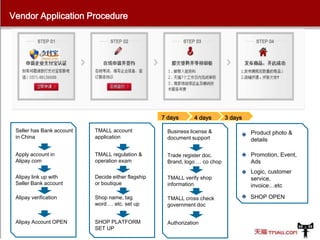
Vendor Application Procedure

7 days

4 days

3 days

Seller has Bank account
in China

TMALL account
application

Business license &
document support

Product photo &
details

Apply account in
Alipay.com

TMALL regulation &
operation exam

Trade register doc.
Brand, logo … co chop

Promotion, Event,
Ads

Alipay link up with
Seller Bank account

Decide either flagship
or boutique

TMALL verify shop
information

Logic, customer
service,
invoice…etc

Alipay verification

Shop name, tag
word … etc. set up

TMALL cross check
government doc

Alipay Account OPEN

SHOP PLATFORM
SET UP

Authorization

SHOP OPEN
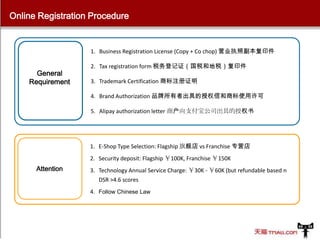
Online Registration Procedure

1. Business Registration License (Copy + Co chop) 营业执照副本复印件

General
Requirement

2. Tax registration form 税务登记证(国税和地税)复印件
3. Trademark Certification 商标注册证明
4. Brand Authorization 品牌所有者出具的授权信和商标使用许可
5. Alipay authorization letter 商户向支付宝公司出具的授权书

1. E-Shop Type Selection: Flagship 旗舰店 vs Franchise 专营店

2. Security deposit: Flagship ¥100K, Franchise ¥150K

Attention

3. Technology Annual Service Charge: ¥30K - ¥60K (but refundable based n
DSR >4.6 scores
4. Follow Chinese Law
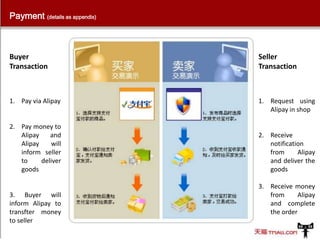
Payment (details as appendix)

Buyer
Transaction

Seller
Transaction

1. Pay via Alipay

1. Request using
Alipay in shop

2. Pay money to
Alipay
and
Alipay
will
inform seller
to
deliver
goods

3. Buyer will
inform Alipay to
transfter money
to seller

2. Receive
notification
from
Alipay
and deliver the
goods
3. Receive money
from
Alipay
and complete
the order
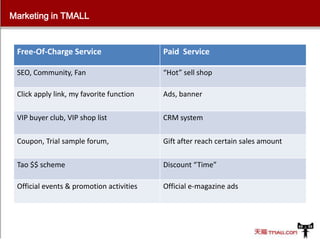
Marketing in TMALL

Free-Of-Charge Service

Paid Service

SEO, Community, Fan

“Hot” sell shop

Click apply link, my favorite function

Ads, banner

VIP buyer club, VIP shop list

CRM system

Coupon, Trial sample forum,

Gift after reach certain sales amount

Tao $$ scheme

Discount “Time”

Official events & promotion activities

Official e-magazine ads
THANK YOU
• This presentation focus on how TMALL operate in China.
• Other B2B and B2C platform operation system will be
summarizing and compare in last section
• New brand + e-commerce strategy in China

Prepared by Charlotte Lee
2013 Oct
Appendix
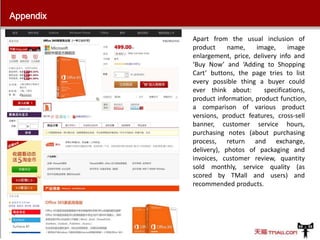
Apart from the usual inclusion of
product
name,
image,
image
enlargement, price, delivery info and
‘Buy Now’ and ‘Adding to Shopping
Cart’ buttons, the page tries to list
every possible thing a buyer could
ever think about:
specifications,
product information, product function,
a comparison of various product
versions, product features, cross-sell
banner, customer service hours,
purchasing notes (about purchasing
process, return and exchange,
delivery), photos of packaging and
invoices, customer review, quantity
sold monthly, service quality (as
scored by TMall and users) and
recommended products.
Appendix
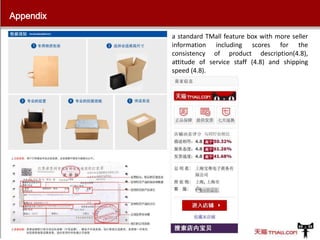
a standard TMall feature box with more seller
information including scores for the
consistency of product description(4.8),
attitude of service staff (4.8) and shipping
speed (4.8).
Appendix

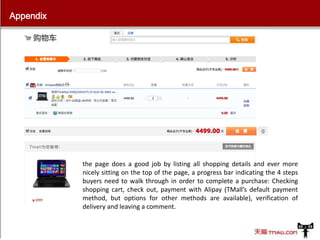
the page does a good job by listing all shopping details and ever more
nicely sitting on the top of the page, a progress bar indicating the 4 steps
buyers need to walk through in order to complete a purchase: Checking
shopping cart, check out, payment with Alipay (TMall’s default payment
method, but options for other methods are available), verification of
delivery and leaving a comment.
Appendix

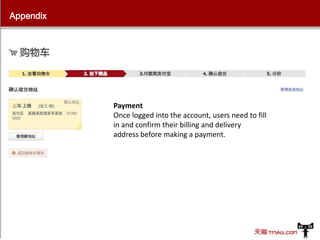
Payment
Once logged into the account, users need to fill
in and confirm their billing and delivery
address before making a payment.
Appendix

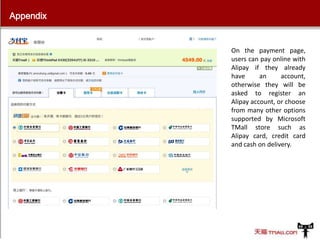
On the payment page,
users can pay online with
Alipay if they already
have
an
account,
otherwise they will be
asked to register an
Alipay account, or choose
from many other options
supported by Microsoft
TMall store such as
Alipay card, credit card
and cash on delivery.

Alibaba TMALL China - Operation Procedure

  • 1.
    Supplier Operation Procedure– TMALL in China • Shop Registration Procedure • Payment • Delivery Procedure • Marketing Prepared by Charlotte Lee 2013 Oct
  • 2.
    Vendor Application Procedure 7days 4 days 3 days Seller has Bank account in China TMALL account application Business license & document support Product photo & details Apply account in Alipay.com TMALL regulation & operation exam Trade register doc. Brand, logo … co chop Promotion, Event, Ads Alipay link up with Seller Bank account Decide either flagship or boutique TMALL verify shop information Logic, customer service, invoice…etc Alipay verification Shop name, tag word … etc. set up TMALL cross check government doc Alipay Account OPEN SHOP PLATFORM SET UP Authorization SHOP OPEN
  • 3.
    Online Registration Procedure 1.Business Registration License (Copy + Co chop) 营业执照副本复印件 General Requirement 2. Tax registration form 税务登记证(国税和地税)复印件 3. Trademark Certification 商标注册证明 4. Brand Authorization 品牌所有者出具的授权信和商标使用许可 5. Alipay authorization letter 商户向支付宝公司出具的授权书 1. E-Shop Type Selection: Flagship 旗舰店 vs Franchise 专营店 2. Security deposit: Flagship ¥100K, Franchise ¥150K Attention 3. Technology Annual Service Charge: ¥30K - ¥60K (but refundable based n DSR >4.6 scores 4. Follow Chinese Law
  • 4.
    Payment (details asappendix) Buyer Transaction Seller Transaction 1. Pay via Alipay 1. Request using Alipay in shop 2. Pay money to Alipay and Alipay will inform seller to deliver goods 3. Buyer will inform Alipay to transfter money to seller 2. Receive notification from Alipay and deliver the goods 3. Receive money from Alipay and complete the order
  • 5.
    Marketing in TMALL Free-Of-ChargeService Paid Service SEO, Community, Fan “Hot” sell shop Click apply link, my favorite function Ads, banner VIP buyer club, VIP shop list CRM system Coupon, Trial sample forum, Gift after reach certain sales amount Tao $$ scheme Discount “Time” Official events & promotion activities Official e-magazine ads
  • 6.
    THANK YOU • Thispresentation focus on how TMALL operate in China. • Other B2B and B2C platform operation system will be summarizing and compare in last section • New brand + e-commerce strategy in China Prepared by Charlotte Lee 2013 Oct
  • 7.
    Appendix Apart from theusual inclusion of product name, image, image enlargement, price, delivery info and ‘Buy Now’ and ‘Adding to Shopping Cart’ buttons, the page tries to list every possible thing a buyer could ever think about: specifications, product information, product function, a comparison of various product versions, product features, cross-sell banner, customer service hours, purchasing notes (about purchasing process, return and exchange, delivery), photos of packaging and invoices, customer review, quantity sold monthly, service quality (as scored by TMall and users) and recommended products.
  • 8.
    Appendix a standard TMallfeature box with more seller information including scores for the consistency of product description(4.8), attitude of service staff (4.8) and shipping speed (4.8).
  • 9.
    Appendix the page doesa good job by listing all shopping details and ever more nicely sitting on the top of the page, a progress bar indicating the 4 steps buyers need to walk through in order to complete a purchase: Checking shopping cart, check out, payment with Alipay (TMall’s default payment method, but options for other methods are available), verification of delivery and leaving a comment.
  • 10.
    Appendix Payment Once logged intothe account, users need to fill in and confirm their billing and delivery address before making a payment.
  • 11.
    Appendix On the paymentpage, users can pay online with Alipay if they already have an account, otherwise they will be asked to register an Alipay account, or choose from many other options supported by Microsoft TMall store such as Alipay card, credit card and cash on delivery.