G.VINOTHINI
Data synchronization in mobile computing
systems
 Data synchronization is defined as the process of
maintaining the availability of data generated from the
source and maintaining consistency between the copies
pushed from the source and local cached or ordered data at
different computing systems without discrepanciesor
conflicts among the distributed data
 A consistency copy of data is a copy which may not be
identical to the present data record at the data generating
source,but must satisfy all the required functions and
domain dependent specific rules
Types of synchronization
1. Two-way synchronization of partial or full
copies of data
 Between mobile-device and personalarea
computer
 For example, whenever the list of contacts
and personal information manager data is
modified at any of them, it is made
consistent after synchronization
2. Server-alerted synchronization
 The server alerts the client the data modification or additions
 The client synchronizes the modified or new data by pull reques
For example, alerting new e-mail and the device pulling that
3. One-way server-initiated synchronization
 Server initiates synchronization of any new modification since
communication of last modification
 Sends modified data copies to the client
 When a new email arrives at a server, it initiates the synchronization as
and when the device connects to the server and pushes the mail
4. Client initiated refresh synchronization
 The client initiates synchronization with the server for
refreshing its existing data copies
 For refreshing the configuration parameters saved at
the server for it
 Client initiated refresh synchronization─ Example
 For example, a computer or mobile device initiates
refreshing of the hoarded contacts and personal
information data either at periodic intervals or as and
when it connects
SYNCHRONIZATION
 Data disseminated and replicated at remote
stations may occur in number of ways
 Data replication may done by copying the data
from one place to another place or copying data
from one place to many other other places or
copying the data from many other places to many
other places
 For examples music files are copied into
ipods,iphones,and to several devices
 The replicated data may be full copy or a partial
copy
Synchronization software for
mobile devices
 Let us consider a pc is associated with mobile
device and this computer connected to the
internet which download applications and larger
files
 Now consider the data at the computer is modified
at some instant,the disseminated data at the
server has changed at another instant-the changes
are take place at one of the three ends at different
instants there be a need to synchronize the data at
three ends
Synchronization protocols
 By definition, mobile users are not always connected to a network and its stored
data. Users retrieve data from the network and store it on the mobile device, where
they access and manipulate the local copy of the data. Periodically, users reconnect
with the network to send any local changes back to the networked data repository.
 Users also have the opportunity to learn about updates made to the networked data
while the device was disconnected. Occasionally, they need to resolve conflicts
among the updates made to the networked data. This reconciliation operation –
where updates are exchanged and conflicts are resolved – is known as data
synchronization. Data synchronization, then, is the process of making two sets of
data look identical. For a mobile device, synchronization applies to the data that the
mobile device stores locally.
 A data synchronization protocol defines the workflow for communication during a
data synchronization session when the mobile device is connected to the network.
The protocol must support naming and identification of records, common protocol
commands to synchronize local and network data, and it can support identification
and resolution of synchronization conflicts.
Mobile devices server and
management
Mobile agent application server
 Application level logic that handles business functions involved in a particular organization (e.g. how to
handle information requests from sales personnel in the field) and its integration with backend database or
business application systems such as mainframe financial accounting systems, manufacturing systems,
inventory, ERP (Enterprise Resource Planning) and emerging CRM (Customer Resource Management)
systems
 Presentation services for the Mobile client device (handheld computers, notebook, PDA, etc) i.e. application
server takes raw data from database applications/queries and transforms the data on a specific thin client (or
a thick client like a PC) considering its presentation space characteristics and limitations. This is also called
GUI (Graphical User Interface) in some cases though some handheld are more like older text terminals than
PC. It includes breaking the messages into smaller chunks, filtering redundant information, and even
logically compressing the data , etc.
 Transaction services, in some cases - including multi-threading for heavy volumes and persistency i.e.
recovery across session failures
 Application programming level interfaces (APIs) with specialized communications protocols
 An application server may be considered as part of a multi-tier (mostly three tier) architecture. Conventional
tiers are:
 First tier - A thin client based on handheld devices or a thick client on a PC - typically a browser-based
interface in the Web context
 Middle tier consists of business applications on a set of servers - communications and business applications
 Third Tier - backend legacy data base systems and mission-critical ERP systems on a large server or
mainframe
Gateway, portals, service discovery
 Gateway is a server or daemon typically installed onto physical or virtual appliance
placed into DMZ. The Gateway's public interface is exposed to the Internet (or other
untrusted network) and accepts TCP/IP connections from mobile applications. It
operates on IPv4 and/or IPv6 networks. Incoming client connections typically use
SSL/TLS to provide security for the network communication and a mutual trust of
communicating peers. Communication protocol is typically based on HTTP
 A mobile portal is an Internet gateway that enables mobile devices to connect
remotely with an enterprise intranet or extranet, typically via a Web browser
interface. Consumer-oriented mobile portals provide access to mobile services and
content using channels such as SMS, a microbrowser such as WAP, i-mode and
voice. Consumer mobile portals aggregate content from many sources and may offer
personalized services and content to mobile users — for example, unified
messaging, news, search facilities, directories and m-commerce transactions.

Service discovery is the automatic detection of devices and services offered by
these devices on a computer network. ... Service discovery requires a common
language to allow software agents to make use of one another's services without the
need for continuous user intervention.
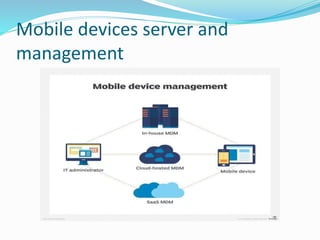
Device management
 MDM is typically a deployment of a combination of on-device applications and configurations, corporate
policies and certificates, and backend infrastructure, for the purpose of simplifying and enhancing the IT
management of end user devices. In modern corporate IT environments, the sheer number and diversity of
managed devices (and user behavior) has motivated MDM solutions that allow the management of devices
and users in a consistent and scalable way. The overall role of MDM is to increase device supportability,
security, and corporate functionality while maintaining some user flexibility.
 Many organizations administer devices and applications using MDM products/services. MDM primarily
deals with corporate data segregation, securing emails, securing corporate documents on devices, enforcing
corporate policies, integrating and managing mobile devices including laptops and handhelds of various
categories. MDM implementations may be either on-premises or cloud-based.
 Some of the core functions of MDM include:
 Ensuring that diverse user equipment is configured to a consistent standard / supported set of applications,
functions, or corporate policies
 Updating equipment, applications, functions, or policies in a scalable manner
 Ensuring that users use applications in a consistent and supportable manner
 Ensuring that equipment performs consistently
 Monitoring and tracking equipment (e.g. location, status, ownership, activity)
 Being able to efficiently diagnose and troubleshoot equipment remotely
Mobile file system
 A file system for mobile computing
 Information systems. Information storage systems.
Record storage systems.
 Software and its engineering. Software organization and
properties. Contextual software domains.
Operating systems. File systems management. ...
 Theory of computation. Design and analysis of
algorithms. Data structures design and analysis. Sorting
and searching.
security
 Mobile computing security can be implemented in various layers of
mobile software, operating systems, and downloadable apps. In
addition, end users can be sensitized to the dangers and educated as
to best practices, greatly increasing their devices' security.
 Updates: Hackers and defensive software are engaged in running
battles for superiority, so any delay in updating operating systems
and/or security systems leaves mobile devices particularly
vulnerable. Systems should be set to check automatically for updates,
and users should get in the habit of performing manual updates at
regular intervals.
 While it may seem like no data is safe in this technological age, users
can greatly decrease the likelihood of a security breach on their
devices by adhering to these mobile computing security guidelines.

SYNCHRONIZATION

  • 1.
  • 2.
    Data synchronization inmobile computing systems  Data synchronization is defined as the process of maintaining the availability of data generated from the source and maintaining consistency between the copies pushed from the source and local cached or ordered data at different computing systems without discrepanciesor conflicts among the distributed data  A consistency copy of data is a copy which may not be identical to the present data record at the data generating source,but must satisfy all the required functions and domain dependent specific rules
  • 3.
    Types of synchronization 1.Two-way synchronization of partial or full copies of data  Between mobile-device and personalarea computer  For example, whenever the list of contacts and personal information manager data is modified at any of them, it is made consistent after synchronization
  • 4.
    2. Server-alerted synchronization The server alerts the client the data modification or additions  The client synchronizes the modified or new data by pull reques For example, alerting new e-mail and the device pulling that 3. One-way server-initiated synchronization  Server initiates synchronization of any new modification since communication of last modification  Sends modified data copies to the client  When a new email arrives at a server, it initiates the synchronization as and when the device connects to the server and pushes the mail
  • 5.
    4. Client initiatedrefresh synchronization  The client initiates synchronization with the server for refreshing its existing data copies  For refreshing the configuration parameters saved at the server for it  Client initiated refresh synchronization─ Example  For example, a computer or mobile device initiates refreshing of the hoarded contacts and personal information data either at periodic intervals or as and when it connects
  • 6.
    SYNCHRONIZATION  Data disseminatedand replicated at remote stations may occur in number of ways  Data replication may done by copying the data from one place to another place or copying data from one place to many other other places or copying the data from many other places to many other places  For examples music files are copied into ipods,iphones,and to several devices  The replicated data may be full copy or a partial copy
  • 7.
    Synchronization software for mobiledevices  Let us consider a pc is associated with mobile device and this computer connected to the internet which download applications and larger files  Now consider the data at the computer is modified at some instant,the disseminated data at the server has changed at another instant-the changes are take place at one of the three ends at different instants there be a need to synchronize the data at three ends
  • 8.
    Synchronization protocols  Bydefinition, mobile users are not always connected to a network and its stored data. Users retrieve data from the network and store it on the mobile device, where they access and manipulate the local copy of the data. Periodically, users reconnect with the network to send any local changes back to the networked data repository.  Users also have the opportunity to learn about updates made to the networked data while the device was disconnected. Occasionally, they need to resolve conflicts among the updates made to the networked data. This reconciliation operation – where updates are exchanged and conflicts are resolved – is known as data synchronization. Data synchronization, then, is the process of making two sets of data look identical. For a mobile device, synchronization applies to the data that the mobile device stores locally.  A data synchronization protocol defines the workflow for communication during a data synchronization session when the mobile device is connected to the network. The protocol must support naming and identification of records, common protocol commands to synchronize local and network data, and it can support identification and resolution of synchronization conflicts.
  • 9.
    Mobile devices serverand management
  • 10.
    Mobile agent applicationserver  Application level logic that handles business functions involved in a particular organization (e.g. how to handle information requests from sales personnel in the field) and its integration with backend database or business application systems such as mainframe financial accounting systems, manufacturing systems, inventory, ERP (Enterprise Resource Planning) and emerging CRM (Customer Resource Management) systems  Presentation services for the Mobile client device (handheld computers, notebook, PDA, etc) i.e. application server takes raw data from database applications/queries and transforms the data on a specific thin client (or a thick client like a PC) considering its presentation space characteristics and limitations. This is also called GUI (Graphical User Interface) in some cases though some handheld are more like older text terminals than PC. It includes breaking the messages into smaller chunks, filtering redundant information, and even logically compressing the data , etc.  Transaction services, in some cases - including multi-threading for heavy volumes and persistency i.e. recovery across session failures  Application programming level interfaces (APIs) with specialized communications protocols  An application server may be considered as part of a multi-tier (mostly three tier) architecture. Conventional tiers are:  First tier - A thin client based on handheld devices or a thick client on a PC - typically a browser-based interface in the Web context  Middle tier consists of business applications on a set of servers - communications and business applications  Third Tier - backend legacy data base systems and mission-critical ERP systems on a large server or mainframe
  • 11.
    Gateway, portals, servicediscovery  Gateway is a server or daemon typically installed onto physical or virtual appliance placed into DMZ. The Gateway's public interface is exposed to the Internet (or other untrusted network) and accepts TCP/IP connections from mobile applications. It operates on IPv4 and/or IPv6 networks. Incoming client connections typically use SSL/TLS to provide security for the network communication and a mutual trust of communicating peers. Communication protocol is typically based on HTTP  A mobile portal is an Internet gateway that enables mobile devices to connect remotely with an enterprise intranet or extranet, typically via a Web browser interface. Consumer-oriented mobile portals provide access to mobile services and content using channels such as SMS, a microbrowser such as WAP, i-mode and voice. Consumer mobile portals aggregate content from many sources and may offer personalized services and content to mobile users — for example, unified messaging, news, search facilities, directories and m-commerce transactions.  Service discovery is the automatic detection of devices and services offered by these devices on a computer network. ... Service discovery requires a common language to allow software agents to make use of one another's services without the need for continuous user intervention.
  • 12.
    Device management  MDMis typically a deployment of a combination of on-device applications and configurations, corporate policies and certificates, and backend infrastructure, for the purpose of simplifying and enhancing the IT management of end user devices. In modern corporate IT environments, the sheer number and diversity of managed devices (and user behavior) has motivated MDM solutions that allow the management of devices and users in a consistent and scalable way. The overall role of MDM is to increase device supportability, security, and corporate functionality while maintaining some user flexibility.  Many organizations administer devices and applications using MDM products/services. MDM primarily deals with corporate data segregation, securing emails, securing corporate documents on devices, enforcing corporate policies, integrating and managing mobile devices including laptops and handhelds of various categories. MDM implementations may be either on-premises or cloud-based.  Some of the core functions of MDM include:  Ensuring that diverse user equipment is configured to a consistent standard / supported set of applications, functions, or corporate policies  Updating equipment, applications, functions, or policies in a scalable manner  Ensuring that users use applications in a consistent and supportable manner  Ensuring that equipment performs consistently  Monitoring and tracking equipment (e.g. location, status, ownership, activity)  Being able to efficiently diagnose and troubleshoot equipment remotely
  • 13.
    Mobile file system A file system for mobile computing  Information systems. Information storage systems. Record storage systems.  Software and its engineering. Software organization and properties. Contextual software domains. Operating systems. File systems management. ...  Theory of computation. Design and analysis of algorithms. Data structures design and analysis. Sorting and searching.
  • 14.
    security  Mobile computingsecurity can be implemented in various layers of mobile software, operating systems, and downloadable apps. In addition, end users can be sensitized to the dangers and educated as to best practices, greatly increasing their devices' security.  Updates: Hackers and defensive software are engaged in running battles for superiority, so any delay in updating operating systems and/or security systems leaves mobile devices particularly vulnerable. Systems should be set to check automatically for updates, and users should get in the habit of performing manual updates at regular intervals.  While it may seem like no data is safe in this technological age, users can greatly decrease the likelihood of a security breach on their devices by adhering to these mobile computing security guidelines.