Mobile Data Management
Instructor – Sanjay Madria
Lesson Title - Introduction
What is Pervasive Computing?
 “Pervasive computing is a term for the strongly
emerging trend toward:
– Numerous, casually accessible, often
invisible computing devices
– Frequently mobile or embedded in the
environment
– Connected to an increasingly ubiquitous
network structure.”
– NIST, Pervasive Computing 2001
Party on Friday
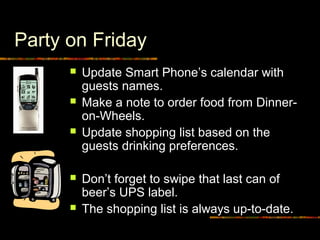
 Update Smart Phone’s calendar with
guests names.
 Make a note to order food from Dinner-
on-Wheels.
 Update shopping list based on the
guests drinking preferences.
 Don’t forget to swipe that last can of
beer’s UPS label.
 The shopping list is always up-to-date.
Party on Friday
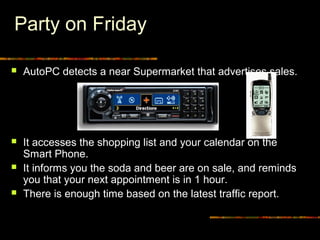
 AutoPC detects a near Supermarket that advertises sales.
 It accesses the shopping list and your calendar on the
Smart Phone.
 It informs you the soda and beer are on sale, and reminds
you that your next appointment is in 1 hour.
 There is enough time based on the latest traffic report.
Party on Friday
 Smart Phone reminds you that you need to
order food by noon.
 It downloads the Dinner-on-Wheels menu from
the Web on your PC with the guests’
preferences marked.
 It sends the shopping list to your CO-OP’s PC.
 Everything will be delivered by the time
you get home in the evening.
Mobile Applications
 Expected to create an entire new class of
Applications
 new massive markets in conjunction with the Web
 Mobile Information Appliances - combining personal
computing and consumer electronics
 Applications:
 Vertical: vehicle dispatching, tracking, point of sale
 Horizontal: mail enabled applications, filtered
information provision, collaborative computing…
Mobile and Wireless Computing
 Goal: Access Information Anywhere, Anytime,
and in Any Way.
 Aliases: Mobile, Nomadic, Wireless,
Pervasive, Invisible, Ubiquitous Computing.
 Distinction:
• Fixed wired network: Traditional distributed computing.
• Fixed wireless network: Wireless computing.
• Wireless network: Mobile Computing.
 Key Issues: Wireless communication, Mobility,
Portability.
Terminologies
 GSM - Global System for Mobile Communication
 GSM allows eight simultaneous calls on the same radio
frequency and uses narrowband TDMA. It uses time as
well as frequency division.
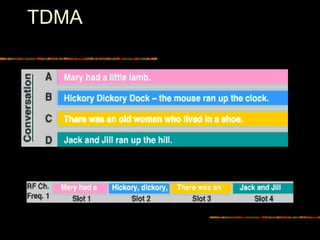
 TDMA - Time Division Multiple Access
 With TDMA, a frequency band is chopped into several
channels or time slots which are then stacked into
shorter time units, facilitating the sharing of a single
channel by several calls
 CDMA - Code Division Multiple Access
 data can be sent over multiple frequencies
simultaneously, optimizing the use of available
bandwidth.
 data is broken into packets, each of which are given a
unique identifier, so that they can be sent out over
multiple frequencies and then re-built in the correct order
by the receiver.
TDMA
Wireless Technologies
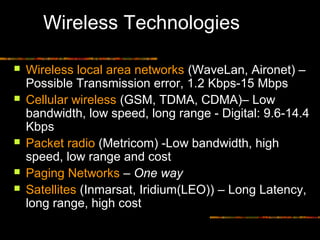
 Wireless local area networks (WaveLan, Aironet) –
Possible Transmission error, 1.2 Kbps-15 Mbps
 Cellular wireless (GSM, TDMA, CDMA)– Low
bandwidth, low speed, long range - Digital: 9.6-14.4
Kbps
 Packet radio (Metricom) -Low bandwidth, high
speed, low range and cost
 Paging Networks – One way
 Satellites (Inmarsat, Iridium(LEO)) – Long Latency,
long range, high cost
Mobile Network Architecture
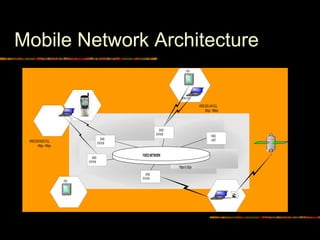
FIXEDNETWORK
PDA
FIXED
HOSTBASE
STATION
BASE
STATION
BASE
STATION
MbpstoGbps
MOBILEHOST
WIRELESSLANCELL
2Kbps-15Mbps
WIRELESSRADIOCELL
9Kbps-14Kbps
BASE
STATION
PDA
Wireless characteristics
 Variant Connectivity
 Low bandwidth and reliability
 Frequent disconnections
• predictable or sudden
 Asymmetric Communication
 Broadcast medium
 Monetarily expensive
 Charges per connection or per message/packet
 Connectivity is weak, intermittent and expensive
Portable Information Devices
 PDAs, Personal Communicators
 Light, small and durable to be easily carried around
 dumb terminals, palmtops, wristwatch PC/Phone,
 will run on AA+ /Ni-Cd/Li-Ion batteries
 may be diskless
 I/O devices: Mouse is out, Pen is in
 Wireless connection to information networks
 either infrared or cellular phone
 Specialized Hardware (for
compression/encryption)
Portability Characteristics
 Battery power restrictions
 transmit/receive, disk spinning, display, CPUs,
memory consume power
 Battery lifetime will see very small increase
 need energy efficient hardware (CPUs, memory) and
system software
 planned disconnections - doze mode
 Power consumption vs. resource utilization
Portability Characteristics
Cont.
 Resource constraints
 Mobile computers are resource poor
 Reduce program size – interpret script languages
(Mobile Java?)
 Computation and communication load cannot be
distributed equally
 Small screen sizes
 Asymmetry between static and mobile
computers
Mobility Characteristics
 Location changes
• location management - cost to locate is added to
communication
 Heterogeneity in services
 bandwidth restrictions and variability
 Dynamic replication of data
• data and services follow users
 Querying data - location-based responses
 Security and authentication
 System configuration is no longer static
What Needs to be
Reexamined?
 Operating systems - TinyOS
 File systems - CODA
 Data-based systems – TinyDB
 Communication architecture and protocols
 Hardware and architecture
 Real-Time, multimedia, QoS
 Security
 Application requirements and design
 PDA design: Interfaces, Languages
Mobility Constraints
 CPU
 Power
 Variable Bandwidth
 Delay tolerance, but unreliable
 Physical size
 Constraints on peripherals and GUIs
 Frequent Location changes
 Security
 Heterogeneity
 Expensive
 Frequent disconnections but predictable
What is Mobility?
 A device that moves between
 different geographical locations
 Between different networks
 A person who moves between
 different geographical locations
 different networks
 different communication devices
 different applications
Device mobility
 Laptop moves between Ethernet, WaveLAN and Metricom
networks
 Wired and wireless network access
 Potentially continuous connectivity, but may be breaks
in service
 Network address changes
 Radically different network performance on different
networks
 Network interface changes
 Can we achieve best of both worlds?
 Continuous connectivity of wireless access
 Performance of better networks when available
Mobility Means Changes
 Addresses
 IP addresses
 Network performance
 Bandwidth, delay, bit error rates, cost, connectivity
 Network interfaces
 PPP, eth0, strip
 Between applications
 Different interfaces over phone & laptop
 Within applications
 Loss of bandwidth trigger change from color to B&W
 Available resources
 Files, printers, displays, power, even routing
Bandwidth Management
 Clients assumed to have weak and/or
unreliable communication capabilities
 Broadcast--scalable but high latency
 On-demand--less scalable and requires
more powerful client, but better response
 Client caching allows bandwidth
conservation
Energy Management
 Battery life expected to increase by only
20% in the next 10 years
 Reduce the number of messages sent
 Doze modes
 Power aware system software
 Power aware microprocessors
 Indexing wireless data to reduce tuning
time
Why Mobile Data Management?
 Wireless Connectivity and use of PDA’s,
handheld computing devices on the rise
 Workforces will carry extracts of corporate
databases with them to have continuous
connectivity
 Need central database repositories to serve
these work groups and keep them fairly upto-
date and consistent
Mobile Data Applications
 Sales Force Automation - especially in
pharmaceutical industry, consumer goods,
parts
 Financial Consulting and Planning
 Insurance and Claim Processing - Auto,
General, and Life Insurance
 Real Estate/Property Management -
Maintenance and Building Contracting
 Mobile E-commerce
Mobility – Impact on DBMS
 Handling/representing fast-changing data
 Scale
 Data Shipping v/s Query shipping
 Transaction Management
 Replica management
 Integrity constraint enforcement
 Recovery
 Location Management
 Security
 User interfaces
 Most RDBMS vendors support the mobile
scenario - but no design and optimization aids
 Specialized Environments for mobile applications:
Sybase Remote Server
Synchrologic iMOBILE
Microsoft SQL server - mobile application
support
Oracle Lite
Xtnd-Connect-Server (Extended Technologies)
Scoutware (Riverbed Technologies)
DBMS Industry Scenario
Query Processing
 New Issues
 Energy Efficient Query Processing
– Location Dependent Query Processing
 Old Issues - New Context
 Cost Model
Location Management
 New Issues
 Tracking Mobile Users
 Old Issues - New Context
 Managing Update Intensive Location
Information
 Providing Replication to Reduce Latency for
Location Queries
 Consistent Maintenance of Location Information
Transaction Processing
 New Issues
– Recovery of Mobile Transactions
– Lock Management in Mobile Transaction
 Old Issues - New Context
 Extended Transaction Models
– Partitioning Objects while Maintaining
Correctness
Data Processing Scenario
 One server or many servers
 Shared Data
 Some Local Data per client , mostly subset of
global data
 Need for accurate, up-to-date information, but some
applications can tolerate bounded inconsistency
 Client side and Server side Computing
 Long disconnection should not constraint availability
 Mainly Serial Transactions at Mobile Hosts
 Update Propagation and Installation

Mdm intro-chapter1

  • 1.
    Mobile Data Management Instructor– Sanjay Madria Lesson Title - Introduction
  • 2.
    What is PervasiveComputing?  “Pervasive computing is a term for the strongly emerging trend toward: – Numerous, casually accessible, often invisible computing devices – Frequently mobile or embedded in the environment – Connected to an increasingly ubiquitous network structure.” – NIST, Pervasive Computing 2001
  • 3.
    Party on Friday Update Smart Phone’s calendar with guests names.  Make a note to order food from Dinner- on-Wheels.  Update shopping list based on the guests drinking preferences.  Don’t forget to swipe that last can of beer’s UPS label.  The shopping list is always up-to-date.
  • 4.
    Party on Friday AutoPC detects a near Supermarket that advertises sales.  It accesses the shopping list and your calendar on the Smart Phone.  It informs you the soda and beer are on sale, and reminds you that your next appointment is in 1 hour.  There is enough time based on the latest traffic report.
  • 5.
    Party on Friday Smart Phone reminds you that you need to order food by noon.  It downloads the Dinner-on-Wheels menu from the Web on your PC with the guests’ preferences marked.  It sends the shopping list to your CO-OP’s PC.  Everything will be delivered by the time you get home in the evening.
  • 6.
    Mobile Applications  Expectedto create an entire new class of Applications  new massive markets in conjunction with the Web  Mobile Information Appliances - combining personal computing and consumer electronics  Applications:  Vertical: vehicle dispatching, tracking, point of sale  Horizontal: mail enabled applications, filtered information provision, collaborative computing…
  • 7.
    Mobile and WirelessComputing  Goal: Access Information Anywhere, Anytime, and in Any Way.  Aliases: Mobile, Nomadic, Wireless, Pervasive, Invisible, Ubiquitous Computing.  Distinction: • Fixed wired network: Traditional distributed computing. • Fixed wireless network: Wireless computing. • Wireless network: Mobile Computing.  Key Issues: Wireless communication, Mobility, Portability.
  • 8.
    Terminologies  GSM -Global System for Mobile Communication  GSM allows eight simultaneous calls on the same radio frequency and uses narrowband TDMA. It uses time as well as frequency division.  TDMA - Time Division Multiple Access  With TDMA, a frequency band is chopped into several channels or time slots which are then stacked into shorter time units, facilitating the sharing of a single channel by several calls  CDMA - Code Division Multiple Access  data can be sent over multiple frequencies simultaneously, optimizing the use of available bandwidth.  data is broken into packets, each of which are given a unique identifier, so that they can be sent out over multiple frequencies and then re-built in the correct order by the receiver.
  • 9.
  • 10.
    Wireless Technologies  Wirelesslocal area networks (WaveLan, Aironet) – Possible Transmission error, 1.2 Kbps-15 Mbps  Cellular wireless (GSM, TDMA, CDMA)– Low bandwidth, low speed, long range - Digital: 9.6-14.4 Kbps  Packet radio (Metricom) -Low bandwidth, high speed, low range and cost  Paging Networks – One way  Satellites (Inmarsat, Iridium(LEO)) – Long Latency, long range, high cost
  • 11.
  • 12.
    Wireless characteristics  VariantConnectivity  Low bandwidth and reliability  Frequent disconnections • predictable or sudden  Asymmetric Communication  Broadcast medium  Monetarily expensive  Charges per connection or per message/packet  Connectivity is weak, intermittent and expensive
  • 13.
    Portable Information Devices PDAs, Personal Communicators  Light, small and durable to be easily carried around  dumb terminals, palmtops, wristwatch PC/Phone,  will run on AA+ /Ni-Cd/Li-Ion batteries  may be diskless  I/O devices: Mouse is out, Pen is in  Wireless connection to information networks  either infrared or cellular phone  Specialized Hardware (for compression/encryption)
  • 14.
    Portability Characteristics  Batterypower restrictions  transmit/receive, disk spinning, display, CPUs, memory consume power  Battery lifetime will see very small increase  need energy efficient hardware (CPUs, memory) and system software  planned disconnections - doze mode  Power consumption vs. resource utilization
  • 15.
    Portability Characteristics Cont.  Resourceconstraints  Mobile computers are resource poor  Reduce program size – interpret script languages (Mobile Java?)  Computation and communication load cannot be distributed equally  Small screen sizes  Asymmetry between static and mobile computers
  • 16.
    Mobility Characteristics  Locationchanges • location management - cost to locate is added to communication  Heterogeneity in services  bandwidth restrictions and variability  Dynamic replication of data • data and services follow users  Querying data - location-based responses  Security and authentication  System configuration is no longer static
  • 17.
    What Needs tobe Reexamined?  Operating systems - TinyOS  File systems - CODA  Data-based systems – TinyDB  Communication architecture and protocols  Hardware and architecture  Real-Time, multimedia, QoS  Security  Application requirements and design  PDA design: Interfaces, Languages
  • 18.
    Mobility Constraints  CPU Power  Variable Bandwidth  Delay tolerance, but unreliable  Physical size  Constraints on peripherals and GUIs  Frequent Location changes  Security  Heterogeneity  Expensive  Frequent disconnections but predictable
  • 19.
    What is Mobility? A device that moves between  different geographical locations  Between different networks  A person who moves between  different geographical locations  different networks  different communication devices  different applications
  • 20.
    Device mobility  Laptopmoves between Ethernet, WaveLAN and Metricom networks  Wired and wireless network access  Potentially continuous connectivity, but may be breaks in service  Network address changes  Radically different network performance on different networks  Network interface changes  Can we achieve best of both worlds?  Continuous connectivity of wireless access  Performance of better networks when available
  • 21.
    Mobility Means Changes Addresses  IP addresses  Network performance  Bandwidth, delay, bit error rates, cost, connectivity  Network interfaces  PPP, eth0, strip  Between applications  Different interfaces over phone & laptop  Within applications  Loss of bandwidth trigger change from color to B&W  Available resources  Files, printers, displays, power, even routing
  • 22.
    Bandwidth Management  Clientsassumed to have weak and/or unreliable communication capabilities  Broadcast--scalable but high latency  On-demand--less scalable and requires more powerful client, but better response  Client caching allows bandwidth conservation
  • 23.
    Energy Management  Batterylife expected to increase by only 20% in the next 10 years  Reduce the number of messages sent  Doze modes  Power aware system software  Power aware microprocessors  Indexing wireless data to reduce tuning time
  • 24.
    Why Mobile DataManagement?  Wireless Connectivity and use of PDA’s, handheld computing devices on the rise  Workforces will carry extracts of corporate databases with them to have continuous connectivity  Need central database repositories to serve these work groups and keep them fairly upto- date and consistent
  • 25.
    Mobile Data Applications Sales Force Automation - especially in pharmaceutical industry, consumer goods, parts  Financial Consulting and Planning  Insurance and Claim Processing - Auto, General, and Life Insurance  Real Estate/Property Management - Maintenance and Building Contracting  Mobile E-commerce
  • 26.
    Mobility – Impacton DBMS  Handling/representing fast-changing data  Scale  Data Shipping v/s Query shipping  Transaction Management  Replica management  Integrity constraint enforcement  Recovery  Location Management  Security  User interfaces
  • 27.
     Most RDBMSvendors support the mobile scenario - but no design and optimization aids  Specialized Environments for mobile applications: Sybase Remote Server Synchrologic iMOBILE Microsoft SQL server - mobile application support Oracle Lite Xtnd-Connect-Server (Extended Technologies) Scoutware (Riverbed Technologies) DBMS Industry Scenario
  • 28.
    Query Processing  NewIssues  Energy Efficient Query Processing – Location Dependent Query Processing  Old Issues - New Context  Cost Model
  • 29.
    Location Management  NewIssues  Tracking Mobile Users  Old Issues - New Context  Managing Update Intensive Location Information  Providing Replication to Reduce Latency for Location Queries  Consistent Maintenance of Location Information
  • 30.
    Transaction Processing  NewIssues – Recovery of Mobile Transactions – Lock Management in Mobile Transaction  Old Issues - New Context  Extended Transaction Models – Partitioning Objects while Maintaining Correctness
  • 31.
    Data Processing Scenario One server or many servers  Shared Data  Some Local Data per client , mostly subset of global data  Need for accurate, up-to-date information, but some applications can tolerate bounded inconsistency  Client side and Server side Computing  Long disconnection should not constraint availability  Mainly Serial Transactions at Mobile Hosts  Update Propagation and Installation

Editor's Notes

  • #14 Li-Ion (Lithium-Ion)
  • #16 Query By Icons (QBI): Iconic visual Language [Massari&Chrysanthis95]
  • #17 bursty network activity during connections