www.mindrivergroup.comSymantec Endpoint Protection
Symantec Endpoint Protectionwww.mindrivergroup.com	About Symantec Endpoint ProtectionSymantec Endpoint Protection protects endpoint computing devices from virus, threats, and risks, and provides three layers of protection to your endpoint computing devices. The layers are network threat protection, proactive threat protection, and antivirus and antispyware protection.2
SEP FeaturesSymantec Endpoint Protection provides the following features:Essential threat protection technologies are combined into a single Symantec Endpoint Protection client:Antivirus and Antispyware Protection adds rootkit detection and removal and has an improved resource footprint.Network Threat Protection provides new rules-based firewall and Generic Exploit Blocking (GEB) that blocks malware before it can enter the computer. This feature provides protection that is based on signatures and protection against buffer overflows.Proactive Threat Protection adds protection for zero-day attack threats without relying on signatures.Administrators can customize the interface to control what configuration options are available to the end user and can completely hide the interface.www.mindrivergroup.com3
SEP FeaturesThe redesigned management console can be used to:Manage both Symantec Endpoint Protection and Symantec Network Access Control. You can manage all security technologies from a single console.Monitor and report on security threats and system response from a central point.Allow different administrators to access different levels of the management system based on their roles and responsibilities. www.mindrivergroup.com4
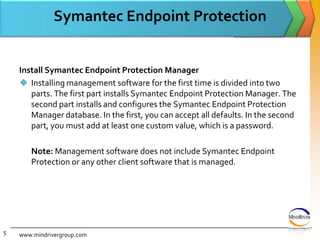
Symantec Endpoint ProtectionInstall Symantec Endpoint Protection ManagerInstalling management software for the first time is divided into two parts. The first part installs Symantec Endpoint Protection Manager. The second part installs and configures the Symantec Endpoint Protection Manager database. In the first, you can accept all defaults. In the second part, you must add at least one custom value, which is a password. 	Note: Management software does not include Symantec Endpoint Protection or any other client software that is managed.www.mindrivergroup.com5
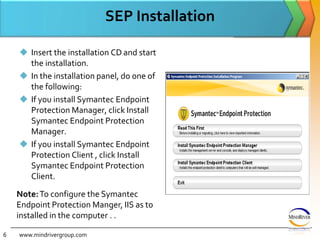
SEP InstallationInsert the installation CD and start the installation.In the installation panel, do one of the following: If you install Symantec Endpoint Protection Manager, click Install Symantec Endpoint Protection Manager.If you install Symantec Endpoint Protection Client , click Install Symantec Endpoint Protection Client.www.mindrivergroup.comNote:To configure the Symantec Endpoint Protection Manger, IIS as to installed in the computer . .6
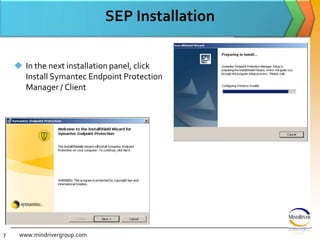
SEP Installationwww.mindrivergroup.comIn the next installation panel, click Install Symantec Endpoint Protection Manager / Client7
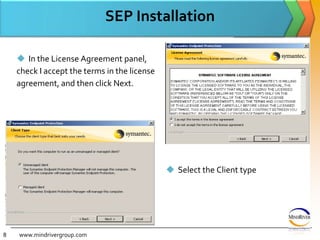
SEP InstallationIn the License Agreement panel, check I accept the terms in the license agreement, and then click Next.www.mindrivergroup.comSelect the Client type8
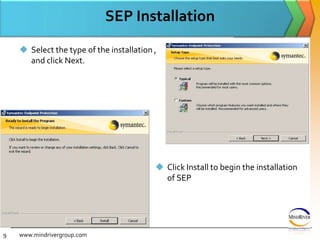
SEP InstallationSelect the type of the installation , and click Next.www.mindrivergroup.comClick Install to begin the installation of SEP 9
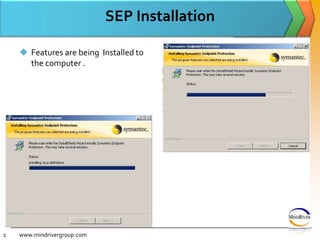
SEP InstallationFeatures are being  Installed to the computer .www.mindrivergroup.com10
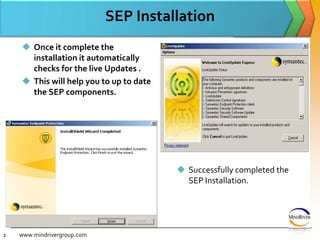
SEP InstallationOnce it complete the installation it automatically checks for the live Updates .This will help you to up to date the SEP components.www.mindrivergroup.comSuccessfully completed the SEP Installation.11
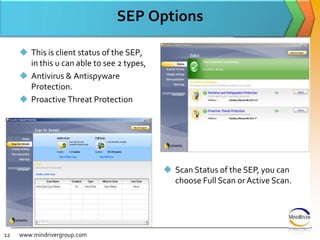
SEP OptionsThis is client status of the SEP, in this u can able to see 2 types,Antivirus & Antispyware Protection.Proactive Threat Protectionwww.mindrivergroup.comScan Status of the SEP, you can choose Full Scan or Active Scan.12
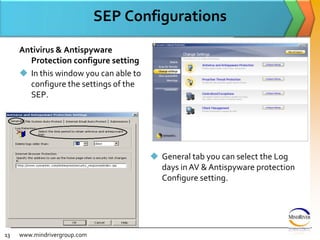
SEP ConfigurationsAntivirus & Antispyware Protection configure settingIn this window you can able to configure the settings of the SEP.www.mindrivergroup.comGeneral tab you can select the Log days in AV & Antispyware protection Configure setting.13
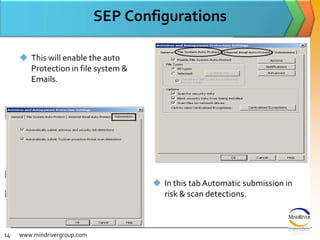
SEP ConfigurationsThis will enable the auto Protection in file system & Emails.www.mindrivergroup.comIn this tab Automatic submission in risk & scan detections.14
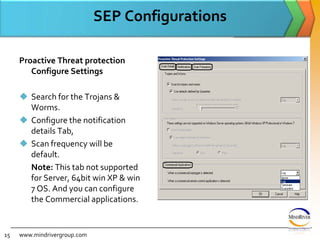
SEP ConfigurationsProactive Threat protection Configure SettingsSearch for the Trojans & Worms. Configure the notification details Tab, Scan frequency will be default.	Note: This tab not supported for Server, 64bit win XP & win 7 OS. And you can configure the Commercial applications.www.mindrivergroup.com15
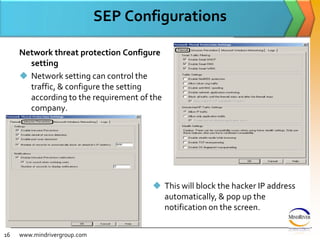
SEP ConfigurationsNetwork threat protection Configure  settingNetwork setting can control the traffic, & configure the setting according to the requirement of the company. www.mindrivergroup.comThis will block the hacker IP address automatically, & pop up the notification on the screen.16
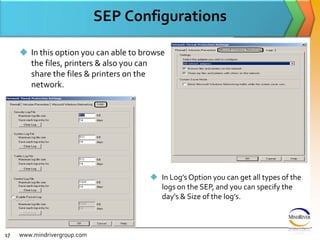
SEP ConfigurationsIn this option you can able to browse the files, printers & also you can share the files & printers on the network.www.mindrivergroup.comIn Log’s Option you can get all types of the logs on the SEP, and you can specify the day’s & Size of the log’s.17
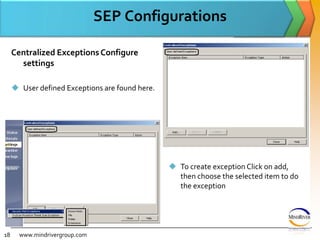
SEP Configurationswww.mindrivergroup.comCentralized Exceptions Configure settingsUser defined Exceptions are found here.
To create exception Click on add, then choose the selected item to do the exception18
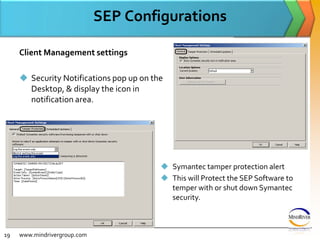
SEP ConfigurationsClient Management settingsSecurity Notifications pop up on the Desktop, & display the icon in notification area.www.mindrivergroup.comSymantec tamper protection alert
This will Protect the SEP Software to temper with or shut down Symantec security.19
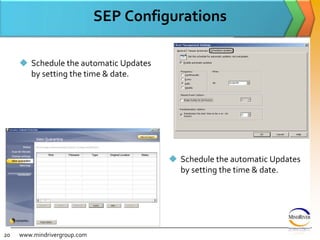
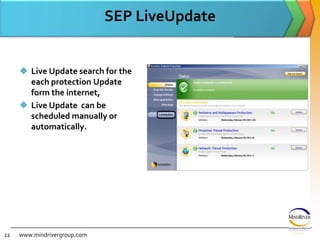
SEP ConfigurationsSchedule the automatic Updates by setting the time & date.www.mindrivergroup.comSchedule the automatic Updates by setting the time & date.20
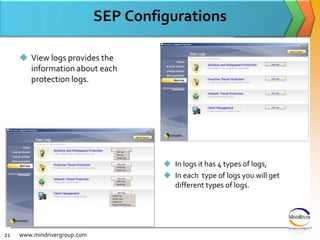
SEP ConfigurationsView logs provides the information about each protection logs.www.mindrivergroup.comIn logs it has 4 types of logs,
In each  type of logs you will get different types of logs. 21

Symantec Endpoint Protection

  • 1.
  • 2.
    Symantec Endpoint Protectionwww.mindrivergroup.com AboutSymantec Endpoint ProtectionSymantec Endpoint Protection protects endpoint computing devices from virus, threats, and risks, and provides three layers of protection to your endpoint computing devices. The layers are network threat protection, proactive threat protection, and antivirus and antispyware protection.2
  • 3.
    SEP FeaturesSymantec EndpointProtection provides the following features:Essential threat protection technologies are combined into a single Symantec Endpoint Protection client:Antivirus and Antispyware Protection adds rootkit detection and removal and has an improved resource footprint.Network Threat Protection provides new rules-based firewall and Generic Exploit Blocking (GEB) that blocks malware before it can enter the computer. This feature provides protection that is based on signatures and protection against buffer overflows.Proactive Threat Protection adds protection for zero-day attack threats without relying on signatures.Administrators can customize the interface to control what configuration options are available to the end user and can completely hide the interface.www.mindrivergroup.com3
  • 4.
    SEP FeaturesThe redesignedmanagement console can be used to:Manage both Symantec Endpoint Protection and Symantec Network Access Control. You can manage all security technologies from a single console.Monitor and report on security threats and system response from a central point.Allow different administrators to access different levels of the management system based on their roles and responsibilities. www.mindrivergroup.com4
  • 5.
    Symantec Endpoint ProtectionInstallSymantec Endpoint Protection ManagerInstalling management software for the first time is divided into two parts. The first part installs Symantec Endpoint Protection Manager. The second part installs and configures the Symantec Endpoint Protection Manager database. In the first, you can accept all defaults. In the second part, you must add at least one custom value, which is a password.  Note: Management software does not include Symantec Endpoint Protection or any other client software that is managed.www.mindrivergroup.com5
  • 6.
    SEP InstallationInsert theinstallation CD and start the installation.In the installation panel, do one of the following: If you install Symantec Endpoint Protection Manager, click Install Symantec Endpoint Protection Manager.If you install Symantec Endpoint Protection Client , click Install Symantec Endpoint Protection Client.www.mindrivergroup.comNote:To configure the Symantec Endpoint Protection Manger, IIS as to installed in the computer . .6
  • 7.
    SEP Installationwww.mindrivergroup.comIn thenext installation panel, click Install Symantec Endpoint Protection Manager / Client7
  • 8.
    SEP InstallationIn theLicense Agreement panel, check I accept the terms in the license agreement, and then click Next.www.mindrivergroup.comSelect the Client type8
  • 9.
    SEP InstallationSelect thetype of the installation , and click Next.www.mindrivergroup.comClick Install to begin the installation of SEP 9
  • 10.
    SEP InstallationFeatures arebeing Installed to the computer .www.mindrivergroup.com10
  • 11.
    SEP InstallationOnce itcomplete the installation it automatically checks for the live Updates .This will help you to up to date the SEP components.www.mindrivergroup.comSuccessfully completed the SEP Installation.11
  • 12.
    SEP OptionsThis isclient status of the SEP, in this u can able to see 2 types,Antivirus & Antispyware Protection.Proactive Threat Protectionwww.mindrivergroup.comScan Status of the SEP, you can choose Full Scan or Active Scan.12
  • 13.
    SEP ConfigurationsAntivirus &Antispyware Protection configure settingIn this window you can able to configure the settings of the SEP.www.mindrivergroup.comGeneral tab you can select the Log days in AV & Antispyware protection Configure setting.13
  • 14.
    SEP ConfigurationsThis willenable the auto Protection in file system & Emails.www.mindrivergroup.comIn this tab Automatic submission in risk & scan detections.14
  • 15.
    SEP ConfigurationsProactive Threatprotection Configure SettingsSearch for the Trojans & Worms. Configure the notification details Tab, Scan frequency will be default. Note: This tab not supported for Server, 64bit win XP & win 7 OS. And you can configure the Commercial applications.www.mindrivergroup.com15
  • 16.
    SEP ConfigurationsNetwork threatprotection Configure settingNetwork setting can control the traffic, & configure the setting according to the requirement of the company. www.mindrivergroup.comThis will block the hacker IP address automatically, & pop up the notification on the screen.16
  • 17.
    SEP ConfigurationsIn thisoption you can able to browse the files, printers & also you can share the files & printers on the network.www.mindrivergroup.comIn Log’s Option you can get all types of the logs on the SEP, and you can specify the day’s & Size of the log’s.17
  • 18.
    SEP Configurationswww.mindrivergroup.comCentralized ExceptionsConfigure settingsUser defined Exceptions are found here.
  • 19.
    To create exceptionClick on add, then choose the selected item to do the exception18
  • 20.
    SEP ConfigurationsClient ManagementsettingsSecurity Notifications pop up on the Desktop, & display the icon in notification area.www.mindrivergroup.comSymantec tamper protection alert
  • 21.
    This will Protectthe SEP Software to temper with or shut down Symantec security.19
  • 22.
    SEP ConfigurationsSchedule theautomatic Updates by setting the time & date.www.mindrivergroup.comSchedule the automatic Updates by setting the time & date.20
  • 23.
    SEP ConfigurationsView logsprovides the information about each protection logs.www.mindrivergroup.comIn logs it has 4 types of logs,
  • 24.
    In each type of logs you will get different types of logs. 21