An Introduction to  Augmented Reality Gaming Trond Nilsen HIT Lab NZ University of Canterbury
Introduction Who are we? Intro to AR HCI topics in AR Interaction techniques Break Motivations for AR Gaming Lots of examples… Demos & Questions.
Who are we? Who are we? Graduate students at HIT Lab NZ and the University of Canterbury Research in AR Gaming, interface design, and HCI Play far too many games
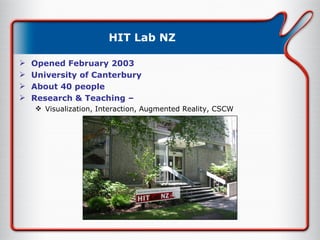
HIT Lab NZ Opened February 2003 University of Canterbury About 40 people Research & Teaching –  Visualization, Interaction, Augmented Reality, CSCW
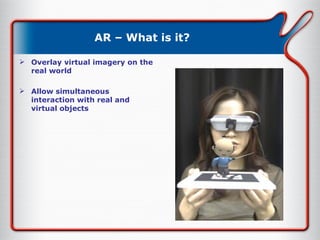
AR – What is it? Overlay virtual imagery on the real world Allow simultaneous interaction with real and virtual objects
AR – Brief History (1) 1960s – Sutherland & Sproull’s first HMD
AR – Brief History (2) 1970s -> 1980s – USAF helmet displays, Super cockpit (Tom Furness)
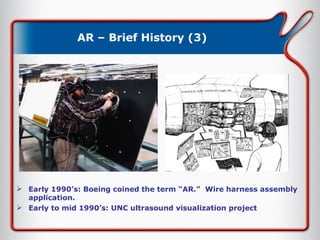
AR – Brief History (3) Early 1990’s: Boeing coined the term “AR.”  Wire harness assembly application. Early to mid 1990’s: UNC ultrasound visualization project
AR – Brief History (4) 1995: Fiducial tracking in video see-through [Bajura / Neumann] Late 90’s: Collaboration, outdoor, interaction Momentum builds in research and applications 2003 – HIT Lab NZ
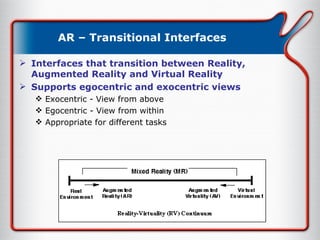
AR – RV Continuum Milgram’s Reality – Virtuality Continuum
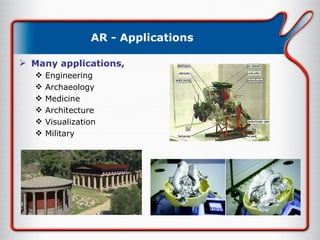
AR - Applications Many applications, Engineering Archaeology Medicine Architecture Visualization Military
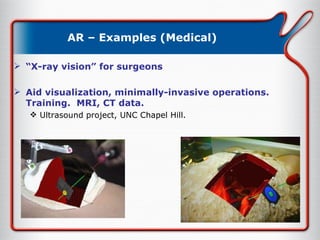
AR – Examples (Medical) “ X-ray vision” for surgeons Aid visualization, minimally-invasive operations.  Training.  MRI, CT data. Ultrasound project, UNC Chapel Hill.
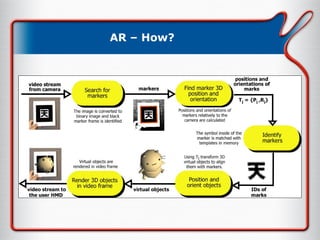
AR – How?
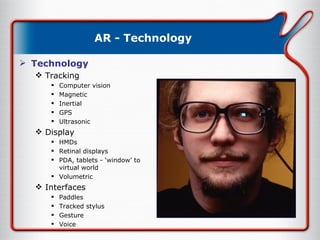
AR - Technology Technology Tracking Computer vision Magnetic Inertial GPS Ultrasonic Display HMDs Retinal displays PDA, tablets - ‘window’ to virtual world Volumetric Interfaces Paddles Tracked stylus Gesture Voice
AR – Tangible UI Ishii (1997) Create digital shadows for physical objects Foreground graspable UI Background ambient interfaces
AR – Tangible UI Ambient Fixtures Dahley, Wisneski, Ishii 1998 Use natural material qualities for information display Graspable Interface TerraVision (Art+Com) seamless zooming tangible interface separation of physical + virtual
AR – Tangible AR AR overcomes limitation of TUIs enhance display possibilities merge task/display space provide public and private views  TUI + AR = Tangible AR Apply TUI methods to AR interface design
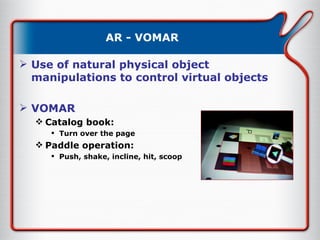
AR - VOMAR Use of natural physical object manipulations to control virtual objects VOMAR Catalog book: Turn over the page Paddle operation: Push, shake, incline, hit, scoop
AR - VOMAR Show VOMAR Video
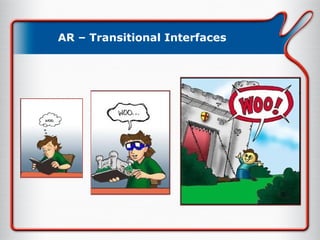
AR – Transitional Interfaces Interfaces that transition between Reality, Augmented Reality and Virtual Reality Supports egocentric and exocentric views Exocentric - View from above Egocentric - View from within Appropriate for different tasks
AR – Transitional Interfaces
AR – Transitional Interfaces Show MagicBook Video
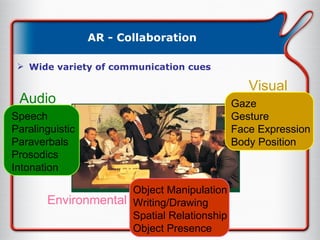
AR - Collaboration Wide variety of communication cues Speech Paralinguistic Paraverbals Prosodics Intonation Audio Gaze Gesture Face Expression Body Position Visual Object Manipulation Writing/Drawing Spatial Relationship Object Presence Environmental
AR - Collaboration Face-to-face collaboration People surround a table It is easy to see each other Computer collaboration People sit side by side It is hard to see each other
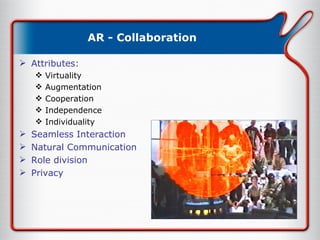
AR - Collaboration Attributes: Virtuality Augmentation Cooperation Independence Individuality Seamless Interaction Natural Communication Role division Privacy
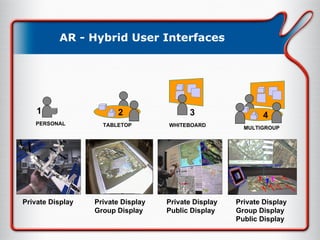
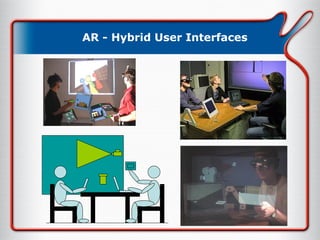
AR - Hybrid User Interfaces Goal: Incorporate Augmented Reality into a normal collaborative environment Use the most appropriate tools  Manipulate 2D text or images on a 2D screen Manipulate 3D objects in 3D space Use the most appropriate displays size, resolution, stereopsis privacy vs sharing
AR - Hybrid User Interfaces Private Display Private Display Group Display Private Display Public Display Private Display Group Display Public Display PERSONAL 1 TABLETOP 2 WHITEBOARD 3 MULTIGROUP 4
AR - Hybrid User Interfaces
AR – Interaction techniques Interaction in AR Paddle Interaction  MagicLenses FigARTips Occlusion Gesture General purpose devices.. Gamepads Joysticks PDAs
Interaction – AR MagicLenses Developed at Xerox PARC in 1993 View a region of the workspace differently to the rest Not limited to magnification Overlap MagicLenses to create composite effects
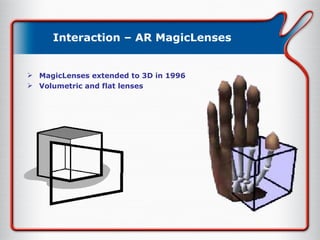
Interaction – AR MagicLenses MagicLenses extended to 3D in 1996 Volumetric and flat lenses
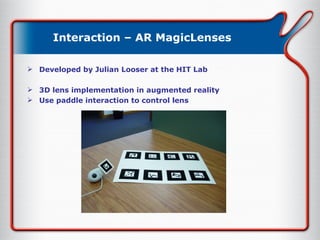
Interaction – AR MagicLenses Developed by Julian Looser at the HIT Lab 3D lens implementation in augmented reality Use paddle interaction to control lens
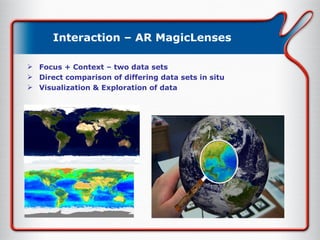
Interaction – AR MagicLenses Focus + Context – two data sets Direct comparison of differing data sets in situ Visualization & Exploration of data
Interaction – AR MagicLenses Show Globe video
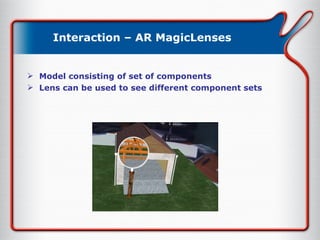
Interaction – AR MagicLenses Model consisting of set of components Lens can be used to see different component sets
Interaction – AR MagicLenses Show House video
Interaction – FingARTips Developed by Oakley Buchmann & Stephen Violich at the HIT Lab Gesture Based Interaction Hand tracking  3 markers on fingertips Haptic Feedback Vibrating motors Depth cues Occlusion + shadows
AR – FingARTips Show FingARTips video
Interaction - Occlusive Interfaces AR interface for 1 & 2D input Physical Components Sheet of tracking markers Display Elements 1D or 2D virtual menu Interaction Metaphor Find 2D input using occlusion  Limited fidelity
Interaction - Occlusive Interfaces Grid of tracking markers 2D interaction – moving virtual objects
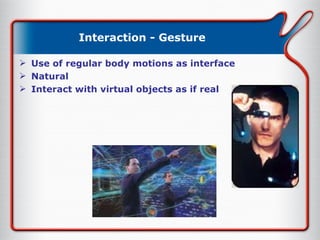
Interaction - Gesture Use of regular body motions as interface Natural Interact with virtual objects as if real
Break Break
Gaming AR is cool! How can it be applied to gaming ? Why are we interested ? What are the possibilities ? Is there a formal approach ?
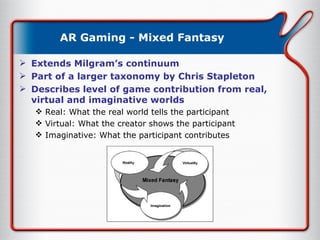
AR Gaming - Mixed Fantasy Extends Milgram’s continuum Part of a larger taxonomy by Chris Stapleton Describes level of game contribution from real, virtual and imaginative worlds Real: What the real world tells the participant Virtual: What the creator shows the participant Imaginative: What the participant contributes
AR Gaming - Motivations What makes AR a good platform for gaming? AR  is  cool. But that’s not enough. No clear reasons are articulated by AR game designers AR game design is currently a random hunt for ‘cool’ games While exploration is valuable, clear understanding of the benefits AR can offer is necessary Hypothesis: AR provides a medium for games that allows game designers to merge the best of real world games with the best of computer games
AR Gaming - Motivations The physical world and the virtual world have different strengths as gaming mediums Most games engage players in several ways Such multifaceted games are particularly suited to AR enhancement Remember limitations of current AR technology, bearing in mind its rate of change But don’t forget AR specific games!!
Gaming – Some games.. Early AR Games Camball AR 2  Hockey ARQuake MIND Warping RV Invaders / AquaGauntlet More recent developments Human Pacman Collaborative 3D Tetris
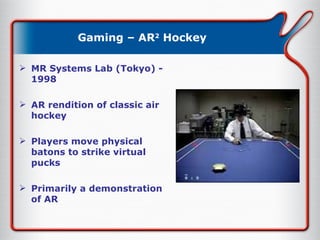
Gaming – AR 2  Hockey MR Systems Lab (Tokyo) - 1998 AR rendition of classic air hockey Players move physical batons to strike virtual pucks Primarily a demonstration of AR
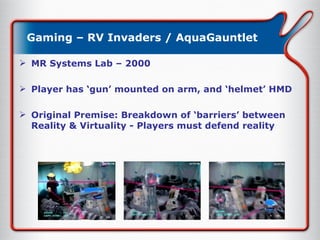
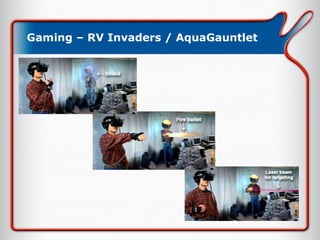
Gaming – RV Invaders / AquaGauntlet MR Systems Lab – 2000 Player has ‘gun’ mounted on arm, and ‘helmet’ HMD Original Premise: Breakdown of ‘barriers’ between Reality & Virtuality - Players must defend reality
Gaming – RV Invaders / AquaGauntlet
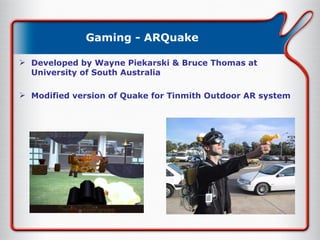
Gaming - ARQuake Developed by Wayne Piekarski & Bruce Thomas at University of South Australia Modified version of Quake for Tinmith Outdoor AR system
Gaming - ARQuake Conceptually impressive, but very difficult to play. Tracking: GPS, Inertial Tinmith project – real advances are in interaction techniques for Outdoor AR.
Gaming – Human Pacman
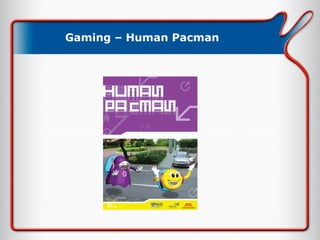
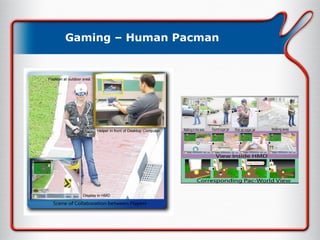
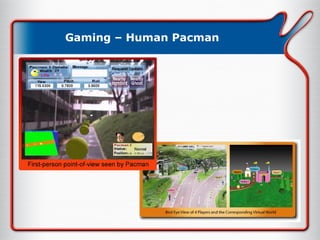
Gaming – Human Pacman Developed by Adrian Cheok and the Mixed Reality Lab at NUS (Soon to be HIT Lab) Multiplayer Outdoor AR Wide combination of technologies  GPS Inertial tracking Wireless & wearable computing Remote collaboration Uses real world as gameworld
Gaming – Human Pacman
Gaming – Our games Hybrid Settlers  2003 – Project for Cosc 426 (Trond Nilsen, David Thompson) Hybrid AR Worms 2003 – Project for Cosc 426 (Steven Linton, Allister Cournane, Nilufar Baghaei, Kieran Molloy) 2004 – Redevelopment (Steven Linton, Trond Nilsen, Julian Looser, Robert Grant) Tankwar May 2004 – DSTA (Trond Nilsen, Julian Looser, Adrian Clark)
Gaming – Hybrid AR Worms Worms series – Team 17 (1995 onwards) Turn based game of skill & cunning.
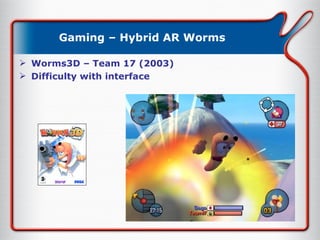
Gaming – Hybrid AR Worms Worms3D – Team 17 (2003) Difficulty with interface
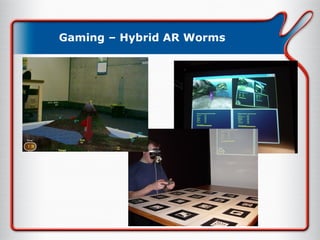
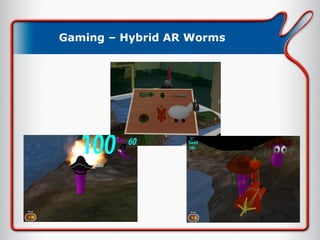
Gaming – Hybrid AR Worms Features Face to Face Collaboration Tangible UI AR to VR transitions Hybrid Gaming  Components Head mounted display Projection screen Wireless input device Table top tracking
Gaming – Hybrid AR Worms
Gaming – Hybrid AR Worms Show Worms Video
Gaming – Hybrid AR Worms Lessons Learned Fun and engaging Collaboration Tangible UI intuitive Turned based game not ideal Disrupts face to face communication Most users happy with screen based version AR features don’t enhance game play
AR - Tankwar Real Time Strategy game in AR Face to Face Collaboration  / Competition
Further work Usability More thought into game design – beyond POC! More complex multiplayer games The ‘crazy list’ Augmented War and Role Playing games Civil & Military applications (yes, we’re convinced of the ethicality of this)
Come join us!! HIT Lab NZ Postgrad students Open days AR Toolkit Try it out!! Tutorials, workshops
The End Questions & Discussion Demos in the next room..

Nzgdc2004 Argaming Seminar

  • 1.
    An Introduction to Augmented Reality Gaming Trond Nilsen HIT Lab NZ University of Canterbury
  • 2.
    Introduction Who arewe? Intro to AR HCI topics in AR Interaction techniques Break Motivations for AR Gaming Lots of examples… Demos & Questions.
  • 3.
    Who are we?Who are we? Graduate students at HIT Lab NZ and the University of Canterbury Research in AR Gaming, interface design, and HCI Play far too many games
  • 4.
    HIT Lab NZOpened February 2003 University of Canterbury About 40 people Research & Teaching – Visualization, Interaction, Augmented Reality, CSCW
  • 5.
    AR – Whatis it? Overlay virtual imagery on the real world Allow simultaneous interaction with real and virtual objects
  • 6.
    AR – BriefHistory (1) 1960s – Sutherland & Sproull’s first HMD
  • 7.
    AR – BriefHistory (2) 1970s -> 1980s – USAF helmet displays, Super cockpit (Tom Furness)
  • 8.
    AR – BriefHistory (3) Early 1990’s: Boeing coined the term “AR.” Wire harness assembly application. Early to mid 1990’s: UNC ultrasound visualization project
  • 9.
    AR – BriefHistory (4) 1995: Fiducial tracking in video see-through [Bajura / Neumann] Late 90’s: Collaboration, outdoor, interaction Momentum builds in research and applications 2003 – HIT Lab NZ
  • 10.
    AR – RVContinuum Milgram’s Reality – Virtuality Continuum
  • 11.
    AR - ApplicationsMany applications, Engineering Archaeology Medicine Architecture Visualization Military
  • 12.
    AR – Examples(Medical) “ X-ray vision” for surgeons Aid visualization, minimally-invasive operations. Training. MRI, CT data. Ultrasound project, UNC Chapel Hill.
  • 13.
  • 14.
    AR - TechnologyTechnology Tracking Computer vision Magnetic Inertial GPS Ultrasonic Display HMDs Retinal displays PDA, tablets - ‘window’ to virtual world Volumetric Interfaces Paddles Tracked stylus Gesture Voice
  • 15.
    AR – TangibleUI Ishii (1997) Create digital shadows for physical objects Foreground graspable UI Background ambient interfaces
  • 16.
    AR – TangibleUI Ambient Fixtures Dahley, Wisneski, Ishii 1998 Use natural material qualities for information display Graspable Interface TerraVision (Art+Com) seamless zooming tangible interface separation of physical + virtual
  • 17.
    AR – TangibleAR AR overcomes limitation of TUIs enhance display possibilities merge task/display space provide public and private views TUI + AR = Tangible AR Apply TUI methods to AR interface design
  • 18.
    AR - VOMARUse of natural physical object manipulations to control virtual objects VOMAR Catalog book: Turn over the page Paddle operation: Push, shake, incline, hit, scoop
  • 19.
    AR - VOMARShow VOMAR Video
  • 20.
    AR – TransitionalInterfaces Interfaces that transition between Reality, Augmented Reality and Virtual Reality Supports egocentric and exocentric views Exocentric - View from above Egocentric - View from within Appropriate for different tasks
  • 21.
  • 22.
    AR – TransitionalInterfaces Show MagicBook Video
  • 23.
    AR - CollaborationWide variety of communication cues Speech Paralinguistic Paraverbals Prosodics Intonation Audio Gaze Gesture Face Expression Body Position Visual Object Manipulation Writing/Drawing Spatial Relationship Object Presence Environmental
  • 24.
    AR - CollaborationFace-to-face collaboration People surround a table It is easy to see each other Computer collaboration People sit side by side It is hard to see each other
  • 25.
    AR - CollaborationAttributes: Virtuality Augmentation Cooperation Independence Individuality Seamless Interaction Natural Communication Role division Privacy
  • 26.
    AR - HybridUser Interfaces Goal: Incorporate Augmented Reality into a normal collaborative environment Use the most appropriate tools Manipulate 2D text or images on a 2D screen Manipulate 3D objects in 3D space Use the most appropriate displays size, resolution, stereopsis privacy vs sharing
  • 27.
    AR - HybridUser Interfaces Private Display Private Display Group Display Private Display Public Display Private Display Group Display Public Display PERSONAL 1 TABLETOP 2 WHITEBOARD 3 MULTIGROUP 4
  • 28.
    AR - HybridUser Interfaces
  • 29.
    AR – Interactiontechniques Interaction in AR Paddle Interaction MagicLenses FigARTips Occlusion Gesture General purpose devices.. Gamepads Joysticks PDAs
  • 30.
    Interaction – ARMagicLenses Developed at Xerox PARC in 1993 View a region of the workspace differently to the rest Not limited to magnification Overlap MagicLenses to create composite effects
  • 31.
    Interaction – ARMagicLenses MagicLenses extended to 3D in 1996 Volumetric and flat lenses
  • 32.
    Interaction – ARMagicLenses Developed by Julian Looser at the HIT Lab 3D lens implementation in augmented reality Use paddle interaction to control lens
  • 33.
    Interaction – ARMagicLenses Focus + Context – two data sets Direct comparison of differing data sets in situ Visualization & Exploration of data
  • 34.
    Interaction – ARMagicLenses Show Globe video
  • 35.
    Interaction – ARMagicLenses Model consisting of set of components Lens can be used to see different component sets
  • 36.
    Interaction – ARMagicLenses Show House video
  • 37.
    Interaction – FingARTipsDeveloped by Oakley Buchmann & Stephen Violich at the HIT Lab Gesture Based Interaction Hand tracking 3 markers on fingertips Haptic Feedback Vibrating motors Depth cues Occlusion + shadows
  • 38.
    AR – FingARTipsShow FingARTips video
  • 39.
    Interaction - OcclusiveInterfaces AR interface for 1 & 2D input Physical Components Sheet of tracking markers Display Elements 1D or 2D virtual menu Interaction Metaphor Find 2D input using occlusion Limited fidelity
  • 40.
    Interaction - OcclusiveInterfaces Grid of tracking markers 2D interaction – moving virtual objects
  • 41.
    Interaction - GestureUse of regular body motions as interface Natural Interact with virtual objects as if real
  • 42.
  • 43.
    Gaming AR iscool! How can it be applied to gaming ? Why are we interested ? What are the possibilities ? Is there a formal approach ?
  • 44.
    AR Gaming -Mixed Fantasy Extends Milgram’s continuum Part of a larger taxonomy by Chris Stapleton Describes level of game contribution from real, virtual and imaginative worlds Real: What the real world tells the participant Virtual: What the creator shows the participant Imaginative: What the participant contributes
  • 45.
    AR Gaming -Motivations What makes AR a good platform for gaming? AR is cool. But that’s not enough. No clear reasons are articulated by AR game designers AR game design is currently a random hunt for ‘cool’ games While exploration is valuable, clear understanding of the benefits AR can offer is necessary Hypothesis: AR provides a medium for games that allows game designers to merge the best of real world games with the best of computer games
  • 46.
    AR Gaming -Motivations The physical world and the virtual world have different strengths as gaming mediums Most games engage players in several ways Such multifaceted games are particularly suited to AR enhancement Remember limitations of current AR technology, bearing in mind its rate of change But don’t forget AR specific games!!
  • 47.
    Gaming – Somegames.. Early AR Games Camball AR 2 Hockey ARQuake MIND Warping RV Invaders / AquaGauntlet More recent developments Human Pacman Collaborative 3D Tetris
  • 48.
    Gaming – AR2 Hockey MR Systems Lab (Tokyo) - 1998 AR rendition of classic air hockey Players move physical batons to strike virtual pucks Primarily a demonstration of AR
  • 49.
    Gaming – RVInvaders / AquaGauntlet MR Systems Lab – 2000 Player has ‘gun’ mounted on arm, and ‘helmet’ HMD Original Premise: Breakdown of ‘barriers’ between Reality & Virtuality - Players must defend reality
  • 50.
    Gaming – RVInvaders / AquaGauntlet
  • 51.
    Gaming - ARQuakeDeveloped by Wayne Piekarski & Bruce Thomas at University of South Australia Modified version of Quake for Tinmith Outdoor AR system
  • 52.
    Gaming - ARQuakeConceptually impressive, but very difficult to play. Tracking: GPS, Inertial Tinmith project – real advances are in interaction techniques for Outdoor AR.
  • 53.
  • 54.
    Gaming – HumanPacman Developed by Adrian Cheok and the Mixed Reality Lab at NUS (Soon to be HIT Lab) Multiplayer Outdoor AR Wide combination of technologies GPS Inertial tracking Wireless & wearable computing Remote collaboration Uses real world as gameworld
  • 55.
  • 56.
  • 57.
    Gaming – Ourgames Hybrid Settlers 2003 – Project for Cosc 426 (Trond Nilsen, David Thompson) Hybrid AR Worms 2003 – Project for Cosc 426 (Steven Linton, Allister Cournane, Nilufar Baghaei, Kieran Molloy) 2004 – Redevelopment (Steven Linton, Trond Nilsen, Julian Looser, Robert Grant) Tankwar May 2004 – DSTA (Trond Nilsen, Julian Looser, Adrian Clark)
  • 58.
    Gaming – HybridAR Worms Worms series – Team 17 (1995 onwards) Turn based game of skill & cunning.
  • 59.
    Gaming – HybridAR Worms Worms3D – Team 17 (2003) Difficulty with interface
  • 60.
    Gaming – HybridAR Worms Features Face to Face Collaboration Tangible UI AR to VR transitions Hybrid Gaming Components Head mounted display Projection screen Wireless input device Table top tracking
  • 61.
  • 62.
  • 63.
    Gaming – HybridAR Worms Show Worms Video
  • 64.
    Gaming – HybridAR Worms Lessons Learned Fun and engaging Collaboration Tangible UI intuitive Turned based game not ideal Disrupts face to face communication Most users happy with screen based version AR features don’t enhance game play
  • 65.
    AR - TankwarReal Time Strategy game in AR Face to Face Collaboration / Competition
  • 66.
    Further work UsabilityMore thought into game design – beyond POC! More complex multiplayer games The ‘crazy list’ Augmented War and Role Playing games Civil & Military applications (yes, we’re convinced of the ethicality of this)
  • 67.
    Come join us!!HIT Lab NZ Postgrad students Open days AR Toolkit Try it out!! Tutorials, workshops
  • 68.
    The End Questions& Discussion Demos in the next room..