Strong Passwords
Sameeha Fatima
In The News…
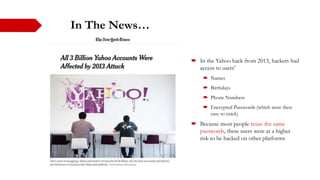
 In the Yahoo hack from 2013, hackers had
access to users’
 Names
 Birthdays
 Phone Numbers
 Encrypted Passwords (which were then
easy to crack)
 Because most people reuse the same
passwords, these users were at a higher
risk to be hacked on other platforms
“
”
Between 31% and 55% of the people
use the same password at multiple
sites
- Center For Internet Security
Reasons To Have A Strong Password
 The most common way a person hacks
into someone’s account is by guessing
his/her password
 Treat passwords as you would your
physical keys you use to unlock your
house
 So if you have a “Strong Password”
 It’s less likely for someone else to log
into your account
 It protects your personal information
Guidelines For A Strong Password
 Do not include your name or your username
 Do not use a combination of dictionary words
 At least 8 characters long (the more the better)
 Make sure it’s something that you will remember (if you have to write it
down its not strong)
 A mixture of both uppercase and lowercase letters
 A mixture of letters and numbers
 Including at least 1 special character “@?<>{}[]()*&^%$#”
 Make sure the password is only used on one account
p@ssw0rd
12345678
abc123
easy to guess passwords
like these are too easy to
guess/hack
Storing Passwords
 Remembering a plethora of passwords can be frustrating.
 A way to deal with this is to use a password manager
 Ex: Dashlane
For the password manager to be most efficient:
 Create a “Strong Password” for accessing the manager
 Terminate out of the manager completely when you are not using it (even if it is locked)
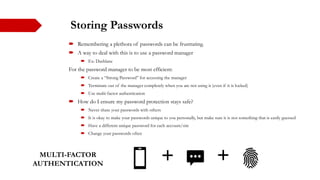
 Use multi-factor authentication
 How do I ensure my password protection stays safe?
 Never share your passwords with others
 It is okay to make your passwords unique to you personally, but make sure it is not something that is easily guessed
 Have a different unique password for each account/site
 Change your passwords often
MULTI-FACTOR
AUTHENTICATION
In the end, hackers rely on the human
instinct to guess passwords, so it’s up to you
to be unpredictable and to protect your
precious information.
References
 https://support.google.com/accounts/answer/32040?hl=en
 https://its.lafayette.edu/policies/strongpasswords/
 https://www.angelo.edu/services/technology/it_policies/password_quality.php
 https://www.howtogeek.com/195430/how-to-create-a-strong-password-and-remember-it/
 https://www.forbes.com/sites/kateoflahertyuk/2019/02/20/password-managers-have-a-security-
flaw-heres-how-to-avoid-it/#2d49adf4e16b
 https://www.cisecurity.org/newsletter/why-strong-unique-passwords-matter/
 https://www.arcyber.army.mil/Portals/34/Fact%20Sheets/ARCYBER%20fact%20sheet%20-
%20Passwords%20and%20Securing%20Accounts%20(19April2018).pdf?ver=2018-04-19-161536-
120
 https://www.itpro.co.uk/security/34616/the-top-password-cracking-techniques-used-by-hackers

Strong Passwords

  • 1.
  • 2.
    In The News… In the Yahoo hack from 2013, hackers had access to users’  Names  Birthdays  Phone Numbers  Encrypted Passwords (which were then easy to crack)  Because most people reuse the same passwords, these users were at a higher risk to be hacked on other platforms
  • 3.
    “ ” Between 31% and55% of the people use the same password at multiple sites - Center For Internet Security
  • 4.
    Reasons To HaveA Strong Password  The most common way a person hacks into someone’s account is by guessing his/her password  Treat passwords as you would your physical keys you use to unlock your house  So if you have a “Strong Password”  It’s less likely for someone else to log into your account  It protects your personal information
  • 5.
    Guidelines For AStrong Password  Do not include your name or your username  Do not use a combination of dictionary words  At least 8 characters long (the more the better)  Make sure it’s something that you will remember (if you have to write it down its not strong)  A mixture of both uppercase and lowercase letters  A mixture of letters and numbers  Including at least 1 special character “@?<>{}[]()*&^%$#”  Make sure the password is only used on one account p@ssw0rd 12345678 abc123 easy to guess passwords like these are too easy to guess/hack
  • 6.
    Storing Passwords  Rememberinga plethora of passwords can be frustrating.  A way to deal with this is to use a password manager  Ex: Dashlane For the password manager to be most efficient:  Create a “Strong Password” for accessing the manager  Terminate out of the manager completely when you are not using it (even if it is locked)  Use multi-factor authentication  How do I ensure my password protection stays safe?  Never share your passwords with others  It is okay to make your passwords unique to you personally, but make sure it is not something that is easily guessed  Have a different unique password for each account/site  Change your passwords often MULTI-FACTOR AUTHENTICATION
  • 7.
    In the end,hackers rely on the human instinct to guess passwords, so it’s up to you to be unpredictable and to protect your precious information.
  • 8.
    References  https://support.google.com/accounts/answer/32040?hl=en  https://its.lafayette.edu/policies/strongpasswords/ https://www.angelo.edu/services/technology/it_policies/password_quality.php  https://www.howtogeek.com/195430/how-to-create-a-strong-password-and-remember-it/  https://www.forbes.com/sites/kateoflahertyuk/2019/02/20/password-managers-have-a-security- flaw-heres-how-to-avoid-it/#2d49adf4e16b  https://www.cisecurity.org/newsletter/why-strong-unique-passwords-matter/  https://www.arcyber.army.mil/Portals/34/Fact%20Sheets/ARCYBER%20fact%20sheet%20- %20Passwords%20and%20Securing%20Accounts%20(19April2018).pdf?ver=2018-04-19-161536- 120  https://www.itpro.co.uk/security/34616/the-top-password-cracking-techniques-used-by-hackers

Editor's Notes

  • #3 News Article - https://www.nytimes.com/2017/10/03/technology/yahoo-hack-3-billion-users.html
  • #4 Quote Credit - https://www.cisecurity.org/blog/reusing-passwords-on-multiple-sites/ Pic Credit - <a href='https://www.freepik.com/photos/computer'>Computer photo created by freepik - www.freepik.com</a>