VIRTUALIZATION
Modern Trends in Computing
Dr S O Frimpong
CONTENTS
 Introduction of virtualization
 Architecture of virtualization
 Types of virtualization
 Hardware Virtualization.
 Operating system Virtualization.
 Server Virtualization.
 Storage Virtualization.
 Advantage and Disadvantage of virtualization.
 Cloud v/s virtualization
 Conclusion.
INTRODUCTION OF VIRTUALIZATION
 Virtualization is a technique, which allows to share single physical
instance of an application or resource among multiple organizations
or tenants (customers)
 Virtualization is a proved technology that makes it possible to run
multiple operating system and applications on the same server at
same time.
 Virtualization is the process of creating a logical(virtual) version of a
server operating system, a storage device, or network services.
 The technology that work behind virtualization is known as a virtual
machine monitor(VM), or virtual manager which separates compute
environments from the actual physical infrastructure.
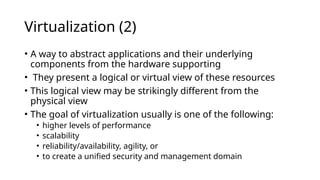
Virtualization (2)
• A way to abstract applications and their underlying
components from the hardware supporting
• They present a logical or virtual view of these resources
• This logical view may be strikingly different from the
physical view
• The goal of virtualization usually is one of the following:
• higher levels of performance
• scalability
• reliability/availability, agility, or
• to create a unified security and management domain
How it works:
• virtual view is constructed using
excess processing power,
memory, storage, or network
bandwidth
• Virtualization can create the
artificial view that many
computers are a single computing
resource or that a single machine
is really many individual
computers
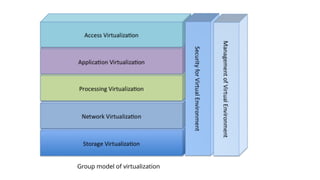
Group model of virtualization
WHAT IS THE CONCEPT BEHIND THE
VIRTUALIZATION
 Creation of a virtual machine over existing operating system
and hardware.
 Host machine: The machine on which the virtual machine is
created.
 Guest machine: virtual machines referred as a guest
machine.
 Hypervisor: Hypervisor is a firmware or low-level program that
acts as a Virtual Machine Manager.
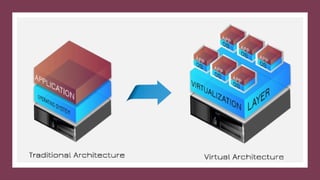
ARCHITECTURE OF VITUALIZATION
TYPES OF VIRTUALIZATION
1. Hardware Virtualization.
2. Operating system Virtualization.
3. Server Virtualization.
4. Storage Virtualization.
1. HARDWARE VIRTUALIZATION
 When the virtual machine software or virtual machine
manager (VMM) is directly installed on the hardware system is
known as hardware virtualization.
 The main job of hypervisor is to control and monitoring the
processor, memory and other hardware resources.
 Usage:
 Hardware virtualization is mainly done for the server platforms,
because controlling virtual machines is much easier than
controlling a physical server.
OPERATING SYSTEM VIRTUALIZATION
• When the virtual machine software or virtual machine manager (VMM) is
installed on the Host operating system instead of directly on the hardware
system is known as operating system virtualization.
Usage:
• Operating System Virtualization is mainly used for testing the applications on different
platforms of OS.
Virtual Operating system
Architecture
Traditional Operating system
Architecture
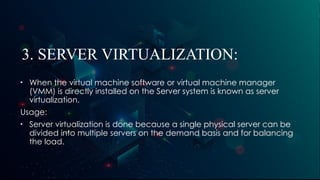
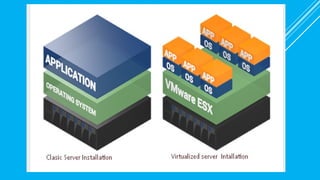
3. SERVER VIRTUALIZATION:
• When the virtual machine software or virtual machine manager
(VMM) is directly installed on the Server system is known as server
virtualization.
Usage:
• Server virtualization is done because a single physical server can be
divided into multiple servers on the demand basis and for balancing
the load.
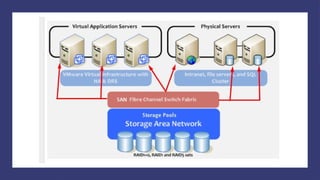
4. STORAGE VIRTUALIZATION
• Storage virtualization is the process of grouping the physical storage from
multiple network storage devices so that it looks like a single storage
device.
• Storage virtualization is also implemented by using software applications.
Usage:
• Storage virtualization is mainly done for back-up and recovery purposes.
CLOUD VS VIRTUALIZATION
 Cloud computer is internet based computing where virtual
shared provide Software, Infrastructure, platform.
 Virtualized
 API
 Pay-as-per-use
 Scalability
Virtualization can exist without the cloud but cloud computing
cannot exist without virtualization.
ADVANTAGES OF VIRTUALIZATION
 Reduced Costs.
 Efficient hardware Utilization.
 Virtualization leads to better resource Utilization and increase
performance
 Testing for software development.
 Increase Availability
 Save energy
 Shifting all your Local Infrastructure to Cloud in a day
 Possibility to Divide Services
 Running application not supported by the host.
DISADVANTAGES OF
VIRTUALIZATION
1. Extra Costs.
2. Software Licensing.
CONCLUSION
Virtualization means, running multiple operating systems on a single machine
but sharing all the hardware resources and it helps us to provide the pool of IT
resources so that we can share these IT resources in order get benefits in the
business.
One of the main cost-saving, hardware-reducing, and energy-saving
techniques used by cloud providers is virtualization
With OS virtualization each VM can use a different operating system (OS), and
each OS is isolated from the others.
Use VMs to enabling different services to run in separate VMs on the same
physical machine.
REFERENCES:
Kusnetzky, D. (2011). Virtualization: A manager's guide. "
O'Reilly Media, Inc.".
Portnoy, M. (2012). Virtualization essentials (Vol. 19). John
Wiley & Sons.

Virtualization in cloud computing environment.pptx

  • 1.
    VIRTUALIZATION Modern Trends inComputing Dr S O Frimpong
  • 2.
    CONTENTS  Introduction ofvirtualization  Architecture of virtualization  Types of virtualization  Hardware Virtualization.  Operating system Virtualization.  Server Virtualization.  Storage Virtualization.  Advantage and Disadvantage of virtualization.  Cloud v/s virtualization  Conclusion.
  • 3.
    INTRODUCTION OF VIRTUALIZATION Virtualization is a technique, which allows to share single physical instance of an application or resource among multiple organizations or tenants (customers)  Virtualization is a proved technology that makes it possible to run multiple operating system and applications on the same server at same time.  Virtualization is the process of creating a logical(virtual) version of a server operating system, a storage device, or network services.  The technology that work behind virtualization is known as a virtual machine monitor(VM), or virtual manager which separates compute environments from the actual physical infrastructure.
  • 4.
    Virtualization (2) • Away to abstract applications and their underlying components from the hardware supporting • They present a logical or virtual view of these resources • This logical view may be strikingly different from the physical view • The goal of virtualization usually is one of the following: • higher levels of performance • scalability • reliability/availability, agility, or • to create a unified security and management domain
  • 5.
    How it works: •virtual view is constructed using excess processing power, memory, storage, or network bandwidth • Virtualization can create the artificial view that many computers are a single computing resource or that a single machine is really many individual computers
  • 6.
    Group model ofvirtualization
  • 7.
    WHAT IS THECONCEPT BEHIND THE VIRTUALIZATION  Creation of a virtual machine over existing operating system and hardware.  Host machine: The machine on which the virtual machine is created.  Guest machine: virtual machines referred as a guest machine.  Hypervisor: Hypervisor is a firmware or low-level program that acts as a Virtual Machine Manager.
  • 8.
  • 10.
    TYPES OF VIRTUALIZATION 1.Hardware Virtualization. 2. Operating system Virtualization. 3. Server Virtualization. 4. Storage Virtualization.
  • 11.
    1. HARDWARE VIRTUALIZATION When the virtual machine software or virtual machine manager (VMM) is directly installed on the hardware system is known as hardware virtualization.  The main job of hypervisor is to control and monitoring the processor, memory and other hardware resources.  Usage:  Hardware virtualization is mainly done for the server platforms, because controlling virtual machines is much easier than controlling a physical server.
  • 13.
    OPERATING SYSTEM VIRTUALIZATION •When the virtual machine software or virtual machine manager (VMM) is installed on the Host operating system instead of directly on the hardware system is known as operating system virtualization. Usage: • Operating System Virtualization is mainly used for testing the applications on different platforms of OS.
  • 14.
  • 15.
    3. SERVER VIRTUALIZATION: •When the virtual machine software or virtual machine manager (VMM) is directly installed on the Server system is known as server virtualization. Usage: • Server virtualization is done because a single physical server can be divided into multiple servers on the demand basis and for balancing the load.
  • 18.
    4. STORAGE VIRTUALIZATION •Storage virtualization is the process of grouping the physical storage from multiple network storage devices so that it looks like a single storage device. • Storage virtualization is also implemented by using software applications. Usage: • Storage virtualization is mainly done for back-up and recovery purposes.
  • 20.
    CLOUD VS VIRTUALIZATION Cloud computer is internet based computing where virtual shared provide Software, Infrastructure, platform.  Virtualized  API  Pay-as-per-use  Scalability Virtualization can exist without the cloud but cloud computing cannot exist without virtualization.
  • 22.
    ADVANTAGES OF VIRTUALIZATION Reduced Costs.  Efficient hardware Utilization.  Virtualization leads to better resource Utilization and increase performance  Testing for software development.  Increase Availability  Save energy  Shifting all your Local Infrastructure to Cloud in a day  Possibility to Divide Services  Running application not supported by the host.
  • 23.
    DISADVANTAGES OF VIRTUALIZATION 1. ExtraCosts. 2. Software Licensing.
  • 24.
    CONCLUSION Virtualization means, runningmultiple operating systems on a single machine but sharing all the hardware resources and it helps us to provide the pool of IT resources so that we can share these IT resources in order get benefits in the business. One of the main cost-saving, hardware-reducing, and energy-saving techniques used by cloud providers is virtualization With OS virtualization each VM can use a different operating system (OS), and each OS is isolated from the others. Use VMs to enabling different services to run in separate VMs on the same physical machine.
  • 29.
    REFERENCES: Kusnetzky, D. (2011).Virtualization: A manager's guide. " O'Reilly Media, Inc.". Portnoy, M. (2012). Virtualization essentials (Vol. 19). John Wiley & Sons.

Editor's Notes

  • #5 It can make a single large storage resource appear to be many smaller ones or make many smaller storage devices appear to be a single device.
  • #8 RTS real time system hypervisor KVM, or Kernel-based Virtual Machine, is a free and open-source virtualization tool for Linux. It allows users to create virtual machines (VMs) on physical Linux machines. 
  • #19 HA : High availability DRS Distributed Resource Sheduler