How Does Virtualization Change Storage?May 18, 2009Stephen Foskett, Director of Consulting, Nirvanix
AbstractThe virtualization of servers destroys everything that storage folks thought they knew about I/O and throws in a new layer of abstraction to bootCreating storage for virtualization is not the same as storage for most other apps, and storage virtual servers on a SAN or NAS is not the same as using internal diskThis session will walk through what virtualization changes about storage, the various storage options, pros and cons, and what the future looks like with FCoE, UCS, 10 GbE, and VMware vStorage APIs2
Server Virtualization RecoilThe server virtualization revolution has challenged storage in many ways:
Dramaticallychanged I/O
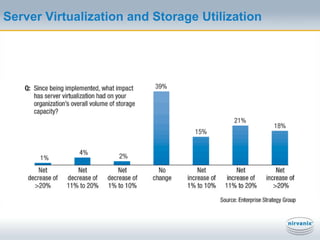
Impact on storage capacity utilization
Architecture decisions to be made: DAS, SAN, NAS
Trouble for traditional backup, replication, reporting
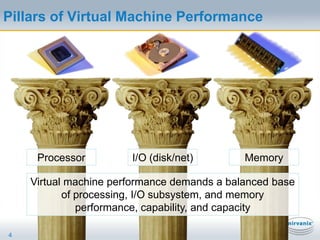
Biggest issue: Converged technology leads to converged management organizationsPillars of Virtual Machine Performance4ProcessorI/O (disk/net)MemoryVirtual machine performance demands a balanced base of processing, I/O subsystem, and memory performance, capability, and capacity
Virtualization As An I/O EngineServer virtualization is the single greatest I/O driver in the modern data centerCPU power and memory capacity are easy to ramp up, I/O is notUnbalanced systems will not perform well5
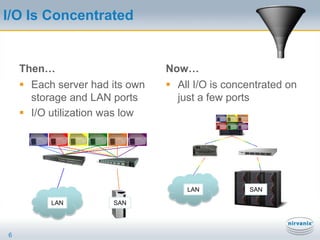
I/O Is ConcentratedThen…Each server had its own storage and LAN portsI/O utilization was lowNow…6All I/O is concentrated on just a few portsLANSANLANSAN
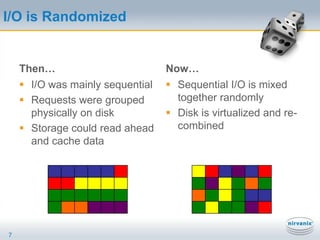
I/O is RandomizedThen…Now…Sequential I/O is mixed together randomlyDisk is virtualized and re-combined7I/O was mainly sequentialRequests were grouped physically on diskStorage could read ahead and cache data
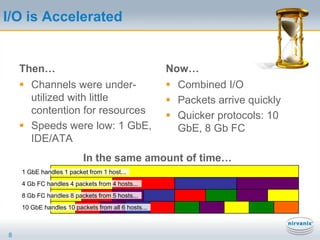
I/O is AcceleratedThen…Now…Combined I/OPackets arrive quicklyQuicker protocols: 10 GbE, 8 Gb FC8Channels were under-utilized with little contention for resourcesSpeeds were low: 1 GbE, IDE/ATAIn the same amount of time…1 GbE handles 1 packet from 1 host...4 Gb FC handles 4 packets from 4 hosts...8 Gb FC handles 8 packets from 5 hosts...10 GbE handles 10 packets from all 6 hosts...
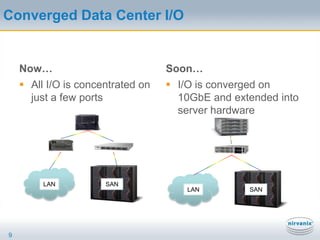
Converged Data Center I/ONow…All I/O is concentrated on just a few portsSoon…9I/O is converged on 10GbE and extended into server hardwareLANSANLANSAN
Server Virtualization and Storage Utilization
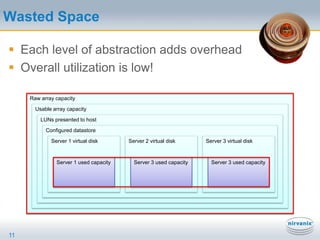
Wasted SpaceEach level of abstraction adds overheadOverall utilization is low!11Raw array capacityUsable array capacityLUNs presented to hostConfigured datastoreServer 1 virtual diskServer 2 virtual diskServer 3 virtual diskServer 1 used capacityServer 3 used capacityServer 3 used capacity
Thin ProvisioningThin provisioning allocates storage as-neededExample: 500 GB request for new project, but only 2 GB of initial data is written – array only allocates 2 GB and expands as data is writtenWhat’s not to love?Oops – we provisioned a petabyte and ran out of storageChunk sizes and formatting conflictsCan it thin unprovision?Can it replicate to and from thin provisioned volumes?VMware adding thin provisioning to vSphere 4 (standard at all license levels!)Some storage arrays do thin (3PAR, HDS, NetApp)12
Server Virtualization Demands SAN and NASServer virtualization has transformed the data center and storage requirements86% have implemented some server virtualization (ESG 2008)VMware is the #1 driver of SAN adoption today!60% of virtual server storage is on SAN or NAS (ESG 2008)Server virtualization has enabled and demanded centralization and sharing of storage on arrays like never before!
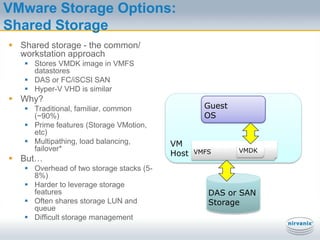
VMware Storage Options:Shared StorageShared storage - the common/ workstation approachStores VMDK image in VMFS datastoresDAS or FC/iSCSI SANHyper-V VHD is similarWhy?Traditional, familiar, common (~90%)Prime features (Storage VMotion, etc)Multipathing, load balancing, failover*But…Overhead of two storage stacks (5-8%)Harder to leverage storage featuresOften shares storage LUN and queueDifficult storage managementVMHostGuestOSVMFSVMDKDAS or SANStorage
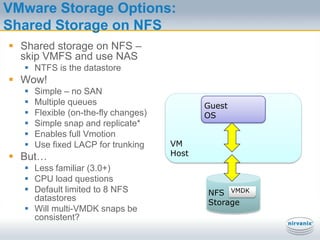
VMware Storage Options:Shared Storage on NFSShared storage on NFS – skip VMFS and use NASNTFS is the datastoreWow!Simple – no SANMultiple queuesFlexible (on-the-fly changes)Simple snap and replicate*Enables full VmotionUse fixed LACP for trunkingBut…Less familiar (3.0+)CPU load questionsDefault limited to 8 NFS datastoresWill multi-VMDK snaps be consistent?VMHostGuestOSNFSStorageVMDK
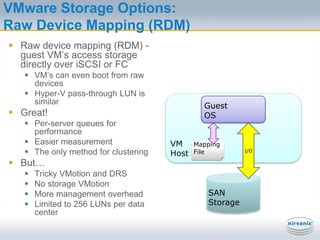
VMware Storage Options:Raw Device Mapping (RDM)Raw device mapping (RDM) - guest VM’s access storage directly over iSCSI or FCVM’s can even boot from raw devicesHyper-V pass-through LUN is similarGreat!Per-server queues for performanceEasier measurementThe only method for clusteringBut…Tricky VMotion and DRSNo storage VMotionMore management overheadLimited to 256 LUNs per data centerVMHostGuestOSI/OMapping FileSAN Storage
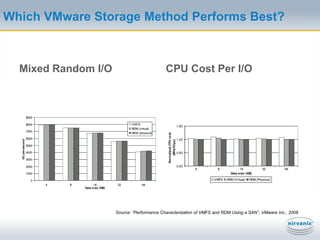
Which VMware Storage Method Performs Best?Mixed Random I/OCPU Cost Per I/OVMFS,RDM (p), or RDM (v)Source: “Performance Characterization of VMFS and RDM Using a SAN”, VMware Inc., 2008
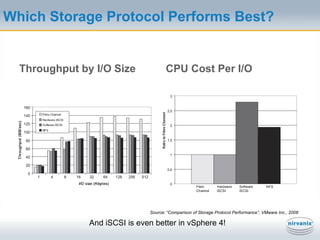
Which Storage Protocol Performs Best?Throughput by I/O SizeCPU Cost Per I/OFibre Channel,NFS,iSCSI (sw),iSCSI (TOE)Source: “Comparison of Storage Protocol Performance”, VMware Inc., 2008And iSCSI is even better in vSphere 4!
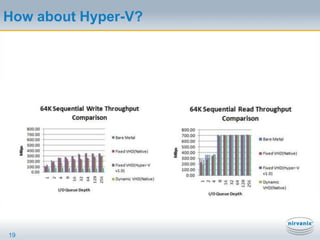
How about Hyper-V?19
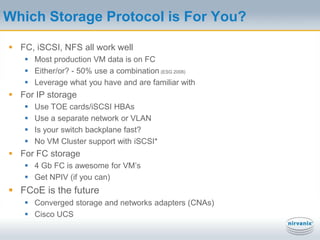
Which Storage Protocol is For You?FC, iSCSI, NFS all work wellMost production VM data is on FCEither/or? - 50% use a combination (ESG 2008)Leverage what you have and are familiar withFor IP storageUse TOE cards/iSCSI HBAsUse a separate network or VLANIs your switch backplane fast?No VM Cluster support with iSCSI*For FC storage4 Gb FC is awesome for VM’sGet NPIV (if you can)FCoE is the futureConverged storage and networks adapters (CNAs)Cisco UCS

Virtualization Changes Storage

  • 1.
    How Does VirtualizationChange Storage?May 18, 2009Stephen Foskett, Director of Consulting, Nirvanix
  • 2.
    AbstractThe virtualization ofservers destroys everything that storage folks thought they knew about I/O and throws in a new layer of abstraction to bootCreating storage for virtualization is not the same as storage for most other apps, and storage virtual servers on a SAN or NAS is not the same as using internal diskThis session will walk through what virtualization changes about storage, the various storage options, pros and cons, and what the future looks like with FCoE, UCS, 10 GbE, and VMware vStorage APIs2
  • 3.
    Server Virtualization RecoilTheserver virtualization revolution has challenged storage in many ways:
  • 4.
  • 5.
    Impact on storagecapacity utilization
  • 6.
    Architecture decisions tobe made: DAS, SAN, NAS
  • 7.
    Trouble for traditionalbackup, replication, reporting
  • 8.
    Biggest issue: Convergedtechnology leads to converged management organizationsPillars of Virtual Machine Performance4ProcessorI/O (disk/net)MemoryVirtual machine performance demands a balanced base of processing, I/O subsystem, and memory performance, capability, and capacity
  • 9.
    Virtualization As AnI/O EngineServer virtualization is the single greatest I/O driver in the modern data centerCPU power and memory capacity are easy to ramp up, I/O is notUnbalanced systems will not perform well5
  • 10.
    I/O Is ConcentratedThen…Eachserver had its own storage and LAN portsI/O utilization was lowNow…6All I/O is concentrated on just a few portsLANSANLANSAN
  • 11.
    I/O is RandomizedThen…Now…SequentialI/O is mixed together randomlyDisk is virtualized and re-combined7I/O was mainly sequentialRequests were grouped physically on diskStorage could read ahead and cache data
  • 12.
    I/O is AcceleratedThen…Now…CombinedI/OPackets arrive quicklyQuicker protocols: 10 GbE, 8 Gb FC8Channels were under-utilized with little contention for resourcesSpeeds were low: 1 GbE, IDE/ATAIn the same amount of time…1 GbE handles 1 packet from 1 host...4 Gb FC handles 4 packets from 4 hosts...8 Gb FC handles 8 packets from 5 hosts...10 GbE handles 10 packets from all 6 hosts...
  • 13.
    Converged Data CenterI/ONow…All I/O is concentrated on just a few portsSoon…9I/O is converged on 10GbE and extended into server hardwareLANSANLANSAN
  • 14.
    Server Virtualization andStorage Utilization
  • 15.
    Wasted SpaceEach levelof abstraction adds overheadOverall utilization is low!11Raw array capacityUsable array capacityLUNs presented to hostConfigured datastoreServer 1 virtual diskServer 2 virtual diskServer 3 virtual diskServer 1 used capacityServer 3 used capacityServer 3 used capacity
  • 16.
    Thin ProvisioningThin provisioningallocates storage as-neededExample: 500 GB request for new project, but only 2 GB of initial data is written – array only allocates 2 GB and expands as data is writtenWhat’s not to love?Oops – we provisioned a petabyte and ran out of storageChunk sizes and formatting conflictsCan it thin unprovision?Can it replicate to and from thin provisioned volumes?VMware adding thin provisioning to vSphere 4 (standard at all license levels!)Some storage arrays do thin (3PAR, HDS, NetApp)12
  • 17.
    Server Virtualization DemandsSAN and NASServer virtualization has transformed the data center and storage requirements86% have implemented some server virtualization (ESG 2008)VMware is the #1 driver of SAN adoption today!60% of virtual server storage is on SAN or NAS (ESG 2008)Server virtualization has enabled and demanded centralization and sharing of storage on arrays like never before!
  • 18.
    VMware Storage Options:SharedStorageShared storage - the common/ workstation approachStores VMDK image in VMFS datastoresDAS or FC/iSCSI SANHyper-V VHD is similarWhy?Traditional, familiar, common (~90%)Prime features (Storage VMotion, etc)Multipathing, load balancing, failover*But…Overhead of two storage stacks (5-8%)Harder to leverage storage featuresOften shares storage LUN and queueDifficult storage managementVMHostGuestOSVMFSVMDKDAS or SANStorage
  • 19.
    VMware Storage Options:SharedStorage on NFSShared storage on NFS – skip VMFS and use NASNTFS is the datastoreWow!Simple – no SANMultiple queuesFlexible (on-the-fly changes)Simple snap and replicate*Enables full VmotionUse fixed LACP for trunkingBut…Less familiar (3.0+)CPU load questionsDefault limited to 8 NFS datastoresWill multi-VMDK snaps be consistent?VMHostGuestOSNFSStorageVMDK
  • 20.
    VMware Storage Options:RawDevice Mapping (RDM)Raw device mapping (RDM) - guest VM’s access storage directly over iSCSI or FCVM’s can even boot from raw devicesHyper-V pass-through LUN is similarGreat!Per-server queues for performanceEasier measurementThe only method for clusteringBut…Tricky VMotion and DRSNo storage VMotionMore management overheadLimited to 256 LUNs per data centerVMHostGuestOSI/OMapping FileSAN Storage
  • 21.
    Which VMware StorageMethod Performs Best?Mixed Random I/OCPU Cost Per I/OVMFS,RDM (p), or RDM (v)Source: “Performance Characterization of VMFS and RDM Using a SAN”, VMware Inc., 2008
  • 22.
    Which Storage ProtocolPerforms Best?Throughput by I/O SizeCPU Cost Per I/OFibre Channel,NFS,iSCSI (sw),iSCSI (TOE)Source: “Comparison of Storage Protocol Performance”, VMware Inc., 2008And iSCSI is even better in vSphere 4!
  • 23.
  • 24.
    Which Storage Protocolis For You?FC, iSCSI, NFS all work wellMost production VM data is on FCEither/or? - 50% use a combination (ESG 2008)Leverage what you have and are familiar withFor IP storageUse TOE cards/iSCSI HBAsUse a separate network or VLANIs your switch backplane fast?No VM Cluster support with iSCSI*For FC storage4 Gb FC is awesome for VM’sGet NPIV (if you can)FCoE is the futureConverged storage and networks adapters (CNAs)Cisco UCS

Editor's Notes

  • #15 Up to 256 FC or iSCSI LUNsESX multipathingLoad balancingFailoverFailover between FC and iSCSI*Beware of block sizes greater than 256 KB!If you want virtual disks greater than 256 GB, you must use a VMFS block size larger than 1 MBAlign your virtual disk starting offset to your array (by booting the VM and using diskpart, Windows PE, or UNIX fdisk)*
  • #16 Link Aggregate Control Protocol (LACP) for trunking/EtherChannel - Use “fixed” path policy, not LRUUp to 8 (or 32) NFS mount pointsTurn off access time updatesThin provisioning? Turn on AutoSize and watch out