Storage 101
Rook and Ceph
SƩbastien Han, Sean Cohen, Federico Lucifredi
WHAT IS THIS TALK ABOUT?
STORAGE CONTAINER ORCHESTRATION WITH KUBERNETES
Kubernetes (K8s) is an open-source system for
automating deployment, scaling, and management of
containerized applications.
Ceph is an open source distributed storage
software-defined solution that allows you to consume
your data through several interfaces such as object,
block and file.
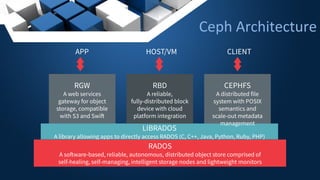
Ceph Architecture
RGW
A web services
gateway for object
storage, compatible
with S3 and Swift
LIBRADOS
A library allowing apps to directly access RADOS (C, C++, Java, Python, Ruby, PHP)
RADOS
A software-based, reliable, autonomous, distributed object store comprised of
self-healing, self-managing, intelligent storage nodes and lightweight monitors
RBD
A reliable,
fully-distributed block
device with cloud
platform integration
CEPHFS
A distributed file
system with POSIX
semantics and
scale-out metadata
management
APP HOST/VM CLIENT
WHY IS STORAGE HARD?
STORAGE IN KUBERNETES CONTAINER ORCHESTRATION
STORAGE IN KUBERNETES
• K8s abstracts away the infrastructure it manages
• Dynamic environment
– Balancing load
– Rebuilding pods (healing)
• Ephemeral storage design
Terminology
• CRD: Custom Resource Definition; Schema Extension to Kubernetes API
• CR: Custom Resource; One record/instance/object, conforming to a CRD
• OPERATOR: Daemon that watches for changes to resources
• STORAGE CLASS: ā€œclassā€ of storage service
• PVC: Persistent Volume Claim, attach persistent storage to a pod
• POD: a group of one or more containers managed by Kubernetes
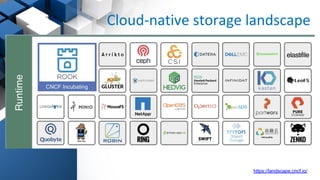
Cloud-native storage landscape
https://landscape.cncf.io/
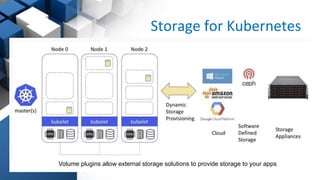
Storage for Kubernetes
Volume plugins allow external storage solutions to provide storage to your apps
• Not portable: requires these services to be
accessible
• Deployment burden of external solutions
• Vendor lock-in due to using provider managed
services
Limitations
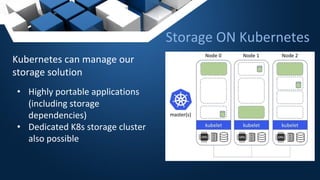
Kubernetes can manage our
storage solution
• Highly portable applications
(including storage
dependencies)
• Dedicated K8s storage cluster
also possible
Storage ON Kubernetes
Concept that describes the general data need of your application
• Database, message queue, cache, object store, etc.
• Works across environments and providers
– RDS in Amazon
– Cloud SQL in Google
• Choose the best environment for your code
– cost, features, resiliency, compliance
• Goal: Hybrid and Multi Cloud Storage abstraction
Portable Abstractions
The Container Storage Interface
(CSI)
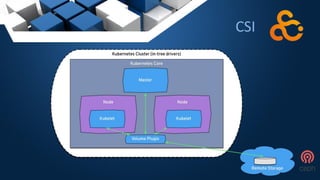
Container Storage Interface
– Prior to CSI, it was challenging to add support for new volume
plugins to Kubernetes.
– Volume plugins were ā€œin-treeā€, third-party storage code caused
reliability and security issues in core Kubernetes binaries
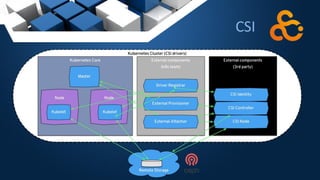
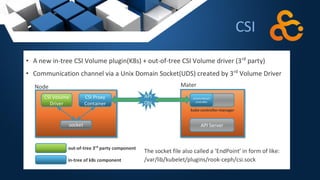
– With the introduction of CSI, storage can now be treated as another
workload to be containerized and deployed on a Kubernetes cluster.
– Using CSI, third-party storage providers can write and deploy plugins
exposing new storage systems in Kubernetes without touching the
core Kubernetes code.
CSI
CSI
CSI
CSI
Ceph-CSI
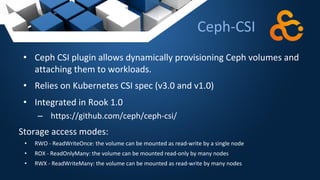
• Ceph CSI plugin allows dynamically provisioning Ceph volumes and
attaching them to workloads.
• Relies on Kubernetes CSI spec (v3.0 and v1.0)
• Integrated in Rook 1.0
– https://github.com/ceph/ceph-csi/
Storage access modes:
• RWO - ReadWriteOnce: the volume can be mounted as read-write by a single node
• ROX - ReadOnlyMany: the volume can be mounted read-only by many nodes
• RWX - ReadWriteMany: the volume can be mounted as read-write by many nodes
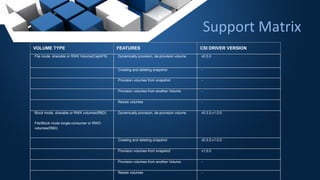
Support Matrix
VOLUME TYPE FEATURES CSI DRIVER VERSION
File mode, sharable or RWX Volume(CephFS) Dynamically provision, de-provision volume v0.3.0
Creating and deleting snapshot -
Provision volumes from snapshot -
Provision volumes from another Volume -
Resize volumes -
Block mode, sharable or RWX volumes(RBD)
File/Block mode single-consumer or RWO
volumes(RBD)
Dynamically provision, de-provision volume v0.3.0,v1.0.0
Creating and deleting snapshot v0.3.0,v1.0.0
Provision volumes from snapshot v1.0.0
Provision volumes from another Volume -
Resize volumes -
ROOK
PROVIDE BEST CEPH STORAGE EXPERIENCE IN KUBERNETES
– Rook is bringing Ceph and Kubernetes together
– It is one of the most popular cloud-native storage solutions
– With more than 5000 Github stars, 21M docker pools and 140+
contributors.
– Accepted as the CNCF’s first storage project
– Rook has recently reached incubation stage
ROOK + CEPH
Cloud-Native Storage Orchestrator
• Extends Kubernetes with custom types and controllers
• Automate deployment, bootstrapping, configuration,
provisioning, scaling, upgrading, migration, disaster recovery,
monitoring, and resource management
• Framework for many storage providers and solutions
• Open Source (Apache 2.0)
• Hosted by the Cloud-Native Computing Foundation
Storage Framework
Storage Framework
ā— Orchestration
āˆ’ Automated deployment, bootstrapping, configuration,
provisioning, scaling, upgrading, migration, disaster recovery,
monitoring, and resource management
ā— Kubernetes Volume Plugins: Attaching and mounting RBD/CephFS
āˆ’ In-tree drivers (legacy)
āˆ’ Flex Volume Driver (soon to be deprecated)
āˆ’ Ceph-CSI (Container Storage Interface)
Advantages
THE BENEFIT OF CEPH+ROOK
• Ceph automates the internal storage management
• Rook automates the user-facing operations
• Rook makes storage consumption from Kubernetes transparent
SCALE
- Horizontally (nodes) and vertically (user volumes), storage scale (Ceph)
- Fast, automatic provisioning
- Hides ceph.conf settings from end user (could be any storage source)
Kubernetes Storage Challenges
• Reliance on external storage
– Requires these services to be accessible
– Deployment burden
• Reliance on cloud provider managed services
– Vendor lock-in
• Day 2 operations - who is managing the storage?
Why Rook?
ARCHITECTURE
High-level Architecture
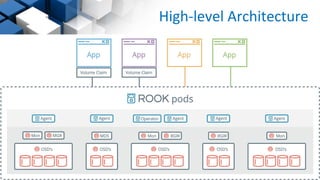
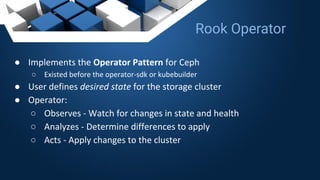
ā— Implements the Operator Pattern for Ceph
ā—‹ Existed before the operator-sdk or kubebuilder
ā— User defines desired state for the storage cluster
ā— Operator:
ā—‹ Observes - Watch for changes in state and health
ā—‹ Analyzes - Determine differences to apply
ā—‹ Acts - Apply changes to the cluster
Rook Operator
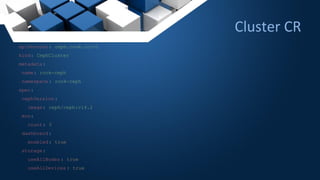
Cluster CR
apiVersion: ceph.rook.io/v1
kind: CephCluster
metadata:
name: rook-ceph
namespace: rook-ceph
spec:
cephVersion :
image: ceph/ceph:v14.2
mon:
count: 3
dashboard:
enabled: true
storage:
useAllNodes : true
useAllDevices : true
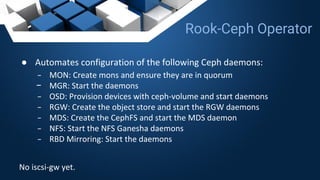
ā— Automates configuration of the following Ceph daemons:
āˆ’ MON: Create mons and ensure they are in quorum
āˆ’ MGR: Start the daemons
āˆ’ OSD: Provision devices with ceph-volume and start daemons
āˆ’ RGW: Create the object store and start the RGW daemons
āˆ’ MDS: Create the CephFS and start the MDS daemon
āˆ’ NFS: Start the NFS Ganesha daemons
āˆ’ RBD Mirroring: Start the daemons
No iscsi-gw yet.
Rook-Ceph Operator
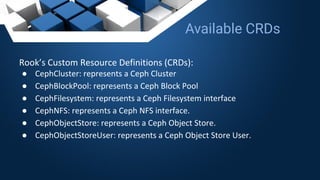
Rook’s Custom Resource Definitions (CRDs):
ā— CephCluster: represents a Ceph Cluster
ā— CephBlockPool: represents a Ceph Block Pool
ā— CephFilesystem: represents a Ceph Filesystem interface
ā— CephNFS: represents a Ceph NFS interface.
ā— CephObjectStore: represents a Ceph Object Store.
ā— CephObjectStoreUser: represents a Ceph Object Store User.
Available CRDs
FUTURE OF ROOK
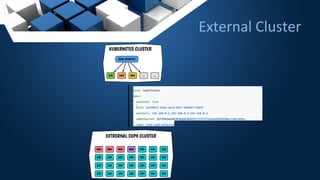
• Ability to consume existing Ceph storage cluster that were not
deployed with Rook
• Rook does not manage the cluster
• Bootstrap stateless daemons in Kubernetes but leave the rest in
place on the existing cluster
• Different Storage Classes for certain clusters
External Cluster
External Cluster
Incoming changes
• Auto-scale when plugging a new disk
• Watch for new storage node and increase capacity
automatically
• Upgrade mechanism enhancement
• Expose more CR’s details (Ceph health)
• More control over logging (enable/disable on the fly)
• Better maintenance mode
• Better resources control (requests and limits)
• Integration with Multus
– Attach multiple physical interfaces to a pod
– Removes the need of host Networking
– More secure, more control
• Cloud block provisioner
– Relies on Kubernetes block PVC
– Allows smoother run Cloud platforms like AWS/GKE/AKS
• Bucket Storage Class for object storage
– ObjectBucketClaim / ObjectBucket
Future Work
Give it a try!
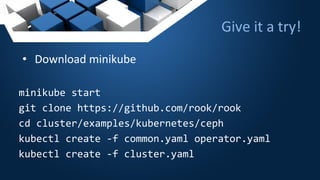
• Download minikube
minikube start
git clone https://github.com/rook/rook
cd cluster/examples/kubernetes/ceph
kubectl create -f common.yaml operator.yaml
kubectl create -f cluster.yaml
Getting Started with Rook
• https://rook.io
– Read the docs… seriously
– Github repo: https://github.com/rook/rook
– Design docs:
https://github.com/rook/rook/tree/master/design
• Slack
https://rook-io.slack.com/
THANK YOU
@0xF2
@leseb_
@SeanCohen_RH

Storage 101: Rook and Ceph - Open Infrastructure Denver 2019

  • 1.
    Storage 101 Rook andCeph SƩbastien Han, Sean Cohen, Federico Lucifredi
  • 2.
    WHAT IS THISTALK ABOUT? STORAGE CONTAINER ORCHESTRATION WITH KUBERNETES
  • 3.
    Kubernetes (K8s) isan open-source system for automating deployment, scaling, and management of containerized applications.
  • 4.
    Ceph is anopen source distributed storage software-defined solution that allows you to consume your data through several interfaces such as object, block and file.
  • 5.
    Ceph Architecture RGW A webservices gateway for object storage, compatible with S3 and Swift LIBRADOS A library allowing apps to directly access RADOS (C, C++, Java, Python, Ruby, PHP) RADOS A software-based, reliable, autonomous, distributed object store comprised of self-healing, self-managing, intelligent storage nodes and lightweight monitors RBD A reliable, fully-distributed block device with cloud platform integration CEPHFS A distributed file system with POSIX semantics and scale-out metadata management APP HOST/VM CLIENT
  • 6.
    WHY IS STORAGEHARD? STORAGE IN KUBERNETES CONTAINER ORCHESTRATION
  • 7.
    STORAGE IN KUBERNETES •K8s abstracts away the infrastructure it manages • Dynamic environment – Balancing load – Rebuilding pods (healing) • Ephemeral storage design
  • 8.
    Terminology • CRD: CustomResource Definition; Schema Extension to Kubernetes API • CR: Custom Resource; One record/instance/object, conforming to a CRD • OPERATOR: Daemon that watches for changes to resources • STORAGE CLASS: ā€œclassā€ of storage service • PVC: Persistent Volume Claim, attach persistent storage to a pod • POD: a group of one or more containers managed by Kubernetes
  • 9.
  • 10.
    Storage for Kubernetes Volumeplugins allow external storage solutions to provide storage to your apps
  • 11.
    • Not portable:requires these services to be accessible • Deployment burden of external solutions • Vendor lock-in due to using provider managed services Limitations
  • 12.
    Kubernetes can manageour storage solution • Highly portable applications (including storage dependencies) • Dedicated K8s storage cluster also possible Storage ON Kubernetes
  • 13.
    Concept that describesthe general data need of your application • Database, message queue, cache, object store, etc. • Works across environments and providers – RDS in Amazon – Cloud SQL in Google • Choose the best environment for your code – cost, features, resiliency, compliance • Goal: Hybrid and Multi Cloud Storage abstraction Portable Abstractions
  • 14.
    The Container StorageInterface (CSI)
  • 15.
    Container Storage Interface –Prior to CSI, it was challenging to add support for new volume plugins to Kubernetes. – Volume plugins were ā€œin-treeā€, third-party storage code caused reliability and security issues in core Kubernetes binaries – With the introduction of CSI, storage can now be treated as another workload to be containerized and deployed on a Kubernetes cluster. – Using CSI, third-party storage providers can write and deploy plugins exposing new storage systems in Kubernetes without touching the core Kubernetes code. CSI
  • 16.
  • 17.
  • 18.
  • 19.
    Ceph-CSI • Ceph CSIplugin allows dynamically provisioning Ceph volumes and attaching them to workloads. • Relies on Kubernetes CSI spec (v3.0 and v1.0) • Integrated in Rook 1.0 – https://github.com/ceph/ceph-csi/ Storage access modes: • RWO - ReadWriteOnce: the volume can be mounted as read-write by a single node • ROX - ReadOnlyMany: the volume can be mounted read-only by many nodes • RWX - ReadWriteMany: the volume can be mounted as read-write by many nodes
  • 20.
    Support Matrix VOLUME TYPEFEATURES CSI DRIVER VERSION File mode, sharable or RWX Volume(CephFS) Dynamically provision, de-provision volume v0.3.0 Creating and deleting snapshot - Provision volumes from snapshot - Provision volumes from another Volume - Resize volumes - Block mode, sharable or RWX volumes(RBD) File/Block mode single-consumer or RWO volumes(RBD) Dynamically provision, de-provision volume v0.3.0,v1.0.0 Creating and deleting snapshot v0.3.0,v1.0.0 Provision volumes from snapshot v1.0.0 Provision volumes from another Volume - Resize volumes -
  • 21.
    ROOK PROVIDE BEST CEPHSTORAGE EXPERIENCE IN KUBERNETES
  • 22.
    – Rook isbringing Ceph and Kubernetes together – It is one of the most popular cloud-native storage solutions – With more than 5000 Github stars, 21M docker pools and 140+ contributors. – Accepted as the CNCF’s first storage project – Rook has recently reached incubation stage ROOK + CEPH
  • 23.
    Cloud-Native Storage Orchestrator •Extends Kubernetes with custom types and controllers • Automate deployment, bootstrapping, configuration, provisioning, scaling, upgrading, migration, disaster recovery, monitoring, and resource management • Framework for many storage providers and solutions • Open Source (Apache 2.0) • Hosted by the Cloud-Native Computing Foundation Storage Framework
  • 24.
    Storage Framework ā— Orchestration āˆ’Automated deployment, bootstrapping, configuration, provisioning, scaling, upgrading, migration, disaster recovery, monitoring, and resource management ā— Kubernetes Volume Plugins: Attaching and mounting RBD/CephFS āˆ’ In-tree drivers (legacy) āˆ’ Flex Volume Driver (soon to be deprecated) āˆ’ Ceph-CSI (Container Storage Interface)
  • 25.
    Advantages THE BENEFIT OFCEPH+ROOK • Ceph automates the internal storage management • Rook automates the user-facing operations • Rook makes storage consumption from Kubernetes transparent SCALE - Horizontally (nodes) and vertically (user volumes), storage scale (Ceph) - Fast, automatic provisioning - Hides ceph.conf settings from end user (could be any storage source)
  • 26.
    Kubernetes Storage Challenges •Reliance on external storage – Requires these services to be accessible – Deployment burden • Reliance on cloud provider managed services – Vendor lock-in • Day 2 operations - who is managing the storage? Why Rook?
  • 27.
  • 28.
  • 29.
    ā— Implements theOperator Pattern for Ceph ā—‹ Existed before the operator-sdk or kubebuilder ā— User defines desired state for the storage cluster ā— Operator: ā—‹ Observes - Watch for changes in state and health ā—‹ Analyzes - Determine differences to apply ā—‹ Acts - Apply changes to the cluster Rook Operator
  • 30.
    Cluster CR apiVersion: ceph.rook.io/v1 kind:CephCluster metadata: name: rook-ceph namespace: rook-ceph spec: cephVersion : image: ceph/ceph:v14.2 mon: count: 3 dashboard: enabled: true storage: useAllNodes : true useAllDevices : true
  • 31.
    ā— Automates configurationof the following Ceph daemons: āˆ’ MON: Create mons and ensure they are in quorum āˆ’ MGR: Start the daemons āˆ’ OSD: Provision devices with ceph-volume and start daemons āˆ’ RGW: Create the object store and start the RGW daemons āˆ’ MDS: Create the CephFS and start the MDS daemon āˆ’ NFS: Start the NFS Ganesha daemons āˆ’ RBD Mirroring: Start the daemons No iscsi-gw yet. Rook-Ceph Operator
  • 32.
    Rook’s Custom ResourceDefinitions (CRDs): ā— CephCluster: represents a Ceph Cluster ā— CephBlockPool: represents a Ceph Block Pool ā— CephFilesystem: represents a Ceph Filesystem interface ā— CephNFS: represents a Ceph NFS interface. ā— CephObjectStore: represents a Ceph Object Store. ā— CephObjectStoreUser: represents a Ceph Object Store User. Available CRDs
  • 33.
  • 34.
    • Ability toconsume existing Ceph storage cluster that were not deployed with Rook • Rook does not manage the cluster • Bootstrap stateless daemons in Kubernetes but leave the rest in place on the existing cluster • Different Storage Classes for certain clusters External Cluster
  • 35.
  • 36.
    Incoming changes • Auto-scalewhen plugging a new disk • Watch for new storage node and increase capacity automatically • Upgrade mechanism enhancement • Expose more CR’s details (Ceph health) • More control over logging (enable/disable on the fly) • Better maintenance mode • Better resources control (requests and limits)
  • 37.
    • Integration withMultus – Attach multiple physical interfaces to a pod – Removes the need of host Networking – More secure, more control • Cloud block provisioner – Relies on Kubernetes block PVC – Allows smoother run Cloud platforms like AWS/GKE/AKS • Bucket Storage Class for object storage – ObjectBucketClaim / ObjectBucket Future Work
  • 38.
    Give it atry! • Download minikube minikube start git clone https://github.com/rook/rook cd cluster/examples/kubernetes/ceph kubectl create -f common.yaml operator.yaml kubectl create -f cluster.yaml
  • 39.
    Getting Started withRook • https://rook.io – Read the docs… seriously – Github repo: https://github.com/rook/rook – Design docs: https://github.com/rook/rook/tree/master/design • Slack https://rook-io.slack.com/
  • 40.