INTRODUCTION TO MULTIMEDIA
Mr. Butler
Digital Design
WHAT IS MULTIMEDIA?
 In a generic sense, multimedia is simply the use of
more than one media element. Hence, Web-based
multimedia is defined as an online, interactive
experience that incorporates two or more media
elements including text, graphics, sound, animation
and video. A fundamental feature of most Web-
based multimedia is interactivity, which gives user
some control over the content
WHAT IS MULTIMEDIA?
Multimedia – using more than one media:
 Text
 Graphics
 Animation
 Sound
 Video
Multimedia Application Definition
 A Multimedia Application is an application
which uses a collection of multiple media
sources e.g. text, graphics,
images,sound/audio, animation and/or video.
DIGITIZED MULTIMEDIA
 Today, this integration is accomplished by
digitizing different media elements and then
manipulating them with computer software
 Digitized – Media elements have been
captured in a code that the computer can
understand
Multimedia Applications
 Examples of Multimedia Applications include:
 World Wide Web
 Multimedia Authoring, e.g.
Adobe/Macromedia Director
 Hypermedia courseware
 Video
Multimedia Applications
 Interactive TV
 Computer Games
 Virtual reality
 Digital video editing and production systems
 Multimedia Database systems
What is HyperText and
HyperMedia?
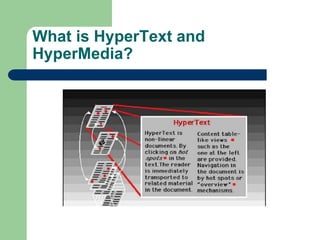
 Hypertext is a text which contains links to
other texts.
 The term was invented by Ted Nelson
around 1965.
What is HyperText and
HyperMedia?
What is HyperText and
HyperMedia?
 HyperText Navigation
 Traversal through pages of hypertext is
therefore usually
 non-linear (as explained later).
What is HyperText and
HyperMedia?
Hypermedia
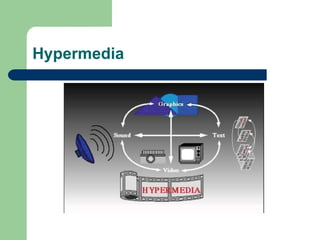
 HyperMedia is not constrained to be text-
based. It can include other media, e.g.,
graphics, images, and especially the
continuous media – sound and video.
Hypermedia
Example Hypermedia
Applications?
 The World Wide Web (WWW) is the best
example of a hypermedia application.
 Powerpoint
 Adobe Acrobat (or other PDF software)
 Adobe Flash
 Many Others?
LINEAR AND NONLINEAR
MULTIMEDIA
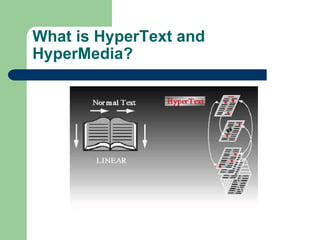
 A multimedia website can be linear, which
users start at the beginning and progress
through a set sequence of events until they
reach the end. But most websites use a
nonlinear approach to navigation, which
users have more control over what they are
interested in pursuing.
INTERACTIVE MULTIMEDIA
 It enables the user to directly respond to and
control any or all of the media elements.
Hence, users of interactive multimedia
applications become active participants
instead of the passive recipients of
information
IMPORTANCE OF MULTIMEDIA
 “Tell me and I will forget; show me and I may
remember; involve me and I will understand”
(Chinese proverb)
 Each person learns differently and each
person is inspired by something different.
The use of multimedia allows developers to
tap into these differences.
IMPORTANCE OF MULTIMEDIA
 In fact, research shows that people
remember only 20% of what they see, 30%
of what they hear. When they see and hear
it, they remember 50%, if we include some
interaction; they will remember 80% of it
BENEFITS OF MULTIMEDIA
 Addresses multiple learning styles
 Provides an excellent way to convey content
 Uses a variety of media elements to reinforce one
idea
 Activates multiple senses creating rich experiences
 Gives life to flat information
 Enhances user enjoyment
 Improves retention
 Enables users to control Web experience
WHERE DO WE USE MULTIMEDIA?
 Multimedia in Business
Business application that are multimedia based include
presentations, training, marketing, advertising, product demos,
databases, catalogues, and networked communications.
Multimedia is getting much utilization in training programs.
 Multimedia in School
Schools are perhaps the most ideal target for multimedia. Its
rich set of media is potential for delivering effective teaching.
Multimedia equipped education lets the students. Learn at
their own pace and at their own time. It is ideal in distance
education and open learning systems wherein students need
not to be physically present in class. Students can learn while
having fun.
WHERE DO WE USE MULTIMEDIA?
 Multimedia at Home
From cooking to gardening, home design to repair, indeed
multimedia has made itself useful at home. It enables you to
convert your video to digital format, store your pictures in a
compact disc, and many more. Today, multimedia is also
being applied in our TV and soon, multimedia projects will
reach out homes via interactive TV (iTV).
 Multimedia in Public Places
Multimedia is present in standalone terminals, or kiosks, in
airport terminals, hotels, mall, train stations, museums,
grocery stores, and more. It provides us information and help
about a particular place. Interactive kiosks enables you to
make a transaction without talking to a sales agent.
WHERE DO WE USE MULTIMEDIA?
 Multimedia in the Internet
Multimedia was introduced in the Internet with the
advent of the WWW. In fact, the Web is the
multimedia part of the internet. In the early stages
of the internet, you can view information in plain
text. The Web enables multimedia to be delivered
online. Playing live Internet games with multiple
players around the world has caught much
attention. Some e-learning systems use multimedia
on the internet as a method to deliver learning
materials to students anywhere.
WHERE DO WE USE MULTIMEDIA?
 Multimedia in Mobile Devices
Mobile devices such as personal digital assistants
(PDAs or handheld computers), smartphones, and
mobile devices are not exceptions to multimedia.
MMS (Multimedia Messages Services) is a store-
and-forward method of transmitting graphics, video
clips, sound files, and short text messages over
wireless network using the WAP. It also supports
email addressing, so the device can send-emails
directly to communication between mobile phones.
WEB-BASED MULTIMEDIA
CATEGORIES
 Electronic Commerce (E-Commerce)
Involves using web to serve clients and customers
and is one way to provide solutions for companies
that wish to sell products or services online.
Multimedia is used extensively in advertising and
marketing.
 Web-Based Training and Distance Learning
The Web offers many options for delivering and
receiving education over the distance. Web-based
training is an instruction delivered over the Internet
using a web browser.
WEB-BASED MULTIMEDIA
CATEGORIES
 Research and References
Today, newspaper, newsletters, magazines, books,
encyclopaedias and other reference materials are being
offered online via Web. In many cases, they represent
“Electronic” versions of existing research and reference
materials. An increasing number of self-help and how-to-
guides are being offered as interactive multimedia
applications on the Web. Some advantages: Cross-
referencing, Expanded search capabilities, multisensory
experiences.
 Entertainment and Games
They are the examples of some of the most popular and most
varied interactive multimedia sites available.
CAREERS IN WEB-BASED
MULTIMEDIA
Management-Related Positions
 Executive Producer – Move a project into an
through production
 Project Manager – forming a project, moving
it into production and overseeing its creation
Production-Related Positions
 Audio Specialist – Music scores, sound
effects, voice overs, vocals and transitional
sounds, recording, editing and selecting
voices, sounds and music
 Computer Programmer – Creates the
underlying code that makes the website
interactive and responsive to user’s actions
 Video Specialist – Manages the process of
capturing and editing original video
Production-Related Positions
 Web Designer – Develops or refines a design
process and efficiently creates a cohesive and well-
planned website from the front end
 Web Developer – Ensures the communication
between the front end of the website and its back
end is working
 Web Master – Making sure the web page is
technically correct and functional on the Web Server
Art-Related Positions
 Animation Specialist – Creates 2D/3D
animation by taking a sequence of static
images and displaying them in rapid
succession on the computer screen
 Art Director – Coordinate the creation of the
artwork for the project
 Graphic Artist/Designer – Creating and
designing all of the graphic images for a
project
Art-Related Positions
 Interface Designer – Responsible for the look
of the website interface and navigation
methods
 Photographer – Shoots and captures
appropriate, compelling and high quality
photos
 Videographer - Shoots and captures
appropriate, compelling and high quality
video footage
Content-Related Positions
 Content Specialist – Providing authenticity
and accuracy of information on the website
 Instructional Specialist – Expert in designing
instructional projects
 Writers/Editors – Technical
writers/scriptwriters, creative writers or
journalist involved in the project
Support-Related Positions
 Production Positions – Entry level positions
 Quality Assurance – Responsible for testing
the website on multiple platforms using
different versions of different browsers
 Sales/Marketing – Provides input and
feedback on the website
 Customer Support – Responds to the users
who have questions and problems.

Intro to Multimedia.ppt

  • 1.
    INTRODUCTION TO MULTIMEDIA Mr.Butler Digital Design
  • 2.
    WHAT IS MULTIMEDIA? In a generic sense, multimedia is simply the use of more than one media element. Hence, Web-based multimedia is defined as an online, interactive experience that incorporates two or more media elements including text, graphics, sound, animation and video. A fundamental feature of most Web- based multimedia is interactivity, which gives user some control over the content
  • 3.
    WHAT IS MULTIMEDIA? Multimedia– using more than one media:  Text  Graphics  Animation  Sound  Video
  • 4.
    Multimedia Application Definition A Multimedia Application is an application which uses a collection of multiple media sources e.g. text, graphics, images,sound/audio, animation and/or video.
  • 5.
    DIGITIZED MULTIMEDIA  Today,this integration is accomplished by digitizing different media elements and then manipulating them with computer software  Digitized – Media elements have been captured in a code that the computer can understand
  • 6.
    Multimedia Applications  Examplesof Multimedia Applications include:  World Wide Web  Multimedia Authoring, e.g. Adobe/Macromedia Director  Hypermedia courseware  Video
  • 7.
    Multimedia Applications  InteractiveTV  Computer Games  Virtual reality  Digital video editing and production systems  Multimedia Database systems
  • 8.
    What is HyperTextand HyperMedia?  Hypertext is a text which contains links to other texts.  The term was invented by Ted Nelson around 1965.
  • 10.
    What is HyperTextand HyperMedia?
  • 11.
    What is HyperTextand HyperMedia?  HyperText Navigation  Traversal through pages of hypertext is therefore usually  non-linear (as explained later).
  • 12.
    What is HyperTextand HyperMedia?
  • 13.
    Hypermedia  HyperMedia isnot constrained to be text- based. It can include other media, e.g., graphics, images, and especially the continuous media – sound and video.
  • 14.
  • 15.
    Example Hypermedia Applications?  TheWorld Wide Web (WWW) is the best example of a hypermedia application.  Powerpoint  Adobe Acrobat (or other PDF software)  Adobe Flash  Many Others?
  • 16.
    LINEAR AND NONLINEAR MULTIMEDIA A multimedia website can be linear, which users start at the beginning and progress through a set sequence of events until they reach the end. But most websites use a nonlinear approach to navigation, which users have more control over what they are interested in pursuing.
  • 17.
    INTERACTIVE MULTIMEDIA  Itenables the user to directly respond to and control any or all of the media elements. Hence, users of interactive multimedia applications become active participants instead of the passive recipients of information
  • 18.
    IMPORTANCE OF MULTIMEDIA “Tell me and I will forget; show me and I may remember; involve me and I will understand” (Chinese proverb)  Each person learns differently and each person is inspired by something different. The use of multimedia allows developers to tap into these differences.
  • 19.
    IMPORTANCE OF MULTIMEDIA In fact, research shows that people remember only 20% of what they see, 30% of what they hear. When they see and hear it, they remember 50%, if we include some interaction; they will remember 80% of it
  • 20.
    BENEFITS OF MULTIMEDIA Addresses multiple learning styles  Provides an excellent way to convey content  Uses a variety of media elements to reinforce one idea  Activates multiple senses creating rich experiences  Gives life to flat information  Enhances user enjoyment  Improves retention  Enables users to control Web experience
  • 21.
    WHERE DO WEUSE MULTIMEDIA?  Multimedia in Business Business application that are multimedia based include presentations, training, marketing, advertising, product demos, databases, catalogues, and networked communications. Multimedia is getting much utilization in training programs.  Multimedia in School Schools are perhaps the most ideal target for multimedia. Its rich set of media is potential for delivering effective teaching. Multimedia equipped education lets the students. Learn at their own pace and at their own time. It is ideal in distance education and open learning systems wherein students need not to be physically present in class. Students can learn while having fun.
  • 22.
    WHERE DO WEUSE MULTIMEDIA?  Multimedia at Home From cooking to gardening, home design to repair, indeed multimedia has made itself useful at home. It enables you to convert your video to digital format, store your pictures in a compact disc, and many more. Today, multimedia is also being applied in our TV and soon, multimedia projects will reach out homes via interactive TV (iTV).  Multimedia in Public Places Multimedia is present in standalone terminals, or kiosks, in airport terminals, hotels, mall, train stations, museums, grocery stores, and more. It provides us information and help about a particular place. Interactive kiosks enables you to make a transaction without talking to a sales agent.
  • 23.
    WHERE DO WEUSE MULTIMEDIA?  Multimedia in the Internet Multimedia was introduced in the Internet with the advent of the WWW. In fact, the Web is the multimedia part of the internet. In the early stages of the internet, you can view information in plain text. The Web enables multimedia to be delivered online. Playing live Internet games with multiple players around the world has caught much attention. Some e-learning systems use multimedia on the internet as a method to deliver learning materials to students anywhere.
  • 24.
    WHERE DO WEUSE MULTIMEDIA?  Multimedia in Mobile Devices Mobile devices such as personal digital assistants (PDAs or handheld computers), smartphones, and mobile devices are not exceptions to multimedia. MMS (Multimedia Messages Services) is a store- and-forward method of transmitting graphics, video clips, sound files, and short text messages over wireless network using the WAP. It also supports email addressing, so the device can send-emails directly to communication between mobile phones.
  • 25.
    WEB-BASED MULTIMEDIA CATEGORIES  ElectronicCommerce (E-Commerce) Involves using web to serve clients and customers and is one way to provide solutions for companies that wish to sell products or services online. Multimedia is used extensively in advertising and marketing.  Web-Based Training and Distance Learning The Web offers many options for delivering and receiving education over the distance. Web-based training is an instruction delivered over the Internet using a web browser.
  • 26.
    WEB-BASED MULTIMEDIA CATEGORIES  Researchand References Today, newspaper, newsletters, magazines, books, encyclopaedias and other reference materials are being offered online via Web. In many cases, they represent “Electronic” versions of existing research and reference materials. An increasing number of self-help and how-to- guides are being offered as interactive multimedia applications on the Web. Some advantages: Cross- referencing, Expanded search capabilities, multisensory experiences.  Entertainment and Games They are the examples of some of the most popular and most varied interactive multimedia sites available.
  • 27.
  • 28.
    Management-Related Positions  ExecutiveProducer – Move a project into an through production  Project Manager – forming a project, moving it into production and overseeing its creation
  • 29.
    Production-Related Positions  AudioSpecialist – Music scores, sound effects, voice overs, vocals and transitional sounds, recording, editing and selecting voices, sounds and music  Computer Programmer – Creates the underlying code that makes the website interactive and responsive to user’s actions  Video Specialist – Manages the process of capturing and editing original video
  • 30.
    Production-Related Positions  WebDesigner – Develops or refines a design process and efficiently creates a cohesive and well- planned website from the front end  Web Developer – Ensures the communication between the front end of the website and its back end is working  Web Master – Making sure the web page is technically correct and functional on the Web Server
  • 31.
    Art-Related Positions  AnimationSpecialist – Creates 2D/3D animation by taking a sequence of static images and displaying them in rapid succession on the computer screen  Art Director – Coordinate the creation of the artwork for the project  Graphic Artist/Designer – Creating and designing all of the graphic images for a project
  • 32.
    Art-Related Positions  InterfaceDesigner – Responsible for the look of the website interface and navigation methods  Photographer – Shoots and captures appropriate, compelling and high quality photos  Videographer - Shoots and captures appropriate, compelling and high quality video footage
  • 33.
    Content-Related Positions  ContentSpecialist – Providing authenticity and accuracy of information on the website  Instructional Specialist – Expert in designing instructional projects  Writers/Editors – Technical writers/scriptwriters, creative writers or journalist involved in the project
  • 34.
    Support-Related Positions  ProductionPositions – Entry level positions  Quality Assurance – Responsible for testing the website on multiple platforms using different versions of different browsers  Sales/Marketing – Provides input and feedback on the website  Customer Support – Responds to the users who have questions and problems.