

Mark D. Drake, Marco Gralike
Manager, Product Management 
• Server Technology, Oracle Corporation 
• Oracle 25+ years experience 
• XML Infrastructure products in Oracle's 
Server Technology division
Management Consultant 
• Ordina, The Netherlands 
• Oracle 20+ years experience 
• Oracle ACE Director (www.xmldb.nl)
Basic constructs 
(recursive) 
 Base values 
number, string, 
boolean, … 
 Objects { } 
sets of label-value 
pairs 
 Arrays [ ] 
lists of values
New in Oracle Database 12.1.0.2.0 
 Store and manage JSON documents in Database 
▪ JSON documents stored as text 
▪ JSON documents can be indexed 
 Access JSON documents via developer-friendly 
‘Document-Store’ API’s 
 SQL query capabilities over JSON documents for 
reporting and analysis
Allows Oracle RDBMS to be used as a JSON 
Document Store 
 Enables storing, indexing and querying of JSON 
documents 
No new JSON data type 
IS JSON constraint used to ensure a column 
contains valid JSON documents 
 Apply to CLOB, VARCHAR2, RAWand BLOB data 
 Enables use of .dotted notation to navigate JSON 
document structure and access content
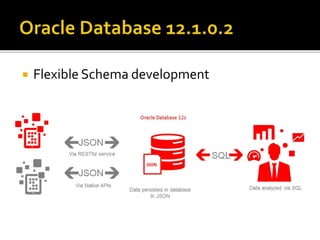
Flexible Schema development
JSON data can also be 
 Partitioned 
 Used with Flashback 
 Recovered (when proper backup is in place) 
 Used with Securefile storage 
▪ Smaller storage 
▪ Encryption, Deduplication, Compressed 
 Multiple index options 
 Caching advantages, etc., etc.,…
JSON content is accessible from SQL via 
new operators 
JSON operators use JSON Path 
language to navigate JSON objects 
Proposed extention to SQL standards
The JSON Path language makes it possible to 
address the contents of a JSON document 
 A JSON path expression can address 1 of 4 items 
▪ The entire object, a scalar value, an array, a specific object 
 JSON Path expressions are similar to XPath 
Expressions 
▪ The entire document is referenced by $ 
▪ All JSON path expressions start with a $ symbol 
▪ Key names are separated by a ’.’ (period) 
JSON Path expressions are case sensitive
JSON Path Expression Type Contents 
$.Reference String "ABULL-20120421" 
$.ShippingInstructions.Address.zipcode Number 99236 
$.ShippingInstructions.Address Object 
{ "street": "200 Sporting Green", 
"city": "South San Francisco", 
"state": "CA", 
"zipCode": 99236, 
"country": “USA" 
} 
$LineItems Array 
[ { "ItemNumber" : 1, 
"Part" : { 
"Description" : “Christmas” 
"UPCCode" : 13131092899 } 
}, 
{ "ItemNumber" : 2, 
"Part" : { 
"Description" : “Easter” 
"UPCCode" : 13131092899 } 
]
Compatible with Java Script 
 $.phone[0] 
Wildcards, Multi-Selects, Ranges 
 $.phone[*], $.phone[0,1 5 to 9] 
Predicates 
 .address?(.zip > $zip) 
SQL conversion functions usable in 
predicates 
 .?(to_date(.date) > $date)
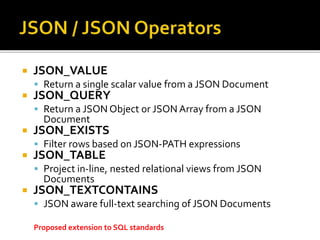
JSON_VALUE 
 Return a single scalar value from a JSON Document 
JSON_QUERY 
 Return a JSON Object or JSON Array from a JSON 
Document 
JSON_EXISTS 
 Filter rows based on JSON-PATH expressions 
JSON_TABLE 
 Project in-line, nested relational views from JSON 
Documents 
JSON_TEXTCONTAINS 
 JSON aware full-text searching of JSON Documents 
Proposed extension to SQL standards
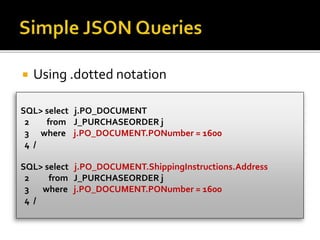
Using .dotted notation 
SQL> select j.PO_DOCUMENT 
2 from J_PURCHASEORDER j 
3 where j.PO_DOCUMENT.PONumber = 1600 
4 / 
SQL> select j.PO_DOCUMENT.ShippingInstructions.Address 
2 from J_PURCHASEORDER j 
3 where j.PO_DOCUMENT.PONumber = 1600 
4 /
Can only return a SCALAR value 
SQL> select JSON_VALUE(PO_DOCUMENT, 
2 '$.LineItems[0].Part.UnitPrice' 
3 returning NUMBER(5,3)) 
4 from J_PURCHASEORDER p 
5 where JSON_VALUE(PO_DOCUMENT, 
6 '$.PONumber' returning NUMBER(10)) = 1600 ;
Can only returns anARRAY or OBJECT 
SELECT JSON_QUERY('{a:100, b:200, c:300}', '$.*' WITH WRAPPER) 
AS value 
FROM DUAL; 
VALUE 
-------------------------------------------------------------------------------- 
[100,200,300]
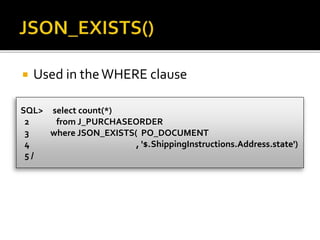
Used in the WHERE clause 
SQL> select count(*) 
2 from J_PURCHASEORDER 
3 where JSON_EXISTS( PO_DOCUMENT 
4 , '$.ShippingInstructions.Address.state') 
5 /
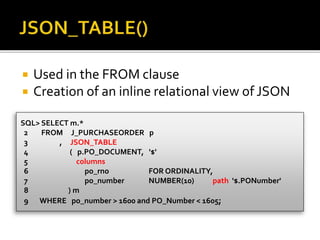
Used in the FROM clause 
Creation of an inline relational view of JSON 
SQL> SELECT m.* 
2 FROM J_PURCHASEORDER p 
3 , JSON_TABLE 
4 ( p.PO_DOCUMENT, '$' 
5 columns 
6 po_rno FOR ORDINALITY, 
7 po_number NUMBER(10) path '$.PONumber' 
8 ) m 
9 WHERE po_number > 1600 and PO_Number < 1605;
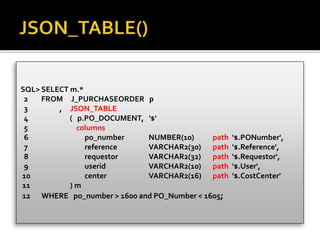
SQL> SELECT m.* 
2 FROM J_PURCHASEORDER p 
3 , JSON_TABLE 
4 ( p.PO_DOCUMENT, '$' 
5 columns 
6 po_number NUMBER(10) path '$.PONumber', 
7 reference VARCHAR2(30) path '$.Reference', 
8 requestor VARCHAR2(32) path '$.Requestor', 
9 userid VARCHAR2(10) path '$.User', 
10 center VARCHAR2(16) path '$.CostCenter' 
11 ) m 
12 WHERE po_number > 1600 and PO_Number < 1605;
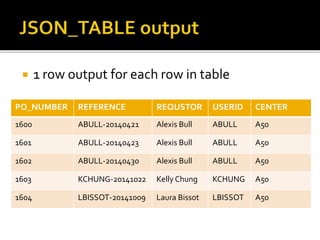
1 row output for each row in table 
PO_NUMBER REFERENCE REQUSTOR USERID CENTER 
1600 ABULL-20140421 Alexis Bull ABULL A50 
1601 ABULL-20140423 Alexis Bull ABULL A50 
1602 ABULL-20140430 Alexis Bull ABULL A50 
1603 KCHUNG-20141022 Kelly Chung KCHUNG A50 
1604 LBISSOT-20141009 Laura Bissot LBISSOT A50
create or replace view J_PURCHASEORDER_DETAIL_VIEW as 
select d.* 
from J_PURCHASEORDER p, 
JSON_TABLE 
(p.PO_DOCUMENT, '$' 
columns ( 
PO_NUMBER NUMBER(10) path '$.PONumber', 
USERID VARCHAR2(10) path '$.User', 
COSTCENTER VARCHAR2(16) path '$.CostCenter', 
NESTED PATH '$.LineItems[*]' 
columns 
( ITEMNO NUMBER(38) path '$.ItemNumber', 
UNITPRICE NUMBER(14,2) path '$.Part.UnitPrice' 
) ) ) d;
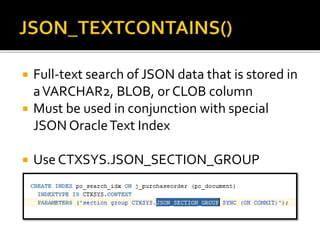
Full-text search of JSON data that is stored in 
a VARCHAR2, BLOB, or CLOB column 
Must be used in conjunction with special 
JSON Oracle Text Index 
Use CTXSYS.JSON_SECTION_GROUP
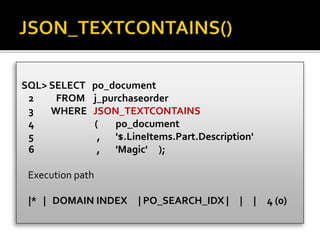
SQL> SELECT po_document 
2 FROM j_purchaseorder 
3 WHERE JSON_TEXTCONTAINS 
4 ( po_document 
5 , '$.LineItems.Part.Description' 
6 , 'Magic' ); 
Execution path 
|* | DOMAIN INDEX | PO_SEARCH_IDX | | | 4 (0)
Check constraint guarantees that values are 
valid JSON documents 
IS [NOT] JSON predicate 
 Returns TRUE if column value is JSON, FALSE 
otherwise 
 Full parse of the data while validating syntax 
 Tolerant and strict modes 
Use to ensure that the documents stored in a 
column are valid JSON
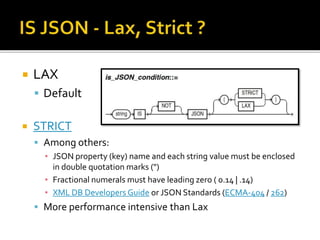
LAX 
 Default 
STRICT 
 Among others: 
▪ JSON property (key) name and each string value must be enclosed 
in double quotation marks (") 
▪ Fractional numerals must have leading zero ( 0.14 | .14) 
▪ XML DB Developers Guide or JSON Standards (ECMA-404 / 262) 
 More performance intensive than Lax
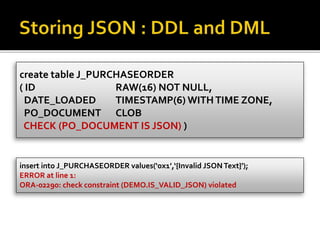
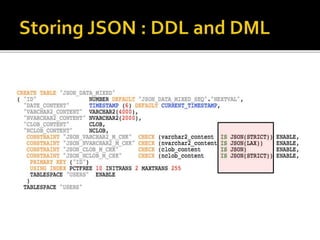
create table J_PURCHASEORDER 
( ID RAW(16) NOT NULL, 
DATE_LOADED TIMESTAMP(6) WITH TIME ZONE, 
PO_DOCUMENT CLOB 
CHECK (PO_DOCUMENT IS JSON) ) 
insert into J_PURCHASEORDER values(‘0x1’,‘{Invalid JSON Text}'); 
ERROR at line 1: 
ORA-02290: check constraint (DEMO.IS_VALID_JSON) violated
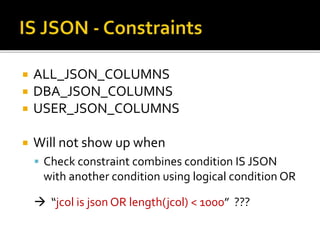
ALL_JSON_COLUMNS 
DBA_JSON_COLUMNS 
USER_JSON_COLUMNS 
Will not show up when 
 Check constraint combines condition IS JSON 
with another condition using logical condition OR 
 “jcol is json OR length(jcol) < 1000” ???
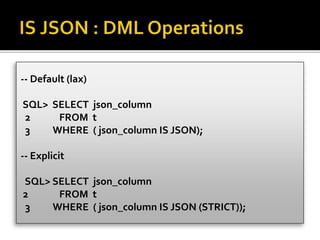
-- Default (lax) 
SQL> SELECT json_column 
2 FROM t 
3 WHERE ( json_column IS JSON); 
-- Explicit 
SQL> SELECT json_column 
2 FROM t 
3 WHERE ( json_column IS JSON (STRICT));
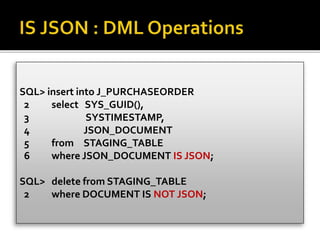
SQL> insert into J_PURCHASEORDER 
2 select SYS_GUID(), 
3 SYSTIMESTAMP, 
4 JSON_DOCUMENT 
5 from STAGING_TABLE 
6 where JSON_DOCUMENT IS JSON; 
SQL> delete from STAGING_TABLE 
2 where DOCUMENT IS NOT JSON;
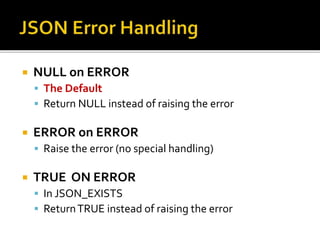
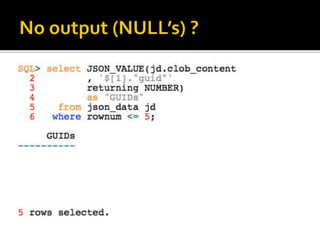
NULL on ERROR 
 The Default 
 Return NULL instead of raising the error 
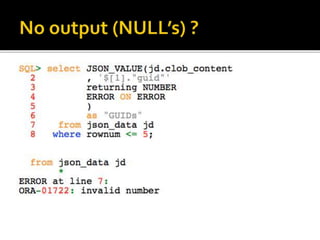
ERROR on ERROR 
 Raise the error (no special handling) 
TRUE ON ERROR 
 In JSON_EXISTS 
 Return TRUE instead of raising the error
FALSE ON ERROR 
 In JSON_EXISTS 
 Return FALSE instead of raising the error 
EMPTY ON ERROR 
 In JSON_QUERY 
 Return an empty array ([]) instead of raising the error 
DEFAULT 'literal_value' ON ERROR 
 Return the specified value instead of raising the error
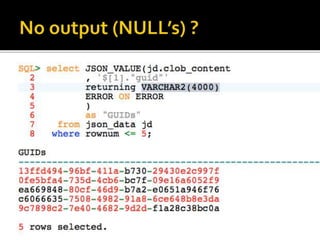
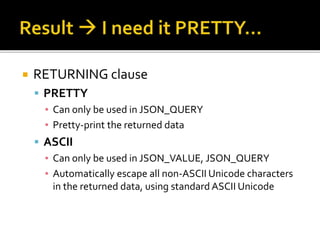
RETURNING clause 
 PRETTY 
▪ Can only be used in JSON_QUERY 
▪ Pretty-print the returned data 
 ASCII 
▪ Can only be used in JSON_VALUE, JSON_QUERY 
▪ Automatically escape all non-ASCII Unicode characters 
in the returned data, using standard ASCII Unicode
JSON_TABLE, JSON_QUERY 
 WITHOUT WRAPPER 
▪ Default, no change 
▪ Raise error, if scalar/multiple values in non JSON result 
 WITH WRAPPER 
▪ Wrap result as a JSON ARRAY [ ] 
 WITH CONDITIONAL WRAPPER 
▪ Wrap result as a JSON ARRAY [ ] 
▪ Don’t wrap result if scalar/multiple values in JSON result
For a single JSON object or array value, it is the same as WITHOUT WRAPPER. 
JSON 
Example 
WITH WRAPPER WITHOUT 
WRAPPER 
WITH CONDITIONAL 
WRAPPER 
{"id": 38327} 
(single object) 
[{"id": 38327}] {"id": 38327} {"id": 38327} 
[42, "a", true] 
(single array) 
[[42, "a", true]] [42, "a", true] [42, "a", true] 
42 [42] Error 
(scalar) 
[42] 
42, "a", true [42, "a", true] Error 
(multiple values) 
[42, "a", true] 
none [] Error 
(no values) 
[]
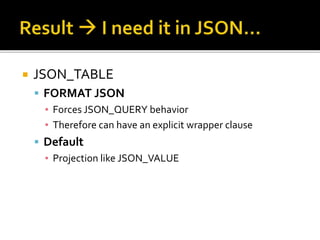
JSON_TABLE 
 FORMAT JSON 
▪ Forces JSON_QUERY behavior 
▪ Therefore can have an explicit wrapper clause 
 Default 
▪ Projection like JSON_VALUE
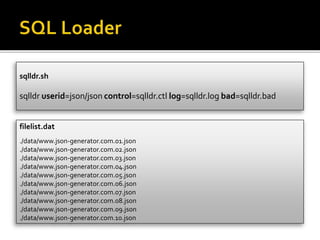
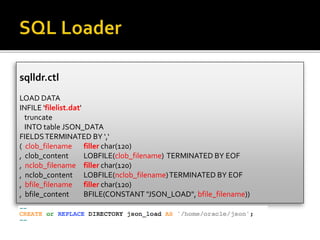
sqlldr.sh 
sqlldr userid=json/json control=sqlldr.ctl log=sqlldr.log bad=sqlldr.bad 
filelist.dat 
./data/www.json-generator.com.01.json 
./data/www.json-generator.com.02.json 
./data/www.json-generator.com.03.json 
./data/www.json-generator.com.04.json 
./data/www.json-generator.com.05.json 
./data/www.json-generator.com.06.json 
./data/www.json-generator.com.07.json 
./data/www.json-generator.com.08.json 
./data/www.json-generator.com.09.json 
./data/www.json-generator.com.10.json
sqlldr.ctl 
LOAD DATA 
INFILE 'filelist.dat' 
truncate 
INTO table JSON_DATA 
FIELDS TERMINATED BY ',‘ 
( clob_filename filler char(120) 
, clob_content LOBFILE(clob_filename) TERMINATED BY EOF 
, nclob_filename filler char(120) 
, nclob_content LOBFILE(nclob_filename) TERMINATED BY EOF 
, bfile_filename filler char(120) 
, bfile_content BFILE(CONSTANT "JSON_LOAD", bfile_filename))
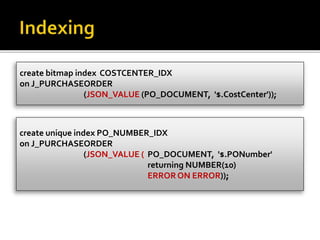
create bitmap index COSTCENTER_IDX 
on J_PURCHASEORDER 
(JSON_VALUE (PO_DOCUMENT, '$.CostCenter')); 
create unique index PO_NUMBER_IDX 
on J_PURCHASEORDER 
(JSON_VALUE ( PO_DOCUMENT, '$.PONumber' 
returning NUMBER(10) 
ERROR ON ERROR));
Path Expressions 
Operators 
Functions 
Conditions 
Error Handling 
Returning results 
Loading JSON data 
Indexing JSON data
Oracle Database SQL 
Language Reference 
 JSON Functions 
▪ JSON_QUERY 
▪ JSON_TABLE 
▪ JSON_VALUE 
 JSON Conditions 
▪ IS JSON 
▪ JSON_EXISTS 
▪ JSON_TEXTCONTAINS 
Oracle XMLDB 
Developers Guide 
 JSON in DB 12.1.0.2 
 JSON Path Expressions 
▪ Syntax 
 Indexing JSON 
▪ Syntax 
 Loading JSON 
▪ A Method 
JSON on xmldb.nl
Stanford - Introduction to Databases (JSON) 
Eclipse JSON Editor Plugin 
JSONView addon (Firefox/Chrome) 
JSON Schema 
Get Started With JSON 
www.json-generator.com 
JSON Datasets: www.data.gov

Starting with JSON Path Expressions in Oracle 12.1.0.2

  • 1.
    Mark D. Drake,Marco Gralike
  • 2.
    Manager, Product Management • Server Technology, Oracle Corporation • Oracle 25+ years experience • XML Infrastructure products in Oracle's Server Technology division
  • 4.
    Management Consultant •Ordina, The Netherlands • Oracle 20+ years experience • Oracle ACE Director (www.xmldb.nl)
  • 5.
    Basic constructs (recursive)  Base values number, string, boolean, …  Objects { } sets of label-value pairs  Arrays [ ] lists of values
  • 7.
    New in OracleDatabase 12.1.0.2.0  Store and manage JSON documents in Database ▪ JSON documents stored as text ▪ JSON documents can be indexed  Access JSON documents via developer-friendly ‘Document-Store’ API’s  SQL query capabilities over JSON documents for reporting and analysis
  • 8.
    Allows Oracle RDBMSto be used as a JSON Document Store  Enables storing, indexing and querying of JSON documents No new JSON data type IS JSON constraint used to ensure a column contains valid JSON documents  Apply to CLOB, VARCHAR2, RAWand BLOB data  Enables use of .dotted notation to navigate JSON document structure and access content
  • 9.
  • 10.
    JSON data canalso be  Partitioned  Used with Flashback  Recovered (when proper backup is in place)  Used with Securefile storage ▪ Smaller storage ▪ Encryption, Deduplication, Compressed  Multiple index options  Caching advantages, etc., etc.,…
  • 12.
    JSON content isaccessible from SQL via new operators JSON operators use JSON Path language to navigate JSON objects Proposed extention to SQL standards
  • 13.
    The JSON Pathlanguage makes it possible to address the contents of a JSON document  A JSON path expression can address 1 of 4 items ▪ The entire object, a scalar value, an array, a specific object  JSON Path expressions are similar to XPath Expressions ▪ The entire document is referenced by $ ▪ All JSON path expressions start with a $ symbol ▪ Key names are separated by a ’.’ (period) JSON Path expressions are case sensitive
  • 14.
    JSON Path ExpressionType Contents $.Reference String "ABULL-20120421" $.ShippingInstructions.Address.zipcode Number 99236 $.ShippingInstructions.Address Object { "street": "200 Sporting Green", "city": "South San Francisco", "state": "CA", "zipCode": 99236, "country": “USA" } $LineItems Array [ { "ItemNumber" : 1, "Part" : { "Description" : “Christmas” "UPCCode" : 13131092899 } }, { "ItemNumber" : 2, "Part" : { "Description" : “Easter” "UPCCode" : 13131092899 } ]
  • 15.
    Compatible with JavaScript  $.phone[0] Wildcards, Multi-Selects, Ranges  $.phone[*], $.phone[0,1 5 to 9] Predicates  .address?(.zip > $zip) SQL conversion functions usable in predicates  .?(to_date(.date) > $date)
  • 17.
    JSON_VALUE  Returna single scalar value from a JSON Document JSON_QUERY  Return a JSON Object or JSON Array from a JSON Document JSON_EXISTS  Filter rows based on JSON-PATH expressions JSON_TABLE  Project in-line, nested relational views from JSON Documents JSON_TEXTCONTAINS  JSON aware full-text searching of JSON Documents Proposed extension to SQL standards
  • 18.
    Using .dotted notation SQL> select j.PO_DOCUMENT 2 from J_PURCHASEORDER j 3 where j.PO_DOCUMENT.PONumber = 1600 4 / SQL> select j.PO_DOCUMENT.ShippingInstructions.Address 2 from J_PURCHASEORDER j 3 where j.PO_DOCUMENT.PONumber = 1600 4 /
  • 19.
    Can only returna SCALAR value SQL> select JSON_VALUE(PO_DOCUMENT, 2 '$.LineItems[0].Part.UnitPrice' 3 returning NUMBER(5,3)) 4 from J_PURCHASEORDER p 5 where JSON_VALUE(PO_DOCUMENT, 6 '$.PONumber' returning NUMBER(10)) = 1600 ;
  • 20.
    Can only returnsanARRAY or OBJECT SELECT JSON_QUERY('{a:100, b:200, c:300}', '$.*' WITH WRAPPER) AS value FROM DUAL; VALUE -------------------------------------------------------------------------------- [100,200,300]
  • 21.
    Used in theWHERE clause SQL> select count(*) 2 from J_PURCHASEORDER 3 where JSON_EXISTS( PO_DOCUMENT 4 , '$.ShippingInstructions.Address.state') 5 /
  • 22.
    Used in theFROM clause Creation of an inline relational view of JSON SQL> SELECT m.* 2 FROM J_PURCHASEORDER p 3 , JSON_TABLE 4 ( p.PO_DOCUMENT, '$' 5 columns 6 po_rno FOR ORDINALITY, 7 po_number NUMBER(10) path '$.PONumber' 8 ) m 9 WHERE po_number > 1600 and PO_Number < 1605;
  • 23.
    SQL> SELECT m.* 2 FROM J_PURCHASEORDER p 3 , JSON_TABLE 4 ( p.PO_DOCUMENT, '$' 5 columns 6 po_number NUMBER(10) path '$.PONumber', 7 reference VARCHAR2(30) path '$.Reference', 8 requestor VARCHAR2(32) path '$.Requestor', 9 userid VARCHAR2(10) path '$.User', 10 center VARCHAR2(16) path '$.CostCenter' 11 ) m 12 WHERE po_number > 1600 and PO_Number < 1605;
  • 24.
    1 row outputfor each row in table PO_NUMBER REFERENCE REQUSTOR USERID CENTER 1600 ABULL-20140421 Alexis Bull ABULL A50 1601 ABULL-20140423 Alexis Bull ABULL A50 1602 ABULL-20140430 Alexis Bull ABULL A50 1603 KCHUNG-20141022 Kelly Chung KCHUNG A50 1604 LBISSOT-20141009 Laura Bissot LBISSOT A50
  • 25.
    create or replaceview J_PURCHASEORDER_DETAIL_VIEW as select d.* from J_PURCHASEORDER p, JSON_TABLE (p.PO_DOCUMENT, '$' columns ( PO_NUMBER NUMBER(10) path '$.PONumber', USERID VARCHAR2(10) path '$.User', COSTCENTER VARCHAR2(16) path '$.CostCenter', NESTED PATH '$.LineItems[*]' columns ( ITEMNO NUMBER(38) path '$.ItemNumber', UNITPRICE NUMBER(14,2) path '$.Part.UnitPrice' ) ) ) d;
  • 26.
    Full-text search ofJSON data that is stored in a VARCHAR2, BLOB, or CLOB column Must be used in conjunction with special JSON Oracle Text Index Use CTXSYS.JSON_SECTION_GROUP
  • 27.
    SQL> SELECT po_document 2 FROM j_purchaseorder 3 WHERE JSON_TEXTCONTAINS 4 ( po_document 5 , '$.LineItems.Part.Description' 6 , 'Magic' ); Execution path |* | DOMAIN INDEX | PO_SEARCH_IDX | | | 4 (0)
  • 29.
    Check constraint guaranteesthat values are valid JSON documents IS [NOT] JSON predicate  Returns TRUE if column value is JSON, FALSE otherwise  Full parse of the data while validating syntax  Tolerant and strict modes Use to ensure that the documents stored in a column are valid JSON
  • 30.
    LAX  Default STRICT  Among others: ▪ JSON property (key) name and each string value must be enclosed in double quotation marks (") ▪ Fractional numerals must have leading zero ( 0.14 | .14) ▪ XML DB Developers Guide or JSON Standards (ECMA-404 / 262)  More performance intensive than Lax
  • 31.
    create table J_PURCHASEORDER ( ID RAW(16) NOT NULL, DATE_LOADED TIMESTAMP(6) WITH TIME ZONE, PO_DOCUMENT CLOB CHECK (PO_DOCUMENT IS JSON) ) insert into J_PURCHASEORDER values(‘0x1’,‘{Invalid JSON Text}'); ERROR at line 1: ORA-02290: check constraint (DEMO.IS_VALID_JSON) violated
  • 32.
    ALL_JSON_COLUMNS DBA_JSON_COLUMNS USER_JSON_COLUMNS Will not show up when  Check constraint combines condition IS JSON with another condition using logical condition OR  “jcol is json OR length(jcol) < 1000” ???
  • 33.
    -- Default (lax) SQL> SELECT json_column 2 FROM t 3 WHERE ( json_column IS JSON); -- Explicit SQL> SELECT json_column 2 FROM t 3 WHERE ( json_column IS JSON (STRICT));
  • 34.
    SQL> insert intoJ_PURCHASEORDER 2 select SYS_GUID(), 3 SYSTIMESTAMP, 4 JSON_DOCUMENT 5 from STAGING_TABLE 6 where JSON_DOCUMENT IS JSON; SQL> delete from STAGING_TABLE 2 where DOCUMENT IS NOT JSON;
  • 37.
    NULL on ERROR  The Default  Return NULL instead of raising the error ERROR on ERROR  Raise the error (no special handling) TRUE ON ERROR  In JSON_EXISTS  Return TRUE instead of raising the error
  • 38.
    FALSE ON ERROR  In JSON_EXISTS  Return FALSE instead of raising the error EMPTY ON ERROR  In JSON_QUERY  Return an empty array ([]) instead of raising the error DEFAULT 'literal_value' ON ERROR  Return the specified value instead of raising the error
  • 43.
    RETURNING clause PRETTY ▪ Can only be used in JSON_QUERY ▪ Pretty-print the returned data  ASCII ▪ Can only be used in JSON_VALUE, JSON_QUERY ▪ Automatically escape all non-ASCII Unicode characters in the returned data, using standard ASCII Unicode
  • 44.
    JSON_TABLE, JSON_QUERY WITHOUT WRAPPER ▪ Default, no change ▪ Raise error, if scalar/multiple values in non JSON result  WITH WRAPPER ▪ Wrap result as a JSON ARRAY [ ]  WITH CONDITIONAL WRAPPER ▪ Wrap result as a JSON ARRAY [ ] ▪ Don’t wrap result if scalar/multiple values in JSON result
  • 45.
    For a singleJSON object or array value, it is the same as WITHOUT WRAPPER. JSON Example WITH WRAPPER WITHOUT WRAPPER WITH CONDITIONAL WRAPPER {"id": 38327} (single object) [{"id": 38327}] {"id": 38327} {"id": 38327} [42, "a", true] (single array) [[42, "a", true]] [42, "a", true] [42, "a", true] 42 [42] Error (scalar) [42] 42, "a", true [42, "a", true] Error (multiple values) [42, "a", true] none [] Error (no values) []
  • 46.
    JSON_TABLE  FORMATJSON ▪ Forces JSON_QUERY behavior ▪ Therefore can have an explicit wrapper clause  Default ▪ Projection like JSON_VALUE
  • 48.
    sqlldr.sh sqlldr userid=json/jsoncontrol=sqlldr.ctl log=sqlldr.log bad=sqlldr.bad filelist.dat ./data/www.json-generator.com.01.json ./data/www.json-generator.com.02.json ./data/www.json-generator.com.03.json ./data/www.json-generator.com.04.json ./data/www.json-generator.com.05.json ./data/www.json-generator.com.06.json ./data/www.json-generator.com.07.json ./data/www.json-generator.com.08.json ./data/www.json-generator.com.09.json ./data/www.json-generator.com.10.json
  • 49.
    sqlldr.ctl LOAD DATA INFILE 'filelist.dat' truncate INTO table JSON_DATA FIELDS TERMINATED BY ',‘ ( clob_filename filler char(120) , clob_content LOBFILE(clob_filename) TERMINATED BY EOF , nclob_filename filler char(120) , nclob_content LOBFILE(nclob_filename) TERMINATED BY EOF , bfile_filename filler char(120) , bfile_content BFILE(CONSTANT "JSON_LOAD", bfile_filename))
  • 52.
    create bitmap indexCOSTCENTER_IDX on J_PURCHASEORDER (JSON_VALUE (PO_DOCUMENT, '$.CostCenter')); create unique index PO_NUMBER_IDX on J_PURCHASEORDER (JSON_VALUE ( PO_DOCUMENT, '$.PONumber' returning NUMBER(10) ERROR ON ERROR));
  • 54.
    Path Expressions Operators Functions Conditions Error Handling Returning results Loading JSON data Indexing JSON data
  • 55.
    Oracle Database SQL Language Reference  JSON Functions ▪ JSON_QUERY ▪ JSON_TABLE ▪ JSON_VALUE  JSON Conditions ▪ IS JSON ▪ JSON_EXISTS ▪ JSON_TEXTCONTAINS Oracle XMLDB Developers Guide  JSON in DB 12.1.0.2  JSON Path Expressions ▪ Syntax  Indexing JSON ▪ Syntax  Loading JSON ▪ A Method JSON on xmldb.nl
  • 56.
    Stanford - Introductionto Databases (JSON) Eclipse JSON Editor Plugin JSONView addon (Firefox/Chrome) JSON Schema Get Started With JSON www.json-generator.com JSON Datasets: www.data.gov