Copyright © 2015, Oracle and/or its affiliates. All rights reserved. |
MySQL Rises with JSON Support
MySQL 5.7
Okcan Yasin Saygılı
yasin.x.saygili@oracle.com
Copyright © 2015, Oracle and/or its affiliates. All rights reserved.
Agenda
2
1.The new JSON data type
2.Inlined JSON path expressions
3.Indexing JSON data
Copyright © 2015, Oracle and/or its affiliates. All rights reserved.
JSON Datatype
3
MySQL supports solid JSON data type and enables effect access to data in
JSON documents. The JSONdata type support these advantages over storing
JSON-format strings ,
•Automatic validation of JSON documents stored in JSON columns.
•Optimized storage format. JSON documents stored in JSON columns are
converted to an internal format that permits quick read access to document
elements.
Copyright © 2015, Oracle and/or its affiliates. All rights reserved.
JSON Datatype
4
•The size of JSON documents stored in JSON columns is limited to the value
of the max allowed packet system variable
•JSON columns cannot have a default value.
•JSON columns cannot be indexed
Copyright © 2015, Oracle and/or its affiliates. All rights reserved.
• mysql> SELECT JSON_ARRAY(1, "abc", NULL, TRUE, CURTIME());
• +---------------------------------------------+
• | JSON_ARRAY(1, "abc", NULL, TRUE, CURTIME()) |
• +---------------------------------------------+
• | [1, "abc", null, true, "11:30:24.000000"] |
• +---------------------------------------------+
5
The New JSON Datatype
Evaluates a (possibly empty) list of values and returns a JSON array
containing those values.
Copyright © 2015, Oracle and/or its affiliates. All rights reserved.
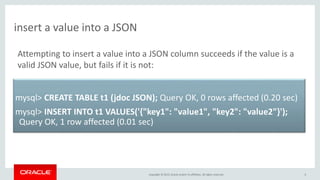
insert a value into a JSON
6
mysql> CREATE TABLE t1 (jdoc JSON); Query OK, 0 rows affected (0.20 sec)
mysql> INSERT INTO t1 VALUES('{"key1": "value1", "key2": "value2"}');
Query OK, 1 row affected (0.01 sec)
Attempting to insert a value into a JSON column succeeds if the value is a
valid JSON value, but fails if it is not:
Copyright © 2015, Oracle and/or its affiliates. All rights reserved.
Insert Value
7
mysql> SELECT JSON_INSERT(@j, '$[1].b[0]', 1, '$[2][2]', 2);
+-----------------------------------------------+
| JSON_INSERT(@j, '$[1].b[0]', 1, '$[2][2]', 2) |
+-----------------------------------------------+
| ["a", {"b": [true, false]}, [10, 20, 2]] |
+-----------------------------------------------+
JSON_INSERT() adds new values but does not replace existing values:
Copyright © 2015, Oracle and/or its affiliates. All rights reserved.
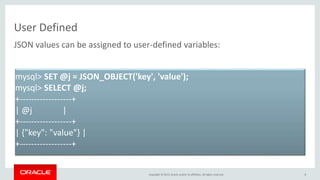
User Defined
8
JSON values can be assigned to user-defined variables:
mysql> SET @j = JSON_OBJECT('key', 'value');
mysql> SELECT @j;
+------------------+
| @j |
+------------------+
| {"key": "value"} |
+------------------+
Copyright © 2015, Oracle and/or its affiliates. All rights reserved.
JSON Replace
9
JSON_REPLACE replaces existing values and ignores new values:
mysql> SELECT JSON_REPLACE(@j, '$[1].b[0]', 1, '$[2][2]', 2);
+------------------------------------------------+
| JSON_REPLACE(@j, '$[1].b[0]', 1, '$[2][2]', 2) |
+------------------------------------------------+
| ["a", {"b": [1, false]}, [10, 20]] |
+------------------------------------------------+
Copyright © 2015, Oracle and/or its affiliates. All rights reserved.
JSON Remove
10
JSON_REMOVE() takes a JSON document and one or more paths that specify
values to be removed from the document
mysql> SELECT JSON_REMOVE(@j, '$[2]', '$[1].b[1]', '$[1].b[1]');
+---------------------------------------------------+
| JSON_REMOVE(@j, '$[2]', '$[1].b[1]', '$[1].b[1]') |
+---------------------------------------------------+
| ["a", {"b": [true]}] |
+---------------------------------------------------+
Copyright © 2015, Oracle and/or its affiliates. All rights reserved.
Agenda
11
1.The new JSON data type
2.Inlined JSON path expressions
3.Indexing JSON data
Copyright © 2015, Oracle and/or its affiliates. All rights reserved.
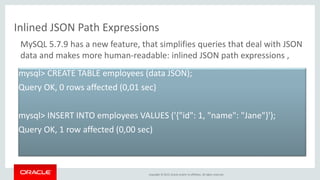
Inlined JSON Path Expressions
mysql> CREATE TABLE employees (data JSON);
Query OK, 0 rows affected (0,01 sec)
mysql> INSERT INTO employees VALUES ('{"id": 1, "name": "Jane"}');
Query OK, 1 row affected (0,00 sec)
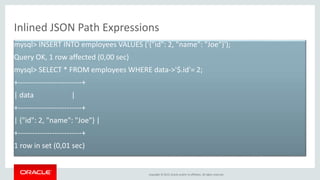
MySQL 5.7.9 has a new feature, that simplifies queries that deal with JSON
data and makes more human-readable: inlined JSON path expressions ,
Copyright © 2015, Oracle and/or its affiliates. All rights reserved.
Inlined JSON Path Expressions
mysql> INSERT INTO employees VALUES ('{"id": 2, "name": "Joe"}');
Query OK, 1 row affected (0,00 sec)
mysql> SELECT * FROM employees WHERE data->'$.id'= 2;
+--------------------------+
| data |
+--------------------------+
| {"id": 2, "name": "Joe"} |
+--------------------------+
1 row in set (0,01 sec)
Copyright © 2015, Oracle and/or its affiliates. All rights reserved.
Agenda
14
1.The new JSON data type
2.Inlined JSON path expressions
3.Indexing JSON data
Copyright © 2015, Oracle and/or its affiliates. All rights reserved.
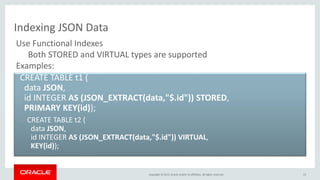
Indexing JSON Data
• CREATE TABLE t1 (
data JSON,
id INTEGER AS (JSON_EXTRACT(data,"$.id")) STORED,
PRIMARY KEY(id));
– CREATE TABLE t2 (
data JSON,
id INTEGER AS (JSON_EXTRACT(data,"$.id")) VIRTUAL,
KEY(id));
15
Use Functional Indexes
Both STORED and VIRTUAL types are supported
Examples:
Copyright © 2015, Oracle and/or its affiliates. All rights reserved.
References
• http://mysqlserverteam.com/inline-json-path-expressions-in-mysql-5-7/
• https://dev.mysql.com/doc/refman/5.7/en/json-search-functions.html
• https://dev.mysql.com/doc/refman/5.7/en/json-functions.html
• https://dev.mysql.com/doc/refman/5.7/en/json-search-functions.html
• http://www.slideshare.net/GeorgiKodinov/bgoug-2014-developing-using-my-sql
• http://www.slideshare.net/gkodinov/bgoug15-json-support-in-mysql-57?qid=409fcf82-
1139-498e-9f14-c4176d26212a&v=default&b=&from_search=1
And more …
16
Copyright © 2015, Oracle and/or its affiliates. All rights reserved.
Questions ?
17
Copyright © 2015, Oracle and/or its affiliates. All rights reserved.
Safe Harbor Statement
The preceding is intended to outline our general product direction. It is intended for
information purposes only, and may not be incorporated into any contract. It is not a
commitment to deliver any material, code, or functionality, and should not be relied upon
in making purchasing decisions. The development, release, and timing of any features or
functionality described for Oracle’s products remains at the sole discretion of Oracle.
18
Copyright © 2015, Oracle and/or its affiliates. All rights reserved. 19

MySQL Rises with JSON Support

  • 1.
    Copyright © 2015,Oracle and/or its affiliates. All rights reserved. | MySQL Rises with JSON Support MySQL 5.7 Okcan Yasin Saygılı yasin.x.saygili@oracle.com
  • 2.
    Copyright © 2015,Oracle and/or its affiliates. All rights reserved. Agenda 2 1.The new JSON data type 2.Inlined JSON path expressions 3.Indexing JSON data
  • 3.
    Copyright © 2015,Oracle and/or its affiliates. All rights reserved. JSON Datatype 3 MySQL supports solid JSON data type and enables effect access to data in JSON documents. The JSONdata type support these advantages over storing JSON-format strings , •Automatic validation of JSON documents stored in JSON columns. •Optimized storage format. JSON documents stored in JSON columns are converted to an internal format that permits quick read access to document elements.
  • 4.
    Copyright © 2015,Oracle and/or its affiliates. All rights reserved. JSON Datatype 4 •The size of JSON documents stored in JSON columns is limited to the value of the max allowed packet system variable •JSON columns cannot have a default value. •JSON columns cannot be indexed
  • 5.
    Copyright © 2015,Oracle and/or its affiliates. All rights reserved. • mysql> SELECT JSON_ARRAY(1, "abc", NULL, TRUE, CURTIME()); • +---------------------------------------------+ • | JSON_ARRAY(1, "abc", NULL, TRUE, CURTIME()) | • +---------------------------------------------+ • | [1, "abc", null, true, "11:30:24.000000"] | • +---------------------------------------------+ 5 The New JSON Datatype Evaluates a (possibly empty) list of values and returns a JSON array containing those values.
  • 6.
    Copyright © 2015,Oracle and/or its affiliates. All rights reserved. insert a value into a JSON 6 mysql> CREATE TABLE t1 (jdoc JSON); Query OK, 0 rows affected (0.20 sec) mysql> INSERT INTO t1 VALUES('{"key1": "value1", "key2": "value2"}'); Query OK, 1 row affected (0.01 sec) Attempting to insert a value into a JSON column succeeds if the value is a valid JSON value, but fails if it is not:
  • 7.
    Copyright © 2015,Oracle and/or its affiliates. All rights reserved. Insert Value 7 mysql> SELECT JSON_INSERT(@j, '$[1].b[0]', 1, '$[2][2]', 2); +-----------------------------------------------+ | JSON_INSERT(@j, '$[1].b[0]', 1, '$[2][2]', 2) | +-----------------------------------------------+ | ["a", {"b": [true, false]}, [10, 20, 2]] | +-----------------------------------------------+ JSON_INSERT() adds new values but does not replace existing values:
  • 8.
    Copyright © 2015,Oracle and/or its affiliates. All rights reserved. User Defined 8 JSON values can be assigned to user-defined variables: mysql> SET @j = JSON_OBJECT('key', 'value'); mysql> SELECT @j; +------------------+ | @j | +------------------+ | {"key": "value"} | +------------------+
  • 9.
    Copyright © 2015,Oracle and/or its affiliates. All rights reserved. JSON Replace 9 JSON_REPLACE replaces existing values and ignores new values: mysql> SELECT JSON_REPLACE(@j, '$[1].b[0]', 1, '$[2][2]', 2); +------------------------------------------------+ | JSON_REPLACE(@j, '$[1].b[0]', 1, '$[2][2]', 2) | +------------------------------------------------+ | ["a", {"b": [1, false]}, [10, 20]] | +------------------------------------------------+
  • 10.
    Copyright © 2015,Oracle and/or its affiliates. All rights reserved. JSON Remove 10 JSON_REMOVE() takes a JSON document and one or more paths that specify values to be removed from the document mysql> SELECT JSON_REMOVE(@j, '$[2]', '$[1].b[1]', '$[1].b[1]'); +---------------------------------------------------+ | JSON_REMOVE(@j, '$[2]', '$[1].b[1]', '$[1].b[1]') | +---------------------------------------------------+ | ["a", {"b": [true]}] | +---------------------------------------------------+
  • 11.
    Copyright © 2015,Oracle and/or its affiliates. All rights reserved. Agenda 11 1.The new JSON data type 2.Inlined JSON path expressions 3.Indexing JSON data
  • 12.
    Copyright © 2015,Oracle and/or its affiliates. All rights reserved. Inlined JSON Path Expressions mysql> CREATE TABLE employees (data JSON); Query OK, 0 rows affected (0,01 sec) mysql> INSERT INTO employees VALUES ('{"id": 1, "name": "Jane"}'); Query OK, 1 row affected (0,00 sec) MySQL 5.7.9 has a new feature, that simplifies queries that deal with JSON data and makes more human-readable: inlined JSON path expressions ,
  • 13.
    Copyright © 2015,Oracle and/or its affiliates. All rights reserved. Inlined JSON Path Expressions mysql> INSERT INTO employees VALUES ('{"id": 2, "name": "Joe"}'); Query OK, 1 row affected (0,00 sec) mysql> SELECT * FROM employees WHERE data->'$.id'= 2; +--------------------------+ | data | +--------------------------+ | {"id": 2, "name": "Joe"} | +--------------------------+ 1 row in set (0,01 sec)
  • 14.
    Copyright © 2015,Oracle and/or its affiliates. All rights reserved. Agenda 14 1.The new JSON data type 2.Inlined JSON path expressions 3.Indexing JSON data
  • 15.
    Copyright © 2015,Oracle and/or its affiliates. All rights reserved. Indexing JSON Data • CREATE TABLE t1 ( data JSON, id INTEGER AS (JSON_EXTRACT(data,"$.id")) STORED, PRIMARY KEY(id)); – CREATE TABLE t2 ( data JSON, id INTEGER AS (JSON_EXTRACT(data,"$.id")) VIRTUAL, KEY(id)); 15 Use Functional Indexes Both STORED and VIRTUAL types are supported Examples:
  • 16.
    Copyright © 2015,Oracle and/or its affiliates. All rights reserved. References • http://mysqlserverteam.com/inline-json-path-expressions-in-mysql-5-7/ • https://dev.mysql.com/doc/refman/5.7/en/json-search-functions.html • https://dev.mysql.com/doc/refman/5.7/en/json-search-functions.html • https://dev.mysql.com/doc/refman/5.7/en/json-functions.html • https://dev.mysql.com/doc/refman/5.7/en/json-search-functions.html • http://www.slideshare.net/GeorgiKodinov/bgoug-2014-developing-using-my-sql • http://www.slideshare.net/gkodinov/bgoug15-json-support-in-mysql-57?qid=409fcf82- 1139-498e-9f14-c4176d26212a&v=default&b=&from_search=1 And more … 16
  • 17.
    Copyright © 2015,Oracle and/or its affiliates. All rights reserved. Questions ? 17
  • 18.
    Copyright © 2015,Oracle and/or its affiliates. All rights reserved. Safe Harbor Statement The preceding is intended to outline our general product direction. It is intended for information purposes only, and may not be incorporated into any contract. It is not a commitment to deliver any material, code, or functionality, and should not be relied upon in making purchasing decisions. The development, release, and timing of any features or functionality described for Oracle’s products remains at the sole discretion of Oracle. 18
  • 19.
    Copyright © 2015,Oracle and/or its affiliates. All rights reserved. 19