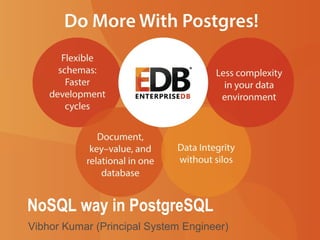
NoSQL way in PostgreSQL 
Vibhor Kumar (Principal System Engineer)
Agenda 
• Intro to JSON, HSTORE and PL/V8 
• JSON History in Postgres 
• JSON Data Types, Operators and Functions 
• JSON, JSONB– when to use which one? 
• JSONB and Node.JS – easy as pie 
• NoSQL Performance in Postgres – fast as greased lightning 
• Say ‘Yes’ to ‘Not only SQL’ 
• Useful resources 
© 2014 EnterpriseDB Corporation. All rights reserved. 2
Let’s Ask Ourselves, Why NoSQL? 
• Where did NoSQL come from? 
− Where all cool tech stuff comes from – Internet companies 
• Why did they make NoSQL? 
− To support huge data volumes and evolving demands for ways 
to work with new data types 
• What does NoSQL accomplish? 
− Enables you to work with new data types: email, mobile 
interactions, machine data, social connections 
− Enables you to work in new ways: incremental development 
and continuous release 
• Why did they have to build something new? 
− There were limitations to most relational databases 
© 2014 EnterpriseDB Corporation. All rights reserved. 3
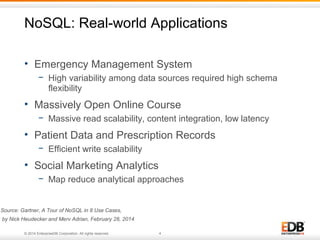
NoSQL: Real-world Applications 
• Emergency Management System 
− High variability among data sources required high schema 
flexibility 
• Massively Open Online Course 
− Massive read scalability, content integration, low latency 
• Patient Data and Prescription Records 
− Efficient write scalability 
• Social Marketing Analytics 
− Map reduce analytical approaches 
Source: Gartner, A Tour of NoSQL in 8 Use Cases, 
by Nick Heudecker and Merv Adrian, February 28, 2014 
© 2014 EnterpriseDB Corporation. All rights reserved. 4
Postgres’ Response 
• HSTORE 
− Key-value pair 
− Simple, fast and easy 
− Postgres v 8.2 – pre-dates many NoSQL-only solutions 
− Ideal for flat data structures that are sparsely populated 
• JSON 
− Hierarchical document model 
− Introduced in Postgres 9.2, perfected in 9.3 
• JSONB 
− Binary version of JSON 
− Faster, more operators and even more robust 
− Postgres 9.4 
© 2014 EnterpriseDB Corporation. All rights reserved. 5
Postgres: Key-value Store 
• Supported since 2006, the HStore 
contrib module enables storing 
key/value pairs within a single 
column 
• Allows you to create a schema-less, 
ACID compliant data store within 
Postgres 
• Create single HStore column and 
include, for each row, only those keys 
which pertain to the record 
• Add attributes to a table and query 
without advance planning 
•Combines flexibility with ACID compliance 
© 2014 EnterpriseDB Corporation. All rights reserved. 6
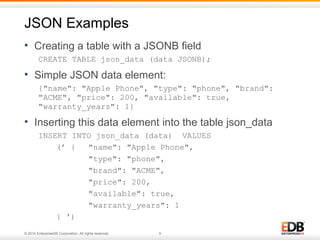
HSTORE Examples 
• Create a table with HSTORE field 
CREATE TABLE hstore_data (data HSTORE); 
• Insert a record into hstore_data 
INSERT INTO hstore_data (data) VALUES (’ 
"cost"=>"500", 
"product"=>"iphone", 
"provider"=>"apple"'); 
• Select data from hstore_data 
SELECT data FROM hstore_data ; 
------------------------------------------ 
"cost"=>"500”,"product"=>"iphone”,"provider"=>"Apple" 
(1 row) 
© 2014 EnterpriseDB Corporation. All rights reserved. 7
Postgres: Document Store 
• JSON is the most popular 
data-interchange format on the web 
• Derived from the ECMAScript 
Programming Language Standard 
(European Computer Manufacturers 
Association). 
• Supported by virtually every 
programming language 
• New supporting technologies 
continue to expand JSON’s utility 
− PL/V8 JavaScript extension 
− Node.js 
• Postgres has a native JSON data type (v9.2) and a JSON parser and a 
variety of JSON functions (v9.3) 
• Postgres will have a JSONB data type with binary storage and indexing 
(coming – v9.4) 
© 2014 EnterpriseDB Corporation. All rights reserved. 8
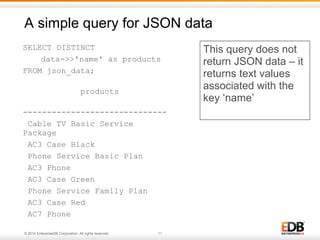
JSON Examples 
• Creating a table with a JSONB field 
CREATE TABLE json_data (data JSONB); 
• Simple JSON data element: 
{"name": "Apple Phone", "type": "phone", "brand": 
"ACME", "price": 200, "available": true, 
"warranty_years": 1} 
• Inserting this data element into the table json_data 
INSERT INTO json_data (data) VALUES 
(’ { "name": "Apple Phone", 
"type": "phone", 
"brand": "ACME", 
"price": 200, 
"available": true, 
"warranty_years": 1 
} ') 
© 2014 EnterpriseDB Corporation. All rights reserved. 9
JSON Examples 
• JSON data element with nesting: 
{“full name”: “John Joseph Carl Salinger”, 
“names”: 
[ 
{"type": "firstname", “value”: ”John”}, 
{“type”: “middlename”, “value”: “Joseph”}, 
{“type”: “middlename”, “value”: “Carl”}, 
{“type”: “lastname”, “value”: “Salinger”} 
] 
} 
© 2014 EnterpriseDB Corporation. All rights reserved. 10
A simple query for JSON data 
SELECT DISTINCT 
data->>'name' as products 
FROM json_data; 
products 
------------------------------ 
Cable TV Basic Service 
Package 
AC3 Case Black 
Phone Service Basic Plan 
AC3 Phone 
AC3 Case Green 
Phone Service Family Plan 
AC3 Case Red 
AC7 Phone 
© 2014 EnterpriseDB Corporation. All rights reserved. 11 
This query does not 
return JSON data – it 
returns text values 
associated with the 
key ‘name’
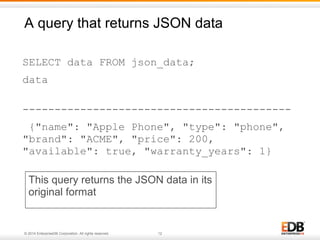
A query that returns JSON data 
SELECT data FROM json_data; 
data 
------------------------------------------ 
{"name": "Apple Phone", "type": "phone", 
"brand": "ACME", "price": 200, 
"available": true, "warranty_years": 1} 
This query returns the JSON data in its 
original format 
© 2014 EnterpriseDB Corporation. All rights reserved. 12
JSON and ANSI SQL - PB&J for the DBA 
• JSON is naturally 
integrated with ANSI SQL 
in Postgres 
• JSON and SQL queries 
use the same language, the 
same planner, and the same ACID compliant 
transaction framework 
• JSON and HSTORE are elegant and easy to use 
extensions of the underlying object-relational model 
© 2014 EnterpriseDB Corporation. All rights reserved. 13
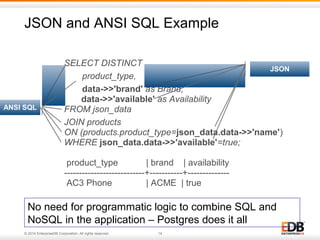
JSON and ANSI SQL Example 
SELECT DISTINCT 
product_type, 
data->>'brand' as Brand, 
data->>'available' as Availability 
FROM json_data 
JOIN products 
ON (products.product_type=json_data.data->>'name') 
WHERE json_data.data->>'available'=true; 
product_type | brand | availability 
---------------------------+-----------+-------------- 
AC3 Phone | ACME | true 
ANSI SQL 
© 2014 EnterpriseDB Corporation. All rights reserved. 14 
JSON 
No need for programmatic logic to combine SQL and 
NoSQL in the application – Postgres does it all
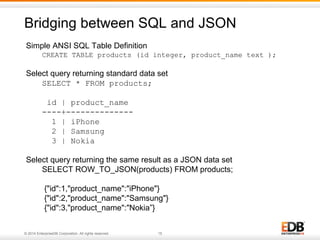
Bridging between SQL and JSON 
Simple ANSI SQL Table Definition 
CREATE TABLE products (id integer, product_name text ); 
Select query returning standard data set 
SELECT * FROM products; 
id | product_name 
----+-------------- 
1 | iPhone 
2 | Samsung 
3 | Nokia 
Select query returning the same result as a JSON data set 
SELECT ROW_TO_JSON(products) FROM products; 
{"id":1,"product_name":"iPhone"} 
{"id":2,"product_name":"Samsung"} 
{"id":3,"product_name":"Nokia”} 
© 2014 EnterpriseDB Corporation. All rights reserved. 15
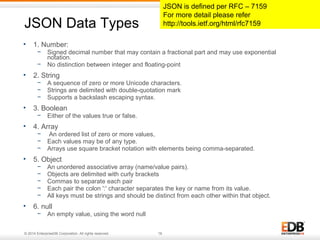
JSON Data Types 
• 1. Number: 
− Signed decimal number that may contain a fractional part and may use exponential 
notation. 
− No distinction between integer and floating-point 
• 2. String 
− A sequence of zero or more Unicode characters. 
− Strings are delimited with double-quotation mark 
− Supports a backslash escaping syntax. 
• 3. Boolean 
− Either of the values true or false. 
• 4. Array 
− An ordered list of zero or more values, 
− Each values may be of any type. 
− Arrays use square bracket notation with elements being comma-separated. 
• 5. Object 
− An unordered associative array (name/value pairs). 
− Objects are delimited with curly brackets 
− Commas to separate each pair 
− Each pair the colon ':' character separates the key or name from its value. 
− All keys must be strings and should be distinct from each other within that object. 
• 6. null 
− An empty value, using the word null 
© 2014 EnterpriseDB Corporation. All rights reserved. 16 
JSON is defined per RFC – 7159 
For more detail please refer 
http://tools.ietf.org/html/rfc7159
JSON Data Type Example 
{ 
"firstName": "John", -- String Type 
"lastName": "Smith", -- String Type 
"isAlive": true, -- Boolean Type 
"age": 25, -- Number Type 
"height_cm": 167.6, -- Number Type 
"address": { -- Object Type 
"streetAddress": "21 2nd Street”, 
"city": "New York”, 
"state": "NY”, 
"postalCode": "10021-3100” 
}, 
"phoneNumbers": [ // Object Array 
{ // Object 
"type": "home”, 
"number": "212 555-1234” 
}, 
{ 
"type": "office”, 
"number": "646 555-4567” 
} 
], 
"children": [], 
"spouse": null // Null 
} 
© 2014 EnterpriseDB Corporation. All rights reserved. 17
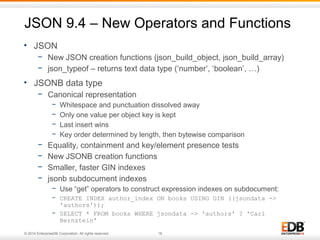
JSON 9.4 – New Operators and Functions 
• JSON 
− New JSON creation functions (json_build_object, json_build_array) 
− json_typeof – returns text data type (‘number’, ‘boolean’, …) 
• JSONB data type 
− Canonical representation 
− Whitespace and punctuation dissolved away 
− Only one value per object key is kept 
− Last insert wins 
− Key order determined by length, then bytewise comparison 
− Equality, containment and key/element presence tests 
− New JSONB creation functions 
− Smaller, faster GIN indexes 
− jsonb subdocument indexes 
− Use “get” operators to construct expression indexes on subdocument: 
− CREATE INDEX author_index ON books USING GIN ((jsondata -> 
'authors')); 
− SELECT * FROM books WHERE jsondata -> 'authors' ? 'Carl 
Bernstein' 
© 2014 EnterpriseDB Corporation. All rights reserved. 18
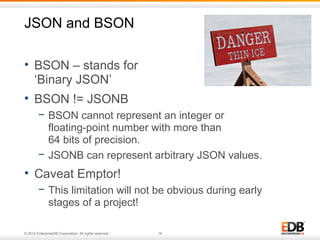
JSON and BSON 
• BSON – stands for 
‘Binary JSON’ 
• BSON != JSONB 
− BSON cannot represent an integer or 
floating-point number with more than 
64 bits of precision. 
− JSONB can represent arbitrary JSON values. 
• Caveat Emptor! 
− This limitation will not be obvious during early 
stages of a project! 
© 2014 EnterpriseDB Corporation. All rights reserved. 19
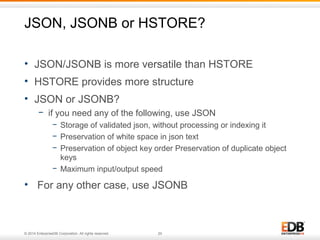
JSON, JSONB or HSTORE? 
• JSON/JSONB is more versatile than HSTORE 
• HSTORE provides more structure 
• JSON or JSONB? 
− if you need any of the following, use JSON 
− Storage of validated json, without processing or indexing it 
− Preservation of white space in json text 
− Preservation of object key order Preservation of duplicate object 
keys 
− Maximum input/output speed 
• For any other case, use JSONB 
© 2014 EnterpriseDB Corporation. All rights reserved. 20
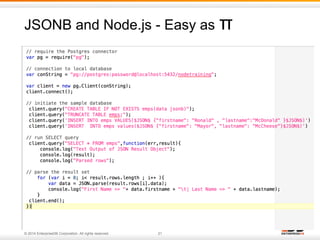
JSONB and Node.js - Easy as π 
• Simple Demo of Node.js to Postgres cnnection 
© 2014 EnterpriseDB Corporation. All rights reserved. 21
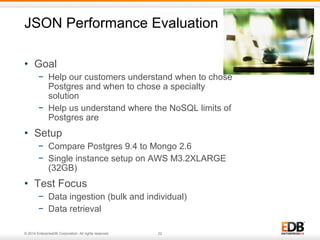
JSON Performance Evaluation 
• Goal 
− Help our customers understand when to chose 
Postgres and when to chose a specialty 
solution 
− Help us understand where the NoSQL limits of 
Postgres are 
• Setup 
− Compare Postgres 9.4 to Mongo 2.6 
− Single instance setup on AWS M3.2XLARGE 
(32GB) 
• Test Focus 
− Data ingestion (bulk and individual) 
− Data retrieval 
© 2014 EnterpriseDB Corporation. All rights reserved. 22
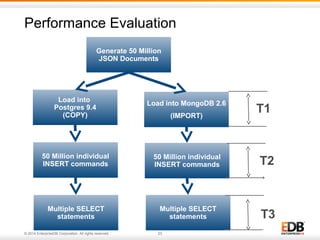
Performance Evaluation 
Generate 50 Million 
JSON Documents 
Load into MongoDB 2.6 
© 2014 EnterpriseDB Corporation. All rights reserved. 23 
(IMPORT) 
Load into 
Postgres 9.4 
(COPY) 
50 Million individual 
INSERT commands 
50 Million individual 
INSERT commands 
Multiple SELECT 
statements 
Multiple SELECT 
statements 
T1 
T2 
T3
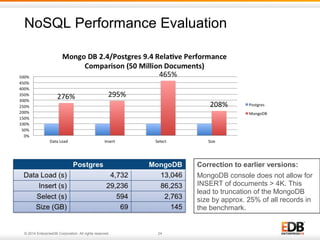
NoSQL Performance Evaluation 
© 2014 EnterpriseDB Corporation. All rights reserved. 24 
Correction to earlier versions: 
MongoDB console does not allow for 
INSERT of documents > 4K. This 
lead to truncation of the MongoDB 
size by approx. 25% of all records in 
the benchmark.
Performance Evaluations – Next Steps 
• Initial tests confirm that Postgres’ can handle many 
NoSQL workloads 
• EDB is making the test scripts publically available 
• EDB encourages community participation to 
better define where Postgres should be used 
and where specialty solutions are appropriate 
• Download the source at 
https://github.com/EnterpriseDB/pg_nosql_benchmark 
• Join us to discuss the findings at 
http://bit.ly/EDB-NoSQL-Postgres-Benchmark 
© 2014 EnterpriseDB Corporation. All rights reserved. 25
Structured or Unstructured? 
“No SQL Only” or “Not Only SQL”? 
• Structures and standards emerge! 
• Data has references (products link to catalogues; 
products have bills of material; components appear in 
multiple products; storage locations link to ISO country 
tables) 
• When the database has duplicate data entries, then the 
application has to manage updates in multiple places – 
what happens when there is no ACID transactional 
model? 
© 2014 EnterpriseDB Corporation. All rights reserved. 26
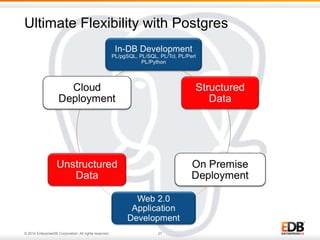
Ultimate Flexibility with Postgres 
© 2014 EnterpriseDB Corporation. All rights reserved. 27
Say yes to ‘Not only SQL’ 
• Postgres overcomes many of the standard objections 
“It can’t be done with a conventional database system” 
• Postgres 
− Combines structured data and unstructured data (ANSI SQL 
and JSON/HSTORE) 
− Is faster (for many workloads) than than the leading NoSQL-only 
solution 
− Integrates easily with Web 2.0 application development 
environments 
− Can be deployed on-premise or in the cloud 
Do more with Postgres – the Enterprise NoSQL Solution 
© 2014 EnterpriseDB Corporation. All rights reserved. 28
Useful Resources 
• Postgres NoSQL Training Events 
− Bruce Momjian & Vibhor Kumar @ pgEurope 
− Madrid (Oct 21): Maximizing Results with JSONB and PostgreSQL 
• Whitepapers @ http://www.enterprisedb.com/nosql-for-enterprise 
− PostgreSQL Advances to Meet NoSQL Challenges (business 
oriented) 
− Using the NoSQL Capabilities in Postgres (full of code examples) 
• Run the NoSQL benchmark 
− https://github.com/EnterpriseDB/pg_nosql_benchmark 
© 2014 EnterpriseDB Corporation. All rights reserved. 29
© 2014 EnterpriseDB Corporation. All rights reserved. 30

The NoSQL Way in Postgres

  • 1.
    NoSQL way inPostgreSQL Vibhor Kumar (Principal System Engineer)
  • 2.
    Agenda • Introto JSON, HSTORE and PL/V8 • JSON History in Postgres • JSON Data Types, Operators and Functions • JSON, JSONB– when to use which one? • JSONB and Node.JS – easy as pie • NoSQL Performance in Postgres – fast as greased lightning • Say ‘Yes’ to ‘Not only SQL’ • Useful resources © 2014 EnterpriseDB Corporation. All rights reserved. 2
  • 3.
    Let’s Ask Ourselves,Why NoSQL? • Where did NoSQL come from? − Where all cool tech stuff comes from – Internet companies • Why did they make NoSQL? − To support huge data volumes and evolving demands for ways to work with new data types • What does NoSQL accomplish? − Enables you to work with new data types: email, mobile interactions, machine data, social connections − Enables you to work in new ways: incremental development and continuous release • Why did they have to build something new? − There were limitations to most relational databases © 2014 EnterpriseDB Corporation. All rights reserved. 3
  • 4.
    NoSQL: Real-world Applications • Emergency Management System − High variability among data sources required high schema flexibility • Massively Open Online Course − Massive read scalability, content integration, low latency • Patient Data and Prescription Records − Efficient write scalability • Social Marketing Analytics − Map reduce analytical approaches Source: Gartner, A Tour of NoSQL in 8 Use Cases, by Nick Heudecker and Merv Adrian, February 28, 2014 © 2014 EnterpriseDB Corporation. All rights reserved. 4
  • 5.
    Postgres’ Response •HSTORE − Key-value pair − Simple, fast and easy − Postgres v 8.2 – pre-dates many NoSQL-only solutions − Ideal for flat data structures that are sparsely populated • JSON − Hierarchical document model − Introduced in Postgres 9.2, perfected in 9.3 • JSONB − Binary version of JSON − Faster, more operators and even more robust − Postgres 9.4 © 2014 EnterpriseDB Corporation. All rights reserved. 5
  • 6.
    Postgres: Key-value Store • Supported since 2006, the HStore contrib module enables storing key/value pairs within a single column • Allows you to create a schema-less, ACID compliant data store within Postgres • Create single HStore column and include, for each row, only those keys which pertain to the record • Add attributes to a table and query without advance planning •Combines flexibility with ACID compliance © 2014 EnterpriseDB Corporation. All rights reserved. 6
  • 7.
    HSTORE Examples •Create a table with HSTORE field CREATE TABLE hstore_data (data HSTORE); • Insert a record into hstore_data INSERT INTO hstore_data (data) VALUES (’ "cost"=>"500", "product"=>"iphone", "provider"=>"apple"'); • Select data from hstore_data SELECT data FROM hstore_data ; ------------------------------------------ "cost"=>"500”,"product"=>"iphone”,"provider"=>"Apple" (1 row) © 2014 EnterpriseDB Corporation. All rights reserved. 7
  • 8.
    Postgres: Document Store • JSON is the most popular data-interchange format on the web • Derived from the ECMAScript Programming Language Standard (European Computer Manufacturers Association). • Supported by virtually every programming language • New supporting technologies continue to expand JSON’s utility − PL/V8 JavaScript extension − Node.js • Postgres has a native JSON data type (v9.2) and a JSON parser and a variety of JSON functions (v9.3) • Postgres will have a JSONB data type with binary storage and indexing (coming – v9.4) © 2014 EnterpriseDB Corporation. All rights reserved. 8
  • 9.
    JSON Examples •Creating a table with a JSONB field CREATE TABLE json_data (data JSONB); • Simple JSON data element: {"name": "Apple Phone", "type": "phone", "brand": "ACME", "price": 200, "available": true, "warranty_years": 1} • Inserting this data element into the table json_data INSERT INTO json_data (data) VALUES (’ { "name": "Apple Phone", "type": "phone", "brand": "ACME", "price": 200, "available": true, "warranty_years": 1 } ') © 2014 EnterpriseDB Corporation. All rights reserved. 9
  • 10.
    JSON Examples •JSON data element with nesting: {“full name”: “John Joseph Carl Salinger”, “names”: [ {"type": "firstname", “value”: ”John”}, {“type”: “middlename”, “value”: “Joseph”}, {“type”: “middlename”, “value”: “Carl”}, {“type”: “lastname”, “value”: “Salinger”} ] } © 2014 EnterpriseDB Corporation. All rights reserved. 10
  • 11.
    A simple queryfor JSON data SELECT DISTINCT data->>'name' as products FROM json_data; products ------------------------------ Cable TV Basic Service Package AC3 Case Black Phone Service Basic Plan AC3 Phone AC3 Case Green Phone Service Family Plan AC3 Case Red AC7 Phone © 2014 EnterpriseDB Corporation. All rights reserved. 11 This query does not return JSON data – it returns text values associated with the key ‘name’
  • 12.
    A query thatreturns JSON data SELECT data FROM json_data; data ------------------------------------------ {"name": "Apple Phone", "type": "phone", "brand": "ACME", "price": 200, "available": true, "warranty_years": 1} This query returns the JSON data in its original format © 2014 EnterpriseDB Corporation. All rights reserved. 12
  • 13.
    JSON and ANSISQL - PB&J for the DBA • JSON is naturally integrated with ANSI SQL in Postgres • JSON and SQL queries use the same language, the same planner, and the same ACID compliant transaction framework • JSON and HSTORE are elegant and easy to use extensions of the underlying object-relational model © 2014 EnterpriseDB Corporation. All rights reserved. 13
  • 14.
    JSON and ANSISQL Example SELECT DISTINCT product_type, data->>'brand' as Brand, data->>'available' as Availability FROM json_data JOIN products ON (products.product_type=json_data.data->>'name') WHERE json_data.data->>'available'=true; product_type | brand | availability ---------------------------+-----------+-------------- AC3 Phone | ACME | true ANSI SQL © 2014 EnterpriseDB Corporation. All rights reserved. 14 JSON No need for programmatic logic to combine SQL and NoSQL in the application – Postgres does it all
  • 15.
    Bridging between SQLand JSON Simple ANSI SQL Table Definition CREATE TABLE products (id integer, product_name text ); Select query returning standard data set SELECT * FROM products; id | product_name ----+-------------- 1 | iPhone 2 | Samsung 3 | Nokia Select query returning the same result as a JSON data set SELECT ROW_TO_JSON(products) FROM products; {"id":1,"product_name":"iPhone"} {"id":2,"product_name":"Samsung"} {"id":3,"product_name":"Nokia”} © 2014 EnterpriseDB Corporation. All rights reserved. 15
  • 16.
    JSON Data Types • 1. Number: − Signed decimal number that may contain a fractional part and may use exponential notation. − No distinction between integer and floating-point • 2. String − A sequence of zero or more Unicode characters. − Strings are delimited with double-quotation mark − Supports a backslash escaping syntax. • 3. Boolean − Either of the values true or false. • 4. Array − An ordered list of zero or more values, − Each values may be of any type. − Arrays use square bracket notation with elements being comma-separated. • 5. Object − An unordered associative array (name/value pairs). − Objects are delimited with curly brackets − Commas to separate each pair − Each pair the colon ':' character separates the key or name from its value. − All keys must be strings and should be distinct from each other within that object. • 6. null − An empty value, using the word null © 2014 EnterpriseDB Corporation. All rights reserved. 16 JSON is defined per RFC – 7159 For more detail please refer http://tools.ietf.org/html/rfc7159
  • 17.
    JSON Data TypeExample { "firstName": "John", -- String Type "lastName": "Smith", -- String Type "isAlive": true, -- Boolean Type "age": 25, -- Number Type "height_cm": 167.6, -- Number Type "address": { -- Object Type "streetAddress": "21 2nd Street”, "city": "New York”, "state": "NY”, "postalCode": "10021-3100” }, "phoneNumbers": [ // Object Array { // Object "type": "home”, "number": "212 555-1234” }, { "type": "office”, "number": "646 555-4567” } ], "children": [], "spouse": null // Null } © 2014 EnterpriseDB Corporation. All rights reserved. 17
  • 18.
    JSON 9.4 –New Operators and Functions • JSON − New JSON creation functions (json_build_object, json_build_array) − json_typeof – returns text data type (‘number’, ‘boolean’, …) • JSONB data type − Canonical representation − Whitespace and punctuation dissolved away − Only one value per object key is kept − Last insert wins − Key order determined by length, then bytewise comparison − Equality, containment and key/element presence tests − New JSONB creation functions − Smaller, faster GIN indexes − jsonb subdocument indexes − Use “get” operators to construct expression indexes on subdocument: − CREATE INDEX author_index ON books USING GIN ((jsondata -> 'authors')); − SELECT * FROM books WHERE jsondata -> 'authors' ? 'Carl Bernstein' © 2014 EnterpriseDB Corporation. All rights reserved. 18
  • 19.
    JSON and BSON • BSON – stands for ‘Binary JSON’ • BSON != JSONB − BSON cannot represent an integer or floating-point number with more than 64 bits of precision. − JSONB can represent arbitrary JSON values. • Caveat Emptor! − This limitation will not be obvious during early stages of a project! © 2014 EnterpriseDB Corporation. All rights reserved. 19
  • 20.
    JSON, JSONB orHSTORE? • JSON/JSONB is more versatile than HSTORE • HSTORE provides more structure • JSON or JSONB? − if you need any of the following, use JSON − Storage of validated json, without processing or indexing it − Preservation of white space in json text − Preservation of object key order Preservation of duplicate object keys − Maximum input/output speed • For any other case, use JSONB © 2014 EnterpriseDB Corporation. All rights reserved. 20
  • 21.
    JSONB and Node.js- Easy as π • Simple Demo of Node.js to Postgres cnnection © 2014 EnterpriseDB Corporation. All rights reserved. 21
  • 22.
    JSON Performance Evaluation • Goal − Help our customers understand when to chose Postgres and when to chose a specialty solution − Help us understand where the NoSQL limits of Postgres are • Setup − Compare Postgres 9.4 to Mongo 2.6 − Single instance setup on AWS M3.2XLARGE (32GB) • Test Focus − Data ingestion (bulk and individual) − Data retrieval © 2014 EnterpriseDB Corporation. All rights reserved. 22
  • 23.
    Performance Evaluation Generate50 Million JSON Documents Load into MongoDB 2.6 © 2014 EnterpriseDB Corporation. All rights reserved. 23 (IMPORT) Load into Postgres 9.4 (COPY) 50 Million individual INSERT commands 50 Million individual INSERT commands Multiple SELECT statements Multiple SELECT statements T1 T2 T3
  • 24.
    NoSQL Performance Evaluation © 2014 EnterpriseDB Corporation. All rights reserved. 24 Correction to earlier versions: MongoDB console does not allow for INSERT of documents > 4K. This lead to truncation of the MongoDB size by approx. 25% of all records in the benchmark.
  • 25.
    Performance Evaluations –Next Steps • Initial tests confirm that Postgres’ can handle many NoSQL workloads • EDB is making the test scripts publically available • EDB encourages community participation to better define where Postgres should be used and where specialty solutions are appropriate • Download the source at https://github.com/EnterpriseDB/pg_nosql_benchmark • Join us to discuss the findings at http://bit.ly/EDB-NoSQL-Postgres-Benchmark © 2014 EnterpriseDB Corporation. All rights reserved. 25
  • 26.
    Structured or Unstructured? “No SQL Only” or “Not Only SQL”? • Structures and standards emerge! • Data has references (products link to catalogues; products have bills of material; components appear in multiple products; storage locations link to ISO country tables) • When the database has duplicate data entries, then the application has to manage updates in multiple places – what happens when there is no ACID transactional model? © 2014 EnterpriseDB Corporation. All rights reserved. 26
  • 27.
    Ultimate Flexibility withPostgres © 2014 EnterpriseDB Corporation. All rights reserved. 27
  • 28.
    Say yes to‘Not only SQL’ • Postgres overcomes many of the standard objections “It can’t be done with a conventional database system” • Postgres − Combines structured data and unstructured data (ANSI SQL and JSON/HSTORE) − Is faster (for many workloads) than than the leading NoSQL-only solution − Integrates easily with Web 2.0 application development environments − Can be deployed on-premise or in the cloud Do more with Postgres – the Enterprise NoSQL Solution © 2014 EnterpriseDB Corporation. All rights reserved. 28
  • 29.
    Useful Resources •Postgres NoSQL Training Events − Bruce Momjian & Vibhor Kumar @ pgEurope − Madrid (Oct 21): Maximizing Results with JSONB and PostgreSQL • Whitepapers @ http://www.enterprisedb.com/nosql-for-enterprise − PostgreSQL Advances to Meet NoSQL Challenges (business oriented) − Using the NoSQL Capabilities in Postgres (full of code examples) • Run the NoSQL benchmark − https://github.com/EnterpriseDB/pg_nosql_benchmark © 2014 EnterpriseDB Corporation. All rights reserved. 29
  • 30.
    © 2014 EnterpriseDBCorporation. All rights reserved. 30

Editor's Notes

  • #2 Title slide Add customer logo if applicable
  • #3 This is the roadmap for content of the meeting Adjust as necessary based on previous discussions on objectives and areas of interest Goal is to set expectations for content to be discussed Agree on specific meeting objectives/outcomes up front Inquire about any specific areas of interest or current needs that should be emphasized
  • #4 Bruce
  • #5 Marc Linster Emergency Management System: Rapid integration of heterogeneous data sources for new analysis platform - High variability among data sources required high schema flexibility MOOC: - Massive read sclability - Content integration from a variety of sources - Low latency at peak volumes Patient data and prescription records - Distributed key-value store reduced complexity of integration and management overhead Online Gambling - Key value store simplified development (up to 75% acceleration) - Efficient write sclability Online Marketing Firm - massive time series storage facilitated by table style DBMS - data center replication Social Marketing Analytics - Massive amounts of data from social media systems - Map-reduce analytical approaches Product Manufacturing Master Data Management - Network dependencies between product lines Drug Discovery - Drug Analysis
  • #7 Bruce
  • #9 Bruce
  • #17 Note: 1. JSON generally ignores any whitespace around or between syntactic elements (values and punctuation, but not within a string value). 2. JSON only recognizes four specific whitespace characters: i. the space ii. horizontal tab, iii. line feed, and carriage return. 3. JSON does not provide or allow any sort of comment syntax.