Learning Exciting JSON Features in DB2 for
z/OS
Jane Man, IBM
Session Code: F5
Monday, 16 November 2015 17:00-18:00
Platform: DB2 for z/OS
Objectives
• To illustrate JSON storage model in DB2 for z/OS
• To introduce JSON SQL APIs features and examples
• To share tips and pitfalls of implementing an JSON solution
22
Please Note
• IBM’s statements regarding its plans, directions, and intent are subject to change or
withdrawal without notice at IBM’s sole discretion.
• Information regarding potential future products is intended to outline our general product
direction and it should not be relied on in making a purchasing decision.
• The information mentioned regarding potential future products is not a commitment,
promise, or legal obligation to deliver any material, code or functionality. Information
about potential future products may not be incorporated into any contract.
• The development, release, and timing of any future features or functionality described
for our products remains at our sole discretion.
• Performance is based on measurements and projections using standard IBM benchmarks in a
controlled environment. The actual throughput or performance that any user will experience
will vary depending upon many factors, including considerations such as the amount of
multiprogramming in the user’s job stream, the I/O configuration, the storage configuration,
and the workload processed. Therefore, no assurance can be given that an individual user will
achieve results similar to those stated here.
3
Agenda
• Motivations for NoSQL in the Enterprise
• New era applications
• JSON and JSON document stores
• Blending JSON and traditional relational
• DB2 JSON Technology
• SQL APIs
• JSON and XML
• Summary and Q&A
4
JSON is the Language of the Web
• JavaScript Object Notation
• Lightweight data interchange format
• Specified in IETF RFC 4627
• http://www.JSON.org
• Designed to be minimal, portable, textual
and a subset of JavaScript
• Only 6 kinds of values!
• Easy to implement and easy to use
• Text format, so readable by humans and
machines
• Language independent, most languages
have features that map easily to JSON
• Used to exchange data between programs
written in all modern programming
languages
{
"firstName“ : "John",
"lastName" : "Smith",
"age" : 25,
“active” : true,
“freqflyer_num : null,
"address" :
{
"streetAddress“ : "21 2nd Street",
"city" : "New York",
"state" : "NY",
"postalCode" : "10021"
},
"phoneNumber“ :
[
{
"type" : "home",
"number“ : "212 555-1234"
},
{
"type" : “mobile",
"number“ : "646 555-4567"
}
]
}
5
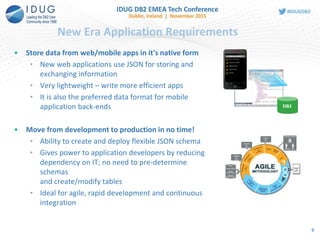
New Era Application Requirements
• Store data from web/mobile apps in it's native form
• New web applications use JSON for storing and
exchanging information
• Very lightweight – write more efficient apps
• It is also the preferred data format for mobile
application back-ends
• Move from development to production in no time!
• Ability to create and deploy flexible JSON schema
• Gives power to application developers by reducing
dependency on IT; no need to pre-determine
schemas
and create/modify tables
• Ideal for agile, rapid development and continuous
integration
DB2
6
• Combine data from “systems of engagement” with core
enterprise data
• Simplicity and agility of JSON + enterprise strengths of DB2
• Maintains JSON simplicity and agility
• Interoperate seamlessly with modern applications
• Flexible schemas allow rapid delivery of applications
• Leverages DB2 Qualities of Services
• Security
• Management, operations
• High availability
• Delivers the best of both worlds
• Schema Agility and Enterprise Quality of Service
DB2 for z/OS Enterprise-class JSON Database
Agility with DB2 Qualities of Service
7
8
SQL APIs for JSON
(recommended)
JSON in SQL – First Steps
Extend JSON API Building blocks for external use
New functions released in DB2 11 only
• JSON2BSON - convert JSON string into BSON format
• BSON2JSON - convert BSON LOB into JSON string
• JSON_VAL - retrieve specific value from inside a
BSON object (also in V10)
INSERT INTO EMPLOYEE(data) VALUES (SYSTOOLS.JSON2BSON
(‘{ name: "Joe", age:28, isManager: false, jobs :[“QA”, “Developer”] } ’))
SELECT SYSTOOLS.BSON2JSON(data) FROM EMPLOYEE
UPDATE EMPLOYEE SET DATA =
SYSTOOLS.JSON2BSON('{ name: "Jane", age:18, isManager: false, jobs
:["Developer", "Team Lead"] } ')
JSON is stored internally as BSON format in inline BLOB column
9
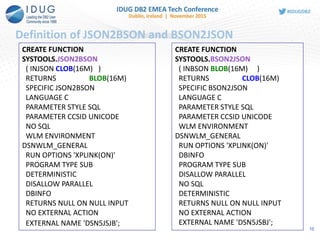
Definition of JSON2BSON and BSON2JSON
CREATE FUNCTION
SYSTOOLS.JSON2BSON
( INJSON CLOB(16M) )
RETURNS BLOB(16M)
SPECIFIC JSON2BSON
LANGUAGE C
PARAMETER STYLE SQL
PARAMETER CCSID UNICODE
NO SQL
WLM ENVIRONMENT
DSNWLM_GENERAL
RUN OPTIONS 'XPLINK(ON)'
PROGRAM TYPE SUB
DETERMINISTIC
DISALLOW PARALLEL
DBINFO
RETURNS NULL ON NULL INPUT
NO EXTERNAL ACTION
EXTERNAL NAME 'DSN5JSJB';
CREATE FUNCTION
SYSTOOLS.BSON2JSON
( INBSON BLOB(16M) )
RETURNS CLOB(16M)
SPECIFIC BSON2JSON
LANGUAGE C
PARAMETER STYLE SQL
PARAMETER CCSID UNICODE
WLM ENVIRONMENT
DSNWLM_GENERAL
RUN OPTIONS 'XPLINK(ON)'
DBINFO
PROGRAM TYPE SUB
DISALLOW PARALLEL
NO SQL
DETERMINISTIC
RETURNS NULL ON NULL INPUT
NO EXTERNAL ACTION
EXTERNAL NAME 'DSN5JSBJ';
10
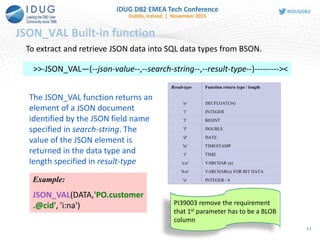
JSON_VAL Built-in function
>>-JSON_VAL—(--json-value--,--search-string--,--result-type--)---------><
To extract and retrieve JSON data into SQL data types from BSON.
The JSON_VAL function returns an
element of a JSON document
identified by the JSON field name
specified in search-string. The
value of the JSON element is
returned in the data type and
length specified in result-type
Result-type Function return type / length
'n' DECFLOAT(34)
'i' INTEGER
'l' BIGINT
'f' DOUBLE
'd' DATE
'ts' TIMESTAMP
't' TIME
's:n' VARCHAR (n)
'b:n' VARCHAR(n) FOR BIT DATA
'u' INTEGER / 4Example:
JSON_VAL(DATA,'PO.customer
.@cid', 'i:na') PI39003 remove the requirement
that 1st parameter has to be a BLOB
column
11
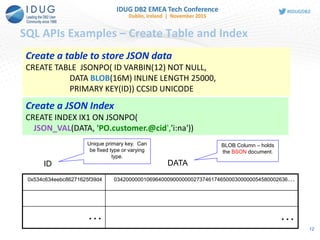
SQL APIs Examples – Create Table and Index
Create a table to store JSON data
CREATE TABLE JSONPO( ID VARBIN(12) NOT NULL,
DATA BLOB(16M) INLINE LENGTH 25000,
PRIMARY KEY(ID)) CCSID UNICODE
Create a JSON Index
CREATE INDEX IX1 ON JSONPO(
JSON_VAL(DATA, 'PO.customer.@cid','i:na'))
……
03420000001069640009000000027374617465000300000054580002636…0x534c634eebc86271625f39d4
ID DATA
Unique primary key. Can
be fixed type or varying
type.
BLOB Column – holds
the BSON document.
12
SQL APIs Examples – Insert a JSON document
INSERT INTO JSONPO VALUES (
123,
SYSTOOLS.JSON2BSON(
'{"PO":{"@id": 101,
"@orderDate": "2014-11-18",
"customer": {"@cid": 999},
"items": {
"item": [{"@partNum": "872-AA",
"productName": "Lawnmower",
"quantity": 1,
"USPrice": 149.99,
"shipDate": "2014-11-20"
},
{"@partNum": "945-ZG",
"productName": "Sapphire Bracelet",
"quantity": 2,
"USPrice": 178.99,
"comment": "Not shipped"
}
]
}
} }'))
JSON2BSON () is used
to convert text format of
JSON to BSON
13
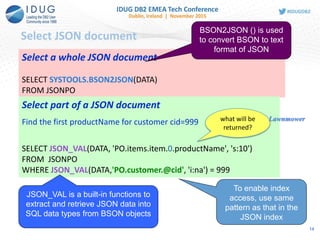
Select JSON document
Select a whole JSON document
SELECT SYSTOOLS.BSON2JSON(DATA)
FROM JSONPO
Select part of a JSON document
Find the first productName for customer cid=999
SELECT JSON_VAL(DATA, 'PO.items.item.0.productName', 's:10')
FROM JSONPO
WHERE JSON_VAL(DATA,'PO.customer.@cid', 'i:na') = 999
BSON2JSON () is used
to convert BSON to text
format of JSON
To enable index
access, use same
pattern as that in the
JSON index
JSON_VAL is a built-in functions to
extract and retrieve JSON data into
SQL data types from BSON objects
what will be
returned?
Lawnmower
14
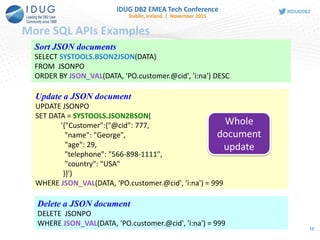
More SQL APIs Examples
Sort JSON documents
SELECT SYSTOOLS.BSON2JSON(DATA)
FROM JSONPO
ORDER BY JSON_VAL(DATA, 'PO.customer.@cid', 'i:na') DESC
Update a JSON document
UPDATE JSONPO
SET DATA = SYSTOOLS.JSON2BSON(
'{"Customer":{"@cid": 777,
"name": "George",
"age": 29,
"telephone": "566-898-1111",
"country": "USA"
}}')
WHERE JSON_VAL(DATA, ‘PO.customer.@cid', 'i:na') = 999
Delete a JSON document
DELETE JSONPO
WHERE JSON_VAL(DATA, ‘PO.customer.@cid', 'i:na') = 999
Whole
document
update
15
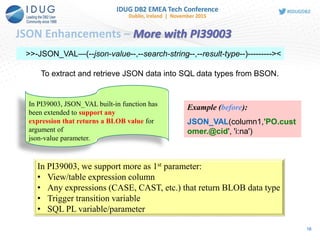
JSON Enhancements – More with PI39003
>>-JSON_VAL—(--json-value--,--search-string--,--result-type--)---------><
To extract and retrieve JSON data into SQL data types from BSON.
Example (before):
JSON_VAL(column1,'PO.cust
omer.@cid', 'i:na')
In PI39003, JSON_VAL built-in function has
been extended to support any
expression that returns a BLOB value for
argument of
json-value parameter.
In PI39003, we support more as 1st parameter:
• View/table expression column
• Any expressions (CASE, CAST, etc.) that return BLOB data type
• Trigger transition variable
• SQL PL variable/parameter
16
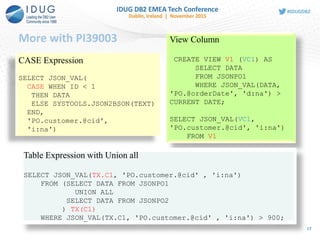
More with PI39003
17
CASE Expression
SELECT JSON_VAL(
CASE WHEN ID < 1
THEN DATA
ELSE SYSTOOLS.JSON2BSON(TEXT)
END,
'PO.customer.@cid',
'i:na')
View Column
CREATE VIEW V1 (VC1) AS
SELECT DATA
FROM JSONPO1
WHERE JSON_VAL(DATA,
'PO.@orderDate', 'd:na') >
CURRENT DATE;
SELECT JSON_VAL(VC1,
'PO.customer.@cid', 'i:na')
FROM V1
Table Expression with Union all
SELECT JSON_VAL(TX.C1, 'PO.customer.@cid' , 'i:na')
FROM (SELECT DATA FROM JSONPO1
UNION ALL
SELECT DATA FROM JSONPO2
) TX(C1)
WHERE JSON_VAL(TX.C1, 'PO.customer.@cid' , 'i:na') > 900;
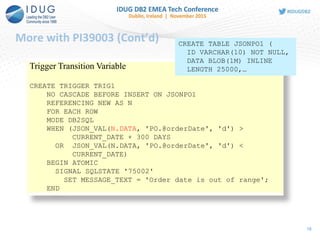
More with PI39003 (Cont’d)
18
Trigger Transition Variable
CREATE TRIGGER TRIG1
NO CASCADE BEFORE INSERT ON JSONPO1
REFERENCING NEW AS N
FOR EACH ROW
MODE DB2SQL
WHEN (JSON_VAL(N.DATA, 'PO.@orderDate', 'd') >
CURRENT_DATE + 300 DAYS
OR JSON_VAL(N.DATA, 'PO.@orderDate', 'd') <
CURRENT_DATE)
BEGIN ATOMIC
SIGNAL SQLSTATE '75002'
SET MESSAGE_TEXT = 'Order date is out of range';
END
CREATE TABLE JSONPO1 (
ID VARCHAR(10) NOT NULL,
DATA BLOB(1M) INLINE
LENGTH 25000,…
More with PI39003 (Cont’d)
19
SQL PL Variable/Parameter
CREATE TYPE INTARRAY AS INTEGER ARRAY [20]!
CREATE PROCEDURE MYSP1(IN JSONDATA BLOB(16M))
LANGUAGE SQL
BEGIN
DECLARE POID INTARRAY;
DECLARE CUSTID INTEGER;
SET POID =
ARRAY[SELECT JSON_VAL(DATA, 'PO.@id', 'i:na')
FROM JSONPO1];
SELECT JSON_VAL(JSONDATA, 'PO.customer.@cid', 'i:na')
INTO CUSTID
FROM SYSIBM.SYSDUMMY1;
END!
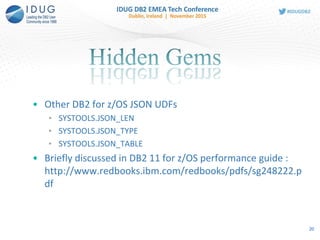
• Other DB2 for z/OS JSON UDFs
• SYSTOOLS.JSON_LEN
• SYSTOOLS.JSON_TYPE
• SYSTOOLS.JSON_TABLE
• Briefly discussed in DB2 11 for z/OS performance guide :
http://www.redbooks.ibm.com/redbooks/pdfs/sg248222.p
df
20
SYSTOOLS.JSON_LEN
21
CREATE FUNCTION SYSTOOLS.JSON_LEN
( INJSON BLOB(16M)
, INELEM VARCHAR(2048)
)
RETURNS INTEGER
This function returns the size of
array of elements in JSON data,
and returns NULL if an
element is not an array. '{"PO":{"@id": 101,
"@orderDate": "2014-11-18",
"customer": {"@cid": 999},
"items": {
"item": [{"@partNum": "872-AA",
"productName": "Lawnmower",
"quantity": 1,
"USPrice": 149.99,
"shipDate": "2014-11-20"
},
{"@partNum": "945-ZG",
"productName": "Sapphire Bracelet",
"quantity": 2,
"USPrice": 178.99,
"comment": "Not shipped"
}
]
}
}
}
Example:
SELECT SYSTOOLS.JSON_LEN(DATA,
'PO.items.item') AS "# of entry in
PO.items.item"
FROM JSONPO;
Output:
# of entry in PO.items.item
2
1 record(s) selected
SYSTOOLS.JSON_TYPE
22
CREATE FUNCTION SYSTOOLS.JSON_TYPE
( INJSON BLOB(16M)
, INELEM VARCHAR(2048)
, MAXLENGTH INTEGER
)
RETURNS INTEGER
This function returns the type of
JSON data.
'{"PO":{"@id": 101,
"@orderDate": "2014-11-18",
"customer": {"@cid": 999},
"items": {
"item": [{"@partNum": "872-AA",
"productName": "Lawnmower",
"quantity": 1,
"USPrice": 149.99,
"shipDate": "2014-11-20"
},
{"@partNum": "945-ZG",
"productName": "Sapphire Bracelet",
"quantity": 2,
"USPrice": 178.99,
"comment": "Not shipped"
}
]
}
}
}
Example:
SELECT SYSTOOLS.JSON_TYPE(DATA,
'PO.items.item.productName', 20) AS
"JSON_TYPE“ FROM JSONPO;
JSON_TYPE
2
Example:
SELECT SYSTOOLS.JSON_TYPE(DATA,
'PO.items.item.USPrice', 20) AS "JSON_TYPE“
FROM JSONPO;
JSON_TYPE
1
SYSTOOLS.JSON_TABLE
23
CREATE FUNCTION
SYSTOOLS.JSON_TABLE
( INJSON BLOB(16M)
, INELEM VARCHAR(2048)
, RETTYPE VARCHAR(100)
)
RETURNS TABLE
( TYPE INTEGER
, VALUE VARCHAR(2048)
)
This function returns array of
elements in JSON data.
Example:
SELECT X.* FROM JSONPO,
TABLE(SYSTOOLS.JSON_TABLE(DATA,
'PO.items.item.productName', 's:20')) X
Output:
TYPE VALUE
2 Lawnmower
2 Sapphire Bracelet
'{"PO":{"@id": 101,
"@orderDate": "2014-11-18",
"customer": {"@cid": 999},
"items": {
"item": [{"@partNum": "872-AA",
"productName": "Lawnmower",
"quantity": 1,
"USPrice": 149.99,
"shipDate": "2014-11-20"
},
{"@partNum": "945-ZG",
"productName": "Sapphire Bracelet",
"quantity": 2,
"USPrice": 178.99,
"comment": "Not shipped"
}
]
}
}
}
SYSTOOLS.JSON_TABLE
24
Example:
SELECT X.* FROM JSONPO,
TABLE(SYSTOOLS.JSON_TABLE(DATA,
'PO.items.item', 's:200')) X
'{"PO":{"@id": 101,
"@orderDate": "2014-11-18",
"customer": {"@cid": 999},
"items": {
"item": [{"@partNum": "872-AA",
"productName": "Lawnmower",
"quantity": 1,
"USPrice": 149.99,
"shipDate": "2014-11-20"
},
{"@partNum": "945-ZG",
"productName": "Sapphire Bracelet",
"quantity": 2,
"USPrice": 178.99,
"comment": "Not shipped"
}
]
}
}
}
Output:
TYPE VALUE
3 {@partNum:"872-
AA",productName:"Lawnmower",quantity:1,USPrice:149.990000,shipDate:"2014-11-
20"}
3 {@partNum:"945-ZG",productName:"Sapphire
Bracelet",quantity:2,USPrice:178.990000,comment:"Not shipped"}
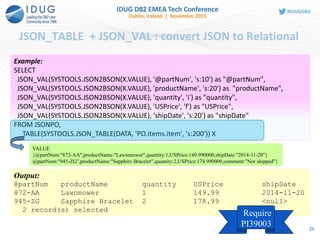
JSON_TABLE + JSON_VAL : convert JSON to Relational
25
Example:
SELECT
JSON_VAL(SYSTOOLS.JSON2BSON(X.VALUE), '@partNum', 's:10') as "@partNum",
JSON_VAL(SYSTOOLS.JSON2BSON(X.VALUE), 'productName', 's:20') as "productName",
JSON_VAL(SYSTOOLS.JSON2BSON(X.VALUE), 'quantity', 'i') as "quantity",
JSON_VAL(SYSTOOLS.JSON2BSON(X.VALUE), 'USPrice', 'f') as "USPrice",
JSON_VAL(SYSTOOLS.JSON2BSON(X.VALUE), 'shipDate', 's:20') as "shipDate"
FROM JSONPO,
TABLE(SYSTOOLS.JSON_TABLE(DATA, 'PO.items.item', 's:200')) X
Output:
@partNum productName quantity USPrice shipDate
872-AA Lawnmower 1 149.99 2014-11-20
945-ZG Sapphire Bracelet 2 178.99 <null>
2 record(s) selected
Require
PI39003
VALUE
{@partNum:"872-AA",productName:"Lawnmower",quantity:1,USPrice:149.990000,shipDate:"2014-11-20"}
@partNum:"945-ZG",productName:"Sapphire Bracelet",quantity:2,USPrice:178.990000,comment:"Not shipped"}
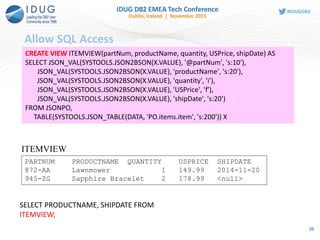
Allow SQL Access
26
CREATE VIEW ITEMVIEW(partNum, productName, quantity, USPrice, shipDate) AS
SELECT JSON_VAL(SYSTOOLS.JSON2BSON(X.VALUE), '@partNum', 's:10'),
JSON_VAL(SYSTOOLS.JSON2BSON(X.VALUE), 'productName', 's:20'),
JSON_VAL(SYSTOOLS.JSON2BSON(X.VALUE), 'quantity', 'i'),
JSON_VAL(SYSTOOLS.JSON2BSON(X.VALUE), 'USPrice', 'f'),
JSON_VAL(SYSTOOLS.JSON2BSON(X.VALUE), 'shipDate', 's:20')
FROM JSONPO,
TABLE(SYSTOOLS.JSON_TABLE(DATA, 'PO.items.item', 's:200')) X
SELECT PRODUCTNAME, SHIPDATE FROM
ITEMVIEW;
PARTNUM PRODUCTNAME QUANTITY USPRICE SHIPDATE
872-AA Lawnmower 1 149.99 2014-11-20
945-ZG Sapphire Bracelet 2 178.99 <null>
ITEMVIEW
Parameter to Table
27
CREATE TABLE T1 (
PARTNUM VARCHAR(10),
PRODUCTNAME VARCHAR(20),
QUANTITY INT,
USPRICE DECFLOAT,
SHIPDATE VARCHAR(20));
PARTNUM PRODUCTNAME QUANTITY USPRICE SHIPDATE
872-AA Lawnmower 1 149.99 2014-11-20
945-ZG Sapphire Bracelet 2 178.99 <null>
T1
'{"PO":{"@id": 101,
"@orderDate": "2014-11-18",
"customer": {"@cid": 999},
"items": {
"item": [{"@partNum": "872-AA",
"productName": "Lawnmower",
"quantity": 1,
"USPrice": 149.99,
"shipDate": "2014-11-20"
},
{"@partNum": "945-ZG",
"productName": "Sapphire Bracelet",
"quantity": 2,
"USPrice": 178.99,
"comment": "Not shipped"
}
] …
INSERT INTO T1
SELECT JSON_VAL(SYSTOOLS.JSON2BSON(X.VALUE), '@partNum', 's:10'),
JSON_VAL(SYSTOOLS.JSON2BSON(X.VALUE), 'productName', 's:20') ,
JSON_VAL(SYSTOOLS.JSON2BSON(X.VALUE), 'quantity', 'i'),
JSON_VAL(SYSTOOLS.JSON2BSON(X.VALUE), 'USPrice', 'f') ,
JSON_VAL(SYSTOOLS.JSON2BSON(X.VALUE), 'shipDate', 's:20')
FROM
TABLE(SYSTOOLS.JSON_TABLE(
SYSTOOLS.JSON2BSON(?), 'PO.items.item', 's:200')) X
28
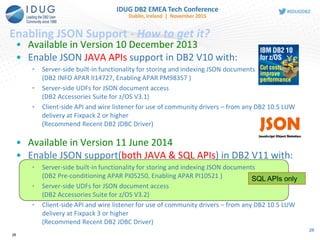
Enabling JSON Support - How to get it?
SQL APIs only
• Available in Version 10 December 2013
• Enable JSON JAVA APIs support in DB2 V10 with:
• Server-side built-in functionality for storing and indexing JSON documents
(DB2 INFO APAR II14727, Enabling APAR PM98357 )
• Server-side UDFs for JSON document access
(DB2 Accessories Suite for z/OS V3.1)
• Client-side API and wire listener for use of community drivers – from any DB2 10.5 LUW
delivery at Fixpack 2 or higher
(Recommend Recent DB2 JDBC Driver)
• Available in Version 11 June 2014
• Enable JSON support(both JAVA & SQL APIs) in DB2 V11 with:
• Server-side built-in functionality for storing and indexing JSON documents
(DB2 Pre-conditioning APAR PI05250, Enabling APAR PI10521 )
• Server-side UDFs for JSON document access
(DB2 Accessories Suite for z/OS V3.2)
• Client-side API and wire listener for use of community drivers – from any DB2 10.5 LUW
delivery at Fixpack 3 or higher
(Recommend Recent DB2 JDBC Driver)
28
29
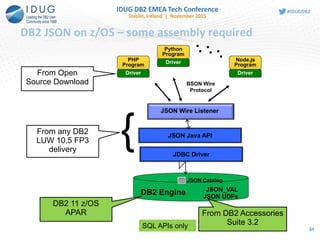
DB2 JSON on z/OS – some assembly required
. . .
JSON Java API
DB2 Engine JSON_VAL
JSON UDFs
JSON Catalog
JSON Wire Listener
BSON Wire
Protocol
PHP
Program
Python
Program
Node.js
Program
Driver
Driver
Driver
. . .
JDBC Driver
DB2 11 z/OS
APAR
From any DB2
LUW 10.5 FP3
delivery
From DB2 Accessories
Suite 3.2
From Open
Source Download
{
SQL APIs only 31
JSON and XML
30
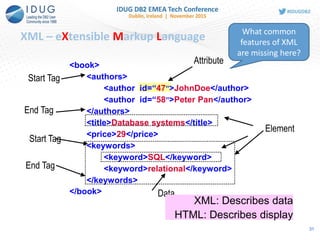
XML – eXtensible Markup Language
<book>
<authors>
<author id=“47”>JohnDoe</author>
<author id=“58”>Peter Pan</author>
</authors>
<title>Database systems</title>
<price>29</price>
<keywords>
<keyword>SQL</keyword>
<keyword>relational</keyword>
</keywords>
</book>
Start Tag
Data
End Tag
Element
Attribute
XML: Describes data
HTML: Describes display
End Tag
Start Tag
What common
features of XML
are missing here?
31
32
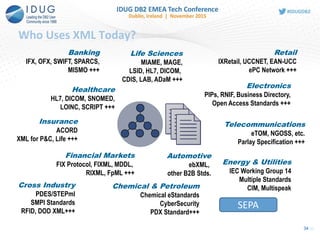
Who Uses XML Today?
Banking
IFX, OFX, SWIFT, SPARCS,
MISMO +++
Financial Markets
FIX Protocol, FIXML, MDDL,
RIXML, FpML +++
Insurance
ACORD
XML for P&C, Life +++
Chemical & Petroleum
Chemical eStandards
CyberSecurity
PDX Standard+++
Healthcare
HL7, DICOM, SNOMED,
LOINC, SCRIPT +++
Life Sciences
MIAME, MAGE,
LSID, HL7, DICOM,
CDIS, LAB, ADaM +++
Retail
IXRetail, UCCNET, EAN-UCC
ePC Network +++
Electronics
PIPs, RNIF, Business Directory,
Open Access Standards +++
Automotive
ebXML,
other B2B Stds.
Telecommunications
eTOM, NGOSS, etc.
Parlay Specification +++
Energy & Utilities
IEC Working Group 14
Multiple Standards
CIM, MultispeakCross Industry
PDES/STEPml
SMPI Standards
RFID, DOD XML+++
SEPA
34
33
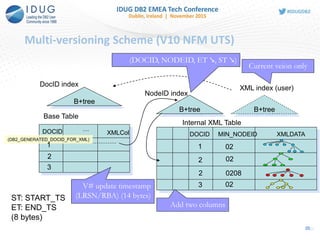
Multi-versioning Scheme (V10 NFM UTS)
Base Table
XMLColDOCID …
B+tree
DocID index
Internal XML Table
B+tree
NodeID index
B+tree
XML index (user)
XMLDATADOCID MIN_NODEID
(DB2_GENERATED_DOCID_FOR_XML)
Current veion only
(DOCID, NODEID, ET ↘, ST ↘)
ST: START_TS
ET: END_TS
(8 bytes)
V# update timestamp
(LRSN/RBA) (14 bytes)
Add two columns
1
2
3
1
2
2
3
02
02
0208
02
35
34
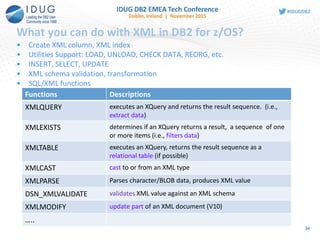
What you can do with XML in DB2 for z/OS?
• Create XML column, XML index
• Utilities Support: LOAD, UNLOAD, CHECK DATA, REORG, etc.
• INSERT, SELECT, UPDATE
• XML schema validation, transformation
• SQL/XML functions
an XML document (V10)Functions Descriptions
XMLQUERY executes an XQuery and returns the result sequence. (i.e.,
extract data)
XMLEXISTS determines if an XQuery returns a result, a sequence of one
or more items (i.e., filters data)
XMLTABLE executes an XQuery, returns the result sequence as a
relational table (if possible)
XMLCAST cast to or from an XML type
XMLPARSE Parses character/BLOB data, produces XML value
DSN_XMLVALIDATE validates XML value against an XML schema
XMLMODIFY update part of an XML document (V10)
…..
Create tables to store XML and JSON, create indexes
XML
CREATE TABLE XMLT1 (ID INT, XMLPO XML) IN DB1.TS1;
CREATE TABLE XMLT2 (ID INT, XMLPO XML(XMLSCHEMA ID
SYSXSR.PO1)) IN DB1.TS1;
create index custidx1 on XMLT1(XMLPO)
generate key using
xmlpattern '/PO/customer/@cid' as sql decfloat
JSON – JAVA API
nosql>db.createCollection("JSONPO", {_id: "$oid"})
Collection: TEST."JSONPO" created. Use db.JSONPO.
nosql>db.JSONPO.ensureIndex({"PO.customer.@cid":[1,
"$int"]}, "myJSONIndex")
Create table
with XML col
associated
with an XML
schema
Create index on
/PO/customer/@
cid
JSON - SQL APIs
CREATE TABLE JSONPO( ID VARBIN(12) NOT NULL,
DATA BLOB(16M) INLINE LENGTH 25000,
PRIMARY KEY(ID)) CCSID UNICODE
CREATE INDEX IX1 ON JSONPO(
JSON_VAL(DATA, 'PO.customer.@cid','i:na'))
Create index on
PO.customer.@
cid 35
Insert
XML
INSERT INTO XMLT1 values(1,
'<PO id="123" orderDate="2013-11-18">
<customer cid="999"/>
<items>
……
</items>
</PO>')
JSON – JAVA API
nosql>db.JSONPO.insert(
{
"PO": {
"@id": 123,
"@orderDate": "2013-11-18",
"customer": { "@cid": 999 },
"items": {
…….
]
}
}
})
JSON – SQL API (V11 only)
INSERT INTO JSONPO(data) VALUES
(SYSTOOLS.JSON2BSON
(‘{ “PO”:{…} } ’))
JSON data is
converted to
BSON before
sending to DB2
XML parsing
and validation is
eligible for
offload to zIIP
36
Query – find productName for cid 999
XML
SELECT XMLQuery('/PO/items/item/productName' PASSING XMLPO)
FROM XMLT1
WHERE XMLEXISTS('/PO/customer[@cid=999]' PASSING XMLPO)
JSON – JAVA API
nosql>db.JSONPO.find({"PO.customer.@cid": 999}, {_id:0,
"PO.items.item.productName":1})
From trace:
SELECT CAST(SYSTOOLS.JSON_BINARY2(DATA,
'PO.items.item.productName', 2048) AS VARCHAR(2048) FOR BIT
DATA) AS "xPO_items_item_productName" FROM TEST."JSONPO"
WHERE (JSON_VAL(DATA, 'PO.customer.@cid', 'f:na')=?)
JSON – SQL API
SELECT JSON_VAL(DATA, 'PO.items.item.productName', 's:10')
FROM JSONPO
WHERE JSON_VAL(DATA,'PO.customer.@cid', 'i:na') = 999
37
Update – replace value
XML
-- replace the USPrice of SKII daily lotion
UPDATE XMLT1 SET XMLPO =
XMLModify('replace value of node
/PO/items/item[productName="SKII daily lotion"]/USPrice
with xs:decimal(200)')
WHERE XMLEXISTS('/PO[items/item/productName="SKII daily lotion"
and customer/@cid=111]'
PASSING XMLPO)
JSON – JAVA API
nosql>db.JSONPO.update(
{"PO.customer.@cid": 111,
"PO.items.item.productName":"SKII daily lotion"},
{ $set:{"PO.items.item.$.USPrice": 200}})
JSON – SQL API
UPDATE JSONPO
SET DATA = SYSTOOLS.JSON2BSON(‘{ …. }')
WHERE JSON_VAL(DATA, ‘PO.customer.@cid', 'i:na') = 111
AND JSON_VAL(DATA, ‘PO.items.item.productName', ‘s:na') ="SKII
daily lotion”
Whole
document
update
Whole
document
update
Sub-
document
update
38
Delete – delete the document for cid 111
XML
DELETE FROM XMLT1
WHERE XMLEXISTS('/PO/customer[@cid=111]'
PASSING XMLPO)
JSON – JAVA API
nosql> db.JSONPO.remove({"PO.customer.@cid": 111})
JSON – SQL API
DELETE JSONPO
WHERE JSON_VAL(DATA, ‘PO.Customer.@cid', 'i:na') = 111
39
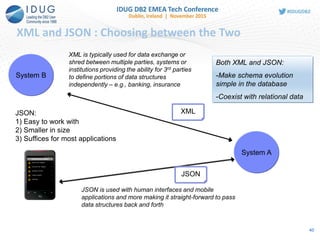
System B
JSON
XML
Both XML and JSON:
-Make schema evolution
simple in the database
-Coexist with relational data
JSON is used with human interfaces and mobile
applications and more making it straight-forward to pass
data structures back and forth
XML is typically used for data exchange or
shred between multiple parties, systems or
institutions providing the ability for 3rd parties
to define portions of data structures
independently – e.g., banking, insurance
System A
JSON:
1) Easy to work with
2) Smaller in size
3) Suffices for most applications
XML and JSON : Choosing between the Two
40
Summary
• JSON and DB2 – Complementary Technologies
• DB2 JSON Technology
• JAVA APIs
• SQL APIs (recommended)
• JSON and XML
41
Read DB2 JSON Tech Article Series
• Introduction to DB2 JSON
ibm.co/15ImEke
• Command line processor
ibm.co/GYfi3e
• Writing apps with Java API
ibm.co/19RWv5Y
• JSON Wire Listener
ibm.co/16aLEmF
• XML or JSON: Guidelines for what to choose for DB2 for z/OS by Jane Man and Susan
Malaika
http://www.ibm.com/developerworks/data/library/techarticle/dm-
1403xmljson/index.html
• Use a SQL interface to handle JSON data in DB2 11 for z/OS by Jane Man and Jae Lee
https://ibm.biz/BdEwL8
Announcement Details (z/OS)
• DB2 for z/OS Accessories Suite
http://www-01.ibm.com/common/ssi/cgi-
bin/ssialias?subtype=ca&infotype=an&supplier=897&letternum=ENUS213-395
Getting more information
42
XML Resources
• DeverloperWorks DB2 for z/OS pureXML wiki
• https://www.ibm.com/developerworks/community/wikis/home?lang
=en#!/wiki/pureXML/page/DB2%20for%20zOS%20pureXML
• One stop shopping for all things pureXML. Categories include: white
papers, Webcasts and Podcasts, Presentations and Demonstration,
etc.
• Join other customers and become a pureXML devotee
• Hosts periodic pureXML talks by the experts
• https://www.ibm.com/developerworks/wikis/display/db2xml/devote
e
43
44
45
Jane Man
IBM
janeman@us.ibm.com
F5
Learning Exciting JSON features in DB2
for z/OS Please fill out your session
evaluation before leaving!

JSON Support in DB2 for z/OS

  • 1.
    Learning Exciting JSONFeatures in DB2 for z/OS Jane Man, IBM Session Code: F5 Monday, 16 November 2015 17:00-18:00 Platform: DB2 for z/OS
  • 2.
    Objectives • To illustrateJSON storage model in DB2 for z/OS • To introduce JSON SQL APIs features and examples • To share tips and pitfalls of implementing an JSON solution 22
  • 3.
    Please Note • IBM’sstatements regarding its plans, directions, and intent are subject to change or withdrawal without notice at IBM’s sole discretion. • Information regarding potential future products is intended to outline our general product direction and it should not be relied on in making a purchasing decision. • The information mentioned regarding potential future products is not a commitment, promise, or legal obligation to deliver any material, code or functionality. Information about potential future products may not be incorporated into any contract. • The development, release, and timing of any future features or functionality described for our products remains at our sole discretion. • Performance is based on measurements and projections using standard IBM benchmarks in a controlled environment. The actual throughput or performance that any user will experience will vary depending upon many factors, including considerations such as the amount of multiprogramming in the user’s job stream, the I/O configuration, the storage configuration, and the workload processed. Therefore, no assurance can be given that an individual user will achieve results similar to those stated here. 3
  • 4.
    Agenda • Motivations forNoSQL in the Enterprise • New era applications • JSON and JSON document stores • Blending JSON and traditional relational • DB2 JSON Technology • SQL APIs • JSON and XML • Summary and Q&A 4
  • 5.
    JSON is theLanguage of the Web • JavaScript Object Notation • Lightweight data interchange format • Specified in IETF RFC 4627 • http://www.JSON.org • Designed to be minimal, portable, textual and a subset of JavaScript • Only 6 kinds of values! • Easy to implement and easy to use • Text format, so readable by humans and machines • Language independent, most languages have features that map easily to JSON • Used to exchange data between programs written in all modern programming languages { "firstName“ : "John", "lastName" : "Smith", "age" : 25, “active” : true, “freqflyer_num : null, "address" : { "streetAddress“ : "21 2nd Street", "city" : "New York", "state" : "NY", "postalCode" : "10021" }, "phoneNumber“ : [ { "type" : "home", "number“ : "212 555-1234" }, { "type" : “mobile", "number“ : "646 555-4567" } ] } 5
  • 6.
    New Era ApplicationRequirements • Store data from web/mobile apps in it's native form • New web applications use JSON for storing and exchanging information • Very lightweight – write more efficient apps • It is also the preferred data format for mobile application back-ends • Move from development to production in no time! • Ability to create and deploy flexible JSON schema • Gives power to application developers by reducing dependency on IT; no need to pre-determine schemas and create/modify tables • Ideal for agile, rapid development and continuous integration DB2 6
  • 7.
    • Combine datafrom “systems of engagement” with core enterprise data • Simplicity and agility of JSON + enterprise strengths of DB2 • Maintains JSON simplicity and agility • Interoperate seamlessly with modern applications • Flexible schemas allow rapid delivery of applications • Leverages DB2 Qualities of Services • Security • Management, operations • High availability • Delivers the best of both worlds • Schema Agility and Enterprise Quality of Service DB2 for z/OS Enterprise-class JSON Database Agility with DB2 Qualities of Service 7
  • 8.
    8 SQL APIs forJSON (recommended)
  • 9.
    JSON in SQL– First Steps Extend JSON API Building blocks for external use New functions released in DB2 11 only • JSON2BSON - convert JSON string into BSON format • BSON2JSON - convert BSON LOB into JSON string • JSON_VAL - retrieve specific value from inside a BSON object (also in V10) INSERT INTO EMPLOYEE(data) VALUES (SYSTOOLS.JSON2BSON (‘{ name: "Joe", age:28, isManager: false, jobs :[“QA”, “Developer”] } ’)) SELECT SYSTOOLS.BSON2JSON(data) FROM EMPLOYEE UPDATE EMPLOYEE SET DATA = SYSTOOLS.JSON2BSON('{ name: "Jane", age:18, isManager: false, jobs :["Developer", "Team Lead"] } ') JSON is stored internally as BSON format in inline BLOB column 9
  • 10.
    Definition of JSON2BSONand BSON2JSON CREATE FUNCTION SYSTOOLS.JSON2BSON ( INJSON CLOB(16M) ) RETURNS BLOB(16M) SPECIFIC JSON2BSON LANGUAGE C PARAMETER STYLE SQL PARAMETER CCSID UNICODE NO SQL WLM ENVIRONMENT DSNWLM_GENERAL RUN OPTIONS 'XPLINK(ON)' PROGRAM TYPE SUB DETERMINISTIC DISALLOW PARALLEL DBINFO RETURNS NULL ON NULL INPUT NO EXTERNAL ACTION EXTERNAL NAME 'DSN5JSJB'; CREATE FUNCTION SYSTOOLS.BSON2JSON ( INBSON BLOB(16M) ) RETURNS CLOB(16M) SPECIFIC BSON2JSON LANGUAGE C PARAMETER STYLE SQL PARAMETER CCSID UNICODE WLM ENVIRONMENT DSNWLM_GENERAL RUN OPTIONS 'XPLINK(ON)' DBINFO PROGRAM TYPE SUB DISALLOW PARALLEL NO SQL DETERMINISTIC RETURNS NULL ON NULL INPUT NO EXTERNAL ACTION EXTERNAL NAME 'DSN5JSBJ'; 10
  • 11.
    JSON_VAL Built-in function >>-JSON_VAL—(--json-value--,--search-string--,--result-type--)--------->< Toextract and retrieve JSON data into SQL data types from BSON. The JSON_VAL function returns an element of a JSON document identified by the JSON field name specified in search-string. The value of the JSON element is returned in the data type and length specified in result-type Result-type Function return type / length 'n' DECFLOAT(34) 'i' INTEGER 'l' BIGINT 'f' DOUBLE 'd' DATE 'ts' TIMESTAMP 't' TIME 's:n' VARCHAR (n) 'b:n' VARCHAR(n) FOR BIT DATA 'u' INTEGER / 4Example: JSON_VAL(DATA,'PO.customer .@cid', 'i:na') PI39003 remove the requirement that 1st parameter has to be a BLOB column 11
  • 12.
    SQL APIs Examples– Create Table and Index Create a table to store JSON data CREATE TABLE JSONPO( ID VARBIN(12) NOT NULL, DATA BLOB(16M) INLINE LENGTH 25000, PRIMARY KEY(ID)) CCSID UNICODE Create a JSON Index CREATE INDEX IX1 ON JSONPO( JSON_VAL(DATA, 'PO.customer.@cid','i:na')) …… 03420000001069640009000000027374617465000300000054580002636…0x534c634eebc86271625f39d4 ID DATA Unique primary key. Can be fixed type or varying type. BLOB Column – holds the BSON document. 12
  • 13.
    SQL APIs Examples– Insert a JSON document INSERT INTO JSONPO VALUES ( 123, SYSTOOLS.JSON2BSON( '{"PO":{"@id": 101, "@orderDate": "2014-11-18", "customer": {"@cid": 999}, "items": { "item": [{"@partNum": "872-AA", "productName": "Lawnmower", "quantity": 1, "USPrice": 149.99, "shipDate": "2014-11-20" }, {"@partNum": "945-ZG", "productName": "Sapphire Bracelet", "quantity": 2, "USPrice": 178.99, "comment": "Not shipped" } ] } } }')) JSON2BSON () is used to convert text format of JSON to BSON 13
  • 14.
    Select JSON document Selecta whole JSON document SELECT SYSTOOLS.BSON2JSON(DATA) FROM JSONPO Select part of a JSON document Find the first productName for customer cid=999 SELECT JSON_VAL(DATA, 'PO.items.item.0.productName', 's:10') FROM JSONPO WHERE JSON_VAL(DATA,'PO.customer.@cid', 'i:na') = 999 BSON2JSON () is used to convert BSON to text format of JSON To enable index access, use same pattern as that in the JSON index JSON_VAL is a built-in functions to extract and retrieve JSON data into SQL data types from BSON objects what will be returned? Lawnmower 14
  • 15.
    More SQL APIsExamples Sort JSON documents SELECT SYSTOOLS.BSON2JSON(DATA) FROM JSONPO ORDER BY JSON_VAL(DATA, 'PO.customer.@cid', 'i:na') DESC Update a JSON document UPDATE JSONPO SET DATA = SYSTOOLS.JSON2BSON( '{"Customer":{"@cid": 777, "name": "George", "age": 29, "telephone": "566-898-1111", "country": "USA" }}') WHERE JSON_VAL(DATA, ‘PO.customer.@cid', 'i:na') = 999 Delete a JSON document DELETE JSONPO WHERE JSON_VAL(DATA, ‘PO.customer.@cid', 'i:na') = 999 Whole document update 15
  • 16.
    JSON Enhancements –More with PI39003 >>-JSON_VAL—(--json-value--,--search-string--,--result-type--)--------->< To extract and retrieve JSON data into SQL data types from BSON. Example (before): JSON_VAL(column1,'PO.cust omer.@cid', 'i:na') In PI39003, JSON_VAL built-in function has been extended to support any expression that returns a BLOB value for argument of json-value parameter. In PI39003, we support more as 1st parameter: • View/table expression column • Any expressions (CASE, CAST, etc.) that return BLOB data type • Trigger transition variable • SQL PL variable/parameter 16
  • 17.
    More with PI39003 17 CASEExpression SELECT JSON_VAL( CASE WHEN ID < 1 THEN DATA ELSE SYSTOOLS.JSON2BSON(TEXT) END, 'PO.customer.@cid', 'i:na') View Column CREATE VIEW V1 (VC1) AS SELECT DATA FROM JSONPO1 WHERE JSON_VAL(DATA, 'PO.@orderDate', 'd:na') > CURRENT DATE; SELECT JSON_VAL(VC1, 'PO.customer.@cid', 'i:na') FROM V1 Table Expression with Union all SELECT JSON_VAL(TX.C1, 'PO.customer.@cid' , 'i:na') FROM (SELECT DATA FROM JSONPO1 UNION ALL SELECT DATA FROM JSONPO2 ) TX(C1) WHERE JSON_VAL(TX.C1, 'PO.customer.@cid' , 'i:na') > 900;
  • 18.
    More with PI39003(Cont’d) 18 Trigger Transition Variable CREATE TRIGGER TRIG1 NO CASCADE BEFORE INSERT ON JSONPO1 REFERENCING NEW AS N FOR EACH ROW MODE DB2SQL WHEN (JSON_VAL(N.DATA, 'PO.@orderDate', 'd') > CURRENT_DATE + 300 DAYS OR JSON_VAL(N.DATA, 'PO.@orderDate', 'd') < CURRENT_DATE) BEGIN ATOMIC SIGNAL SQLSTATE '75002' SET MESSAGE_TEXT = 'Order date is out of range'; END CREATE TABLE JSONPO1 ( ID VARCHAR(10) NOT NULL, DATA BLOB(1M) INLINE LENGTH 25000,…
  • 19.
    More with PI39003(Cont’d) 19 SQL PL Variable/Parameter CREATE TYPE INTARRAY AS INTEGER ARRAY [20]! CREATE PROCEDURE MYSP1(IN JSONDATA BLOB(16M)) LANGUAGE SQL BEGIN DECLARE POID INTARRAY; DECLARE CUSTID INTEGER; SET POID = ARRAY[SELECT JSON_VAL(DATA, 'PO.@id', 'i:na') FROM JSONPO1]; SELECT JSON_VAL(JSONDATA, 'PO.customer.@cid', 'i:na') INTO CUSTID FROM SYSIBM.SYSDUMMY1; END!
  • 20.
    • Other DB2for z/OS JSON UDFs • SYSTOOLS.JSON_LEN • SYSTOOLS.JSON_TYPE • SYSTOOLS.JSON_TABLE • Briefly discussed in DB2 11 for z/OS performance guide : http://www.redbooks.ibm.com/redbooks/pdfs/sg248222.p df 20
  • 21.
    SYSTOOLS.JSON_LEN 21 CREATE FUNCTION SYSTOOLS.JSON_LEN (INJSON BLOB(16M) , INELEM VARCHAR(2048) ) RETURNS INTEGER This function returns the size of array of elements in JSON data, and returns NULL if an element is not an array. '{"PO":{"@id": 101, "@orderDate": "2014-11-18", "customer": {"@cid": 999}, "items": { "item": [{"@partNum": "872-AA", "productName": "Lawnmower", "quantity": 1, "USPrice": 149.99, "shipDate": "2014-11-20" }, {"@partNum": "945-ZG", "productName": "Sapphire Bracelet", "quantity": 2, "USPrice": 178.99, "comment": "Not shipped" } ] } } } Example: SELECT SYSTOOLS.JSON_LEN(DATA, 'PO.items.item') AS "# of entry in PO.items.item" FROM JSONPO; Output: # of entry in PO.items.item 2 1 record(s) selected
  • 22.
    SYSTOOLS.JSON_TYPE 22 CREATE FUNCTION SYSTOOLS.JSON_TYPE (INJSON BLOB(16M) , INELEM VARCHAR(2048) , MAXLENGTH INTEGER ) RETURNS INTEGER This function returns the type of JSON data. '{"PO":{"@id": 101, "@orderDate": "2014-11-18", "customer": {"@cid": 999}, "items": { "item": [{"@partNum": "872-AA", "productName": "Lawnmower", "quantity": 1, "USPrice": 149.99, "shipDate": "2014-11-20" }, {"@partNum": "945-ZG", "productName": "Sapphire Bracelet", "quantity": 2, "USPrice": 178.99, "comment": "Not shipped" } ] } } } Example: SELECT SYSTOOLS.JSON_TYPE(DATA, 'PO.items.item.productName', 20) AS "JSON_TYPE“ FROM JSONPO; JSON_TYPE 2 Example: SELECT SYSTOOLS.JSON_TYPE(DATA, 'PO.items.item.USPrice', 20) AS "JSON_TYPE“ FROM JSONPO; JSON_TYPE 1
  • 23.
    SYSTOOLS.JSON_TABLE 23 CREATE FUNCTION SYSTOOLS.JSON_TABLE ( INJSONBLOB(16M) , INELEM VARCHAR(2048) , RETTYPE VARCHAR(100) ) RETURNS TABLE ( TYPE INTEGER , VALUE VARCHAR(2048) ) This function returns array of elements in JSON data. Example: SELECT X.* FROM JSONPO, TABLE(SYSTOOLS.JSON_TABLE(DATA, 'PO.items.item.productName', 's:20')) X Output: TYPE VALUE 2 Lawnmower 2 Sapphire Bracelet '{"PO":{"@id": 101, "@orderDate": "2014-11-18", "customer": {"@cid": 999}, "items": { "item": [{"@partNum": "872-AA", "productName": "Lawnmower", "quantity": 1, "USPrice": 149.99, "shipDate": "2014-11-20" }, {"@partNum": "945-ZG", "productName": "Sapphire Bracelet", "quantity": 2, "USPrice": 178.99, "comment": "Not shipped" } ] } } }
  • 24.
    SYSTOOLS.JSON_TABLE 24 Example: SELECT X.* FROMJSONPO, TABLE(SYSTOOLS.JSON_TABLE(DATA, 'PO.items.item', 's:200')) X '{"PO":{"@id": 101, "@orderDate": "2014-11-18", "customer": {"@cid": 999}, "items": { "item": [{"@partNum": "872-AA", "productName": "Lawnmower", "quantity": 1, "USPrice": 149.99, "shipDate": "2014-11-20" }, {"@partNum": "945-ZG", "productName": "Sapphire Bracelet", "quantity": 2, "USPrice": 178.99, "comment": "Not shipped" } ] } } } Output: TYPE VALUE 3 {@partNum:"872- AA",productName:"Lawnmower",quantity:1,USPrice:149.990000,shipDate:"2014-11- 20"} 3 {@partNum:"945-ZG",productName:"Sapphire Bracelet",quantity:2,USPrice:178.990000,comment:"Not shipped"}
  • 25.
    JSON_TABLE + JSON_VAL: convert JSON to Relational 25 Example: SELECT JSON_VAL(SYSTOOLS.JSON2BSON(X.VALUE), '@partNum', 's:10') as "@partNum", JSON_VAL(SYSTOOLS.JSON2BSON(X.VALUE), 'productName', 's:20') as "productName", JSON_VAL(SYSTOOLS.JSON2BSON(X.VALUE), 'quantity', 'i') as "quantity", JSON_VAL(SYSTOOLS.JSON2BSON(X.VALUE), 'USPrice', 'f') as "USPrice", JSON_VAL(SYSTOOLS.JSON2BSON(X.VALUE), 'shipDate', 's:20') as "shipDate" FROM JSONPO, TABLE(SYSTOOLS.JSON_TABLE(DATA, 'PO.items.item', 's:200')) X Output: @partNum productName quantity USPrice shipDate 872-AA Lawnmower 1 149.99 2014-11-20 945-ZG Sapphire Bracelet 2 178.99 <null> 2 record(s) selected Require PI39003 VALUE {@partNum:"872-AA",productName:"Lawnmower",quantity:1,USPrice:149.990000,shipDate:"2014-11-20"} @partNum:"945-ZG",productName:"Sapphire Bracelet",quantity:2,USPrice:178.990000,comment:"Not shipped"}
  • 26.
    Allow SQL Access 26 CREATEVIEW ITEMVIEW(partNum, productName, quantity, USPrice, shipDate) AS SELECT JSON_VAL(SYSTOOLS.JSON2BSON(X.VALUE), '@partNum', 's:10'), JSON_VAL(SYSTOOLS.JSON2BSON(X.VALUE), 'productName', 's:20'), JSON_VAL(SYSTOOLS.JSON2BSON(X.VALUE), 'quantity', 'i'), JSON_VAL(SYSTOOLS.JSON2BSON(X.VALUE), 'USPrice', 'f'), JSON_VAL(SYSTOOLS.JSON2BSON(X.VALUE), 'shipDate', 's:20') FROM JSONPO, TABLE(SYSTOOLS.JSON_TABLE(DATA, 'PO.items.item', 's:200')) X SELECT PRODUCTNAME, SHIPDATE FROM ITEMVIEW; PARTNUM PRODUCTNAME QUANTITY USPRICE SHIPDATE 872-AA Lawnmower 1 149.99 2014-11-20 945-ZG Sapphire Bracelet 2 178.99 <null> ITEMVIEW
  • 27.
    Parameter to Table 27 CREATETABLE T1 ( PARTNUM VARCHAR(10), PRODUCTNAME VARCHAR(20), QUANTITY INT, USPRICE DECFLOAT, SHIPDATE VARCHAR(20)); PARTNUM PRODUCTNAME QUANTITY USPRICE SHIPDATE 872-AA Lawnmower 1 149.99 2014-11-20 945-ZG Sapphire Bracelet 2 178.99 <null> T1 '{"PO":{"@id": 101, "@orderDate": "2014-11-18", "customer": {"@cid": 999}, "items": { "item": [{"@partNum": "872-AA", "productName": "Lawnmower", "quantity": 1, "USPrice": 149.99, "shipDate": "2014-11-20" }, {"@partNum": "945-ZG", "productName": "Sapphire Bracelet", "quantity": 2, "USPrice": 178.99, "comment": "Not shipped" } ] … INSERT INTO T1 SELECT JSON_VAL(SYSTOOLS.JSON2BSON(X.VALUE), '@partNum', 's:10'), JSON_VAL(SYSTOOLS.JSON2BSON(X.VALUE), 'productName', 's:20') , JSON_VAL(SYSTOOLS.JSON2BSON(X.VALUE), 'quantity', 'i'), JSON_VAL(SYSTOOLS.JSON2BSON(X.VALUE), 'USPrice', 'f') , JSON_VAL(SYSTOOLS.JSON2BSON(X.VALUE), 'shipDate', 's:20') FROM TABLE(SYSTOOLS.JSON_TABLE( SYSTOOLS.JSON2BSON(?), 'PO.items.item', 's:200')) X
  • 28.
    28 Enabling JSON Support- How to get it? SQL APIs only • Available in Version 10 December 2013 • Enable JSON JAVA APIs support in DB2 V10 with: • Server-side built-in functionality for storing and indexing JSON documents (DB2 INFO APAR II14727, Enabling APAR PM98357 ) • Server-side UDFs for JSON document access (DB2 Accessories Suite for z/OS V3.1) • Client-side API and wire listener for use of community drivers – from any DB2 10.5 LUW delivery at Fixpack 2 or higher (Recommend Recent DB2 JDBC Driver) • Available in Version 11 June 2014 • Enable JSON support(both JAVA & SQL APIs) in DB2 V11 with: • Server-side built-in functionality for storing and indexing JSON documents (DB2 Pre-conditioning APAR PI05250, Enabling APAR PI10521 ) • Server-side UDFs for JSON document access (DB2 Accessories Suite for z/OS V3.2) • Client-side API and wire listener for use of community drivers – from any DB2 10.5 LUW delivery at Fixpack 3 or higher (Recommend Recent DB2 JDBC Driver) 28
  • 29.
    29 DB2 JSON onz/OS – some assembly required . . . JSON Java API DB2 Engine JSON_VAL JSON UDFs JSON Catalog JSON Wire Listener BSON Wire Protocol PHP Program Python Program Node.js Program Driver Driver Driver . . . JDBC Driver DB2 11 z/OS APAR From any DB2 LUW 10.5 FP3 delivery From DB2 Accessories Suite 3.2 From Open Source Download { SQL APIs only 31
  • 30.
  • 31.
    XML – eXtensibleMarkup Language <book> <authors> <author id=“47”>JohnDoe</author> <author id=“58”>Peter Pan</author> </authors> <title>Database systems</title> <price>29</price> <keywords> <keyword>SQL</keyword> <keyword>relational</keyword> </keywords> </book> Start Tag Data End Tag Element Attribute XML: Describes data HTML: Describes display End Tag Start Tag What common features of XML are missing here? 31
  • 32.
    32 Who Uses XMLToday? Banking IFX, OFX, SWIFT, SPARCS, MISMO +++ Financial Markets FIX Protocol, FIXML, MDDL, RIXML, FpML +++ Insurance ACORD XML for P&C, Life +++ Chemical & Petroleum Chemical eStandards CyberSecurity PDX Standard+++ Healthcare HL7, DICOM, SNOMED, LOINC, SCRIPT +++ Life Sciences MIAME, MAGE, LSID, HL7, DICOM, CDIS, LAB, ADaM +++ Retail IXRetail, UCCNET, EAN-UCC ePC Network +++ Electronics PIPs, RNIF, Business Directory, Open Access Standards +++ Automotive ebXML, other B2B Stds. Telecommunications eTOM, NGOSS, etc. Parlay Specification +++ Energy & Utilities IEC Working Group 14 Multiple Standards CIM, MultispeakCross Industry PDES/STEPml SMPI Standards RFID, DOD XML+++ SEPA 34
  • 33.
    33 Multi-versioning Scheme (V10NFM UTS) Base Table XMLColDOCID … B+tree DocID index Internal XML Table B+tree NodeID index B+tree XML index (user) XMLDATADOCID MIN_NODEID (DB2_GENERATED_DOCID_FOR_XML) Current veion only (DOCID, NODEID, ET ↘, ST ↘) ST: START_TS ET: END_TS (8 bytes) V# update timestamp (LRSN/RBA) (14 bytes) Add two columns 1 2 3 1 2 2 3 02 02 0208 02 35
  • 34.
    34 What you cando with XML in DB2 for z/OS? • Create XML column, XML index • Utilities Support: LOAD, UNLOAD, CHECK DATA, REORG, etc. • INSERT, SELECT, UPDATE • XML schema validation, transformation • SQL/XML functions an XML document (V10)Functions Descriptions XMLQUERY executes an XQuery and returns the result sequence. (i.e., extract data) XMLEXISTS determines if an XQuery returns a result, a sequence of one or more items (i.e., filters data) XMLTABLE executes an XQuery, returns the result sequence as a relational table (if possible) XMLCAST cast to or from an XML type XMLPARSE Parses character/BLOB data, produces XML value DSN_XMLVALIDATE validates XML value against an XML schema XMLMODIFY update part of an XML document (V10) …..
  • 35.
    Create tables tostore XML and JSON, create indexes XML CREATE TABLE XMLT1 (ID INT, XMLPO XML) IN DB1.TS1; CREATE TABLE XMLT2 (ID INT, XMLPO XML(XMLSCHEMA ID SYSXSR.PO1)) IN DB1.TS1; create index custidx1 on XMLT1(XMLPO) generate key using xmlpattern '/PO/customer/@cid' as sql decfloat JSON – JAVA API nosql>db.createCollection("JSONPO", {_id: "$oid"}) Collection: TEST."JSONPO" created. Use db.JSONPO. nosql>db.JSONPO.ensureIndex({"PO.customer.@cid":[1, "$int"]}, "myJSONIndex") Create table with XML col associated with an XML schema Create index on /PO/customer/@ cid JSON - SQL APIs CREATE TABLE JSONPO( ID VARBIN(12) NOT NULL, DATA BLOB(16M) INLINE LENGTH 25000, PRIMARY KEY(ID)) CCSID UNICODE CREATE INDEX IX1 ON JSONPO( JSON_VAL(DATA, 'PO.customer.@cid','i:na')) Create index on PO.customer.@ cid 35
  • 36.
    Insert XML INSERT INTO XMLT1values(1, '<PO id="123" orderDate="2013-11-18"> <customer cid="999"/> <items> …… </items> </PO>') JSON – JAVA API nosql>db.JSONPO.insert( { "PO": { "@id": 123, "@orderDate": "2013-11-18", "customer": { "@cid": 999 }, "items": { ……. ] } } }) JSON – SQL API (V11 only) INSERT INTO JSONPO(data) VALUES (SYSTOOLS.JSON2BSON (‘{ “PO”:{…} } ’)) JSON data is converted to BSON before sending to DB2 XML parsing and validation is eligible for offload to zIIP 36
  • 37.
    Query – findproductName for cid 999 XML SELECT XMLQuery('/PO/items/item/productName' PASSING XMLPO) FROM XMLT1 WHERE XMLEXISTS('/PO/customer[@cid=999]' PASSING XMLPO) JSON – JAVA API nosql>db.JSONPO.find({"PO.customer.@cid": 999}, {_id:0, "PO.items.item.productName":1}) From trace: SELECT CAST(SYSTOOLS.JSON_BINARY2(DATA, 'PO.items.item.productName', 2048) AS VARCHAR(2048) FOR BIT DATA) AS "xPO_items_item_productName" FROM TEST."JSONPO" WHERE (JSON_VAL(DATA, 'PO.customer.@cid', 'f:na')=?) JSON – SQL API SELECT JSON_VAL(DATA, 'PO.items.item.productName', 's:10') FROM JSONPO WHERE JSON_VAL(DATA,'PO.customer.@cid', 'i:na') = 999 37
  • 38.
    Update – replacevalue XML -- replace the USPrice of SKII daily lotion UPDATE XMLT1 SET XMLPO = XMLModify('replace value of node /PO/items/item[productName="SKII daily lotion"]/USPrice with xs:decimal(200)') WHERE XMLEXISTS('/PO[items/item/productName="SKII daily lotion" and customer/@cid=111]' PASSING XMLPO) JSON – JAVA API nosql>db.JSONPO.update( {"PO.customer.@cid": 111, "PO.items.item.productName":"SKII daily lotion"}, { $set:{"PO.items.item.$.USPrice": 200}}) JSON – SQL API UPDATE JSONPO SET DATA = SYSTOOLS.JSON2BSON(‘{ …. }') WHERE JSON_VAL(DATA, ‘PO.customer.@cid', 'i:na') = 111 AND JSON_VAL(DATA, ‘PO.items.item.productName', ‘s:na') ="SKII daily lotion” Whole document update Whole document update Sub- document update 38
  • 39.
    Delete – deletethe document for cid 111 XML DELETE FROM XMLT1 WHERE XMLEXISTS('/PO/customer[@cid=111]' PASSING XMLPO) JSON – JAVA API nosql> db.JSONPO.remove({"PO.customer.@cid": 111}) JSON – SQL API DELETE JSONPO WHERE JSON_VAL(DATA, ‘PO.Customer.@cid', 'i:na') = 111 39
  • 40.
    System B JSON XML Both XMLand JSON: -Make schema evolution simple in the database -Coexist with relational data JSON is used with human interfaces and mobile applications and more making it straight-forward to pass data structures back and forth XML is typically used for data exchange or shred between multiple parties, systems or institutions providing the ability for 3rd parties to define portions of data structures independently – e.g., banking, insurance System A JSON: 1) Easy to work with 2) Smaller in size 3) Suffices for most applications XML and JSON : Choosing between the Two 40
  • 41.
    Summary • JSON andDB2 – Complementary Technologies • DB2 JSON Technology • JAVA APIs • SQL APIs (recommended) • JSON and XML 41
  • 42.
    Read DB2 JSONTech Article Series • Introduction to DB2 JSON ibm.co/15ImEke • Command line processor ibm.co/GYfi3e • Writing apps with Java API ibm.co/19RWv5Y • JSON Wire Listener ibm.co/16aLEmF • XML or JSON: Guidelines for what to choose for DB2 for z/OS by Jane Man and Susan Malaika http://www.ibm.com/developerworks/data/library/techarticle/dm- 1403xmljson/index.html • Use a SQL interface to handle JSON data in DB2 11 for z/OS by Jane Man and Jae Lee https://ibm.biz/BdEwL8 Announcement Details (z/OS) • DB2 for z/OS Accessories Suite http://www-01.ibm.com/common/ssi/cgi- bin/ssialias?subtype=ca&infotype=an&supplier=897&letternum=ENUS213-395 Getting more information 42
  • 43.
    XML Resources • DeverloperWorksDB2 for z/OS pureXML wiki • https://www.ibm.com/developerworks/community/wikis/home?lang =en#!/wiki/pureXML/page/DB2%20for%20zOS%20pureXML • One stop shopping for all things pureXML. Categories include: white papers, Webcasts and Podcasts, Presentations and Demonstration, etc. • Join other customers and become a pureXML devotee • Hosts periodic pureXML talks by the experts • https://www.ibm.com/developerworks/wikis/display/db2xml/devote e 43
  • 44.
  • 45.
  • 46.
    Jane Man IBM janeman@us.ibm.com F5 Learning ExcitingJSON features in DB2 for z/OS Please fill out your session evaluation before leaving!