Don't overcomplicate Introduction to Micro ORM Ivan Korneliuk @korneliuk http://korneliuk.blogspot.com/ 31337 Kiev ALT.NET
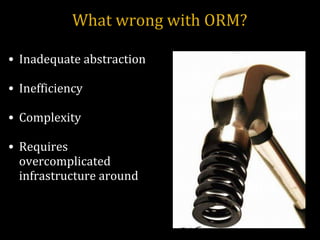
What wrong with ORM? Inadequate abstraction Inefficiency Complexity Requires overcomplicated infrastructure around
Micro ORM Massive  by Rob Connery Simple.Data  by Mark Rendle Peta Poco  by Top Ten Software Dapper  by Sam Saffron
dapper-dot-net Simple SQL object mapper for ADO.NET Created by StackOverflow guys Single file Read oriented Ultra fast - performance is a key feature Pure SQL 
dapper-dot-net Main concepts Enrich IDbCommand with extension methods for querying and executing sql commands. Can map query results to list of POCOs or dynamics.
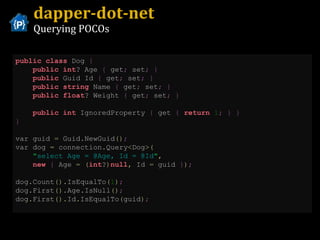
dapper-dot-net Querying POCOs public   class  Dog  {   public   int ? Age  {  get ;  set ;   }   public  Guid Id  {  get ;  set ;   }   public   string  Name  {  get ;  set ;   }   public   float ? Weight  {  get ;  set ;   }   public   int  IgnoredProperty  {  get  {   return   1 ;   }   }   }   var guid  =  Guid . NewGuid () ;   var dog  =  connection . Query < Dog >( &quot; select Age = @Age, Id = @Id &quot; ,   new   {  Age  =   ( int ? ) null ,  Id  =  guid  } ) ; dog . Count (). IsEqualTo ( 1 ) ; dog . First (). Age . IsNull () ; dog . First (). Id . IsEqualTo ( guid ) ;
dapper-dot-net Advanced features List support -  automatically parameterize query by passing IEnumerable connection . Query < int >( @ &quot; select * from    (select 1 as Id union select 2 union select 3) as X    where Id in @Ids &quot; ,   new   {  Ids  =   new   int []   {   1 ,   2 ,   3   } ) ; select   *   from   ( select   1   as   Id   union   select   2   union   all   select   3 )   as  X  where   Id   in   ( @Ids1 ,   @Ids2 ,   @Ids3 )   // @Ids1 = 1 , @Ids2 = 2 , @Ids2 = 3
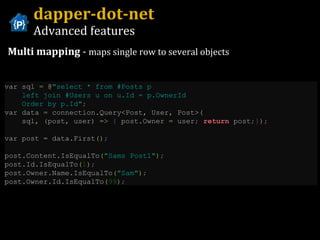
dapper-dot-net Advanced features Multi mapping  -  maps single row to several objects var sql  =  @ &quot; select * from #Posts p    left join #Users u on u.Id = p.OwnerId    Order by p.Id &quot; ; var data  =  connection . Query < Post ,  User ,  Post >( sql ,   ( post ,  user )   =>   {  post . Owner  =  user ;   return  post ;} ) ;   var post  =  data . First () ;   post . Content . IsEqualTo ( &quot; Sams Post1 &quot; ) ;   post . Id . IsEqualTo ( 1 ) ;   post . Owner . Name . IsEqualTo ( &quot; Sam &quot; ) ;   post . Owner . Id . IsEqualTo ( 99 ) ;
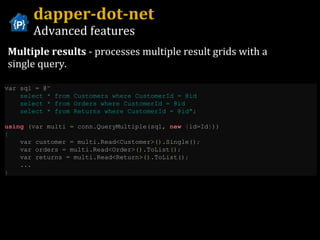
dapper-dot-net Advanced features Multiple results  - processes multiple result grids with a single query. var sql  =  @ “ select * from Customers where CustomerId = @id  select * from Orders where CustomerId = @id  select * from Returns where CustomerId = @id &quot; ;   using   ( var multi  =  conn . QueryMultiple ( sql ,   new   { id = Id } ))   {   var customer  =  multi . Read < Customer >(). Single () ;   var orders  =  multi . Read < Order >(). ToList () ;   var returns  =  multi . Read < Return >(). ToList () ;     ...   }
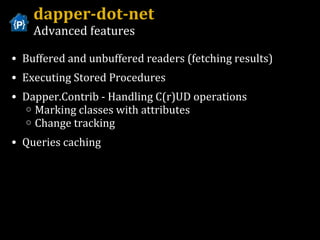
Buffered and unbuffered readers (fetching results) Executing Stored Procedures Dapper.Contrib - Handling C(r)UD operations Marking classes with attributes Change tracking Queries caching dapper-dot-net Advanced features
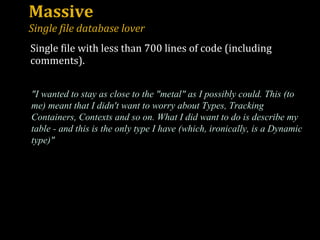
Massive Single file database lover &quot;I wanted to stay as close to the &quot;metal&quot; as I possibly could. This (to me) meant that I didn't want to worry about Types, Tracking Containers, Contexts and so on. What I did want to do is describe my table - and this is the only type I have (which, ironically, is a Dynamic type)&quot; Single file with less than 700 lines of code (including comments).
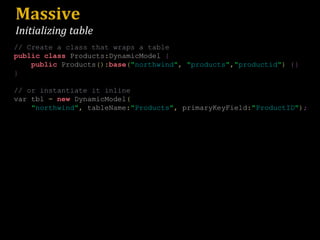
Massive Initializing table // Create a class that wraps a table public   class  Products : DynamicModel  { public  Products (): base ( &quot; northwind &quot; ,   &quot; products &quot; , &quot; productid &quot; )   {} } // or instantiate it inline var tbl  =   new  DynamicModel ( &quot; northwind &quot; ,  tableName : &quot; Products &quot; ,  primaryKeyField : &quot; ProductID &quot; ) ;
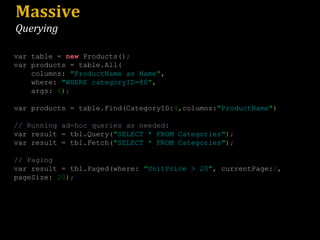
Massive Querying var table  =   new  Products () ; var products  =  table . All ( columns :   &quot; ProductName as Name &quot; ,   where :   &quot; WHERE categoryID=@0 &quot; ,   args :   4 ) ; var products  =  table . Find ( CategoryID : 4 , columns : &quot; ProductName &quot; ) // Running ad-hoc queries as needed: var result  =  tbl . Query ( &quot; SELECT * FROM Categories &quot; ) ; var result  =  tbl . Fetch ( &quot; SELECT * FROM Categories &quot; ) ; // Paging var result  =  tbl . Paged ( where :   &quot; UnitPrice > 20 &quot; ,  currentPage : 2 ,  pageSize :   20 ) ;
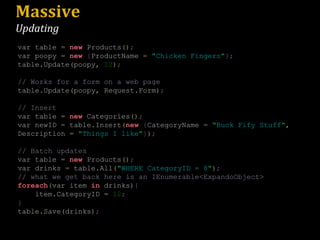
Massive Updating var table  =   new  Products () ; var poopy  =   new   { ProductName  =   &quot; Chicken Fingers &quot; }; table . Update ( poopy ,   12 ) ; // Works for a form on a web page table . Update ( poopy ,  Request . Form ) ; // Insert var table  =   new  Categories () ; var newID  =  table . Insert ( new   { CategoryName  =   &quot; Buck Fify Stuff &quot; ,  Description  =   &quot; Things I like &quot; } ) ; // Batch updates var table  =   new  Products () ; var drinks  =  table . All ( &quot; WHERE CategoryID = 8 &quot; ) ; // what we get back here is an IEnumerable<ExpandoObject> foreach ( var item  in  drinks ) { item . CategoryID  =   12 ; } table . Save ( drinks ) ;
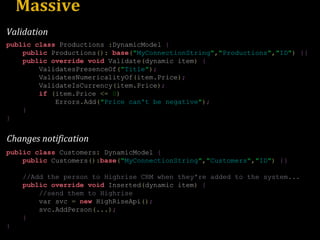
Massive public   class  Productions  : DynamicModel  { public  Productions ():   base ( &quot; MyConnectionString &quot; , &quot; Productions &quot; , &quot; ID &quot; )   {} public   override   void  Validate ( dynamic item )   { ValidatesPresenceOf ( &quot; Title &quot; ) ; ValidatesNumericalityOf ( item . Price ) ; ValidateIsCurrency ( item . Price ) ; if   ( item . Price  <=   0 ) Errors . Add ( &quot; Price can't be negative &quot; ) ; } } public   class  Customers :  DynamicModel  { public  Customers (): base ( &quot; MyConnectionString &quot; , &quot; Customers &quot; , &quot; ID &quot; )   {} //Add the person to Highrise CRM when they're added to the system... public   override   void  Inserted ( dynamic item )   { //send them to Highrise var svc  =   new  HighRiseApi () ; svc . AddPerson (...) ; } } Changes notification Validation
PetaPoco Tiny ORM to use with non-dynamic POCO objects Inspired by Massive but works with strongly typed POCOs Also supports dynamic Expandos T4 template for generating classes from database schema Marking classes with attributes The query language is SQL Helper methods for Insert/Delete/Update/Save and IsNew Hooks for logging exceptions, installing value converters and mapping columns to properties without attributes Works even if you stuck with .NET 3.5
PetaPoco Code samples
Simple.Data an ORM without O, the R or the M &quot;A lightweight, dynamic data access component for .NET&quot;
Simple.Data Microsoft.Data done right Really simple Protects from SQL injection Convention based and LINQ like syntax Master-detail relations without SELECT N+1 Easy testing with mock database
Simple.Data Syntax overview dynamic  db  =  Database . Open () ; User user  =  db . Users . FindByUserName ( &quot; bob &quot; ) ;   // Method name form user  =  db . Users . FindBy ( UserName :   &quot; bob &quot; ) ;   // Named parameter form @p0   =   'bob' SELECT   *   FROM  Users  WHERE  UserName  =   @p0 IEnumerable < dynamic >  customers  =  db . Customers . FindAll ( db . Customers . CustomerName  ==   &quot; Arthur &quot; ) . OrderByCustomerName () . Distinct () ; @p1   =   'Arthur' select   distinct   dbo . customers . customerid ,  dbo . customers . customer_name from   [ dbo ].[ customers ]   where   [ dbo ].[ customers ].[ customer_name ]   =   @p1   order   by   [ customer_name ] FindAllBy FindBy
Simple.Data Syntax overview var q  =  db . Employees . Query () . Join ( db . Department ,  Id :  db . Employees . DepartmentId ) . Select ( db . Employees . Name ,  db . Department . Name . As ( &quot; Department &quot; )) ; var q  =  db . Employees . Find ( db . Employees . DepartmentId  ==  db . Department . Id ) . Select ( db . Employees . Name ,  db . Department . Name . As ( &quot; Department &quot; )) ; select   [ dbo ].[ employee ].[ name ], [ dbo ].[ department ].[ name ]   as   [ Department ]   from   [ dbo ].[ employee ] join   [ dbo ].[ department ]   on   ([ dbo ].[ department ].[ id ]   =   [ dbo ].[ employee ].[ departmentid ]) Explicit join Natural join (dynamic form)
Simple.Data Syntax overview - Insert var user  =  db . Users . Insert ( Name :   &quot; Steve &quot; ,  Age :   50 ) ; @p0   =   'Steve' @p1   =   50 insert   into   [ dbo ].[ Users ]   ([ Name ],[ Age ])   values   ( @p0 , @p1 ) var user  =   new  User  {  Name  =   &quot; Steve &quot; ,  Age  =   50   }; db . Users . Insert ( user ) ; By object Named parameters Generated SQL: Insert, Update and Delete methods return a row or rowSet of data that has just been modified.  Insert and Update can be used in two forms, Named parameters and by object. The object can be a POCO or a dynamic.
Simple.Data Syntax overview - Update db . Users . UpdateById ( Id :   1 ,  Name :   &quot; Steve &quot; ,  Age :   50 ) ; @p0   =   1 ,   @p1   =   'Steve' ,   @p2   =   50 update   [ dbo ].[ Users ]   set   [ Name ]   =   @p1 ,   [ Age ]   =   @p2   where   [ dbo ].[ Users ].[ Id ]   =   @p3 dynamic record  =   new  SimpleRecord () ; record . Id  =   1 ; record . Name  =   &quot; Steve &quot; ; record . Age  =   50 ; db . Users . UpdateById ( record ) ;  // Method name form db . Users . Update ( record ) ;  // By Primary Key By object (can be POCO or dynamic) Named parameters Generated SQL:
Simple.Data Syntax overview - UpdateAll db . Users . UpdateAll ( Name :   &quot; Steve &quot; ) ; @p0   =   'Steve' update   [ dbo ].[ Users ]   set   [ Name ]   =   @p Named parameters db . Users . UpdateAll ( Name :   &quot; Steve &quot; ,  Condition :  db . Users . Age  >   30 ) ; db . Users . UpdateAll ( db . Users . Age  >   30 ,  Name :   &quot; Steve &quot; ) ; With expression @p0   =   'Steve' @p1   =   30 update   [ dbo ].[ Users ]   set   [ Name ]   =   @p0   where   [ dbo ].[ Users ].[ Age ]   >   @p1
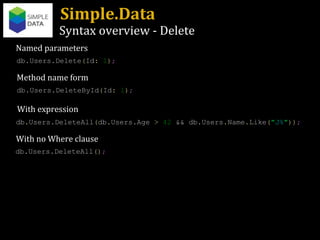
Simple.Data Syntax overview - Delete db . Users . Delete ( Id :   1 ) ; Named parameters db . Users . DeleteById ( Id :   1 ) ; db . Users . DeleteAll ( db . Users . Age  >   42  && db . Users . Name . Like ( &quot; J% &quot; )) ; Method name form  db . Users . DeleteAll () ; With expression With no Where clause
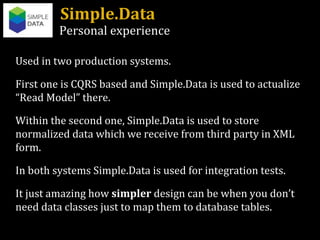
Simple.Data Personal experience Used in two production systems. First one is CQRS based and Simple.Data is used to actualize “Read Model” there. Within the second one, Simple.Data is used to store normalized data which we receive from third party in XML form. In both systems Simple.Data is used for integration tests. It just amazing how  simpler  design can be when you don’t need data classes just to map them to database tables.
Simple.Data Real code examples
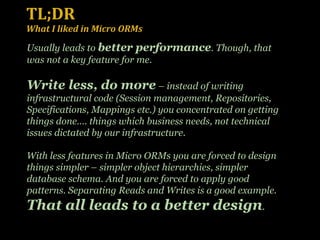
TL;DR What I liked in Micro ORMs Usually leads to  better performance . Though, that was not a key feature for me.  Write less, do more  – instead of writing infrastructural code (Session management, Repositories, Specifications, Mappings etc.) you concentrated on getting things done…. things which business needs, not technical issues dictated by our infrastructure. With less features in Micro ORMs you are forced to design things simpler – simpler object hierarchies, simpler database schema. And you are forced to apply good patterns. Separating Reads and Writes is a good example. That all leads to a better design .
References General “ ORM is an anti-pattern” article –  http://seldo.com/weblog/2011/06/15/orm_is_an_antipattern   Micro ORM Samples –  https://github.com/ijrussell/MicroORM InfoQ. Micro ORMs with Sam Saffron and Rob Conery –  http://www.infoq.com/articles/ORM-Saffron-Conery Hanselminutes Podcast 262 - The Rise of the Micro-ORM with Sam Saffron and Rob Conery  http://www.hanselman.com/blog/HanselminutesPodcast262TheRiseOfTheMicroORMWithSamSaffronAndRobConery.aspx Dapper-dot-net Home –  http://code.google.com/p/dapper-dot-net/   (with performance comparison) “ How I learned to stop worrying and write my own ORM” – http://samsaffron.com/archive/2011/03/30/How+I+learned+to+stop+worrying+and+write+my+own+ORM “ A day in the life of a slow page at Stack Overflow” -  http://samsaffron.com/archive/2011/05/02/A+day+in+the+life+of+a+slow+page+at+Stack+Overflow Massive Home –  https://github.com/robconery/massive Rob Conery blog -  http://wekeroad.com/
References PetaPoco Source –  https://github.com/toptensoftware/petapoco Documentation –  http://www.toptensoftware.com/petapoco/ Simple.Data Source –  https://github.com/markrendle/Simple.Data Documentation –  http://simplefx.org/simpledata/docs/ Mark Rendle blog -  http://blog.markrendle.net/ HERDING CODE 106: MARK RENDLE ON SIMPLE.DATA (podcast) –  http://herdingcode.com/?p=305 .Net Rocks! podcast “Mark Rendle Has Some Simple.Data” –  http://www.dotnetrocks.com/default.aspx?showNum=683
Follow Friday @marcgravell @markrendle @robconery @samsaffron @toptensoftware
 

Micro-ORM Introduction - Don't overcomplicate

  • 1.
    Don't overcomplicate Introductionto Micro ORM Ivan Korneliuk @korneliuk http://korneliuk.blogspot.com/ 31337 Kiev ALT.NET
  • 2.
    What wrong withORM? Inadequate abstraction Inefficiency Complexity Requires overcomplicated infrastructure around
  • 3.
    Micro ORM Massive by Rob Connery Simple.Data  by Mark Rendle Peta Poco  by Top Ten Software Dapper  by Sam Saffron
  • 4.
    dapper-dot-net Simple SQLobject mapper for ADO.NET Created by StackOverflow guys Single file Read oriented Ultra fast - performance is a key feature Pure SQL 
  • 5.
    dapper-dot-net Main conceptsEnrich IDbCommand with extension methods for querying and executing sql commands. Can map query results to list of POCOs or dynamics.
  • 6.
    dapper-dot-net Querying POCOspublic class Dog { public int ? Age { get ; set ; } public Guid Id { get ; set ; } public string Name { get ; set ; } public float ? Weight { get ; set ; } public int IgnoredProperty { get { return 1 ; } } } var guid = Guid . NewGuid () ; var dog = connection . Query < Dog >( &quot; select Age = @Age, Id = @Id &quot; , new { Age = ( int ? ) null , Id = guid } ) ; dog . Count (). IsEqualTo ( 1 ) ; dog . First (). Age . IsNull () ; dog . First (). Id . IsEqualTo ( guid ) ;
  • 7.
    dapper-dot-net Advanced featuresList support - automatically parameterize query by passing IEnumerable connection . Query < int >( @ &quot; select * from (select 1 as Id union select 2 union select 3) as X where Id in @Ids &quot; , new { Ids = new int [] { 1 , 2 , 3 } ) ; select * from ( select 1 as Id union select 2 union all select 3 ) as X where Id in ( @Ids1 , @Ids2 , @Ids3 ) // @Ids1 = 1 , @Ids2 = 2 , @Ids2 = 3
  • 8.
    dapper-dot-net Advanced featuresMulti mapping  - maps single row to several objects var sql = @ &quot; select * from #Posts p left join #Users u on u.Id = p.OwnerId Order by p.Id &quot; ; var data = connection . Query < Post , User , Post >( sql , ( post , user ) => { post . Owner = user ; return post ;} ) ; var post = data . First () ; post . Content . IsEqualTo ( &quot; Sams Post1 &quot; ) ; post . Id . IsEqualTo ( 1 ) ; post . Owner . Name . IsEqualTo ( &quot; Sam &quot; ) ; post . Owner . Id . IsEqualTo ( 99 ) ;
  • 9.
    dapper-dot-net Advanced featuresMultiple results  - processes multiple result grids with a single query. var sql = @ “ select * from Customers where CustomerId = @id select * from Orders where CustomerId = @id select * from Returns where CustomerId = @id &quot; ; using ( var multi = conn . QueryMultiple ( sql , new { id = Id } )) { var customer = multi . Read < Customer >(). Single () ; var orders = multi . Read < Order >(). ToList () ; var returns = multi . Read < Return >(). ToList () ; ... }
  • 10.
    Buffered and unbufferedreaders (fetching results) Executing Stored Procedures Dapper.Contrib - Handling C(r)UD operations Marking classes with attributes Change tracking Queries caching dapper-dot-net Advanced features
  • 11.
    Massive Single filedatabase lover &quot;I wanted to stay as close to the &quot;metal&quot; as I possibly could. This (to me) meant that I didn't want to worry about Types, Tracking Containers, Contexts and so on. What I did want to do is describe my table - and this is the only type I have (which, ironically, is a Dynamic type)&quot; Single file with less than 700 lines of code (including comments).
  • 12.
    Massive Initializing table// Create a class that wraps a table public class Products : DynamicModel { public Products (): base ( &quot; northwind &quot; , &quot; products &quot; , &quot; productid &quot; ) {} } // or instantiate it inline var tbl = new DynamicModel ( &quot; northwind &quot; , tableName : &quot; Products &quot; , primaryKeyField : &quot; ProductID &quot; ) ;
  • 13.
    Massive Querying vartable = new Products () ; var products = table . All ( columns : &quot; ProductName as Name &quot; , where : &quot; WHERE categoryID=@0 &quot; , args : 4 ) ; var products = table . Find ( CategoryID : 4 , columns : &quot; ProductName &quot; ) // Running ad-hoc queries as needed: var result = tbl . Query ( &quot; SELECT * FROM Categories &quot; ) ; var result = tbl . Fetch ( &quot; SELECT * FROM Categories &quot; ) ; // Paging var result = tbl . Paged ( where : &quot; UnitPrice > 20 &quot; , currentPage : 2 , pageSize : 20 ) ;
  • 14.
    Massive Updating vartable = new Products () ; var poopy = new { ProductName = &quot; Chicken Fingers &quot; }; table . Update ( poopy , 12 ) ; // Works for a form on a web page table . Update ( poopy , Request . Form ) ; // Insert var table = new Categories () ; var newID = table . Insert ( new { CategoryName = &quot; Buck Fify Stuff &quot; , Description = &quot; Things I like &quot; } ) ; // Batch updates var table = new Products () ; var drinks = table . All ( &quot; WHERE CategoryID = 8 &quot; ) ; // what we get back here is an IEnumerable<ExpandoObject> foreach ( var item in drinks ) { item . CategoryID = 12 ; } table . Save ( drinks ) ;
  • 15.
    Massive public class Productions : DynamicModel { public Productions (): base ( &quot; MyConnectionString &quot; , &quot; Productions &quot; , &quot; ID &quot; ) {} public override void Validate ( dynamic item ) { ValidatesPresenceOf ( &quot; Title &quot; ) ; ValidatesNumericalityOf ( item . Price ) ; ValidateIsCurrency ( item . Price ) ; if ( item . Price <= 0 ) Errors . Add ( &quot; Price can't be negative &quot; ) ; } } public class Customers : DynamicModel { public Customers (): base ( &quot; MyConnectionString &quot; , &quot; Customers &quot; , &quot; ID &quot; ) {} //Add the person to Highrise CRM when they're added to the system... public override void Inserted ( dynamic item ) { //send them to Highrise var svc = new HighRiseApi () ; svc . AddPerson (...) ; } } Changes notification Validation
  • 16.
    PetaPoco Tiny ORMto use with non-dynamic POCO objects Inspired by Massive but works with strongly typed POCOs Also supports dynamic Expandos T4 template for generating classes from database schema Marking classes with attributes The query language is SQL Helper methods for Insert/Delete/Update/Save and IsNew Hooks for logging exceptions, installing value converters and mapping columns to properties without attributes Works even if you stuck with .NET 3.5
  • 17.
  • 18.
    Simple.Data an ORMwithout O, the R or the M &quot;A lightweight, dynamic data access component for .NET&quot;
  • 19.
    Simple.Data Microsoft.Data doneright Really simple Protects from SQL injection Convention based and LINQ like syntax Master-detail relations without SELECT N+1 Easy testing with mock database
  • 20.
    Simple.Data Syntax overviewdynamic db = Database . Open () ; User user = db . Users . FindByUserName ( &quot; bob &quot; ) ; // Method name form user = db . Users . FindBy ( UserName : &quot; bob &quot; ) ; // Named parameter form @p0 = 'bob' SELECT * FROM Users WHERE UserName = @p0 IEnumerable < dynamic > customers = db . Customers . FindAll ( db . Customers . CustomerName == &quot; Arthur &quot; ) . OrderByCustomerName () . Distinct () ; @p1 = 'Arthur' select distinct dbo . customers . customerid , dbo . customers . customer_name from [ dbo ].[ customers ] where [ dbo ].[ customers ].[ customer_name ] = @p1 order by [ customer_name ] FindAllBy FindBy
  • 21.
    Simple.Data Syntax overviewvar q = db . Employees . Query () . Join ( db . Department , Id : db . Employees . DepartmentId ) . Select ( db . Employees . Name , db . Department . Name . As ( &quot; Department &quot; )) ; var q = db . Employees . Find ( db . Employees . DepartmentId == db . Department . Id ) . Select ( db . Employees . Name , db . Department . Name . As ( &quot; Department &quot; )) ; select [ dbo ].[ employee ].[ name ], [ dbo ].[ department ].[ name ] as [ Department ] from [ dbo ].[ employee ] join [ dbo ].[ department ] on ([ dbo ].[ department ].[ id ] = [ dbo ].[ employee ].[ departmentid ]) Explicit join Natural join (dynamic form)
  • 22.
    Simple.Data Syntax overview- Insert var user = db . Users . Insert ( Name : &quot; Steve &quot; , Age : 50 ) ; @p0 = 'Steve' @p1 = 50 insert into [ dbo ].[ Users ] ([ Name ],[ Age ]) values ( @p0 , @p1 ) var user = new User { Name = &quot; Steve &quot; , Age = 50 }; db . Users . Insert ( user ) ; By object Named parameters Generated SQL: Insert, Update and Delete methods return a row or rowSet of data that has just been modified. Insert and Update can be used in two forms, Named parameters and by object. The object can be a POCO or a dynamic.
  • 23.
    Simple.Data Syntax overview- Update db . Users . UpdateById ( Id : 1 , Name : &quot; Steve &quot; , Age : 50 ) ; @p0 = 1 , @p1 = 'Steve' , @p2 = 50 update [ dbo ].[ Users ] set [ Name ] = @p1 , [ Age ] = @p2 where [ dbo ].[ Users ].[ Id ] = @p3 dynamic record = new SimpleRecord () ; record . Id = 1 ; record . Name = &quot; Steve &quot; ; record . Age = 50 ; db . Users . UpdateById ( record ) ; // Method name form db . Users . Update ( record ) ; // By Primary Key By object (can be POCO or dynamic) Named parameters Generated SQL:
  • 24.
    Simple.Data Syntax overview- UpdateAll db . Users . UpdateAll ( Name : &quot; Steve &quot; ) ; @p0 = 'Steve' update [ dbo ].[ Users ] set [ Name ] = @p Named parameters db . Users . UpdateAll ( Name : &quot; Steve &quot; , Condition : db . Users . Age > 30 ) ; db . Users . UpdateAll ( db . Users . Age > 30 , Name : &quot; Steve &quot; ) ; With expression @p0 = 'Steve' @p1 = 30 update [ dbo ].[ Users ] set [ Name ] = @p0 where [ dbo ].[ Users ].[ Age ] > @p1
  • 25.
    Simple.Data Syntax overview- Delete db . Users . Delete ( Id : 1 ) ; Named parameters db . Users . DeleteById ( Id : 1 ) ; db . Users . DeleteAll ( db . Users . Age > 42 && db . Users . Name . Like ( &quot; J% &quot; )) ; Method name form db . Users . DeleteAll () ; With expression With no Where clause
  • 26.
    Simple.Data Personal experienceUsed in two production systems. First one is CQRS based and Simple.Data is used to actualize “Read Model” there. Within the second one, Simple.Data is used to store normalized data which we receive from third party in XML form. In both systems Simple.Data is used for integration tests. It just amazing how simpler design can be when you don’t need data classes just to map them to database tables.
  • 27.
  • 28.
    TL;DR What Iliked in Micro ORMs Usually leads to better performance . Though, that was not a key feature for me. Write less, do more – instead of writing infrastructural code (Session management, Repositories, Specifications, Mappings etc.) you concentrated on getting things done…. things which business needs, not technical issues dictated by our infrastructure. With less features in Micro ORMs you are forced to design things simpler – simpler object hierarchies, simpler database schema. And you are forced to apply good patterns. Separating Reads and Writes is a good example. That all leads to a better design .
  • 29.
    References General “ORM is an anti-pattern” article – http://seldo.com/weblog/2011/06/15/orm_is_an_antipattern Micro ORM Samples – https://github.com/ijrussell/MicroORM InfoQ. Micro ORMs with Sam Saffron and Rob Conery – http://www.infoq.com/articles/ORM-Saffron-Conery Hanselminutes Podcast 262 - The Rise of the Micro-ORM with Sam Saffron and Rob Conery http://www.hanselman.com/blog/HanselminutesPodcast262TheRiseOfTheMicroORMWithSamSaffronAndRobConery.aspx Dapper-dot-net Home – http://code.google.com/p/dapper-dot-net/ (with performance comparison) “ How I learned to stop worrying and write my own ORM” – http://samsaffron.com/archive/2011/03/30/How+I+learned+to+stop+worrying+and+write+my+own+ORM “ A day in the life of a slow page at Stack Overflow” - http://samsaffron.com/archive/2011/05/02/A+day+in+the+life+of+a+slow+page+at+Stack+Overflow Massive Home – https://github.com/robconery/massive Rob Conery blog - http://wekeroad.com/
  • 30.
    References PetaPoco Source– https://github.com/toptensoftware/petapoco Documentation – http://www.toptensoftware.com/petapoco/ Simple.Data Source – https://github.com/markrendle/Simple.Data Documentation – http://simplefx.org/simpledata/docs/ Mark Rendle blog - http://blog.markrendle.net/ HERDING CODE 106: MARK RENDLE ON SIMPLE.DATA (podcast) – http://herdingcode.com/?p=305 .Net Rocks! podcast “Mark Rendle Has Some Simple.Data” – http://www.dotnetrocks.com/default.aspx?showNum=683
  • 31.
    Follow Friday @marcgravell@markrendle @robconery @samsaffron @toptensoftware
  • 32.