Recommended
PDF
【論文読み会】Deep Clustering for Unsupervised Learning of Visual Features
PPTX
[DL輪読会]Graph R-CNN for Scene Graph Generation
PDF
Active Learning の基礎と最近の研究
PPTX
データサイエンス概論第一=3-1 線形代数に基づくデータ解析の基礎
PDF
PPTX
CVPR2018 pix2pixHD論文紹介 (CV勉強会@関東)
PDF
High-impact Papers in Computer Vision: 歴史を変えた/トレンドを創る論文
PPTX
【DL輪読会】High-Resolution Image Synthesis with Latent Diffusion Models
PPTX
PPTX
Swin Transformer (ICCV'21 Best Paper) を完璧に理解する資料
PDF
PDF
PDF
semantic segmentation サーベイ
PDF
PPTX
PDF
PDF
LSTM (Long short-term memory) 概要
PDF
Attentionの基礎からTransformerの入門まで
PPTX
PDF
Disentanglement Survey:Can You Explain How Much Are Generative models Disenta...
PDF
PDF
深層生成モデルと世界モデル(2020/11/20版)
PDF
[DL輪読会]Wasserstein GAN/Towards Principled Methods for Training Generative Adv...
PDF
PPTX
【DL輪読会】Visual Classification via Description from Large Language Models (ICLR...
PPTX
マルコフ連鎖モンテカルロ法 (2/3はベイズ推定の話)
PDF
Transformerを多層にする際の勾配消失問題と解決法について
PDF
PDF
PDF
More Related Content
PDF
【論文読み会】Deep Clustering for Unsupervised Learning of Visual Features
PPTX
[DL輪読会]Graph R-CNN for Scene Graph Generation
PDF
Active Learning の基礎と最近の研究
PPTX
データサイエンス概論第一=3-1 線形代数に基づくデータ解析の基礎
PDF
PPTX
CVPR2018 pix2pixHD論文紹介 (CV勉強会@関東)
PDF
High-impact Papers in Computer Vision: 歴史を変えた/トレンドを創る論文
PPTX
【DL輪読会】High-Resolution Image Synthesis with Latent Diffusion Models
What's hot
PPTX
PPTX
Swin Transformer (ICCV'21 Best Paper) を完璧に理解する資料
PDF
PDF
PDF
semantic segmentation サーベイ
PDF
PPTX
PDF
PDF
LSTM (Long short-term memory) 概要
PDF
Attentionの基礎からTransformerの入門まで
PPTX
PDF
Disentanglement Survey:Can You Explain How Much Are Generative models Disenta...
PDF
PDF
深層生成モデルと世界モデル(2020/11/20版)
PDF
[DL輪読会]Wasserstein GAN/Towards Principled Methods for Training Generative Adv...
PDF
PPTX
【DL輪読会】Visual Classification via Description from Large Language Models (ICLR...
PPTX
マルコフ連鎖モンテカルロ法 (2/3はベイズ推定の話)
PDF
Transformerを多層にする際の勾配消失問題と解決法について
PDF
Similar to 画像処理基礎
PDF
PDF
PDF
Pythonで画像処理をやってみよう! 第1回 - ヒストグラムと濃度変換 -
PDF
PDF
PPTX
PDF
20110109第8回CV勉強会(ミーンシフトの原理と応用:6章・7章)shirasy)
PDF
PDF
[MIRU2017 招待講演] 白黒写真の自動色付け (SIGGRAPH 2016)
PPTX
PDF
2020年度秋学期 画像情報処理 第1回 イントロダクションー画像科学と数学 (2020. 9. 25)
PPTX
PDF
PPTX
PDF
PPTX
PDF
(文献紹介)エッジ保存フィルタ:Side Window Filter, Curvature Filter
PDF
PDF
[チュートリアル講演]画像データを対象とする情報ハイディング〜JPEG画像を利用したハイディング〜
PDF
More from 大貴 末廣
PPTX
PPTX
PPTX
PPTX
PPTX
PPTX
PPTX
PDF
PDF
PDF
PDF
PDF
PDF
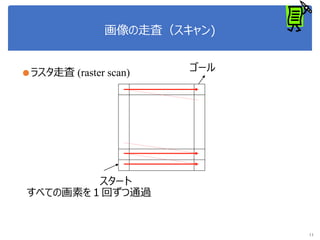
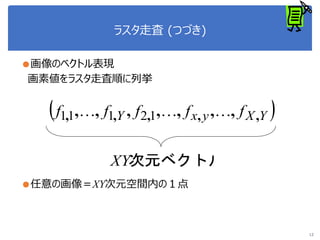
画像処理基礎 1. 2. 3. 4. 5. 6. 7. 8. 9. 10. 11. 12. ラスタ走査 (つづき)
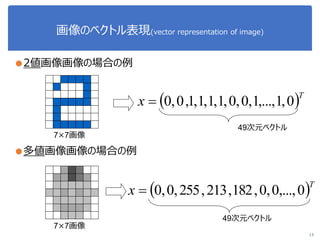
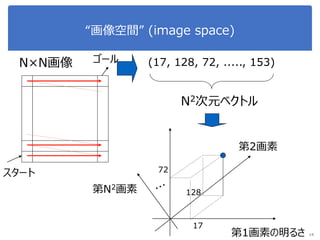
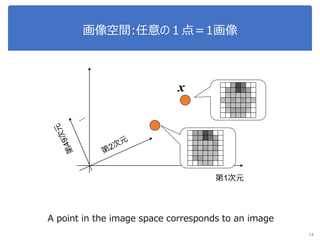
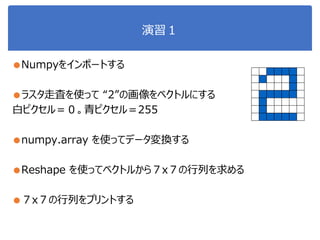
●画像のベクトル表現
画素値をラスタ走査順に列挙
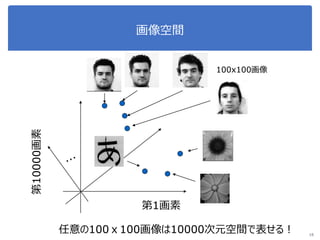
●任意の画像=XY次元空間内の1点
12
YXyxY fffff ,,,,, ,,,,,,, 12111
次元ベクトルXY
13. 画像のベクトル表現(vector representation of image)
●2値画像画像の場合の例
●多値画像画像の場合の例
13
T
x 0,1,...,1,0,0,1,1,1,1,0,0
T
x 0,...,0,0,182,213,255,0,0
49次元ベクトル
49次元ベクトル
7×7画像
7×7画像
14. 15. 16. 17. 18. 19. 20. OpenCV
●http://opencv.org
●CV = “Computer Vision”
●様々な画像解析ライブラリ(関数群)が提供され
ている
●Python用にライブラリが整備されている
●注)アナコンダにはデフォルトでは入っていないため、
インストールが別途必要。
If interested, try at home
http://docs.opencv.org/3.0-
beta/doc/py_tutorials/py_tutorials.html
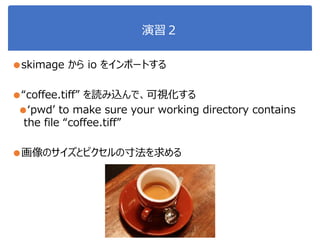
21. 22. 23. 24. 演習2
●skimage から io をインポートする
●“coffee.tiff” を読み込んで、可視化する
●‘pwd’ to make sure your working directory contains
the file “coffee.tiff”
●画像のサイズとピクセルの寸法を求める
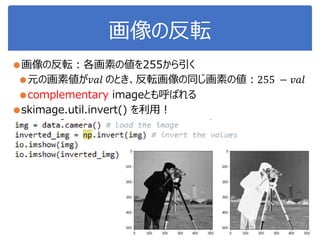
25. 26. 27. 28. 29. 30. 31. 32. コントラスト強調
●画素値: (一般的には)0 ~ 255 を取りうる
●実際には、その中の狭い範囲にしか値がない画像も多い
●下記の画像では [50, 100]の値しかない
●コントラストが低い
●skimage.exposure :画像のコントラストを強調(利用する画素
値の幅を広める)する関数が提供されている
33. 34. Histogram equalization
● “Histogram_Equalization.py” を利用
Source: http://scikit-image.org/docs/stable/auto_examples/color_exposure/plot_equalize.html#sphx-glr-
auto-examples-color-exposure-plot-equalize-py
Output images
輝度値のヒストグラム
輝度範囲: [0: 1]
red curve :輝度の積算
元画像 線形変換 ヒストグラム
均一化
ヒストグラム
適応均一化
35. 演習3
●skimage から data をインポートする
●“chealsea"を読み込んで、 red channel > 160 となっている画
素を green [0, 255, 0]に上書きして、表示
●Note on data type
Data type Range
uint8 0 to 255
uint16 0 to 65535
uint32 0 to 232
float -1 to 1 or 0 to 1
int8 -128 to 127
int16 -32768 to 32767
int32 -231 to 231 - 1
reddish = cat[:, :, 0] > 160
cat = data.chelsea() # load the cat image
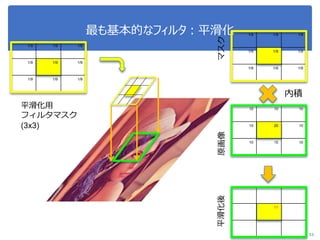
36. 37. 38. 39. 40. 41. 42. 43. 44. 45. 46. 47. 48. 49. 50. 51. 52. 53. 最も基本的なフィルタ:平滑化
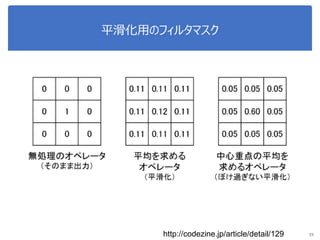
1/9 1/9 1/9
1/9 1/9 1/9
1/9 1/9 1/9
53
平滑化用
フィルタマスク
(3x3)
10 10 10
10 20 10
10 10 10
1/9 1/9 1/9
1/9 1/9 1/9
1/9 1/9 1/9
10 10 10
10 11 10
10 10 10
内積
マスク原画像平滑化後
54. 55. 56. 57. 58. 59. 60. 61. 62. 63. 64. 65. 66. 演習 3 (downsampling)
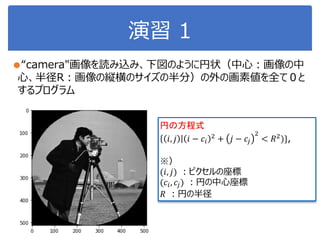
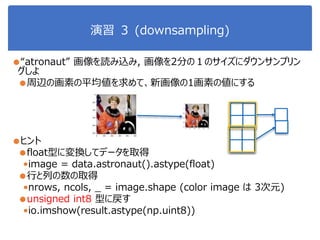
●“atronaut” 画像を読み込み, 画像を2分の1のサイズにダウンサンプリン
グしよ
●周辺の画素の平均値を求めて、新画像の1画素の値にする
●ヒント
●float型に変換してデータを取得
•image = data.astronaut().astype(float)
●行と列の数の取得
•nrows, ncols, _ = image.shape (color image は 3次元)
●unsigned int8 型に戻す
•io.imshow(result.astype(np.uint8))
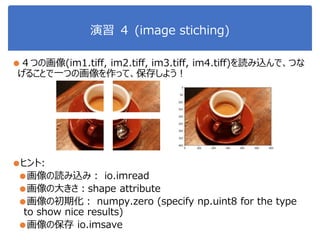
67. 演習 4 (image stiching)
●4つの画像(im1.tiff, im2.tiff, im3.tiff, im4.tiff)を読み込んで、つな
げることで一つの画像を作って、保存しよう!
●ヒント:
●画像の読み込み: io.imread
●画像の大きさ:shape attribute
●画像の初期化: numpy.zero (specify np.uint8 for the type
to show nice results)
●画像の保存 io.imsave
68. 69. 70. 71. 72. 73.
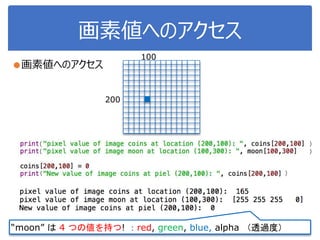
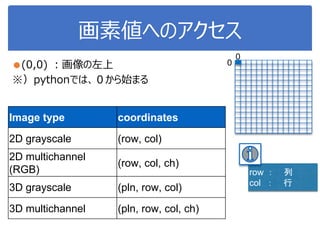
![画像データ
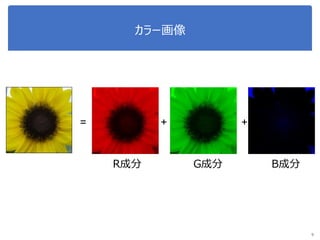
●カラー画像データは、ピクセルごとにRGBの3つ
のチャンネルの数字の組み合わせ
●n 行 m 列の画像: 𝑛 × 𝑚 ピクセルの数値
●カラー画像:1つのピクセルは3つのチャンネルの数値を持つ
● red, green, blue.
●例:100×100のカラー画像
⇒3×100×100=30000の次元のベクトル
pixel = [red, green, blue]
n
m](https://image.slidesharecdn.com/imageprocessing1-190124085754/85/slide-17-320.jpg)
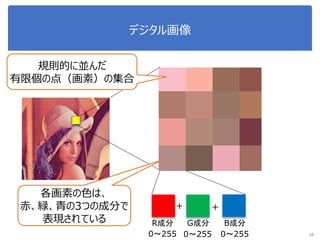
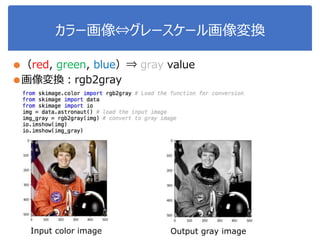
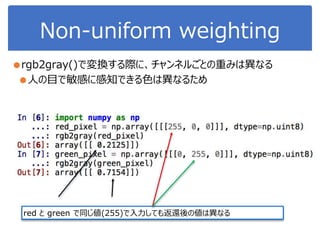
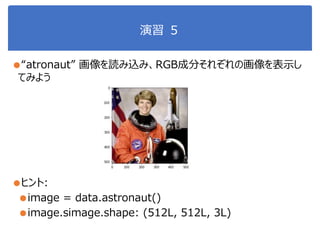
![カラー画像
●1画素につき、(Red,Green,Blue)の3チャンネルの数値
●データ名.shape を使って確認しよう
●それぞれのチャンネルに、0 から 255 までの値が入っている
●例:赤(255, 0, 0)
●Pythonで, それぞれのチャンネルにアクセスするには
[row, col, 0 or 1 or 2]
Red Green Blue](https://image.slidesharecdn.com/imageprocessing1-190124085754/85/slide-28-320.jpg)
![コントラスト強調
●画素値: (一般的には)0 ~ 255 を取りうる
●実際には、その中の狭い範囲にしか値がない画像も多い
●下記の画像では [50, 100]の値しかない
●コントラストが低い
●skimage.exposure :画像のコントラストを強調(利用する画素
値の幅を広める)する関数が提供されている](https://image.slidesharecdn.com/imageprocessing1-190124085754/85/slide-32-320.jpg)
![コントラスト強調手法
●ガンマ補正
●暗い画素を持ち上げる(明るくする)
●輝度ヒストグラムを用いたコントラスト補正
●輝度の分布を用いて、輝度値を補正し、コントラストを強調
●線形濃度変換
●輝度値の分布範囲を[0, 255]に広げる](https://image.slidesharecdn.com/imageprocessing1-190124085754/85/slide-33-320.jpg)
![Histogram equalization
● “Histogram_Equalization.py” を利用
Source: http://scikit-image.org/docs/stable/auto_examples/color_exposure/plot_equalize.html#sphx-glr-
auto-examples-color-exposure-plot-equalize-py
Output images
輝度値のヒストグラム
輝度範囲: [0: 1]
red curve :輝度の積算
元画像 線形変換 ヒストグラム
均一化
ヒストグラム
適応均一化](https://image.slidesharecdn.com/imageprocessing1-190124085754/85/slide-34-320.jpg)
![演習3
●skimage から data をインポートする
●“chealsea"を読み込んで、 red channel > 160 となっている画
素を green [0, 255, 0]に上書きして、表示
●Note on data type
Data type Range
uint8 0 to 255
uint16 0 to 65535
uint32 0 to 232
float -1 to 1 or 0 to 1
int8 -128 to 127
int16 -32768 to 32767
int32 -231 to 231 - 1
reddish = cat[:, :, 0] > 160
cat = data.chelsea() # load the cat image](https://image.slidesharecdn.com/imageprocessing1-190124085754/85/slide-35-320.jpg)

![[DL輪読会]Graph R-CNN for Scene Graph Generation](https://cdn.slidesharecdn.com/ss_thumbnails/graphr-cnnforscenegraphgenerationkobayashi1130-181130001547-thumbnail.jpg?width=640&height=640&fit=bounds)


![[DL輪読会]Wasserstein GAN/Towards Principled Methods for Training Generative Adv...](https://cdn.slidesharecdn.com/ss_thumbnails/wgan-1-170224021826-thumbnail.jpg?width=640&height=640&fit=bounds)


![[MIRU2017 招待講演] 白黒写真の自動色付け (SIGGRAPH 2016)](https://cdn.slidesharecdn.com/ss_thumbnails/miru2017invitedtalkiizuka-170809090023-thumbnail.jpg?width=640&height=640&fit=bounds)


![[チュートリアル講演]画像データを対象とする情報ハイディング〜JPEG画像を利用したハイディング〜](https://cdn.slidesharecdn.com/ss_thumbnails/slideupload-130524001604-phpapp02-thumbnail.jpg?width=640&height=640&fit=bounds)


