SR-IOV and KVM virtual machines
under GNU/Linux Debian (Jessie)
Intel X520 10Gbps cards
Yoann Juet @ University of Nantes, France
Information Technology Services
Version 1.2 (12 Jun 2015)
2/19
Our goal
• Virtualize high-performance servers, firewalls
requiring:
- Low network latency and jitter
- Low processor impact (I/O)
- High throughput (10Gbps or more)
• Solution: Single Root – IO Virtualization (SR-IOV)
- A single PCI card is showed up as multiple virtual PCI cards
- Exposes n virtual interfaces from a single physical interface
> Shared bandwidth
3/19
Prerequisites
• Virtualization Technology for Directed I/O: Intel VT-d
or AMD-Vi
- Must be supported by both the CPU and the chipset
- Guest machines gain direct memory access (DMA) to PCI(e)
devices, such as Ethernet cards
• PCI-SIG Single Root I/O Virtualization: SR-IOV
- Must be supported by both the Ethernet cards and the BIOS
- Guest machines are able to achieve ~ bare metal performance
4/19
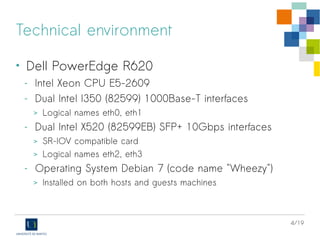
Technical environment
• Dell PowerEdge R720xd
- Intel Xeon CPU E5-2660
- Quad Broadcom BCM5720 1000Base-T interfaces
> Logical names eth2 to eth5
- Dual Intel X520 SFP+ 10Gbps interfaces
> SR-IOV compatible card
> Logical names eth0 and eth1
- Operating System Debian 8 (code name "Jessie")
> Installed on both hosts and guests machines
5/19
BIOS
Host machine
• Ensure Intel VT-d feature is enabled
- System BIOS > Processor Settings > Virtualization Technology
6/19
BIOS
Host machine
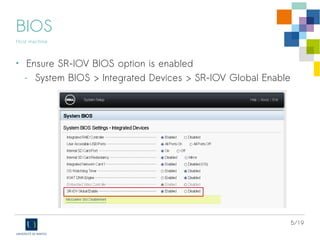
• Ensure SR-IOV BIOS option is enabled
- Device Settings > [Select NIC] > Device Level Configuration
> Virtualization mode = SR-IOV
7/19
BIOS
Host machine
• Ensure SR-IOV BIOS option is enabled
- Device Settings > [Select NIC] > NIC Configuration
> PCI Virtual Functions Advertised = 64
8/19
Debian: Starting with SR-IOV
Host machine
• Some Kernel requirements:
CONFIG_PCI_IOV={y|m}
CONFIG_PCI_STUB={y|m}
CONFIG_VFIO_IOMMU_TYPE1={y|m}
CONFIG_VFIO={y|m}
CONFIG_VFIO_PCI={y|m}
CONFIG_INTEL_IOMMU_DEFAULT_ON={y|m}
• On Jessie default kernel, CONFIG_INTEL_IOMMU_DEFAULT_ON is not
set require a grub special configuration→
9/19
Debian: Starting with SR-IOV
Host machine
• Edit file /etc/default/grub and update the following parameter
GRUB_CMDLINE_LINUX="intel_iommu=on"
• Execute the command update-grub and finaly reboot
10/19
Debian: Starting with SR-IOV
Host machine
• Check for SR-IOV hardware support on NICs:
# lspci -v
…
42:00.0 Ethernet controller: Intel Corporation Ethernet 10G 2P X520 Adapter (rev 01)
Subsystem: Intel Corporation 10GbE 2P X520 Adapter
...
Capabilities: [160] Single Root I/O Virtualization (SR-IOV)
Kernel driver in use: ixgbe
42:00.1 Ethernet controller: Intel Corporation Ethernet 10G 2P X520 Adapter (rev 01)
Subsystem: Intel Corporation 10GbE 2P X520 Adapter
...
Capabilities: [160] Single Root I/O Virtualization (SR-IOV)
Kernel driver in use: ixgbe
eth0
eth1
11/19
Debian: Starting with SR-IOV
Host machine
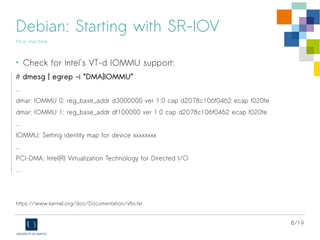
• Check for Intel's VT-d IOMMU support:
# dmesg | egrep -i “DMA|IOMMU”
…
Kernel command line: BOOT_IMAGE=/vmlinuz-3.16.0-4-amd64 root=UUID=821747a0-fe42-473c-9273-391feb7f82cf
ro intel_iommu=on quiet
Intel-IOMMU: enabled
...
dmar: IOMMU 0: reg_base_addr d5000000 ver 1:0 cap d2078c106f0466 ecap f020de
dmar: IOMMU 1: reg_base_addr df900000 ver 1:0 cap d2078c106f0466 ecap f020de
...
IOMMU: Setting identity map for device 0000:00:1f.0 [0x0 - 0xffffff]
PCI-DMA: Intel(R) Virtualization Technology for Directed I/O
…
https://www.kernel.org/doc/Documentation/vfio.txt
12/19
Debian: Starting with SR-IOV
Host machine
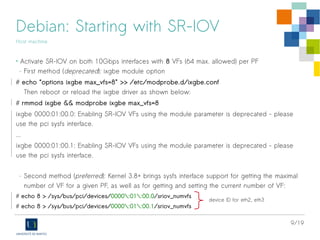
• Activate SR-IOV on both 10Gbps interfaces
with 8 VFs (64 max. allowed) per PF
# echo 8 > /sys/bus/pci/devices/0000:42:00.0/sriov_numvfs
# echo 8 > /sys/bus/pci/devices/0000:42:00.1/sriov_numvfs
USB IDs for eth0 and eth1
13/19
Debian: Starting with SR-IOV
Host machine
• Check for new virtual PCIe devices (Virtual Functions):
# lspci
...
42:00.0 Ethernet controller: Intel Corporation Ethernet 10G 2P X520 Adapter (rev 01)
42:00.1 Ethernet controller: Intel Corporation Ethernet 10G 2P X520 Adapter (rev 01)
42:10.0 Ethernet controller: Intel Corporation 82599 Ethernet Controller Virtual Function (rev 01)
42:10.1 Ethernet controller: Intel Corporation 82599 Ethernet Controller Virtual Function (rev 01)
42:10.2 Ethernet controller: Intel Corporation 82599 Ethernet Controller Virtual Function (rev 01)
42:10.3 Ethernet controller: Intel Corporation 82599 Ethernet Controller Virtual Function (rev 01)
42:10.4 Ethernet controller: Intel Corporation 82599 Ethernet Controller Virtual Function (rev 01)
42:10.5 Ethernet controller: Intel Corporation 82599 Ethernet Controller Virtual Function (rev 01)
42:10.6 Ethernet controller: Intel Corporation 82599 Ethernet Controller Virtual Function (rev 01)
42:10.7 Ethernet controller: Intel Corporation 82599 Ethernet Controller Virtual Function (rev 01)
42:11.0 Ethernet controller: Intel Corporation 82599 Ethernet Controller Virtual Function (rev 01)
42:11.1 Ethernet controller: Intel Corporation 82599 Ethernet Controller Virtual Function (rev 01)
42:11.2 Ethernet controller: Intel Corporation 82599 Ethernet Controller Virtual Function (rev 01)
42:11.3 Ethernet controller: Intel Corporation 82599 Ethernet Controller Virtual Function (rev 01)
42:11.4 Ethernet controller: Intel Corporation 82599 Ethernet Controller Virtual Function (rev 01)
42:11.5 Ethernet controller: Intel Corporation 82599 Ethernet Controller Virtual Function (rev 01)
42:11.6 Ethernet controller: Intel Corporation 82599 Ethernet Controller Virtual Function (rev 01)
42:11.7 Ethernet controller: Intel Corporation 82599 Ethernet Controller Virtual Function (rev 01)
8 VFs on the second PF (eth1)
8 VFs on the first PF (eth0)
14/19
Debian: Starting with SR-IOV
Host machine
• Each VF behaves like a traditional network interface - below, logical names eth6 eth21→
# ip link show
6: eth0: <BROADCAST,MULTICAST,SLAVE,UP,LOWER_UP> mtu 1500 qdisc mq master bond0 state UP mode DEFAULT group default qlen 1000
link/ether a0:36:9f:51:cc:78 brd ff:ff:ff:ff:ff:ff
vf 0 MAC 00:00:00:00:00:00, spoof checking on, link-state auto
vf 1 MAC 32:b3:0d:59:31:42, spoof checking on, link-state auto
vf 2 MAC 7e:9f:5c:09:c8:a6, spoof checking on, link-state auto
vf 3 MAC e2:ba:d4:c2:67:3d, spoof checking on, link-state auto
vf 4 MAC e6:fd:c3:16:c5:ce, spoof checking on, link-state auto
vf 5 MAC f2:6b:58:67:c8:67, spoof checking on, link-state auto
vf 6 MAC fe:4c:58:40:ff:59, spoof checking on, link-state auto
vf 7 MAC 5e:ad:3a:0b:1e:3f, spoof checking on, link-state auto
7: eth1: <BROADCAST,MULTICAST,SLAVE,UP,LOWER_UP> mtu 1500 qdisc mq master bond0 state UP mode DEFAULT group default qlen 1000
link/ether a0:36:9f:51:cc:78 brd ff:ff:ff:ff:ff:ff
vf 0 MAC 52:b3:83:97:5d:a6, spoof checking on, link-state auto
vf 1 MAC d2:37:28:fb:f5:f8, spoof checking on, link-state auto
vf 2 MAC 0e:74:de:f5:b8:2d, spoof checking on, link-state auto
vf 3 MAC 32:54:71:e2:f4:da, spoof checking on, link-state auto
vf 4 MAC ca:5b:02:0a:c9:b2, spoof checking on, link-state auto
vf 5 MAC fa:ff:65:56:95:79, spoof checking on, link-state auto
vf 6 MAC 8a:e5:a0:30:32:51, spoof checking on, link-state auto
vf 7 MAC 00:00:00:00:00:00, spoof checking on, link-state auto
8 unused VFs on the first PF
8 unused VFs on the second PF
15/19
Debian: Starting with SR-IOV
Host machine
9: eth6: <BROADCAST,MULTICAST> mtu 1500 qdisc noop state DOWN mode DEFAULT group default qlen 1000
10: eth7: <BROADCAST,MULTICAST> mtu 1500 qdisc noop state DOWN mode DEFAULT group default qlen 1000
11: eth8: <BROADCAST,MULTICAST> mtu 1500 qdisc noop state DOWN mode DEFAULT group default qlen 1000
12: eth9: <BROADCAST,MULTICAST> mtu 1500 qdisc noop state DOWN mode DEFAULT group default qlen 1000
13: eth10: <BROADCAST,MULTICAST> mtu 1500 qdisc noop state DOWN mode DEFAULT group default qlen 1000
14: eth11: <BROADCAST,MULTICAST> mtu 1500 qdisc noop state DOWN mode DEFAULT group default qlen 1000
15: eth12: <BROADCAST,MULTICAST> mtu 1500 qdisc noop state DOWN mode DEFAULT group default qlen 1000
16: eth13: <BROADCAST,MULTICAST> mtu 1500 qdisc noop state DOWN mode DEFAULT group default qlen 1000
17: eth14: <BROADCAST,MULTICAST> mtu 1500 qdisc noop state DOWN mode DEFAULT group default qlen 1000
18: eth15: <BROADCAST,MULTICAST> mtu 1500 qdisc noop state DOWN mode DEFAULT group default qlen 1000
19: eth16: <BROADCAST,MULTICAST> mtu 1500 qdisc noop state DOWN mode DEFAULT group default qlen 1000
20: eth17: <BROADCAST,MULTICAST> mtu 1500 qdisc noop state DOWN mode DEFAULT group default qlen 1000
21: eth18: <BROADCAST,MULTICAST> mtu 1500 qdisc noop state DOWN mode DEFAULT group default qlen 1000
22: eth19: <BROADCAST,MULTICAST> mtu 1500 qdisc noop state DOWN mode DEFAULT group default qlen 1000
23: eth20: <BROADCAST,MULTICAST> mtu 1500 qdisc noop state DOWN mode DEFAULT group default qlen 1000
24: eth21: <BROADCAST,MULTICAST> mtu 1500 qdisc noop state DOWN mode DEFAULT group default qlen 1000
16virtual
interfaces
16/19
Debian: PCI passthrough with libvirt
Host machine
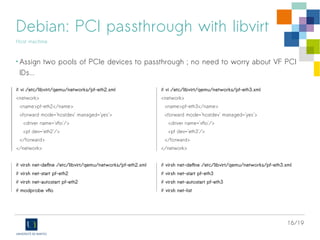
• Assign two pools of PCIe devices to passthrough ; no need to worry about VF PCI
IDs... Allocation of ressources is dynamic.
# vi /etc/libvirt/qemu/networks/pf-eth0.xml
<network>
<name>pf-eth0</name>
<forward mode='hostdev' managed='yes'>
<driver name='vfio'/>
<pf dev='eth0'/>
</forward>
</network>
# virsh net-define /etc/libvirt/qemu/networks/pf-eth0.xml
# virsh net-start pf-eth0
# virsh net-autostart pf-eth0
# modprobe vfio
# vi /etc/libvirt/qemu/networks/pf-eth1.xml
<network>
<name>pf-eth1</name>
<forward mode='hostdev' managed='yes'>
<driver name='vfio'/>
<pf dev='eth1'/>
</forward>
</network>
# virsh net-define /etc/libvirt/qemu/networks/pf-eth1.xml
# virsh net-start pf-eth1
# virsh net-autostart pf-eth1
# virsh net-list
17/19
Debian: PCI passthrough with libvirt
Host machine
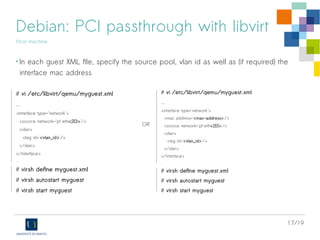
• In each guest XML file, specify the source pool, vlan id as well as (if required) the
interface mac address
# vi /etc/libvirt/qemu/myguest.xml
...
<interface type='network'>
<source network='pf-eth<0|1>'/>
<vlan>
<tag id='<vlan_id>'/>
</vlan>
</interface>
...
# virsh define myguest.xml
# virsh autostart myguest
# virsh start myguest
# vi /etc/libvirt/qemu/myguest.xml
...
<interface type='network'>
<mac address='<mac-address>'/>
<source network='pf-eth<0|1>'/>
<vlan>
<tag id='<vlan_id>'/>
</vlan>
</interface>
...
# virsh define myguest.xml
# virsh autostart myguest
# virsh start myguest
OR
18/19
Debian: Starting
Guest machine
• No prerequisite, nor specific configuration
on the guest linux machine
• “a pure” Debian 8 (kernel 3.16.x) works
perfectly
• Virtual interfaces are using the driver
ixgbevf
19/19
University of Nantes – IT Services
Questions
Yoann (dot) Juet (at) univ–nantes.fr

SR-IOV, KVM and Intel X520 10Gbps cards on Debian/Stable

  • 1.
    SR-IOV and KVMvirtual machines under GNU/Linux Debian (Jessie) Intel X520 10Gbps cards Yoann Juet @ University of Nantes, France Information Technology Services Version 1.2 (12 Jun 2015)
  • 2.
    2/19 Our goal • Virtualizehigh-performance servers, firewalls requiring: - Low network latency and jitter - Low processor impact (I/O) - High throughput (10Gbps or more) • Solution: Single Root – IO Virtualization (SR-IOV) - A single PCI card is showed up as multiple virtual PCI cards - Exposes n virtual interfaces from a single physical interface > Shared bandwidth
  • 3.
    3/19 Prerequisites • Virtualization Technologyfor Directed I/O: Intel VT-d or AMD-Vi - Must be supported by both the CPU and the chipset - Guest machines gain direct memory access (DMA) to PCI(e) devices, such as Ethernet cards • PCI-SIG Single Root I/O Virtualization: SR-IOV - Must be supported by both the Ethernet cards and the BIOS - Guest machines are able to achieve ~ bare metal performance
  • 4.
    4/19 Technical environment • DellPowerEdge R720xd - Intel Xeon CPU E5-2660 - Quad Broadcom BCM5720 1000Base-T interfaces > Logical names eth2 to eth5 - Dual Intel X520 SFP+ 10Gbps interfaces > SR-IOV compatible card > Logical names eth0 and eth1 - Operating System Debian 8 (code name "Jessie") > Installed on both hosts and guests machines
  • 5.
    5/19 BIOS Host machine • EnsureIntel VT-d feature is enabled - System BIOS > Processor Settings > Virtualization Technology
  • 6.
    6/19 BIOS Host machine • EnsureSR-IOV BIOS option is enabled - Device Settings > [Select NIC] > Device Level Configuration > Virtualization mode = SR-IOV
  • 7.
    7/19 BIOS Host machine • EnsureSR-IOV BIOS option is enabled - Device Settings > [Select NIC] > NIC Configuration > PCI Virtual Functions Advertised = 64
  • 8.
    8/19 Debian: Starting withSR-IOV Host machine • Some Kernel requirements: CONFIG_PCI_IOV={y|m} CONFIG_PCI_STUB={y|m} CONFIG_VFIO_IOMMU_TYPE1={y|m} CONFIG_VFIO={y|m} CONFIG_VFIO_PCI={y|m} CONFIG_INTEL_IOMMU_DEFAULT_ON={y|m} • On Jessie default kernel, CONFIG_INTEL_IOMMU_DEFAULT_ON is not set require a grub special configuration→
  • 9.
    9/19 Debian: Starting withSR-IOV Host machine • Edit file /etc/default/grub and update the following parameter GRUB_CMDLINE_LINUX="intel_iommu=on" • Execute the command update-grub and finaly reboot
  • 10.
    10/19 Debian: Starting withSR-IOV Host machine • Check for SR-IOV hardware support on NICs: # lspci -v … 42:00.0 Ethernet controller: Intel Corporation Ethernet 10G 2P X520 Adapter (rev 01) Subsystem: Intel Corporation 10GbE 2P X520 Adapter ... Capabilities: [160] Single Root I/O Virtualization (SR-IOV) Kernel driver in use: ixgbe 42:00.1 Ethernet controller: Intel Corporation Ethernet 10G 2P X520 Adapter (rev 01) Subsystem: Intel Corporation 10GbE 2P X520 Adapter ... Capabilities: [160] Single Root I/O Virtualization (SR-IOV) Kernel driver in use: ixgbe eth0 eth1
  • 11.
    11/19 Debian: Starting withSR-IOV Host machine • Check for Intel's VT-d IOMMU support: # dmesg | egrep -i “DMA|IOMMU” … Kernel command line: BOOT_IMAGE=/vmlinuz-3.16.0-4-amd64 root=UUID=821747a0-fe42-473c-9273-391feb7f82cf ro intel_iommu=on quiet Intel-IOMMU: enabled ... dmar: IOMMU 0: reg_base_addr d5000000 ver 1:0 cap d2078c106f0466 ecap f020de dmar: IOMMU 1: reg_base_addr df900000 ver 1:0 cap d2078c106f0466 ecap f020de ... IOMMU: Setting identity map for device 0000:00:1f.0 [0x0 - 0xffffff] PCI-DMA: Intel(R) Virtualization Technology for Directed I/O … https://www.kernel.org/doc/Documentation/vfio.txt
  • 12.
    12/19 Debian: Starting withSR-IOV Host machine • Activate SR-IOV on both 10Gbps interfaces with 8 VFs (64 max. allowed) per PF # echo 8 > /sys/bus/pci/devices/0000:42:00.0/sriov_numvfs # echo 8 > /sys/bus/pci/devices/0000:42:00.1/sriov_numvfs USB IDs for eth0 and eth1
  • 13.
    13/19 Debian: Starting withSR-IOV Host machine • Check for new virtual PCIe devices (Virtual Functions): # lspci ... 42:00.0 Ethernet controller: Intel Corporation Ethernet 10G 2P X520 Adapter (rev 01) 42:00.1 Ethernet controller: Intel Corporation Ethernet 10G 2P X520 Adapter (rev 01) 42:10.0 Ethernet controller: Intel Corporation 82599 Ethernet Controller Virtual Function (rev 01) 42:10.1 Ethernet controller: Intel Corporation 82599 Ethernet Controller Virtual Function (rev 01) 42:10.2 Ethernet controller: Intel Corporation 82599 Ethernet Controller Virtual Function (rev 01) 42:10.3 Ethernet controller: Intel Corporation 82599 Ethernet Controller Virtual Function (rev 01) 42:10.4 Ethernet controller: Intel Corporation 82599 Ethernet Controller Virtual Function (rev 01) 42:10.5 Ethernet controller: Intel Corporation 82599 Ethernet Controller Virtual Function (rev 01) 42:10.6 Ethernet controller: Intel Corporation 82599 Ethernet Controller Virtual Function (rev 01) 42:10.7 Ethernet controller: Intel Corporation 82599 Ethernet Controller Virtual Function (rev 01) 42:11.0 Ethernet controller: Intel Corporation 82599 Ethernet Controller Virtual Function (rev 01) 42:11.1 Ethernet controller: Intel Corporation 82599 Ethernet Controller Virtual Function (rev 01) 42:11.2 Ethernet controller: Intel Corporation 82599 Ethernet Controller Virtual Function (rev 01) 42:11.3 Ethernet controller: Intel Corporation 82599 Ethernet Controller Virtual Function (rev 01) 42:11.4 Ethernet controller: Intel Corporation 82599 Ethernet Controller Virtual Function (rev 01) 42:11.5 Ethernet controller: Intel Corporation 82599 Ethernet Controller Virtual Function (rev 01) 42:11.6 Ethernet controller: Intel Corporation 82599 Ethernet Controller Virtual Function (rev 01) 42:11.7 Ethernet controller: Intel Corporation 82599 Ethernet Controller Virtual Function (rev 01) 8 VFs on the second PF (eth1) 8 VFs on the first PF (eth0)
  • 14.
    14/19 Debian: Starting withSR-IOV Host machine • Each VF behaves like a traditional network interface - below, logical names eth6 eth21→ # ip link show 6: eth0: <BROADCAST,MULTICAST,SLAVE,UP,LOWER_UP> mtu 1500 qdisc mq master bond0 state UP mode DEFAULT group default qlen 1000 link/ether a0:36:9f:51:cc:78 brd ff:ff:ff:ff:ff:ff vf 0 MAC 00:00:00:00:00:00, spoof checking on, link-state auto vf 1 MAC 32:b3:0d:59:31:42, spoof checking on, link-state auto vf 2 MAC 7e:9f:5c:09:c8:a6, spoof checking on, link-state auto vf 3 MAC e2:ba:d4:c2:67:3d, spoof checking on, link-state auto vf 4 MAC e6:fd:c3:16:c5:ce, spoof checking on, link-state auto vf 5 MAC f2:6b:58:67:c8:67, spoof checking on, link-state auto vf 6 MAC fe:4c:58:40:ff:59, spoof checking on, link-state auto vf 7 MAC 5e:ad:3a:0b:1e:3f, spoof checking on, link-state auto 7: eth1: <BROADCAST,MULTICAST,SLAVE,UP,LOWER_UP> mtu 1500 qdisc mq master bond0 state UP mode DEFAULT group default qlen 1000 link/ether a0:36:9f:51:cc:78 brd ff:ff:ff:ff:ff:ff vf 0 MAC 52:b3:83:97:5d:a6, spoof checking on, link-state auto vf 1 MAC d2:37:28:fb:f5:f8, spoof checking on, link-state auto vf 2 MAC 0e:74:de:f5:b8:2d, spoof checking on, link-state auto vf 3 MAC 32:54:71:e2:f4:da, spoof checking on, link-state auto vf 4 MAC ca:5b:02:0a:c9:b2, spoof checking on, link-state auto vf 5 MAC fa:ff:65:56:95:79, spoof checking on, link-state auto vf 6 MAC 8a:e5:a0:30:32:51, spoof checking on, link-state auto vf 7 MAC 00:00:00:00:00:00, spoof checking on, link-state auto 8 unused VFs on the first PF 8 unused VFs on the second PF
  • 15.
    15/19 Debian: Starting withSR-IOV Host machine 9: eth6: <BROADCAST,MULTICAST> mtu 1500 qdisc noop state DOWN mode DEFAULT group default qlen 1000 10: eth7: <BROADCAST,MULTICAST> mtu 1500 qdisc noop state DOWN mode DEFAULT group default qlen 1000 11: eth8: <BROADCAST,MULTICAST> mtu 1500 qdisc noop state DOWN mode DEFAULT group default qlen 1000 12: eth9: <BROADCAST,MULTICAST> mtu 1500 qdisc noop state DOWN mode DEFAULT group default qlen 1000 13: eth10: <BROADCAST,MULTICAST> mtu 1500 qdisc noop state DOWN mode DEFAULT group default qlen 1000 14: eth11: <BROADCAST,MULTICAST> mtu 1500 qdisc noop state DOWN mode DEFAULT group default qlen 1000 15: eth12: <BROADCAST,MULTICAST> mtu 1500 qdisc noop state DOWN mode DEFAULT group default qlen 1000 16: eth13: <BROADCAST,MULTICAST> mtu 1500 qdisc noop state DOWN mode DEFAULT group default qlen 1000 17: eth14: <BROADCAST,MULTICAST> mtu 1500 qdisc noop state DOWN mode DEFAULT group default qlen 1000 18: eth15: <BROADCAST,MULTICAST> mtu 1500 qdisc noop state DOWN mode DEFAULT group default qlen 1000 19: eth16: <BROADCAST,MULTICAST> mtu 1500 qdisc noop state DOWN mode DEFAULT group default qlen 1000 20: eth17: <BROADCAST,MULTICAST> mtu 1500 qdisc noop state DOWN mode DEFAULT group default qlen 1000 21: eth18: <BROADCAST,MULTICAST> mtu 1500 qdisc noop state DOWN mode DEFAULT group default qlen 1000 22: eth19: <BROADCAST,MULTICAST> mtu 1500 qdisc noop state DOWN mode DEFAULT group default qlen 1000 23: eth20: <BROADCAST,MULTICAST> mtu 1500 qdisc noop state DOWN mode DEFAULT group default qlen 1000 24: eth21: <BROADCAST,MULTICAST> mtu 1500 qdisc noop state DOWN mode DEFAULT group default qlen 1000 16virtual interfaces
  • 16.
    16/19 Debian: PCI passthroughwith libvirt Host machine • Assign two pools of PCIe devices to passthrough ; no need to worry about VF PCI IDs... Allocation of ressources is dynamic. # vi /etc/libvirt/qemu/networks/pf-eth0.xml <network> <name>pf-eth0</name> <forward mode='hostdev' managed='yes'> <driver name='vfio'/> <pf dev='eth0'/> </forward> </network> # virsh net-define /etc/libvirt/qemu/networks/pf-eth0.xml # virsh net-start pf-eth0 # virsh net-autostart pf-eth0 # modprobe vfio # vi /etc/libvirt/qemu/networks/pf-eth1.xml <network> <name>pf-eth1</name> <forward mode='hostdev' managed='yes'> <driver name='vfio'/> <pf dev='eth1'/> </forward> </network> # virsh net-define /etc/libvirt/qemu/networks/pf-eth1.xml # virsh net-start pf-eth1 # virsh net-autostart pf-eth1 # virsh net-list
  • 17.
    17/19 Debian: PCI passthroughwith libvirt Host machine • In each guest XML file, specify the source pool, vlan id as well as (if required) the interface mac address # vi /etc/libvirt/qemu/myguest.xml ... <interface type='network'> <source network='pf-eth<0|1>'/> <vlan> <tag id='<vlan_id>'/> </vlan> </interface> ... # virsh define myguest.xml # virsh autostart myguest # virsh start myguest # vi /etc/libvirt/qemu/myguest.xml ... <interface type='network'> <mac address='<mac-address>'/> <source network='pf-eth<0|1>'/> <vlan> <tag id='<vlan_id>'/> </vlan> </interface> ... # virsh define myguest.xml # virsh autostart myguest # virsh start myguest OR
  • 18.
    18/19 Debian: Starting Guest machine •No prerequisite, nor specific configuration on the guest linux machine • “a pure” Debian 8 (kernel 3.16.x) works perfectly • Virtual interfaces are using the driver ixgbevf
  • 19.
    19/19 University of Nantes– IT Services Questions Yoann (dot) Juet (at) univ–nantes.fr