Xen SR-IOV Feature 
(I/O Virtualization) 
Lingfei Kong 
lkong@redhat.com 
Sep. 2013
Agenda 
● Background 
● SR-IOV Overview 
● How it works with Xen 
● Reference link 
● Q & A
Background 
I/O is an important part of any computing platform, including virtual machines running 
on top of a virtual machine monitor. 
● I/O Virtualization Goals 
● Provide the same device 
● Provide scalability to support the number of virtual machines(VMs) 
They should also provide near native performance for I/O operations. 
● Isolation 
● Memory 
● I/O streams 
● Interrupts 
● Control operations 
● I/O operations and errors
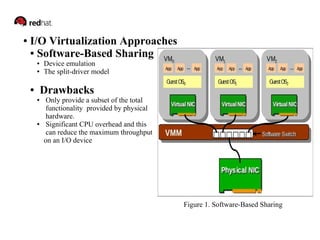
● I/O Virtualization Approaches 
● Software-Based Sharing 
● Device emulation 
● The split-driver model 
● Drawbacks 
● Only provide a subset of the total 
functionality provided by physical 
hardware. 
● Significant CPU overhead and this 
can reduce the maximum throughput 
on an I/O device 
Figure 1. Software-Based Sharing 
.
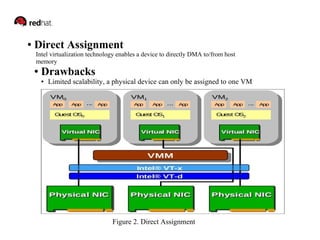
● Direct Assignment 
Intel virtualization technology enables a device to directly DMA to/from host 
memory 
● Drawbacks 
● Limited scalability, a physical device can only be assigned to one VM 
Figure 2. Direct Assignment
SR-IOV Overview 
● SR-IOV is a specification that allows a PCIe device to appear to be multiple separate 
PCIe devices. The SR-IOV specification was created and is maintained by the PCI SIG, with 
the idea that a standard specification will help promote inter interoperability. 
● SR-IOV works by introducing the idea of physical functions(PFs) and virtual functions(VFs) 
● Physical Functions(PFs): These are full PCIe functions that include the SR-IOV Extended 
Capability. The capability is used to configure and manage the SR-IOV functionality. 
● Virtual Functions(VFs): These are 'lightweight' PCIe functions that contain the resources 
necessary for data movement but have a carefully minimized set of configuration resources. 
● The Direct Assignment method of virtualization provides very fast I/O. However, it 
prevents the sharing of I/O devices. SR-IOV provides a mechanism by which a Single Root 
Function(For example a single Ethernet Port) can appear to be multiple separate physical 
Devices.
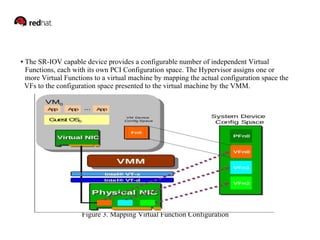
● The SR-IOV capable device provides a configurable number of independent Virtual 
Functions, each with its own PCI Configuration space. The Hypervisor assigns one or 
more Virtual Functions to a virtual machine by mapping the actual configuration space the 
VFs to the configuration space presented to the virtual machine by the VMM. 
Figure 3. Mapping Virtual Function Configuration
Figure 4. Intel SR-IOV Overview
How it works with Xen ● Setup 
● Enabled VT-d(for Intel machine) or AMD-V(for AMD machine) in BIOS 
● SR-IOV supported hardware. (for example: Intel 82576 and Intel 82599 NIC) 
● Check PF 
[host]#lspci | grep Etherne 
86:00.0 Ethernet controller: Intel Corporation 82576 Gigabit Network Connection 
(rev 01) 
86:00.1 Ethernet controller: Intel Corporation 82576 Gigabit Network Connection 
(rev 01) 
● Enable VF in grub.conf 
Add "iommu=no-intremap" in kernel line 
Add "pci_pt_e820_access=on" in module line 
Reboot the host. 
After reboot, please check if these lines exist in `xm dmesg` output(mainly the first 
line): 
(XEN) [VT-D]iommu.c:1720: Interrupt Remapping hardware not found 
(XEN) [VT-D]iommu.c:1722: Device assignment will be disabled for security reasons 
(CVE-2011-1898). 
(XEN) [VT-D]iommu.c:1724: Use iommu=no-intremap to override.
If exist, change `iommu=1` to `iommu=no-intremap` and reboot again. 
Enable VF in driver 
[host]#echo 'options igb max_vfs=7' >> /etc/modprobe.conf 
Then, restart system. VFs will be enabled automatically when host start. 
Another way to enable VF(after reboot): 
[host]# modprobe -r igb 
[host]# modprobe igb max_vfs=7
● Check VF 
[root@unused ~]# lspci|grep Ethernet 
04:00.0 Ethernet controller: Broadcom Corporation NetXtreme II BCM5709 Gigabit 
Ethernet (rev 20) 
04:00.1 Ethernet controller: Broadcom Corporation NetXtreme II BCM5709 Gigabit 
Ethernet (rev 20) 
86:00.0 Ethernet controller: Intel Corporation 82576 Gigabit Network Connection (rev 01) 
86:00.1 Ethernet controller: Intel Corporation 82576 Gigabit Network Connection (rev 01) 
86:10.0 Ethernet controller: Intel Corporation 82576 Virtual Function (rev 01) 
86:10.1 Ethernet controller: Intel Corporation 82576 Virtual Function (rev 01) 
86:10.2 Ethernet controller: Intel Corporation 82576 Virtual Function (rev 01) 
86:10.3 Ethernet controller: Intel Corporation 82576 Virtual Function (rev 01) 
86:10.4 Ethernet controller: Intel Corporation 82576 Virtual Function (rev 01) 
86:10.5 Ethernet controller: Intel Corporation 82576 Virtual Function (rev 01) 
86:10.6 Ethernet controller: Intel Corporation 82576 Virtual Function (rev 01) 
86:10.7 Ethernet controller: Intel Corporation 82576 Virtual Function (rev 01) 
86:11.0 Ethernet controller: Intel Corporation 82576 Virtual Function (rev 01) 
86:11.1 Ethernet controller: Intel Corporation 82576 Virtual Function (rev 01) 
86:11.2 Ethernet controller: Intel Corporation 82576 Virtual Function (rev 01) 
86:11.3 Ethernet controller: Intel Corporation 82576 Virtual Function (rev 01) 
86:11.4 Ethernet controller: Intel Corporation 82576 Virtual Function (rev 01) 
86:11.5 Ethernet controller: Intel Corporation 82576 Virtual Function (rev 01)
● Load pciback driver 
[host]#modprobe pciback 
[host]#lsmod |grep pciback 
pciback 65617 0 
● Get device ID of Vfs 
[host]# lspci -D | grep "82576 Virtual Function" 
0000:86:10.0 Ethernet controller: Intel Corporation 82576 Virtual Function (rev 01) 
0000:86:10.1 Ethernet controller: Intel Corporation 82576 Virtual Function (rev 01) 
…. 
● Unbind device from host kernel driver 
[host]#echo 0000:86:10.0 > /sys/bus/pci/drivers/igbvf/unbind 
● Bind PCI device to pciback driver 
[host]#echo 0000:86:10.0 > /sys/bus/pci/drivers/pciback/new_slot 
[host]#echo 0000:86:10.0 > /sys/bus/pci/drivers/pciback/bind 
Make sure the vifs get ip addresss?
● Make sure the VFs has been hidden from Dom0 already 
[host]#xm pci-list-assignable-devices 
0000:86:10.0 
● Create the guest with VF devices' ID as parameter 
xm create pv-6.4-64.cfg pci='0000:86:10.0'
Reference link 
● Xen Technical Papers -> SR-IOV 
https://docspace.corp.redhat.com/docs/DOC-133989 
● PCI-SIG SR-IOV Primer 
https://docspace.corp.redhat.com/servlet/JiveServlet/downloadBody/155072-102-1- 
755489/PCI-SIGSR-IOVPrimer.pdf 
● SR-IOV support in Xen 
https://mirrorglass.englab.nay.redhat.com/XWiki/bin/download/Main/SR%2DIOV/ 
Xen%2DSR%2DIOV.pdf 
● Overview of SR-IOV Driver Implementation 
https://mirrorglass.englab.nay.redhat.com/XWiki/bin/download/Main/SR 
%2DIOV/Intel82576SRIOV.pdf
● Xen PCI Passthrough 
http://wiki.xensource.com/wiki/XenPCIpassthrough 
● Technical Paper (from KVM section) 
https://mirrorglass.englab.nay.redhat.com/XWiki/bin/download/Main/SR%2DIOV/SR 
%2DIOVTechPaper.pdf
Q&A

SR-IOV Introduce

  • 1.
    Xen SR-IOV Feature (I/O Virtualization) Lingfei Kong lkong@redhat.com Sep. 2013
  • 2.
    Agenda ● Background ● SR-IOV Overview ● How it works with Xen ● Reference link ● Q & A
  • 3.
    Background I/O isan important part of any computing platform, including virtual machines running on top of a virtual machine monitor. ● I/O Virtualization Goals ● Provide the same device ● Provide scalability to support the number of virtual machines(VMs) They should also provide near native performance for I/O operations. ● Isolation ● Memory ● I/O streams ● Interrupts ● Control operations ● I/O operations and errors
  • 4.
    ● I/O VirtualizationApproaches ● Software-Based Sharing ● Device emulation ● The split-driver model ● Drawbacks ● Only provide a subset of the total functionality provided by physical hardware. ● Significant CPU overhead and this can reduce the maximum throughput on an I/O device Figure 1. Software-Based Sharing .
  • 5.
    ● Direct Assignment Intel virtualization technology enables a device to directly DMA to/from host memory ● Drawbacks ● Limited scalability, a physical device can only be assigned to one VM Figure 2. Direct Assignment
  • 6.
    SR-IOV Overview ●SR-IOV is a specification that allows a PCIe device to appear to be multiple separate PCIe devices. The SR-IOV specification was created and is maintained by the PCI SIG, with the idea that a standard specification will help promote inter interoperability. ● SR-IOV works by introducing the idea of physical functions(PFs) and virtual functions(VFs) ● Physical Functions(PFs): These are full PCIe functions that include the SR-IOV Extended Capability. The capability is used to configure and manage the SR-IOV functionality. ● Virtual Functions(VFs): These are 'lightweight' PCIe functions that contain the resources necessary for data movement but have a carefully minimized set of configuration resources. ● The Direct Assignment method of virtualization provides very fast I/O. However, it prevents the sharing of I/O devices. SR-IOV provides a mechanism by which a Single Root Function(For example a single Ethernet Port) can appear to be multiple separate physical Devices.
  • 7.
    ● The SR-IOVcapable device provides a configurable number of independent Virtual Functions, each with its own PCI Configuration space. The Hypervisor assigns one or more Virtual Functions to a virtual machine by mapping the actual configuration space the VFs to the configuration space presented to the virtual machine by the VMM. Figure 3. Mapping Virtual Function Configuration
  • 8.
    Figure 4. IntelSR-IOV Overview
  • 9.
    How it workswith Xen ● Setup ● Enabled VT-d(for Intel machine) or AMD-V(for AMD machine) in BIOS ● SR-IOV supported hardware. (for example: Intel 82576 and Intel 82599 NIC) ● Check PF [host]#lspci | grep Etherne 86:00.0 Ethernet controller: Intel Corporation 82576 Gigabit Network Connection (rev 01) 86:00.1 Ethernet controller: Intel Corporation 82576 Gigabit Network Connection (rev 01) ● Enable VF in grub.conf Add "iommu=no-intremap" in kernel line Add "pci_pt_e820_access=on" in module line Reboot the host. After reboot, please check if these lines exist in `xm dmesg` output(mainly the first line): (XEN) [VT-D]iommu.c:1720: Interrupt Remapping hardware not found (XEN) [VT-D]iommu.c:1722: Device assignment will be disabled for security reasons (CVE-2011-1898). (XEN) [VT-D]iommu.c:1724: Use iommu=no-intremap to override.
  • 10.
    If exist, change`iommu=1` to `iommu=no-intremap` and reboot again. Enable VF in driver [host]#echo 'options igb max_vfs=7' >> /etc/modprobe.conf Then, restart system. VFs will be enabled automatically when host start. Another way to enable VF(after reboot): [host]# modprobe -r igb [host]# modprobe igb max_vfs=7
  • 11.
    ● Check VF [root@unused ~]# lspci|grep Ethernet 04:00.0 Ethernet controller: Broadcom Corporation NetXtreme II BCM5709 Gigabit Ethernet (rev 20) 04:00.1 Ethernet controller: Broadcom Corporation NetXtreme II BCM5709 Gigabit Ethernet (rev 20) 86:00.0 Ethernet controller: Intel Corporation 82576 Gigabit Network Connection (rev 01) 86:00.1 Ethernet controller: Intel Corporation 82576 Gigabit Network Connection (rev 01) 86:10.0 Ethernet controller: Intel Corporation 82576 Virtual Function (rev 01) 86:10.1 Ethernet controller: Intel Corporation 82576 Virtual Function (rev 01) 86:10.2 Ethernet controller: Intel Corporation 82576 Virtual Function (rev 01) 86:10.3 Ethernet controller: Intel Corporation 82576 Virtual Function (rev 01) 86:10.4 Ethernet controller: Intel Corporation 82576 Virtual Function (rev 01) 86:10.5 Ethernet controller: Intel Corporation 82576 Virtual Function (rev 01) 86:10.6 Ethernet controller: Intel Corporation 82576 Virtual Function (rev 01) 86:10.7 Ethernet controller: Intel Corporation 82576 Virtual Function (rev 01) 86:11.0 Ethernet controller: Intel Corporation 82576 Virtual Function (rev 01) 86:11.1 Ethernet controller: Intel Corporation 82576 Virtual Function (rev 01) 86:11.2 Ethernet controller: Intel Corporation 82576 Virtual Function (rev 01) 86:11.3 Ethernet controller: Intel Corporation 82576 Virtual Function (rev 01) 86:11.4 Ethernet controller: Intel Corporation 82576 Virtual Function (rev 01) 86:11.5 Ethernet controller: Intel Corporation 82576 Virtual Function (rev 01)
  • 12.
    ● Load pcibackdriver [host]#modprobe pciback [host]#lsmod |grep pciback pciback 65617 0 ● Get device ID of Vfs [host]# lspci -D | grep "82576 Virtual Function" 0000:86:10.0 Ethernet controller: Intel Corporation 82576 Virtual Function (rev 01) 0000:86:10.1 Ethernet controller: Intel Corporation 82576 Virtual Function (rev 01) …. ● Unbind device from host kernel driver [host]#echo 0000:86:10.0 > /sys/bus/pci/drivers/igbvf/unbind ● Bind PCI device to pciback driver [host]#echo 0000:86:10.0 > /sys/bus/pci/drivers/pciback/new_slot [host]#echo 0000:86:10.0 > /sys/bus/pci/drivers/pciback/bind Make sure the vifs get ip addresss?
  • 13.
    ● Make surethe VFs has been hidden from Dom0 already [host]#xm pci-list-assignable-devices 0000:86:10.0 ● Create the guest with VF devices' ID as parameter xm create pv-6.4-64.cfg pci='0000:86:10.0'
  • 14.
    Reference link ●Xen Technical Papers -> SR-IOV https://docspace.corp.redhat.com/docs/DOC-133989 ● PCI-SIG SR-IOV Primer https://docspace.corp.redhat.com/servlet/JiveServlet/downloadBody/155072-102-1- 755489/PCI-SIGSR-IOVPrimer.pdf ● SR-IOV support in Xen https://mirrorglass.englab.nay.redhat.com/XWiki/bin/download/Main/SR%2DIOV/ Xen%2DSR%2DIOV.pdf ● Overview of SR-IOV Driver Implementation https://mirrorglass.englab.nay.redhat.com/XWiki/bin/download/Main/SR %2DIOV/Intel82576SRIOV.pdf
  • 15.
    ● Xen PCIPassthrough http://wiki.xensource.com/wiki/XenPCIpassthrough ● Technical Paper (from KVM section) https://mirrorglass.englab.nay.redhat.com/XWiki/bin/download/Main/SR%2DIOV/SR %2DIOVTechPaper.pdf
  • 16.