






#SPSGeneva6th December 2018
Geneva
WELCOME
#SPSGeneva
Azure Information Protection
Albert Hoitingh – Motion10
#SPSGeneva
#SPSGeneva
#SPSGeneva
A Huge “Thank You!” To Our Sponsors …
#SPSGeneva
Albert Hoitingh
• Solution Architect
• Motion10
• The Hague
• Working for over 25 years in IT (sigh…..)
• Microsoft MVP for Enterprise Mobility
#SPSGeneva
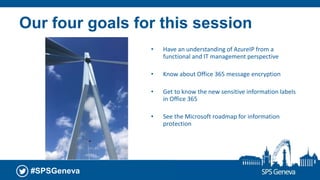
Our four goals for this session
• Have an understanding of AzureIP from a
functional and IT management perspective
• Know about Office 365 message encryption
• Get to know the new sensitive information labels
in Office 365
• See the Microsoft roadmap for information
protection
#SPSGeneva
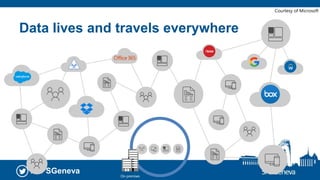
Data lives and travels everywhere
On-premises
Courtesy of Microsoft
#SPSGeneva
Three reasons for information
protection
• Regulatory compliance (GDPR anyone?)
• Information/knowledge workers need to be aware of data
classification within the enterprise
• Secure internal and external sharing without data losses
© 2018
#SPSGeneva
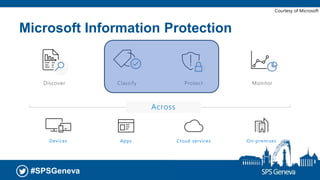
Microsoft Information Protection
Courtesy of Microsoft
#SPSGeneva
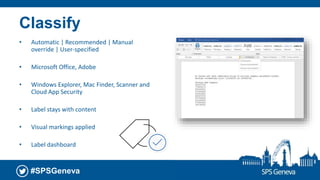
Classify
• Automatic | Recommended | Manual
override | User-specified
• Microsoft Office, Adobe
• Windows Explorer, Mac Finder, Scanner and
Cloud App Security
• Label stays with content
• Visual markings applied
• Label dashboard
#SPSGeneva
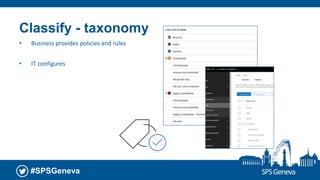
Classify - taxonomy
• Business provides policies and rules
• IT configures
#SPSGeneva
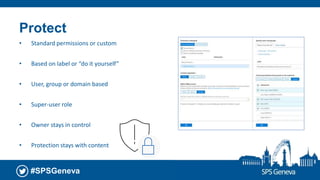
Protect
• Standard permissions or custom
• Based on label or “do it yourself”
• User, group or domain based
• Super-user role
• Owner stays in control
• Protection stays with content
#SPSGeneva
DEMO
#SPSGeneva
Some (technical) details
• Document encryption: AES (128 and 256 bits)
• Key protection: RSA (2048 bits)
• Certificate signing: SHA-256
• Client required, can be protected using conditional access
Licensing
• Office 365 Message Encryption | SharePoint Online IRM
• Stand-alone (P1/P2) | EMS (E3/E5) | Microsoft 365 (E3/E5)
#SPSGeneva
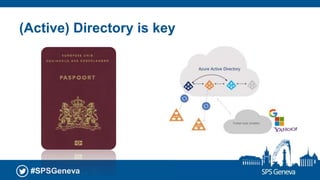
(Active) Directory is key
#SPSGeneva
DEMO
Automation and cloud apps
#SPSGeneva
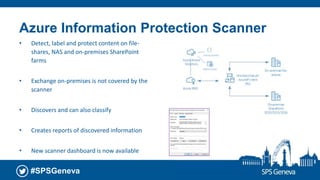
Azure Information Protection Scanner
• Detect, label and protect content on file-
shares, NAS and on-premises SharePoint
farms
• Exchange on-premises is not covered by the
scanner
• Discovers and can also classify
• Creates reports of discovered information
• New scanner dashboard is now available
#SPSGeneva
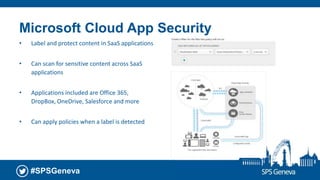
Microsoft Cloud App Security
• Label and protect content in SaaS applications
• Can scan for sensitive content across SaaS
applications
• Applications included are Office 365,
DropBox, OneDrive, Salesforce and more
• Can apply policies when a label is detected
#SPSGeneva
DEMO
Securing e-mails
#SPSGeneva
© 2018
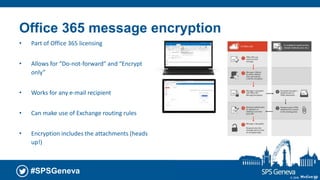
Office 365 message encryption
• Part of Office 365 licensing
• Allows for “Do-not-forward” and “Encrypt
only”
• Works for any e-mail recipient
• Can make use of Exchange routing rules
• Encryption includes the attachments (heads
up!)
22
#SPSGeneva
© 2018
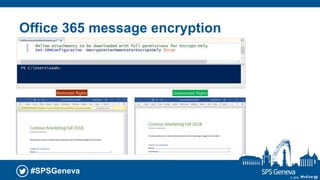
Office 365 message encryption
23
#SPSGeneva
DEMO
Office 365 sensitivity labels
#SPSGeneva
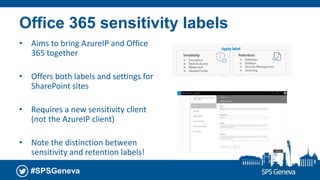
Office 365 sensitivity labels
• Aims to bring AzureIP and Office
365 together
• Offers both labels and settings for
SharePoint sites
• Requires a new sensitivity client
(not the AzureIP client)
• Note the distinction between
sensitivity and retention labels!
#SPSGeneva
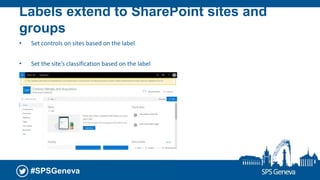
Labels extend to SharePoint sites and
groups
• Set controls on sites based on the label
• Set the site’s classification based on the label
#SPSGeneva
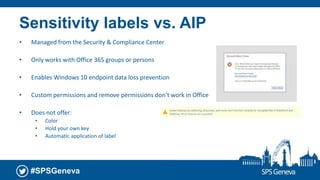
Sensitivity labels vs. AIP
• Managed from the Security & Compliance Center
• Only works with Office 365 groups or persons
• Enables Windows 10 endpoint data loss prevention
• Custom permissions and remove permissions don’t work in Office
• Does not offer:
• Color
• Hold your own key
• Automatic application of label
#SPSGeneva
DEMO
Roadmap and take ways
#SPSGeneva
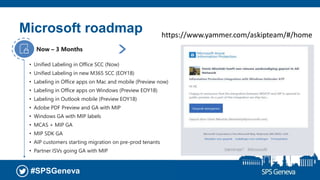
• Unified Labeling in Office SCC (Now)
• Unified Labeling in new M365 SCC (EOY18)
• Labeling in Office apps on Mac and mobile (Preview now)
• Labeling in Office apps on Windows (Preview EOY18)
• Labeling in Outlook mobile (Preview EOY18)
• Adobe PDF Preview and GA with MIP
• Windows GA with MIP labels
• MCAS + MIP GA
• MIP SDK GA
• AIP customers starting migration on pre-prod tenants
• Partner ISVs going GA with MIP
Now – 3 Months
• Auto-classification for sensitivity outcomes
• AIP customers migrate to using M365 SCC for
admin experiences
3 – 6 Months
Microsoft roadmap https://www.yammer.com/askipteam/#/home
#SPSGeneva
Take aways
• There’s a lot happening with Microsoft Information Protection
• (Azure) Information Protection is a piece of the puzzle
• Automate Azure Information Protection for the important stuff (PII, highly confidential,
etc)
• Content is everywhere, use Cloud App Security/PowerShell/AIP scanner to identify and
protect
• Look at the new sensitive labels and Office 365 integration
#SPSGeneva
Thank You!
Office365 under siege - 15:15 – Room 1
@alberthoitingh
albert.hoitingh@motion10.com
https://alberthoitingh.com
https://www.linkedin.com/in/appieh/
#SPSGeneva6th December 2018
Geneva
WELCOME

SPS Geneva - Azure information protection

  • 1.
  • 2.
  • 3.
  • 4.
    #SPSGeneva A Huge “ThankYou!” To Our Sponsors …
  • 5.
    #SPSGeneva Albert Hoitingh • SolutionArchitect • Motion10 • The Hague • Working for over 25 years in IT (sigh…..) • Microsoft MVP for Enterprise Mobility
  • 6.
    #SPSGeneva Our four goalsfor this session • Have an understanding of AzureIP from a functional and IT management perspective • Know about Office 365 message encryption • Get to know the new sensitive information labels in Office 365 • See the Microsoft roadmap for information protection
  • 7.
    #SPSGeneva Data lives andtravels everywhere On-premises Courtesy of Microsoft
  • 8.
    #SPSGeneva Three reasons forinformation protection • Regulatory compliance (GDPR anyone?) • Information/knowledge workers need to be aware of data classification within the enterprise • Secure internal and external sharing without data losses © 2018
  • 9.
  • 10.
    #SPSGeneva Classify • Automatic |Recommended | Manual override | User-specified • Microsoft Office, Adobe • Windows Explorer, Mac Finder, Scanner and Cloud App Security • Label stays with content • Visual markings applied • Label dashboard
  • 11.
    #SPSGeneva Classify - taxonomy •Business provides policies and rules • IT configures
  • 12.
    #SPSGeneva Protect • Standard permissionsor custom • Based on label or “do it yourself” • User, group or domain based • Super-user role • Owner stays in control • Protection stays with content
  • 13.
  • 14.
    #SPSGeneva Some (technical) details •Document encryption: AES (128 and 256 bits) • Key protection: RSA (2048 bits) • Certificate signing: SHA-256 • Client required, can be protected using conditional access Licensing • Office 365 Message Encryption | SharePoint Online IRM • Stand-alone (P1/P2) | EMS (E3/E5) | Microsoft 365 (E3/E5)
  • 15.
  • 16.
  • 17.
  • 18.
    #SPSGeneva Azure Information ProtectionScanner • Detect, label and protect content on file- shares, NAS and on-premises SharePoint farms • Exchange on-premises is not covered by the scanner • Discovers and can also classify • Creates reports of discovered information • New scanner dashboard is now available
  • 19.
    #SPSGeneva Microsoft Cloud AppSecurity • Label and protect content in SaaS applications • Can scan for sensitive content across SaaS applications • Applications included are Office 365, DropBox, OneDrive, Salesforce and more • Can apply policies when a label is detected
  • 20.
  • 21.
  • 22.
    #SPSGeneva © 2018 Office 365message encryption • Part of Office 365 licensing • Allows for “Do-not-forward” and “Encrypt only” • Works for any e-mail recipient • Can make use of Exchange routing rules • Encryption includes the attachments (heads up!) 22
  • 23.
    #SPSGeneva © 2018 Office 365message encryption 23
  • 24.
  • 25.
  • 26.
    #SPSGeneva Office 365 sensitivitylabels • Aims to bring AzureIP and Office 365 together • Offers both labels and settings for SharePoint sites • Requires a new sensitivity client (not the AzureIP client) • Note the distinction between sensitivity and retention labels!
  • 27.
    #SPSGeneva Labels extend toSharePoint sites and groups • Set controls on sites based on the label • Set the site’s classification based on the label
  • 28.
    #SPSGeneva Sensitivity labels vs.AIP • Managed from the Security & Compliance Center • Only works with Office 365 groups or persons • Enables Windows 10 endpoint data loss prevention • Custom permissions and remove permissions don’t work in Office • Does not offer: • Color • Hold your own key • Automatic application of label
  • 29.
  • 30.
  • 31.
    #SPSGeneva • Unified Labelingin Office SCC (Now) • Unified Labeling in new M365 SCC (EOY18) • Labeling in Office apps on Mac and mobile (Preview now) • Labeling in Office apps on Windows (Preview EOY18) • Labeling in Outlook mobile (Preview EOY18) • Adobe PDF Preview and GA with MIP • Windows GA with MIP labels • MCAS + MIP GA • MIP SDK GA • AIP customers starting migration on pre-prod tenants • Partner ISVs going GA with MIP Now – 3 Months • Auto-classification for sensitivity outcomes • AIP customers migrate to using M365 SCC for admin experiences 3 – 6 Months Microsoft roadmap https://www.yammer.com/askipteam/#/home
  • 32.
    #SPSGeneva Take aways • There’sa lot happening with Microsoft Information Protection • (Azure) Information Protection is a piece of the puzzle • Automate Azure Information Protection for the important stuff (PII, highly confidential, etc) • Content is everywhere, use Cloud App Security/PowerShell/AIP scanner to identify and protect • Look at the new sensitive labels and Office 365 integration
  • 33.
    #SPSGeneva Thank You! Office365 undersiege - 15:15 – Room 1 @alberthoitingh albert.hoitingh@motion10.com https://alberthoitingh.com https://www.linkedin.com/in/appieh/
  • 34.

Editor's Notes

  • #15 Eventview van werkplek logt acties. MS overweegt hiervoor een dashboard te maken FIPS: The Federal Information Processing Standard (FIPS) SHA: Secure Hash Algorithm 2 AES: Advanced Encryption Standard (AES) - Allow HTTPS traffic on TCP 443 to api.informationprotection.azure.com. - Do not terminate the TLS client-to-service connection (for example, to do packet-level inspection). Doing so breaks the certificate pinning that RMS clients use with Microsoft-managed CAs to help secure their communication with Azure RMS. - If you use a web proxy that requires authentication, you must configure it to use integrated Windows authentication with the user's Active Directory logon credentials.
  • #16 Toegang goed uitleggen! https://docs.microsoft.com/en-us/azure/information-protection/secure-collaboration-documents#example-configuration-for-a-label-to-apply-protection-to-support-internal-and-external-collaboration Azure AD (eigen, gesynced of via RMS account microsoft) Federated social (Google, Yahoo, Microsoft) Office account (heb je Office2016 click to run voor nodig) Iedereen (werkt alleen met Office 365 message encryption) – werkt met one time passcode
  • #19 Eventview van werkplek logt acties. MS overweegt hiervoor een dashboard te maken FIPS: The Federal Information Processing Standard (FIPS) SHA: Secure Hash Algorithm 2 AES: Advanced Encryption Standard (AES) - Allow HTTPS traffic on TCP 443 to api.informationprotection.azure.com. - Do not terminate the TLS client-to-service connection (for example, to do packet-level inspection). Doing so breaks the certificate pinning that RMS clients use with Microsoft-managed CAs to help secure their communication with Azure RMS. - If you use a web proxy that requires authentication, you must configure it to use integrated Windows authentication with the user's Active Directory logon credentials.
  • #20 Eventview van werkplek logt acties. MS overweegt hiervoor een dashboard te maken FIPS: The Federal Information Processing Standard (FIPS) SHA: Secure Hash Algorithm 2 AES: Advanced Encryption Standard (AES) - Allow HTTPS traffic on TCP 443 to api.informationprotection.azure.com. - Do not terminate the TLS client-to-service connection (for example, to do packet-level inspection). Doing so breaks the certificate pinning that RMS clients use with Microsoft-managed CAs to help secure their communication with Azure RMS. - If you use a web proxy that requires authentication, you must configure it to use integrated Windows authentication with the user's Active Directory logon credentials.