UNIT I
Introduction
Syllabus
Introduction to Systems Programming, Need of Systems Programming, Software
Hierarchy, Types of software: system software and application software, Machine
structure.
Evolution of components of Systems Programming: Text Editors, Assembler, Macros,
Compiler, Interpreter, Loader, Linker, Debugger, Device Drivers, Operating System.
Elements of Assembly Language Programming: Assembly Language statements,
Benefits of Assembly Language, A simple Assembly scheme, Pass Structure of
Assembler.
Design of two pass Assembler: Processing of declaration statements, Assembler
Directives and imperative statements, Advanced Assembler Directives, Intermediate
code forms, Pass I and Pass II of two pass Assembler.
Introduction
Computer : A programmable device that can store, retrieve, and process
data.(Combination of H/w & S/w )
Hardware : things which we can touch.
Software : things which we cannot touch.(Can only see)
Programming: A programming language is a set of commands,
instructions, and other syntax use to create a software program.
Data : Information in a form a computer can use
Information : Any knowledge that can be communicated
Introduction
• What is System?
– System is the collection of various components
• Ex:- College is a system.
• College is a system because it consist of various components like
various departments, classrooms, faculties and students.
• What is Programming?
– Art of designing and implementing the programs.
Introduction
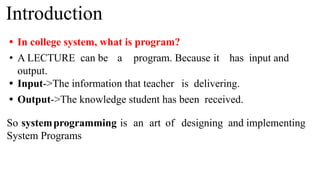
• In college system, what is program?
• A LECTURE can be a program. Because it has input and
output.
• Input->The information that teacher is delivering.
• Output->The knowledge student has been received.
So systemprogramming is an art of designing and implementing
System Programs
Introduction
Introduction
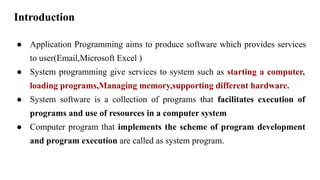
● Application Programming aims to produce software which provides services
to user(Email,Microsoft Excel )
● System programming give services to system such as starting a computer,
loading programs,Managing memory,supporting different hardware.
● System software is a collection of programs that facilitates execution of
programs and use of resources in a computer system
● Computer program that implements the scheme of program development
and program execution are called as system program.
Systems programming
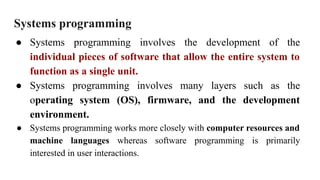
● Systems programming involves the development of the
individual pieces of software that allow the entire system to
function as a single unit.
● Systems programming involves many layers such as the
operating system (OS), firmware, and the development
environment.
● Systems programming works more closely with computer resources and
machine languages whereas software programming is primarily
interested in user interactions.
System Programming
Software
● Application software usually used by end-user
● It is concerned with the solution of some problem, using the computer as a tool,
instead of how computers actually work.
System software
● System software consists of a variety of programs that support the operation of
a computer (ex: text editor, compiler, debugger)
● One characteristic in which most system software differ from application
software is machine dependency
● A system software programmer must know the target machine structure
●
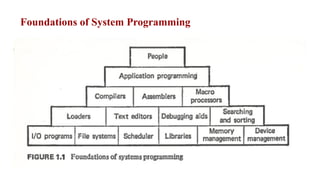
Foundations of System Programming
Need of System Programming
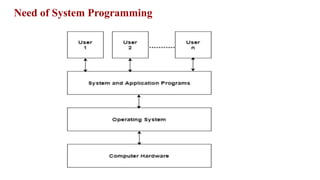
• System programs provide an environment where programs can be
developed and executed.
• In the simplest sense, system programs also provide a bridge
between the user interface and system calls.
• In reality, they are much more complex. For example, a compiler
is a complex system program.
Need of System Programming
● System Software consists of a variety of programs that support
the operation of a computer.
● The software makes it possible for the users to focus on an
application or other problem to be solved, without needing to know
the details of how the machine works internally.
Need of System Programming
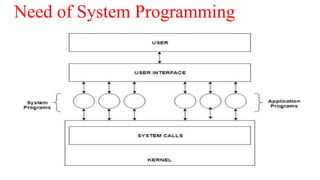
• The system program serves as a part of the operating system. It
traditionally lies between the user interface and the system
calls.
• The user view of the system is actually defined by system
programs and not system calls because that is what they interact
with and system programs are closer to the user interface.
Need of System Programming
● To Achieve effective performance of the system
● To make effective execution of general user
program
● To make effective utilization of human resources
● To make available new,better facilities.
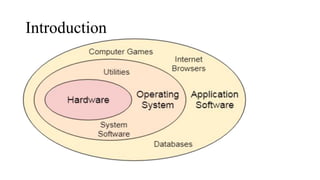
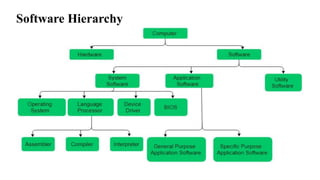
Software Hierarchy
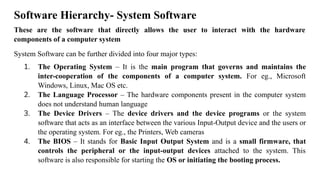
Software Hierarchy- System Software
These are the software that directly allows the user to interact with the hardware
components of a computer system
System Software can be further divided into four major types:
1. The Operating System – It is the main program that governs and maintains the
inter-cooperation of the components of a computer system. For eg., Microsoft
Windows, Linux, Mac OS etc.
2. The Language Processor – The hardware components present in the computer system
does not understand human language
3. The Device Drivers – The device drivers and the device programs or the system
software that acts as an interface between the various Input-Output device and the users or
the operating system. For eg., the Printers, Web cameras
4. The BIOS – It stands for Basic Input Output System and is a small firmware, that
controls the peripheral or the input-output devices attached to the system. This
software is also responsible for starting the OS or initiating the booting process.
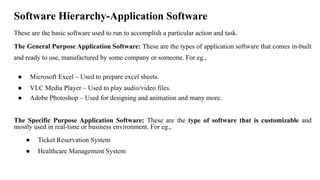
Software Hierarchy-Application Software
These are the basic software used to run to accomplish a particular action and task.
The General Purpose Application Software: These are the types of application software that comes in-built
and ready to use, manufactured by some company or someone. For eg.,
● Microsoft Excel – Used to prepare excel sheets.
● VLC Media Player – Used to play audio/video files.
● Adobe Photoshop – Used for designing and animation and many more.
The Specific Purpose Application Software: These are the type of software that is customizable and
mostly used in real-time or business environment. For eg.,
● Ticket Reservation System
● Healthcare Management System
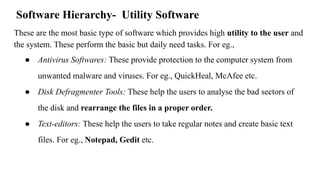
Software Hierarchy- Utility Software
These are the most basic type of software which provides high utility to the user and
the system. These perform the basic but daily need tasks. For eg.,
● Antivirus Softwares: These provide protection to the computer system from
unwanted malware and viruses. For eg., QuickHeal, McAfee etc.
● Disk Defragmenter Tools: These help the users to analyse the bad sectors of
the disk and rearrange the files in a proper order.
● Text-editors: These help the users to take regular notes and create basic text
files. For eg., Notepad, Gedit etc.
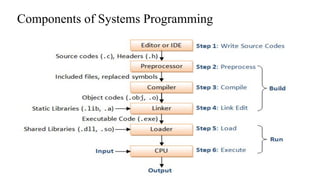
Components of Systems Programming
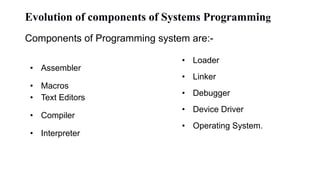
Evolution of components of Systems Programming
Components of Programming system are:-
• Assembler
• Macros
• Text Editors
• Compiler
• Interpreter
• Loader
• Linker
• Debugger
• Device Driver
• Operating System.
Assembler :
● The Assembler is used to translate the program written in Assembly
language into machine code.
● The source program is an input of an assembler that contains assembly
language instructions.
● The output generated by the assembler is the object code or machine code
understandable by the computer.
● Assembler is basically the 1st interface that is able to communicate humans
with the machine.
Assembler
• We need an Assembler to fill the gap between human and machine so
that they can communicate with each other.
• Code written in assembly language is some sort of
mnemonics(instructions) like ADD, MUL, MUX, SUB, DIV, MOV
and so on.
• Assembler is basically able to convert these mnemonics in Binary
code.
• These mnemonics also depend upon the architecture of the machine.
• For example, the architecture of intel 8085 and intel 8086 are
different.
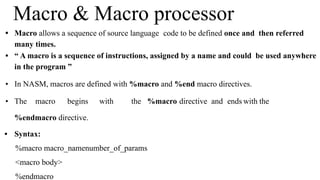
• Macro allows a sequence of source language code to be defined once and then referred
many times.
• “ A macro is a sequence of instructions, assigned by a name and could be used anywhere
in the program ”
• In NASM, macros are defined with %macro and %end macro directives.
• The macro begins with the %macro directive and ends with the
%endmacro directive.
• Syntax:
%macro macro_namenumber_of_params
<macro body>
%endmacro
Macro & Macro processor
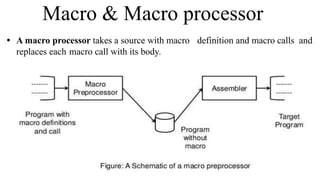
• A macro processor takes a source with macro definition and macro calls and
replaces each macro call with its body.
Macro & Macro Processor
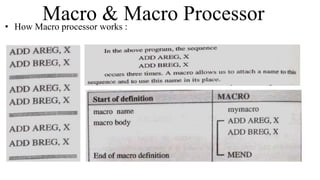
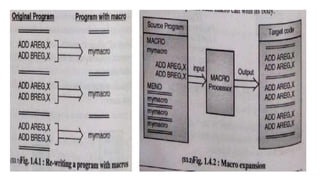
• How Macro processor works :
Editors
• Editor is a computer program that allows a userto
create and revise a document.
• A text editor is a type of program used for editing plain text files.
• With the helpof text editor you can write your program(e.g. C
Program or Java Program).
• Notepad, Wordpad are some of the common editors used on Windows
OS
• vi, emacs, Jed, pico are the editors on UNIX OS.
• Features normally associated with text editors are — moving the
cursor, deleting, replacing, pasting, finding, finding and replacing,
saving etc.
Types of Text Editors
Line editor : This editor edits the file line by line. You cannot
work on a stream of lines using the line editor. Example of a line
editor is teleprinter.
Stream editor : In this type of editors, the file is treated as
continuous flow or sequence of characters instead of line
numbers, which means here you can type paragraphs.
Ex : Sed editor in UNIX
Types of Text Editors
Screen editors : In this type of editors, the user is able to see the cursor
on the screen and can make a copy, cut, paste operation easily. It is
very easy to use mouse pointer.
Ex : vi, emacs, Notepad
Word Processor : Overcoming the limitations of screen editors, it
allows one to use some format to insert images, files, videos, use font,
size, style features. It majorly focuses on Natural language.
Structure Editor: Structure editor focuses on programming languages.
It provides features to write and edit source code.
Ex : Netbeans IDE, gEdit.
Compiler
● A translator or language processor is a program that translates an
input program written in a programming language into an equivalent
program in another language.
● The compiler is a type of translator, which takes a program written in
a high-level programming language as input and translates it into an
equivalent program in low-level languages such as machine
language or assembly language.
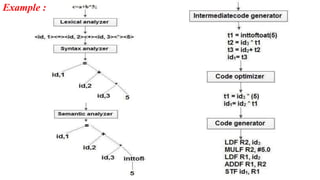
Phases of Compiler
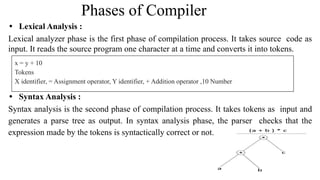
• Lexical Analysis :
Lexical analyzer phase is the first phase of compilation process. It takes source code as
input. It reads the source program one character at a time and converts it into tokens.
• Syntax Analysis :
Syntax analysis is the second phase of compilation process. It takes tokens as input and
generates a parse tree as output. In syntax analysis phase, the parser checks that the
expression made by the tokens is syntactically correct or not.
x = y + 10
Tokens
X identifier, = Assignment operator, Y identifier, + Addition operator ,10 Number
Phases of Compiler
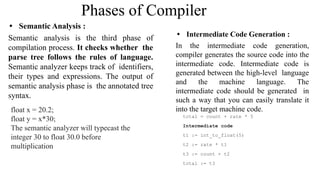
• Semantic Analysis :
Semantic analysis is the third phase of
compilation process. It checks whether the
parse tree follows the rules of language.
Semantic analyzer keeps track of identifiers,
their types and expressions. The output of
semantic analysis phase is the annotated tree
syntax.
float x = 20.2;
float y = x*30;
The semantic analyzer will typecast the
integer 30 to float 30.0 before
multiplication
• Intermediate Code Generation :
In the intermediate code generation,
compiler generates the source code into the
intermediate code. Intermediate code is
generated between the high-level language
and the machine language. The
intermediate code should be generated in
such a way that you can easily translate it
into the target machine code.
total = count + rate * 5
Intermediate code
t1 := int_to_float(5)
t2 := rate * t1
t3 := count + t2
total := t3
Phases of Compiler
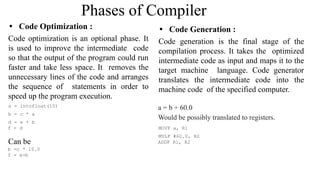
• Code Optimization :
Code optimization is an optional phase. It
is used to improve the intermediate code
so that the output of the program could run
faster and take less space. It removes the
unnecessary lines of the code and arranges
the sequence of statements in order to
speed up the program execution.
a = intofloat(10)
b = c * a
d = e + b
f = d
Can be
b =c * 10.0
f = e+b
• Code Generation :
Code generation is the final stage of the
compilation process. It takes the optimized
intermediate code as input and maps it to the
target machine language. Code generator
translates the intermediate code into the
machine code of the specified computer.
a = b + 60.0
Would be possibly translated to registers.
MOVF a, R1
MULF #60.0, R2
ADDF R1, R2
Example :
Interpreter
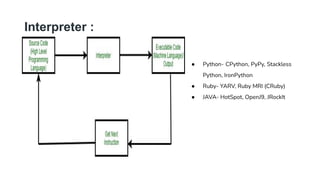
● The software by which the conversion of the high-level instructions is
performed line-by-line to machine-level language, other than compiler and
assembler, is known as INTERPRETER.
● It is 5 to 25 times faster than a compiler but it stops at the line where error
occurs and then again if the next line has an error too.
● Where as a compiler gives all the errors in the code at once.
● Also, a compiler saves the machine codes for future use permanently but an
interpreter doesn’t, but an interpreter occupies less memory.
Interpreter :
● Python- CPython, PyPy, Stackless
Python, IronPython
● Ruby- YARV, Ruby MRI (CRuby)
● JAVA- HotSpot, OpenJ9, JRockIt
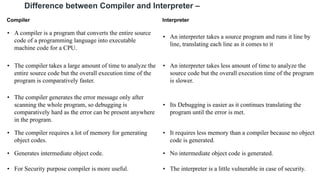
Difference between Compiler and Interpreter –
Compiler Interpreter
• A compiler is a program that converts the entire source
code of a programming language into executable
machine code for a CPU.
• An interpreter takes a source program and runs it line by
line, translating each line as it comes to it
• The compiler takes a large amount of time to analyze the
entire source code but the overall execution time of the
program is comparatively faster.
• An interpreter takes less amount of time to analyze the
source code but the overall execution time of the program
is slower.
• The compiler generates the error message only after
scanning the whole program, so debugging is
comparatively hard as the error can be present anywhere
in the program.
• Its Debugging is easier as it continues translating the
program until the error is met.
• The compiler requires a lot of memory for generating
object codes.
• It requires less memory than a compiler because no object
code is generated.
• Generates intermediate object code. • No intermediate object code is generated.
• For Security purpose compiler is more useful. • The interpreter is a little vulnerable in case of security.
Linker
● For a code to run we need to include a header file or a file saved
from the library which are pre-defined if they are not included in
the beginning of the program then after execution the compiler will
generate errors, and the code will not work.
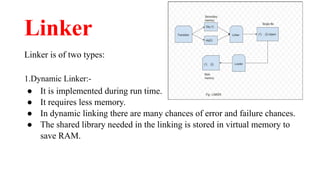
● Linker is a program that holds one or more object files which is
created by compiler, combines them into one executable
file.Linking is implemented at both time,load time and compile
time. Compile time is when high level language is turns to machine
code and load time is when the code is loaded into the memory by
loader.
Linker
Linker is of two types:
1.Dynamic Linker:-
● It is implemented during run time.
● It requires less memory.
● In dynamic linking there are many chances of error and failure chances.
● The shared library needed in the linking is stored in virtual memory to
save RAM.
Linker
Linker is of two types:
2.Static Linker:-
● It is implemented during compilation of source program.
● It requires more memory.
● Linking is implemented before execution in static linking.
● It is faster and portable.
● In static linking there are less chances to error and No chances to failure.
Loader
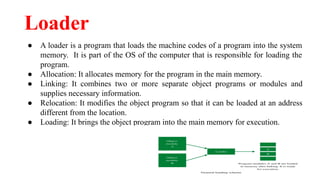
● A loader is a program that loads the machine codes of a program into the system
memory. It is part of the OS of the computer that is responsible for loading the
program.
● Allocation: It allocates memory for the program in the main memory.
● Linking: It combines two or more separate object programs or modules and
supplies necessary information.
● Relocation: It modifies the object program so that it can be loaded at an address
different from the location.
● Loading: It brings the object program into the main memory for execution.
Debugger
● A debugger is a tool that allows you to examine the state of a running
program.
● Debugging is the process of locating and then removing bugs or errors in a
program. An interactive debugging system gives programmers tools to help
them test and debug their programs.
● Debugging is the methodical process of locating and eliminating bugs or
defects in a computer program.
● Recognize the Error, Locate the Error, Evaluate the Error, Verify the
Analysis, Cover Lateral Damage
Operating System
• An Operating System (OS) is an interface between a computer user and
computer hardware.
• An operating system is a software which performs all the basic tasks like file
management, memory management, process management, handling input and
output, and controlling peripheral devices such as disk drives and printers.
• Today, Operating systems is found almost in every device like mobile phones,
personal computers, mainframe computers, automobiles, TV, Toys etc
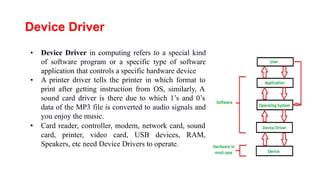
Device Driver
• Device Driver in computing refers to a special kind
of software program or a specific type of software
application that controls a specific hardware device
• A printer driver tells the printer in which format to
print after getting instruction from OS, similarly, A
sound card driver is there due to which 1’s and 0’s
data of the MP3 file is converted to audio signals and
you enjoy the music.
• Card reader, controller, modem, network card, sound
card, printer, video card, USB devices, RAM,
Speakers, etc need Device Drivers to operate.
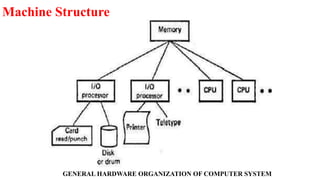
Machine Structure
GENERAL HARDWARE ORGANIZATION OF COMPUTER SYSTEM
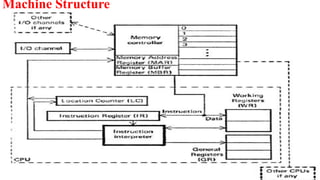
Machine Structure
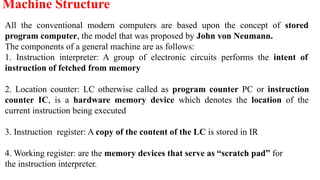
All the conventional modern computers are based upon the concept of stored
program computer, the model that was proposed by John von Neumann.
The components of a general machine are as follows:
1. Instruction interpreter: A group of electronic circuits performs the intent of
instruction of fetched from memory
2. Location counter: LC otherwise called as program counter PC or instruction
counter IC, is a hardware memory device which denotes the location of the
current instruction being executed
3. Instruction register: A copy of the content of the LC is stored in IR
4. Working register: are the memory devices that serve as “scratch pad” for
the instruction interpreter.
Machine Structure
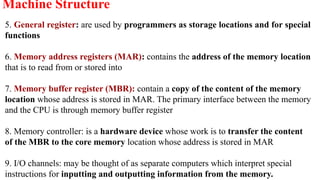
5. General register: are used by programmers as storage locations and for special
functions
6. Memory address registers (MAR): contains the address of the memory location
that is to read from or stored into
7. Memory buffer register (MBR): contain a copy of the content of the memory
location whose address is stored in MAR. The primary interface between the memory
and the CPU is through memory buffer register
8. Memory controller: is a hardware device whose work is to transfer the content
of the MBR to the core memory location whose address is stored in MAR
9. I/O channels: may be thought of as separate computers which interpret special
instructions for inputting and outputting information from the memory.
Machine Structure
Machine instruction Format
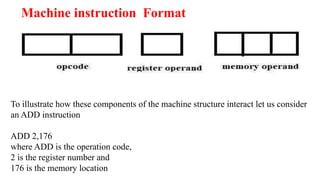
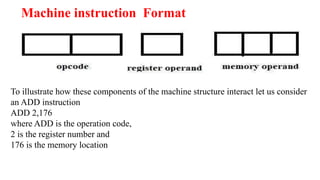
To illustrate how these components of the machine structure interact let us consider
an ADD instruction
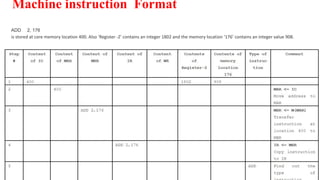
ADD 2,176
where ADD is the operation code,
2 is the register number and
176 is the memory location
Machine instruction Format
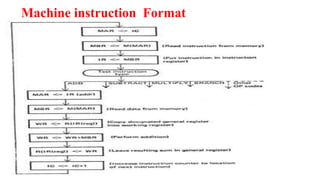
ADD 2, 176
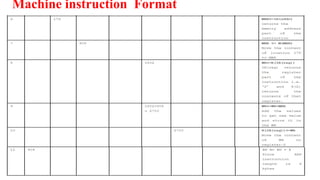
is stored at core memory location 400. Also ‘Register -2’ contains an integer 1802 and the memory location ‘176’ contains an integer value 908.
Machine instruction Format
Assembly Language
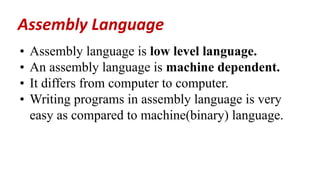
• Assembly language is low level language.
• An assembly language is machine dependent.
• It differs from computer to computer.
• Writing programs in assembly language is very
easy as compared to machine(binary) language.
Assembly Language
Assembly language programming
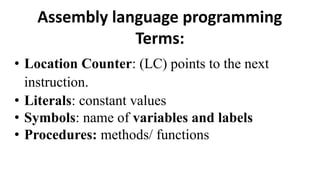
Terms:
• Location Counter: (LC) points to the next
instruction.
• Literals: constant values
• Symbols: name of variables and labels
• Procedures: methods/ functions
Elements of Assembly Language Programming
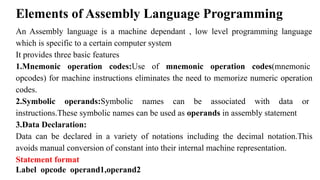
An Assembly language is a machine dependant , low level programming language
which is specific to a certain computer system
It provides three basic features
1.Mnemonic operation codes:Use of mnemonic operation codes(mnemonic
opcodes) for machine instructions eliminates the need to memorize numeric operation
codes.
2.Symbolic operands:Symbolic names can be associated with data or
instructions.These symbolic names can be used as operands in assembly statement
3.Data Declaration:
Data can be declared in a variety of notations including the decimal notation.This
avoids manual conversion of constant into their internal machine representation.
Statement format
Label opcode operand1,operand2
Machine instruction Format
To illustrate how these components of the machine structure interact let us consider
an ADD instruction
ADD 2,176
where ADD is the operation code,
2 is the register number and
176 is the memory location
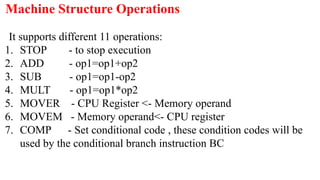
It supports different 11 operations:
1. STOP - to stop execution
2. ADD - op1=op1+op2
3. SUB - op1=op1-op2
4. MULT - op1=op1*op2
5. MOVER - CPU Register <- Memory operand
6. MOVEM - Memory operand<- CPU register
7. COMP - Set conditional code , these condition codes will be
used by the conditional branch instruction BC
Machine Structure Operations
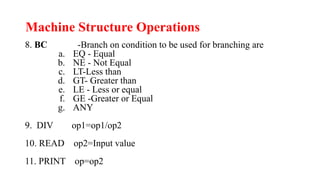
8. BC -Branch on condition to be used for branching are
a. EQ - Equal
b. NE - Not Equal
c. LT-Less than
d. GT- Greater than
e. LE - Less or equal
f. GE -Greater or Equal
g. ANY
9. DIV op1=op1/op2
10. READ op2=Input value
11. PRINT op=op2
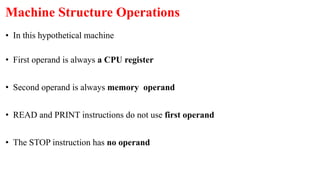
• In this hypothetical machine
• First operand is always a CPU register
• Second operand is always memory operand
• READ and PRINT instructions do not use first operand
• The STOP instruction has no operand
Machine Structure Operations
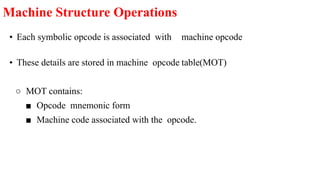
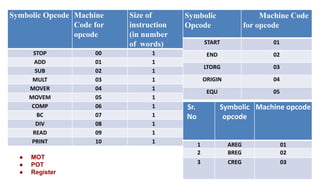
• Each symbolic opcode is associated with machine opcode
• These details are stored in machine opcode table(MOT)
○ MOT contains:
■ Opcode mnemonic form
■ Machine code associated with the opcode.
Machine Structure Operations
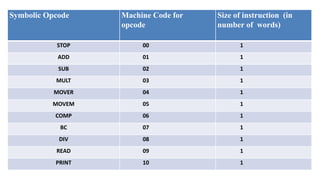
Symbolic Opcode Machine Code for
opcode
Size of instruction (in
number of words)
STOP 00 1
ADD 01 1
SUB 02 1
MULT 03 1
MOVER 04 1
MOVEM 05 1
COMP 06 1
BC 07 1
DIV 08 1
READ 09 1
PRINT 10 1
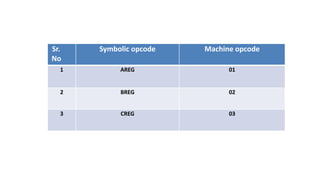
Sr.
No
Symbolic opcode Machine opcode
1 AREG 01
2 BREG 02
3 CREG 03
Assembly language
Statements:
• Imperative Statements:
• Declarative/Declaration Statements:
• Assembler Directive:
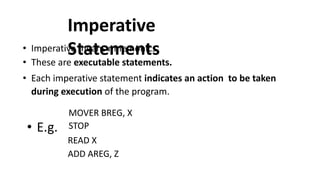
Imperative
Statements
• Imperative means mnemonics
• These are executable statements.
• Each imperative statement indicates an action to be taken
during execution of the program.
• E.g.
MOVER BREG, X
STOP
READ X
ADD AREG, Z
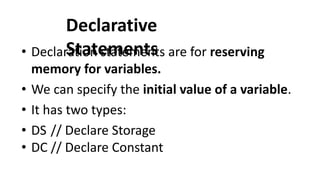
Declarative
Statements
• Declaration statements are for reserving
memory for variables.
• We can specify the initial value of a variable.
• It has two types:
• DS // Declare Storage
• DC // Declare Constant
DS(Declare
Storage):
• Syntax:
• [Label]
• E.g.
DS <Constant specifying size>
X DS 1
DC (Declare Constant):
Syntax:
[Label ]
E.g Y
DC <constant specifying value>
DC ‘5’
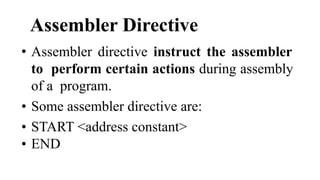
Assembler Directive
• Assembler directive instruct the assembler
to perform certain actions during assembly
of a program.
• Some assembler directive are:
• START <address constant>
• END
Advanced Assembler Directives
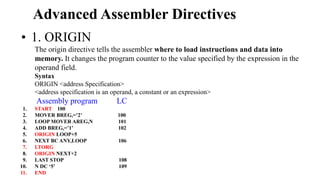
• 1. ORIGIN
The origin directive tells the assembler where to load instructions and data into
memory. It changes the program counter to the value specified by the expression in the
operand field.
Syntax
ORIGIN <address Specification>
<address specification is an operand, a constant or an expression>
Assembly program LC
1. START 100
2. MOVER BREG,=’2’ 100
3. LOOP MOVER AREG,N 101
4. ADD BREG,=’1’ 102
5. ORIGIN LOOP+5
6. NEXT BC ANY,LOOP 106
7. LTORG
8. ORIGIN NEXT+2
9. LAST STOP 108
10. N DC ‘5’ 109
11. END
Advanced Assembler Directives
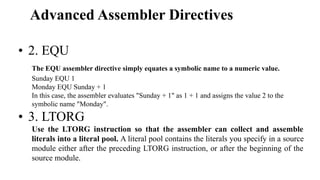
• 2. EQU
The EQU assembler directive simply equates a symbolic name to a numeric value.
Sunday EQU 1
Monday EQU Sunday + 1
In this case, the assembler evaluates "Sunday + 1" as 1 + 1 and assigns the value 2 to the
symbolic name "Monday".
• 3. LTORG
Use the LTORG instruction so that the assembler can collect and assemble
literals into a literal pool. A literal pool contains the literals you specify in a source
module either after the preceding LTORG instruction, or after the beginning of the
source module.
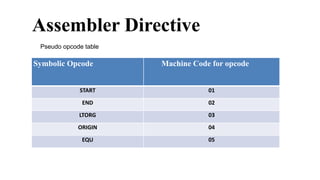
Symbolic Opcode Machine Code for opcode
START 01
END 02
LTORG 03
ORIGIN 04
EQU 05
Assembler Directive
Pseudo opcode table
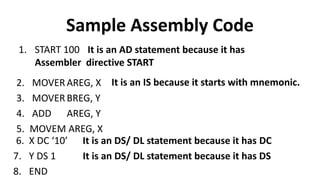
Sample Assembly Code
1. START 100 It is an AD statement because it has
Assembler directive START
2. MOVER AREG, X
3. MOVER BREG, Y
4. ADD AREG, Y
5. MOVEM AREG, X
It is an IS because it starts with mnemonic.
6. X DC ‘10’
7. Y DS 1
8. END
It is an DS/ DL statement because it has DC
It is an DS/ DL statement because it has DS
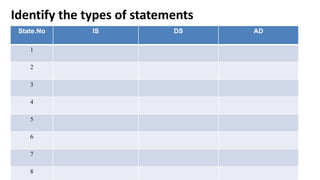
Identify the types of statements
State.No IS DS AD
1
2
3
4
5
6
7
8
Identify the types of statements
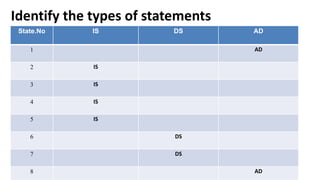
State.No IS DS AD
1 AD
2 IS
3 IS
4 IS
5 IS
6 DS
7 DS
8 AD
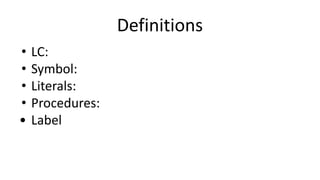
Definitions
• LC:
• Symbol:
• Literals:
• Procedures:
• Label
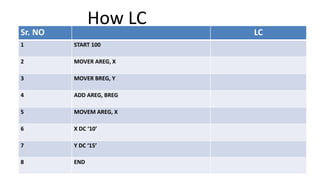
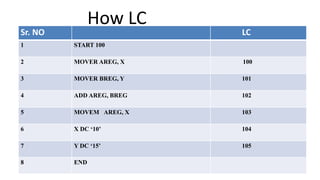
How LC
Operates?
Sr. NO LC
1 START 100
2 MOVER AREG, X
3 MOVER BREG, Y
4 ADD AREG, BREG
5 MOVEM AREG, X
6 X DC ‘10’
7 Y DC ‘15’
8 END
How LC
Operates?
Sr. NO LC
1 START 100
2 MOVER AREG, X 100
3 MOVER BREG, Y 101
4 ADD AREG, BREG 102
5 MOVEM AREG, X 103
6 X DC ‘10’ 104
7 Y DC ‘15’ 105
8 END
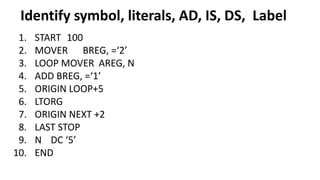
Identify symbol, literals, AD, IS, DS, Label
1. START 100
2. MOVER BREG, =‘2’
3. LOOP MOVER AREG, N
4. ADD BREG, =‘1’
5. ORIGIN LOOP+5
6. LTORG
7. ORIGIN NEXT +2
8. LAST STOP
9. N DC ‘5’
10. END
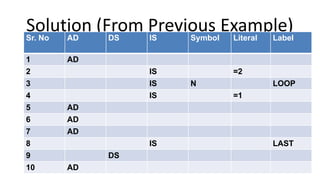
Solution (From Previous Example)
Sr. No AD DS IS Symbol Literal Label
1 AD
2 IS =2
3 IS N LOOP
4 IS =1
5 AD
6 AD
7 AD
8 IS LAST
9 DS
10 AD
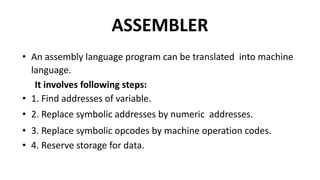
ASSEMBLER
• An assembly language program can be translated into machine
language.
It involves following steps:
• 1. Find addresses of variable.
• 2. Replace symbolic addresses by numeric addresses.
• 3. Replace symbolic opcodes by machine operation codes.
• 4. Reserve storage for data.
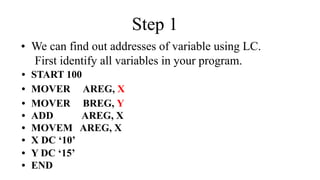
Step 1
• We can find out addresses of variable using LC.
First identify all variables in your program.
• START 100
• MOVER AREG, X
• MOVER BREG, Y
• ADD AREG, X
• MOVEM AREG, X
• X DC ‘10’
• Y DC ‘15’
• END
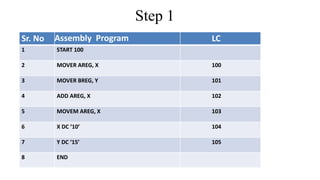
Sr. No Assembly Program LC
1 START 100
2 MOVER AREG, X 100
3 MOVER BREG, Y 101
4 ADD AREG, X 102
5 MOVEM AREG, X 103
6 X DC ‘10’ 104
7 Y DC ‘15’ 105
8 END
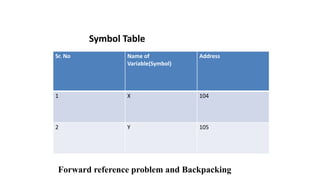
Step 1
Sr. No Name of
Variable(Symbol)
Address
1 X 10⁴
2 Y 105
Symbol Table
Forward reference problem and Backpacking
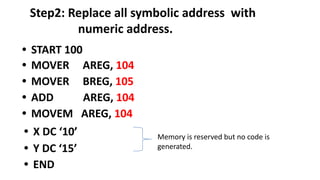
Step2: Replace all symbolic address with
numeric address.
• START 100
• MOVER AREG, 104
• MOVER BREG, 105
• ADD AREG, 104
• MOVEM AREG, 104
• X DC ‘10’
• Y DC ‘15’
• END
Memory is reserved but no code is
generated.
Symbolic Opcode Machine
Code for
opcode
Size of
instruction
(in number
of words)
STOP 00 1
ADD 01 1
SUB 02 1
MULT 03 1
MOVER 04 1
MOVEM 05 1
COMP 06 1
BC 07 1
DIV 08 1
READ 09 1
PRINT 10 1
Symbolic
Opcode
Machine Code
for opcode
START 01
END 02
LTORG 03
ORIGIN 04
EQU 05
Sr.
No
Symbolic
opcode
Machine opcode
1 AREG 01
2 BREG 02
3 CREG 03
● MOT
● POT
● Register
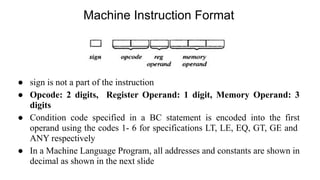
Machine Instruction Format
● sign is not a part of the instruction
● Opcode: 2 digits, Register Operand: 1 digit, Memory Operand: 3
digits
● Condition code specified in a BC statement is encoded into the first
operand using the codes 1- 6 for specifications LT, LE, EQ, GT, GE and
ANY respectively
● In a Machine Language Program, all addresses and constants are shown in
decimal as shown in the next slide
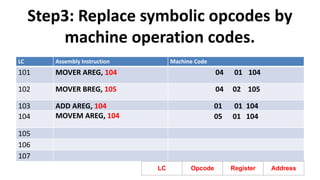
Step3: Replace symbolic opcodes by
machine operation codes.
LC Assembly Instruction Machine Code
101 MOVER AREG, 104 04 01 104
102 MOVER BREG, 105 04 02 105
103 ADD AREG, 104 01 01 104
104 MOVEM AREG, 104 05 01 104
105
106
107
LC Opcode Register Address
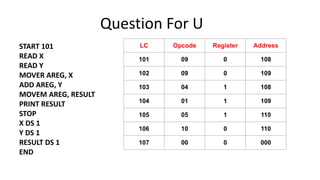
Question For U
START 101
READ X
READ Y
MOVER AREG, X
ADD AREG, Y
MOVEM AREG, RESULT
PRINT RESULT
STOP
X DS 1
Y DS 1
RESULT DS 1
END
LC Opcode Register Address
101 09 0 108
102 09 0 109
103 04 1 108
104 01 1 109
105 05 1 110
106 10 0 110
107 00 0 000
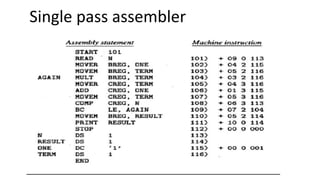
Single pass assembler
Assembler
• An Assembler is a translator which translates
assembly language code into machine language
with help of data structure.
• It has two types
• Pass 1 Assembler.
• Pass 2 Assembler.
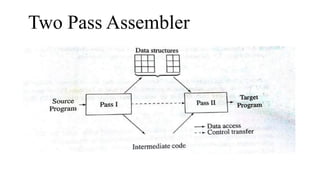
Two Pass Assembler
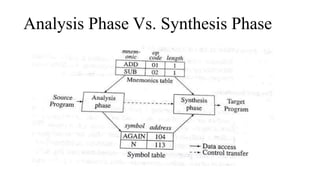
Analysis Phase Vs. Synthesis Phase
• PASS 2 assembler requires two scans of program to
generate machine code.
• It uses data structures defined by pass 1.
like symbol table, MOT, LT.
General design procedure of assembler
• Statement of Problem
• Data Structure
• Format of databases
• Algorithms
• Look for modularity.
Statement of Problem
• We want to convert assembly language program into
machine language.
Data Structure Used
• Data Structure used are as follows:
• Symbol Table
• Literal Table
• Mnemonic Opcode Table
• Pool Table
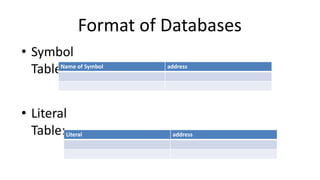
Format of Databases
• Symbol
Table:
• Literal
Table:
Name of Symbol address
Literal address
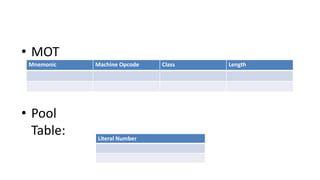
• MOT
:
• Pool
Table:
Mnemonic Machine Opcode Class Length
Literal Number
Look for Modularity
• If your program is too long…
• U can make modules of it.
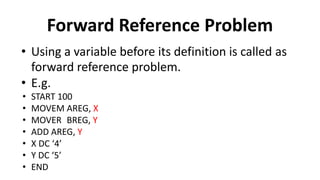
Forward Reference Problem
• Using a variable before its definition is called as
forward reference problem.
• E.g.
• START 100
• MOVEM AREG, X
• MOVER BREG, Y
• ADD AREG, Y
• X DC ‘4’
• Y DC ‘5’
• END
• In example variable X, Y are making forward
reference.
• So, We can solve it by using back patching.
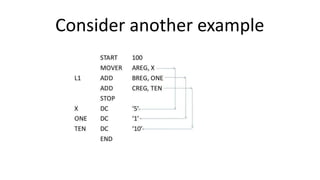
Consider another example
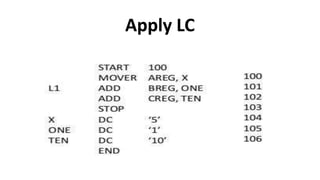
Apply LC
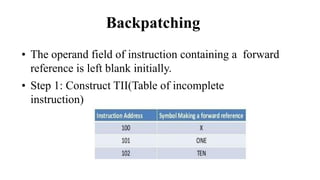
Backpatching
• The operand field of instruction containing a forward
reference is left blank initially.
• Step 1: Construct TII(Table of incomplete
instruction)
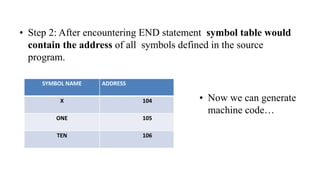
• Step 2: After encountering END statement symbol table would
contain the address of all symbols defined in the source
program.
SYMBOL NAME ADDRESS
X 104
ONE 105
TEN 106
• Now we can generate
machine code…
Pass 1 Assembler
• Pass 1 assembler separate the labels ,mnemonic opcode
table, and operand fields.
• Determine storage requirement for every assembly
language statement and update the location counter.
• Build the symbol table. Symbol table is used to store each
label and each variable and its corresponding address.
How pass 1 assembler works?
Pass I uses following data structures.
1. Machine opcode table.(MOT)
2. Symbol Table(ST)
3. Literal Table(LT)
4. Pool Table(PT)
Contents of MOT are fixed for an assembler.
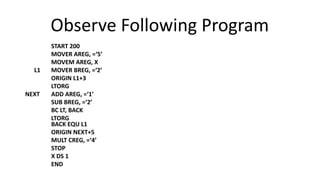
Observe Following Program
START 200
MOVER AREG, =‘5’
MOVEM AREG, X
L1 MOVER BREG, =‘2’
ORIGIN L1+3
LTORG
NEXT ADD AREG, =‘1’
SUB BREG, =‘2’
BC LT, BACK
LTORG
BACK EQU L1
ORIGIN NEXT+5
MULT CREG, =‘4’
STOP
X DS 1
END
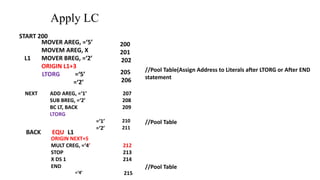
Apply LC
START 200
MOVER AREG, =‘5’
MOVEM AREG, X
L1 MOVER BREG, =‘2’
ORIGIN L1+3
LTORG =‘5’
=‘2’
200
201
202
205
206
NEXT ADD AREG, =‘1’ 207
SUB BREG, =‘2’ 208
BC LT, BACK 209
LTORG
=‘1’ 210
=‘2’ 211
BACK EQU L1
ORIGIN NEXT+5
MULT CREG, =‘4’ 212
STOP 213
X DS 1 214
END
=‘4’ 215
//Pool Table(Assign Address to Literals after LTORG or After END
statement
//Pool Table
//Pool Table
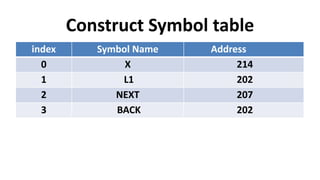
Construct Symbol table
index Symbol Name Address
0 X 214
1 L1 202
2 NEXT 207
3 BACK 202
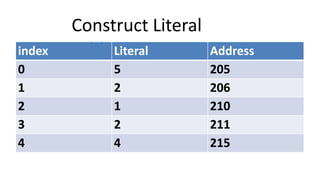
Construct Literal
Table
index Literal Address
0 5 205
1 2 206
2 1 210
3 2 211
4 4 215
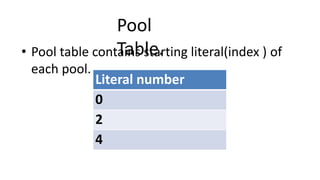
Pool
Table.
• Pool table contains starting literal(index ) of
each pool.
Literal number
0
2
4
NOW CONSTRUCT INTERMEDIATE CODE/MACHINE CODE
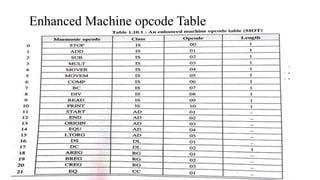
• For constructing intermediate code we need MOT.
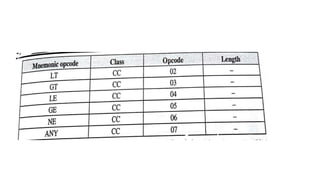
Enhanced Machine opcode Table
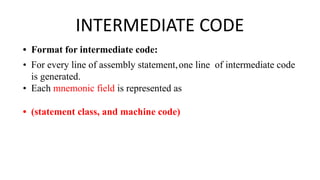
INTERMEDIATE CODE
• Format for intermediate code:
• For every line of assembly statement,one line of intermediate code
is generated.
• Each mnemonic field is represented as
• (statement class, and machine code)
• Statement class can be:
1. IS
2. DL/DS
3. AD
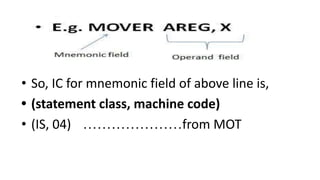
• So, IC for mnemonic field of above line is,
• (statement class, machine code)
• (IS, 04) …………………from MOT
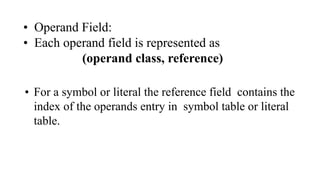
• Operand Field:
• Each operand field is represented as
(operand class, reference)
• For a symbol or literal the reference field contains the
index of the operands entry in symbol table or literal
table.
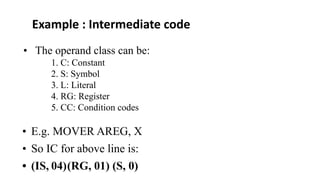
• The operand class can be:
1. C: Constant
2. S: Symbol
3. L: Literal
4. RG: Register
5. CC: Condition codes
• E.g. MOVER AREG, X
• So IC for above line is:
• (IS, 04)(RG, 01) (S, 0)
Example : Intermediate code
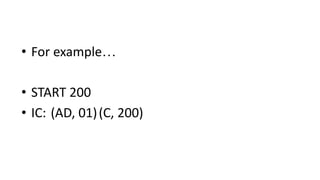
• For example…
• START 200
• IC: (AD, 01)(C, 200)
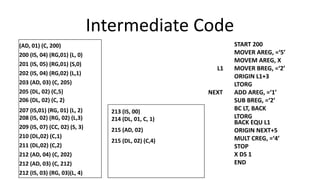
Intermediate Code
(AD, 01) (C, 200)
200 (IS, 04) (RG,01) (L, 0)
201 (IS, 05) (RG,01) (S,0)
202 (IS, 04) (RG,02) (L,1)
203 (AD, 03) (C, 205)
205 (DL, 02) (C,5)
206 (DL, 02) (C, 2)
207 (IS,01) (RG, 01) (L, 2)
208 (IS, 02) (RG, 02) (L,3)
209 (IS, 07) (CC, 02) (S, 3)
210 (DL,02) (C,1)
211 (DL,02) (C,2)
212 (AD, 04) (C, 202)
212 (AD, 03) (C, 212)
212 (IS, 03) (RG, 03)(L, 4)
START 200
MOVER AREG, =‘5’
MOVEM AREG, X
L1 MOVER BREG, =‘2’
ORIGIN L1+3
LTORG
NEXT ADD AREG, =‘1’
SUB BREG, =‘2’
BC LT, BACK
LTORG
BACK EQU L1
ORIGIN NEXT+5
MULT CREG, =‘4’
STOP
X DS 1
END
213 (IS, 00)
214 (DL, 01, C, 1)
215 (AD, 02)
215 (DL, 02) (C,4)
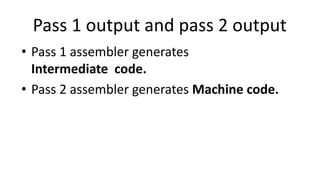
Pass 1 output and pass 2 output
• Pass 1 assembler generates
Intermediate code.
• Pass 2 assembler generates Machine code.
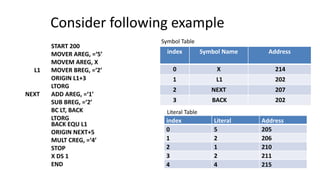
Consider following example
START 200
MOVER AREG, =‘5’
MOVEM AREG, X
L1 MOVER BREG, =‘2’
ORIGIN L1+3
LTORG
NEXT ADD AREG, =‘1’
SUB BREG, =‘2’
BC LT, BACK
LTORG
BACK EQU L1
ORIGIN NEXT+5
MULT CREG, =‘4’
STOP
X DS 1
END
index Symbol Name Address
0 X 214
1 L1 202
2 NEXT 207
3 BACK 202
index Literal Address
0 5 205
1 2 206
2 1 210
3 2 211
4 4 215
Literal Table
Symbol Table
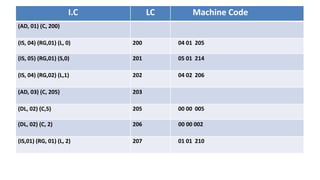
I.C LC Machine Code
(AD, 01) (C, 200)
(IS, 04) (RG,01) (L, 0) 200 04 01 205
(IS, 05) (RG,01) (S,0) 201 05 01 214
(IS, 04) (RG,02) (L,1) 202 04 02 206
(AD, 03) (C, 205) 203
(DL, 02) (C,5) 205 00 00 005
(DL, 02) (C, 2) 206 00 00 002
(IS,01) (RG, 01) (L, 2) 207 01 01 210
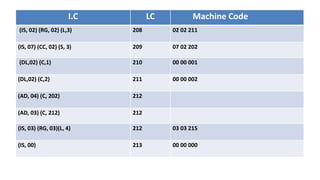
I.C LC Machine Code
(IS, 02) (RG, 02) (L,3) 208 02 02 211
(IS, 07) (CC, 02) (S, 3) 209 07 02 202
(DL,02) (C,1) 210 00 00 001
(DL,02) (C,2) 211 00 00 002
(AD, 04) (C, 202) 212
(AD, 03) (C, 212) 212
(IS, 03) (RG, 03)(L, 4) 212 03 03 215
(IS, 00) 213 00 00 000
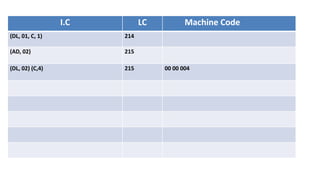
I.C LC Machine Code
(DL, 01, C, 1) 214
(AD, 02) 215
(DL, 02) (C,4) 215 00 00 004
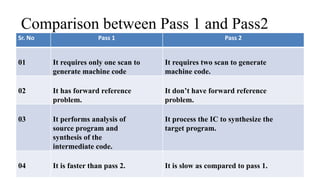
Comparison between Pass 1 and Pass2
Sr. No Pass 1 Pass 2
01 It requires only one scan to
generate machine code
It requires two scan to generate
machine code.
02 It has forward reference
problem.
It don’t have forward reference
problem.
03 It performs analysis of
source program and
synthesis of the
intermediate code.
It process the IC to synthesize the
target program.
04 It is faster than pass 2. It is slow as compared to pass 1.
Variants of Intermediate Code.
• There are two variants of I.C.:
• Variant I
• Variant II.
Variant I
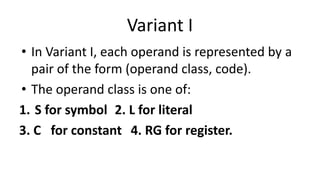
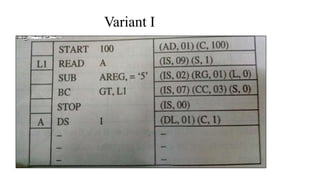
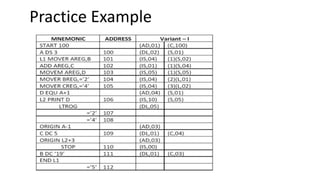
• In Variant I, each operand is represented by a
pair of the form (operand class, code).
• The operand class is one of:
1. S for symbol 2. L for literal
3. C for constant 4. RG for register.
Variant I
Variant II
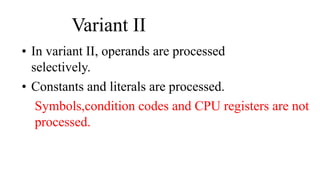
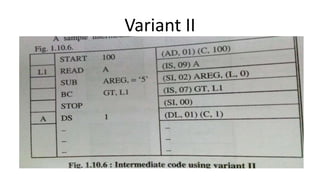
• In variant II, operands are processed
selectively.
• Constants and literals are processed.
Symbols,condition codes and CPU registers are not
processed.
Variant II
Comparison
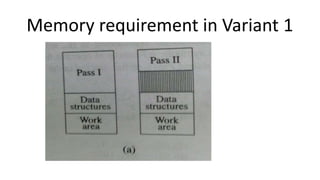
• Variant I does more work in Pass I. Operands fields are
completely processed in Pass 1. Memory requirements are
higher in Pass 1.
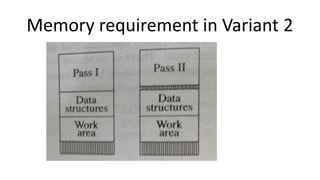
• Variant II, Pass 2 has to do more work. Here the
processing requirement is evenly distributed over two
passes.
• In Variant II over all memory requirement of the assembler
is lower.
Memory requirement in Variant 1
Memory requirement in Variant 2
Practice Example
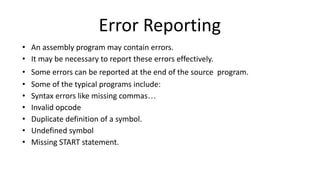
Error Reporting
• An assembly program may contain errors.
• It may be necessary to report these errors effectively.
• Some errors can be reported at the end of the source program.
• Some of the typical programs include:
• Syntax errors like missing commas…
• Invalid opcode
• Duplicate definition of a symbol.
• Undefined symbol
• Missing START statement.
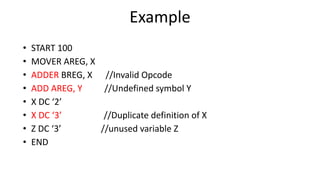
Example
• START 100
• MOVER AREG, X
• ADDER BREG, X //Invalid Opcode
• ADD AREG, Y //Undefined symbol Y
• X DC ‘2’
• X DC ‘3’ //Duplicate definition of X
• Z DC ‘3’ //unused variable Z
• END
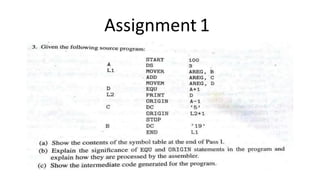
Assignment 1
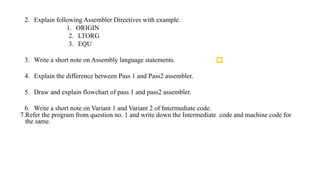
2. Explain following Assembler Directives with example.
1. ORIGIN
2. LTORG
3. EQU
3. Write a short note on Assembly language statements.
4. Explain the difference between Pass 1 and Pass2 assembler.
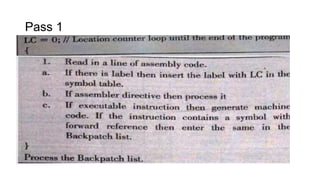
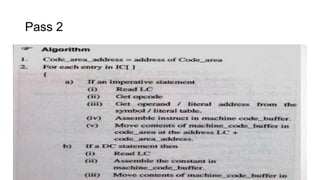
5. Draw and explain flowchart of pass 1 and pass2 assembler.
6. Write a short note on Variant 1 and Variant 2 of Intermediate code.
7.Refer the program from question no. 1 and write down the Intermediate code and machine code for
the same.
1. The only language that the computer can process or execute is called ___________ ?
(A) Machine language (B) Normal language (C) Computer language (D) High-level
language
1. Which of the following software is used to control the operations of a computer?
(A) Application Software (B) System Software (C) Utility Software (D) Language
Processor
1. Which one of the following software is designed to solve a specific problem or to do a
specific task?
(A) Language Processor (B) Application Software (C) System Software (D) Utility
Software
E. Student’s evaluation
Pass 1
Pass 2

SPOS_UNIT I System Programming and Operating System.pdf

  • 1.
  • 2.
    Syllabus Introduction to SystemsProgramming, Need of Systems Programming, Software Hierarchy, Types of software: system software and application software, Machine structure. Evolution of components of Systems Programming: Text Editors, Assembler, Macros, Compiler, Interpreter, Loader, Linker, Debugger, Device Drivers, Operating System. Elements of Assembly Language Programming: Assembly Language statements, Benefits of Assembly Language, A simple Assembly scheme, Pass Structure of Assembler. Design of two pass Assembler: Processing of declaration statements, Assembler Directives and imperative statements, Advanced Assembler Directives, Intermediate code forms, Pass I and Pass II of two pass Assembler.
  • 3.
    Introduction Computer : Aprogrammable device that can store, retrieve, and process data.(Combination of H/w & S/w ) Hardware : things which we can touch. Software : things which we cannot touch.(Can only see) Programming: A programming language is a set of commands, instructions, and other syntax use to create a software program. Data : Information in a form a computer can use Information : Any knowledge that can be communicated
  • 4.
    Introduction • What isSystem? – System is the collection of various components • Ex:- College is a system. • College is a system because it consist of various components like various departments, classrooms, faculties and students. • What is Programming? – Art of designing and implementing the programs.
  • 5.
    Introduction • In collegesystem, what is program? • A LECTURE can be a program. Because it has input and output. • Input->The information that teacher is delivering. • Output->The knowledge student has been received. So systemprogramming is an art of designing and implementing System Programs
  • 6.
  • 7.
    Introduction ● Application Programmingaims to produce software which provides services to user(Email,Microsoft Excel ) ● System programming give services to system such as starting a computer, loading programs,Managing memory,supporting different hardware. ● System software is a collection of programs that facilitates execution of programs and use of resources in a computer system ● Computer program that implements the scheme of program development and program execution are called as system program.
  • 8.
    Systems programming ● Systemsprogramming involves the development of the individual pieces of software that allow the entire system to function as a single unit. ● Systems programming involves many layers such as the operating system (OS), firmware, and the development environment. ● Systems programming works more closely with computer resources and machine languages whereas software programming is primarily interested in user interactions.
  • 9.
    System Programming Software ● Applicationsoftware usually used by end-user ● It is concerned with the solution of some problem, using the computer as a tool, instead of how computers actually work. System software ● System software consists of a variety of programs that support the operation of a computer (ex: text editor, compiler, debugger) ● One characteristic in which most system software differ from application software is machine dependency ● A system software programmer must know the target machine structure
  • 10.
  • 11.
    Need of SystemProgramming • System programs provide an environment where programs can be developed and executed. • In the simplest sense, system programs also provide a bridge between the user interface and system calls. • In reality, they are much more complex. For example, a compiler is a complex system program.
  • 12.
    Need of SystemProgramming ● System Software consists of a variety of programs that support the operation of a computer. ● The software makes it possible for the users to focus on an application or other problem to be solved, without needing to know the details of how the machine works internally.
  • 13.
    Need of SystemProgramming
  • 14.
    Need of SystemProgramming • The system program serves as a part of the operating system. It traditionally lies between the user interface and the system calls. • The user view of the system is actually defined by system programs and not system calls because that is what they interact with and system programs are closer to the user interface.
  • 15.
    Need of SystemProgramming
  • 16.
    Need of SystemProgramming ● To Achieve effective performance of the system ● To make effective execution of general user program ● To make effective utilization of human resources ● To make available new,better facilities.
  • 17.
  • 18.
    Software Hierarchy- SystemSoftware These are the software that directly allows the user to interact with the hardware components of a computer system System Software can be further divided into four major types: 1. The Operating System – It is the main program that governs and maintains the inter-cooperation of the components of a computer system. For eg., Microsoft Windows, Linux, Mac OS etc. 2. The Language Processor – The hardware components present in the computer system does not understand human language 3. The Device Drivers – The device drivers and the device programs or the system software that acts as an interface between the various Input-Output device and the users or the operating system. For eg., the Printers, Web cameras 4. The BIOS – It stands for Basic Input Output System and is a small firmware, that controls the peripheral or the input-output devices attached to the system. This software is also responsible for starting the OS or initiating the booting process.
  • 19.
    Software Hierarchy-Application Software Theseare the basic software used to run to accomplish a particular action and task. The General Purpose Application Software: These are the types of application software that comes in-built and ready to use, manufactured by some company or someone. For eg., ● Microsoft Excel – Used to prepare excel sheets. ● VLC Media Player – Used to play audio/video files. ● Adobe Photoshop – Used for designing and animation and many more. The Specific Purpose Application Software: These are the type of software that is customizable and mostly used in real-time or business environment. For eg., ● Ticket Reservation System ● Healthcare Management System
  • 20.
    Software Hierarchy- UtilitySoftware These are the most basic type of software which provides high utility to the user and the system. These perform the basic but daily need tasks. For eg., ● Antivirus Softwares: These provide protection to the computer system from unwanted malware and viruses. For eg., QuickHeal, McAfee etc. ● Disk Defragmenter Tools: These help the users to analyse the bad sectors of the disk and rearrange the files in a proper order. ● Text-editors: These help the users to take regular notes and create basic text files. For eg., Notepad, Gedit etc.
  • 21.
  • 22.
    Evolution of componentsof Systems Programming Components of Programming system are:- • Assembler • Macros • Text Editors • Compiler • Interpreter • Loader • Linker • Debugger • Device Driver • Operating System.
  • 23.
    Assembler : ● TheAssembler is used to translate the program written in Assembly language into machine code. ● The source program is an input of an assembler that contains assembly language instructions. ● The output generated by the assembler is the object code or machine code understandable by the computer. ● Assembler is basically the 1st interface that is able to communicate humans with the machine.
  • 24.
    Assembler • We needan Assembler to fill the gap between human and machine so that they can communicate with each other. • Code written in assembly language is some sort of mnemonics(instructions) like ADD, MUL, MUX, SUB, DIV, MOV and so on. • Assembler is basically able to convert these mnemonics in Binary code. • These mnemonics also depend upon the architecture of the machine. • For example, the architecture of intel 8085 and intel 8086 are different.
  • 25.
    • Macro allowsa sequence of source language code to be defined once and then referred many times. • “ A macro is a sequence of instructions, assigned by a name and could be used anywhere in the program ” • In NASM, macros are defined with %macro and %end macro directives. • The macro begins with the %macro directive and ends with the %endmacro directive. • Syntax: %macro macro_namenumber_of_params <macro body> %endmacro Macro & Macro processor
  • 26.
    Macro & Macroprocessor • A macro processor takes a source with macro definition and macro calls and replaces each macro call with its body.
  • 27.
    Macro & MacroProcessor • How Macro processor works :
  • 29.
    Editors • Editor isa computer program that allows a userto create and revise a document. • A text editor is a type of program used for editing plain text files. • With the helpof text editor you can write your program(e.g. C Program or Java Program). • Notepad, Wordpad are some of the common editors used on Windows OS • vi, emacs, Jed, pico are the editors on UNIX OS. • Features normally associated with text editors are — moving the cursor, deleting, replacing, pasting, finding, finding and replacing, saving etc.
  • 30.
    Types of TextEditors Line editor : This editor edits the file line by line. You cannot work on a stream of lines using the line editor. Example of a line editor is teleprinter. Stream editor : In this type of editors, the file is treated as continuous flow or sequence of characters instead of line numbers, which means here you can type paragraphs. Ex : Sed editor in UNIX
  • 31.
    Types of TextEditors Screen editors : In this type of editors, the user is able to see the cursor on the screen and can make a copy, cut, paste operation easily. It is very easy to use mouse pointer. Ex : vi, emacs, Notepad Word Processor : Overcoming the limitations of screen editors, it allows one to use some format to insert images, files, videos, use font, size, style features. It majorly focuses on Natural language. Structure Editor: Structure editor focuses on programming languages. It provides features to write and edit source code. Ex : Netbeans IDE, gEdit.
  • 32.
    Compiler ● A translatoror language processor is a program that translates an input program written in a programming language into an equivalent program in another language. ● The compiler is a type of translator, which takes a program written in a high-level programming language as input and translates it into an equivalent program in low-level languages such as machine language or assembly language.
  • 33.
    Phases of Compiler •Lexical Analysis : Lexical analyzer phase is the first phase of compilation process. It takes source code as input. It reads the source program one character at a time and converts it into tokens. • Syntax Analysis : Syntax analysis is the second phase of compilation process. It takes tokens as input and generates a parse tree as output. In syntax analysis phase, the parser checks that the expression made by the tokens is syntactically correct or not. x = y + 10 Tokens X identifier, = Assignment operator, Y identifier, + Addition operator ,10 Number
  • 34.
    Phases of Compiler •Semantic Analysis : Semantic analysis is the third phase of compilation process. It checks whether the parse tree follows the rules of language. Semantic analyzer keeps track of identifiers, their types and expressions. The output of semantic analysis phase is the annotated tree syntax. float x = 20.2; float y = x*30; The semantic analyzer will typecast the integer 30 to float 30.0 before multiplication • Intermediate Code Generation : In the intermediate code generation, compiler generates the source code into the intermediate code. Intermediate code is generated between the high-level language and the machine language. The intermediate code should be generated in such a way that you can easily translate it into the target machine code. total = count + rate * 5 Intermediate code t1 := int_to_float(5) t2 := rate * t1 t3 := count + t2 total := t3
  • 35.
    Phases of Compiler •Code Optimization : Code optimization is an optional phase. It is used to improve the intermediate code so that the output of the program could run faster and take less space. It removes the unnecessary lines of the code and arranges the sequence of statements in order to speed up the program execution. a = intofloat(10) b = c * a d = e + b f = d Can be b =c * 10.0 f = e+b • Code Generation : Code generation is the final stage of the compilation process. It takes the optimized intermediate code as input and maps it to the target machine language. Code generator translates the intermediate code into the machine code of the specified computer. a = b + 60.0 Would be possibly translated to registers. MOVF a, R1 MULF #60.0, R2 ADDF R1, R2
  • 36.
  • 37.
    Interpreter ● The softwareby which the conversion of the high-level instructions is performed line-by-line to machine-level language, other than compiler and assembler, is known as INTERPRETER. ● It is 5 to 25 times faster than a compiler but it stops at the line where error occurs and then again if the next line has an error too. ● Where as a compiler gives all the errors in the code at once. ● Also, a compiler saves the machine codes for future use permanently but an interpreter doesn’t, but an interpreter occupies less memory.
  • 38.
    Interpreter : ● Python-CPython, PyPy, Stackless Python, IronPython ● Ruby- YARV, Ruby MRI (CRuby) ● JAVA- HotSpot, OpenJ9, JRockIt
  • 39.
    Difference between Compilerand Interpreter – Compiler Interpreter • A compiler is a program that converts the entire source code of a programming language into executable machine code for a CPU. • An interpreter takes a source program and runs it line by line, translating each line as it comes to it • The compiler takes a large amount of time to analyze the entire source code but the overall execution time of the program is comparatively faster. • An interpreter takes less amount of time to analyze the source code but the overall execution time of the program is slower. • The compiler generates the error message only after scanning the whole program, so debugging is comparatively hard as the error can be present anywhere in the program. • Its Debugging is easier as it continues translating the program until the error is met. • The compiler requires a lot of memory for generating object codes. • It requires less memory than a compiler because no object code is generated. • Generates intermediate object code. • No intermediate object code is generated. • For Security purpose compiler is more useful. • The interpreter is a little vulnerable in case of security.
  • 40.
    Linker ● For acode to run we need to include a header file or a file saved from the library which are pre-defined if they are not included in the beginning of the program then after execution the compiler will generate errors, and the code will not work. ● Linker is a program that holds one or more object files which is created by compiler, combines them into one executable file.Linking is implemented at both time,load time and compile time. Compile time is when high level language is turns to machine code and load time is when the code is loaded into the memory by loader.
  • 41.
    Linker Linker is oftwo types: 1.Dynamic Linker:- ● It is implemented during run time. ● It requires less memory. ● In dynamic linking there are many chances of error and failure chances. ● The shared library needed in the linking is stored in virtual memory to save RAM.
  • 42.
    Linker Linker is oftwo types: 2.Static Linker:- ● It is implemented during compilation of source program. ● It requires more memory. ● Linking is implemented before execution in static linking. ● It is faster and portable. ● In static linking there are less chances to error and No chances to failure.
  • 43.
    Loader ● A loaderis a program that loads the machine codes of a program into the system memory. It is part of the OS of the computer that is responsible for loading the program. ● Allocation: It allocates memory for the program in the main memory. ● Linking: It combines two or more separate object programs or modules and supplies necessary information. ● Relocation: It modifies the object program so that it can be loaded at an address different from the location. ● Loading: It brings the object program into the main memory for execution.
  • 44.
    Debugger ● A debuggeris a tool that allows you to examine the state of a running program. ● Debugging is the process of locating and then removing bugs or errors in a program. An interactive debugging system gives programmers tools to help them test and debug their programs. ● Debugging is the methodical process of locating and eliminating bugs or defects in a computer program. ● Recognize the Error, Locate the Error, Evaluate the Error, Verify the Analysis, Cover Lateral Damage
  • 45.
    Operating System • AnOperating System (OS) is an interface between a computer user and computer hardware. • An operating system is a software which performs all the basic tasks like file management, memory management, process management, handling input and output, and controlling peripheral devices such as disk drives and printers. • Today, Operating systems is found almost in every device like mobile phones, personal computers, mainframe computers, automobiles, TV, Toys etc
  • 46.
    Device Driver • DeviceDriver in computing refers to a special kind of software program or a specific type of software application that controls a specific hardware device • A printer driver tells the printer in which format to print after getting instruction from OS, similarly, A sound card driver is there due to which 1’s and 0’s data of the MP3 file is converted to audio signals and you enjoy the music. • Card reader, controller, modem, network card, sound card, printer, video card, USB devices, RAM, Speakers, etc need Device Drivers to operate.
  • 47.
    Machine Structure GENERAL HARDWAREORGANIZATION OF COMPUTER SYSTEM
  • 48.
  • 49.
    All the conventionalmodern computers are based upon the concept of stored program computer, the model that was proposed by John von Neumann. The components of a general machine are as follows: 1. Instruction interpreter: A group of electronic circuits performs the intent of instruction of fetched from memory 2. Location counter: LC otherwise called as program counter PC or instruction counter IC, is a hardware memory device which denotes the location of the current instruction being executed 3. Instruction register: A copy of the content of the LC is stored in IR 4. Working register: are the memory devices that serve as “scratch pad” for the instruction interpreter. Machine Structure
  • 50.
    5. General register:are used by programmers as storage locations and for special functions 6. Memory address registers (MAR): contains the address of the memory location that is to read from or stored into 7. Memory buffer register (MBR): contain a copy of the content of the memory location whose address is stored in MAR. The primary interface between the memory and the CPU is through memory buffer register 8. Memory controller: is a hardware device whose work is to transfer the content of the MBR to the core memory location whose address is stored in MAR 9. I/O channels: may be thought of as separate computers which interpret special instructions for inputting and outputting information from the memory. Machine Structure
  • 51.
    Machine instruction Format Toillustrate how these components of the machine structure interact let us consider an ADD instruction ADD 2,176 where ADD is the operation code, 2 is the register number and 176 is the memory location
  • 52.
  • 53.
    Machine instruction Format ADD2, 176 is stored at core memory location 400. Also ‘Register -2’ contains an integer 1802 and the memory location ‘176’ contains an integer value 908.
  • 54.
  • 55.
  • 56.
    • Assembly languageis low level language. • An assembly language is machine dependent. • It differs from computer to computer. • Writing programs in assembly language is very easy as compared to machine(binary) language. Assembly Language
  • 57.
    Assembly language programming Terms: •Location Counter: (LC) points to the next instruction. • Literals: constant values • Symbols: name of variables and labels • Procedures: methods/ functions
  • 58.
    Elements of AssemblyLanguage Programming An Assembly language is a machine dependant , low level programming language which is specific to a certain computer system It provides three basic features 1.Mnemonic operation codes:Use of mnemonic operation codes(mnemonic opcodes) for machine instructions eliminates the need to memorize numeric operation codes. 2.Symbolic operands:Symbolic names can be associated with data or instructions.These symbolic names can be used as operands in assembly statement 3.Data Declaration: Data can be declared in a variety of notations including the decimal notation.This avoids manual conversion of constant into their internal machine representation. Statement format Label opcode operand1,operand2
  • 59.
    Machine instruction Format Toillustrate how these components of the machine structure interact let us consider an ADD instruction ADD 2,176 where ADD is the operation code, 2 is the register number and 176 is the memory location
  • 60.
    It supports different11 operations: 1. STOP - to stop execution 2. ADD - op1=op1+op2 3. SUB - op1=op1-op2 4. MULT - op1=op1*op2 5. MOVER - CPU Register <- Memory operand 6. MOVEM - Memory operand<- CPU register 7. COMP - Set conditional code , these condition codes will be used by the conditional branch instruction BC Machine Structure Operations
  • 61.
    Machine Structure Operations 8.BC -Branch on condition to be used for branching are a. EQ - Equal b. NE - Not Equal c. LT-Less than d. GT- Greater than e. LE - Less or equal f. GE -Greater or Equal g. ANY 9. DIV op1=op1/op2 10. READ op2=Input value 11. PRINT op=op2
  • 62.
    • In thishypothetical machine • First operand is always a CPU register • Second operand is always memory operand • READ and PRINT instructions do not use first operand • The STOP instruction has no operand Machine Structure Operations
  • 63.
    • Each symbolicopcode is associated with machine opcode • These details are stored in machine opcode table(MOT) ○ MOT contains: ■ Opcode mnemonic form ■ Machine code associated with the opcode. Machine Structure Operations
  • 64.
    Symbolic Opcode MachineCode for opcode Size of instruction (in number of words) STOP 00 1 ADD 01 1 SUB 02 1 MULT 03 1 MOVER 04 1 MOVEM 05 1 COMP 06 1 BC 07 1 DIV 08 1 READ 09 1 PRINT 10 1
  • 65.
    Sr. No Symbolic opcode Machineopcode 1 AREG 01 2 BREG 02 3 CREG 03
  • 66.
    Assembly language Statements: • ImperativeStatements: • Declarative/Declaration Statements: • Assembler Directive:
  • 67.
    Imperative Statements • Imperative meansmnemonics • These are executable statements. • Each imperative statement indicates an action to be taken during execution of the program. • E.g. MOVER BREG, X STOP READ X ADD AREG, Z
  • 68.
    Declarative Statements • Declaration statementsare for reserving memory for variables. • We can specify the initial value of a variable. • It has two types: • DS // Declare Storage • DC // Declare Constant
  • 69.
    DS(Declare Storage): • Syntax: • [Label] •E.g. DS <Constant specifying size> X DS 1 DC (Declare Constant): Syntax: [Label ] E.g Y DC <constant specifying value> DC ‘5’
  • 70.
    Assembler Directive • Assemblerdirective instruct the assembler to perform certain actions during assembly of a program. • Some assembler directive are: • START <address constant> • END
  • 71.
    Advanced Assembler Directives •1. ORIGIN The origin directive tells the assembler where to load instructions and data into memory. It changes the program counter to the value specified by the expression in the operand field. Syntax ORIGIN <address Specification> <address specification is an operand, a constant or an expression> Assembly program LC 1. START 100 2. MOVER BREG,=’2’ 100 3. LOOP MOVER AREG,N 101 4. ADD BREG,=’1’ 102 5. ORIGIN LOOP+5 6. NEXT BC ANY,LOOP 106 7. LTORG 8. ORIGIN NEXT+2 9. LAST STOP 108 10. N DC ‘5’ 109 11. END
  • 72.
    Advanced Assembler Directives •2. EQU The EQU assembler directive simply equates a symbolic name to a numeric value. Sunday EQU 1 Monday EQU Sunday + 1 In this case, the assembler evaluates "Sunday + 1" as 1 + 1 and assigns the value 2 to the symbolic name "Monday". • 3. LTORG Use the LTORG instruction so that the assembler can collect and assemble literals into a literal pool. A literal pool contains the literals you specify in a source module either after the preceding LTORG instruction, or after the beginning of the source module.
  • 73.
    Symbolic Opcode MachineCode for opcode START 01 END 02 LTORG 03 ORIGIN 04 EQU 05 Assembler Directive Pseudo opcode table
  • 74.
    Sample Assembly Code 1.START 100 It is an AD statement because it has Assembler directive START 2. MOVER AREG, X 3. MOVER BREG, Y 4. ADD AREG, Y 5. MOVEM AREG, X It is an IS because it starts with mnemonic. 6. X DC ‘10’ 7. Y DS 1 8. END It is an DS/ DL statement because it has DC It is an DS/ DL statement because it has DS
  • 75.
    Identify the typesof statements State.No IS DS AD 1 2 3 4 5 6 7 8
  • 76.
    Identify the typesof statements State.No IS DS AD 1 AD 2 IS 3 IS 4 IS 5 IS 6 DS 7 DS 8 AD
  • 77.
    Definitions • LC: • Symbol: •Literals: • Procedures: • Label
  • 78.
    How LC Operates? Sr. NOLC 1 START 100 2 MOVER AREG, X 3 MOVER BREG, Y 4 ADD AREG, BREG 5 MOVEM AREG, X 6 X DC ‘10’ 7 Y DC ‘15’ 8 END
  • 79.
    How LC Operates? Sr. NOLC 1 START 100 2 MOVER AREG, X 100 3 MOVER BREG, Y 101 4 ADD AREG, BREG 102 5 MOVEM AREG, X 103 6 X DC ‘10’ 104 7 Y DC ‘15’ 105 8 END
  • 80.
    Identify symbol, literals,AD, IS, DS, Label 1. START 100 2. MOVER BREG, =‘2’ 3. LOOP MOVER AREG, N 4. ADD BREG, =‘1’ 5. ORIGIN LOOP+5 6. LTORG 7. ORIGIN NEXT +2 8. LAST STOP 9. N DC ‘5’ 10. END
  • 81.
    Solution (From PreviousExample) Sr. No AD DS IS Symbol Literal Label 1 AD 2 IS =2 3 IS N LOOP 4 IS =1 5 AD 6 AD 7 AD 8 IS LAST 9 DS 10 AD
  • 82.
    ASSEMBLER • An assemblylanguage program can be translated into machine language. It involves following steps: • 1. Find addresses of variable. • 2. Replace symbolic addresses by numeric addresses. • 3. Replace symbolic opcodes by machine operation codes. • 4. Reserve storage for data.
  • 83.
    Step 1 • Wecan find out addresses of variable using LC. First identify all variables in your program. • START 100 • MOVER AREG, X • MOVER BREG, Y • ADD AREG, X • MOVEM AREG, X • X DC ‘10’ • Y DC ‘15’ • END
  • 84.
    Sr. No AssemblyProgram LC 1 START 100 2 MOVER AREG, X 100 3 MOVER BREG, Y 101 4 ADD AREG, X 102 5 MOVEM AREG, X 103 6 X DC ‘10’ 104 7 Y DC ‘15’ 105 8 END Step 1
  • 85.
    Sr. No Nameof Variable(Symbol) Address 1 X 10⁴ 2 Y 105 Symbol Table Forward reference problem and Backpacking
  • 86.
    Step2: Replace allsymbolic address with numeric address. • START 100 • MOVER AREG, 104 • MOVER BREG, 105 • ADD AREG, 104 • MOVEM AREG, 104 • X DC ‘10’ • Y DC ‘15’ • END Memory is reserved but no code is generated.
  • 87.
    Symbolic Opcode Machine Codefor opcode Size of instruction (in number of words) STOP 00 1 ADD 01 1 SUB 02 1 MULT 03 1 MOVER 04 1 MOVEM 05 1 COMP 06 1 BC 07 1 DIV 08 1 READ 09 1 PRINT 10 1 Symbolic Opcode Machine Code for opcode START 01 END 02 LTORG 03 ORIGIN 04 EQU 05 Sr. No Symbolic opcode Machine opcode 1 AREG 01 2 BREG 02 3 CREG 03 ● MOT ● POT ● Register
  • 88.
    Machine Instruction Format ●sign is not a part of the instruction ● Opcode: 2 digits, Register Operand: 1 digit, Memory Operand: 3 digits ● Condition code specified in a BC statement is encoded into the first operand using the codes 1- 6 for specifications LT, LE, EQ, GT, GE and ANY respectively ● In a Machine Language Program, all addresses and constants are shown in decimal as shown in the next slide
  • 89.
    Step3: Replace symbolicopcodes by machine operation codes. LC Assembly Instruction Machine Code 101 MOVER AREG, 104 04 01 104 102 MOVER BREG, 105 04 02 105 103 ADD AREG, 104 01 01 104 104 MOVEM AREG, 104 05 01 104 105 106 107 LC Opcode Register Address
  • 90.
    Question For U START101 READ X READ Y MOVER AREG, X ADD AREG, Y MOVEM AREG, RESULT PRINT RESULT STOP X DS 1 Y DS 1 RESULT DS 1 END LC Opcode Register Address 101 09 0 108 102 09 0 109 103 04 1 108 104 01 1 109 105 05 1 110 106 10 0 110 107 00 0 000
  • 91.
  • 92.
    Assembler • An Assembleris a translator which translates assembly language code into machine language with help of data structure. • It has two types • Pass 1 Assembler. • Pass 2 Assembler.
  • 93.
  • 94.
    Analysis Phase Vs.Synthesis Phase
  • 95.
    • PASS 2assembler requires two scans of program to generate machine code. • It uses data structures defined by pass 1. like symbol table, MOT, LT.
  • 96.
    General design procedureof assembler • Statement of Problem • Data Structure • Format of databases • Algorithms • Look for modularity.
  • 97.
    Statement of Problem •We want to convert assembly language program into machine language.
  • 98.
    Data Structure Used •Data Structure used are as follows: • Symbol Table • Literal Table • Mnemonic Opcode Table • Pool Table
  • 99.
    Format of Databases •Symbol Table: • Literal Table: Name of Symbol address Literal address
  • 100.
    • MOT : • Pool Table: MnemonicMachine Opcode Class Length Literal Number
  • 101.
    Look for Modularity •If your program is too long… • U can make modules of it.
  • 102.
    Forward Reference Problem •Using a variable before its definition is called as forward reference problem. • E.g. • START 100 • MOVEM AREG, X • MOVER BREG, Y • ADD AREG, Y • X DC ‘4’ • Y DC ‘5’ • END
  • 103.
    • In examplevariable X, Y are making forward reference. • So, We can solve it by using back patching.
  • 104.
  • 105.
  • 106.
    Backpatching • The operandfield of instruction containing a forward reference is left blank initially. • Step 1: Construct TII(Table of incomplete instruction)
  • 107.
    • Step 2:After encountering END statement symbol table would contain the address of all symbols defined in the source program. SYMBOL NAME ADDRESS X 104 ONE 105 TEN 106 • Now we can generate machine code…
  • 108.
    Pass 1 Assembler •Pass 1 assembler separate the labels ,mnemonic opcode table, and operand fields. • Determine storage requirement for every assembly language statement and update the location counter. • Build the symbol table. Symbol table is used to store each label and each variable and its corresponding address.
  • 109.
    How pass 1assembler works? Pass I uses following data structures. 1. Machine opcode table.(MOT) 2. Symbol Table(ST) 3. Literal Table(LT) 4. Pool Table(PT) Contents of MOT are fixed for an assembler.
  • 110.
    Observe Following Program START200 MOVER AREG, =‘5’ MOVEM AREG, X L1 MOVER BREG, =‘2’ ORIGIN L1+3 LTORG NEXT ADD AREG, =‘1’ SUB BREG, =‘2’ BC LT, BACK LTORG BACK EQU L1 ORIGIN NEXT+5 MULT CREG, =‘4’ STOP X DS 1 END
  • 111.
    Apply LC START 200 MOVERAREG, =‘5’ MOVEM AREG, X L1 MOVER BREG, =‘2’ ORIGIN L1+3 LTORG =‘5’ =‘2’ 200 201 202 205 206 NEXT ADD AREG, =‘1’ 207 SUB BREG, =‘2’ 208 BC LT, BACK 209 LTORG =‘1’ 210 =‘2’ 211 BACK EQU L1 ORIGIN NEXT+5 MULT CREG, =‘4’ 212 STOP 213 X DS 1 214 END =‘4’ 215 //Pool Table(Assign Address to Literals after LTORG or After END statement //Pool Table //Pool Table
  • 112.
    Construct Symbol table indexSymbol Name Address 0 X 214 1 L1 202 2 NEXT 207 3 BACK 202
  • 113.
    Construct Literal Table index LiteralAddress 0 5 205 1 2 206 2 1 210 3 2 211 4 4 215
  • 114.
    Pool Table. • Pool tablecontains starting literal(index ) of each pool. Literal number 0 2 4
  • 115.
    NOW CONSTRUCT INTERMEDIATECODE/MACHINE CODE • For constructing intermediate code we need MOT.
  • 116.
  • 118.
    INTERMEDIATE CODE • Formatfor intermediate code: • For every line of assembly statement,one line of intermediate code is generated. • Each mnemonic field is represented as • (statement class, and machine code)
  • 119.
    • Statement classcan be: 1. IS 2. DL/DS 3. AD
  • 120.
    • So, ICfor mnemonic field of above line is, • (statement class, machine code) • (IS, 04) …………………from MOT
  • 121.
    • Operand Field: •Each operand field is represented as (operand class, reference) • For a symbol or literal the reference field contains the index of the operands entry in symbol table or literal table.
  • 122.
    • The operandclass can be: 1. C: Constant 2. S: Symbol 3. L: Literal 4. RG: Register 5. CC: Condition codes • E.g. MOVER AREG, X • So IC for above line is: • (IS, 04)(RG, 01) (S, 0) Example : Intermediate code
  • 123.
    • For example… •START 200 • IC: (AD, 01)(C, 200)
  • 124.
    Intermediate Code (AD, 01)(C, 200) 200 (IS, 04) (RG,01) (L, 0) 201 (IS, 05) (RG,01) (S,0) 202 (IS, 04) (RG,02) (L,1) 203 (AD, 03) (C, 205) 205 (DL, 02) (C,5) 206 (DL, 02) (C, 2) 207 (IS,01) (RG, 01) (L, 2) 208 (IS, 02) (RG, 02) (L,3) 209 (IS, 07) (CC, 02) (S, 3) 210 (DL,02) (C,1) 211 (DL,02) (C,2) 212 (AD, 04) (C, 202) 212 (AD, 03) (C, 212) 212 (IS, 03) (RG, 03)(L, 4) START 200 MOVER AREG, =‘5’ MOVEM AREG, X L1 MOVER BREG, =‘2’ ORIGIN L1+3 LTORG NEXT ADD AREG, =‘1’ SUB BREG, =‘2’ BC LT, BACK LTORG BACK EQU L1 ORIGIN NEXT+5 MULT CREG, =‘4’ STOP X DS 1 END 213 (IS, 00) 214 (DL, 01, C, 1) 215 (AD, 02) 215 (DL, 02) (C,4)
  • 125.
    Pass 1 outputand pass 2 output • Pass 1 assembler generates Intermediate code. • Pass 2 assembler generates Machine code.
  • 126.
    Consider following example START200 MOVER AREG, =‘5’ MOVEM AREG, X L1 MOVER BREG, =‘2’ ORIGIN L1+3 LTORG NEXT ADD AREG, =‘1’ SUB BREG, =‘2’ BC LT, BACK LTORG BACK EQU L1 ORIGIN NEXT+5 MULT CREG, =‘4’ STOP X DS 1 END index Symbol Name Address 0 X 214 1 L1 202 2 NEXT 207 3 BACK 202 index Literal Address 0 5 205 1 2 206 2 1 210 3 2 211 4 4 215 Literal Table Symbol Table
  • 127.
    I.C LC MachineCode (AD, 01) (C, 200) (IS, 04) (RG,01) (L, 0) 200 04 01 205 (IS, 05) (RG,01) (S,0) 201 05 01 214 (IS, 04) (RG,02) (L,1) 202 04 02 206 (AD, 03) (C, 205) 203 (DL, 02) (C,5) 205 00 00 005 (DL, 02) (C, 2) 206 00 00 002 (IS,01) (RG, 01) (L, 2) 207 01 01 210
  • 128.
    I.C LC MachineCode (IS, 02) (RG, 02) (L,3) 208 02 02 211 (IS, 07) (CC, 02) (S, 3) 209 07 02 202 (DL,02) (C,1) 210 00 00 001 (DL,02) (C,2) 211 00 00 002 (AD, 04) (C, 202) 212 (AD, 03) (C, 212) 212 (IS, 03) (RG, 03)(L, 4) 212 03 03 215 (IS, 00) 213 00 00 000
  • 129.
    I.C LC MachineCode (DL, 01, C, 1) 214 (AD, 02) 215 (DL, 02) (C,4) 215 00 00 004
  • 130.
    Comparison between Pass1 and Pass2 Sr. No Pass 1 Pass 2 01 It requires only one scan to generate machine code It requires two scan to generate machine code. 02 It has forward reference problem. It don’t have forward reference problem. 03 It performs analysis of source program and synthesis of the intermediate code. It process the IC to synthesize the target program. 04 It is faster than pass 2. It is slow as compared to pass 1.
  • 131.
    Variants of IntermediateCode. • There are two variants of I.C.: • Variant I • Variant II.
  • 132.
    Variant I • InVariant I, each operand is represented by a pair of the form (operand class, code). • The operand class is one of: 1. S for symbol 2. L for literal 3. C for constant 4. RG for register.
  • 133.
  • 134.
    Variant II • Invariant II, operands are processed selectively. • Constants and literals are processed. Symbols,condition codes and CPU registers are not processed.
  • 135.
  • 136.
    Comparison • Variant Idoes more work in Pass I. Operands fields are completely processed in Pass 1. Memory requirements are higher in Pass 1. • Variant II, Pass 2 has to do more work. Here the processing requirement is evenly distributed over two passes. • In Variant II over all memory requirement of the assembler is lower.
  • 137.
  • 138.
  • 139.
  • 140.
    Error Reporting • Anassembly program may contain errors. • It may be necessary to report these errors effectively. • Some errors can be reported at the end of the source program. • Some of the typical programs include: • Syntax errors like missing commas… • Invalid opcode • Duplicate definition of a symbol. • Undefined symbol • Missing START statement.
  • 141.
    Example • START 100 •MOVER AREG, X • ADDER BREG, X //Invalid Opcode • ADD AREG, Y //Undefined symbol Y • X DC ‘2’ • X DC ‘3’ //Duplicate definition of X • Z DC ‘3’ //unused variable Z • END
  • 142.
  • 143.
    2. Explain followingAssembler Directives with example. 1. ORIGIN 2. LTORG 3. EQU 3. Write a short note on Assembly language statements. 4. Explain the difference between Pass 1 and Pass2 assembler. 5. Draw and explain flowchart of pass 1 and pass2 assembler. 6. Write a short note on Variant 1 and Variant 2 of Intermediate code. 7.Refer the program from question no. 1 and write down the Intermediate code and machine code for the same.
  • 144.
    1. The onlylanguage that the computer can process or execute is called ___________ ? (A) Machine language (B) Normal language (C) Computer language (D) High-level language 1. Which of the following software is used to control the operations of a computer? (A) Application Software (B) System Software (C) Utility Software (D) Language Processor 1. Which one of the following software is designed to solve a specific problem or to do a specific task? (A) Language Processor (B) Application Software (C) System Software (D) Utility Software E. Student’s evaluation
  • 146.
  • 147.