Web Services Bootcamp


   Bill Buchan - HADSL


                          1
Agenda

   Introduction
   Web Services Overview
   Using Domino to provide Web Services
       LotusScript in Domino v7 and v8
   Using Notes to consume Web Services
       LotusScript in Notes 8
       COM
       Stubby in Notes 7
   Summary, Q+A


                                           2
Introduction

   I am Bill Buchan. I am:
       A blogger - http://www.billbuchan.com
            I was blogging when it was called ‘Talking rubbish on the
             internet’.
            Some things never change.
       A principal of HADSL - http://www.hadsl.com
       A Notes veteran of some 14 years

   You are
       Lotus Domino developers
       Interested in starting or enhancing Web Services in your
        environment
       Familiar with LotusScript, and perhaps Java


                                                                         3
This is a JumpStart

   This takes you from a low level in a subject to a good
    level of expertise
   Little existing knowledge is assumed
       But we assume your are developers, and are familiar with
        LotusScript
   People have paid to come to this session
       But still, as a matter of courtesy, please switch off all mobile
        phones, etc
   Feel free to ask some questions as we go along
       But I reserve the right to leave some answers till the end
   I will be doing live demonstrations
       So feel free to laugh if they break!


                                                                      4
Agenda

   Introduction
   Web Services Overview
   Using Domino to provide Web Services
       LotusScript in Domino v7 and v8
   Using Notes to consume Web Services
       LotusScript in Notes 8
       COM
       Stubby in Notes 7
   Summary, Q+A


                                           5
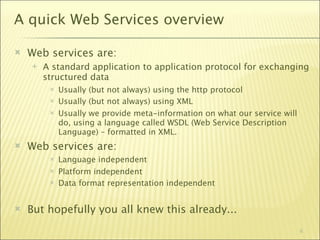
A quick Web Services overview

   Web services are:
       A standard application to application protocol for exchanging
        structured data
            Usually (but not always) using the http protocol
            Usually (but not always) using XML
            Usually we provide meta-information on what our service will
             do, using a language called WSDL (Web Service Description
             Language) – formatted in XML.
   Web services are:
            Language independent
            Platform independent
            Data format representation independent


   But hopefully you all knew this already...
                                                                            6
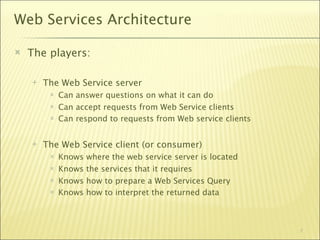
Web Services Architecture

   The players:

       The Web Service server
            Can answer questions on what it can do
            Can accept requests from Web Service clients
            Can respond to requests from Web service clients


       The Web Service client (or consumer)‫‏‬
            Knows   where the web service server is located
            Knows   the services that it requires
            Knows   how to prepare a Web Services Query
            Knows   how to interpret the returned data


                                                                7
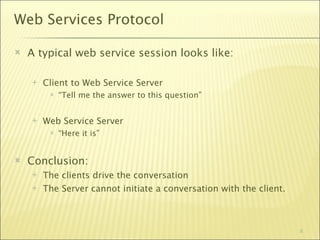
Web Services Protocol

   A typical web service session looks like:

       Client to Web Service Server
            “Tell me the answer to this question”


       Web Service Server
            “Here it is”


   Conclusion:
       The clients drive the conversation
       The Server cannot initiate a conversation with the client.


                                                                     8
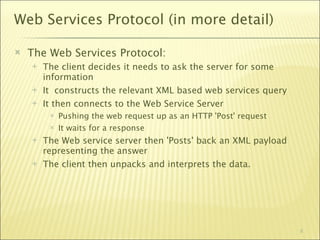
Web Services Protocol (in more detail)‫‏‬

   The Web Services Protocol:
       The client decides it needs to ask the server for some
        information
       It constructs the relevant XML based web services query‫‏‬
       It then connects to the Web Service Server
            Pushing the web request up as an HTTP 'Post' request
            It waits for a response
       The Web service server then 'Posts' back an XML payload
        representing the answer
       The client then unpacks and interprets the data.


                                                                    9
This sounds hard...

   Not really.
       Its a combination of web protocol and XML construction and
        unpacking
       Most of the hard work is done for you by the various Web
        Service servers and Consumers
       Its fairly easy to debug using the correct tools


                                                                10
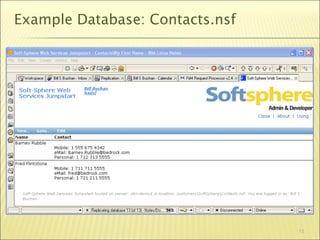
Lets prepare a sample application

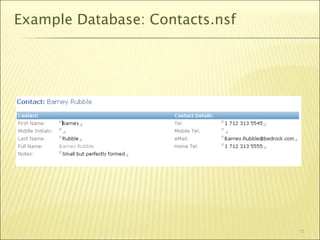
   Fairly simple Domino Contact Database
       A single ‘Contact’ form with some information
       Not meant to be a ‘real-world’ example
       Its here to demonstrate the techniques


   All example code is in the database
       Simple to figure out and ‘research’
       Probably is not best practice!


                                                        11
Example Database: Contacts.nsf


                                 12
Example Database: Contacts.nsf


                                 13
How do we test a web service?

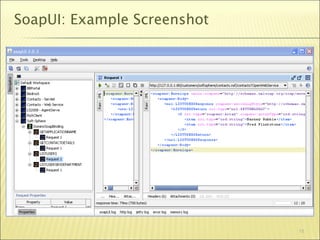
   I recommend SoapUI
       Its free!
       http://www.soapui.org
   It allows you to interrogate a web service
       And build test case with real data


                                                 14
SoapUI: Example Screenshot


                             15
Agenda

   Introduction
   Web Services Overview
   Using Domino to provide Web Services
       LotusScript in Domino v7 and v8
   Using Notes to consume Web Services
       LotusScript in Notes 8
       COM
       Stubby in Notes 7
   Summary, Q+A


                                           16
Domino as a Web Service Server

   Three different methods:
       Using LotusScript as a Web service
       Coding a Java Servlet
       Using an agent
   By far the simplest is to use a LotusScript Web Service
   Servlets should be avoided unless
       You are running on Domino v6.5.x or older
       You absolutely require persistence
   Agents are good for
       Very low transaction services
       Simple services
   We’re only talking about using LotusScript today
                                                         17
Agenda

   Introduction
   Web Services Overview
   Using Domino to provide Web Services
       LotusScript in Domino v7 and v8
   Using Notes to consume Web Services
       LotusScript in Notes 8
       COM
       Stubby in Notes 7
   Summary, Q+A


                                           18
LotusScript Web Services in nd7 & nd8
   Introduced in Lotus Domino 7
   Robust
   Code the web service using LotusScript
   Fairly high performance but
       Remember: Lack of persistence between calls, so
            Be aware of what your code is doing!
            Use ‘Agent Profiling’ to see timings…


                                                          19
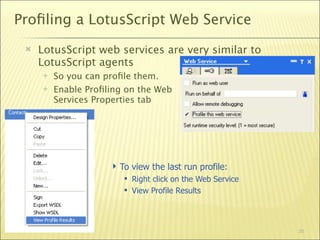
Profiling a LotusScript Web Service
    LotusScript web services are very similar to
     LotusScript agents
        So you can profile them.
        Enable Profiling on the Web
         Services Properties tab


                      To view the last run profile:
                         Right click on the Web Service
                         View Profile Results


                                                           20
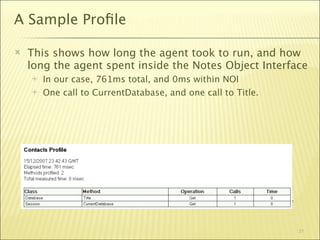
A Sample Profile

   This shows how long the agent took to run, and how
    long the agent spent inside the Notes Object Interface
       In our case, 761ms total, and 0ms within NOI
       One call to CurrentDatabase, and one call to Title.


       Obviously, this wasn’t a very interesting web service call…


                                                                      21
Designing a Web Service

   Spend time thinking about how your consumer will
    use this web service.
       More time thinking, less time coding
       You do NOT want to change this web service interface once
        its published
            Instead - roll out a new web service
       Think through client use cases
       Remember - you can use LotusScript to perform complex
        business rules, and provide a summary of data to your
        consumer
            Don’t assume the consumer can perform a lot of data
             manipulation - BlackBerry, Windows Mobile?
   Best to put complex code in a script library, and just
    surface it via a web service
            It means you can put a normal agent ‘test harness’ around it and
             debug it                                                      22
Contacts.nsf - Web Service

   In our case we wish to:
       Be able to list all users
            By Name
            By Department
       Be able to get details on a particular user
       Be able to search for users
   Do we
       Pass all fields back as web service items?
       Pass back an array of fields?
   In this case, we pass back Web Service Items
       Assume data mapping knowledge and responsibility.


                                                            23
Contacts.nsf - Web Service Design

   We design our web service interface within a ‘Class’ in
    LotusScript.
       At this point, you probably wished that you studied the
        Object Orientated LotusScript sessions I used to give…
       Good example presentations on my personal blog
        presentations page
            http://www.billbuchan.com/web.nsf/plinks/BBUN6MQECQ.htm
   Our web service will expose all ‘public’ methods and
    properties
       We do not have to put all the code in one ‘class’
       Beware of extending existing classes - you might expose
        more than you want!
            Beware over-exposure…


                                                                  24
Contacts.nsf - Web Service Design

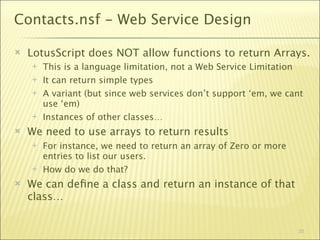
   LotusScript does NOT allow functions to return Arrays.
       This is a language limitation, not a Web Service Limitation
       It can return simple types
       A variant (but since web services don’t support ‘em, we cant
        use ‘em)
       Instances of other classes…
   We need to use arrays to return results
       For instance, we need to return an array of Zero or more
        entries to list our users.
       How do we do that?
   We can define a class and return an instance of that
    class…


                                                                   25
Returning complex types

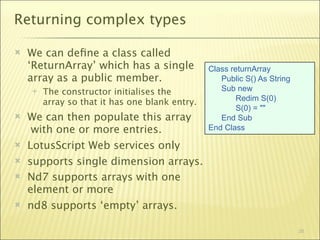
   We can define a class called
    ‘ReturnArray’ which has a single            Class returnArray
    array as a public member.                      Public S() As String
       The constructor initialises the            Sub new
                                                        Redim S(0)
        array so that it has one blank entry.
                                                        S(0) = ""
   We can then populate this array                End Sub
     with one or more entries.                  End Class

   LotusScript Web services only
   supports single dimension arrays.
   Nd7 supports arrays with one
    element or more
   nd8 supports ‘empty’ arrays.

                                                                          26
Returning complex types…
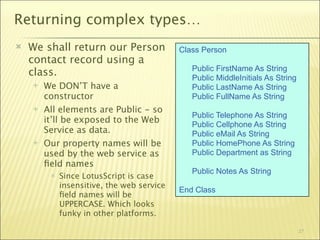
   We shall return our Person              Class Person
    contact record using a
                                               Public FirstName As String
    class.                                     Public MiddleInitials As String
       We DON’T have a                        Public LastName As String
        constructor                            Public FullName As String
       All elements are Public - so
                                               Public Telephone As String
        it’ll be exposed to the Web            Public Cellphone As String
        Service as data.                       Public eMail As String
       Our property names will be             Public HomePhone As String
        used by the web service as             Public Department as String
        field names
                                               Public Notes As String
            Since LotusScript is case
             insensitive, the web service
                                            End Class
             field names will be
             UPPERCASE. Which looks
             funky in other platforms.

                                                                                 27
Demo Time!


   Finally! A Demo!


                       28
Web Services Design - lets make it better

   We need to add:
       Logging. We need to know when it works, and importantly,
        when it does not
       Error Handling. We need to pass errors back to the consumer
       Security. We might want to harden this service somewhat
   We committed the following sins:
       We put all the code in the web service itself, making it hard to
        test. Best to consider embedding most of the code in script
        libraries
       We’ve tightly bound the data structures in our data to our
        web service
            If we add more fields to our contact record - we shall have to
             change the web service. And therefore, all our clients will have
             to be checked and/or recompiled.
            If the data set is likely to change, construct a more flexible data-
             mapping schema                                                  29
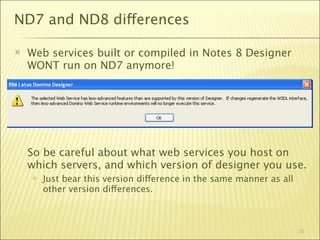
ND7 and ND8 differences

   Web services built or compiled in Notes 8 Designer
    WONT run on ND7 anymore!


    So be careful about what web services you host on
    which servers, and which version of designer you use.
       Just bear this version difference in the same manner as all
        other version differences.


                                                                      30
ND7 and ND8 differences

   In ND7, the class used for the web service has to
    reside in the web service design element. In ND8, this
    can be in a script library.
       This means that for complex services, you can place all the
        business code in a script library, allowing simple construction
        of a test harness.
   ND8 now supports code in Java Libraries
   ND8 supports more error handling SOAP elements
   ND8 supports ‘empty’ arrays - nd7 does not


                                                                    31
Testing this web service using SoapUI


   Demo: Lets go test this service with SoapUI


                                                  32
Web Services Design - lets talk about

   WSDL - Web Services Description Language
       Its an XML document
       You can query a web service for its WSDL,
       You build a web service consumer from the WSDL
   Lotus Domino LotusScript Web Services WSDL
       Is automatically generated for you
       You can query a LotusScript Web Service by passing a URL:
            http://<host>/<directory>/<database>/<web service>?WSDL
            It will then return an XML document showing the WSDL


                                                                    33
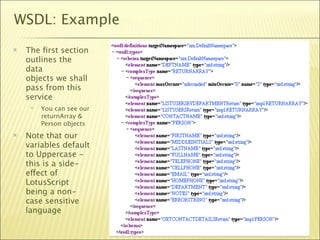
WSDL: Example
   The first section
    outlines the
    data
    objects we shall
    pass from this
    service
        You can see our
         returnArray &
         Person objects
   Note that our
    variables default
    to Uppercase -
    this is a side-
    effect of
    LotusScript
    being a non-
    case sensitive
    language

                           34
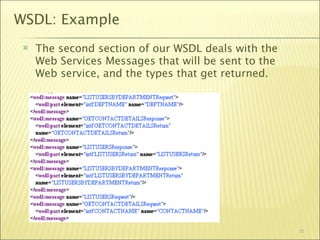
WSDL: Example
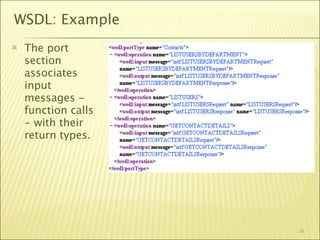
    The second section of our WSDL deals with the
     Web Services Messages that will be sent to the
     Web service, and the types that get returned.


                                                      35
WSDL: Example
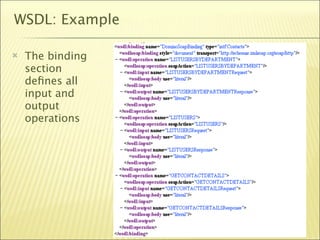
   The port
    section
    associates
    input
    messages -
    function calls
    - with their
    return types.


                     36
WSDL: Example

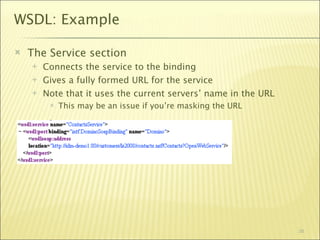
   The binding
    section
    defines all
    input and
    output
    operations


                  37
WSDL: Example

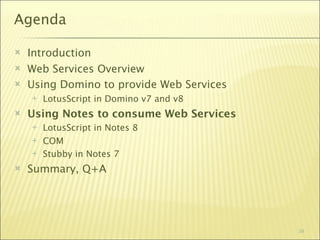
   The Service section
       Connects the service to the binding
       Gives a fully formed URL for the service
       Note that it uses the current servers’ name in the URL
            This may be an issue if you’re masking the URL


                                                                 38
Agenda

   Introduction
   Web Services Overview
   Using Domino to provide Web Services
       LotusScript in Domino v7 and v8
   Using Notes to consume Web Services
       LotusScript in Notes 8
       COM
       Stubby in Notes 7
   Summary, Q+A


                                           39
Consuming a web service - overview

   Why consume web services?
       To gain access to information in other systems
       To prevent the syncronisation and replication of external data
        sources to Notes
       Real time, up to date data lookup
   Where?
       We could use a scheduled Java agent in Domino to interrogate
        external services
            No UI means you have to monitor and check
       We could use client-driven code on the client workstation
            Be aware of network issues between the clients and the remote
             service
                  Large corporate intranets are rarely stable and predictable
                  Predict & accommodate remote service outage
            Any issues are immediately visible to the users
                  Empowering or Confusing?                                      40
Consuming a web service - overview

   Security
       Remote web services may require
            Username/password login
            Encrypted username/password pairs in data
            SSL.
   Things change
       You may have to change your web service consumer to
        accommodate this
       The remote web service may move
       When designing, don’t hard-code…


                                                              41
Consuming a web service - examples

   In the following sections,
       We shall use the web services we constructed earlier as a
        target
       We wont use any security features for simplicity
       We’re coding to demonstrate technique, not best practices
            So by all means reuse this code, but make it production-
             strength
                  Add Error handling
                  Remove hard-coding
                  Add Logging


                                                                        42
Agenda

   Introduction
   Web Services Overview
   Using Domino to provide Web Services
       LotusScript in Domino v7 and v8
   Using Notes to consume Web Services
       LotusScript in Notes 8
       COM
       Stubby in Notes 7
   Summary, Q+A


                                           43
Consuming Web Services with LotusScript

   Summary:
       Notes 8
       Its very simple
       It works in LotusScript and in Java
       It does a lot of work for you


   How do I construct a Web Service Consumer in
    LotusScript?
       Create a new, empty script library
       Click on the Import WSDL button
       It creates a Class definition
       You can then “use” the script library and class.


                                                           44
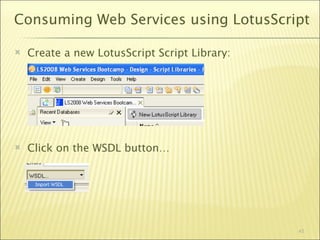
Consuming Web Services using LotusScript

   Create a new LotusScript Script Library:


   Click on the WSDL button…


                                               45
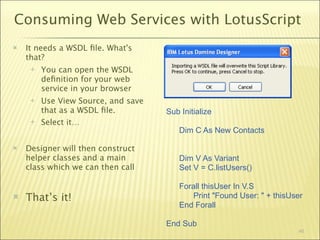
Consuming Web Services with LotusScript
   It needs a WSDL file. What's
    that?
        You can open the WSDL
         definition for your web
         service in your browser
        Use View Source, and save
         that as a WSDL file.         Sub Initialize
        Select it…
                                         Dim C As New Contacts

   Designer will then construct
    helper classes and a main            Dim V As Variant
    class which we can then call         Set V = C.listUsers()

                                         Forall thisUser In V.S
   That’s it!                               Print "Found User: " + thisUser
                                         End Forall

                                     End Sub
                                                                          46
Demo: LotusScript Web Service Consumer


   Lets go build our LotusScript consumer LIVE…


                                                   47
LotusScript Consumer: Gotchas

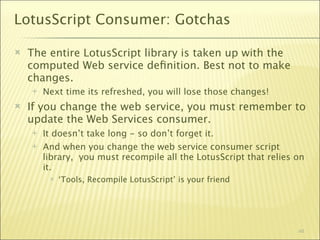
   The entire LotusScript library is taken up with the
    computed Web service definition. Best not to make
    changes.
       Next time its refreshed, you will lose those changes!
   If you change the web service, you must remember to
    update the Web Services consumer.
       It doesn’t take long - so don’t forget it.
       And when you change the web service consumer script
        library, you must recompile all the LotusScript that relies on
        it.
            ‘Tools, Recompile LotusScript’ is your friend


                                                                    48
LotusScript Consumer: Gotchas

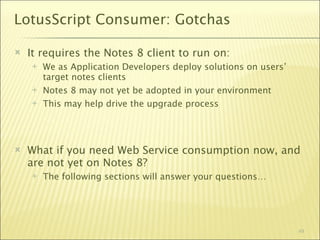
   It requires the Notes 8 client to run on:
       We as Application Developers deploy solutions on users’
        target notes clients
       Notes 8 may not yet be adopted in your environment
       This may help drive the upgrade process


   What if you need Web Service consumption now, and
    are not yet on Notes 8?
       The following sections will answer your questions…


                                                                  49
Agenda

   Introduction
   Web Services Overview
   Using Domino to provide Web Services
       LotusScript in Domino v7 and v8
   Using Notes to consume Web Services
       LotusScript in Notes 8
       COM
       Stubby in Notes 7
   Summary, Q+A


                                           50
Consuming a web service using COM

   There are applications which enable you to perform
    web service consumer work directly from LotusScript
       We shall focus on the MS Soap Toolkit
       Its not the only one - many others exist
   Very Quick and Very Dirty
       Its platform specific
       You need to install a DLL on each workstation
   When would you use this?
       Building test harnesses
       Perhaps on low user-count web service applications


                                                             51
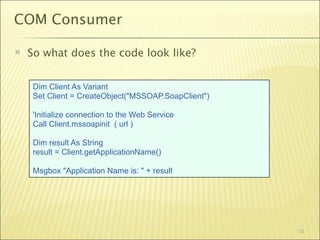
COM Consumer

   So what does the code look like?


     Dim Client As Variant
     Set Client = CreateObject("MSSOAP.SoapClient")

     'Initialize connection to the Web Service
     Call Client.mssoapinit ( url )

     Dim result As String
     result = Client.getApplicationName()

     Msgbox "Application Name is: " + result


                                                      52
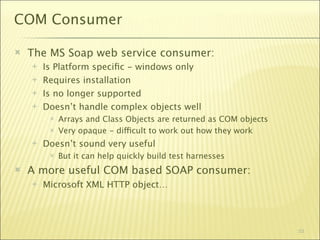
COM Consumer

   The MS Soap web service consumer:
       Is Platform specific - windows only
       Requires installation
       Is no longer supported
       Doesn’t handle complex objects well
            Arrays and Class Objects are returned as COM objects
            Very opaque - difficult to work out how they work
       Doesn’t sound very useful
            But it can help quickly build test harnesses
   A more useful COM based SOAP consumer:
       Microsoft XML HTTP object…


                                                                    53
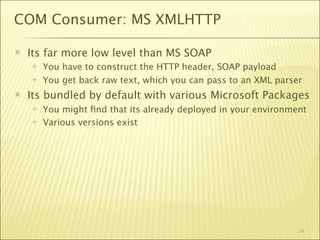
COM Consumer: MS XMLHTTP

   Its far more low level than MS SOAP
       You have to construct the HTTP header, SOAP payload
       You get back raw text, which you can pass to an XML parser
   Its bundled by default with various Microsoft Packages
       You might find that its already deployed in your environment
       Various versions exist


                                                                 54
Agenda

   Introduction
   Web Services Overview
   Using Domino to provide Web Services
       LotusScript in Domino v7 and v8
       Java using a servlet in Domino 5 upwards
       Using an agent
       REST
   Using Notes to consume Web Services
       LotusScript in Notes 8
       COM
       Stubby in Notes 7
   Summary, Q+A
                                                   55
Stubby: Introduction

   It:
         Is a project on http://OpenNtf.org
         Generates the relevant java stub files to allow you to consume
          java web services
         runs on the notes client
         Only runs on Notes 7
              So it’s a very tactical solution…
   Use the helper form to create the necessary stub files:


                                                                    56
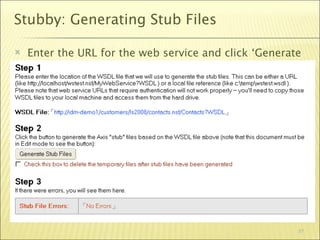
Stubby: Generating Stub Files

   Enter the URL for the web service and click ‘Generate
    Stub Files’


                                                        57
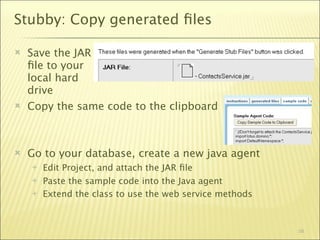
Stubby: Copy generated files

   Save the JAR
    file to your
    local hard
    drive
   Copy the same code to the clipboard


   Go to your database, create a new java agent
       Edit Project, and attach the JAR file
       Paste the sample code into the Java agent
       Extend the class to use the web service methods


                                                          58
Stubby: Exposing Java to LotusScript

   So far this has created a platform independent Java
    agent.
       But we’re interested in LotusScript!
   We have two easy ways of interfacing Java and
    LotusScript agents
       LS2J
       Notes agents can call Notes agents…


                                                          59
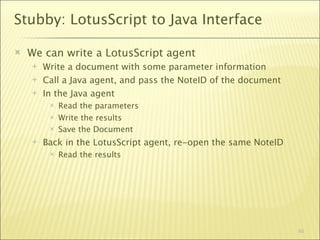
Stubby: LotusScript to Java Interface

   We can write a LotusScript agent
       Write a document with some parameter information
       Call a Java agent, and pass the NoteID of the document
       In the Java agent
            Read the parameters
            Write the results
            Save the Document
       Back in the LotusScript agent, re-open the same NoteID
            Read the results


                                                                 60
Agenda

   Introduction
   Web Services Overview
   Using Domino to provide Web Services
       LotusScript in Domino v7 and v8
       Java using a servlet in Domino 5 upwards
       Using an agent
       REST
   Using Notes to consume Web Services
       LotusScript in Notes 8
       COM
       Stubby in Notes 7
   Summary, Q+A
                                                   61
Summary

   Web Services
       Are pretty straightforward
       An important part of your armory
       Help break down barriers between Domino and other systems
       Help prevent data duplication in your environment


   By now, you know enough to make a real difference


                                                              62
Questions and Answers ?


   Please fill out your evaluations

   Thank you for your time today

   Bill Buchan
       http://www.billbuchan.com
       http://www.hadsl.com


                                      63

Softsphere 08 web services bootcamp

  • 1.
    Web Services Bootcamp  Bill Buchan - HADSL 1
  • 2.
    Agenda  Introduction  Web Services Overview  Using Domino to provide Web Services  LotusScript in Domino v7 and v8  Using Notes to consume Web Services  LotusScript in Notes 8  COM  Stubby in Notes 7  Summary, Q+A 2
  • 3.
    Introduction  I am Bill Buchan. I am:  A blogger - http://www.billbuchan.com  I was blogging when it was called ‘Talking rubbish on the internet’.  Some things never change.  A principal of HADSL - http://www.hadsl.com  A Notes veteran of some 14 years  You are  Lotus Domino developers  Interested in starting or enhancing Web Services in your environment  Familiar with LotusScript, and perhaps Java 3
  • 4.
    This is aJumpStart  This takes you from a low level in a subject to a good level of expertise  Little existing knowledge is assumed  But we assume your are developers, and are familiar with LotusScript  People have paid to come to this session  But still, as a matter of courtesy, please switch off all mobile phones, etc  Feel free to ask some questions as we go along  But I reserve the right to leave some answers till the end  I will be doing live demonstrations  So feel free to laugh if they break! 4
  • 5.
    Agenda  Introduction  Web Services Overview  Using Domino to provide Web Services  LotusScript in Domino v7 and v8  Using Notes to consume Web Services  LotusScript in Notes 8  COM  Stubby in Notes 7  Summary, Q+A 5
  • 6.
    A quick WebServices overview  Web services are:  A standard application to application protocol for exchanging structured data  Usually (but not always) using the http protocol  Usually (but not always) using XML  Usually we provide meta-information on what our service will do, using a language called WSDL (Web Service Description Language) – formatted in XML.  Web services are:  Language independent  Platform independent  Data format representation independent  But hopefully you all knew this already... 6
  • 7.
    Web Services Architecture  The players:  The Web Service server  Can answer questions on what it can do  Can accept requests from Web Service clients  Can respond to requests from Web service clients  The Web Service client (or consumer)‫‏‬  Knows where the web service server is located  Knows the services that it requires  Knows how to prepare a Web Services Query  Knows how to interpret the returned data 7
  • 8.
    Web Services Protocol  A typical web service session looks like:  Client to Web Service Server  “Tell me the answer to this question”  Web Service Server  “Here it is”  Conclusion:  The clients drive the conversation  The Server cannot initiate a conversation with the client. 8
  • 9.
    Web Services Protocol(in more detail)‫‏‬  The Web Services Protocol:  The client decides it needs to ask the server for some information  It constructs the relevant XML based web services query‫‏‬  It then connects to the Web Service Server  Pushing the web request up as an HTTP 'Post' request  It waits for a response  The Web service server then 'Posts' back an XML payload representing the answer  The client then unpacks and interprets the data. 9
  • 10.
    This sounds hard...  Not really.  Its a combination of web protocol and XML construction and unpacking  Most of the hard work is done for you by the various Web Service servers and Consumers  Its fairly easy to debug using the correct tools 10
  • 11.
    Lets prepare asample application  Fairly simple Domino Contact Database  A single ‘Contact’ form with some information  Not meant to be a ‘real-world’ example  Its here to demonstrate the techniques  All example code is in the database  Simple to figure out and ‘research’  Probably is not best practice! 11
  • 12.
  • 13.
  • 14.
    How do wetest a web service?  I recommend SoapUI  Its free!  http://www.soapui.org  It allows you to interrogate a web service  And build test case with real data 14
  • 15.
  • 16.
    Agenda  Introduction  Web Services Overview  Using Domino to provide Web Services  LotusScript in Domino v7 and v8  Using Notes to consume Web Services  LotusScript in Notes 8  COM  Stubby in Notes 7  Summary, Q+A 16
  • 17.
    Domino as aWeb Service Server  Three different methods:  Using LotusScript as a Web service  Coding a Java Servlet  Using an agent  By far the simplest is to use a LotusScript Web Service  Servlets should be avoided unless  You are running on Domino v6.5.x or older  You absolutely require persistence  Agents are good for  Very low transaction services  Simple services  We’re only talking about using LotusScript today 17
  • 18.
    Agenda  Introduction  Web Services Overview  Using Domino to provide Web Services  LotusScript in Domino v7 and v8  Using Notes to consume Web Services  LotusScript in Notes 8  COM  Stubby in Notes 7  Summary, Q+A 18
  • 19.
    LotusScript Web Servicesin nd7 & nd8  Introduced in Lotus Domino 7  Robust  Code the web service using LotusScript  Fairly high performance but  Remember: Lack of persistence between calls, so  Be aware of what your code is doing!  Use ‘Agent Profiling’ to see timings… 19
  • 20.
    Profiling a LotusScriptWeb Service  LotusScript web services are very similar to LotusScript agents  So you can profile them.  Enable Profiling on the Web Services Properties tab  To view the last run profile:  Right click on the Web Service  View Profile Results 20
  • 21.
    A Sample Profile  This shows how long the agent took to run, and how long the agent spent inside the Notes Object Interface  In our case, 761ms total, and 0ms within NOI  One call to CurrentDatabase, and one call to Title.  Obviously, this wasn’t a very interesting web service call… 21
  • 22.
    Designing a WebService  Spend time thinking about how your consumer will use this web service.  More time thinking, less time coding  You do NOT want to change this web service interface once its published  Instead - roll out a new web service  Think through client use cases  Remember - you can use LotusScript to perform complex business rules, and provide a summary of data to your consumer  Don’t assume the consumer can perform a lot of data manipulation - BlackBerry, Windows Mobile?  Best to put complex code in a script library, and just surface it via a web service  It means you can put a normal agent ‘test harness’ around it and debug it 22
  • 23.
    Contacts.nsf - WebService  In our case we wish to:  Be able to list all users  By Name  By Department  Be able to get details on a particular user  Be able to search for users  Do we  Pass all fields back as web service items?  Pass back an array of fields?  In this case, we pass back Web Service Items  Assume data mapping knowledge and responsibility. 23
  • 24.
    Contacts.nsf - WebService Design  We design our web service interface within a ‘Class’ in LotusScript.  At this point, you probably wished that you studied the Object Orientated LotusScript sessions I used to give…  Good example presentations on my personal blog presentations page  http://www.billbuchan.com/web.nsf/plinks/BBUN6MQECQ.htm  Our web service will expose all ‘public’ methods and properties  We do not have to put all the code in one ‘class’  Beware of extending existing classes - you might expose more than you want!  Beware over-exposure… 24
  • 25.
    Contacts.nsf - WebService Design  LotusScript does NOT allow functions to return Arrays.  This is a language limitation, not a Web Service Limitation  It can return simple types  A variant (but since web services don’t support ‘em, we cant use ‘em)  Instances of other classes…  We need to use arrays to return results  For instance, we need to return an array of Zero or more entries to list our users.  How do we do that?  We can define a class and return an instance of that class… 25
  • 26.
    Returning complex types  We can define a class called ‘ReturnArray’ which has a single Class returnArray array as a public member. Public S() As String  The constructor initialises the Sub new Redim S(0) array so that it has one blank entry. S(0) = ""  We can then populate this array End Sub with one or more entries. End Class  LotusScript Web services only  supports single dimension arrays.  Nd7 supports arrays with one element or more  nd8 supports ‘empty’ arrays. 26
  • 27.
    Returning complex types…  We shall return our Person Class Person contact record using a Public FirstName As String class. Public MiddleInitials As String  We DON’T have a Public LastName As String constructor Public FullName As String  All elements are Public - so Public Telephone As String it’ll be exposed to the Web Public Cellphone As String Service as data. Public eMail As String  Our property names will be Public HomePhone As String used by the web service as Public Department as String field names Public Notes As String  Since LotusScript is case insensitive, the web service End Class field names will be UPPERCASE. Which looks funky in other platforms. 27
  • 28.
    Demo Time!  Finally! A Demo! 28
  • 29.
    Web Services Design- lets make it better  We need to add:  Logging. We need to know when it works, and importantly, when it does not  Error Handling. We need to pass errors back to the consumer  Security. We might want to harden this service somewhat  We committed the following sins:  We put all the code in the web service itself, making it hard to test. Best to consider embedding most of the code in script libraries  We’ve tightly bound the data structures in our data to our web service  If we add more fields to our contact record - we shall have to change the web service. And therefore, all our clients will have to be checked and/or recompiled.  If the data set is likely to change, construct a more flexible data- mapping schema 29
  • 30.
    ND7 and ND8differences  Web services built or compiled in Notes 8 Designer WONT run on ND7 anymore! So be careful about what web services you host on which servers, and which version of designer you use.  Just bear this version difference in the same manner as all other version differences. 30
  • 31.
    ND7 and ND8differences  In ND7, the class used for the web service has to reside in the web service design element. In ND8, this can be in a script library.  This means that for complex services, you can place all the business code in a script library, allowing simple construction of a test harness.  ND8 now supports code in Java Libraries  ND8 supports more error handling SOAP elements  ND8 supports ‘empty’ arrays - nd7 does not 31
  • 32.
    Testing this webservice using SoapUI  Demo: Lets go test this service with SoapUI 32
  • 33.
    Web Services Design- lets talk about  WSDL - Web Services Description Language  Its an XML document  You can query a web service for its WSDL,  You build a web service consumer from the WSDL  Lotus Domino LotusScript Web Services WSDL  Is automatically generated for you  You can query a LotusScript Web Service by passing a URL:  http://<host>/<directory>/<database>/<web service>?WSDL  It will then return an XML document showing the WSDL 33
  • 34.
    WSDL: Example  The first section outlines the data objects we shall pass from this service  You can see our returnArray & Person objects  Note that our variables default to Uppercase - this is a side- effect of LotusScript being a non- case sensitive language 34
  • 35.
    WSDL: Example  The second section of our WSDL deals with the Web Services Messages that will be sent to the Web service, and the types that get returned. 35
  • 36.
    WSDL: Example  The port section associates input messages - function calls - with their return types. 36
  • 37.
    WSDL: Example  The binding section defines all input and output operations 37
  • 38.
    WSDL: Example  The Service section  Connects the service to the binding  Gives a fully formed URL for the service  Note that it uses the current servers’ name in the URL  This may be an issue if you’re masking the URL 38
  • 39.
    Agenda  Introduction  Web Services Overview  Using Domino to provide Web Services  LotusScript in Domino v7 and v8  Using Notes to consume Web Services  LotusScript in Notes 8  COM  Stubby in Notes 7  Summary, Q+A 39
  • 40.
    Consuming a webservice - overview  Why consume web services?  To gain access to information in other systems  To prevent the syncronisation and replication of external data sources to Notes  Real time, up to date data lookup  Where?  We could use a scheduled Java agent in Domino to interrogate external services  No UI means you have to monitor and check  We could use client-driven code on the client workstation  Be aware of network issues between the clients and the remote service  Large corporate intranets are rarely stable and predictable  Predict & accommodate remote service outage  Any issues are immediately visible to the users  Empowering or Confusing? 40
  • 41.
    Consuming a webservice - overview  Security  Remote web services may require  Username/password login  Encrypted username/password pairs in data  SSL.  Things change  You may have to change your web service consumer to accommodate this  The remote web service may move  When designing, don’t hard-code… 41
  • 42.
    Consuming a webservice - examples  In the following sections,  We shall use the web services we constructed earlier as a target  We wont use any security features for simplicity  We’re coding to demonstrate technique, not best practices  So by all means reuse this code, but make it production- strength  Add Error handling  Remove hard-coding  Add Logging 42
  • 43.
    Agenda  Introduction  Web Services Overview  Using Domino to provide Web Services  LotusScript in Domino v7 and v8  Using Notes to consume Web Services  LotusScript in Notes 8  COM  Stubby in Notes 7  Summary, Q+A 43
  • 44.
    Consuming Web Serviceswith LotusScript  Summary:  Notes 8  Its very simple  It works in LotusScript and in Java  It does a lot of work for you  How do I construct a Web Service Consumer in LotusScript?  Create a new, empty script library  Click on the Import WSDL button  It creates a Class definition  You can then “use” the script library and class. 44
  • 45.
    Consuming Web Servicesusing LotusScript  Create a new LotusScript Script Library:  Click on the WSDL button… 45
  • 46.
    Consuming Web Serviceswith LotusScript  It needs a WSDL file. What's that?  You can open the WSDL definition for your web service in your browser  Use View Source, and save that as a WSDL file. Sub Initialize  Select it… Dim C As New Contacts  Designer will then construct helper classes and a main Dim V As Variant class which we can then call Set V = C.listUsers() Forall thisUser In V.S  That’s it! Print "Found User: " + thisUser End Forall End Sub 46
  • 47.
    Demo: LotusScript WebService Consumer  Lets go build our LotusScript consumer LIVE… 47
  • 48.
    LotusScript Consumer: Gotchas  The entire LotusScript library is taken up with the computed Web service definition. Best not to make changes.  Next time its refreshed, you will lose those changes!  If you change the web service, you must remember to update the Web Services consumer.  It doesn’t take long - so don’t forget it.  And when you change the web service consumer script library, you must recompile all the LotusScript that relies on it.  ‘Tools, Recompile LotusScript’ is your friend 48
  • 49.
    LotusScript Consumer: Gotchas  It requires the Notes 8 client to run on:  We as Application Developers deploy solutions on users’ target notes clients  Notes 8 may not yet be adopted in your environment  This may help drive the upgrade process  What if you need Web Service consumption now, and are not yet on Notes 8?  The following sections will answer your questions… 49
  • 50.
    Agenda  Introduction  Web Services Overview  Using Domino to provide Web Services  LotusScript in Domino v7 and v8  Using Notes to consume Web Services  LotusScript in Notes 8  COM  Stubby in Notes 7  Summary, Q+A 50
  • 51.
    Consuming a webservice using COM  There are applications which enable you to perform web service consumer work directly from LotusScript  We shall focus on the MS Soap Toolkit  Its not the only one - many others exist  Very Quick and Very Dirty  Its platform specific  You need to install a DLL on each workstation  When would you use this?  Building test harnesses  Perhaps on low user-count web service applications 51
  • 52.
    COM Consumer  So what does the code look like? Dim Client As Variant Set Client = CreateObject("MSSOAP.SoapClient") 'Initialize connection to the Web Service Call Client.mssoapinit ( url ) Dim result As String result = Client.getApplicationName() Msgbox "Application Name is: " + result 52
  • 53.
    COM Consumer  The MS Soap web service consumer:  Is Platform specific - windows only  Requires installation  Is no longer supported  Doesn’t handle complex objects well  Arrays and Class Objects are returned as COM objects  Very opaque - difficult to work out how they work  Doesn’t sound very useful  But it can help quickly build test harnesses  A more useful COM based SOAP consumer:  Microsoft XML HTTP object… 53
  • 54.
    COM Consumer: MSXMLHTTP  Its far more low level than MS SOAP  You have to construct the HTTP header, SOAP payload  You get back raw text, which you can pass to an XML parser  Its bundled by default with various Microsoft Packages  You might find that its already deployed in your environment  Various versions exist 54
  • 55.
    Agenda  Introduction  Web Services Overview  Using Domino to provide Web Services  LotusScript in Domino v7 and v8  Java using a servlet in Domino 5 upwards  Using an agent  REST  Using Notes to consume Web Services  LotusScript in Notes 8  COM  Stubby in Notes 7  Summary, Q+A 55
  • 56.
    Stubby: Introduction  It:  Is a project on http://OpenNtf.org  Generates the relevant java stub files to allow you to consume java web services  runs on the notes client  Only runs on Notes 7  So it’s a very tactical solution…  Use the helper form to create the necessary stub files: 56
  • 57.
    Stubby: Generating StubFiles  Enter the URL for the web service and click ‘Generate Stub Files’ 57
  • 58.
    Stubby: Copy generatedfiles  Save the JAR file to your local hard drive  Copy the same code to the clipboard  Go to your database, create a new java agent  Edit Project, and attach the JAR file  Paste the sample code into the Java agent  Extend the class to use the web service methods 58
  • 59.
    Stubby: Exposing Javato LotusScript  So far this has created a platform independent Java agent.  But we’re interested in LotusScript!  We have two easy ways of interfacing Java and LotusScript agents  LS2J  Notes agents can call Notes agents… 59
  • 60.
    Stubby: LotusScript toJava Interface  We can write a LotusScript agent  Write a document with some parameter information  Call a Java agent, and pass the NoteID of the document  In the Java agent  Read the parameters  Write the results  Save the Document  Back in the LotusScript agent, re-open the same NoteID  Read the results 60
  • 61.
    Agenda  Introduction  Web Services Overview  Using Domino to provide Web Services  LotusScript in Domino v7 and v8  Java using a servlet in Domino 5 upwards  Using an agent  REST  Using Notes to consume Web Services  LotusScript in Notes 8  COM  Stubby in Notes 7  Summary, Q+A 61
  • 62.
    Summary  Web Services  Are pretty straightforward  An important part of your armory  Help break down barriers between Domino and other systems  Help prevent data duplication in your environment  By now, you know enough to make a real difference 62
  • 63.
    Questions and Answers?  Please fill out your evaluations  Thank you for your time today  Bill Buchan  http://www.billbuchan.com  http://www.hadsl.com 63