© 2007 Wellesley Information Services. All rights reserved.
Everything You Need to
Know About Agent
Design Options and
Security in LotusScript
Bill Buchan
HADSL
2
What We’ll Cover …
• Overview
• Agent Manager introduction
• Agent Manager deep dive
• Security introduction
• Security deep dive
• Calling the C API security interfaces from LotusScript
• Summary
3
Introduction
• Who is the target audience?
 Lotus Notes developers who use server-based agents
 People who like very long titles (IBM?)
• What is this talk about?
 Agent Manager is a little-understood black box, with its own
set of design considerations
 This presentation leads you through Agent Manager
considerations and best practices
 Lotus Notes is legendarily strong in terms of security.
However, many developers don’t understand its full capability.
 This session intends to remedy this
4
Who Am I?
• Bill Buchan
• Dual Principal Certified Lotus Professional (PCLP) in
Domino v3, v4, v5, v6, v7
• 10+ years senior development consultancy for
Enterprise customers
 Learn from my pain!
• 5+ years code auditing
• CEO of HADSL
 Developing best-practice tools
5
Overview
• This session:
 Is mostly slide-based
 Contains a few code examples
 Is a deep dive in terms of theory
 Summarizes 10+ years of enterprise code auditing
6
What We’ll Cover …
• Overview
• Agent Manager introduction
• Agent Manager deep dive
• Security introduction
• Security deep dive
• Calling the C API security interfaces from LotusScript
• Summary
7
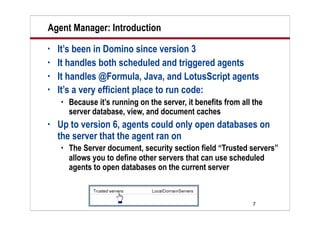
Agent Manager: Introduction
• It’s been in Domino since version 3
• It handles both scheduled and triggered agents
• It handles @Formula, Java, and LotusScript agents
• It’s a very efficient place to run code:
 Because it’s running on the server, it benefits from all the
server database, view, and document caches
• Up to version 6, agents could only open databases on
the server that the agent ran on
 The Server document, security section field “Trusted servers”
allows you to define other servers that can use scheduled
agents to open databases on the current server
8
Agent Manager: Introduction (cont.)
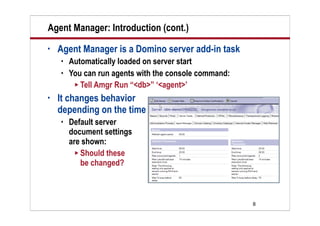
• Agent Manager is a Domino server add-in task
 Automatically loaded on server start
 You can run agents with the console command:
 Tell Amgr Run “<db>” ‘<agent>’
• It changes behavior
depending on the time
 Default server
document settings
are shown:
 Should these
be changed?
9
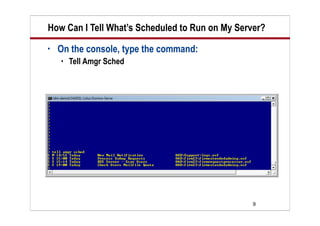
How Can I Tell What’s Scheduled to Run on My Server?
• On the console, type the command:
 Tell Amgr Sched
10
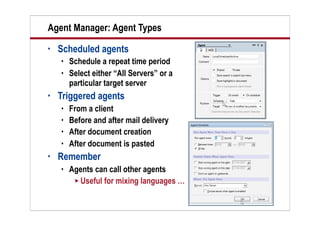
Agent Manager: Agent Types
• Scheduled agents
 Schedule a repeat time period
 Select either “All Servers” or a
particular target server
• Triggered agents
 From a client
 Before and after mail delivery
 After document creation
 After document is pasted
• Remember
 Agents can call other agents
 Useful for mixing languages …
11
What We’ll Cover …
• Overview
• Agent Manager introduction
• Agent Manager deep dive
• Security introduction
• Security deep dive
• Calling the C API security interfaces from LotusScript
• Summary
12
Scheduled Agents in LotusScript
• Scheduled agents:
 Are single-threaded
 Have a time limit
 If they exceed this time limit, they will be killed
 In this event, the “Terminate” code is executed
 Respect this time limit
 You may have two instances of the same agent executing at
the same time …
 Bear this in mind during design
13
Demo
Demo
Brief overview of
AgentClass
14
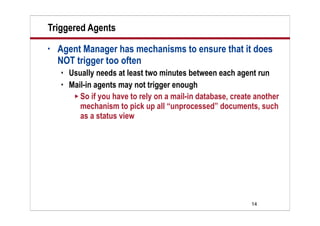
Triggered Agents
• Agent Manager has mechanisms to ensure that it does
NOT trigger too often
 Usually needs at least two minutes between each agent run
 Mail-in agents may not trigger enough
 So if you have to rely on a mail-in database, create another
mechanism to pick up all “unprocessed” documents, such
as a status view
15
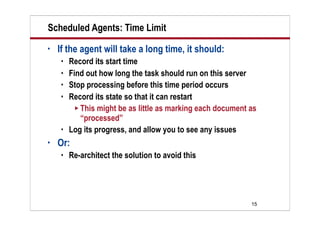
Scheduled Agents: Time Limit
• If the agent will take a long time, it should:
 Record its start time
 Find out how long the task should run on this server
 Stop processing before this time period occurs
 Record its state so that it can restart
 This might be as little as marking each document as
“processed”
 Log its progress, and allow you to see any issues
• Or:
 Re-architect the solution to avoid this
16
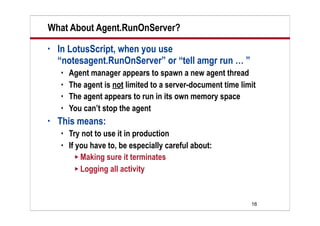
What About Agent.RunOnServer?
• In LotusScript, when you use
“notesagent.RunOnServer” or “tell amgr run … ”
 Agent manager appears to spawn a new agent thread
 The agent is not limited to a server-document time limit
 The agent appears to run in its own memory space
 You can’t stop the agent
• This means:
 Try not to use it in production
 If you have to, be especially careful about:
 Making sure it terminates
 Logging all activity
17
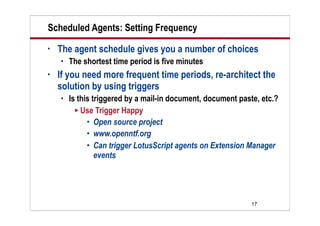
Scheduled Agents: Setting Frequency
• The agent schedule gives you a number of choices
 The shortest time period is five minutes
• If you need more frequent time periods, re-architect the
solution by using triggers
 Is this triggered by a mail-in document, document paste, etc.?
 Use Trigger Happy
 Open source project
 www.openntf.org
 Can trigger LotusScript agents on Extension Manager
events
18
Scheduled Agents: Allowing Users to Manage Them
• One common issue is allowing non-designers in
production environments to control agents
 Specifically, how often they run, on which servers, etc.
• Typically, this is done by changing the template and
refreshing the design
 However, in larger environments, this may be impractical
• One approach is to:
 Schedule the agent to run frequently on all servers
 Check a configuration document within the same database to
see if this agent should run at this time on this server
 Beware profile documents
 Agent Manager caches them, making updates
problematic
19
Scheduled Agents: Setting the Right Security Level
• From Notes v6, you can define the security level
required for your agent on the Agent properties box
 Allows you to define whether it’s a(n):
 Restricted Agent
 Unrestricted Agent
 Unrestricted Agent with Administrator Privileges
 If you migrate databases from v5:
 They default to the lowest level
20
What We’ll Cover …
• Overview
• Agent Manager introduction
• Agent Manager deep dive
• Security introduction
• Security deep dive
• Calling the C API security interfaces from LotusScript
• Summary
21
Security Introduction
• A good developer should understand the entire Domino
security model
• Domino is used by governments, government agencies,
political parties, banks, and legal firms worldwide
 Because it’s easy to build secure document-based workflow
applications
 You can build applications where different groups of people
can see and update fields on the same document
• It was one of the first commercial RSA public/private
key-based directories publicly available
 And now supports 2048-bit key lengths
22
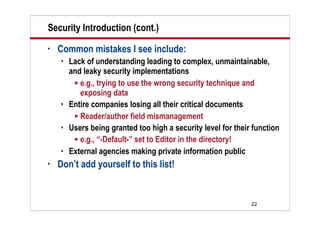
Security Introduction (cont.)
• Common mistakes I see include:
 Lack of understanding leading to complex, unmaintainable,
and leaky security implementations
 e.g., trying to use the wrong security technique and
exposing data
 Entire companies losing all their critical documents
 Reader/author field mismanagement
 Users being granted too high a security level for their function
 e.g., “-Default-” set to Editor in the directory!
 External agencies making private information public
• Don’t add yourself to this list!
23
What We’ll Cover …
• Overview
• Agent Manager introduction
• Agent Manager deep dive
• Security introduction
• Security deep dive
• Calling the C API security interfaces from LotusScript
• Summary
24
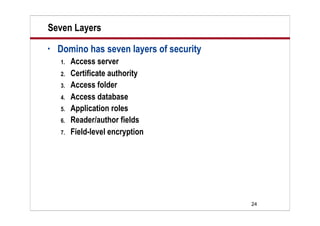
Seven Layers
• Domino has seven layers of security
1. Access server
2. Certificate authority
3. Access folder
4. Access database
5. Application roles
6. Reader/author fields
7. Field-level encryption
25
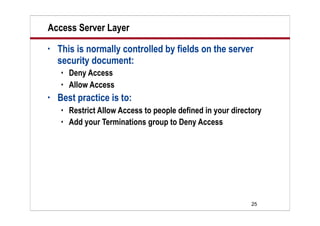
Access Server Layer
• This is normally controlled by fields on the server
security document:
 Deny Access
 Allow Access
• Best practice is to:
 Restrict Allow Access to people defined in your directory
 Add your Terminations group to Deny Access
26
Certificate Authority Layer
• Certificate authority security:
 Is a public/private key-based certificate security based on the
user’s current certificate(s)
 Can be switched off by “Allow Anonymous Access” on the
security:
 Beware!
 Checks user certificate expiration
 Can check public keys and passwords
• Users either:
 Are in the same certificate hierarchy as the server
 Share cross certificates between the server and their certifier
 In the Domino directory
27
Access Folder Layer
• Folders can have an optional Access Control List (ACL)
set on them
 Useful in terms of restricting collections of applications to
groups of users
 e.g., departments, companies, etc.
• Beware
 Folders may also have “Directory Links”
 If the user can navigate to the folder by using an alternative
directory link, the user can access the database
28
Access Database Layer
• The Database Access Control is then checked to see:
 Whether the user is allowed to access this database
 If so, what level and options the user security should be
 The user is set to the maximum level possible based on his/
her collection of ACL entries, unless the user is explicitly
named
• For databases accessed on local hard drives:
 The ACL is not checked unless “Enforce Consistent ACL” is
set to “true”
 This in itself is not a security feature and may be bypassed
• Web users are also governed by “Maximum ACL Level”
29
Application Roles Layer
• Roles are set within the ACL and:
 Allow internal-application “grouping” of users
 Are usually used to allow access to:
 Particular design elements
 Reader/Author fields in documents
 For instance, applications usually have “Administrator” roles
 @IsMember(“[Administrator]”; @userRoles)
30
Reader/Author Fields Layer
• Reader fields dictate who is allowed to read this
document
• Author fields dictate who is allowed to modify a
document, if their ACL level is set to “Author”
• You may have more than one Reader/Author field in a
document
• You may have more than one item in the field
• You may embed Roles into this field
 e.g., “[Administrators]”: “LocalDomainAdmins”: “*/Acme”
31
Reader/Author Fields: Best Practices
• Common mistakes include:
 Losing access to documents
 NOT setting the Reader/Access field as an Array from
LotusScript
 “LocalDomainAdmins; [Administrators]” will NOT work!
 Not setting the Reader/Author field flag in LotusScript
 Not using canonicalized names in fields
 Trying to use only one Reader/Author field
• There are lots of programmers out there who do NOT
know how to do this
 Don’t be one of those!
32
Reader/Author Fields: Example
Public Function setAuthorsField( doc As NotesDocument, _
fieldName As String, newName As String) As Integer
Dim nn As New NotesName(newName)
Dim S(2) As String
S(0) = "LocalDomainAdmins"
S(1) = "[Administrators]"
S(2) = nn.Canonical
Dim itm As NotesItem
Set itm = doc.ReplaceItemValue(fieldName, S)
Itm.IsReaders = True
End Function
33
Field-Level Encryption Layer
• If a user requires access to a document and should NOT
see particular fields, then field-level encryption should
be used
• Possibly one of the least used features in Domino
• Two separate models:
 “Encryption Keys” or “SecretEncryptionKeys”
 Public Key Encryption
• Each model has its strengths and weaknesses
34
Encryption Keys Explained
• Can be:
 Generated, maintained, and distributed by any user
 Incorporated into the User ID file
 Distributed by Mail or by SneakerNet
 Used by the form to encrypt selected fields “by Name”
• Best practices
 At least one copy of ANY key used should be stored in a
secure repository (a safe!), password protected, and
physically disconnected from any computer system
 For instance, on a CD-ROM and a piece of paper!
35
Public Encryption Keys Explained
• Public encryption key-based field-level encryption:
 Is calculated at run time
 Can be updated
 Does not require any encryption key distribution
 Is based on the target user’s public key
• Attractive for:
 Optional encryption of particular documents for groups
of users
 Can be completely hidden from the end-user
 Does not inject new items into the ID file
36
Field-Level Encryption Compared
• Why use encryption keys?
 Because only the people who possess the encryption key can
participate
 Far better from an auditing point of view
 New users can “see” documents without the documents
having to be updated
• Why use public key encryption?
 No distribution of IDs required
 Ad hoc encryption of documents is made more simple
37
Demo
Demo
Brief overview of
Encryption Keys
38
What We’ll Cover …
• Overview
• Agent Manager introduction
• Agent Manager deep dive
• Security introduction
• Security deep dive
• Calling the C API security interfaces from LotusScript
• Summary
39
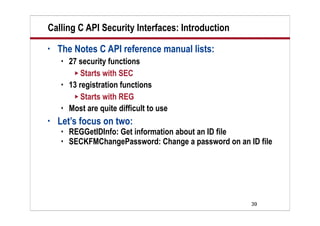
Calling C API Security Interfaces: Introduction
• The Notes C API reference manual lists:
 27 security functions
 Starts with SEC
 13 registration functions
 Starts with REG
 Most are quite difficult to use
• Let’s focus on two:
 REGGetIDInfo: Get information about an ID file
 SECKFMChangePassword: Change a password on an ID file
40
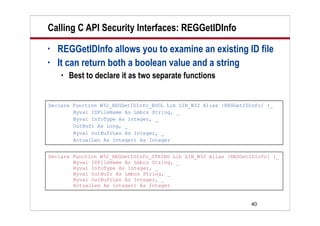
Calling C API Security Interfaces: REGGetIDInfo
• REGGetIDInfo allows you to examine an existing ID file
• It can return both a boolean value and a string
 Best to declare it as two separate functions
Declare Function W32_REGGetIDInfo_BOOL Lib LIB_W32 Alias {REGGetIDInfo} (_
Byval IDFileName As Lmbcs String, _
Byval InfoType As Integer, _
OutBufr As Long, _
Byval OutBufrLen As Integer, _
ActualLen As Integer) As Integer
Declare Function W32_REGGetIDInfo_STRING Lib LIB_W32 Alias {REGGetIDInfo} (_
Byval IDFileName As Lmbcs String, _
Byval InfoType As Integer, _
Byval OutBufr As Lmbcs String, _
Byval OutBufrLen As Integer, _
ActualLen As Integer) As Integer
41
Calling C API Security Interfaces: REGGetIDInfo (cont.)
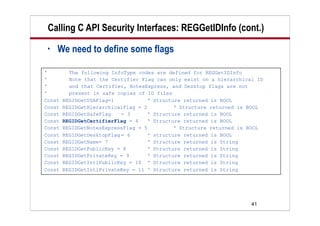
• We need to define some flags
' The following InfoType codes are defined for REGGetIDInfo
' Note that the Certifier Flag can only exist on a hierarchical ID
' and that Certifier, NotesExpress, and Desktop flags are not
' present in safe copies of ID files
Const REGIDGetUSAFlag=1 ‘ Structure returned is BOOL
Const REGIDGetHierarchicalFlag = 2 ‘ Structure returned is BOOL
Const REGIDGetSafeFlag = 3 ‘ Structure returned is BOOL
Const REGIDGetCertifierFlag = 4 ‘ Structure returned is BOOL
Const REGIDGetNotesExpressFlag = 5 ‘ Structure returned is BOOL
Const REGIDGetDesktopFlag = 6 ‘ structure returned is BOOL
Const REGIDGetName= 7 ‘ Structure returned is String
Const REGIDGetPublicKey = 8 ‘ Structure returned is String
Const REGIDGetPrivateKey = 9 ‘ Structure returned is String
Const REGIDGetIntlPublicKey = 10 ‘ Structure returned is String
Const REGIDGetIntlPrivateKey = 11 ‘ Structure returned is String
42
Calling C API Security Interfaces: REGGetIDInfo (cont.)
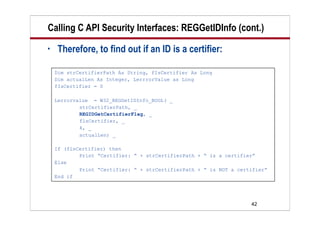
• Therefore, to find out if an ID is a certifier:
Dim strCertifierPath As String, fIsCertifier As Long
Dim actualLen As Integer, LerrrorValue as Long
fIsCertifier = 0
Lerrorvalue = W32_REGGetIDInfo_BOOL( _
strCertifierPath, _
REGIDGetCertifierFlag, _
flsCertifier, _
4, _
actualLen) _
If (flsCertifier) then
Print “Certifier: “ + strCertifierPath + “ is a certifier”
Else
Print “Certifier: “ + strCertifierPath + “ is NOT a certifier”
End if
43
Calling C API Security Interfaces: REGGetIDInfo (cont.)
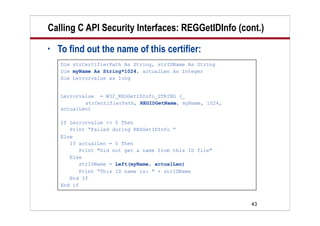
• To find out the name of this certifier:
Dim strCertifierPath As String, strIDName As String
Dim myName As String*1024, actualLen As Integer
Dim Lerrorvalue as long
Lerrorvalue = W32_REGGetIDInfo_STRING (_
strCertifierPath, REGIDGetName, myName, 1024,
actualLen)
If Lerrorvalue <> 0 Then
Print “Failed during REGGetIDInfo “
Else
If actualLen = 0 Then
Print "Did not get a name from this ID file"
Else
strIDName = Left(myName, actualLen)
Print “This ID name is: " + strIDName
End If
End if
44
Calling C API Security Interfaces: SECKFMChangePassword
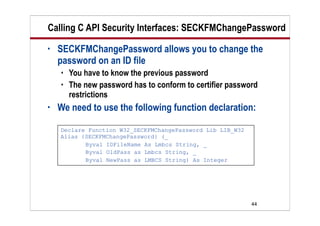
• SECKFMChangePassword allows you to change the
password on an ID file
 You have to know the previous password
 The new password has to conform to certifier password
restrictions
• We need to use the following function declaration:
Declare Function W32_SECKFMChangePassword Lib LIB_W32
Alias {SECKFMChangePassword} (_
Byval IDFileName As Lmbcs String, _
Byval OldPass as Lmbcs String, _
Byval NewPass as LMBCS String) As Integer
45
Calling C API Security Interfaces:
SECKFMChangePassword (cont.)
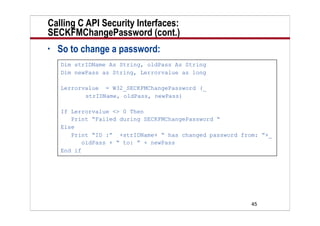
• So to change a password:
Dim strIDName As String, oldPass As String
Dim newPass as String, Lerrorvalue as long
Lerrorvalue = W32_SECKFMChangePassword (_
strIDName, oldPass, newPass)
If Lerrorvalue <> 0 Then
Print “Failed during SECKFMChangePassword “
Else
Print “ID :” +strIDName+ “ has changed password from: ”+_
oldPass + “ to: ” + newPass
End if
46
What We’ll Cover …
• Overview
• Agent Manager introduction
• Agent Manager deep dive
• Security introduction
• Security deep dive
• Calling the C API security interfaces from LotusScript
• Summary
47
Resources
• My “Leveraging the Power of Object Orientated
Programming in LotusScript” presentation
 www.billbuchan.com/web.nsf/htdocs/BBUN6MQECQ.htm
• Steve McConnell, Code Complete, Second Edition,
(Microsoft Press, 2004).
 www.amazon.com/gp/product/0735619670
• Normunds Kalnberzin, LotusScript to Lotus C API
Programming Guide, (November 2003).
 www.ls2capi.com
• “Lotussphere 2004 : AD104 — LotusScript Tips and
Tricks” in the Lotus Sandbox
 www-10.lotus.com/ldd/sandbox.nsf/ecc552f1ab
6e46e4852568a90055c4cd/68797abc4efa809a85
256e51006a2c8a?OpenDocument
48
Resources (cont.)
• NSFTools — Notes Tips
 www.nsftools.com/tips/NotesTips.htm
• The Notes FAQ!
 www.keysolutions.com/NotesFAQ
• Brian Benz and Rocky Oliver, Lotus Notes and Domino
6 Programming Bible, (Wiley, John & Sons,
Incorporated, 2003).
 www.amazon.com/gp/product/0764526111
• Notes.Net (of course)
 www.notes.net
49
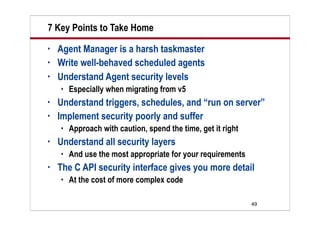
7 Key Points to Take Home
• Agent Manager is a harsh taskmaster
• Write well-behaved scheduled agents
• Understand Agent security levels
 Especially when migrating from v5
• Understand triggers, schedules, and “run on server”
• Implement security poorly and suffer
 Approach with caution, spend the time, get it right
• Understand all security layers
 And use the most appropriate for your requirements
• The C API security interface gives you more detail
 At the cost of more complex code
50
Your Turn!
How to contact me:
Bill Buchan
Bill@hadsl.com

Dev buchan everything you need to know about agent design

  • 1.
    © 2007 WellesleyInformation Services. All rights reserved. Everything You Need to Know About Agent Design Options and Security in LotusScript Bill Buchan HADSL
  • 2.
    2 What We’ll Cover… • Overview • Agent Manager introduction • Agent Manager deep dive • Security introduction • Security deep dive • Calling the C API security interfaces from LotusScript • Summary
  • 3.
    3 Introduction • Who isthe target audience?  Lotus Notes developers who use server-based agents  People who like very long titles (IBM?) • What is this talk about?  Agent Manager is a little-understood black box, with its own set of design considerations  This presentation leads you through Agent Manager considerations and best practices  Lotus Notes is legendarily strong in terms of security. However, many developers don’t understand its full capability.  This session intends to remedy this
  • 4.
    4 Who Am I? •Bill Buchan • Dual Principal Certified Lotus Professional (PCLP) in Domino v3, v4, v5, v6, v7 • 10+ years senior development consultancy for Enterprise customers  Learn from my pain! • 5+ years code auditing • CEO of HADSL  Developing best-practice tools
  • 5.
    5 Overview • This session: Is mostly slide-based  Contains a few code examples  Is a deep dive in terms of theory  Summarizes 10+ years of enterprise code auditing
  • 6.
    6 What We’ll Cover… • Overview • Agent Manager introduction • Agent Manager deep dive • Security introduction • Security deep dive • Calling the C API security interfaces from LotusScript • Summary
  • 7.
    7 Agent Manager: Introduction •It’s been in Domino since version 3 • It handles both scheduled and triggered agents • It handles @Formula, Java, and LotusScript agents • It’s a very efficient place to run code:  Because it’s running on the server, it benefits from all the server database, view, and document caches • Up to version 6, agents could only open databases on the server that the agent ran on  The Server document, security section field “Trusted servers” allows you to define other servers that can use scheduled agents to open databases on the current server
  • 8.
    8 Agent Manager: Introduction(cont.) • Agent Manager is a Domino server add-in task  Automatically loaded on server start  You can run agents with the console command:  Tell Amgr Run “<db>” ‘<agent>’ • It changes behavior depending on the time  Default server document settings are shown:  Should these be changed?
  • 9.
    9 How Can ITell What’s Scheduled to Run on My Server? • On the console, type the command:  Tell Amgr Sched
  • 10.
    10 Agent Manager: AgentTypes • Scheduled agents  Schedule a repeat time period  Select either “All Servers” or a particular target server • Triggered agents  From a client  Before and after mail delivery  After document creation  After document is pasted • Remember  Agents can call other agents  Useful for mixing languages …
  • 11.
    11 What We’ll Cover… • Overview • Agent Manager introduction • Agent Manager deep dive • Security introduction • Security deep dive • Calling the C API security interfaces from LotusScript • Summary
  • 12.
    12 Scheduled Agents inLotusScript • Scheduled agents:  Are single-threaded  Have a time limit  If they exceed this time limit, they will be killed  In this event, the “Terminate” code is executed  Respect this time limit  You may have two instances of the same agent executing at the same time …  Bear this in mind during design
  • 13.
  • 14.
    14 Triggered Agents • AgentManager has mechanisms to ensure that it does NOT trigger too often  Usually needs at least two minutes between each agent run  Mail-in agents may not trigger enough  So if you have to rely on a mail-in database, create another mechanism to pick up all “unprocessed” documents, such as a status view
  • 15.
    15 Scheduled Agents: TimeLimit • If the agent will take a long time, it should:  Record its start time  Find out how long the task should run on this server  Stop processing before this time period occurs  Record its state so that it can restart  This might be as little as marking each document as “processed”  Log its progress, and allow you to see any issues • Or:  Re-architect the solution to avoid this
  • 16.
    16 What About Agent.RunOnServer? •In LotusScript, when you use “notesagent.RunOnServer” or “tell amgr run … ”  Agent manager appears to spawn a new agent thread  The agent is not limited to a server-document time limit  The agent appears to run in its own memory space  You can’t stop the agent • This means:  Try not to use it in production  If you have to, be especially careful about:  Making sure it terminates  Logging all activity
  • 17.
    17 Scheduled Agents: SettingFrequency • The agent schedule gives you a number of choices  The shortest time period is five minutes • If you need more frequent time periods, re-architect the solution by using triggers  Is this triggered by a mail-in document, document paste, etc.?  Use Trigger Happy  Open source project  www.openntf.org  Can trigger LotusScript agents on Extension Manager events
  • 18.
    18 Scheduled Agents: AllowingUsers to Manage Them • One common issue is allowing non-designers in production environments to control agents  Specifically, how often they run, on which servers, etc. • Typically, this is done by changing the template and refreshing the design  However, in larger environments, this may be impractical • One approach is to:  Schedule the agent to run frequently on all servers  Check a configuration document within the same database to see if this agent should run at this time on this server  Beware profile documents  Agent Manager caches them, making updates problematic
  • 19.
    19 Scheduled Agents: Settingthe Right Security Level • From Notes v6, you can define the security level required for your agent on the Agent properties box  Allows you to define whether it’s a(n):  Restricted Agent  Unrestricted Agent  Unrestricted Agent with Administrator Privileges  If you migrate databases from v5:  They default to the lowest level
  • 20.
    20 What We’ll Cover… • Overview • Agent Manager introduction • Agent Manager deep dive • Security introduction • Security deep dive • Calling the C API security interfaces from LotusScript • Summary
  • 21.
    21 Security Introduction • Agood developer should understand the entire Domino security model • Domino is used by governments, government agencies, political parties, banks, and legal firms worldwide  Because it’s easy to build secure document-based workflow applications  You can build applications where different groups of people can see and update fields on the same document • It was one of the first commercial RSA public/private key-based directories publicly available  And now supports 2048-bit key lengths
  • 22.
    22 Security Introduction (cont.) •Common mistakes I see include:  Lack of understanding leading to complex, unmaintainable, and leaky security implementations  e.g., trying to use the wrong security technique and exposing data  Entire companies losing all their critical documents  Reader/author field mismanagement  Users being granted too high a security level for their function  e.g., “-Default-” set to Editor in the directory!  External agencies making private information public • Don’t add yourself to this list!
  • 23.
    23 What We’ll Cover… • Overview • Agent Manager introduction • Agent Manager deep dive • Security introduction • Security deep dive • Calling the C API security interfaces from LotusScript • Summary
  • 24.
    24 Seven Layers • Dominohas seven layers of security 1. Access server 2. Certificate authority 3. Access folder 4. Access database 5. Application roles 6. Reader/author fields 7. Field-level encryption
  • 25.
    25 Access Server Layer •This is normally controlled by fields on the server security document:  Deny Access  Allow Access • Best practice is to:  Restrict Allow Access to people defined in your directory  Add your Terminations group to Deny Access
  • 26.
    26 Certificate Authority Layer •Certificate authority security:  Is a public/private key-based certificate security based on the user’s current certificate(s)  Can be switched off by “Allow Anonymous Access” on the security:  Beware!  Checks user certificate expiration  Can check public keys and passwords • Users either:  Are in the same certificate hierarchy as the server  Share cross certificates between the server and their certifier  In the Domino directory
  • 27.
    27 Access Folder Layer •Folders can have an optional Access Control List (ACL) set on them  Useful in terms of restricting collections of applications to groups of users  e.g., departments, companies, etc. • Beware  Folders may also have “Directory Links”  If the user can navigate to the folder by using an alternative directory link, the user can access the database
  • 28.
    28 Access Database Layer •The Database Access Control is then checked to see:  Whether the user is allowed to access this database  If so, what level and options the user security should be  The user is set to the maximum level possible based on his/ her collection of ACL entries, unless the user is explicitly named • For databases accessed on local hard drives:  The ACL is not checked unless “Enforce Consistent ACL” is set to “true”  This in itself is not a security feature and may be bypassed • Web users are also governed by “Maximum ACL Level”
  • 29.
    29 Application Roles Layer •Roles are set within the ACL and:  Allow internal-application “grouping” of users  Are usually used to allow access to:  Particular design elements  Reader/Author fields in documents  For instance, applications usually have “Administrator” roles  @IsMember(“[Administrator]”; @userRoles)
  • 30.
    30 Reader/Author Fields Layer •Reader fields dictate who is allowed to read this document • Author fields dictate who is allowed to modify a document, if their ACL level is set to “Author” • You may have more than one Reader/Author field in a document • You may have more than one item in the field • You may embed Roles into this field  e.g., “[Administrators]”: “LocalDomainAdmins”: “*/Acme”
  • 31.
    31 Reader/Author Fields: BestPractices • Common mistakes include:  Losing access to documents  NOT setting the Reader/Access field as an Array from LotusScript  “LocalDomainAdmins; [Administrators]” will NOT work!  Not setting the Reader/Author field flag in LotusScript  Not using canonicalized names in fields  Trying to use only one Reader/Author field • There are lots of programmers out there who do NOT know how to do this  Don’t be one of those!
  • 32.
    32 Reader/Author Fields: Example PublicFunction setAuthorsField( doc As NotesDocument, _ fieldName As String, newName As String) As Integer Dim nn As New NotesName(newName) Dim S(2) As String S(0) = "LocalDomainAdmins" S(1) = "[Administrators]" S(2) = nn.Canonical Dim itm As NotesItem Set itm = doc.ReplaceItemValue(fieldName, S) Itm.IsReaders = True End Function
  • 33.
    33 Field-Level Encryption Layer •If a user requires access to a document and should NOT see particular fields, then field-level encryption should be used • Possibly one of the least used features in Domino • Two separate models:  “Encryption Keys” or “SecretEncryptionKeys”  Public Key Encryption • Each model has its strengths and weaknesses
  • 34.
    34 Encryption Keys Explained •Can be:  Generated, maintained, and distributed by any user  Incorporated into the User ID file  Distributed by Mail or by SneakerNet  Used by the form to encrypt selected fields “by Name” • Best practices  At least one copy of ANY key used should be stored in a secure repository (a safe!), password protected, and physically disconnected from any computer system  For instance, on a CD-ROM and a piece of paper!
  • 35.
    35 Public Encryption KeysExplained • Public encryption key-based field-level encryption:  Is calculated at run time  Can be updated  Does not require any encryption key distribution  Is based on the target user’s public key • Attractive for:  Optional encryption of particular documents for groups of users  Can be completely hidden from the end-user  Does not inject new items into the ID file
  • 36.
    36 Field-Level Encryption Compared •Why use encryption keys?  Because only the people who possess the encryption key can participate  Far better from an auditing point of view  New users can “see” documents without the documents having to be updated • Why use public key encryption?  No distribution of IDs required  Ad hoc encryption of documents is made more simple
  • 37.
  • 38.
    38 What We’ll Cover… • Overview • Agent Manager introduction • Agent Manager deep dive • Security introduction • Security deep dive • Calling the C API security interfaces from LotusScript • Summary
  • 39.
    39 Calling C APISecurity Interfaces: Introduction • The Notes C API reference manual lists:  27 security functions  Starts with SEC  13 registration functions  Starts with REG  Most are quite difficult to use • Let’s focus on two:  REGGetIDInfo: Get information about an ID file  SECKFMChangePassword: Change a password on an ID file
  • 40.
    40 Calling C APISecurity Interfaces: REGGetIDInfo • REGGetIDInfo allows you to examine an existing ID file • It can return both a boolean value and a string  Best to declare it as two separate functions Declare Function W32_REGGetIDInfo_BOOL Lib LIB_W32 Alias {REGGetIDInfo} (_ Byval IDFileName As Lmbcs String, _ Byval InfoType As Integer, _ OutBufr As Long, _ Byval OutBufrLen As Integer, _ ActualLen As Integer) As Integer Declare Function W32_REGGetIDInfo_STRING Lib LIB_W32 Alias {REGGetIDInfo} (_ Byval IDFileName As Lmbcs String, _ Byval InfoType As Integer, _ Byval OutBufr As Lmbcs String, _ Byval OutBufrLen As Integer, _ ActualLen As Integer) As Integer
  • 41.
    41 Calling C APISecurity Interfaces: REGGetIDInfo (cont.) • We need to define some flags ' The following InfoType codes are defined for REGGetIDInfo ' Note that the Certifier Flag can only exist on a hierarchical ID ' and that Certifier, NotesExpress, and Desktop flags are not ' present in safe copies of ID files Const REGIDGetUSAFlag=1 ‘ Structure returned is BOOL Const REGIDGetHierarchicalFlag = 2 ‘ Structure returned is BOOL Const REGIDGetSafeFlag = 3 ‘ Structure returned is BOOL Const REGIDGetCertifierFlag = 4 ‘ Structure returned is BOOL Const REGIDGetNotesExpressFlag = 5 ‘ Structure returned is BOOL Const REGIDGetDesktopFlag = 6 ‘ structure returned is BOOL Const REGIDGetName= 7 ‘ Structure returned is String Const REGIDGetPublicKey = 8 ‘ Structure returned is String Const REGIDGetPrivateKey = 9 ‘ Structure returned is String Const REGIDGetIntlPublicKey = 10 ‘ Structure returned is String Const REGIDGetIntlPrivateKey = 11 ‘ Structure returned is String
  • 42.
    42 Calling C APISecurity Interfaces: REGGetIDInfo (cont.) • Therefore, to find out if an ID is a certifier: Dim strCertifierPath As String, fIsCertifier As Long Dim actualLen As Integer, LerrrorValue as Long fIsCertifier = 0 Lerrorvalue = W32_REGGetIDInfo_BOOL( _ strCertifierPath, _ REGIDGetCertifierFlag, _ flsCertifier, _ 4, _ actualLen) _ If (flsCertifier) then Print “Certifier: “ + strCertifierPath + “ is a certifier” Else Print “Certifier: “ + strCertifierPath + “ is NOT a certifier” End if
  • 43.
    43 Calling C APISecurity Interfaces: REGGetIDInfo (cont.) • To find out the name of this certifier: Dim strCertifierPath As String, strIDName As String Dim myName As String*1024, actualLen As Integer Dim Lerrorvalue as long Lerrorvalue = W32_REGGetIDInfo_STRING (_ strCertifierPath, REGIDGetName, myName, 1024, actualLen) If Lerrorvalue <> 0 Then Print “Failed during REGGetIDInfo “ Else If actualLen = 0 Then Print "Did not get a name from this ID file" Else strIDName = Left(myName, actualLen) Print “This ID name is: " + strIDName End If End if
  • 44.
    44 Calling C APISecurity Interfaces: SECKFMChangePassword • SECKFMChangePassword allows you to change the password on an ID file  You have to know the previous password  The new password has to conform to certifier password restrictions • We need to use the following function declaration: Declare Function W32_SECKFMChangePassword Lib LIB_W32 Alias {SECKFMChangePassword} (_ Byval IDFileName As Lmbcs String, _ Byval OldPass as Lmbcs String, _ Byval NewPass as LMBCS String) As Integer
  • 45.
    45 Calling C APISecurity Interfaces: SECKFMChangePassword (cont.) • So to change a password: Dim strIDName As String, oldPass As String Dim newPass as String, Lerrorvalue as long Lerrorvalue = W32_SECKFMChangePassword (_ strIDName, oldPass, newPass) If Lerrorvalue <> 0 Then Print “Failed during SECKFMChangePassword “ Else Print “ID :” +strIDName+ “ has changed password from: ”+_ oldPass + “ to: ” + newPass End if
  • 46.
    46 What We’ll Cover… • Overview • Agent Manager introduction • Agent Manager deep dive • Security introduction • Security deep dive • Calling the C API security interfaces from LotusScript • Summary
  • 47.
    47 Resources • My “Leveragingthe Power of Object Orientated Programming in LotusScript” presentation  www.billbuchan.com/web.nsf/htdocs/BBUN6MQECQ.htm • Steve McConnell, Code Complete, Second Edition, (Microsoft Press, 2004).  www.amazon.com/gp/product/0735619670 • Normunds Kalnberzin, LotusScript to Lotus C API Programming Guide, (November 2003).  www.ls2capi.com • “Lotussphere 2004 : AD104 — LotusScript Tips and Tricks” in the Lotus Sandbox  www-10.lotus.com/ldd/sandbox.nsf/ecc552f1ab 6e46e4852568a90055c4cd/68797abc4efa809a85 256e51006a2c8a?OpenDocument
  • 48.
    48 Resources (cont.) • NSFTools— Notes Tips  www.nsftools.com/tips/NotesTips.htm • The Notes FAQ!  www.keysolutions.com/NotesFAQ • Brian Benz and Rocky Oliver, Lotus Notes and Domino 6 Programming Bible, (Wiley, John & Sons, Incorporated, 2003).  www.amazon.com/gp/product/0764526111 • Notes.Net (of course)  www.notes.net
  • 49.
    49 7 Key Pointsto Take Home • Agent Manager is a harsh taskmaster • Write well-behaved scheduled agents • Understand Agent security levels  Especially when migrating from v5 • Understand triggers, schedules, and “run on server” • Implement security poorly and suffer  Approach with caution, spend the time, get it right • Understand all security layers  And use the most appropriate for your requirements • The C API security interface gives you more detail  At the cost of more complex code
  • 50.
    50 Your Turn! How tocontact me: Bill Buchan Bill@hadsl.com