LotusScript Survival
Tips for Large Systems
        Bill Buchan
        hadsl.com
Agenda
• Introduction
• What do we need?
• Logging
• Performance
• Code Reuse
• Weirdness
Introduction

• I am:
 • Bill Buchan, CEO, hadsl
 • LotusScript expert since 1997, Large
    systems experience
Direction?


• Lets consider the following slide...
Whats New In
       LotusScript?


This page is left intentionally blank
Whats new in
        LotusScript?

• The Class libraries have generally grown
  with each release
  • Leveraging feature-specific stuff such as
    ID Vault in 8.5.0
What does this mean?
• LotusScript is still an invaluable tool in your
  armoury for creating Business Logic
  • Its easy, its multi-platform
• Its NOT the future in terms of Client or
  Web
  • Check out all the xPages sessions here
   • No excuses
What do we need?
• Large environments need:
 • Stability
 • Scalability
• If you cant measure it, you cant manage it
• You want to do more, with less time and
  less people
What do we need?

• Stable performance
 • We cant keep adding new servers every
    time we add a new application/database
    instance
 • We cant let a single application wreak
    havoc on our systems
What do we need?

• Code Reuse. Of course.
 • We have less resources doing more work
 • We need to test more effectively
Logging
• Why do logging?
 • As a rule of thumb, if its scheduled,
    critical, or running in someplace you cant
    immediately check, you need logging
• You need to know:
 • When and where did it start, stop
 • Was it successful
Logging


• If something happens, and you find out from
  the users
 • You have failed
Logging

• Lots of solutions available
 • For instance, use ‘msgbox’ to log to the
    console.
    • Admins hate this
    • It’ll never be acted upon
Logging Solutions

• Check out OpenLog at OpenNTF
 • Add two lines of code, and you have a
    comprehensive log
 • Free and Easy
• No excuses
SuperLogging

• Consider Performance
 • Opening a notes database - even from
    Script - opens the default view
 • Log database views can get large
 • It can be slow
SuperLogging
• Why not
 • Create a new document and populate as
    normal
 • Stamp it with start and stop times -
    handy for measuring load
 • Add Server, Database, Agent and User
 • But then use notesdocument.send()
SuperLogging
• Sending log documents by email means:
 • The process is not waiting for you to
    save the log document (and update the
    views) - huge performance increase
 • The log database need not be local
 • The user processes do NOT need access
    to the log database
SuperLogging

• Once you start emailing in Log
  Documents, you can do more:
 • Spot when agents DONT trigger a log
    document - and do something about it
 • Spot when NEW agents start creating
    logs
SuperLogging

• Remember, ALL code has to log accurately
 • LotusScript, Java, xPages
 • Javascript?
Performance

• We application developers can create
  fantastic applications
• And we can create horrible ones
 • Ones that really kill servers.
• Lets talk about...
Performance:Views

• Your application needs views. Of course it
  does. But does it need them all?
• ‘Click-sort’ columns are evil
• Use more ‘Categorised’ views
Performance:Views


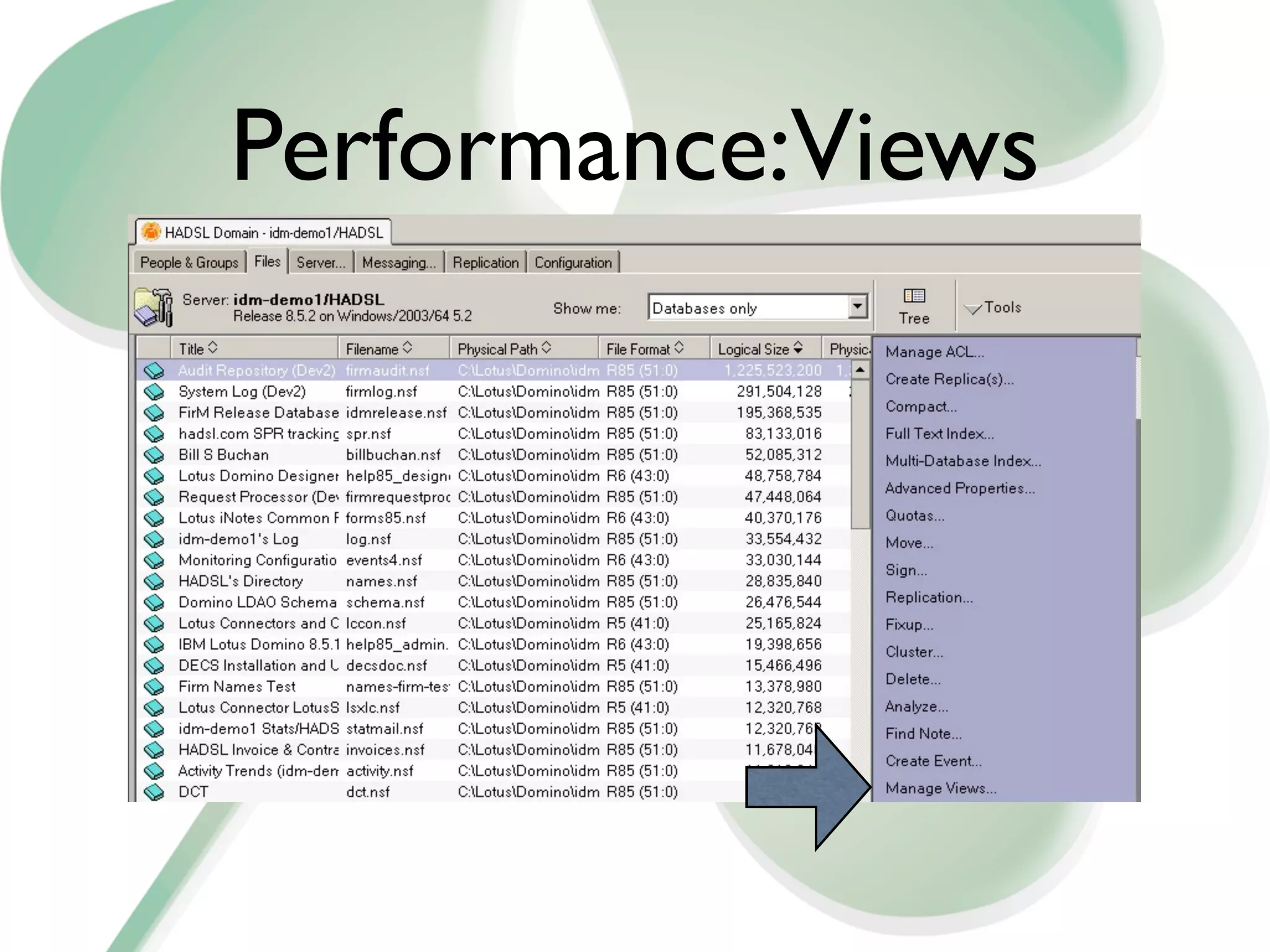
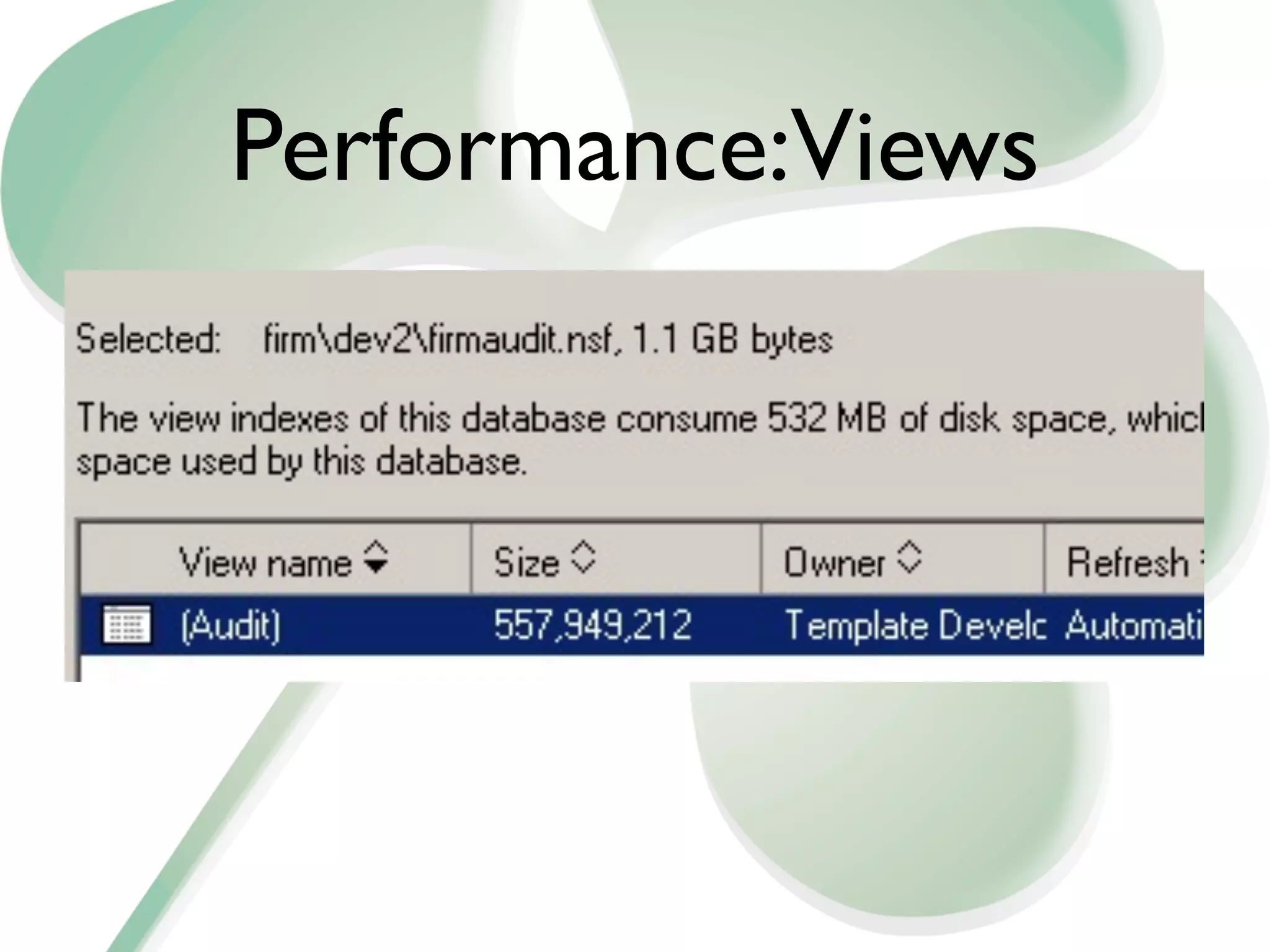
• How can I tell the size of a view?
 • Admin client, select database, Tools,
    Manage Views
Performance:Views
Performance:Views
Performance:Views

• Create as few views as possible
• Don’t use Click-sort on columns unless
  absolutely necessary. Each click-sort
  column creates another copy of the view
Performance:Agents
• Scheduled Agents have to be well-behaved
 • Agent Manager doesn't really do a great
    job in killing runaway agents
 • It certainly doesn't throttle agents which
    consume lots of CPU
 • And it only runs one or two agents at a
    time
Performance:Agents
• So how to we minimise our Agent
  Footprint?
 • Write them to fit the potential size of
    your application
   • If there are lots of documents to
      process, let the agent run multiple
      times
Performance:Agents

• Use Agent Profiling to find out how long
  your agents take against a representative
  quantity of documents
 • ‘It worked in testing’ is not an excuse.
  • Its an admission your testing wasn’t
      rigorous enough
Performance:Agents

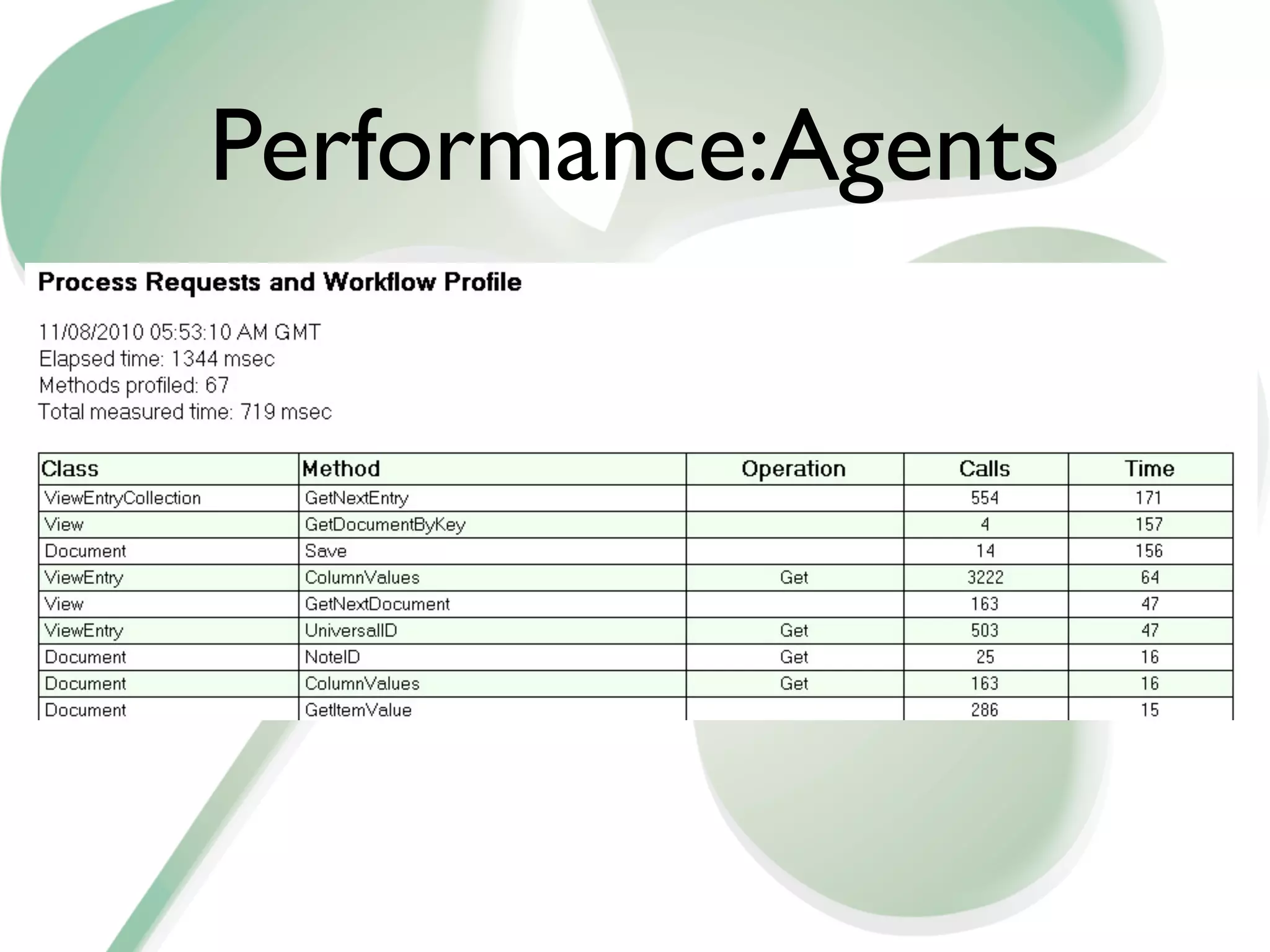
• To enable Agent Profiling, check the ‘Profile
  This agent’ in Agent Properties.
• Once its ran, you can view which calls its
  made, and how much time it took
Performance:Agents
Performance:Agents

• You can see
 • When the agent ran
 • Where it ran
 • Where it spent time
• Invaluable for performance tuning
Performance:Agents

• Now. Lets take it one step further
 • How about collecting ALL agent profiles
    from ALL databases and storing them in a
    database?
 • NOT recommended for production
    environments
Performance:Agents
• Recipe:
 • Take ‘TriggerHappy’ from OpenNTF
 • Have it listen to ALL document saves on
    the server
 • If the form is called "$BEProfileR7"
  • Forward the document to another
      database
Performance:Agents

• For more information on this, visit:
 • http://www.billbuchan.com/
    imported-20091119232548/2010/2/2/
    universal-agent-profiling-in-domino.html
  • URL is in IBM Standard Download
    Notation.
Performance:Agents
• A common scenario
 • We build an agent to examine a lot of
    documents, and update a few of them,
    every night.
 • The database grows
 • Your admin kills you.
Performance:Agents
• Remember:
 • Agent Manager is like a crumbly old
    relative - Everyone loves him
 • But he’s quite shaky on his feet
 • And smells
• Don’t abuse him
Performance:Agents


• Changing the maximum agent run-time on
  the server document is CHEATING
Performance:Agents
• Re-architect the agent
 • It starts up, figures out how long it has to
    run, and works out its termination time.
    • Maximum time minus 2 mins
  • Keep working till expiry time
  • Have the agent run a few times - say
    every 10 mins for 3 hours overnight
Performance:Agents

• So:
 • Own & Understand your agent
   performance
 • Don’t abuse agent manager
 • Don’t let it kill your system
Code Re-use

• Don't reinvent the wheel every time
 • That leaves far too little time for the pub
 • Oh - and it means re-testing from scratch
    every time
• Be Lazy
Code Re-use
• So
 • If your an old-fashioned script guy, create
    a standard script library that
    encapsulates:
    • Standard Logging
    • Configuration lookup
Code Re-Use
• If your a little bored with this (and who
  isn't?)
  • Create a LotusScript class which
    encapsulates all boring logic
  • Extend this class in your own code for
    the business logic
  • Simplify the target code
Code Re-use
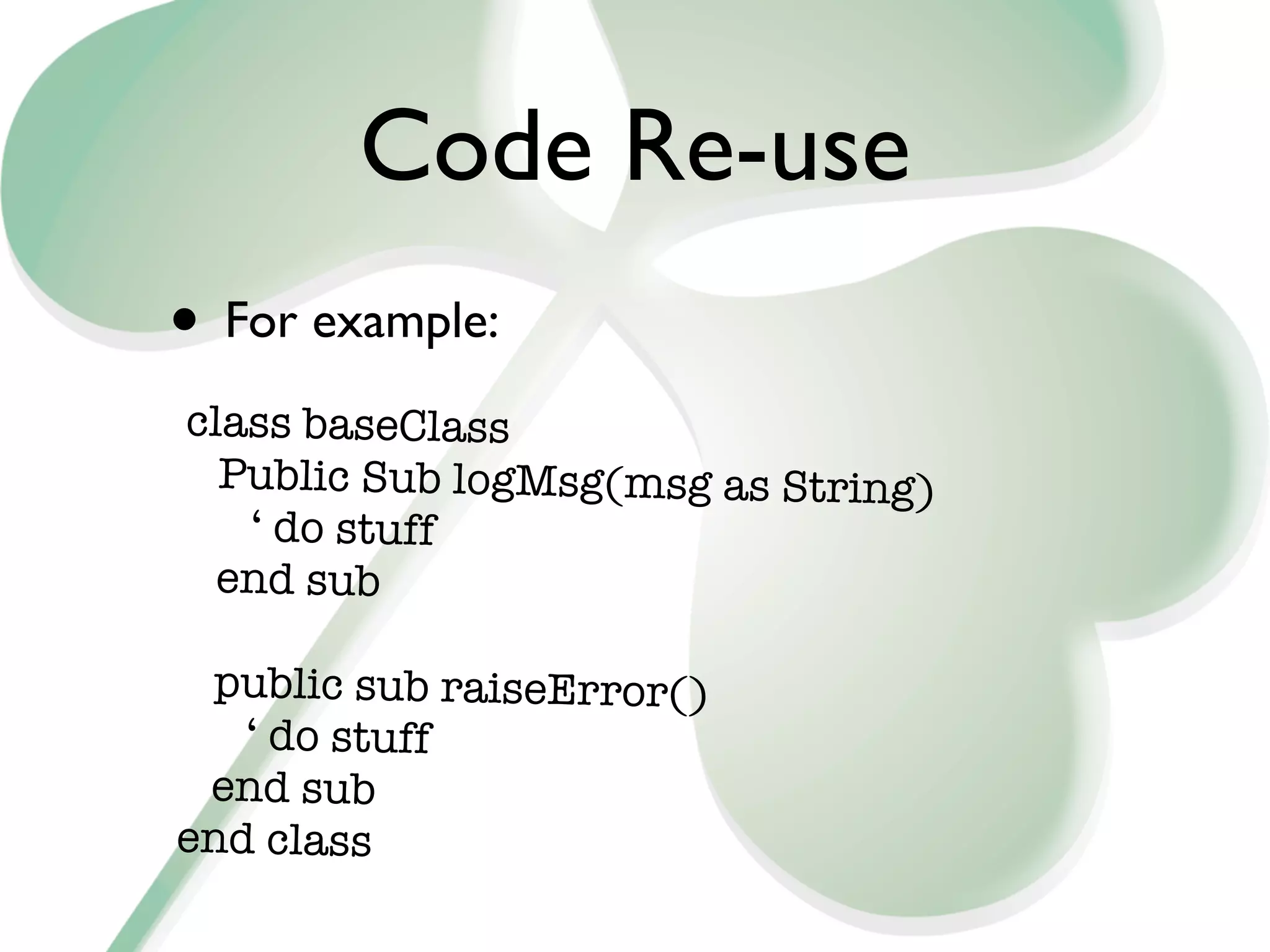
• For example:
class baseClass
  Public Sub logMsg(msg as String)
   ‘ do stuff
  end sub

 public sub raiseError()
   ‘ do stuff
 end sub
end class
Code Re-use
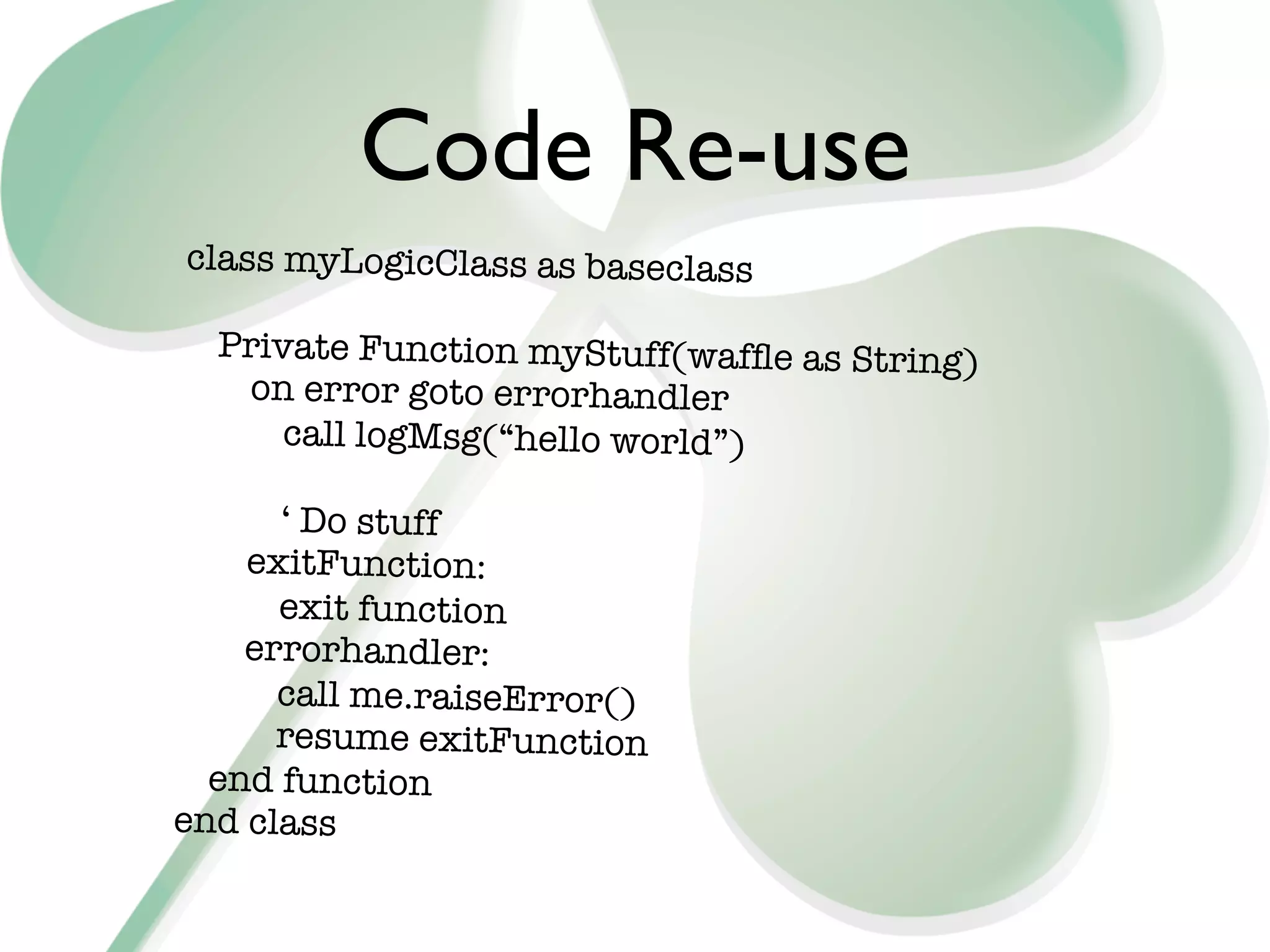
class myLogicClass as baseclass

  Private Function myStuff(waffle as String)
   on error goto errorhandler
      call logMsg(“hello world”)

      ‘ Do stuff
    exitFunction:
      exit function
    errorhandler:
      call me.raiseError()
      resume exitFunction
  end function
end class
Code Re-use

• Remove the responsibility for
 • Logging
 • Error handling
 • Other boring stuff
• From your business logic
Weirdness
• Sometimes, we have to walk on the wild
  side
 • Just sometimes, we like to stroke our
    misshapen little ego
 • Or we actually have a business reason
 • Whatever
Weirdness: Lists
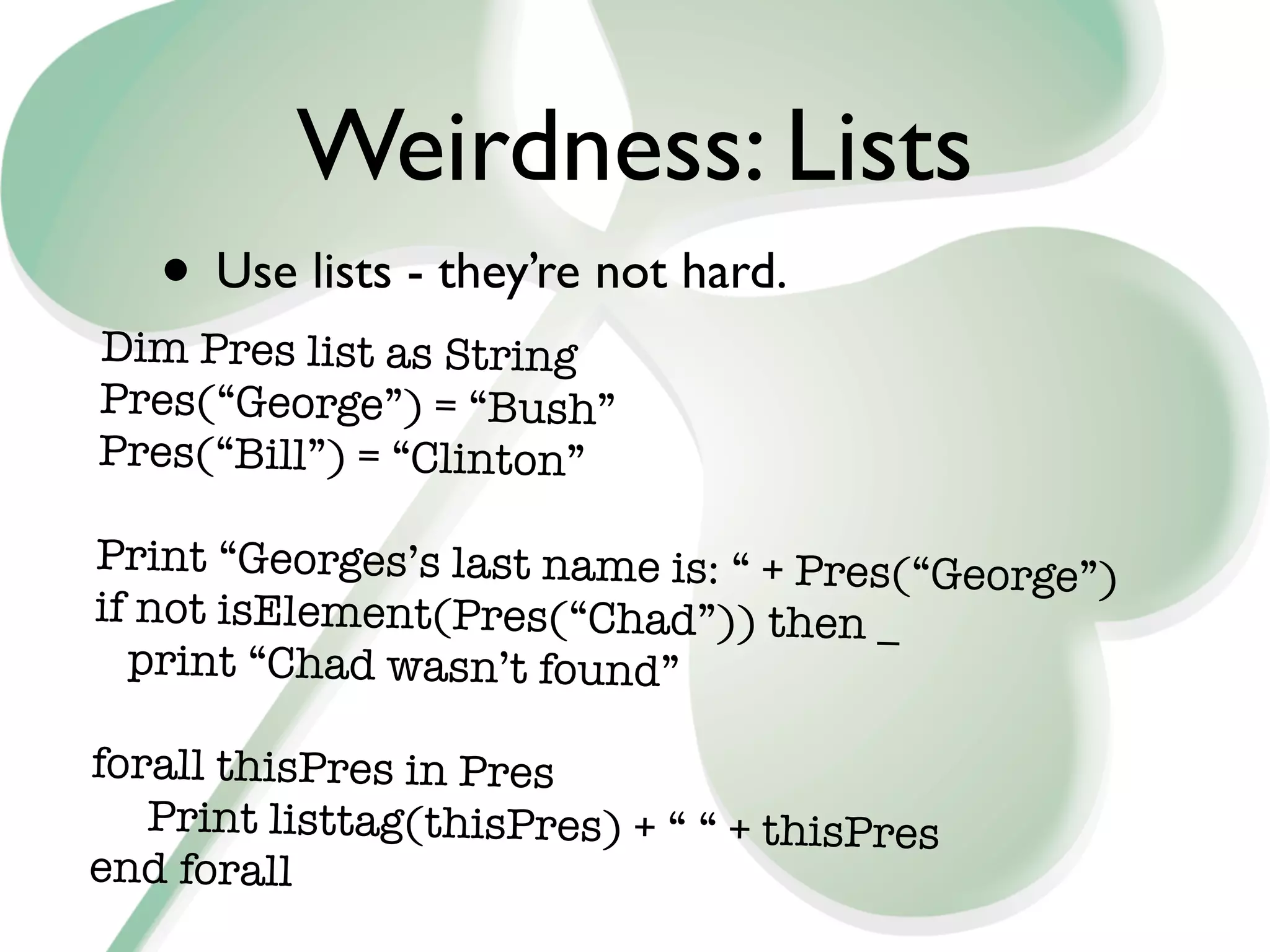
   • Use lists - they’re not hard.
Dim Pres list as String
Pres(“George”) = “Bush”
Pres(“Bill”) = “Clinton”

Print “Georges’s last name is: “ + Pres(“George”
                                                 )
if not isElement(Pres(“Chad”)) then _
  print “Chad wasn’t found”

forall thisPres in Pres

 Print listtag(thisPres) + “ “ + thisPres
end forall
Weirdness:C-API
• LotusScript never does everything.
  Sometimes you have to call out to C-API
 • What is C-API?
  • Over 700 functions that you can get to
      using C code
   • Downside: Creating & Supporting code
      on every platform you support. Eugh.
Weirdness: C-API
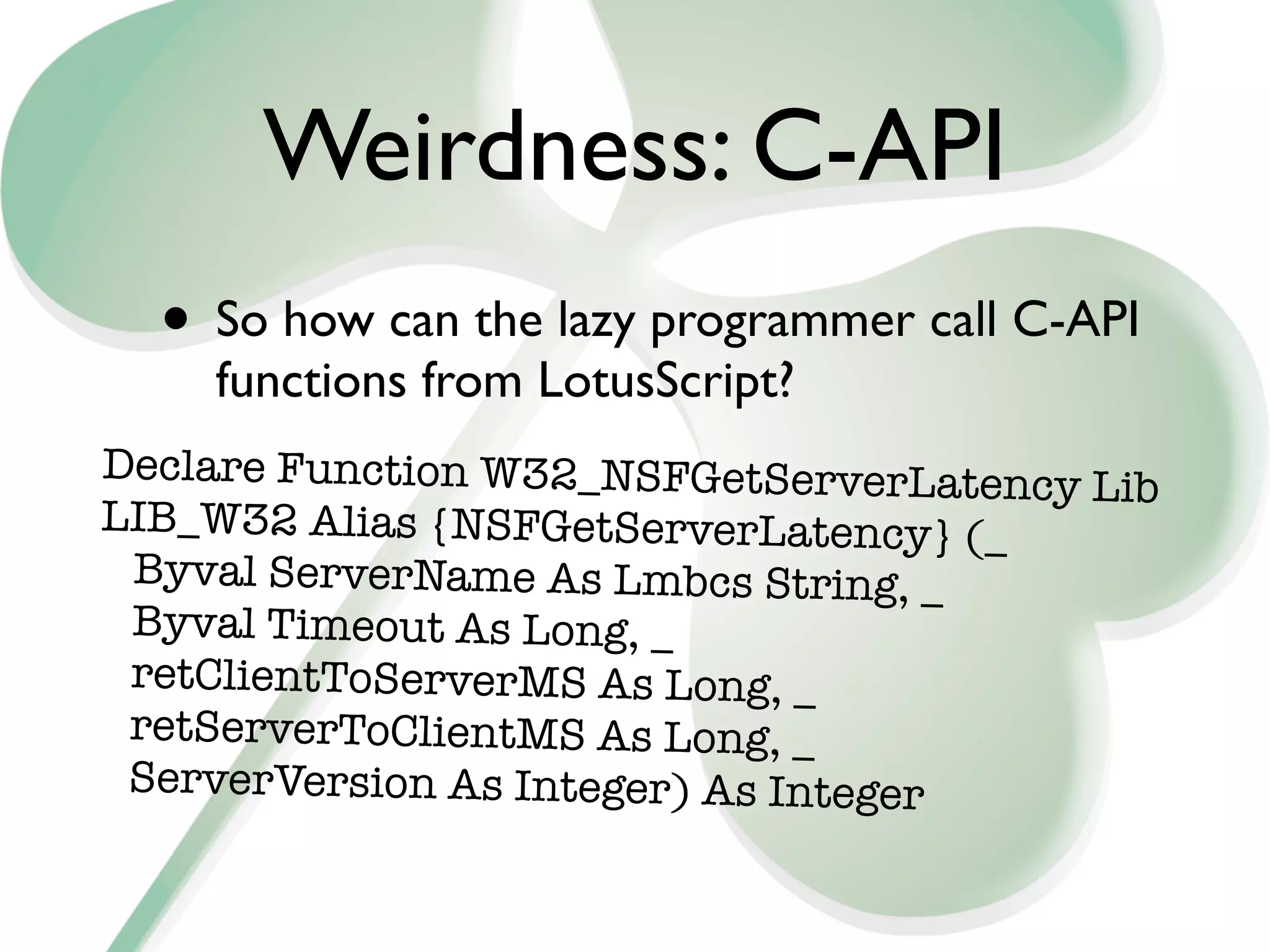
  • So how can the lazy programmer call C-API
    functions from LotusScript?
Declare Function W32_NSFGetServerLatency
                                         Lib
LIB_W32 Alias {NSFGetServerLatency} (_
 Byval ServerName As Lmbcs String, _
 Byval Timeout As Long, _
 retClientToServerMS As Long, _
 retServerToClientMS As Long, _
 ServerVersion As Integer) As Integer
Weirdness: C-API
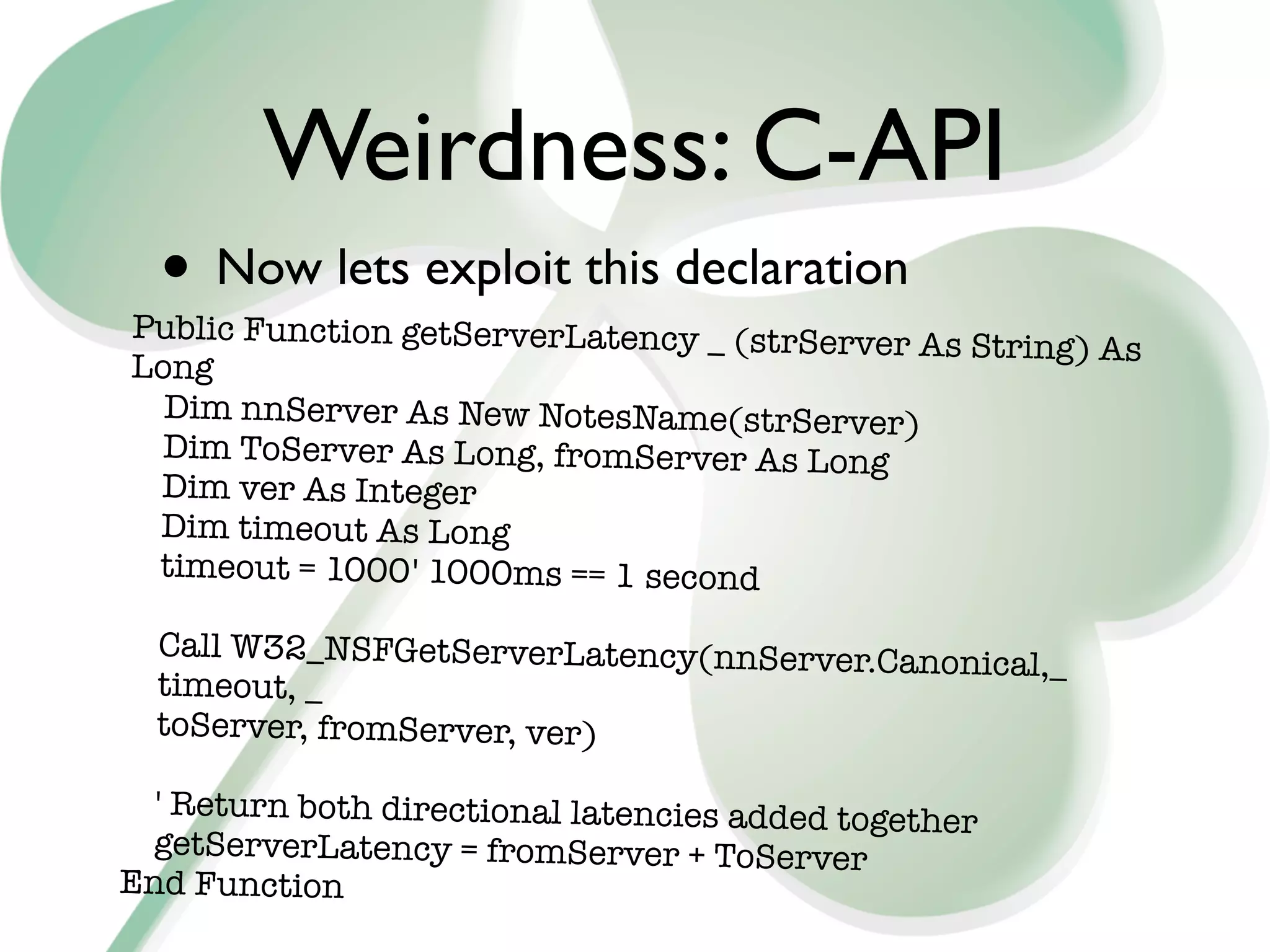
  • Now lets exploit this declaration
Public Function getServerLatency _ (strServer
                                              As String) As
Long
  Dim nnServer As New NotesName(strServer)
  Dim ToServer As Long, fromServer As Long
 Dim ver As Integer
 Dim timeout As Long
 timeout = 1000	 1000ms == 1 second
                 '

  Call W32_NSFGetServerLatency(nnServer.Can
                                            onical,_
  timeout, _
  toServer, fromServer, ver)

  ' Return both directional latencies added togeth
                                                   er
 getServerLatency = fromServer + ToServer
End Function
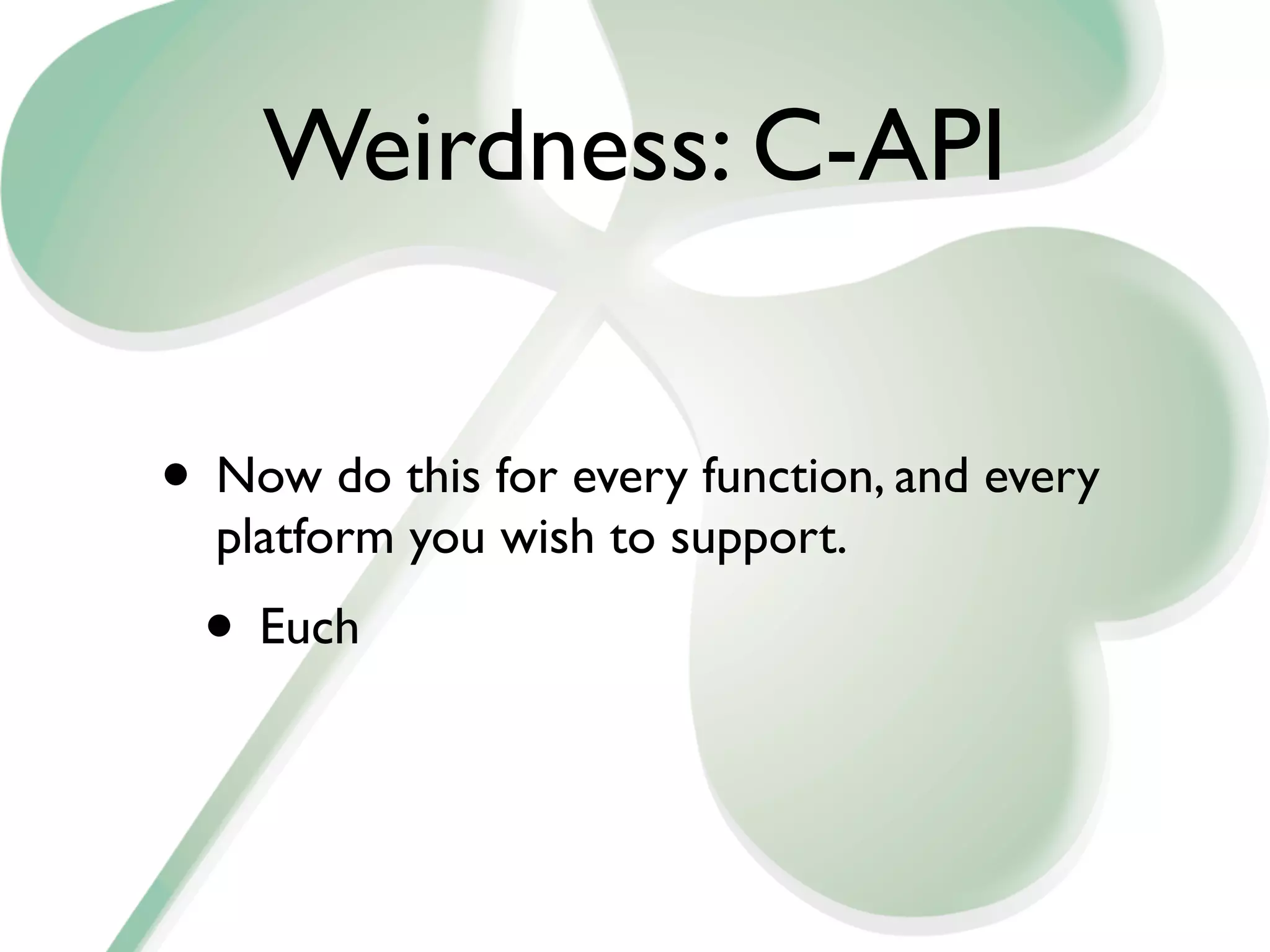
Weirdness: C-API


• Now do this for every function, and every
  platform you wish to support.
 • Euch
Weirdness: Execute

 • You all know how to do ‘Evaluate’ right?
Dim V as variant
V = evaluate( “ @Name( [CN]; @UserName ) “ )
print V(0)
 ‘ Result is ‘Bill Buchan’
Weirdness: Execute
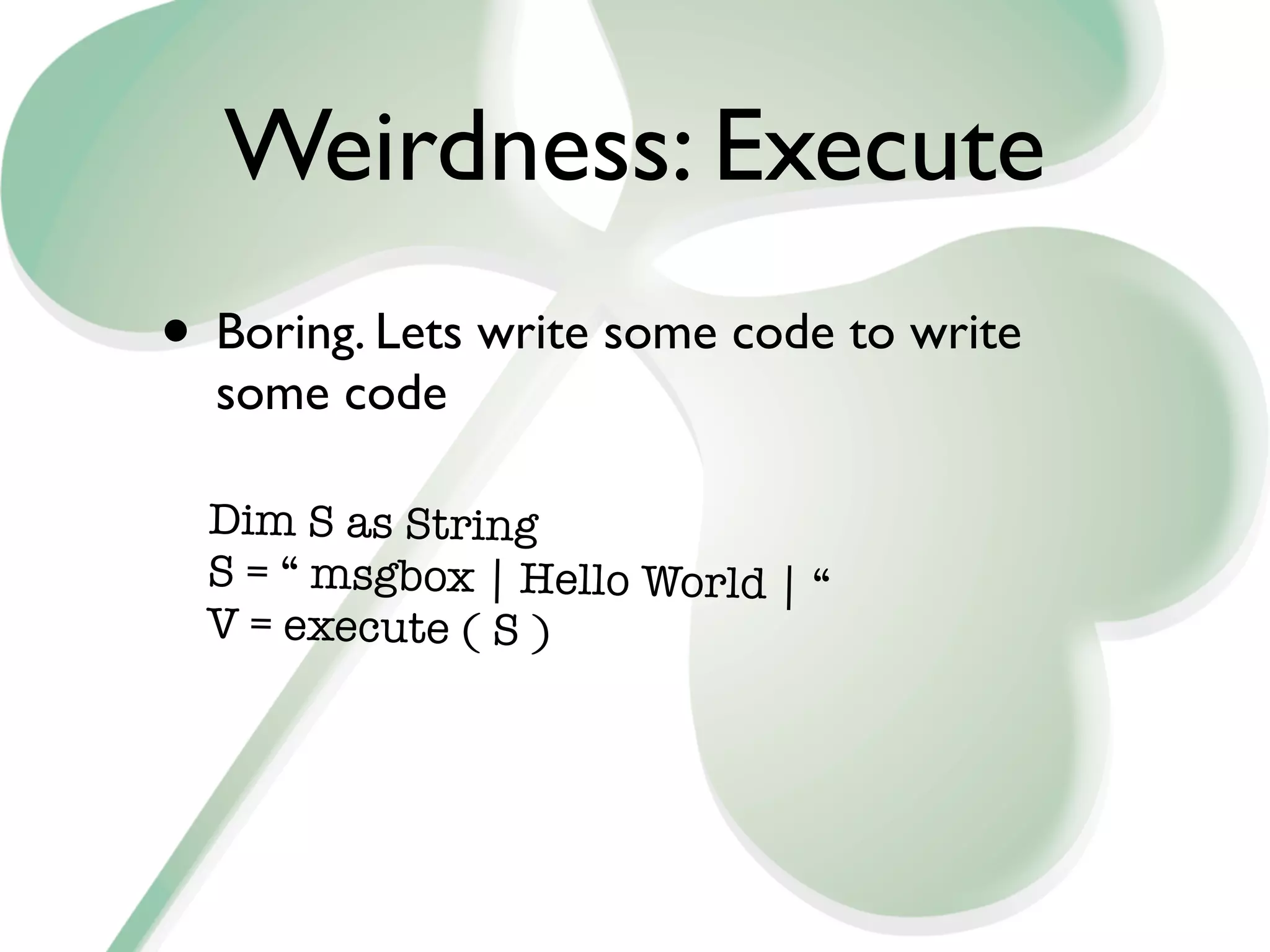
• Boring. Lets write some code to write
  some code

  Dim S as String
  S = “ msgbox | Hello World | “
  V = execute ( S )
Weirdness: Execute
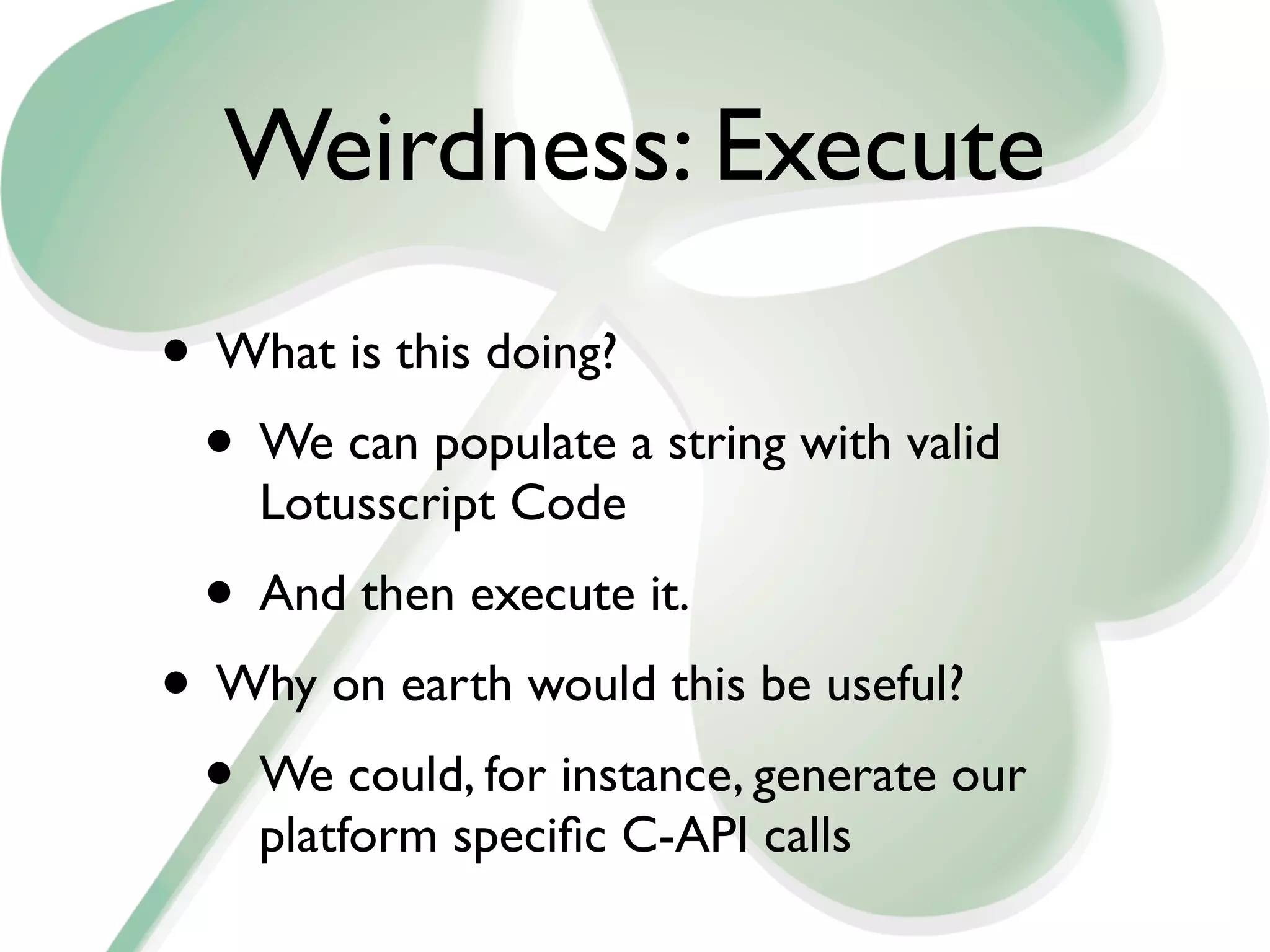
• What is this doing?
 • We can populate a string with valid
    Lotusscript Code
 • And then execute it.
• Why on earth would this be useful?
 • We could, for instance, generate our
    platform specific C-API calls
Weirdness: C-API
• Check out the ls2capi.com web site
• And check out my ls2capi database on
 • http://hadsl.com/hadsl.nsf/Documents/
    LS2CAPI+-+Calling+Notes+C-API+from
    +LotusScript!OpenDocument
• Step through it in the debugger.. ;-)
Conclusion

• Use these techniques to deal with large
  systems
  • Minimise, Simplify and Productionalise
    your code
• Learn xPages

Lotuscript for large systems

  • 1.
    LotusScript Survival Tips forLarge Systems Bill Buchan hadsl.com
  • 2.
    Agenda • Introduction • Whatdo we need? • Logging • Performance • Code Reuse • Weirdness
  • 3.
    Introduction • I am: • Bill Buchan, CEO, hadsl • LotusScript expert since 1997, Large systems experience
  • 4.
    Direction? • Lets considerthe following slide...
  • 5.
    Whats New In LotusScript? This page is left intentionally blank
  • 6.
    Whats new in LotusScript? • The Class libraries have generally grown with each release • Leveraging feature-specific stuff such as ID Vault in 8.5.0
  • 7.
    What does thismean? • LotusScript is still an invaluable tool in your armoury for creating Business Logic • Its easy, its multi-platform • Its NOT the future in terms of Client or Web • Check out all the xPages sessions here • No excuses
  • 8.
    What do weneed? • Large environments need: • Stability • Scalability • If you cant measure it, you cant manage it • You want to do more, with less time and less people
  • 9.
    What do weneed? • Stable performance • We cant keep adding new servers every time we add a new application/database instance • We cant let a single application wreak havoc on our systems
  • 10.
    What do weneed? • Code Reuse. Of course. • We have less resources doing more work • We need to test more effectively
  • 11.
    Logging • Why dologging? • As a rule of thumb, if its scheduled, critical, or running in someplace you cant immediately check, you need logging • You need to know: • When and where did it start, stop • Was it successful
  • 12.
    Logging • If somethinghappens, and you find out from the users • You have failed
  • 13.
    Logging • Lots ofsolutions available • For instance, use ‘msgbox’ to log to the console. • Admins hate this • It’ll never be acted upon
  • 14.
    Logging Solutions • Checkout OpenLog at OpenNTF • Add two lines of code, and you have a comprehensive log • Free and Easy • No excuses
  • 15.
    SuperLogging • Consider Performance • Opening a notes database - even from Script - opens the default view • Log database views can get large • It can be slow
  • 16.
    SuperLogging • Why not • Create a new document and populate as normal • Stamp it with start and stop times - handy for measuring load • Add Server, Database, Agent and User • But then use notesdocument.send()
  • 17.
    SuperLogging • Sending logdocuments by email means: • The process is not waiting for you to save the log document (and update the views) - huge performance increase • The log database need not be local • The user processes do NOT need access to the log database
  • 18.
    SuperLogging • Once youstart emailing in Log Documents, you can do more: • Spot when agents DONT trigger a log document - and do something about it • Spot when NEW agents start creating logs
  • 19.
    SuperLogging • Remember, ALLcode has to log accurately • LotusScript, Java, xPages • Javascript?
  • 20.
    Performance • We applicationdevelopers can create fantastic applications • And we can create horrible ones • Ones that really kill servers. • Lets talk about...
  • 21.
    Performance:Views • Your applicationneeds views. Of course it does. But does it need them all? • ‘Click-sort’ columns are evil • Use more ‘Categorised’ views
  • 22.
    Performance:Views • How canI tell the size of a view? • Admin client, select database, Tools, Manage Views
  • 23.
  • 24.
  • 25.
    Performance:Views • Create asfew views as possible • Don’t use Click-sort on columns unless absolutely necessary. Each click-sort column creates another copy of the view
  • 26.
    Performance:Agents • Scheduled Agentshave to be well-behaved • Agent Manager doesn't really do a great job in killing runaway agents • It certainly doesn't throttle agents which consume lots of CPU • And it only runs one or two agents at a time
  • 27.
    Performance:Agents • So howto we minimise our Agent Footprint? • Write them to fit the potential size of your application • If there are lots of documents to process, let the agent run multiple times
  • 28.
    Performance:Agents • Use AgentProfiling to find out how long your agents take against a representative quantity of documents • ‘It worked in testing’ is not an excuse. • Its an admission your testing wasn’t rigorous enough
  • 29.
    Performance:Agents • To enableAgent Profiling, check the ‘Profile This agent’ in Agent Properties. • Once its ran, you can view which calls its made, and how much time it took
  • 30.
  • 31.
    Performance:Agents • You cansee • When the agent ran • Where it ran • Where it spent time • Invaluable for performance tuning
  • 32.
    Performance:Agents • Now. Letstake it one step further • How about collecting ALL agent profiles from ALL databases and storing them in a database? • NOT recommended for production environments
  • 33.
    Performance:Agents • Recipe: •Take ‘TriggerHappy’ from OpenNTF • Have it listen to ALL document saves on the server • If the form is called "$BEProfileR7" • Forward the document to another database
  • 34.
    Performance:Agents • For moreinformation on this, visit: • http://www.billbuchan.com/ imported-20091119232548/2010/2/2/ universal-agent-profiling-in-domino.html • URL is in IBM Standard Download Notation.
  • 35.
    Performance:Agents • A commonscenario • We build an agent to examine a lot of documents, and update a few of them, every night. • The database grows • Your admin kills you.
  • 36.
    Performance:Agents • Remember: •Agent Manager is like a crumbly old relative - Everyone loves him • But he’s quite shaky on his feet • And smells • Don’t abuse him
  • 37.
    Performance:Agents • Changing themaximum agent run-time on the server document is CHEATING
  • 38.
    Performance:Agents • Re-architect theagent • It starts up, figures out how long it has to run, and works out its termination time. • Maximum time minus 2 mins • Keep working till expiry time • Have the agent run a few times - say every 10 mins for 3 hours overnight
  • 39.
    Performance:Agents • So: •Own & Understand your agent performance • Don’t abuse agent manager • Don’t let it kill your system
  • 40.
    Code Re-use • Don'treinvent the wheel every time • That leaves far too little time for the pub • Oh - and it means re-testing from scratch every time • Be Lazy
  • 41.
    Code Re-use • So • If your an old-fashioned script guy, create a standard script library that encapsulates: • Standard Logging • Configuration lookup
  • 42.
    Code Re-Use • Ifyour a little bored with this (and who isn't?) • Create a LotusScript class which encapsulates all boring logic • Extend this class in your own code for the business logic • Simplify the target code
  • 43.
    Code Re-use • Forexample: class baseClass Public Sub logMsg(msg as String) ‘ do stuff end sub public sub raiseError() ‘ do stuff end sub end class
  • 44.
    Code Re-use class myLogicClassas baseclass Private Function myStuff(waffle as String) on error goto errorhandler call logMsg(“hello world”) ‘ Do stuff exitFunction: exit function errorhandler: call me.raiseError() resume exitFunction end function end class
  • 45.
    Code Re-use • Removethe responsibility for • Logging • Error handling • Other boring stuff • From your business logic
  • 46.
    Weirdness • Sometimes, wehave to walk on the wild side • Just sometimes, we like to stroke our misshapen little ego • Or we actually have a business reason • Whatever
  • 47.
    Weirdness: Lists • Use lists - they’re not hard. Dim Pres list as String Pres(“George”) = “Bush” Pres(“Bill”) = “Clinton” Print “Georges’s last name is: “ + Pres(“George” ) if not isElement(Pres(“Chad”)) then _ print “Chad wasn’t found” forall thisPres in Pres Print listtag(thisPres) + “ “ + thisPres end forall
  • 48.
    Weirdness:C-API • LotusScript neverdoes everything. Sometimes you have to call out to C-API • What is C-API? • Over 700 functions that you can get to using C code • Downside: Creating & Supporting code on every platform you support. Eugh.
  • 49.
    Weirdness: C-API • So how can the lazy programmer call C-API functions from LotusScript? Declare Function W32_NSFGetServerLatency Lib LIB_W32 Alias {NSFGetServerLatency} (_ Byval ServerName As Lmbcs String, _ Byval Timeout As Long, _ retClientToServerMS As Long, _ retServerToClientMS As Long, _ ServerVersion As Integer) As Integer
  • 50.
    Weirdness: C-API • Now lets exploit this declaration Public Function getServerLatency _ (strServer As String) As Long Dim nnServer As New NotesName(strServer) Dim ToServer As Long, fromServer As Long Dim ver As Integer Dim timeout As Long timeout = 1000 1000ms == 1 second ' Call W32_NSFGetServerLatency(nnServer.Can onical,_ timeout, _ toServer, fromServer, ver) ' Return both directional latencies added togeth er getServerLatency = fromServer + ToServer End Function
  • 51.
    Weirdness: C-API • Nowdo this for every function, and every platform you wish to support. • Euch
  • 52.
    Weirdness: Execute •You all know how to do ‘Evaluate’ right? Dim V as variant V = evaluate( “ @Name( [CN]; @UserName ) “ ) print V(0) ‘ Result is ‘Bill Buchan’
  • 53.
    Weirdness: Execute • Boring.Lets write some code to write some code Dim S as String S = “ msgbox | Hello World | “ V = execute ( S )
  • 54.
    Weirdness: Execute • Whatis this doing? • We can populate a string with valid Lotusscript Code • And then execute it. • Why on earth would this be useful? • We could, for instance, generate our platform specific C-API calls
  • 55.
    Weirdness: C-API • Checkout the ls2capi.com web site • And check out my ls2capi database on • http://hadsl.com/hadsl.nsf/Documents/ LS2CAPI+-+Calling+Notes+C-API+from +LotusScript!OpenDocument • Step through it in the debugger.. ;-)
  • 56.
    Conclusion • Use thesetechniques to deal with large systems • Minimise, Simplify and Productionalise your code • Learn xPages