Software Evaluation
Screen Record Programs
Camtasia | Jing
Overview
Screen record programs allow users to make video
recording of their computer screen and have
become an integral in education and corporate
training programs.
There are many screen record programs available,
each with various features.
This evaluation will compare Camtasia and Jing.
Camtasia Features
User guide and tutorials
Pre-production platform
Extensive editing capabilities
Shareability
Camtasia Pros and Cons
Pros
Export capabilities
Editing options
Free trial
Cons
Software installation
Intimidating dashboard
Cost
Jing Features
Simple format
Ease of basic editing
Each capture has URL for sharing
Screencast.com compatibility
Jing Pros and Cons
Pros
Free
Quick
Informal
Cons
5 minute limit
Basic features
.swf format only
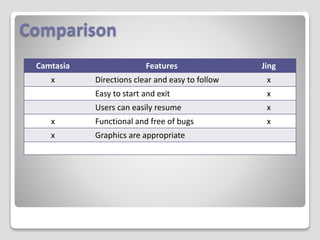
Comparison
Camtasia Features Jing
x Directions clear and easy to follow x
Easy to start and exit x
Users can easily resume x
x Functional and free of bugs x
x Graphics are appropriate
Comparison
Camtasia Features Jing
x Sound can be turned off and on x
Useful management features
Basic tasks easily learned and
intuitive
x
x Advanced features are easy to
access and apply
x Menu-driven tutorials
Recommendation
After research and utilization, I’ve found that Camtasia and Jing
can be useful for very specific applications.
Jing was easy to load and the navigation was user- friendly on
the first attempt. The features were minimal, but users can get
started immediately.
Although complex and feature-rich, the cost of Camtasia
coupled with the significant learning curve for new users makes
this program somewhat less desirable.
My recommendation is Jing.

Software Evaluation Karen Miles

  • 1.
    Software Evaluation Screen RecordPrograms Camtasia | Jing
  • 2.
    Overview Screen record programsallow users to make video recording of their computer screen and have become an integral in education and corporate training programs. There are many screen record programs available, each with various features. This evaluation will compare Camtasia and Jing.
  • 3.
    Camtasia Features User guideand tutorials Pre-production platform Extensive editing capabilities Shareability
  • 4.
    Camtasia Pros andCons Pros Export capabilities Editing options Free trial Cons Software installation Intimidating dashboard Cost
  • 5.
    Jing Features Simple format Easeof basic editing Each capture has URL for sharing Screencast.com compatibility
  • 6.
    Jing Pros andCons Pros Free Quick Informal Cons 5 minute limit Basic features .swf format only
  • 7.
    Comparison Camtasia Features Jing xDirections clear and easy to follow x Easy to start and exit x Users can easily resume x x Functional and free of bugs x x Graphics are appropriate
  • 8.
    Comparison Camtasia Features Jing xSound can be turned off and on x Useful management features Basic tasks easily learned and intuitive x x Advanced features are easy to access and apply x Menu-driven tutorials
  • 9.
    Recommendation After research andutilization, I’ve found that Camtasia and Jing can be useful for very specific applications. Jing was easy to load and the navigation was user- friendly on the first attempt. The features were minimal, but users can get started immediately. Although complex and feature-rich, the cost of Camtasia coupled with the significant learning curve for new users makes this program somewhat less desirable. My recommendation is Jing.