Web Conferencing
Software Evaluation
Anthony Salinas
TexasTech University
Introduction
 The University ofTexas Rio GrandeValley spans the entire Rio
GrandeValley from Starr County to Cameron County. With
campuses in Brownsville, Harlingen, Edinburg, McAllen and
Rio Grande City,TX. Because of this, the Administration is
seeking an online solution to alleviate traveling costs on the
students.With more courses becoming hybrid and fully
online, a synchronous communication tool has been
requested to allow for interactivity and engagement in the
course.
Web Conferencing Software
 The software that will be evaluated is CiscoWebEx and
Blackboard Collaborate Ultra.
Features
Features Cisco Web Ex Blackboard Collaborate
Ultra
Schedule sessions X
Audio X X
Video X X
Chat X X
Whiteboard X X
Application Sharing X X
Record Sessions X X
Recording Conversion X X
Telephony X X
Features
Features Cisco WebEx Blackboard Collaborate
Ultra
MobileWeb
Conferencing
X X
LMS Integration X X
Reporting X X
Knowledge Base
Available
X X
Training Available X X
24/7Technical Support X
Evaluation Process
Both software will be tested by the following steps:
1. Create account and Sign in
2. Open a meeting/session
3. Set up Audio and Video
4. Start a recording
5. Type within Chat window
6. Log in with mobile device
7. Open Whiteboard and tested annotation tools
8. Start Application Sharing
9. Stop Recording
10. View Recording
Comparison
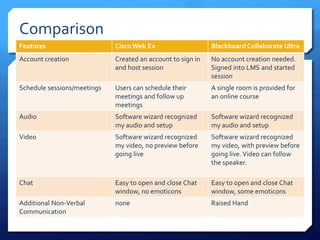
Features Cisco Web Ex Blackboard Collaborate Ultra
Account creation Created an account to sign in
and host session
No account creation needed.
Signed into LMS and started
session
Schedule sessions/meetings Users can schedule their
meetings and follow up
meetings
A single room is provided for
an online course
Audio Software wizard recognized
my audio and setup
Software wizard recognized
my audio and setup
Video Software wizard recognized
my video, no preview before
going live
Software wizard recognized
my video, with preview before
going live.Video can follow
the speaker.
Chat Easy to open and close Chat
window, no emoticons
Easy to open and close Chat
window, some emoticons
Additional Non-Verbal
Communication
none Raised Hand
Comparison
Feature Cisco Web EX Blackboard Collaborate
Ultra
Whiteboard Allowed for user to open
multiple whiteboard,
pointer tool, pen , text and
eraser tool
Allowed for user to open
multiple whiteboard,
pointer tool, pen , text and
eraser tool
Application Sharing Easy to start and share
desktop. Ability to assign
control of
desktop/application to
another user. Ability to
annotate over desktop
Easy to start and share
desktop/application. Can
only be done with Google
Chrome and a desktop
sharing extension.
Record Sessions Able to record/pause and
stop meeting. Timer is
available to see how long
the recording has been.
Able to record/pause and
stop meeting.
Comparison
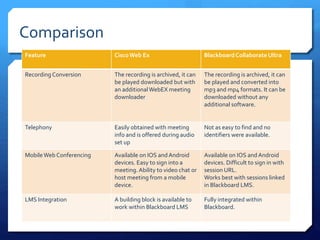
Feature CiscoWeb Ex BlackboardCollaborateUltra
Recording Conversion The recording is archived, it can
be played downloaded but with
an additionalWebEX meeting
downloader
The recording is archived, it can
be played and converted into
mp3 and mp4 formats. It can be
downloaded without any
additional software.
Telephony Easily obtained with meeting
info and is offered during audio
set up
Not as easy to find and no
identifiers were available.
MobileWeb Conferencing Available on IOS andAndroid
devices. Easy to sign into a
meeting.Ability to video chat or
host meeting from a mobile
device.
Available on IOS andAndroid
devices. Difficult to sign in with
session URL.
Works best with sessions linked
in Blackboard LMS.
LMS Integration A building block is available to
work within Blackboard LMS
Fully integrated within
Blackboard.
Comparison
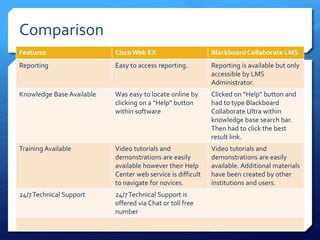
Features Cisco Web EX Blackboard Collaborate LMS
Reporting Easy to access reporting. Reporting is available but only
accessible by LMS
Administrator.
Knowledge Base Available Was easy to locate online by
clicking on a “Help” button
within software
Clicked on “Help” button and
had to type Blackboard
Collaborate Ultra within
knowledge base search bar.
Then had to click the best
result link.
Training Available Video tutorials and
demonstrations are easily
available however their Help
Center web service is difficult
to navigate for novices.
Video tutorials and
demonstrations are easily
available. Additional materials
have been created by other
institutions and users.
24/7Technical Support 24/7Technical Support is
offered via Chat or toll free
number
Recommendation
 The goal of the software is to allow for synchronous
communication amongst the learners and course instructor.
Both Cisco WebEx and Blackboard Collaborate meet this
goal.Although their features and abilities appear identical
the functionality of Cisco WebEX actually surpasses
Blackboard Collaborate. An instructor has made the case that
its features made it easy for his students to access the virtual
sessions easily through the mobile application.
Recommendation
Blackboard Collaborate ease of use made it possible for me to
enter a session and begin sharing course materials. Participants
can easily access the session through their course on the
Learning Management System, Blackboard, as well.This proves
beneficial since students would not need to create a separate
account and memorize another password to participate within a
session. After the session has been completed the student can
access the archives directly from the course and continue
working on course activities.
Recommendation
What makes Blackboard Collaborate stand out is the following:
 Ease of Use
 LMS Integration
The majority of the staff to use this software will be novice users and
not experienced in working with this type of software.Although
WebEx contains multiple features, most users may only use 3 to 4.The
subject matter that is being taught should be the focus of the course
and not the tool or its complexity. Blackboard Collaborate is equivalent
to having a virtual classroom which anyone can enter, sit and learn
without additional setups or hassles. So I would recommend
Blackboard Collaborate as our choice for web conferencing software.

Web Conferencing: Software Evaluation

  • 1.
  • 2.
    Introduction  The UniversityofTexas Rio GrandeValley spans the entire Rio GrandeValley from Starr County to Cameron County. With campuses in Brownsville, Harlingen, Edinburg, McAllen and Rio Grande City,TX. Because of this, the Administration is seeking an online solution to alleviate traveling costs on the students.With more courses becoming hybrid and fully online, a synchronous communication tool has been requested to allow for interactivity and engagement in the course.
  • 3.
    Web Conferencing Software The software that will be evaluated is CiscoWebEx and Blackboard Collaborate Ultra.
  • 4.
    Features Features Cisco WebEx Blackboard Collaborate Ultra Schedule sessions X Audio X X Video X X Chat X X Whiteboard X X Application Sharing X X Record Sessions X X Recording Conversion X X Telephony X X
  • 5.
    Features Features Cisco WebExBlackboard Collaborate Ultra MobileWeb Conferencing X X LMS Integration X X Reporting X X Knowledge Base Available X X Training Available X X 24/7Technical Support X
  • 6.
    Evaluation Process Both softwarewill be tested by the following steps: 1. Create account and Sign in 2. Open a meeting/session 3. Set up Audio and Video 4. Start a recording 5. Type within Chat window 6. Log in with mobile device 7. Open Whiteboard and tested annotation tools 8. Start Application Sharing 9. Stop Recording 10. View Recording
  • 7.
    Comparison Features Cisco WebEx Blackboard Collaborate Ultra Account creation Created an account to sign in and host session No account creation needed. Signed into LMS and started session Schedule sessions/meetings Users can schedule their meetings and follow up meetings A single room is provided for an online course Audio Software wizard recognized my audio and setup Software wizard recognized my audio and setup Video Software wizard recognized my video, no preview before going live Software wizard recognized my video, with preview before going live.Video can follow the speaker. Chat Easy to open and close Chat window, no emoticons Easy to open and close Chat window, some emoticons Additional Non-Verbal Communication none Raised Hand
  • 8.
    Comparison Feature Cisco WebEX Blackboard Collaborate Ultra Whiteboard Allowed for user to open multiple whiteboard, pointer tool, pen , text and eraser tool Allowed for user to open multiple whiteboard, pointer tool, pen , text and eraser tool Application Sharing Easy to start and share desktop. Ability to assign control of desktop/application to another user. Ability to annotate over desktop Easy to start and share desktop/application. Can only be done with Google Chrome and a desktop sharing extension. Record Sessions Able to record/pause and stop meeting. Timer is available to see how long the recording has been. Able to record/pause and stop meeting.
  • 9.
    Comparison Feature CiscoWeb ExBlackboardCollaborateUltra Recording Conversion The recording is archived, it can be played downloaded but with an additionalWebEX meeting downloader The recording is archived, it can be played and converted into mp3 and mp4 formats. It can be downloaded without any additional software. Telephony Easily obtained with meeting info and is offered during audio set up Not as easy to find and no identifiers were available. MobileWeb Conferencing Available on IOS andAndroid devices. Easy to sign into a meeting.Ability to video chat or host meeting from a mobile device. Available on IOS andAndroid devices. Difficult to sign in with session URL. Works best with sessions linked in Blackboard LMS. LMS Integration A building block is available to work within Blackboard LMS Fully integrated within Blackboard.
  • 10.
    Comparison Features Cisco WebEX Blackboard Collaborate LMS Reporting Easy to access reporting. Reporting is available but only accessible by LMS Administrator. Knowledge Base Available Was easy to locate online by clicking on a “Help” button within software Clicked on “Help” button and had to type Blackboard Collaborate Ultra within knowledge base search bar. Then had to click the best result link. Training Available Video tutorials and demonstrations are easily available however their Help Center web service is difficult to navigate for novices. Video tutorials and demonstrations are easily available. Additional materials have been created by other institutions and users. 24/7Technical Support 24/7Technical Support is offered via Chat or toll free number
  • 11.
    Recommendation  The goalof the software is to allow for synchronous communication amongst the learners and course instructor. Both Cisco WebEx and Blackboard Collaborate meet this goal.Although their features and abilities appear identical the functionality of Cisco WebEX actually surpasses Blackboard Collaborate. An instructor has made the case that its features made it easy for his students to access the virtual sessions easily through the mobile application.
  • 12.
    Recommendation Blackboard Collaborate easeof use made it possible for me to enter a session and begin sharing course materials. Participants can easily access the session through their course on the Learning Management System, Blackboard, as well.This proves beneficial since students would not need to create a separate account and memorize another password to participate within a session. After the session has been completed the student can access the archives directly from the course and continue working on course activities.
  • 13.
    Recommendation What makes BlackboardCollaborate stand out is the following:  Ease of Use  LMS Integration The majority of the staff to use this software will be novice users and not experienced in working with this type of software.Although WebEx contains multiple features, most users may only use 3 to 4.The subject matter that is being taught should be the focus of the course and not the tool or its complexity. Blackboard Collaborate is equivalent to having a virtual classroom which anyone can enter, sit and learn without additional setups or hassles. So I would recommend Blackboard Collaborate as our choice for web conferencing software.