
Chapter 8
Analysis Engineering
Software Engineering: A Practitioner’s Approach
by Roger S. Pressman
Analysis Model

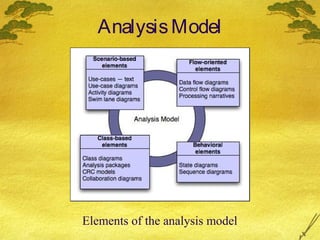
Elements of the analysis model
Scenario-Based Modeling
•Writing Use-Cases
•Developing Use-Case Diagram
•Developing an Activity Diagram
•Developing Swim Lane Diagram
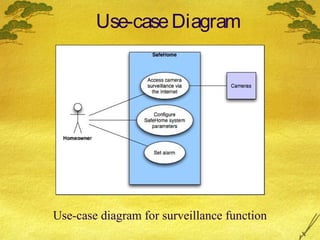
Use-case Diagram

Use-case diagram for surveillance function
Alternative Actions
 Can the actor take some other action at this
point?
 Is it possible that the actor will encounter
some error condition at this point?
 Is it possible that the actor will encounter
behavior invoked by some event outside the
actor’s control?
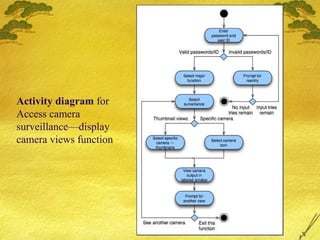
Activity diagram for
Access camera
surveillance—display
camera views function
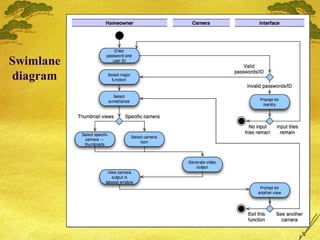
Swimlane
diagram
Flow-Oriented Modeling
•Data flow oriented modeling is one of the most widely
used analysis notations today.
•DFD and other diagrams are not a formal part of
UML, but they can be used to complement UML
diagrams and provide additional insight into system
requirements and flow.
•DFD takes an input-process-output view of a system
that is, data objects flow into the software, are
transformed by processing elements, and resultant data
objects flow out of the software.
Guidelines
 Data objects are represented by labeled arrows and
transformations are represented by circles (also
called bubbles). Data stores are represented by
double lines or rectangle.
 DFD is represented in a hierarchical fashion, that is
first data flow model(level 0 DFD or Context diagram)
represents the system as a whole.
 Refine by isolating candidate processes and their
associated data objects and data stores.
 Carefully note primary input and output.
 Label all elements with meaningful names.
 Information flow continuity must be maintained from
level to level.
 One bubble at a time should be refined.
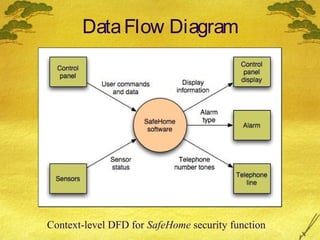
Data Flow Diagram

Context-level DFD for SafeHome security function
Grammatical Parse or Processing Narratives
 The SafeHome security function enables the homeowner to configure the
security system when it is installed, monitors all sensors connected to the
security system, and interacts with the homeowner through the Internet, a
PC, or a control panel.
 During installation, the SafeHome PC is used to program and configure the
system. Each sensor is assigned a number and type, a master password is
programmed for arming and disarming the system, and telephone number(s)
are input for dialing when a sensor event occurs.
 When a sensor event is recognized, the software invokes an audible alarm
attached to the system. After a delay time that is specified by the homeowner
during system configuration activities, the software dials a telephone number
of a monitoring service, provides information about the location, reporting
the nature of the event that has been detected. The telephone number will be
redialed every 20 seconds until a telephone connection is obtained.
 The homeowner receives security information via a control panel, the PC, or
a browser, collectively called an interface. The interface displays prompting
messages and system status information on the control panel, the PC, or the
browser window. Homeowner interaction takes the following form…
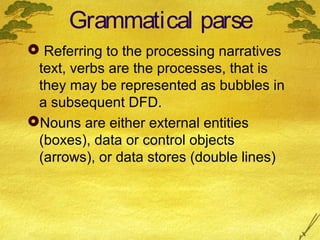
Grammatical parse
 Referring to the processing narratives
text, verbs are the processes, that is
they may be represented as bubbles in
a subsequent DFD.
Nouns are either external entities
(boxes), data or control objects
(arrows), or data stores (double lines)
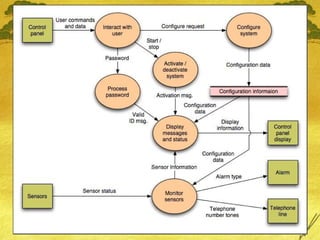
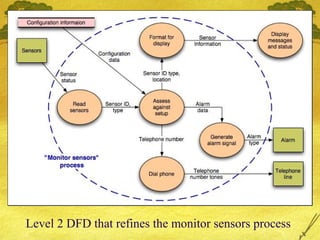
Level 2 DFD that refines the monitor sensors process
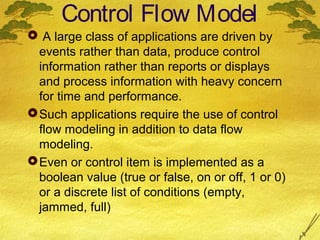
Control Flow Model
 A large class of applications are driven by
events rather than data, produce control
information rather than reports or displays
and process information with heavy concern
for time and performance.
 Such applications require the use of control
flow modeling in addition to data flow
modeling.
 Even or control item is implemented as a
boolean value (true or false, on or off, 1 or 0)
or a discrete list of conditions (empty,
jammed, full)
Guidelines to create Control flow model
 List all sensors that are “read” by the s/w.
 List all interrupt conditions.
 List all “switches” that are actuated by an
operator.
 List all data conditions.
 Recalling the noun/verb parse that was
applied to the processing narrative, review all
“control items” as possible for control flow
inputs / outputs.
 Identify how each state is reached, and define
the transition between states.
 Focus on possible omissions.
Control Specification

 Control specification (CSPEC) represents the
behavior of the system (at the level from
which it has been referenced) in two different
ways.
 The CSPEC contains a state diagram and
can also contain a program activation table.
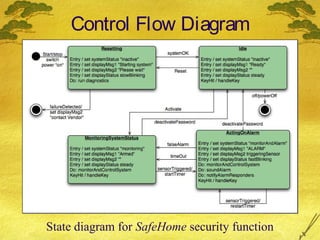
 Figure shows a state diagram for the level 1
control flow model for Safe home. It shows
how the system responds to events as it
traverses the four states defined at this level.
 CSPEC describes the behavior of the system,
but it gives us no information about the inner
working of the processes.
Control Flow Diagram

State diagram for SafeHome security function
Process Specification
 Process specification is used to describe all
flow model processes that appear at the final
level of refinement.
 Content of process specification can include
narrative text, a program design language
(PDL) description of the process algorithm,
mathematical equations, tables, diagrams, or
charts.
Process Specification (PSPEC eg)
 Process password (at control panel).
 Process password receives a four-digit password
from the interact with user function. The password is
first compared to the master password stored within
the system. If the master password matches, [valid id
message = true] is passed to the message and status
display function. If the password does not match the
four digits are compared to the table of secondary
passwords(may assigned to guests etc). If the
password matches an entry within the table, [valid id
message = true] is passed to the message and status
display function. If there is no match, [valid id
message = false] is passed to the message and
status display function.
Class-Based Modeling
Identifying Analysis Classes
 External entities that produce or consume
information
 Things that are part of the information domain
 Occurrences or events
 Roles played by people who interact with the
system
 Organizational units
 Places that establish context
 Structures that define a class of objects
Class Selection Criteria
1.
2.
3.
4.
5.
6.

Retained information
Needed services
Multiple attributes
Common attributes
Common operations
Essential requirements
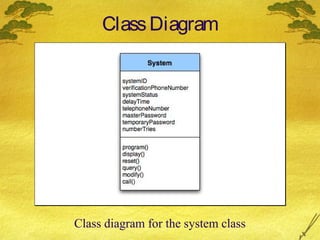
Class Diagram

Class diagram for the system class
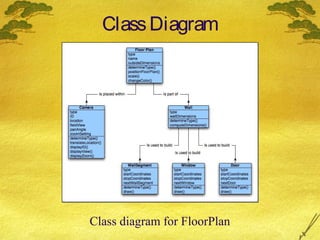
Class Diagram

Class diagram for FloorPlan
Class-Responsibility
Collaborator (CRC)
 CRC provides a simple means for identifying and
organizing the classes that are relevant to system or
product requirements.
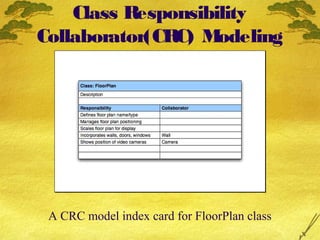
 CRC model is collection of standard index cards that
represents classes. Cards are divided into 3 sections.
(i) top of card write the name of class
(ii) class responsibilities on the left
(iii) collaborators on the right
 Here responsibilities are the attributes and operations
that are relevant to the class.
 Collaborators are those classes that are required to
provide a class with the information needed to
complete a responsibility.
Class Responsibility
Collaborator(CRC) M
odeling

A CRC model index card for FloorPlan class
B
asic guidelines for identifying Classes
and Objects
 Classes can be extended by considering the following
categories:
(a) Entity classes: also called model or business
classes, are extracted directly from the statement of
the problem(eg sensor). These classes typically
represent things that are to be stored in a database.
(b) Boundary classes: are used to create the interface
that the user sees and interacts with the software.
(c) Controller classes: These classes manage (1) the
creation or update of entity objects (2) instantiation of
boundary objects (3) complex communication
between sets of objects and (4) validation of data
communicated between objects or between the user
and the application.
Guidelines for identifying Class
Responsibilities
 System intelligence should be distributed across
classes to best address the needs of the problem.
 Each responsibility should be stated as generally as
possible.
 Information and the behavior related to it should
reside within the same class.
 Information about one thing should be localized with
a single class, not distributed across multiple classes.
 Responsibilities should be shared among related
classes, when appropriate.
Class Collaborations
 Relationships between classes:
 is-part-of — used when classes are part of an
aggregate class.
 has-knowledge-of — used when one class must
acquire information from another class.
 depends-on — used in all other cases.
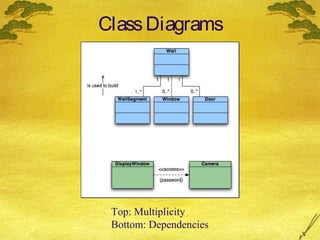
Class Diagrams

Top: Multiplicity
Bottom: Dependencies
Behavioral Modeling
Identifying Events
 A use-case is examined for points of information
exchange.
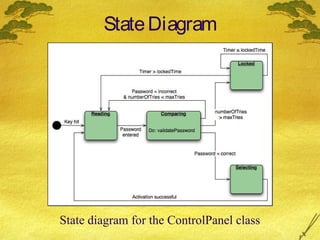
 The homeowner uses the keypad to key in a four-digit
password. The password is compared with the valid
password stored in the system. If the password in
incorrect, the control panel will beep once and reset itself
for additional input. If the password is correct, the control
panel awaits further action.
State Diagram

State diagram for the ControlPanel class
Sequence Diagram

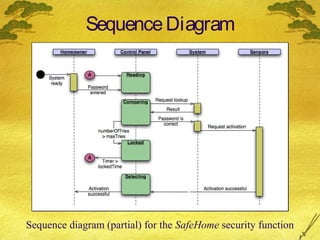
Sequence diagram (partial) for the SafeHome security function

Software engg. pressman_ch-8

  • 1.
    Chapter 8 Analysis Engineering SoftwareEngineering: A Practitioner’s Approach by Roger S. Pressman
  • 2.
    Analysis Model Elements ofthe analysis model
  • 3.
    Scenario-Based Modeling •Writing Use-Cases •DevelopingUse-Case Diagram •Developing an Activity Diagram •Developing Swim Lane Diagram
  • 4.
    Use-case Diagram Use-case diagramfor surveillance function
  • 5.
    Alternative Actions  Canthe actor take some other action at this point?  Is it possible that the actor will encounter some error condition at this point?  Is it possible that the actor will encounter behavior invoked by some event outside the actor’s control?
  • 6.
    Activity diagram for Accesscamera surveillance—display camera views function
  • 7.
  • 8.
    Flow-Oriented Modeling •Data floworiented modeling is one of the most widely used analysis notations today. •DFD and other diagrams are not a formal part of UML, but they can be used to complement UML diagrams and provide additional insight into system requirements and flow. •DFD takes an input-process-output view of a system that is, data objects flow into the software, are transformed by processing elements, and resultant data objects flow out of the software.
  • 9.
    Guidelines  Data objectsare represented by labeled arrows and transformations are represented by circles (also called bubbles). Data stores are represented by double lines or rectangle.  DFD is represented in a hierarchical fashion, that is first data flow model(level 0 DFD or Context diagram) represents the system as a whole.  Refine by isolating candidate processes and their associated data objects and data stores.  Carefully note primary input and output.  Label all elements with meaningful names.  Information flow continuity must be maintained from level to level.  One bubble at a time should be refined.
  • 10.
    Data Flow Diagram Context-levelDFD for SafeHome security function
  • 11.
    Grammatical Parse orProcessing Narratives  The SafeHome security function enables the homeowner to configure the security system when it is installed, monitors all sensors connected to the security system, and interacts with the homeowner through the Internet, a PC, or a control panel.  During installation, the SafeHome PC is used to program and configure the system. Each sensor is assigned a number and type, a master password is programmed for arming and disarming the system, and telephone number(s) are input for dialing when a sensor event occurs.  When a sensor event is recognized, the software invokes an audible alarm attached to the system. After a delay time that is specified by the homeowner during system configuration activities, the software dials a telephone number of a monitoring service, provides information about the location, reporting the nature of the event that has been detected. The telephone number will be redialed every 20 seconds until a telephone connection is obtained.  The homeowner receives security information via a control panel, the PC, or a browser, collectively called an interface. The interface displays prompting messages and system status information on the control panel, the PC, or the browser window. Homeowner interaction takes the following form…
  • 13.
    Grammatical parse  Referringto the processing narratives text, verbs are the processes, that is they may be represented as bubbles in a subsequent DFD. Nouns are either external entities (boxes), data or control objects (arrows), or data stores (double lines)
  • 14.
    Level 2 DFDthat refines the monitor sensors process
  • 15.
    Control Flow Model A large class of applications are driven by events rather than data, produce control information rather than reports or displays and process information with heavy concern for time and performance.  Such applications require the use of control flow modeling in addition to data flow modeling.  Even or control item is implemented as a boolean value (true or false, on or off, 1 or 0) or a discrete list of conditions (empty, jammed, full)
  • 16.
    Guidelines to createControl flow model  List all sensors that are “read” by the s/w.  List all interrupt conditions.  List all “switches” that are actuated by an operator.  List all data conditions.  Recalling the noun/verb parse that was applied to the processing narrative, review all “control items” as possible for control flow inputs / outputs.  Identify how each state is reached, and define the transition between states.  Focus on possible omissions.
  • 17.
    Control Specification  Controlspecification (CSPEC) represents the behavior of the system (at the level from which it has been referenced) in two different ways.  The CSPEC contains a state diagram and can also contain a program activation table.  Figure shows a state diagram for the level 1 control flow model for Safe home. It shows how the system responds to events as it traverses the four states defined at this level.  CSPEC describes the behavior of the system, but it gives us no information about the inner working of the processes.
  • 18.
    Control Flow Diagram Statediagram for SafeHome security function
  • 19.
    Process Specification  Processspecification is used to describe all flow model processes that appear at the final level of refinement.  Content of process specification can include narrative text, a program design language (PDL) description of the process algorithm, mathematical equations, tables, diagrams, or charts.
  • 20.
    Process Specification (PSPECeg)  Process password (at control panel).  Process password receives a four-digit password from the interact with user function. The password is first compared to the master password stored within the system. If the master password matches, [valid id message = true] is passed to the message and status display function. If the password does not match the four digits are compared to the table of secondary passwords(may assigned to guests etc). If the password matches an entry within the table, [valid id message = true] is passed to the message and status display function. If there is no match, [valid id message = false] is passed to the message and status display function.
  • 21.
  • 22.
    Identifying Analysis Classes External entities that produce or consume information  Things that are part of the information domain  Occurrences or events  Roles played by people who interact with the system  Organizational units  Places that establish context  Structures that define a class of objects
  • 23.
    Class Selection Criteria 1. 2. 3. 4. 5. 6. Retainedinformation Needed services Multiple attributes Common attributes Common operations Essential requirements
  • 24.
    Class Diagram Class diagramfor the system class
  • 25.
  • 26.
    Class-Responsibility Collaborator (CRC)  CRCprovides a simple means for identifying and organizing the classes that are relevant to system or product requirements.  CRC model is collection of standard index cards that represents classes. Cards are divided into 3 sections. (i) top of card write the name of class (ii) class responsibilities on the left (iii) collaborators on the right  Here responsibilities are the attributes and operations that are relevant to the class.  Collaborators are those classes that are required to provide a class with the information needed to complete a responsibility.
  • 27.
    Class Responsibility Collaborator(CRC) M odeling ACRC model index card for FloorPlan class
  • 28.
    B asic guidelines foridentifying Classes and Objects  Classes can be extended by considering the following categories: (a) Entity classes: also called model or business classes, are extracted directly from the statement of the problem(eg sensor). These classes typically represent things that are to be stored in a database. (b) Boundary classes: are used to create the interface that the user sees and interacts with the software. (c) Controller classes: These classes manage (1) the creation or update of entity objects (2) instantiation of boundary objects (3) complex communication between sets of objects and (4) validation of data communicated between objects or between the user and the application.
  • 29.
    Guidelines for identifyingClass Responsibilities  System intelligence should be distributed across classes to best address the needs of the problem.  Each responsibility should be stated as generally as possible.  Information and the behavior related to it should reside within the same class.  Information about one thing should be localized with a single class, not distributed across multiple classes.  Responsibilities should be shared among related classes, when appropriate.
  • 30.
    Class Collaborations  Relationshipsbetween classes:  is-part-of — used when classes are part of an aggregate class.  has-knowledge-of — used when one class must acquire information from another class.  depends-on — used in all other cases.
  • 31.
  • 32.
  • 33.
    Identifying Events  Ause-case is examined for points of information exchange.  The homeowner uses the keypad to key in a four-digit password. The password is compared with the valid password stored in the system. If the password in incorrect, the control panel will beep once and reset itself for additional input. If the password is correct, the control panel awaits further action.
  • 34.
    State Diagram State diagramfor the ControlPanel class
  • 35.
    Sequence Diagram Sequence diagram(partial) for the SafeHome security function