1
PAWAN TIWARI
BCA(HONS)-MCA(HONS)
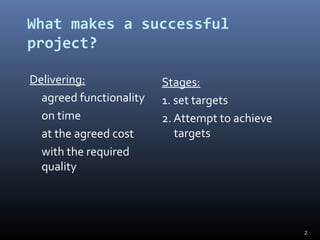
What makes a successful
project?
Delivering:
agreed functionality
on time
at the agreed cost
with the required
quality
Stages:
1. set targets
2. Attempt to achieve
targets
2
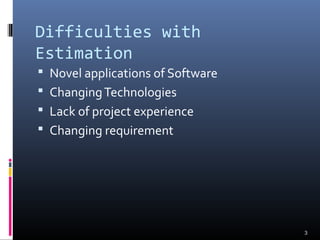
Difficulties with
Estimation
 Novel applications of Software
 ChangingTechnologies
 Lack of project experience
 Changing requirement
3
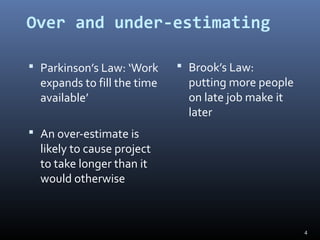
Over and under-estimating
 Parkinson’s Law: ‘Work
expands to fill the time
available’
 An over-estimate is
likely to cause project
to take longer than it
would otherwise
 Brook’s Law:
putting more people
on late job make it
later
4
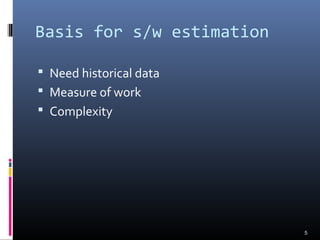
Basis for s/w estimation
 Need historical data
 Measure of work
 Complexity
5
Bottom-up estimating
1. Break project into smaller and smaller
components
[2. Stop when you get to what one person can
do in one/two weeks]
3. Estimate costs for the lowest level activities
4. At each higher level calculate estimate by
adding estimates for lower levels
6
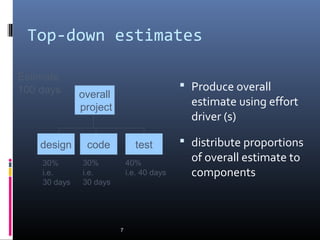
Top-down estimates
 Produce overall
estimate using effort
driver (s)
 distribute proportions
of overall estimate to
components
7
design code
overall
project
test
Estimate
100 days
30%
i.e.
30 days
30%
i.e.
30 days
40%
i.e. 40 days
Bottom-up versus top-down
 Bottom-up
 use when no past project data
 identify all tasks that have to be done – so quite time-
consuming
 use when you have no data about similar past projects
 Top-down
 produce overall estimate based on project cost drivers
 based on past project data
 divide overall estimate between jobs to be done
8
9
Alan Albrecht while working for IBM, recognized the
problem in size measurement in the 1970s, and
developed a technique (which he called Function
Point Analysis), which appeared to be a solution to
the size measurement problem.
Function Count
Function Point
10
The principle of Albrecht’s function point analysis
(FPA) is that a system is decomposed into
functional units.
 Inputs : information entering the system
 Outputs : information leaving the system
 Enquiries : requests for instant access to
information
 Internal logical files : information held within the
system
 External interface files : information held by other system
that is used by the system being
analyzed.
2.Function Count(Cont.)
11
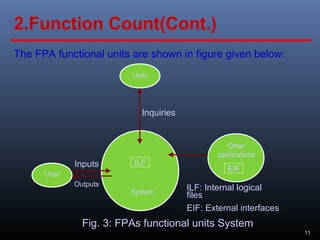
The FPA functional units are shown in figure given below:
ILF
EIF
User
User
Other
applications
System
Outputs
Inputs
Inquiries
ILF: Internal logical
files
EIF: External interfaces
Fig. 3: FPAs functional units System
2.Function Count(Cont.)
12
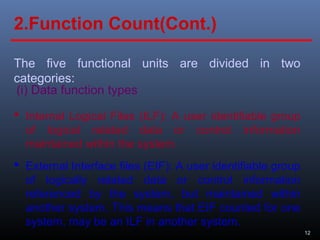
The five functional units are divided in two
categories:
(i) Data function types
 Internal Logical Files (ILF): A user identifiable group
of logical related data or control information
maintained within the system.
2.Function Count(Cont.)
 External Interface files (EIF): A user identifiable group
of logically related data or control information
referenced by the system, but maintained within
another system. This means that EIF counted for one
system, may be an ILF in another system.
13
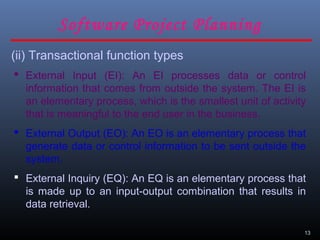
(ii) Transactional function types
 External Input (EI): An EI processes data or control
information that comes from outside the system. The EI is
an elementary process, which is the smallest unit of activity
that is meaningful to the end user in the business.
 External Output (EO): An EO is an elementary process that
generate data or control information to be sent outside the
system.
 External Inquiry (EQ): An EQ is an elementary process that
is made up to an input-output combination that results in
data retrieval.
Software Project Planning
14
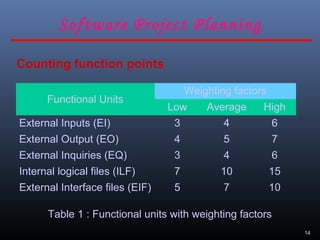
Counting function points
Functional Units
Weighting factors
Low Average High
External Inputs (EI) 3 4 6
External Output (EO) 4 5 7
External Inquiries (EQ) 3 4 6
Internal logical files (ILF) 7 10 15
External Interface files (EIF) 5 7 10
Table 1 : Functional units with weighting factors
Software Project Planning
15
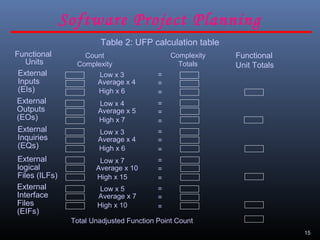
Table 2: UFP calculation table
Count
Complexity
Complexity
Totals
Low x 3
Average x 4
High x 6
=
=
=
=
=
=
=
=
=
=
=
=
=
=
=
Low x 4
Average x 5
High x 7
Low x 3
Average x 4
High x 6
Low x 7
Average x 10
High x 15
Low x 5
Average x 7
High x 10
Functional
Units
External
Inputs
(EIs)
External
Outputs
(EOs)
External
Inquiries
(EQs)
External
logical
Files (ILFs)
External
Interface
Files
(EIFs)
Functional
Unit Totals
Total Unadjusted Function Point Count
Software Project Planning
16
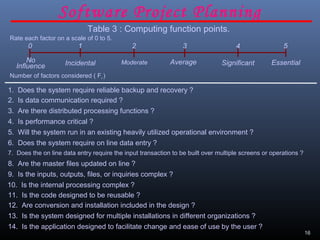
Table 3 : Computing function points.
Rate each factor on a scale of 0 to 5.
20 3 541
ModerateNo
Influence
Average EssentialSignificantIncidental
Number of factors considered ( Fi )
1. Does the system require reliable backup and recovery ?
2. Is data communication required ?
3. Are there distributed processing functions ?
4. Is performance critical ?
5. Will the system run in an existing heavily utilized operational environment ?
6. Does the system require on line data entry ?
7. Does the on line data entry require the input transaction to be built over multiple screens or operations ?
8. Are the master files updated on line ?
9. Is the inputs, outputs, files, or inquiries complex ?
10. Is the internal processing complex ?
11. Is the code designed to be reusable ?
12. Are conversion and installation included in the design ?
13. Is the system designed for multiple installations in different organizations ?
14. Is the application designed to facilitate change and ease of use by the user ?
Software Project Planning
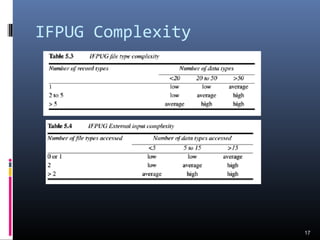
IFPUG Complexity
17
18
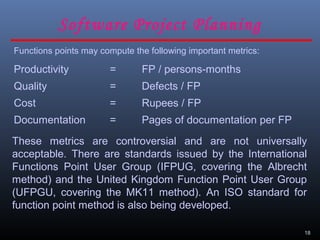
Functions points may compute the following important metrics:
Productivity = FP / persons-months
Quality = Defects / FP
Cost = Rupees / FP
Documentation = Pages of documentation per FP
These metrics are controversial and are not universally
acceptable. There are standards issued by the International
Functions Point User Group (IFPUG, covering the Albrecht
method) and the United Kingdom Function Point User Group
(UFPGU, covering the MK11 method). An ISO standard for
function point method is also being developed.
Software Project Planning
19
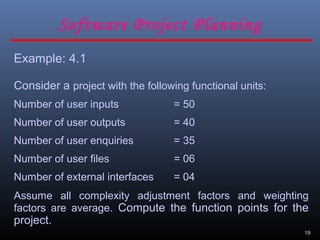
Example: 4.1
Consider a project with the following functional units:
Number of user inputs = 50
Number of user outputs = 40
Number of user enquiries = 35
Number of user files = 06
Number of external interfaces = 04
Assume all complexity adjustment factors and weighting
factors are average. Compute the function points for the
project.
Software Project Planning
20
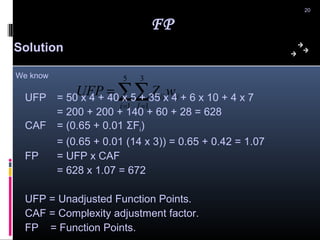
Solution
∑∑= =
=
5
1
3
1i J
ijij wZUFPUFP = 50 x 4 + 40 x 5 + 35 x 4 + 6 x 10 + 4 x 7
= 200 + 200 + 140 + 60 + 28 = 628
CAF = (0.65 + 0.01 ΣFi)
= (0.65 + 0.01 (14 x 3)) = 0.65 + 0.42 = 1.07
FP = UFP x CAF
= 628 x 1.07 = 672
UFP = Unadjusted Function Points.
CAF = Complexity adjustment factor.
FP = Function Points.
FP
We know
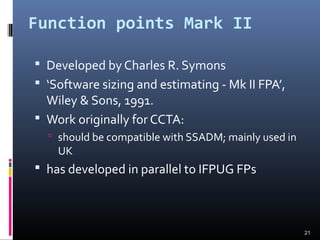
Function points Mark II
 Developed by Charles R. Symons
 ‘Software sizing and estimating - Mk II FPA’,
Wiley & Sons, 1991.
 Work originally for CCTA:
 should be compatible with SSADM; mainly used in
UK
 has developed in parallel to IFPUG FPs
21
Function points Mk II
continued
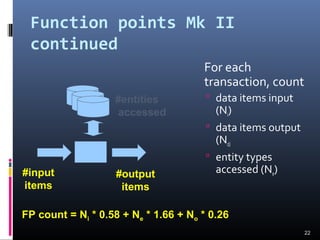
For each
transaction, count
 data items input
(Ni)
 data items output
(No)
 entity types
accessed (Ne)
22
#entities
accessed
#input
items
#output
items
FP count = Ni * 0.58 + Ne * 1.66 + No * 0.26
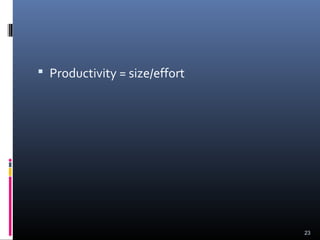
 Productivity = size/effort
23
24
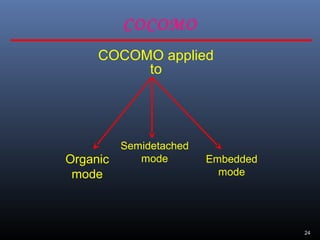
COCOMO applied
to
Semidetached
mode Embedded
mode
Organic
mode
COCOMO
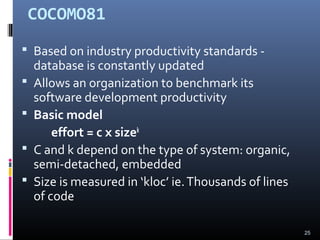
COCOMO81
 Based on industry productivity standards -
database is constantly updated
 Allows an organization to benchmark its
software development productivity
 Basic model
effort = c x sizek
 C and k depend on the type of system: organic,
semi-detached, embedded
 Size is measured in ‘kloc’ ie.Thousands of lines
of code
25
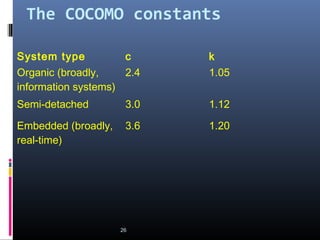
The COCOMO constants
System type c k
Organic (broadly,
information systems)
2.4 1.05
Semi-detached 3.0 1.12
Embedded (broadly,
real-time)
3.6 1.20
26
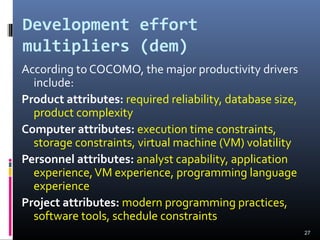
Development effort
multipliers (dem)
According to COCOMO, the major productivity drivers
include:
Product attributes: required reliability, database size,
product complexity
Computer attributes: execution time constraints,
storage constraints, virtual machine (VM) volatility
Personnel attributes: analyst capability, application
experience,VM experience, programming language
experience
Project attributes: modern programming practices,
software tools, schedule constraints
27
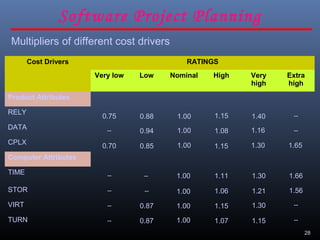
28
Software Project Planning
Cost Drivers RATINGS
Very low Low Nominal High Very
high
Extra
high
Product Attributes
RELY
DATA
CPLX
Computer Attributes
TIME
STOR
VIRT
TURN
Multipliers of different cost drivers
1.651.301.151.000.850.70
--1.161.081.000.94--
--1.401.151.000.880.75
--1.151.071.000.87--
--1.301.151.000.87--
1.561.211.061.00----
1.661.301.111.00----
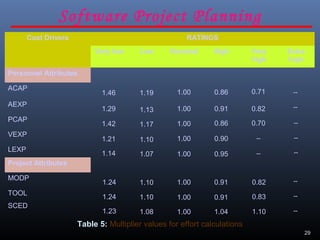
29
Software Project Planning
Cost Drivers RATINGS
Very low Low Nominal High Very
high
Extra
high
Personnel Attributes
ACAP
AEXP
PCAP
VEXP
LEXP
Project Attributes
MODP
TOOL
SCED
--
--0.951.001.071.14
--0.901.001.101.21
0.700.861.001.171.42
0.820.911.001.131.29 --
0.710.861.001.191.46
1.101.041.001.081.23
0.830.911.001.101.24
0.820.911.001.101.24
Table 5: Multiplier values for effort calculations
--
--
--
--
--
--
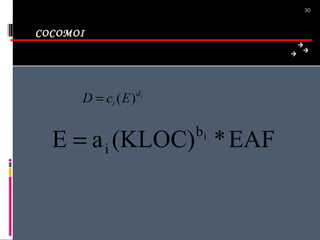
COCOMOI
30
id
i EcD )(=
EAF*(KLOC)aE ib
i=
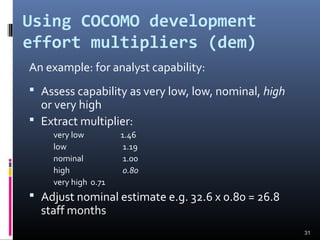
Using COCOMO development
effort multipliers (dem)
An example: for analyst capability:
 Assess capability as very low, low, nominal, high
or very high
 Extract multiplier:
very low 1.46
low 1.19
nominal 1.00
high 0.80
very high 0.71
 Adjust nominal estimate e.g. 32.6 x 0.80 = 26.8
staff months
31
32
33
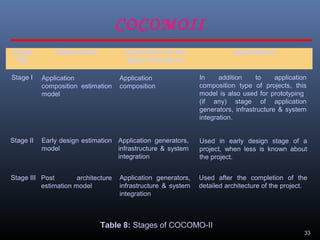
Table 8: Stages of COCOMO-II
Stage
No
Model Name Application for the
types of projects
Applications
Stage I
Stage II
Stage III
Application
composition estimation
model
Early design estimation
model
Post architecture
estimation model
Application
composition
Application generators,
infrastructure & system
integration
Application generators,
infrastructure & system
integration
In addition to application
composition type of projects, this
model is also used for prototyping
(if any) stage of application
generators, infrastructure & system
integration.
Used in early design stage of a
project, when less is known about
the project.
Used after the completion of the
detailed architecture of the project.
COCOMOII

software effort estimation

  • 1.
  • 2.
    What makes asuccessful project? Delivering: agreed functionality on time at the agreed cost with the required quality Stages: 1. set targets 2. Attempt to achieve targets 2
  • 3.
    Difficulties with Estimation  Novelapplications of Software  ChangingTechnologies  Lack of project experience  Changing requirement 3
  • 4.
    Over and under-estimating Parkinson’s Law: ‘Work expands to fill the time available’  An over-estimate is likely to cause project to take longer than it would otherwise  Brook’s Law: putting more people on late job make it later 4
  • 5.
    Basis for s/westimation  Need historical data  Measure of work  Complexity 5
  • 6.
    Bottom-up estimating 1. Breakproject into smaller and smaller components [2. Stop when you get to what one person can do in one/two weeks] 3. Estimate costs for the lowest level activities 4. At each higher level calculate estimate by adding estimates for lower levels 6
  • 7.
    Top-down estimates  Produceoverall estimate using effort driver (s)  distribute proportions of overall estimate to components 7 design code overall project test Estimate 100 days 30% i.e. 30 days 30% i.e. 30 days 40% i.e. 40 days
  • 8.
    Bottom-up versus top-down Bottom-up  use when no past project data  identify all tasks that have to be done – so quite time- consuming  use when you have no data about similar past projects  Top-down  produce overall estimate based on project cost drivers  based on past project data  divide overall estimate between jobs to be done 8
  • 9.
    9 Alan Albrecht whileworking for IBM, recognized the problem in size measurement in the 1970s, and developed a technique (which he called Function Point Analysis), which appeared to be a solution to the size measurement problem. Function Count Function Point
  • 10.
    10 The principle ofAlbrecht’s function point analysis (FPA) is that a system is decomposed into functional units.  Inputs : information entering the system  Outputs : information leaving the system  Enquiries : requests for instant access to information  Internal logical files : information held within the system  External interface files : information held by other system that is used by the system being analyzed. 2.Function Count(Cont.)
  • 11.
    11 The FPA functionalunits are shown in figure given below: ILF EIF User User Other applications System Outputs Inputs Inquiries ILF: Internal logical files EIF: External interfaces Fig. 3: FPAs functional units System 2.Function Count(Cont.)
  • 12.
    12 The five functionalunits are divided in two categories: (i) Data function types  Internal Logical Files (ILF): A user identifiable group of logical related data or control information maintained within the system. 2.Function Count(Cont.)  External Interface files (EIF): A user identifiable group of logically related data or control information referenced by the system, but maintained within another system. This means that EIF counted for one system, may be an ILF in another system.
  • 13.
    13 (ii) Transactional functiontypes  External Input (EI): An EI processes data or control information that comes from outside the system. The EI is an elementary process, which is the smallest unit of activity that is meaningful to the end user in the business.  External Output (EO): An EO is an elementary process that generate data or control information to be sent outside the system.  External Inquiry (EQ): An EQ is an elementary process that is made up to an input-output combination that results in data retrieval. Software Project Planning
  • 14.
    14 Counting function points FunctionalUnits Weighting factors Low Average High External Inputs (EI) 3 4 6 External Output (EO) 4 5 7 External Inquiries (EQ) 3 4 6 Internal logical files (ILF) 7 10 15 External Interface files (EIF) 5 7 10 Table 1 : Functional units with weighting factors Software Project Planning
  • 15.
    15 Table 2: UFPcalculation table Count Complexity Complexity Totals Low x 3 Average x 4 High x 6 = = = = = = = = = = = = = = = Low x 4 Average x 5 High x 7 Low x 3 Average x 4 High x 6 Low x 7 Average x 10 High x 15 Low x 5 Average x 7 High x 10 Functional Units External Inputs (EIs) External Outputs (EOs) External Inquiries (EQs) External logical Files (ILFs) External Interface Files (EIFs) Functional Unit Totals Total Unadjusted Function Point Count Software Project Planning
  • 16.
    16 Table 3 :Computing function points. Rate each factor on a scale of 0 to 5. 20 3 541 ModerateNo Influence Average EssentialSignificantIncidental Number of factors considered ( Fi ) 1. Does the system require reliable backup and recovery ? 2. Is data communication required ? 3. Are there distributed processing functions ? 4. Is performance critical ? 5. Will the system run in an existing heavily utilized operational environment ? 6. Does the system require on line data entry ? 7. Does the on line data entry require the input transaction to be built over multiple screens or operations ? 8. Are the master files updated on line ? 9. Is the inputs, outputs, files, or inquiries complex ? 10. Is the internal processing complex ? 11. Is the code designed to be reusable ? 12. Are conversion and installation included in the design ? 13. Is the system designed for multiple installations in different organizations ? 14. Is the application designed to facilitate change and ease of use by the user ? Software Project Planning
  • 17.
  • 18.
    18 Functions points maycompute the following important metrics: Productivity = FP / persons-months Quality = Defects / FP Cost = Rupees / FP Documentation = Pages of documentation per FP These metrics are controversial and are not universally acceptable. There are standards issued by the International Functions Point User Group (IFPUG, covering the Albrecht method) and the United Kingdom Function Point User Group (UFPGU, covering the MK11 method). An ISO standard for function point method is also being developed. Software Project Planning
  • 19.
    19 Example: 4.1 Consider aproject with the following functional units: Number of user inputs = 50 Number of user outputs = 40 Number of user enquiries = 35 Number of user files = 06 Number of external interfaces = 04 Assume all complexity adjustment factors and weighting factors are average. Compute the function points for the project. Software Project Planning
  • 20.
    20 Solution ∑∑= = = 5 1 3 1i J ijijwZUFPUFP = 50 x 4 + 40 x 5 + 35 x 4 + 6 x 10 + 4 x 7 = 200 + 200 + 140 + 60 + 28 = 628 CAF = (0.65 + 0.01 ΣFi) = (0.65 + 0.01 (14 x 3)) = 0.65 + 0.42 = 1.07 FP = UFP x CAF = 628 x 1.07 = 672 UFP = Unadjusted Function Points. CAF = Complexity adjustment factor. FP = Function Points. FP We know
  • 21.
    Function points MarkII  Developed by Charles R. Symons  ‘Software sizing and estimating - Mk II FPA’, Wiley & Sons, 1991.  Work originally for CCTA:  should be compatible with SSADM; mainly used in UK  has developed in parallel to IFPUG FPs 21
  • 22.
    Function points MkII continued For each transaction, count  data items input (Ni)  data items output (No)  entity types accessed (Ne) 22 #entities accessed #input items #output items FP count = Ni * 0.58 + Ne * 1.66 + No * 0.26
  • 23.
     Productivity =size/effort 23
  • 24.
  • 25.
    COCOMO81  Based onindustry productivity standards - database is constantly updated  Allows an organization to benchmark its software development productivity  Basic model effort = c x sizek  C and k depend on the type of system: organic, semi-detached, embedded  Size is measured in ‘kloc’ ie.Thousands of lines of code 25
  • 26.
    The COCOMO constants Systemtype c k Organic (broadly, information systems) 2.4 1.05 Semi-detached 3.0 1.12 Embedded (broadly, real-time) 3.6 1.20 26
  • 27.
    Development effort multipliers (dem) Accordingto COCOMO, the major productivity drivers include: Product attributes: required reliability, database size, product complexity Computer attributes: execution time constraints, storage constraints, virtual machine (VM) volatility Personnel attributes: analyst capability, application experience,VM experience, programming language experience Project attributes: modern programming practices, software tools, schedule constraints 27
  • 28.
    28 Software Project Planning CostDrivers RATINGS Very low Low Nominal High Very high Extra high Product Attributes RELY DATA CPLX Computer Attributes TIME STOR VIRT TURN Multipliers of different cost drivers 1.651.301.151.000.850.70 --1.161.081.000.94-- --1.401.151.000.880.75 --1.151.071.000.87-- --1.301.151.000.87-- 1.561.211.061.00---- 1.661.301.111.00----
  • 29.
    29 Software Project Planning CostDrivers RATINGS Very low Low Nominal High Very high Extra high Personnel Attributes ACAP AEXP PCAP VEXP LEXP Project Attributes MODP TOOL SCED -- --0.951.001.071.14 --0.901.001.101.21 0.700.861.001.171.42 0.820.911.001.131.29 -- 0.710.861.001.191.46 1.101.041.001.081.23 0.830.911.001.101.24 0.820.911.001.101.24 Table 5: Multiplier values for effort calculations -- -- -- -- -- --
  • 30.
  • 31.
    Using COCOMO development effortmultipliers (dem) An example: for analyst capability:  Assess capability as very low, low, nominal, high or very high  Extract multiplier: very low 1.46 low 1.19 nominal 1.00 high 0.80 very high 0.71  Adjust nominal estimate e.g. 32.6 x 0.80 = 26.8 staff months 31
  • 32.
  • 33.
    33 Table 8: Stagesof COCOMO-II Stage No Model Name Application for the types of projects Applications Stage I Stage II Stage III Application composition estimation model Early design estimation model Post architecture estimation model Application composition Application generators, infrastructure & system integration Application generators, infrastructure & system integration In addition to application composition type of projects, this model is also used for prototyping (if any) stage of application generators, infrastructure & system integration. Used in early design stage of a project, when less is known about the project. Used after the completion of the detailed architecture of the project. COCOMOII

Editor's Notes

  • #2 This talk provides an overview of the basic steps needed to produce a project plan. The framework provided should allow students to identify where some of the particular issues discussed in other chapters are applied to the planning process. As the focus is on project planning, techniques to do with project control are not explicitly described. However, in practice, one element of project planning will be to decide what project control procedures need to be in place.
  • #3 A key point here is that developers may in fact be very competent, but incorrect estimates leading to unachievable targets will lead to extreme customer dissatisfaction.
  • #5 The answer to the problem of over-optimistic estimates might seem to be to pad out all estimates, but this itself can lead to problems. You might miss out to the competition who could underbid you, if you were tendering for work. Generous estimates also tend to lead to reductions in productivity. On the other hand, having aggressive targets in order to increase productivity could lead to poorer product quality. Ask how many students have heard of Parkinson’s Law – the response could be interesting! It is best to explain that C. Northcote Parkinson was to some extent a humourist, rather than a heavyweight social scientist. Note that ‘zeroth’ is what comes before first. This is discussed in Section 5.3 of the text which also covers Brooks’Law.
  • #7 The idea is that even if you have never done something before you can imagine what you could do in about a week. Exercise 5.2 relates to bottom-up estimating
  • #9 There is often confusion between the two approaches as the first part of the bottom-up approach is a top-down analysis of the tasks to be done, followed by the bottom-up adding up of effort for all the work to be done. Make sure you students understand this or it will return to haunt you (and them) at examination time.
  • #22 Once again, just a reminder that the lecture is just an overview of concepts. Mark II FPs is a version of function points developed in the UK and is only used by a minority of FP specialists. The US-based IFPUG method (developed from the original Albrecht approach) is more widely used. I use the Mark II version because it has simpler rules and thus provides an easier introduction to the principles of FPs. Mark II FPs are explained in more detail in Section 5.9. If you are really keen on teaching the IFPUG approach then look at Section 5.10. The IFPUG rules are really quite tricky in places and for the full rules it is best to contact IFPUG.
  • #23 For each transaction (cf use case) count the number of input types (not occurrences e.g. where a table of payments is input on a screen so the account number is repeated a number of times), the number of output types, and the number of entities accessed. Multiply by the weightings shown and sum. This produces an FP count for the transaction which will not be very useful. Sum the counts for all the transactions in an application and the resulting index value is a reasonable indicator of the amount of processing carried out. The number can be used as a measure of size rather than lines of code. See calculations of productivity etc discussed earlier. There is an example calculation in Section 5.9 (Example 5.3) and Exercise 5.7 should give a little practice in applying the method.
  • #26 Recall that the aim of this lecture is to give an overview of principles. COCOMO81 is the original version of the model which has subsequently been developed into COCOMO II some details of which are discussed in Section 5.12. For full details read Barry Boehm et al. Software estimation with COCOMO II Prentice-Hall 2002.
  • #27 An interesting question is what a ‘semi-detached’ system is exactly. To my mind, a project that combines elements of both real-time and information systems (i.e. has a substantial database) ought to be even more difficult than an embedded system. Another point is that COCOMO was based on data from very large projects. There are data from smaller projects that larger projects tend to be more productive because of economies of scale. At some point the diseconomies of scale caused by the additional management and communication overheads then start to make themselves felt. Exercise 5.10 in the textbook provides practice in applying the basic model.
  • #28 Virtual machine volatility is where the operating system that will run your software is subject to change. This could particularly be the case with embedded control software in an industrial environment. Schedule constraints refers to situations where extra resources are deployed to meet a tight deadline. If two developers can complete a task in three months, it does not follow that six developers could complete the job in one month. There would be additional effort needed to divide up the work and co-ordinate effort and so on.
  • #32 Exercise 5.11 gives practice in applying these.