TABLE​ ​OF​ ​CONTENTS
Part Title Page
A
1.​ ​Introduction 2
2.​ ​CostX 3-7
3.​ ​Buildsoft 8-10
4.​ ​Glodon​ ​Cubicost 11-13
5.​ ​Vico 14-15
6.​ ​Summary 16-17
7.​ ​Recommendation 18
B
8.​ ​Preparation/Briefing​ ​Stage 19-20
9.​ ​Design​ ​Stage 21-22
10.​ ​Pre-Construction​ ​Stage 23-24
11.​ ​Construction​ ​Stage 25-26
12.​ ​Post-Construction​ ​Stage 27-28
C 13.​ ​Reference 29-30
Taylor’s​ ​University​ ​|​ ​Software​ ​Application​ ​for​ ​Quantity​ ​Surveying​ ​|​​ ​Group​ ​Project​ ​​ ​​ ​​ ​​ ​​ ​​ ​​ ​​ ​​ ​​ ​​ ​​ ​​ ​​ ​​ ​​ ​​ ​​ ​​ ​​ ​​ ​​ ​​ ​​ ​​ ​​ ​​ ​​ ​​ ​​ ​​ ​​ ​​ ​​ ​​ ​​ ​​ ​​ ​​ ​​ ​​ ​​ ​​ ​​ ​​ ​​ ​​ ​​ ​​ ​​ ​​ ​​ ​​ ​​ ​​ ​​ ​​ ​​ ​​ ​​ ​​ ​​ ​​ ​​ ​​ ​​ ​​ ​​ ​​ ​​ ​​ ​​ ​​ ​​ ​​ ​​ ​​ ​​ ​​ ​​ ​​ ​​ ​​ ​​ ​​ ​​ ​​ ​​ ​​ ​​ ​​ ​​ ​​ ​1
Part​ ​A:
1.​ ​Introduction
In this era of globalization, there is actually tons of information, knowledge, and technology that
has been shared and spread widely across the globe. In the perspective of the construction industry,
Building Information Modeling(BIM) has been introduced to ease the creation and management of
digital representations. With the existence of BIM, the hassle for the process of designing a building is
minimized as it can be done with just any BIM softwares rather than using separate sets of drawings.
Also, one of the main reason BIM’s name is up there is due to being able to share with other parties in a
construction project. Construction companies favor this with the sole purpose of improving time, cost
and​ ​quality.
On a global basis, BIM adoption can vary significantly by region or by country. In certain
countries, companies would take an active role in adopting this BIM by mandating in both public and
private projects. Nowadays since conserving energy as well as carbon emissions is essential on a global
basis, adopting BIM tools and practices should be a high priority, because it can significantly affect the
efficient​ ​use​ ​of​ ​the​ ​valuables​ ​and​ ​lack​ ​of​ ​resources.
Every software that is under BIM has its own greatness and benefits, depending on what a
company favors more in terms of simplicity and functionality. Therefore, our group has decided to do a
research on 4 BIM softwares that will later be evaluated and compared in an in-depth manner to ensure
that we have valid reasons to support the software we would recommend out of the 4. The 4 softwares
that​ ​we​ ​have​ ​chosen​ ​to​ ​talk​ ​about​ ​is​ ​CostX,​ ​Buildsoft​ ​Cubit,​ ​Glodon,​ ​and​ ​Vico.
Taylor’s​ ​University​ ​|​ ​Software​ ​Application​ ​for​ ​Quantity​ ​Surveying​ ​|​​ ​Group​ ​Project​ ​​ ​​ ​​ ​​ ​​ ​​ ​​ ​​ ​​ ​​ ​​ ​​ ​​ ​​ ​​ ​​ ​​ ​​ ​​ ​​ ​​ ​​ ​​ ​​ ​​ ​​ ​​ ​​ ​​ ​​ ​​ ​​ ​​ ​​ ​​ ​​ ​​ ​​ ​​ ​​ ​​ ​​ ​​ ​​ ​​ ​​ ​​ ​​ ​​ ​​ ​​ ​​ ​​ ​​ ​​ ​​ ​​ ​​ ​​ ​​ ​​ ​​ ​​ ​​ ​​ ​​ ​​ ​​ ​​ ​​ ​​ ​​ ​​ ​​ ​​ ​​ ​​ ​​ ​​ ​​ ​​ ​​ ​​ ​​ ​​ ​​ ​​ ​​ ​​ ​​ ​​ ​​ ​​ ​2
2.0​ ​CostX
CostX is a construction digital takeoff software which is developed by Exactal and there is a total of 7
specialised CostX products in the company like CostX 2D and CostX Takeoff 2D which work with 2D
digital drawings. There are CostX and CostX Takeoff in the market; both of them are capable of
integrating with BIM and 3D models to produce quantities automatically. However, only CostX can
provide us the full capabilities of BIM estimating software and powerful features such as Auto-Revise
and 3D model quantity take-off. The general functions of CostX also include coupling with a costing
library​ ​which​ ​permits​ ​an​ ​instant​ ​cost​ ​figure​ ​and​ ​recalculation​ ​when​ ​variations​ ​are​ ​being​ ​made.
2.1​ ​Features
a)​ ​2D​ ​Take​ ​off​ ​&​ ​3D​ ​Take​ ​off
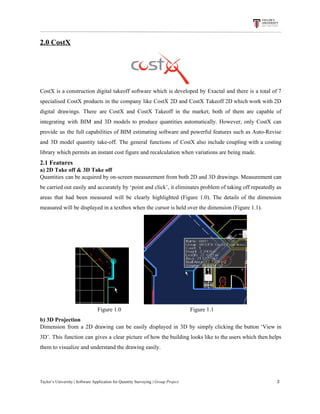
Quantities can be acquired by on-screen measurement from both 2D and 3D drawings. Measurement can
be carried out easily and accurately by ‘point and click’, it eliminates problem of taking off repeatedly as
areas that had been measured will be clearly highlighted (Figure 1.0). The details of the dimension
measured​ ​will​ ​be​ ​displayed​ ​in​ ​a​ ​textbox​ ​when​ ​the​ ​cursor​ ​is​ ​held​ ​over​ ​the​ ​dimension​ ​(Figure​ ​1.1).
​ ​​ ​​ ​​ ​​ ​​ ​​ ​​ ​​ ​
​ ​​ ​​ ​​ ​​ ​​ ​​ ​​ ​​ ​​ ​​ ​​ ​​ ​​ ​​ ​​ ​​ ​​ ​​ ​​ ​​ ​​ ​​ ​​ ​​ ​​ ​​ ​​ ​​ ​​ ​​ ​​​ ​​ ​​ ​​ ​​ ​​ ​​ ​​ ​​ ​Figure​ ​1.0​ ​​ ​​ ​​ ​​ ​​ ​​ ​​ ​​ ​​ ​​ ​​ ​​ ​​ ​​ ​​ ​​ ​​ ​​ ​​ ​​ ​​ ​​ ​​ ​​ ​​ ​​ ​​ ​​ ​​ ​​ ​​ ​​ ​​ ​​ ​​ ​​ ​​ ​​ ​​ ​​ ​​ ​​ ​​ ​​ ​​ ​​ ​​ ​Figure​ ​1.1
b)​ ​3D​ ​Projection
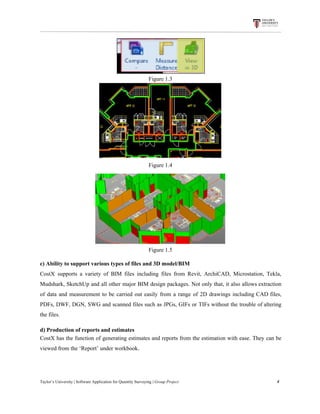
Dimension from a 2D drawing can be easily displayed in 3D by simply clicking the button ‘View in
3D’. This function can gives a clear picture of how the building looks like to the users which then helps
them​ ​to​ ​visualize​ ​and​ ​understand​ ​the​ ​drawing​ ​easily.
Taylor’s​ ​University​ ​|​ ​Software​ ​Application​ ​for​ ​Quantity​ ​Surveying​ ​|​​ ​Group​ ​Project​ ​​ ​​ ​​ ​​ ​​ ​​ ​​ ​​ ​​ ​​ ​​ ​​ ​​ ​​ ​​ ​​ ​​ ​​ ​​ ​​ ​​ ​​ ​​ ​​ ​​ ​​ ​​ ​​ ​​ ​​ ​​ ​​ ​​ ​​ ​​ ​​ ​​ ​​ ​​ ​​ ​​ ​​ ​​ ​​ ​​ ​​ ​​ ​​ ​​ ​​ ​​ ​​ ​​ ​​ ​​ ​​ ​​ ​​ ​​ ​​ ​​ ​​ ​​ ​​ ​​ ​​ ​​ ​​ ​​ ​​ ​​ ​​ ​​ ​​ ​​ ​​ ​​ ​​ ​​ ​​ ​​ ​​ ​​ ​​ ​​ ​​ ​​ ​​ ​​ ​​ ​​ ​​ ​​ ​3
Figure​ ​1.3
Figure​ ​1.4
Figure​ ​1.5
c)​ ​Ability​ ​to​ ​support​ ​various​ ​types​ ​of​ ​files​ ​and​ ​3D​ ​model/BIM
CostX supports a variety of BIM files including files from Revit, ArchiCAD, Microstation, Tekla,
Mudshark, SketchUp and all other major BIM design packages. Not only that, it also allows extraction
of data and measurement to be carried out easily from a range of 2D drawings including CAD files,
PDFs, DWF, DGN, SWG and scanned files such as JPGs, GIFs or TIFs without the trouble of altering
the​ ​files.
d)​ ​Production​ ​of​ ​reports​ ​and​ ​estimates
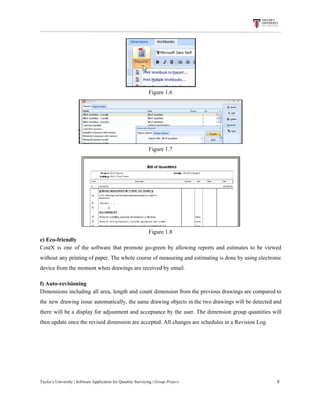
CostX has the function of generating estimates and reports from the estimation with ease. They can be
viewed​ ​from​ ​the​ ​‘Report’​ ​under​ ​workbook.
Taylor’s​ ​University​ ​|​ ​Software​ ​Application​ ​for​ ​Quantity​ ​Surveying​ ​|​​ ​Group​ ​Project​ ​​ ​​ ​​ ​​ ​​ ​​ ​​ ​​ ​​ ​​ ​​ ​​ ​​ ​​ ​​ ​​ ​​ ​​ ​​ ​​ ​​ ​​ ​​ ​​ ​​ ​​ ​​ ​​ ​​ ​​ ​​ ​​ ​​ ​​ ​​ ​​ ​​ ​​ ​​ ​​ ​​ ​​ ​​ ​​ ​​ ​​ ​​ ​​ ​​ ​​ ​​ ​​ ​​ ​​ ​​ ​​ ​​ ​​ ​​ ​​ ​​ ​​ ​​ ​​ ​​ ​​ ​​ ​​ ​​ ​​ ​​ ​​ ​​ ​​ ​​ ​​ ​​ ​​ ​​ ​​ ​​ ​​ ​​ ​​ ​​ ​​ ​​ ​​ ​​ ​​ ​​ ​​ ​​ ​4
Figure​ ​1.6
Figure​ ​1.7
Figure​ ​1.8
e)​ ​Eco-friendly
CostX is one of the software that promote go-green by allowing reports and estimates to be viewed
without any printing of paper. The whole course of measuring and estimating is done by using electronic
device​ ​from​ ​the​ ​moment​ ​when​ ​drawings​ ​are​ ​received​ ​by​ ​email.
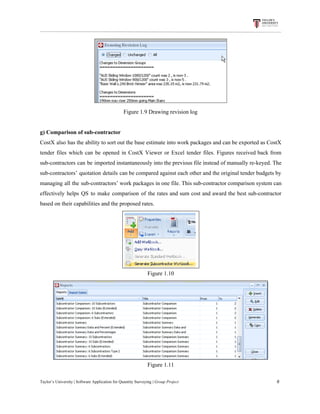
f)​ ​Auto-revisioning
Dimensions including all area, length and count dimension from the previous drawings are compared to
the new drawing issue automatically, the same drawing objects in the two drawings will be detected and
there will be a display for adjustment and acceptance by the user. The dimension group quantities will
then​ ​update​ ​once​ ​the​ ​revised​ ​dimension​ ​are​ ​accepted.​ ​All​ ​changes​ ​are​ ​schedules​ ​in​ ​a​ ​Revision​ ​Log.
Taylor’s​ ​University​ ​|​ ​Software​ ​Application​ ​for​ ​Quantity​ ​Surveying​ ​|​​ ​Group​ ​Project​ ​​ ​​ ​​ ​​ ​​ ​​ ​​ ​​ ​​ ​​ ​​ ​​ ​​ ​​ ​​ ​​ ​​ ​​ ​​ ​​ ​​ ​​ ​​ ​​ ​​ ​​ ​​ ​​ ​​ ​​ ​​ ​​ ​​ ​​ ​​ ​​ ​​ ​​ ​​ ​​ ​​ ​​ ​​ ​​ ​​ ​​ ​​ ​​ ​​ ​​ ​​ ​​ ​​ ​​ ​​ ​​ ​​ ​​ ​​ ​​ ​​ ​​ ​​ ​​ ​​ ​​ ​​ ​​ ​​ ​​ ​​ ​​ ​​ ​​ ​​ ​​ ​​ ​​ ​​ ​​ ​​ ​​ ​​ ​​ ​​ ​​ ​​ ​​ ​​ ​​ ​​ ​​ ​​ ​5
Figure​ ​1.9​ ​Drawing​ ​revision​ ​log
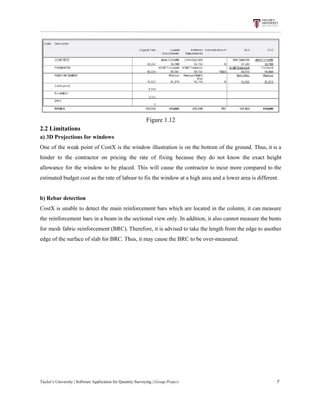
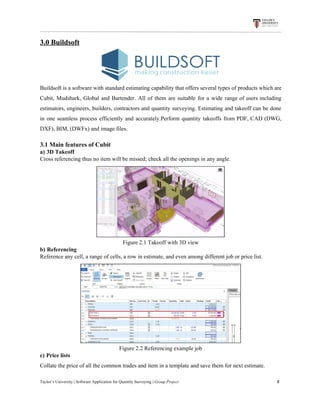
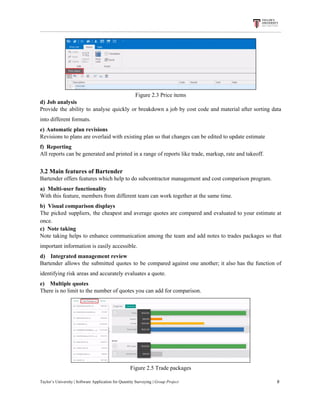
g)​ ​Comparison​ ​of​ ​sub-contractor
CostX also has the ability to sort out the base estimate into work packages and can be exported as CostX
tender files which can be opened in CostX Viewer or Excel tender files. Figures received back from
sub-contractors can be imported instantaneously into the previous file instead of manually re-keyed. The
sub-contractors’ quotation details can be compared against each other and the original tender budgets by
managing all the sub-contractors’ work packages in one file. This sub-contractor comparison system can
effectively helps QS to make comparison of the rates and sum cost and award the best sub-contractor
based​ ​on​ ​their​ ​capabilities​ ​and​ ​the​ ​proposed​ ​rates.
Figure​ ​1.10
Figure​ ​1.11
Taylor’s​ ​University​ ​|​ ​Software​ ​Application​ ​for​ ​Quantity​ ​Surveying​ ​|​​ ​Group​ ​Project​ ​​ ​​ ​​ ​​ ​​ ​​ ​​ ​​ ​​ ​​ ​​ ​​ ​​ ​​ ​​ ​​ ​​ ​​ ​​ ​​ ​​ ​​ ​​ ​​ ​​ ​​ ​​ ​​ ​​ ​​ ​​ ​​ ​​ ​​ ​​ ​​ ​​ ​​ ​​ ​​ ​​ ​​ ​​ ​​ ​​ ​​ ​​ ​​ ​​ ​​ ​​ ​​ ​​ ​​ ​​ ​​ ​​ ​​ ​​ ​​ ​​ ​​ ​​ ​​ ​​ ​​ ​​ ​​ ​​ ​​ ​​ ​​ ​​ ​​ ​​ ​​ ​​ ​​ ​​ ​​ ​​ ​​ ​​ ​​ ​​ ​​ ​​ ​​ ​​ ​​ ​​ ​​ ​​ ​6
Figure​ ​1.12
2.2​ ​Limitations
a)​ ​3D​ ​Projections​ ​for​ ​windows
One of the weak point of CostX is the window illustration is on the bottom of the ground. Thus, it is a
hinder to the contractor on pricing the rate of fixing because they do not know the exact height
allowance for the window to be placed. This will cause the contractor to incur more compared to the
estimated​ ​budget​ ​cost​ ​as​ ​the​ ​rate​ ​of​ ​labour​ ​to​ ​fix​ ​the​ ​window​ ​at​ ​a​ ​high​ ​area​ ​and​ ​a​ ​lower​ ​area​ ​is​ ​different.
b)​ ​Rebar​ ​detection
CostX is unable to detect the main reinforcement bars which are located in the column, it can measure
the reinforcement bars in a beam in the sectional view only. In addition, it also cannot measure the bents
for mesh fabric reinforcement (BRC). Therefore, it is advised to take the length from the edge to another
edge​ ​of​ ​the​ ​surface​ ​of​ ​slab​ ​for​ ​BRC.​ ​Thus,​ ​it​ ​may​ ​cause​ ​the​ ​BRC​ ​to​ ​be​ ​over-measured.
Taylor’s​ ​University​ ​|​ ​Software​ ​Application​ ​for​ ​Quantity​ ​Surveying​ ​|​​ ​Group​ ​Project​ ​​ ​​ ​​ ​​ ​​ ​​ ​​ ​​ ​​ ​​ ​​ ​​ ​​ ​​ ​​ ​​ ​​ ​​ ​​ ​​ ​​ ​​ ​​ ​​ ​​ ​​ ​​ ​​ ​​ ​​ ​​ ​​ ​​ ​​ ​​ ​​ ​​ ​​ ​​ ​​ ​​ ​​ ​​ ​​ ​​ ​​ ​​ ​​ ​​ ​​ ​​ ​​ ​​ ​​ ​​ ​​ ​​ ​​ ​​ ​​ ​​ ​​ ​​ ​​ ​​ ​​ ​​ ​​ ​​ ​​ ​​ ​​ ​​ ​​ ​​ ​​ ​​ ​​ ​​ ​​ ​​ ​​ ​​ ​​ ​​ ​​ ​​ ​​ ​​ ​​ ​​ ​​ ​​ ​7
3.0​ ​Buildsoft
Buildsoft is a software with standard estimating capability that offers several types of products which are
Cubit, Mudshark, Global and Bartender. All of them are suitable for a wide range of users including
estimators, engineers, builders, contractors and quantity surveying. Estimating and takeoff can be done
in one seamless process efficiently and accurately.Perform quantity takeoffs from PDF, CAD (DWG,
DXF),​ ​BIM,​ ​(DWFx)​ ​and​ ​image​ ​files.
3.1​ ​Main​ ​features​ ​of​ ​Cubit
a)​​ ​​ ​​3D​ ​Takeoff
Cross​ ​referencing​ ​thus​ ​no​ ​item​ ​will​ ​be​ ​missed;​ ​check​ ​all​ ​the​ ​openings​ ​in​ ​any​ ​angle.
Figure​ ​2.1​ ​Takeoff​ ​with​ ​3D​ ​view
b)​​ ​​ ​​Referencing
Reference​ ​any​ ​cell,​ ​a​ ​range​ ​of​ ​cells,​ ​a​ ​row​ ​in​ ​estimate,​ ​and​ ​even​ ​among​ ​different​ ​job​ ​or​ ​price​ ​list.
Figure​ ​2.2​ ​Referencing​ ​example​ ​job
c)​​ ​​ ​​Price​ ​lists
Collate​ ​the​ ​price​ ​of​ ​all​ ​the​ ​common​ ​trades​ ​and​ ​item​ ​in​ ​a​ ​template​ ​and​ ​save​ ​them​ ​for​ ​next​ ​estimate.
Taylor’s​ ​University​ ​|​ ​Software​ ​Application​ ​for​ ​Quantity​ ​Surveying​ ​|​​ ​Group​ ​Project​ ​​ ​​ ​​ ​​ ​​ ​​ ​​ ​​ ​​ ​​ ​​ ​​ ​​ ​​ ​​ ​​ ​​ ​​ ​​ ​​ ​​ ​​ ​​ ​​ ​​ ​​ ​​ ​​ ​​ ​​ ​​ ​​ ​​ ​​ ​​ ​​ ​​ ​​ ​​ ​​ ​​ ​​ ​​ ​​ ​​ ​​ ​​ ​​ ​​ ​​ ​​ ​​ ​​ ​​ ​​ ​​ ​​ ​​ ​​ ​​ ​​ ​​ ​​ ​​ ​​ ​​ ​​ ​​ ​​ ​​ ​​ ​​ ​​ ​​ ​​ ​​ ​​ ​​ ​​ ​​ ​​ ​​ ​​ ​​ ​​ ​​ ​​ ​​ ​​ ​​ ​​ ​​ ​​ ​8
Figure​ ​2.3​ ​Price​ ​items
d)​​ ​​ ​​Job​ ​analysis
Provide the ability to analyse quickly or breakdown a job by cost code and material after sorting data
into​ ​different​ ​formats.
e)​​ ​​ ​​Automatic​ ​plan​ ​revisions
Revisions​ ​to​ ​plans​ ​are​ ​overlaid​ ​with​ ​existing​ ​plan​ ​so​ ​that​ ​changes​ ​can​ ​be​ ​edited​ ​to​ ​update​ ​estimate
f)​​ ​​ ​​ ​​Reporting
All​ ​reports​ ​can​ ​be​ ​generated​ ​and​ ​printed​ ​in​ ​a​ ​range​ ​of​ ​reports​ ​like​ ​trade,​ ​markup,​ ​rate​ ​and​ ​takeoff.
3.2​ ​Main​ ​features​ ​of​ ​Bartender
Bartender​ ​offers​ ​features​ ​which​ ​help​ ​to​ ​do​ ​subcontractor​ ​management​ ​and​ ​cost​ ​comparison​ ​program.
a)​​ ​​ ​​Multi-user​ ​functionality
With​ ​this​ ​feature,​ ​members​ ​from​ ​different​ ​team​ ​can​ ​work​ ​together​ ​at​ ​the​ ​same​ ​time.
b)​ ​​ ​Visual​ ​comparison​ ​displays
The picked suppliers, the cheapest and average quotes are compared and evaluated to your estimate at
once.
c)​ ​​ ​Note​ ​taking
Note taking helps to enhance communication among the team and add notes to trades packages so that
important​ ​information​ ​is​ ​easily​ ​accessible.
d)​​ ​​ ​​ ​​ ​​ ​​ ​​Integrated​ ​management​ ​review
Bartender allows the submitted quotes to be compared against one another; it also has the function of
identifying​ ​risk​ ​areas​ ​and​ ​accurately​ ​evaluates​ ​a​ ​quote.
e)​​ ​​ ​​ ​​ ​​ ​​ ​​Multiple​ ​quotes
There​ ​is​ ​no​ ​limit​ ​to​ ​the​ ​number​ ​of​ ​quotes​ ​you​ ​can​ ​add​ ​for​ ​comparison.
Figure​ ​2.5​ ​Trade​ ​packages
Taylor’s​ ​University​ ​|​ ​Software​ ​Application​ ​for​ ​Quantity​ ​Surveying​ ​|​​ ​Group​ ​Project​ ​​ ​​ ​​ ​​ ​​ ​​ ​​ ​​ ​​ ​​ ​​ ​​ ​​ ​​ ​​ ​​ ​​ ​​ ​​ ​​ ​​ ​​ ​​ ​​ ​​ ​​ ​​ ​​ ​​ ​​ ​​ ​​ ​​ ​​ ​​ ​​ ​​ ​​ ​​ ​​ ​​ ​​ ​​ ​​ ​​ ​​ ​​ ​​ ​​ ​​ ​​ ​​ ​​ ​​ ​​ ​​ ​​ ​​ ​​ ​​ ​​ ​​ ​​ ​​ ​​ ​​ ​​ ​​ ​​ ​​ ​​ ​​ ​​ ​​ ​​ ​​ ​​ ​​ ​​ ​​ ​​ ​​ ​​ ​​ ​​ ​​ ​​ ​​ ​​ ​​ ​​ ​​ ​​ ​9
3.3​ ​Main​ ​features​ ​of​ ​Global
a)​​ ​​4​ ​Level​ ​Estimating​ ​System
Similar to manual estimating methods which have 4 stages that are job summary, trade breakup,
calculation​ ​sheet​ ​and​ ​rate​ ​breakup.
b)​​ ​​ ​​Price​ ​lists
The​ ​rate​ ​from​ ​a​ ​pricelist​ ​can​ ​be​ ​transferred​ ​into​ ​a​ ​tender​ ​document​ ​of​ ​a​ ​job.
c)​​ ​​ ​​Job​ ​Analysis
Extracting​ ​part​ ​of​ ​the​ ​item​ ​from​ ​a​ ​BQ​ ​of​ ​a​ ​job​ ​and​ ​converting​ ​the​ ​elemental​ ​bill​ ​into​ ​trades​ ​bill.
d)​​ ​​ ​​Progress​ ​Claims
Claim​ ​job​ ​by​ ​percentage​ ​and​ ​claim​ ​reports​ ​can​ ​be​ ​printed​ ​out.
e)​​ ​​ ​​Integration​ ​with​ ​Cubit
f)​​ ​​ ​​ ​​Cell​ ​referencing
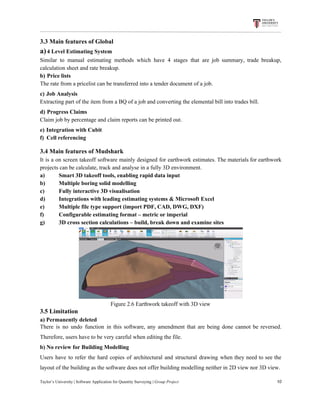
3.4​ ​Main​ ​features​ ​of​ ​Mudshark
It is a on screen takeoff software mainly designed for earthwork estimates. The materials for earthwork
projects​ ​can​ ​be​ ​calculate,​ ​track​ ​and​ ​analyse​ ​in​ ​a​ ​fully​ ​3D​ ​environment.
a) Smart​ ​3D​ ​takeoff​ ​tools,​ ​enabling​ ​rapid​ ​data​ ​input
b) Multiple​ ​boring​ ​solid​ ​modelling
c) Fully​ ​interactive​ ​3D​ ​visualisation
d) Integrations​ ​with​ ​leading​ ​estimating​ ​systems​ ​&​ ​Microsoft​ ​Excel
e) Multiple​ ​file​ ​type​ ​support​ ​(import​ ​PDF,​ ​CAD,​ ​DWG,​ ​DXF)
f) Configurable​ ​estimating​ ​format​ ​–​ ​metric​ ​or​ ​imperial
g) 3D​ ​cross​ ​section​ ​calculations​ ​–​ ​build,​ ​break​ ​down​ ​and​ ​examine​ ​sites
Figure​ ​2.6​ ​Earthwork​ ​takeoff​ ​with​ ​3D​ ​view
3.5​ ​Limitation
a)​ ​Permanently​ ​deleted
There is no undo function in this software, any amendment that are being done cannot be reversed.
Therefore,​ ​users​ ​have​ ​to​ ​be​ ​very​ ​careful​ ​when​ ​editing​ ​the​ ​file.
b)​ ​No​ ​review​ ​for​ ​Building​ ​Modelling
Users have to refer the hard copies of architectural and structural drawing when they need to see the
layout​ ​of​ ​the​ ​building​ ​as​ ​the​ ​software​ ​does​ ​not​ ​offer​ ​building​ ​modelling​ ​neither​ ​in​ ​2D​ ​view​ ​nor​ ​3D​ ​view.
Taylor’s​ ​University​ ​|​ ​Software​ ​Application​ ​for​ ​Quantity​ ​Surveying​ ​|​​ ​Group​ ​Project​ ​​ ​​ ​​ ​​ ​​ ​​ ​​ ​​ ​​ ​​ ​​ ​​ ​​ ​​ ​​ ​​ ​​ ​​ ​​ ​​ ​​ ​​ ​​ ​​ ​​ ​​ ​​ ​​ ​​ ​​ ​​ ​​ ​​ ​​ ​​ ​​ ​​ ​​ ​​ ​​ ​​ ​​ ​​ ​​ ​​ ​​ ​​ ​​ ​​ ​​ ​​ ​​ ​​ ​​ ​​ ​​ ​​ ​​ ​​ ​​ ​​ ​​ ​​ ​​ ​​ ​​ ​​ ​​ ​​ ​​ ​​ ​​ ​​ ​​ ​​ ​​ ​​ ​​ ​​ ​​ ​​ ​​ ​​ ​​ ​​ ​​ ​​ ​​ ​​ ​​ ​​ ​​ ​​ ​10
4.0​ ​Glodon
Glodon Company Limited is founded in 1998 in Beijing, China. The products of Glodon have been
widely used in such three major sectors which are house building, industrial engineering and
infrastructure. It helps quantity surveyor in various stages of construction such as cost estimating, value
engineering, project tendering, tender bidding, project post contract administration and final account
re-measurement. The Glodon BIM software available in the market includes Cubicost Takeoff for Rebar
(TRB), Cubicost Takeoff for Mechanical and Electrical (TME) and Cubicost Takeoff for Architecture
and Structure (TAS). 3D measurement and calculation rules like British Standards and UBBL are
available in the software to standardize the way users carry out taking off. Less data and formulae are
required​ ​to​ ​insert​ ​in​ ​calculation​ ​of​ ​the​ ​quantity,​ ​therefore​ ​the​ ​probability​ ​of​ ​error​ ​occurs​ ​are​ ​lower.
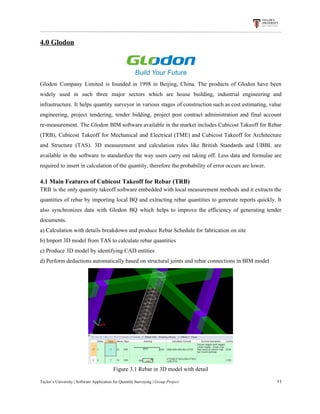
4.1​ ​Main​ ​Features​ ​of​ ​Cubicost​ ​Takeoff​ ​for​ ​Rebar​ ​(TRB)
TRB is the only quantity takeoff software embedded with local measurement methods and it extracts the
quantities of rebar by importing local BQ and extracting rebar quantities to generate reports quickly. It
also synchronizes data with Glodon BQ which helps to improve the efficiency of generating tender
documents.
a)​ ​Calculation​ ​with​ ​details​ ​breakdown​ ​and​ ​produce​ ​Rebar​ ​Schedule​ ​for​ ​fabrication​ ​on​ ​site
b)​ ​Import​ ​3D​ ​model​ ​from​ ​TAS​ ​to​ ​calculate​ ​rebar​ ​quantities
c)​ ​Produce​ ​3D​ ​model​ ​by​ ​identifying​ ​CAD​ ​entities
d)​ ​Perform​ ​deductions​ ​automatically​ ​based​ ​on​ ​structural​ ​joints​ ​and​ ​rebar​ ​connections​ ​in​ ​BIM​ ​model
Figure​ ​3.1​ ​Rebar​ ​in​ ​3D​ ​model​ ​with​ ​detail
Taylor’s​ ​University​ ​|​ ​Software​ ​Application​ ​for​ ​Quantity​ ​Surveying​ ​|​​ ​Group​ ​Project​ ​​ ​​ ​​ ​​ ​​ ​​ ​​ ​​ ​​ ​​ ​​ ​​ ​​ ​​ ​​ ​​ ​​ ​​ ​​ ​​ ​​ ​​ ​​ ​​ ​​ ​​ ​​ ​​ ​​ ​​ ​​ ​​ ​​ ​​ ​​ ​​ ​​ ​​ ​​ ​​ ​​ ​​ ​​ ​​ ​​ ​​ ​​ ​​ ​​ ​​ ​​ ​​ ​​ ​​ ​​ ​​ ​​ ​​ ​​ ​​ ​​ ​​ ​​ ​​ ​​ ​​ ​​ ​​ ​​ ​​ ​​ ​​ ​​ ​​ ​​ ​​ ​​ ​​ ​​ ​​ ​​ ​​ ​​ ​​ ​​ ​​ ​​ ​​ ​​ ​​ ​​ ​​ ​​ ​11
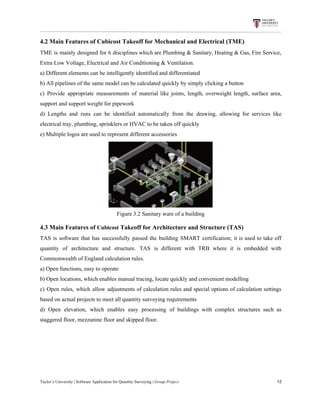
4.2​ ​Main​ ​Features​ ​of​ ​Cubicost​ ​Takeoff​ ​for​ ​Mechanical​ ​and​ ​Electrical​ ​(TME)
TME is mainly designed for 6 disciplines which are Plumbing & Sanitary, Heating & Gas, Fire Service,
Extra​ ​Low​ ​Voltage,​ ​Electrical​ ​and​ ​Air​ ​Conditioning​ ​&​ ​Ventilation.
a)​ ​Different​ ​elements​ ​can​ ​be​ ​intelligently​ ​identified​ ​and​ ​differentiated
b)​ ​All​ ​pipelines​ ​of​ ​the​ ​same​ ​model​ ​can​ ​be​ ​calculated​ ​quickly​ ​by​ ​simply​ ​clicking​ ​a​ ​button
c) Provide appropriate measurements of material like joints, length, overweight length, surface area,
support​ ​and​ ​support​ ​weight​ ​for​ ​pipework
d) Lengths and runs can be identified automatically from the drawing, allowing for services like
electrical​ ​tray,​ ​plumbing,​ ​sprinklers​ ​or​ ​HVAC​ ​to​ ​be​ ​taken​ ​off​ ​quickly
e)​ ​Multiple​ ​logos​ ​are​ ​used​ ​to​ ​represent​ ​different​ ​accessories
Figure​ ​3.2​ ​Sanitary​ ​ware​ ​of​ ​a​ ​building
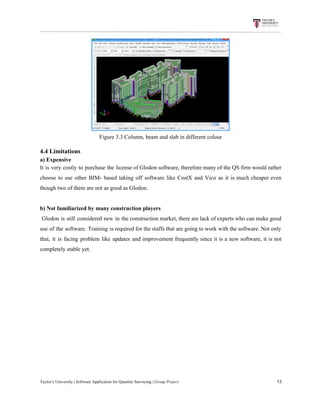
4.3​ ​Main​ ​Features​ ​of​ ​​Cubicost​​ ​Takeoff​ ​for​ ​Architecture​ ​and​ ​Structure​ ​(TAS)
TAS is software that has successfully passed the building SMART certification; it is used to take off
quantity of architecture and structure. TAS is different with TRB where it is embedded with
Commonwealth​ ​of​ ​England​ ​calculation​ ​rules.
a)​ ​Open​ ​functions,​ ​easy​ ​to​ ​operate
b)​ ​Open​ ​locations,​ ​which​ ​enables​ ​manual​ ​tracing,​ ​locate​ ​quickly​ ​and​ ​convenient​ ​modelling
c) Open rules, which allow adjustments of calculation rules and special options of calculation settings
based​ ​on​ ​actual​ ​projects​ ​to​ ​meet​ ​all​ ​quantity​ ​surveying​ ​requirements
d) Open elevation, which enables easy processing of buildings with complex structures such as
staggered​ ​floor,​ ​mezzanine​ ​floor​ ​and​ ​skipped​ ​floor.
Taylor’s​ ​University​ ​|​ ​Software​ ​Application​ ​for​ ​Quantity​ ​Surveying​ ​|​​ ​Group​ ​Project​ ​​ ​​ ​​ ​​ ​​ ​​ ​​ ​​ ​​ ​​ ​​ ​​ ​​ ​​ ​​ ​​ ​​ ​​ ​​ ​​ ​​ ​​ ​​ ​​ ​​ ​​ ​​ ​​ ​​ ​​ ​​ ​​ ​​ ​​ ​​ ​​ ​​ ​​ ​​ ​​ ​​ ​​ ​​ ​​ ​​ ​​ ​​ ​​ ​​ ​​ ​​ ​​ ​​ ​​ ​​ ​​ ​​ ​​ ​​ ​​ ​​ ​​ ​​ ​​ ​​ ​​ ​​ ​​ ​​ ​​ ​​ ​​ ​​ ​​ ​​ ​​ ​​ ​​ ​​ ​​ ​​ ​​ ​​ ​​ ​​ ​​ ​​ ​​ ​​ ​​ ​​ ​​ ​​ ​12
Figure​ ​3.3​ ​Column,​ ​beam​ ​and​ ​slab​ ​in​ ​different​ ​colour
4.4​ ​Limitations
a)​ ​Expensive
It is very costly to purchase the license of Glodon software, therefore many of the QS firm would rather
choose to use other BIM- based taking off software like CostX and Vico as it is much cheaper even
though​ ​two​ ​of​ ​them​ ​are​ ​not​ ​as​ ​good​ ​as​ ​Glodon.
b)​ ​Not​ ​familiarized​ ​by​ ​many​ ​construction​ ​players
Glodon is still considered new in the construction market, there are lack of experts who can make good
use of the software. Training is required for the staffs that are going to work with the software. Not only
that, it is facing problem like updates and improvement frequently since it is a new software, it is not
completely​ ​stable​ ​yet.
Taylor’s​ ​University​ ​|​ ​Software​ ​Application​ ​for​ ​Quantity​ ​Surveying​ ​|​​ ​Group​ ​Project​ ​​ ​​ ​​ ​​ ​​ ​​ ​​ ​​ ​​ ​​ ​​ ​​ ​​ ​​ ​​ ​​ ​​ ​​ ​​ ​​ ​​ ​​ ​​ ​​ ​​ ​​ ​​ ​​ ​​ ​​ ​​ ​​ ​​ ​​ ​​ ​​ ​​ ​​ ​​ ​​ ​​ ​​ ​​ ​​ ​​ ​​ ​​ ​​ ​​ ​​ ​​ ​​ ​​ ​​ ​​ ​​ ​​ ​​ ​​ ​​ ​​ ​​ ​​ ​​ ​​ ​​ ​​ ​​ ​​ ​​ ​​ ​​ ​​ ​​ ​​ ​​ ​​ ​​ ​​ ​​ ​​ ​​ ​​ ​​ ​​ ​​ ​​ ​​ ​​ ​​ ​​ ​​ ​​ ​13
5.Vico​ ​Software
Vico software provides services like coordination, quantity takeoff, cost estimation, project scheduling
and production control. It helps to reduce risk, manage costs, and optimize schedules on complex
building projects. The products under Vico office include Vico Constructability Manager, Vico Layout
Manager, Vico takeoff Manager, Vico LBS Manager and so on. It also launched 5D virtual construction
software which consists of 2D drawings, 3D BIM models for 4D model-based scheduling and 5D
model-based​ ​estimating.​ ​Vico​ ​supports​ ​file​ ​such​ ​as​ ​Tekla,​ ​ArchiCAD,​ ​Revit,​ ​IFC​ ​and​ ​even​ ​SketchUp.
5.1​ ​Main​ ​features
a)​​ ​​ ​​Vico​ ​Document​ ​Controller
2D contract documents are compared with 3D model versions for the final accuracy check and any
additions​ ​or​ ​deletions.
b)​​ ​​ ​​Vico​ ​Constructability​ ​Manager
Constructability issues are identified at the planning stage and coordination solution or integrated
solution​ ​will​ ​be​ ​provided​ ​so​ ​that​ ​problems​ ​occur​ ​at​ ​the​ ​site​ ​can​ ​be​ ​minimised.
c)​​ ​​ ​​Vico​ ​Layout​ ​Manager
Few of the important points in the drawing are mapped to their corresponding points at the site to speed
up​ ​installation​ ​and​ ​avoid​ ​costly​ ​rework​ ​occurs.
d)​​ ​​ ​​Vico​ ​Takeoff​ ​Manager
With 3D model drawing, quick and high accuracy of quantity takeoff can be achieved. Changes have to
be manually added or subtracted from the 3D model for quantity calculations to be carried out.
Furthermore, Vico cost planner and Schedule Planner can takeoff data by location automatically. Thus,
the result of the cost planning and schedules will be more accurate as no data is required to export or
import.
Taylor’s​ ​University​ ​|​ ​Software​ ​Application​ ​for​ ​Quantity​ ​Surveying​ ​|​​ ​Group​ ​Project​ ​​ ​​ ​​ ​​ ​​ ​​ ​​ ​​ ​​ ​​ ​​ ​​ ​​ ​​ ​​ ​​ ​​ ​​ ​​ ​​ ​​ ​​ ​​ ​​ ​​ ​​ ​​ ​​ ​​ ​​ ​​ ​​ ​​ ​​ ​​ ​​ ​​ ​​ ​​ ​​ ​​ ​​ ​​ ​​ ​​ ​​ ​​ ​​ ​​ ​​ ​​ ​​ ​​ ​​ ​​ ​​ ​​ ​​ ​​ ​​ ​​ ​​ ​​ ​​ ​​ ​​ ​​ ​​ ​​ ​​ ​​ ​​ ​​ ​​ ​​ ​​ ​​ ​​ ​​ ​​ ​​ ​​ ​​ ​​ ​​ ​​ ​​ ​​ ​​ ​​ ​​ ​​ ​​ ​14
e)​​ ​​ ​​Vico​ ​LBS​ ​Manager
Vico LBS Manager is dividing the project into work locations so that a good project schedule can be
produced. This is because it optimizes location-based planning and management which allows the trade
crews to flow smoothly without interference. LBS manager can recalculate the quantities and do
amendment​ ​without​ ​going​ ​back​ ​for​ ​the​ ​BIM​ ​application.
f)​​ ​​ ​​Vico​ ​Schedule​ ​Planner
It helps to create schedules by combining the function of Vico Takeoff Manager, Vico Cost Planner and
Vico LBS Manager; distributing tasks, corresponding materials, machinery and labour; which all of
them​ ​are​ ​optimised​ ​by​ ​location.
g)​​ ​​ ​​Vico​ ​Production​ ​Controller
This feature is designed for the on-site production phase, its purpose is to get real time production
updates from the site. It enables forward-looking schedule forecast so that problem can be discovered
and​ ​solved​ ​with​ ​enough​ ​time.
h)​​ ​​ ​​Vico​ ​Cost​ ​Planner
The quantities from Takeoff Manager will be transferred here to get highly accurate amount in
estimating within a short period. This feature also provides cost feedback from the design phase to the
close​ ​out​ ​phase.​ ​Important​ ​and​ ​reusable​ ​projects​ ​data​ ​are​ ​being​ ​saved​ ​for​ ​further​ ​usage.
i)​ ​​ ​Vico​ ​Office​ ​Client
Model versions are managed; the information like constructability reports, cost- and resources -loaded
schedules,​ ​proposed​ ​design​ ​changes,​ ​cost​ ​estimates,​ ​cash​ ​flow​ ​reports​ ​are​ ​shared​ ​among​ ​the​ ​team.
5.2​ ​Limitation
Inefficient
The overall process will be longer as Vico Software can only operate one model at a time. Hence, it is
inefficient​ ​to​ ​use​ ​Vico​ ​Software​ ​in​ ​producing​ ​project​ ​document.
Taylor’s​ ​University​ ​|​ ​Software​ ​Application​ ​for​ ​Quantity​ ​Surveying​ ​|​​ ​Group​ ​Project​ ​​ ​​ ​​ ​​ ​​ ​​ ​​ ​​ ​​ ​​ ​​ ​​ ​​ ​​ ​​ ​​ ​​ ​​ ​​ ​​ ​​ ​​ ​​ ​​ ​​ ​​ ​​ ​​ ​​ ​​ ​​ ​​ ​​ ​​ ​​ ​​ ​​ ​​ ​​ ​​ ​​ ​​ ​​ ​​ ​​ ​​ ​​ ​​ ​​ ​​ ​​ ​​ ​​ ​​ ​​ ​​ ​​ ​​ ​​ ​​ ​​ ​​ ​​ ​​ ​​ ​​ ​​ ​​ ​​ ​​ ​​ ​​ ​​ ​​ ​​ ​​ ​​ ​​ ​​ ​​ ​​ ​​ ​​ ​​ ​​ ​​ ​​ ​​ ​​ ​​ ​​ ​​ ​​ ​15
6.​ ​Summary
6.1​ ​CostX
CostX enables one to quickly and accurately take off quantities from 2D drawings and generate
automatic quantities from 3D models / BIM using the most advanced electronic takeoff system
available. Prepare estimates, bills of quantities and tenders easily and all in a fraction of the time and
cost. CostX is Exactal’s top-of-the-range product where more companies are using CostX for their
complete estimating solution and are demonstrating strong returns on their investment. It can reduce take
off time by up to 80%. Supports a range of 2D drawings, including scanned, PDF or CAD. CostX can
measure areas, lengths and counts with a single click. It also supports BIM by using digital design data
to accurately estimate quantities and costs. Powerful spreadsheet based workbooks are live-linked to the
drawings. Unique revision mode compares drawings and highlights the changes and subcontractor
comparison workbooks can be generated with associated reports. Report writer produces customised
professional​ ​reports​ ​and​ ​codes​ ​&​ ​zones​ ​which​ ​allow​ ​work​ ​to​ ​be​ ​sorted​ ​and​ ​regrouped.
6.2​ ​Buildsoft
Cubit is a specialised estimating system with flexible functionality that allows one to estimate the way
you want. It’s the only application that seamlessly integrates takeoff with estimating for an all-in-one
solution. This makes it up to three times faster than other software packages. Pinpoint accurate takeoff
with a view from any angle. By tracing directly over your imported plans, simple or complex quantity
takeoffs are performed quickly and accurately. One can also collect pricing information and save them
as template price lists (or even import supplier price lists) to control how your company prices jobs,
ensuring accuracy and maximising profitability. Within Cubit, one has the ability to generate and print a
range of professional reports including trade, markup, rate, takeoff, and Bills of Quantities.
Customisable reporting allows one to quickly hide and show various items, making it easy to share
different elements of the estimate with a range of people. All reports can be exported in a range of
common​ ​formats.
6.3​ ​Glodon
Cubicost provides the construction industry with a highly efficient, precise and convenient BIM
integrated solution. This software stands out in a sense that it does not only apply to global calculation
rules, but it can also be applied to local calculation rules. Furthermore, highly realistic 3D models that
contain vast amounts of data can be created and cutting-edge technology that deals with multiple
variations​ ​can​ ​be​ ​used.
Taylor’s​ ​University​ ​|​ ​Software​ ​Application​ ​for​ ​Quantity​ ​Surveying​ ​|​​ ​Group​ ​Project​ ​​ ​​ ​​ ​​ ​​ ​​ ​​ ​​ ​​ ​​ ​​ ​​ ​​ ​​ ​​ ​​ ​​ ​​ ​​ ​​ ​​ ​​ ​​ ​​ ​​ ​​ ​​ ​​ ​​ ​​ ​​ ​​ ​​ ​​ ​​ ​​ ​​ ​​ ​​ ​​ ​​ ​​ ​​ ​​ ​​ ​​ ​​ ​​ ​​ ​​ ​​ ​​ ​​ ​​ ​​ ​​ ​​ ​​ ​​ ​​ ​​ ​​ ​​ ​​ ​​ ​​ ​​ ​​ ​​ ​​ ​​ ​​ ​​ ​​ ​​ ​​ ​​ ​​ ​​ ​​ ​​ ​​ ​​ ​​ ​​ ​​ ​​ ​​ ​​ ​​ ​​ ​​ ​​ ​16
6.4​ ​VICO​ ​Software
Vico’s next generation 5D BIM solution was created for increased demand for efficiency, shorter
delivery times, and higher quality. Vico Office is purpose-built for construction, and is designed as a
tightly-integrated, BIM-neutral platform to which multiple types of BIM models can be published,
synthesized, and augmented with cost and schedule information. To maximize efficiency and meet the
distinctive needs of the various construction process trades and phases, Vico Office is structured in a
modular way, providing you with a tailored, yet expandable solution and a consistent, easy to use
environment. Using Vico Office, building owners and general contractors can collaborate efficiently,
improve predictability, reduce risk, manage cost, and optimize schedules on large, complex building
projects. We believe our integrated construction management software offers project teams the
flexibility to specialize their disciplines (modeling, scheduling, estimating) and still collaborate
(coordination,​ ​budgeting,​ ​and​ ​project​ ​control​ ​with​ ​all​ ​stakeholders).
Feature Vico Glodon CostX Buildsoft​ ​Cubit
Simplicity X
One​ ​3D​ ​model​ ​at​ ​a​ ​time
✓ ✓ X
Uses​ ​manual​ ​input
Paperless​ ​estimating ✓ ✓ ✓ ✓
Produce​ ​Bill​ ​of​ ​Quantities X ✓ ✓ ✓
But​ ​only​ ​for​ ​the​ ​Pro
Version
3D​ ​Taking-off ✓ ✓ ✓ ✓
Architect/engineer​ ​friendly X X X X
Able​ ​to​ ​read​ ​different
types​ ​of​ ​drawings
✓ ✓ ✓ ✓
Support​ ​multiple​ ​file
format
✓ ✓ ✓ ✓
Free​ ​student​ ​license X ✓ ✓ ✓
Taylor’s​ ​University​ ​|​ ​Software​ ​Application​ ​for​ ​Quantity​ ​Surveying​ ​|​​ ​Group​ ​Project​ ​​ ​​ ​​ ​​ ​​ ​​ ​​ ​​ ​​ ​​ ​​ ​​ ​​ ​​ ​​ ​​ ​​ ​​ ​​ ​​ ​​ ​​ ​​ ​​ ​​ ​​ ​​ ​​ ​​ ​​ ​​ ​​ ​​ ​​ ​​ ​​ ​​ ​​ ​​ ​​ ​​ ​​ ​​ ​​ ​​ ​​ ​​ ​​ ​​ ​​ ​​ ​​ ​​ ​​ ​​ ​​ ​​ ​​ ​​ ​​ ​​ ​​ ​​ ​​ ​​ ​​ ​​ ​​ ​​ ​​ ​​ ​​ ​​ ​​ ​​ ​​ ​​ ​​ ​​ ​​ ​​ ​​ ​​ ​​ ​​ ​​ ​​ ​​ ​​ ​​ ​​ ​​ ​​ ​17
7.​ ​Recommendations
To be honest, there is no such thing as the best software for BIM because different people has
different opinions. Also, BIM can be broken down into the perspective of quantity surveying,
architecture, project management and so on. As for us, of course our main focus would be quantity
surveying. But to come to a conclusion to pick which one we would recommend, we would pick
Glodon. We would pick Glodon not because we think it is the best out of all the options we have, but we
pick it due to the fact that it suits our likings better as we work efficiently and well on it compared to the
rest.
Besides that, the professional side of agreeing with Glodon being our recommended software is
because it is a professional management tool that helps us all to provide accurate data and information.
With the benefit of this professional management tool, we can save so much time and cost as well as
improve​ ​the​ ​quality​ ​of​ ​our​ ​construction​ ​project.
Another advantage for Glodon is that it helps us QS to cope with the changes of design and
come out with the quantity take-off quickly just by just adjusting the model information. This is due to
its​ ​ability​ ​to​ ​do​ ​“quick​ ​modeling”​ ​and​ ​because​ ​of​ ​it​ ​being​ ​a​ ​BIM-based​ ​quantity​ ​takeoff​ ​software.
Also, Glodon is well known nation-wide which means that it is pretty favorable to companies in
the construction industry. Hence, this can help us collaborate with other quantity surveyors that uses
Glodon as well. It helps to ease the job so much better and faster with the use of the common software
that​ ​most​ ​QS​ ​companies​ ​would​ ​own.
Taylor’s​ ​University​ ​|​ ​Software​ ​Application​ ​for​ ​Quantity​ ​Surveying​ ​|​​ ​Group​ ​Project​ ​​ ​​ ​​ ​​ ​​ ​​ ​​ ​​ ​​ ​​ ​​ ​​ ​​ ​​ ​​ ​​ ​​ ​​ ​​ ​​ ​​ ​​ ​​ ​​ ​​ ​​ ​​ ​​ ​​ ​​ ​​ ​​ ​​ ​​ ​​ ​​ ​​ ​​ ​​ ​​ ​​ ​​ ​​ ​​ ​​ ​​ ​​ ​​ ​​ ​​ ​​ ​​ ​​ ​​ ​​ ​​ ​​ ​​ ​​ ​​ ​​ ​​ ​​ ​​ ​​ ​​ ​​ ​​ ​​ ​​ ​​ ​​ ​​ ​​ ​​ ​​ ​​ ​​ ​​ ​​ ​​ ​​ ​​ ​​ ​​ ​​ ​​ ​​ ​​ ​​ ​​ ​​ ​​ ​18
Part​ ​B:
8.0​ ​Preparation​ ​/​ ​Briefing​ ​Stage
8.1​ ​Building​ ​Information​ ​Modelling​ ​(BIM)
8.1.1​ ​BIM​ ​Benefits
​ ​​ ​​ ​​ ​a. Better​ ​visualization
- Through​ ​BIM,​ ​this​ ​is​ ​possible​ ​to​ ​visualize​ ​future​ ​buildings​ ​much​ ​more​ ​concretely​ ​than​ ​on​ ​plans
and​ ​have​ ​a​ ​clearer​ ​insight​ ​into​ ​the​ ​project.​ ​Then,​ ​a​ ​presentation​ ​will​ ​be​ ​given​ ​to​ ​the​ ​client;​ ​the
client​ ​will​ ​then​ ​offer​ ​thoughts​ ​on​ ​design​ ​and​ ​adjustment​ ​will​ ​be​ ​made​ ​before​ ​the​ ​model​ ​is​ ​ready
to​ ​enter​ ​the​ ​design​ ​phrase.
​ ​​ ​​ ​​ ​b. Good​ ​outcome​ ​through​ ​collaboration
- Acts​ ​as​ ​a​ ​sharing​ ​and​ ​collaborating​ ​platform​ ​-​ ​project​ ​data​ ​and​ ​models​ ​are​ ​easier​ ​than​ ​with​ ​using
drawing​ ​sets,​ ​as​ ​there​ ​are​ ​a​ ​lot​ ​of​ ​functions​ ​that​ ​are​ ​possible​ ​only​ ​through​ ​a​ ​digital​ ​workflow.
Besides,​ ​peers​ ​can​ ​coordinate​ ​integration​ ​through​ ​review​ ​and​ ​markup​ ​steps​ ​to​ ​ensure​ ​that
everyone​ ​understand​ ​and​ ​the​ ​evolution​ ​of​ ​design.
8.1.2​ ​BIM​ ​Constraints
​ ​​ ​​ ​​ ​​ ​​ ​a. Software​ ​and​ ​training​ ​costs
- The​ ​use​ ​of​ ​BIM​ ​requires​ ​significant​ ​training​ ​and​ ​as​ ​with​ ​the​ ​software​ ​investment​ ​on​ ​continual
licensing.​ ​A​ ​contractor​ ​may​ ​need​ ​to​ ​upgrade​ ​its​ ​computer​ ​system​ ​to​ ​effectively​ ​use​ ​the​ ​BIM
software.
​ ​​ ​​ ​​ ​​ ​b. Lack​ ​of​ ​expertise
- Only​ ​small​ ​range​ ​numbers​ ​of​ ​experts​ ​are​ ​working​ ​in​ ​the​ ​field.​ ​Even​ ​some​ ​universities​ ​are
providing​ ​the​ ​course​ ​to​ ​students,​ ​however,​ ​the​ ​amount​ ​are​ ​not​ ​fulfilled​ ​the​ ​current​ ​market
condition.
8.2​ ​CAD​ ​Measurement
8.2.1​ ​CAD​ ​Benefits
a. Visualization
- 3D​ ​CAD​ ​designs​ ​can​ ​be​ ​made​ ​to​ ​look​ ​realistic​ ​to​ ​show​ ​the​ ​client​ ​the​ ​simulated​ ​environments.
Taylor’s​ ​University​ ​|​ ​Software​ ​Application​ ​for​ ​Quantity​ ​Surveying​ ​|​​ ​Group​ ​Project​ ​​ ​​ ​​ ​​ ​​ ​​ ​​ ​​ ​​ ​​ ​​ ​​ ​​ ​​ ​​ ​​ ​​ ​​ ​​ ​​ ​​ ​​ ​​ ​​ ​​ ​​ ​​ ​​ ​​ ​​ ​​ ​​ ​​ ​​ ​​ ​​ ​​ ​​ ​​ ​​ ​​ ​​ ​​ ​​ ​​ ​​ ​​ ​​ ​​ ​​ ​​ ​​ ​​ ​​ ​​ ​​ ​​ ​​ ​​ ​​ ​​ ​​ ​​ ​​ ​​ ​​ ​​ ​​ ​​ ​​ ​​ ​​ ​​ ​​ ​​ ​​ ​​ ​​ ​​ ​​ ​​ ​​ ​​ ​​ ​​ ​​ ​​ ​​ ​​ ​​ ​​ ​​ ​​ ​19
b. Accuracy
- CAD helps the designer to automatically check if the design is within the specification. It
enables the clients to view the designs at an earlier stage in the design process and it helps the
clients​ ​to​ ​check​ ​the​ ​progress​ ​of​ ​functional​ ​and​ ​semi-functional​ ​prototypes.
8.2.2​ ​CAD​ ​Constraints
a. Software​ ​and​ ​training​ ​costs
- Same as BIM, CAD required to purchase the software license and continual need for updating
software​ ​or​ ​operating​ ​systems.
​ ​​ ​​ ​​ ​​ ​​ ​b.​ ​​ ​​ ​​ ​Computer​ ​problems
- Information can be instantly lost if the computer got crashes, power down, hacked or corrupted
by​ ​viruses.​ ​No​ ​automatic​ ​backups​ ​available​ ​if​ ​these​ ​problems​ ​happened.
8.3​ ​Manual​ ​Measurement
8.3.1​ ​Manual​ ​Measurement​ ​Benefits
​ ​​ ​​ ​​ ​​ ​​ ​a. No​ ​training​ ​is​ ​required
- As every quantity surveyor who graduated from universities are able to produce manual
measurements. Manual method is more convenient than using software which required technical
skills​ ​and​ ​extra​ ​training​ ​to​ ​master​ ​it.
​ ​​ ​​ ​​ ​​ ​​ ​b. No​ ​additional​ ​investment​ ​needed
- This method is most cheapest among the BIM and CAD software that required to purchase on
software​ ​license​ ​and​ ​update​ ​for​ ​new​ ​version​ ​of​ ​computer.
8.3.2​ ​Manual​ ​Measurement​ ​Constraints
​ ​​ ​​ ​​ ​​ ​​ ​a. Storage​ ​Space​ ​required
- All​ ​manual​ ​drawings​ ​needed​ ​a​ ​greater​ ​space​ ​to​ ​keep​ ​for​ ​any​ ​measurement​ ​usage.
​ ​​ ​​ ​​ ​​ ​​ ​b. Time​ ​Consuming
- Manual measurement needed longer time for surveyors to identify, scale and measure based on
the printed drawings with the basic tools – scale rule and calculator. This takes more effort for
the​ ​surveyors​ ​as​ ​everything​ ​in​ ​manually.
Taylor’s​ ​University​ ​|​ ​Software​ ​Application​ ​for​ ​Quantity​ ​Surveying​ ​|​​ ​Group​ ​Project​ ​​ ​​ ​​ ​​ ​​ ​​ ​​ ​​ ​​ ​​ ​​ ​​ ​​ ​​ ​​ ​​ ​​ ​​ ​​ ​​ ​​ ​​ ​​ ​​ ​​ ​​ ​​ ​​ ​​ ​​ ​​ ​​ ​​ ​​ ​​ ​​ ​​ ​​ ​​ ​​ ​​ ​​ ​​ ​​ ​​ ​​ ​​ ​​ ​​ ​​ ​​ ​​ ​​ ​​ ​​ ​​ ​​ ​​ ​​ ​​ ​​ ​​ ​​ ​​ ​​ ​​ ​​ ​​ ​​ ​​ ​​ ​​ ​​ ​​ ​​ ​​ ​​ ​​ ​​ ​​ ​​ ​​ ​​ ​​ ​​ ​​ ​​ ​​ ​​ ​​ ​​ ​​ ​​ ​20
9.0​ ​​ ​Design​ ​Stage
9.1​ ​Building​ ​Information​ ​Modelling
9.1.1​ ​BIM​ ​Benefits
a. High​ ​Quality
- BIM allows for flexibility in the exploration and changes to the project or documentation
process at any time without any hassle to the design team. This results to minimize coordination
time and manual checking that enables the design team to have more time solving real
architectural​ ​problems.
b. Greater​ ​Speed
- BIM allows design and documentation to be done concurrently instead of serially. Schedules,
diagrams, drawings, estimating, value engineering, planning, and other forms of work can be
done​ ​concurrently​ ​while​ ​work​ ​is​ ​progressing.
c. Dive​ ​into​ ​Detail
- The model is a great end point for a lot of knowledge transfer, but there’s also a need to share a
traditional plan, section, and elevation, as well as other reports with project team. Using
automation​ ​and​ ​customization​ ​features,​ ​these​ ​added​ ​sheets​ ​can​ ​save​ ​valuable​ ​drafting​ ​time.
9.1.2​ ​BIM​ ​Constraints
a. Lack​ ​of​ ​expertise
- BIM requires technical skills and knowledge on how a project designed and documented.
Therefore,​ ​most​ ​company​ ​odd​ ​to​ ​pay​ ​for​ ​their​ ​staffs​ ​to​ ​software​ ​training.
9.2​ ​CAD​ ​Measurement
9.2.1​ ​CAD​ ​Benefits
a. Easy​ ​to​ ​edit​ ​&​ ​Time​ ​saving
- By using CAD software, drawings and images will be much easier to maintained and produced
in​ ​a​ ​short​ ​time.​ ​If​ ​errors​ ​are​ ​discovered,​ ​the​ ​drawing’s​ ​error​ ​can​ ​be​ ​fix​ ​and​ ​modify​ ​easily.
b. Improved​ ​accuracy
- CAD​ ​software​ ​able​ ​to​ ​achieve​ ​accuracy​ ​that​ ​never​ ​be​ ​achieved​ ​by​ ​manual​ ​drawings.
CAD​ ​provide​ ​tools​ ​to​ ​measure​ ​the​ ​precision,​ ​skill​ ​and​ ​accuracy​ ​level​ ​of​ ​the​ ​designs.
Taylor’s​ ​University​ ​|​ ​Software​ ​Application​ ​for​ ​Quantity​ ​Surveying​ ​|​​ ​Group​ ​Project​ ​​ ​​ ​​ ​​ ​​ ​​ ​​ ​​ ​​ ​​ ​​ ​​ ​​ ​​ ​​ ​​ ​​ ​​ ​​ ​​ ​​ ​​ ​​ ​​ ​​ ​​ ​​ ​​ ​​ ​​ ​​ ​​ ​​ ​​ ​​ ​​ ​​ ​​ ​​ ​​ ​​ ​​ ​​ ​​ ​​ ​​ ​​ ​​ ​​ ​​ ​​ ​​ ​​ ​​ ​​ ​​ ​​ ​​ ​​ ​​ ​​ ​​ ​​ ​​ ​​ ​​ ​​ ​​ ​​ ​​ ​​ ​​ ​​ ​​ ​​ ​​ ​​ ​​ ​​ ​​ ​​ ​​ ​​ ​​ ​​ ​​ ​​ ​​ ​​ ​​ ​​ ​​ ​​ ​21
9.2.2​ ​CAD​ ​Constraints
a. Software​ ​Complexity
- As CAD software advance, it becomes more flexible and adaptable. However, it became
complexity to first-time user to learn the software. Therefore, skilled draftsmen/staff are needed
to​ ​handle​ ​with​ ​this​ ​software.
b. Security
- Design​ ​drawing​ ​can​ ​be​ ​easily​ ​copy​ ​or​ ​stolen​ ​by​ ​pen-drive​ ​within​ ​few​ ​minutes.
c. Power​ ​Limitations​ ​and​ ​Cost
- CAD software often consumes large amounts of computer processing power. This requires
high-quality computer hardware that can be costly. CAM requires advanced manufacturing
devices​ ​that​ ​are​ ​also​ ​very​ ​expensive.
9.3​ ​Manual​ ​Measurement
9.3.1​ ​Manual​ ​Measurement​ ​Benefits
a. Cost​ ​effective
- Manual measurement can be effectively in comparison to BIM and CAD measurement that it
does​ ​not​ ​required​ ​to​ ​purchase​ ​any​ ​software​ ​license​ ​and​ ​provide​ ​training​ ​for​ ​staff.
b. Easier​ ​drawing​ ​completion
- Manual drafting is the combination of talent, knowledge and skill. It required skilled draftsman
to produce a good manual drafting. Besides, manual drawing can be produce in anywhere with a
pen,​ ​paper​ ​and​ ​T-square​ ​rule.
9.3.2​ ​Manual​ ​Measurement​ ​Constraints
a. Human​ ​errors
- There may be a risk to redraw all drawings if a mistake error was made. All drafting must be
verified​ ​in​ ​correct​ ​size,​ ​dimension​ ​and​ ​alignment.​ ​This​ ​may​ ​cause​ ​a​ ​delay​ ​to​ ​construction​ ​stage.
b. Time​ ​Consuming
- A longer time takes to reproduce or redraw the drawing in comparison to BIM and CAD
drawing​ ​that​ ​all​ ​drawing​ ​done​ ​manually.
Taylor’s​ ​University​ ​|​ ​Software​ ​Application​ ​for​ ​Quantity​ ​Surveying​ ​|​​ ​Group​ ​Project​ ​​ ​​ ​​ ​​ ​​ ​​ ​​ ​​ ​​ ​​ ​​ ​​ ​​ ​​ ​​ ​​ ​​ ​​ ​​ ​​ ​​ ​​ ​​ ​​ ​​ ​​ ​​ ​​ ​​ ​​ ​​ ​​ ​​ ​​ ​​ ​​ ​​ ​​ ​​ ​​ ​​ ​​ ​​ ​​ ​​ ​​ ​​ ​​ ​​ ​​ ​​ ​​ ​​ ​​ ​​ ​​ ​​ ​​ ​​ ​​ ​​ ​​ ​​ ​​ ​​ ​​ ​​ ​​ ​​ ​​ ​​ ​​ ​​ ​​ ​​ ​​ ​​ ​​ ​​ ​​ ​​ ​​ ​​ ​​ ​​ ​​ ​​ ​​ ​​ ​​ ​​ ​​ ​​ ​22
10.0​ ​Pre-Construction​ ​Stage
10.1​ ​Building​ ​Information​ ​Modelling
10.1.1​ ​BIM​ ​Benefits
a. Cost​ ​and​ ​Construction​ ​schedule​ ​effectively
- BIM helps to assist the entire pre-construction phase by supporting building design and
construction phrase with immediate availability of project data that including design, scope,
schedule and cost information. The contractors will be given on schedule work plan so to ensure
process​ ​of​ ​construction​ ​on​ ​time.
b. Visualization
- BIM models are relatively easy to understand and show depth and elevation in a clear, visual
way. For example, on a non-BIM drawing, contractor may not immediately understand how a
room will look once it is completed. However, on a BIM model, the room appears on the
computer​ ​screen​ ​in​ ​a​ ​way​ ​that​ ​mimics​ ​its​ ​finished​ ​look.
10.1.2​ ​BIM​ ​Constraints
a. Construction​ ​Costs
- BIM might present as an idea of the total expected construction costs. BIM allows to estimate
the most accurate building cost-to-complete, however, it will not consider actual price variation
from market, such as fluctuation price on metals, petroleum, cement and other natural disasters
affecting​ ​during​ ​construction​ ​stages.
b. Disruptive
- Although BIM model can do changes and made quickly, however, BIM can disrupt the general
construction process when ordering material based on the dimensions of the design. Ordering
this material may take weeks or months. If the dimensions change, may occur when multiple
contractors are inputting information into a model on a continual basis, the contractor may be
left​ ​with​ ​insufficient​ ​time​ ​to​ ​order​ ​the​ ​material.
10.2​ ​CAD​ ​Measurement
10.2.1​ ​CAD​ ​Benefits
a.​ ​​ ​​ ​​ ​Easy​ ​to​ ​share
- The CAD design can be easily shared between department or companies through email within
minutes​ ​which​ ​can​ ​save​ ​be​ ​printed​ ​in​ ​any​ ​number​ ​of​ ​copies​ ​whenever​ ​needed.
Taylor’s​ ​University​ ​|​ ​Software​ ​Application​ ​for​ ​Quantity​ ​Surveying​ ​|​​ ​Group​ ​Project​ ​​ ​​ ​​ ​​ ​​ ​​ ​​ ​​ ​​ ​​ ​​ ​​ ​​ ​​ ​​ ​​ ​​ ​​ ​​ ​​ ​​ ​​ ​​ ​​ ​​ ​​ ​​ ​​ ​​ ​​ ​​ ​​ ​​ ​​ ​​ ​​ ​​ ​​ ​​ ​​ ​​ ​​ ​​ ​​ ​​ ​​ ​​ ​​ ​​ ​​ ​​ ​​ ​​ ​​ ​​ ​​ ​​ ​​ ​​ ​​ ​​ ​​ ​​ ​​ ​​ ​​ ​​ ​​ ​​ ​​ ​​ ​​ ​​ ​​ ​​ ​​ ​​ ​​ ​​ ​​ ​​ ​​ ​​ ​​ ​​ ​​ ​​ ​​ ​​ ​​ ​​ ​​ ​​ ​23
b.​ ​​ ​​ ​​ ​Accurate​ ​billing​ ​quantities
-​ ​​ ​​ ​​ ​​ ​CAD​ ​drawings​ ​are​ ​produced​ ​according​ ​to​ ​the​ ​actual​ ​size​ ​–​ ​in​ ​scale​ ​1:1,​ ​hence
the​ ​measurement​ ​produced​ ​in​ ​this​ ​stage​ ​will​ ​be​ ​accurate.
c.​ ​​ ​​ ​​ ​Zoom​ ​features
- CAD offer ‘zoom’ feature where allow designers or surveyors can magnify certain elements for
inspection.
10.2.2​ ​CAD​ ​Constraints
a.​​ ​​ ​​ ​​ ​​ ​​ ​​Unable​ ​to​ ​produce​ ​bill​ ​of​ ​quantities
- ​CAD software do not have the function in producing Bills of Quantities automatically. Therefore,
data has to be transferred into BQ format manually or imported the quantities to another
software.​ ​Mistakes​ ​might​ ​occur​ ​during​ ​the​ ​transferring​ ​process.
10.3​ ​Manual​ ​Measurement
10.3.1​ ​Manual​ ​Measurement​ ​Benefits
a. Safer​ ​way
- Since drawings are manually draw, it will not be affected due to any computer problems such as
virus attack or system down that affect to the working as all the drawings are drafting on papers.
Besides, manual drawings are hard to steal/copy compare to BIM and CAD files that can be
easily​ ​saved​ ​into​ ​a​ ​pen-drive​ ​just​ ​in​ ​few​ ​seconds.
b. No​ ​training​ ​required
- As most fresh graduates’ quantity surveyors are mostly exposed to manual measurement, thus
they are able to understand the drawings clearly. Therefore, no extra training needed for the
surveyors​ ​to​ ​take​ ​on​ ​since​ ​all​ ​details​ ​are​ ​based​ ​on​ ​the​ ​drawings.
10.3.2​ ​Manual​ ​Measurement​ ​Constraints
a. Time​ ​consuming
- Manual measurement is not recommended for a large project where required large manpower
and​ ​longer​ ​time​ ​in​ ​measurement​ ​on​ ​the​ ​drawings​ ​one​ ​by​ ​one.
b. Human​ ​Errors
- Errors might be happened when there are plenty of drawings needed to measure and scale that
make​ ​everything​ ​be​ ​complicated​ ​and​ ​complex.
Taylor’s​ ​University​ ​|​ ​Software​ ​Application​ ​for​ ​Quantity​ ​Surveying​ ​|​​ ​Group​ ​Project​ ​​ ​​ ​​ ​​ ​​ ​​ ​​ ​​ ​​ ​​ ​​ ​​ ​​ ​​ ​​ ​​ ​​ ​​ ​​ ​​ ​​ ​​ ​​ ​​ ​​ ​​ ​​ ​​ ​​ ​​ ​​ ​​ ​​ ​​ ​​ ​​ ​​ ​​ ​​ ​​ ​​ ​​ ​​ ​​ ​​ ​​ ​​ ​​ ​​ ​​ ​​ ​​ ​​ ​​ ​​ ​​ ​​ ​​ ​​ ​​ ​​ ​​ ​​ ​​ ​​ ​​ ​​ ​​ ​​ ​​ ​​ ​​ ​​ ​​ ​​ ​​ ​​ ​​ ​​ ​​ ​​ ​​ ​​ ​​ ​​ ​​ ​​ ​​ ​​ ​​ ​​ ​​ ​​ ​24
11.0​ ​Construction​ ​Stage
11.1.​ ​Building​ ​Information​ ​Modelling
11.1.1​ ​BIM​ ​Benefits
a. Collaboration
- BIM allows for unprecedented collaboration on design. The BIM models give all contractor an
opportunity to sit down together and work through issues that arise during the construction
process. It is very useful in the case of ‘’clashes’’ that can lead to ‘’stacking of trades’’ eg, the
areas where two different contractors plan to install material in the same space , sometimes at
the same time. Instead of addressing clashes in the field, where resolution may require that one
contractor​ ​remove​ ​and​ ​reinstall​ ​its​ ​material​ ​or​ ​suffer​ ​delay.
​ ​​ ​​ ​​ ​​ ​b. Flexibility
- With BIM, it is easy to make design changes. A change to BIM model automatically updates all
of the individual drawings that are affected by that change. For example if a foyer is added to
the first floor on the BIM model , all drawings showings showing the first floor will now also
show the details necessary to build the foyer. Once the change is made to the BIM model, it is
unnecessary​ ​to​ ​make​ ​manual​ ​changes.
11.1.2​ ​BIM​ ​Constraints
a. Time​ ​consuming
- The schedule updating can be costly and time consuming and yet the manager must came up
with​ ​decision​ ​on​ ​the​ ​value​ ​of​ ​the​ ​BIM​ ​based​ ​scheduling​ ​based​ ​on​ ​the​ ​needs​ ​of​ ​the​ ​project.
b. Training​ ​and​ ​software​ ​costs
- Usage of BIM requires significant training and as with any software program there are cost
associated​ ​with​ ​the​ ​software​ ​such​ ​as​ ​purchasing,​ ​licensing​ ​and​ ​training.
11.2​ ​CAD​ ​Measurement
11.2.1​ ​CAD​ ​Benefits
a. Enhance​ ​the​ ​relevant​ ​process​ ​with​ ​the​ ​means​ ​of​ ​clarity
- It improves the communication form and most likely to be credited to the simpler
comprehension of the configuration and estimation. The simplicity of the changes which makes
the reexamined and overhauled arrangements to the group are simpler , meanwhile it also
Taylor’s​ ​University​ ​|​ ​Software​ ​Application​ ​for​ ​Quantity​ ​Surveying​ ​|​​ ​Group​ ​Project​ ​​ ​​ ​​ ​​ ​​ ​​ ​​ ​​ ​​ ​​ ​​ ​​ ​​ ​​ ​​ ​​ ​​ ​​ ​​ ​​ ​​ ​​ ​​ ​​ ​​ ​​ ​​ ​​ ​​ ​​ ​​ ​​ ​​ ​​ ​​ ​​ ​​ ​​ ​​ ​​ ​​ ​​ ​​ ​​ ​​ ​​ ​​ ​​ ​​ ​​ ​​ ​​ ​​ ​​ ​​ ​​ ​​ ​​ ​​ ​​ ​​ ​​ ​​ ​​ ​​ ​​ ​​ ​​ ​​ ​​ ​​ ​​ ​​ ​​ ​​ ​​ ​​ ​​ ​​ ​​ ​​ ​​ ​​ ​​ ​​ ​​ ​​ ​​ ​​ ​​ ​​ ​​ ​​ ​25
created a different point of view perspective of a structure or parts of a structure to give a much
precise​ ​data​ ​for​ ​making​ ​development​ ​much​ ​proficient,
​ ​​ ​​ ​​ ​​ ​​ ​​ ​​ ​b​ ​.​ ​Accuracy
- User may experience difficulties by manual drafts or uncertainty in the measurement of some
specific area, by using CAD it not just follow to scale and also help in institutionalization
outline,​ ​drafting​ ​and​ ​documentation,
11.2.2​ ​CAD​ ​Constraints
a. Measurements​ ​are​ ​limited
- There is estimation impediments for CAD , 2D drawings are measured for the unit of
measurements for 2D outline only, while for 3D drawings, extra effort may be required for the
estimation​ ​for​ ​volume.
​ ​​ ​​ ​​ ​​ ​​ ​​ ​b​ ​.​ ​​ ​​ ​Additional​ ​operating​ ​expenses​ ​on​ ​site
- The utilization of CAD at development may cause an issue to the organization money related
administration​ ​strategies​ ​due​ ​to​ ​expenses​ ​increase.
11.3​ ​Manual​ ​Measurement
11.3.1​ ​Manual​ ​Measurement​ ​Benefits
a. Lower​ ​risk​ ​and​ ​secured.
- Manual measurement will reduce the risk of information loss on the computer as it maybe
affected​ ​by​ ​virus​ ​or​ ​not​ ​save​ ​properly​ ​and​ ​it​ ​is​ ​more​ ​secure​ ​as​ ​everything​ ​is​ ​in​ ​hand​ ​written.
11.3.2​ ​Manual​ ​Measurement​ ​Constraints
a. Time​ ​consuming.
- Alteration may occurs from time to time and it is for sure that changes has to be made which
causing manual measurement consume more time and in result delay of works and extension of
time
​ ​​ ​b.​ ​​ ​​ ​​ ​Accuracy​ ​of​ ​data.
- The dimension is restricted as manual measurement as it doesn’t have 2D,3D,4D and 5D like
other software and could not identify errors and the data might not be accurate as all of it is in
manually​ ​calculated.
Taylor’s​ ​University​ ​|​ ​Software​ ​Application​ ​for​ ​Quantity​ ​Surveying​ ​|​​ ​Group​ ​Project​ ​​ ​​ ​​ ​​ ​​ ​​ ​​ ​​ ​​ ​​ ​​ ​​ ​​ ​​ ​​ ​​ ​​ ​​ ​​ ​​ ​​ ​​ ​​ ​​ ​​ ​​ ​​ ​​ ​​ ​​ ​​ ​​ ​​ ​​ ​​ ​​ ​​ ​​ ​​ ​​ ​​ ​​ ​​ ​​ ​​ ​​ ​​ ​​ ​​ ​​ ​​ ​​ ​​ ​​ ​​ ​​ ​​ ​​ ​​ ​​ ​​ ​​ ​​ ​​ ​​ ​​ ​​ ​​ ​​ ​​ ​​ ​​ ​​ ​​ ​​ ​​ ​​ ​​ ​​ ​​ ​​ ​​ ​​ ​​ ​​ ​​ ​​ ​​ ​​ ​​ ​​ ​​ ​​ ​26
12.0​ ​Post-Construction​ ​Stage
12.1.​ ​Building​ ​Information​ ​Modelling
12.1.1​ ​BIM​ ​Benefits
a. Real-time​ ​Data
- The BIM software can be used to locate and track the conditions of the particular building in
real time and enables decision to be made in the short period for any changes to prevent delay
caused​ ​by​ ​incomplete​ ​information.
​ ​​ ​​ ​​ ​​ ​​ ​b.​ ​​ ​​ ​​ ​​ ​Space​ ​Visualization
- By utilizing a 3D visualization of a building space for renovation or other changes are
considerably useful and easier as the software are able to access straight to the method of the
construction and identify the high density areas where the access of the heave equipment and
machinery​ ​access​ ​that​ ​will​ ​rise​ ​a​ ​problem.
12.1.2​ ​BIM​ ​Constraints
a. Resource​ ​Limitation
- Utilization of BIM in the post-construction stage is consider as feasible if it is used throughout
the entire construction duration and meanwhile it is impractical to key in the traditional
measurement and estimating data into a BIM model and causing it requires more time and
resources.
12.2​ ​CAD​ ​Measurement
12.2.1​ ​CAD​ ​Benefits
a. Extension​ ​of​ ​information
- The 3D CAD files are able to extend the information give in the Manual by showing a clear
visualization of different items in the building especially the hidden items such as wiring and
plumbing. It also enable the workers to carried out maintenance of the certain part much easier
especially​ ​the​ ​area​ ​that​ ​involves​ ​sensitive​ ​part​ ​of​ ​the​ ​building
Taylor’s​ ​University​ ​|​ ​Software​ ​Application​ ​for​ ​Quantity​ ​Surveying​ ​|​​ ​Group​ ​Project​ ​​ ​​ ​​ ​​ ​​ ​​ ​​ ​​ ​​ ​​ ​​ ​​ ​​ ​​ ​​ ​​ ​​ ​​ ​​ ​​ ​​ ​​ ​​ ​​ ​​ ​​ ​​ ​​ ​​ ​​ ​​ ​​ ​​ ​​ ​​ ​​ ​​ ​​ ​​ ​​ ​​ ​​ ​​ ​​ ​​ ​​ ​​ ​​ ​​ ​​ ​​ ​​ ​​ ​​ ​​ ​​ ​​ ​​ ​​ ​​ ​​ ​​ ​​ ​​ ​​ ​​ ​​ ​​ ​​ ​​ ​​ ​​ ​​ ​​ ​​ ​​ ​​ ​​ ​​ ​​ ​​ ​​ ​​ ​​ ​​ ​​ ​​ ​​ ​​ ​​ ​​ ​​ ​​ ​27
12..2.2​ ​CAD​ ​Constraints
a. ​ ​Limited​ ​Information
- The CAD files only includes the building hardscape which is there is little or no information
will be provided on the softscape of the building which mainly covers the population and the
designated space usage. Thus causing issues when alternation have to be made as there is
insufficient​ ​visualization​ ​and​ ​information.
12.3​ ​Manual​ ​Measurement
12.3.1​ ​Manual​ ​Measurement​ ​Benefits
a. Easy​ ​to​ ​obtain​ ​information
- The documents of Operation and Manual is kept in the office which is able to be access when it
is​ ​need​ ​at​ ​all​ ​time.
​ ​​ ​​ ​b.​ ​​ ​Straightforward​ ​information
- The information provided by using manual measurement is clear and straightforward and can be
found easily to be understood compare by using software as it require to locate and extract the
information​ ​which​ ​is​ ​need​ ​some​ ​more​ ​it​ ​is​ ​time​ ​saving.
12.3.2​ ​Manual​ ​Measurement​ ​Constraints
a. Limited​ ​Information
- Crucial Information sometimes could not be found or provide in a hard copy manual for the
maintenance​ ​team​ ​to​ ​develop​ ​beyond​ ​the​ ​2D​ ​drawings,
Taylor’s​ ​University​ ​|​ ​Software​ ​Application​ ​for​ ​Quantity​ ​Surveying​ ​|​​ ​Group​ ​Project​ ​​ ​​ ​​ ​​ ​​ ​​ ​​ ​​ ​​ ​​ ​​ ​​ ​​ ​​ ​​ ​​ ​​ ​​ ​​ ​​ ​​ ​​ ​​ ​​ ​​ ​​ ​​ ​​ ​​ ​​ ​​ ​​ ​​ ​​ ​​ ​​ ​​ ​​ ​​ ​​ ​​ ​​ ​​ ​​ ​​ ​​ ​​ ​​ ​​ ​​ ​​ ​​ ​​ ​​ ​​ ​​ ​​ ​​ ​​ ​​ ​​ ​​ ​​ ​​ ​​ ​​ ​​ ​​ ​​ ​​ ​​ ​​ ​​ ​​ ​​ ​​ ​​ ​​ ​​ ​​ ​​ ​​ ​​ ​​ ​​ ​​ ​​ ​​ ​​ ​​ ​​ ​​ ​​ ​28
12.​ ​References
1.​ ​BuildSoft​ ​Pro​ ​vs​ ​CostX​ ​-​ ​Construction​ ​Software​ ​Comparison.​ ​Construction.softwareinsider.com.
Retrieved​ ​10​ ​October​ ​2017,​ ​from
http://construction.softwareinsider.com/compare/204-345/BuildSoft-Pro-vs-CostX
2.​ ​Software,​ ​G.​ ​Glodon​ ​Quantity​ ​Takeoff​ ​Software​ ​-​ ​Mustard​ ​Seed.​ ​Mustard​ ​Seed.​ ​Retrieved​ ​10​ ​October
2017,​ ​from​ ​​http://mseedsystems.com/product/glodon/
3.​ ​Golden​ ​Software​ ​in​ ​Forbes​ ​List.​ ​Forbes.com.​ ​Retrieved​ ​10​ ​October​ ​2017,​ ​from
https://www.forbes.com/companies/glodon-software/#
4.​ ​Top​ ​5​ ​BIM​ ​Quantity​ ​Takeoff​ ​Software​ ​–​ ​3D​ ​Model​ ​Based​ ​Estimating​ ​Solutions.​ ​(2017).​ ​Estimation
QS.​ ​Retrieved​ ​10​ ​October​ ​2017,​ ​from​ ​​http://estimationqs.com/top-5-bim-quantity-takeoff-software/
5.​ ​​MudShark.​ ​Buildsoft.com.au.​ ​Retrieved​ ​27​ ​September​ ​2017,​ ​from
https://www.buildsoft.com.au/mudshark-earthwork-software
6.​ ​​Cubicost​ ​Quantity​ ​Takeoff​ ​&​ ​Estimating​ ​for​ ​Construction​ ​and​ ​M&E​ ​|​ ​UK.​ ​.​ ​www.cubicost.co.uk.
Retrieved​ ​28​ ​September​ ​2017,​ ​from​​ ​​https://www.cubicost.co.uk/tme
7.​ ​​Group,​ ​T.​ ​(2016).​ ​​Construction​ ​Software​ ​|​ ​BIM​ ​Software​ ​|​ ​BIM​ ​for​ ​Construction​ ​|​ ​Vico​ ​Software​.
Vicosoftware.com​.​ ​Retrieved​ ​30​ ​September​ ​2017,​ ​from
http://www.vicosoftware.com/bim-for-construction-software-products
8.​ ​Patel,​ ​H.​ ​(2017,​ ​June​ ​27).​ ​5D​ ​BIM​ ​Bridges​ ​the​ ​Gap​ ​between​ ​Concept​ ​Design​ ​and​ ​Pre-Construction.
Retrieved​ ​October​ ​3,​ ​2017,​ ​from
http://www.hitechcaddservices.com/news/5d-bim-bridges-gap-concept-design-pre-construction/
9.​ ​Preparing​ ​for​ ​BIM​ ​–​ ​what​ ​stage​ ​are​ ​you​ ​at?​ ​(2017).​ ​Retrieved​ ​October​ ​3,​ ​2017,​ ​from
https://www.riba-insight.com/monthlyBriefing/16-07/preparing-for-bim-what-stage-are-you-at.asp
10.​ ​What​ ​is​ ​BIM?​ ​What​ ​are​ ​its​ ​Benefits​ ​to​ ​the​ ​Construction​ ​Industry?​ ​(2017,​ ​October​ ​05).​ ​Retrieved
October​ ​7,​ ​2017,​ ​from
http://www.aproplan.com/blog/quality-management-plan-construction/what-is-bim
11.​ ​Ball,​ ​M.​ ​(2017,​ ​April​ ​26).​ ​Top​ ​10​ ​Benefits​ ​of​ ​BIM​ ​(Building​ ​Information​ ​Modeling).​ ​Retrieved
October​ ​1,​ ​2017,​ ​from
https://www.autodesk.com/redshift/building-information-modeling-top-10-benefits-of-bim/
12.​ ​Rodriguez,​ ​J.​ ​(n.d.).​ ​Building​ ​Information​ ​Modeling​ ​(BIM)​ ​Risks.​ ​Retrieved​ ​October​ ​2,​ ​2017,​ ​from
https://www.thebalance.com/building-information-modeling-risks-845093
Taylor’s​ ​University​ ​|​ ​Software​ ​Application​ ​for​ ​Quantity​ ​Surveying​ ​|​​ ​Group​ ​Project​ ​​ ​​ ​​ ​​ ​​ ​​ ​​ ​​ ​​ ​​ ​​ ​​ ​​ ​​ ​​ ​​ ​​ ​​ ​​ ​​ ​​ ​​ ​​ ​​ ​​ ​​ ​​ ​​ ​​ ​​ ​​ ​​ ​​ ​​ ​​ ​​ ​​ ​​ ​​ ​​ ​​ ​​ ​​ ​​ ​​ ​​ ​​ ​​ ​​ ​​ ​​ ​​ ​​ ​​ ​​ ​​ ​​ ​​ ​​ ​​ ​​ ​​ ​​ ​​ ​​ ​​ ​​ ​​ ​​ ​​ ​​ ​​ ​​ ​​ ​​ ​​ ​​ ​​ ​​ ​​ ​​ ​​ ​​ ​​ ​​ ​​ ​​ ​​ ​​ ​​ ​​ ​​ ​​ ​29
13.​ ​The​ ​Legal​ ​Risks​ ​of​ ​Building​ ​Information​ ​Modeling​ ​(BIM).​ ​(2017,​ ​June​ ​22).​ ​Retrieved​ ​October​ ​3,
2017,​ ​from
http://www.constructionlawnowblog.com/design-and-technology/the-legal-risks-of-building-information
-modeling-bim/
14.​ ​The​ ​value​ ​of​ ​preconstruction​ ​services​ ​and​ ​BIM​ ​for​ ​complex​ ​construction​ ​projects.​ ​(2008,​ ​July​ ​31).
Retrieved​ ​October​ ​2,​ ​2017,​ ​from
https://www.healthcaredesignmagazine.com/architecture/value-preconstruction-services-and-bim-compl
ex-construction-projects/
15.​ ​Advantages​ ​of​ ​Computer​ ​Aided​ ​Design.​ ​(n.d.).​ ​Retrieved​ ​October​ ​2,​ ​2017,​ ​from
https://www.indiacadworks.com/blog/advantages-of-computer-aided-design/
16.​ ​Manual​ ​or​ ​CAD.​ ​Retrieved​ ​October​ ​3,​ ​2017,​ ​from
https://www.dlsweb.rmit.edu.au/toolbox/furnishindustry/toolbox/shared/resources_dr/ask_expert/tania/
manual_cad.htm
17.​ ​The​ ​Advantages​ ​and​ ​Disadvantages​ ​of​ ​CAD.CAM.​ ​(n.d.).​ ​Retrieved​ ​October​ ​3,​ ​2017,​ ​from
http://classroom.synonym.com/advantages-disadvantages-cadcam-10002481.html
18.​ ​The​ ​Disadvantages​ ​of​ ​AutoCAD.​ ​(n.d.).​ ​Retrieved​ ​October​ ​3,​ ​2017,​ ​from
https://itstillworks.com/the-disadvantages-of-autocad-10110.html
Taylor’s​ ​University​ ​|​ ​Software​ ​Application​ ​for​ ​Quantity​ ​Surveying​ ​|​​ ​Group​ ​Project​ ​​ ​​ ​​ ​​ ​​ ​​ ​​ ​​ ​​ ​​ ​​ ​​ ​​ ​​ ​​ ​​ ​​ ​​ ​​ ​​ ​​ ​​ ​​ ​​ ​​ ​​ ​​ ​​ ​​ ​​ ​​ ​​ ​​ ​​ ​​ ​​ ​​ ​​ ​​ ​​ ​​ ​​ ​​ ​​ ​​ ​​ ​​ ​​ ​​ ​​ ​​ ​​ ​​ ​​ ​​ ​​ ​​ ​​ ​​ ​​ ​​ ​​ ​​ ​​ ​​ ​​ ​​ ​​ ​​ ​​ ​​ ​​ ​​ ​​ ​​ ​​ ​​ ​​ ​​ ​​ ​​ ​​ ​​ ​​ ​​ ​​ ​​ ​​ ​​ ​​ ​​ ​​ ​​ ​30

Software application report

  • 2.
    TABLE​ ​OF​ ​CONTENTS PartTitle Page A 1.​ ​Introduction 2 2.​ ​CostX 3-7 3.​ ​Buildsoft 8-10 4.​ ​Glodon​ ​Cubicost 11-13 5.​ ​Vico 14-15 6.​ ​Summary 16-17 7.​ ​Recommendation 18 B 8.​ ​Preparation/Briefing​ ​Stage 19-20 9.​ ​Design​ ​Stage 21-22 10.​ ​Pre-Construction​ ​Stage 23-24 11.​ ​Construction​ ​Stage 25-26 12.​ ​Post-Construction​ ​Stage 27-28 C 13.​ ​Reference 29-30 Taylor’s​ ​University​ ​|​ ​Software​ ​Application​ ​for​ ​Quantity​ ​Surveying​ ​|​​ ​Group​ ​Project​ ​​ ​​ ​​ ​​ ​​ ​​ ​​ ​​ ​​ ​​ ​​ ​​ ​​ ​​ ​​ ​​ ​​ ​​ ​​ ​​ ​​ ​​ ​​ ​​ ​​ ​​ ​​ ​​ ​​ ​​ ​​ ​​ ​​ ​​ ​​ ​​ ​​ ​​ ​​ ​​ ​​ ​​ ​​ ​​ ​​ ​​ ​​ ​​ ​​ ​​ ​​ ​​ ​​ ​​ ​​ ​​ ​​ ​​ ​​ ​​ ​​ ​​ ​​ ​​ ​​ ​​ ​​ ​​ ​​ ​​ ​​ ​​ ​​ ​​ ​​ ​​ ​​ ​​ ​​ ​​ ​​ ​​ ​​ ​​ ​​ ​​ ​​ ​​ ​​ ​​ ​​ ​​ ​​ ​1
  • 3.
    Part​ ​A: 1.​ ​Introduction Inthis era of globalization, there is actually tons of information, knowledge, and technology that has been shared and spread widely across the globe. In the perspective of the construction industry, Building Information Modeling(BIM) has been introduced to ease the creation and management of digital representations. With the existence of BIM, the hassle for the process of designing a building is minimized as it can be done with just any BIM softwares rather than using separate sets of drawings. Also, one of the main reason BIM’s name is up there is due to being able to share with other parties in a construction project. Construction companies favor this with the sole purpose of improving time, cost and​ ​quality. On a global basis, BIM adoption can vary significantly by region or by country. In certain countries, companies would take an active role in adopting this BIM by mandating in both public and private projects. Nowadays since conserving energy as well as carbon emissions is essential on a global basis, adopting BIM tools and practices should be a high priority, because it can significantly affect the efficient​ ​use​ ​of​ ​the​ ​valuables​ ​and​ ​lack​ ​of​ ​resources. Every software that is under BIM has its own greatness and benefits, depending on what a company favors more in terms of simplicity and functionality. Therefore, our group has decided to do a research on 4 BIM softwares that will later be evaluated and compared in an in-depth manner to ensure that we have valid reasons to support the software we would recommend out of the 4. The 4 softwares that​ ​we​ ​have​ ​chosen​ ​to​ ​talk​ ​about​ ​is​ ​CostX,​ ​Buildsoft​ ​Cubit,​ ​Glodon,​ ​and​ ​Vico. Taylor’s​ ​University​ ​|​ ​Software​ ​Application​ ​for​ ​Quantity​ ​Surveying​ ​|​​ ​Group​ ​Project​ ​​ ​​ ​​ ​​ ​​ ​​ ​​ ​​ ​​ ​​ ​​ ​​ ​​ ​​ ​​ ​​ ​​ ​​ ​​ ​​ ​​ ​​ ​​ ​​ ​​ ​​ ​​ ​​ ​​ ​​ ​​ ​​ ​​ ​​ ​​ ​​ ​​ ​​ ​​ ​​ ​​ ​​ ​​ ​​ ​​ ​​ ​​ ​​ ​​ ​​ ​​ ​​ ​​ ​​ ​​ ​​ ​​ ​​ ​​ ​​ ​​ ​​ ​​ ​​ ​​ ​​ ​​ ​​ ​​ ​​ ​​ ​​ ​​ ​​ ​​ ​​ ​​ ​​ ​​ ​​ ​​ ​​ ​​ ​​ ​​ ​​ ​​ ​​ ​​ ​​ ​​ ​​ ​​ ​2
  • 4.
    2.0​ ​CostX CostX isa construction digital takeoff software which is developed by Exactal and there is a total of 7 specialised CostX products in the company like CostX 2D and CostX Takeoff 2D which work with 2D digital drawings. There are CostX and CostX Takeoff in the market; both of them are capable of integrating with BIM and 3D models to produce quantities automatically. However, only CostX can provide us the full capabilities of BIM estimating software and powerful features such as Auto-Revise and 3D model quantity take-off. The general functions of CostX also include coupling with a costing library​ ​which​ ​permits​ ​an​ ​instant​ ​cost​ ​figure​ ​and​ ​recalculation​ ​when​ ​variations​ ​are​ ​being​ ​made. 2.1​ ​Features a)​ ​2D​ ​Take​ ​off​ ​&​ ​3D​ ​Take​ ​off Quantities can be acquired by on-screen measurement from both 2D and 3D drawings. Measurement can be carried out easily and accurately by ‘point and click’, it eliminates problem of taking off repeatedly as areas that had been measured will be clearly highlighted (Figure 1.0). The details of the dimension measured​ ​will​ ​be​ ​displayed​ ​in​ ​a​ ​textbox​ ​when​ ​the​ ​cursor​ ​is​ ​held​ ​over​ ​the​ ​dimension​ ​(Figure​ ​1.1). ​ ​​ ​​ ​​ ​​ ​​ ​​ ​​ ​​ ​ ​ ​​ ​​ ​​ ​​ ​​ ​​ ​​ ​​ ​​ ​​ ​​ ​​ ​​ ​​ ​​ ​​ ​​ ​​ ​​ ​​ ​​ ​​ ​​ ​​ ​​ ​​ ​​ ​​ ​​ ​​ ​​​ ​​ ​​ ​​ ​​ ​​ ​​ ​​ ​​ ​Figure​ ​1.0​ ​​ ​​ ​​ ​​ ​​ ​​ ​​ ​​ ​​ ​​ ​​ ​​ ​​ ​​ ​​ ​​ ​​ ​​ ​​ ​​ ​​ ​​ ​​ ​​ ​​ ​​ ​​ ​​ ​​ ​​ ​​ ​​ ​​ ​​ ​​ ​​ ​​ ​​ ​​ ​​ ​​ ​​ ​​ ​​ ​​ ​​ ​​ ​Figure​ ​1.1 b)​ ​3D​ ​Projection Dimension from a 2D drawing can be easily displayed in 3D by simply clicking the button ‘View in 3D’. This function can gives a clear picture of how the building looks like to the users which then helps them​ ​to​ ​visualize​ ​and​ ​understand​ ​the​ ​drawing​ ​easily. Taylor’s​ ​University​ ​|​ ​Software​ ​Application​ ​for​ ​Quantity​ ​Surveying​ ​|​​ ​Group​ ​Project​ ​​ ​​ ​​ ​​ ​​ ​​ ​​ ​​ ​​ ​​ ​​ ​​ ​​ ​​ ​​ ​​ ​​ ​​ ​​ ​​ ​​ ​​ ​​ ​​ ​​ ​​ ​​ ​​ ​​ ​​ ​​ ​​ ​​ ​​ ​​ ​​ ​​ ​​ ​​ ​​ ​​ ​​ ​​ ​​ ​​ ​​ ​​ ​​ ​​ ​​ ​​ ​​ ​​ ​​ ​​ ​​ ​​ ​​ ​​ ​​ ​​ ​​ ​​ ​​ ​​ ​​ ​​ ​​ ​​ ​​ ​​ ​​ ​​ ​​ ​​ ​​ ​​ ​​ ​​ ​​ ​​ ​​ ​​ ​​ ​​ ​​ ​​ ​​ ​​ ​​ ​​ ​​ ​​ ​3
  • 5.
    Figure​ ​1.3 Figure​ ​1.4 Figure​​1.5 c)​ ​Ability​ ​to​ ​support​ ​various​ ​types​ ​of​ ​files​ ​and​ ​3D​ ​model/BIM CostX supports a variety of BIM files including files from Revit, ArchiCAD, Microstation, Tekla, Mudshark, SketchUp and all other major BIM design packages. Not only that, it also allows extraction of data and measurement to be carried out easily from a range of 2D drawings including CAD files, PDFs, DWF, DGN, SWG and scanned files such as JPGs, GIFs or TIFs without the trouble of altering the​ ​files. d)​ ​Production​ ​of​ ​reports​ ​and​ ​estimates CostX has the function of generating estimates and reports from the estimation with ease. They can be viewed​ ​from​ ​the​ ​‘Report’​ ​under​ ​workbook. Taylor’s​ ​University​ ​|​ ​Software​ ​Application​ ​for​ ​Quantity​ ​Surveying​ ​|​​ ​Group​ ​Project​ ​​ ​​ ​​ ​​ ​​ ​​ ​​ ​​ ​​ ​​ ​​ ​​ ​​ ​​ ​​ ​​ ​​ ​​ ​​ ​​ ​​ ​​ ​​ ​​ ​​ ​​ ​​ ​​ ​​ ​​ ​​ ​​ ​​ ​​ ​​ ​​ ​​ ​​ ​​ ​​ ​​ ​​ ​​ ​​ ​​ ​​ ​​ ​​ ​​ ​​ ​​ ​​ ​​ ​​ ​​ ​​ ​​ ​​ ​​ ​​ ​​ ​​ ​​ ​​ ​​ ​​ ​​ ​​ ​​ ​​ ​​ ​​ ​​ ​​ ​​ ​​ ​​ ​​ ​​ ​​ ​​ ​​ ​​ ​​ ​​ ​​ ​​ ​​ ​​ ​​ ​​ ​​ ​​ ​4
  • 6.
    Figure​ ​1.6 Figure​ ​1.7 Figure​​1.8 e)​ ​Eco-friendly CostX is one of the software that promote go-green by allowing reports and estimates to be viewed without any printing of paper. The whole course of measuring and estimating is done by using electronic device​ ​from​ ​the​ ​moment​ ​when​ ​drawings​ ​are​ ​received​ ​by​ ​email. f)​ ​Auto-revisioning Dimensions including all area, length and count dimension from the previous drawings are compared to the new drawing issue automatically, the same drawing objects in the two drawings will be detected and there will be a display for adjustment and acceptance by the user. The dimension group quantities will then​ ​update​ ​once​ ​the​ ​revised​ ​dimension​ ​are​ ​accepted.​ ​All​ ​changes​ ​are​ ​schedules​ ​in​ ​a​ ​Revision​ ​Log. Taylor’s​ ​University​ ​|​ ​Software​ ​Application​ ​for​ ​Quantity​ ​Surveying​ ​|​​ ​Group​ ​Project​ ​​ ​​ ​​ ​​ ​​ ​​ ​​ ​​ ​​ ​​ ​​ ​​ ​​ ​​ ​​ ​​ ​​ ​​ ​​ ​​ ​​ ​​ ​​ ​​ ​​ ​​ ​​ ​​ ​​ ​​ ​​ ​​ ​​ ​​ ​​ ​​ ​​ ​​ ​​ ​​ ​​ ​​ ​​ ​​ ​​ ​​ ​​ ​​ ​​ ​​ ​​ ​​ ​​ ​​ ​​ ​​ ​​ ​​ ​​ ​​ ​​ ​​ ​​ ​​ ​​ ​​ ​​ ​​ ​​ ​​ ​​ ​​ ​​ ​​ ​​ ​​ ​​ ​​ ​​ ​​ ​​ ​​ ​​ ​​ ​​ ​​ ​​ ​​ ​​ ​​ ​​ ​​ ​​ ​5
  • 7.
    Figure​ ​1.9​ ​Drawing​​revision​ ​log g)​ ​Comparison​ ​of​ ​sub-contractor CostX also has the ability to sort out the base estimate into work packages and can be exported as CostX tender files which can be opened in CostX Viewer or Excel tender files. Figures received back from sub-contractors can be imported instantaneously into the previous file instead of manually re-keyed. The sub-contractors’ quotation details can be compared against each other and the original tender budgets by managing all the sub-contractors’ work packages in one file. This sub-contractor comparison system can effectively helps QS to make comparison of the rates and sum cost and award the best sub-contractor based​ ​on​ ​their​ ​capabilities​ ​and​ ​the​ ​proposed​ ​rates. Figure​ ​1.10 Figure​ ​1.11 Taylor’s​ ​University​ ​|​ ​Software​ ​Application​ ​for​ ​Quantity​ ​Surveying​ ​|​​ ​Group​ ​Project​ ​​ ​​ ​​ ​​ ​​ ​​ ​​ ​​ ​​ ​​ ​​ ​​ ​​ ​​ ​​ ​​ ​​ ​​ ​​ ​​ ​​ ​​ ​​ ​​ ​​ ​​ ​​ ​​ ​​ ​​ ​​ ​​ ​​ ​​ ​​ ​​ ​​ ​​ ​​ ​​ ​​ ​​ ​​ ​​ ​​ ​​ ​​ ​​ ​​ ​​ ​​ ​​ ​​ ​​ ​​ ​​ ​​ ​​ ​​ ​​ ​​ ​​ ​​ ​​ ​​ ​​ ​​ ​​ ​​ ​​ ​​ ​​ ​​ ​​ ​​ ​​ ​​ ​​ ​​ ​​ ​​ ​​ ​​ ​​ ​​ ​​ ​​ ​​ ​​ ​​ ​​ ​​ ​​ ​6
  • 8.
    Figure​ ​1.12 2.2​ ​Limitations a)​​3D​ ​Projections​ ​for​ ​windows One of the weak point of CostX is the window illustration is on the bottom of the ground. Thus, it is a hinder to the contractor on pricing the rate of fixing because they do not know the exact height allowance for the window to be placed. This will cause the contractor to incur more compared to the estimated​ ​budget​ ​cost​ ​as​ ​the​ ​rate​ ​of​ ​labour​ ​to​ ​fix​ ​the​ ​window​ ​at​ ​a​ ​high​ ​area​ ​and​ ​a​ ​lower​ ​area​ ​is​ ​different. b)​ ​Rebar​ ​detection CostX is unable to detect the main reinforcement bars which are located in the column, it can measure the reinforcement bars in a beam in the sectional view only. In addition, it also cannot measure the bents for mesh fabric reinforcement (BRC). Therefore, it is advised to take the length from the edge to another edge​ ​of​ ​the​ ​surface​ ​of​ ​slab​ ​for​ ​BRC.​ ​Thus,​ ​it​ ​may​ ​cause​ ​the​ ​BRC​ ​to​ ​be​ ​over-measured. Taylor’s​ ​University​ ​|​ ​Software​ ​Application​ ​for​ ​Quantity​ ​Surveying​ ​|​​ ​Group​ ​Project​ ​​ ​​ ​​ ​​ ​​ ​​ ​​ ​​ ​​ ​​ ​​ ​​ ​​ ​​ ​​ ​​ ​​ ​​ ​​ ​​ ​​ ​​ ​​ ​​ ​​ ​​ ​​ ​​ ​​ ​​ ​​ ​​ ​​ ​​ ​​ ​​ ​​ ​​ ​​ ​​ ​​ ​​ ​​ ​​ ​​ ​​ ​​ ​​ ​​ ​​ ​​ ​​ ​​ ​​ ​​ ​​ ​​ ​​ ​​ ​​ ​​ ​​ ​​ ​​ ​​ ​​ ​​ ​​ ​​ ​​ ​​ ​​ ​​ ​​ ​​ ​​ ​​ ​​ ​​ ​​ ​​ ​​ ​​ ​​ ​​ ​​ ​​ ​​ ​​ ​​ ​​ ​​ ​​ ​7
  • 9.
    3.0​ ​Buildsoft Buildsoft isa software with standard estimating capability that offers several types of products which are Cubit, Mudshark, Global and Bartender. All of them are suitable for a wide range of users including estimators, engineers, builders, contractors and quantity surveying. Estimating and takeoff can be done in one seamless process efficiently and accurately.Perform quantity takeoffs from PDF, CAD (DWG, DXF),​ ​BIM,​ ​(DWFx)​ ​and​ ​image​ ​files. 3.1​ ​Main​ ​features​ ​of​ ​Cubit a)​​ ​​ ​​3D​ ​Takeoff Cross​ ​referencing​ ​thus​ ​no​ ​item​ ​will​ ​be​ ​missed;​ ​check​ ​all​ ​the​ ​openings​ ​in​ ​any​ ​angle. Figure​ ​2.1​ ​Takeoff​ ​with​ ​3D​ ​view b)​​ ​​ ​​Referencing Reference​ ​any​ ​cell,​ ​a​ ​range​ ​of​ ​cells,​ ​a​ ​row​ ​in​ ​estimate,​ ​and​ ​even​ ​among​ ​different​ ​job​ ​or​ ​price​ ​list. Figure​ ​2.2​ ​Referencing​ ​example​ ​job c)​​ ​​ ​​Price​ ​lists Collate​ ​the​ ​price​ ​of​ ​all​ ​the​ ​common​ ​trades​ ​and​ ​item​ ​in​ ​a​ ​template​ ​and​ ​save​ ​them​ ​for​ ​next​ ​estimate. Taylor’s​ ​University​ ​|​ ​Software​ ​Application​ ​for​ ​Quantity​ ​Surveying​ ​|​​ ​Group​ ​Project​ ​​ ​​ ​​ ​​ ​​ ​​ ​​ ​​ ​​ ​​ ​​ ​​ ​​ ​​ ​​ ​​ ​​ ​​ ​​ ​​ ​​ ​​ ​​ ​​ ​​ ​​ ​​ ​​ ​​ ​​ ​​ ​​ ​​ ​​ ​​ ​​ ​​ ​​ ​​ ​​ ​​ ​​ ​​ ​​ ​​ ​​ ​​ ​​ ​​ ​​ ​​ ​​ ​​ ​​ ​​ ​​ ​​ ​​ ​​ ​​ ​​ ​​ ​​ ​​ ​​ ​​ ​​ ​​ ​​ ​​ ​​ ​​ ​​ ​​ ​​ ​​ ​​ ​​ ​​ ​​ ​​ ​​ ​​ ​​ ​​ ​​ ​​ ​​ ​​ ​​ ​​ ​​ ​​ ​8
  • 10.
    Figure​ ​2.3​ ​Price​​items d)​​ ​​ ​​Job​ ​analysis Provide the ability to analyse quickly or breakdown a job by cost code and material after sorting data into​ ​different​ ​formats. e)​​ ​​ ​​Automatic​ ​plan​ ​revisions Revisions​ ​to​ ​plans​ ​are​ ​overlaid​ ​with​ ​existing​ ​plan​ ​so​ ​that​ ​changes​ ​can​ ​be​ ​edited​ ​to​ ​update​ ​estimate f)​​ ​​ ​​ ​​Reporting All​ ​reports​ ​can​ ​be​ ​generated​ ​and​ ​printed​ ​in​ ​a​ ​range​ ​of​ ​reports​ ​like​ ​trade,​ ​markup,​ ​rate​ ​and​ ​takeoff. 3.2​ ​Main​ ​features​ ​of​ ​Bartender Bartender​ ​offers​ ​features​ ​which​ ​help​ ​to​ ​do​ ​subcontractor​ ​management​ ​and​ ​cost​ ​comparison​ ​program. a)​​ ​​ ​​Multi-user​ ​functionality With​ ​this​ ​feature,​ ​members​ ​from​ ​different​ ​team​ ​can​ ​work​ ​together​ ​at​ ​the​ ​same​ ​time. b)​ ​​ ​Visual​ ​comparison​ ​displays The picked suppliers, the cheapest and average quotes are compared and evaluated to your estimate at once. c)​ ​​ ​Note​ ​taking Note taking helps to enhance communication among the team and add notes to trades packages so that important​ ​information​ ​is​ ​easily​ ​accessible. d)​​ ​​ ​​ ​​ ​​ ​​ ​​Integrated​ ​management​ ​review Bartender allows the submitted quotes to be compared against one another; it also has the function of identifying​ ​risk​ ​areas​ ​and​ ​accurately​ ​evaluates​ ​a​ ​quote. e)​​ ​​ ​​ ​​ ​​ ​​ ​​Multiple​ ​quotes There​ ​is​ ​no​ ​limit​ ​to​ ​the​ ​number​ ​of​ ​quotes​ ​you​ ​can​ ​add​ ​for​ ​comparison. Figure​ ​2.5​ ​Trade​ ​packages Taylor’s​ ​University​ ​|​ ​Software​ ​Application​ ​for​ ​Quantity​ ​Surveying​ ​|​​ ​Group​ ​Project​ ​​ ​​ ​​ ​​ ​​ ​​ ​​ ​​ ​​ ​​ ​​ ​​ ​​ ​​ ​​ ​​ ​​ ​​ ​​ ​​ ​​ ​​ ​​ ​​ ​​ ​​ ​​ ​​ ​​ ​​ ​​ ​​ ​​ ​​ ​​ ​​ ​​ ​​ ​​ ​​ ​​ ​​ ​​ ​​ ​​ ​​ ​​ ​​ ​​ ​​ ​​ ​​ ​​ ​​ ​​ ​​ ​​ ​​ ​​ ​​ ​​ ​​ ​​ ​​ ​​ ​​ ​​ ​​ ​​ ​​ ​​ ​​ ​​ ​​ ​​ ​​ ​​ ​​ ​​ ​​ ​​ ​​ ​​ ​​ ​​ ​​ ​​ ​​ ​​ ​​ ​​ ​​ ​​ ​9
  • 11.
    3.3​ ​Main​ ​features​​of​ ​Global a)​​ ​​4​ ​Level​ ​Estimating​ ​System Similar to manual estimating methods which have 4 stages that are job summary, trade breakup, calculation​ ​sheet​ ​and​ ​rate​ ​breakup. b)​​ ​​ ​​Price​ ​lists The​ ​rate​ ​from​ ​a​ ​pricelist​ ​can​ ​be​ ​transferred​ ​into​ ​a​ ​tender​ ​document​ ​of​ ​a​ ​job. c)​​ ​​ ​​Job​ ​Analysis Extracting​ ​part​ ​of​ ​the​ ​item​ ​from​ ​a​ ​BQ​ ​of​ ​a​ ​job​ ​and​ ​converting​ ​the​ ​elemental​ ​bill​ ​into​ ​trades​ ​bill. d)​​ ​​ ​​Progress​ ​Claims Claim​ ​job​ ​by​ ​percentage​ ​and​ ​claim​ ​reports​ ​can​ ​be​ ​printed​ ​out. e)​​ ​​ ​​Integration​ ​with​ ​Cubit f)​​ ​​ ​​ ​​Cell​ ​referencing 3.4​ ​Main​ ​features​ ​of​ ​Mudshark It is a on screen takeoff software mainly designed for earthwork estimates. The materials for earthwork projects​ ​can​ ​be​ ​calculate,​ ​track​ ​and​ ​analyse​ ​in​ ​a​ ​fully​ ​3D​ ​environment. a) Smart​ ​3D​ ​takeoff​ ​tools,​ ​enabling​ ​rapid​ ​data​ ​input b) Multiple​ ​boring​ ​solid​ ​modelling c) Fully​ ​interactive​ ​3D​ ​visualisation d) Integrations​ ​with​ ​leading​ ​estimating​ ​systems​ ​&​ ​Microsoft​ ​Excel e) Multiple​ ​file​ ​type​ ​support​ ​(import​ ​PDF,​ ​CAD,​ ​DWG,​ ​DXF) f) Configurable​ ​estimating​ ​format​ ​–​ ​metric​ ​or​ ​imperial g) 3D​ ​cross​ ​section​ ​calculations​ ​–​ ​build,​ ​break​ ​down​ ​and​ ​examine​ ​sites Figure​ ​2.6​ ​Earthwork​ ​takeoff​ ​with​ ​3D​ ​view 3.5​ ​Limitation a)​ ​Permanently​ ​deleted There is no undo function in this software, any amendment that are being done cannot be reversed. Therefore,​ ​users​ ​have​ ​to​ ​be​ ​very​ ​careful​ ​when​ ​editing​ ​the​ ​file. b)​ ​No​ ​review​ ​for​ ​Building​ ​Modelling Users have to refer the hard copies of architectural and structural drawing when they need to see the layout​ ​of​ ​the​ ​building​ ​as​ ​the​ ​software​ ​does​ ​not​ ​offer​ ​building​ ​modelling​ ​neither​ ​in​ ​2D​ ​view​ ​nor​ ​3D​ ​view. Taylor’s​ ​University​ ​|​ ​Software​ ​Application​ ​for​ ​Quantity​ ​Surveying​ ​|​​ ​Group​ ​Project​ ​​ ​​ ​​ ​​ ​​ ​​ ​​ ​​ ​​ ​​ ​​ ​​ ​​ ​​ ​​ ​​ ​​ ​​ ​​ ​​ ​​ ​​ ​​ ​​ ​​ ​​ ​​ ​​ ​​ ​​ ​​ ​​ ​​ ​​ ​​ ​​ ​​ ​​ ​​ ​​ ​​ ​​ ​​ ​​ ​​ ​​ ​​ ​​ ​​ ​​ ​​ ​​ ​​ ​​ ​​ ​​ ​​ ​​ ​​ ​​ ​​ ​​ ​​ ​​ ​​ ​​ ​​ ​​ ​​ ​​ ​​ ​​ ​​ ​​ ​​ ​​ ​​ ​​ ​​ ​​ ​​ ​​ ​​ ​​ ​​ ​​ ​​ ​​ ​​ ​​ ​​ ​​ ​​ ​10
  • 12.
    4.0​ ​Glodon Glodon CompanyLimited is founded in 1998 in Beijing, China. The products of Glodon have been widely used in such three major sectors which are house building, industrial engineering and infrastructure. It helps quantity surveyor in various stages of construction such as cost estimating, value engineering, project tendering, tender bidding, project post contract administration and final account re-measurement. The Glodon BIM software available in the market includes Cubicost Takeoff for Rebar (TRB), Cubicost Takeoff for Mechanical and Electrical (TME) and Cubicost Takeoff for Architecture and Structure (TAS). 3D measurement and calculation rules like British Standards and UBBL are available in the software to standardize the way users carry out taking off. Less data and formulae are required​ ​to​ ​insert​ ​in​ ​calculation​ ​of​ ​the​ ​quantity,​ ​therefore​ ​the​ ​probability​ ​of​ ​error​ ​occurs​ ​are​ ​lower. 4.1​ ​Main​ ​Features​ ​of​ ​Cubicost​ ​Takeoff​ ​for​ ​Rebar​ ​(TRB) TRB is the only quantity takeoff software embedded with local measurement methods and it extracts the quantities of rebar by importing local BQ and extracting rebar quantities to generate reports quickly. It also synchronizes data with Glodon BQ which helps to improve the efficiency of generating tender documents. a)​ ​Calculation​ ​with​ ​details​ ​breakdown​ ​and​ ​produce​ ​Rebar​ ​Schedule​ ​for​ ​fabrication​ ​on​ ​site b)​ ​Import​ ​3D​ ​model​ ​from​ ​TAS​ ​to​ ​calculate​ ​rebar​ ​quantities c)​ ​Produce​ ​3D​ ​model​ ​by​ ​identifying​ ​CAD​ ​entities d)​ ​Perform​ ​deductions​ ​automatically​ ​based​ ​on​ ​structural​ ​joints​ ​and​ ​rebar​ ​connections​ ​in​ ​BIM​ ​model Figure​ ​3.1​ ​Rebar​ ​in​ ​3D​ ​model​ ​with​ ​detail Taylor’s​ ​University​ ​|​ ​Software​ ​Application​ ​for​ ​Quantity​ ​Surveying​ ​|​​ ​Group​ ​Project​ ​​ ​​ ​​ ​​ ​​ ​​ ​​ ​​ ​​ ​​ ​​ ​​ ​​ ​​ ​​ ​​ ​​ ​​ ​​ ​​ ​​ ​​ ​​ ​​ ​​ ​​ ​​ ​​ ​​ ​​ ​​ ​​ ​​ ​​ ​​ ​​ ​​ ​​ ​​ ​​ ​​ ​​ ​​ ​​ ​​ ​​ ​​ ​​ ​​ ​​ ​​ ​​ ​​ ​​ ​​ ​​ ​​ ​​ ​​ ​​ ​​ ​​ ​​ ​​ ​​ ​​ ​​ ​​ ​​ ​​ ​​ ​​ ​​ ​​ ​​ ​​ ​​ ​​ ​​ ​​ ​​ ​​ ​​ ​​ ​​ ​​ ​​ ​​ ​​ ​​ ​​ ​​ ​​ ​11
  • 13.
    4.2​ ​Main​ ​Features​​of​ ​Cubicost​ ​Takeoff​ ​for​ ​Mechanical​ ​and​ ​Electrical​ ​(TME) TME is mainly designed for 6 disciplines which are Plumbing & Sanitary, Heating & Gas, Fire Service, Extra​ ​Low​ ​Voltage,​ ​Electrical​ ​and​ ​Air​ ​Conditioning​ ​&​ ​Ventilation. a)​ ​Different​ ​elements​ ​can​ ​be​ ​intelligently​ ​identified​ ​and​ ​differentiated b)​ ​All​ ​pipelines​ ​of​ ​the​ ​same​ ​model​ ​can​ ​be​ ​calculated​ ​quickly​ ​by​ ​simply​ ​clicking​ ​a​ ​button c) Provide appropriate measurements of material like joints, length, overweight length, surface area, support​ ​and​ ​support​ ​weight​ ​for​ ​pipework d) Lengths and runs can be identified automatically from the drawing, allowing for services like electrical​ ​tray,​ ​plumbing,​ ​sprinklers​ ​or​ ​HVAC​ ​to​ ​be​ ​taken​ ​off​ ​quickly e)​ ​Multiple​ ​logos​ ​are​ ​used​ ​to​ ​represent​ ​different​ ​accessories Figure​ ​3.2​ ​Sanitary​ ​ware​ ​of​ ​a​ ​building 4.3​ ​Main​ ​Features​ ​of​ ​​Cubicost​​ ​Takeoff​ ​for​ ​Architecture​ ​and​ ​Structure​ ​(TAS) TAS is software that has successfully passed the building SMART certification; it is used to take off quantity of architecture and structure. TAS is different with TRB where it is embedded with Commonwealth​ ​of​ ​England​ ​calculation​ ​rules. a)​ ​Open​ ​functions,​ ​easy​ ​to​ ​operate b)​ ​Open​ ​locations,​ ​which​ ​enables​ ​manual​ ​tracing,​ ​locate​ ​quickly​ ​and​ ​convenient​ ​modelling c) Open rules, which allow adjustments of calculation rules and special options of calculation settings based​ ​on​ ​actual​ ​projects​ ​to​ ​meet​ ​all​ ​quantity​ ​surveying​ ​requirements d) Open elevation, which enables easy processing of buildings with complex structures such as staggered​ ​floor,​ ​mezzanine​ ​floor​ ​and​ ​skipped​ ​floor. Taylor’s​ ​University​ ​|​ ​Software​ ​Application​ ​for​ ​Quantity​ ​Surveying​ ​|​​ ​Group​ ​Project​ ​​ ​​ ​​ ​​ ​​ ​​ ​​ ​​ ​​ ​​ ​​ ​​ ​​ ​​ ​​ ​​ ​​ ​​ ​​ ​​ ​​ ​​ ​​ ​​ ​​ ​​ ​​ ​​ ​​ ​​ ​​ ​​ ​​ ​​ ​​ ​​ ​​ ​​ ​​ ​​ ​​ ​​ ​​ ​​ ​​ ​​ ​​ ​​ ​​ ​​ ​​ ​​ ​​ ​​ ​​ ​​ ​​ ​​ ​​ ​​ ​​ ​​ ​​ ​​ ​​ ​​ ​​ ​​ ​​ ​​ ​​ ​​ ​​ ​​ ​​ ​​ ​​ ​​ ​​ ​​ ​​ ​​ ​​ ​​ ​​ ​​ ​​ ​​ ​​ ​​ ​​ ​​ ​​ ​12
  • 14.
    Figure​ ​3.3​ ​Column,​​beam​ ​and​ ​slab​ ​in​ ​different​ ​colour 4.4​ ​Limitations a)​ ​Expensive It is very costly to purchase the license of Glodon software, therefore many of the QS firm would rather choose to use other BIM- based taking off software like CostX and Vico as it is much cheaper even though​ ​two​ ​of​ ​them​ ​are​ ​not​ ​as​ ​good​ ​as​ ​Glodon. b)​ ​Not​ ​familiarized​ ​by​ ​many​ ​construction​ ​players Glodon is still considered new in the construction market, there are lack of experts who can make good use of the software. Training is required for the staffs that are going to work with the software. Not only that, it is facing problem like updates and improvement frequently since it is a new software, it is not completely​ ​stable​ ​yet. Taylor’s​ ​University​ ​|​ ​Software​ ​Application​ ​for​ ​Quantity​ ​Surveying​ ​|​​ ​Group​ ​Project​ ​​ ​​ ​​ ​​ ​​ ​​ ​​ ​​ ​​ ​​ ​​ ​​ ​​ ​​ ​​ ​​ ​​ ​​ ​​ ​​ ​​ ​​ ​​ ​​ ​​ ​​ ​​ ​​ ​​ ​​ ​​ ​​ ​​ ​​ ​​ ​​ ​​ ​​ ​​ ​​ ​​ ​​ ​​ ​​ ​​ ​​ ​​ ​​ ​​ ​​ ​​ ​​ ​​ ​​ ​​ ​​ ​​ ​​ ​​ ​​ ​​ ​​ ​​ ​​ ​​ ​​ ​​ ​​ ​​ ​​ ​​ ​​ ​​ ​​ ​​ ​​ ​​ ​​ ​​ ​​ ​​ ​​ ​​ ​​ ​​ ​​ ​​ ​​ ​​ ​​ ​​ ​​ ​​ ​13
  • 15.
    5.Vico​ ​Software Vico softwareprovides services like coordination, quantity takeoff, cost estimation, project scheduling and production control. It helps to reduce risk, manage costs, and optimize schedules on complex building projects. The products under Vico office include Vico Constructability Manager, Vico Layout Manager, Vico takeoff Manager, Vico LBS Manager and so on. It also launched 5D virtual construction software which consists of 2D drawings, 3D BIM models for 4D model-based scheduling and 5D model-based​ ​estimating.​ ​Vico​ ​supports​ ​file​ ​such​ ​as​ ​Tekla,​ ​ArchiCAD,​ ​Revit,​ ​IFC​ ​and​ ​even​ ​SketchUp. 5.1​ ​Main​ ​features a)​​ ​​ ​​Vico​ ​Document​ ​Controller 2D contract documents are compared with 3D model versions for the final accuracy check and any additions​ ​or​ ​deletions. b)​​ ​​ ​​Vico​ ​Constructability​ ​Manager Constructability issues are identified at the planning stage and coordination solution or integrated solution​ ​will​ ​be​ ​provided​ ​so​ ​that​ ​problems​ ​occur​ ​at​ ​the​ ​site​ ​can​ ​be​ ​minimised. c)​​ ​​ ​​Vico​ ​Layout​ ​Manager Few of the important points in the drawing are mapped to their corresponding points at the site to speed up​ ​installation​ ​and​ ​avoid​ ​costly​ ​rework​ ​occurs. d)​​ ​​ ​​Vico​ ​Takeoff​ ​Manager With 3D model drawing, quick and high accuracy of quantity takeoff can be achieved. Changes have to be manually added or subtracted from the 3D model for quantity calculations to be carried out. Furthermore, Vico cost planner and Schedule Planner can takeoff data by location automatically. Thus, the result of the cost planning and schedules will be more accurate as no data is required to export or import. Taylor’s​ ​University​ ​|​ ​Software​ ​Application​ ​for​ ​Quantity​ ​Surveying​ ​|​​ ​Group​ ​Project​ ​​ ​​ ​​ ​​ ​​ ​​ ​​ ​​ ​​ ​​ ​​ ​​ ​​ ​​ ​​ ​​ ​​ ​​ ​​ ​​ ​​ ​​ ​​ ​​ ​​ ​​ ​​ ​​ ​​ ​​ ​​ ​​ ​​ ​​ ​​ ​​ ​​ ​​ ​​ ​​ ​​ ​​ ​​ ​​ ​​ ​​ ​​ ​​ ​​ ​​ ​​ ​​ ​​ ​​ ​​ ​​ ​​ ​​ ​​ ​​ ​​ ​​ ​​ ​​ ​​ ​​ ​​ ​​ ​​ ​​ ​​ ​​ ​​ ​​ ​​ ​​ ​​ ​​ ​​ ​​ ​​ ​​ ​​ ​​ ​​ ​​ ​​ ​​ ​​ ​​ ​​ ​​ ​​ ​14
  • 16.
    e)​​ ​​ ​​Vico​​LBS​ ​Manager Vico LBS Manager is dividing the project into work locations so that a good project schedule can be produced. This is because it optimizes location-based planning and management which allows the trade crews to flow smoothly without interference. LBS manager can recalculate the quantities and do amendment​ ​without​ ​going​ ​back​ ​for​ ​the​ ​BIM​ ​application. f)​​ ​​ ​​Vico​ ​Schedule​ ​Planner It helps to create schedules by combining the function of Vico Takeoff Manager, Vico Cost Planner and Vico LBS Manager; distributing tasks, corresponding materials, machinery and labour; which all of them​ ​are​ ​optimised​ ​by​ ​location. g)​​ ​​ ​​Vico​ ​Production​ ​Controller This feature is designed for the on-site production phase, its purpose is to get real time production updates from the site. It enables forward-looking schedule forecast so that problem can be discovered and​ ​solved​ ​with​ ​enough​ ​time. h)​​ ​​ ​​Vico​ ​Cost​ ​Planner The quantities from Takeoff Manager will be transferred here to get highly accurate amount in estimating within a short period. This feature also provides cost feedback from the design phase to the close​ ​out​ ​phase.​ ​Important​ ​and​ ​reusable​ ​projects​ ​data​ ​are​ ​being​ ​saved​ ​for​ ​further​ ​usage. i)​ ​​ ​Vico​ ​Office​ ​Client Model versions are managed; the information like constructability reports, cost- and resources -loaded schedules,​ ​proposed​ ​design​ ​changes,​ ​cost​ ​estimates,​ ​cash​ ​flow​ ​reports​ ​are​ ​shared​ ​among​ ​the​ ​team. 5.2​ ​Limitation Inefficient The overall process will be longer as Vico Software can only operate one model at a time. Hence, it is inefficient​ ​to​ ​use​ ​Vico​ ​Software​ ​in​ ​producing​ ​project​ ​document. Taylor’s​ ​University​ ​|​ ​Software​ ​Application​ ​for​ ​Quantity​ ​Surveying​ ​|​​ ​Group​ ​Project​ ​​ ​​ ​​ ​​ ​​ ​​ ​​ ​​ ​​ ​​ ​​ ​​ ​​ ​​ ​​ ​​ ​​ ​​ ​​ ​​ ​​ ​​ ​​ ​​ ​​ ​​ ​​ ​​ ​​ ​​ ​​ ​​ ​​ ​​ ​​ ​​ ​​ ​​ ​​ ​​ ​​ ​​ ​​ ​​ ​​ ​​ ​​ ​​ ​​ ​​ ​​ ​​ ​​ ​​ ​​ ​​ ​​ ​​ ​​ ​​ ​​ ​​ ​​ ​​ ​​ ​​ ​​ ​​ ​​ ​​ ​​ ​​ ​​ ​​ ​​ ​​ ​​ ​​ ​​ ​​ ​​ ​​ ​​ ​​ ​​ ​​ ​​ ​​ ​​ ​​ ​​ ​​ ​​ ​15
  • 17.
    6.​ ​Summary 6.1​ ​CostX CostXenables one to quickly and accurately take off quantities from 2D drawings and generate automatic quantities from 3D models / BIM using the most advanced electronic takeoff system available. Prepare estimates, bills of quantities and tenders easily and all in a fraction of the time and cost. CostX is Exactal’s top-of-the-range product where more companies are using CostX for their complete estimating solution and are demonstrating strong returns on their investment. It can reduce take off time by up to 80%. Supports a range of 2D drawings, including scanned, PDF or CAD. CostX can measure areas, lengths and counts with a single click. It also supports BIM by using digital design data to accurately estimate quantities and costs. Powerful spreadsheet based workbooks are live-linked to the drawings. Unique revision mode compares drawings and highlights the changes and subcontractor comparison workbooks can be generated with associated reports. Report writer produces customised professional​ ​reports​ ​and​ ​codes​ ​&​ ​zones​ ​which​ ​allow​ ​work​ ​to​ ​be​ ​sorted​ ​and​ ​regrouped. 6.2​ ​Buildsoft Cubit is a specialised estimating system with flexible functionality that allows one to estimate the way you want. It’s the only application that seamlessly integrates takeoff with estimating for an all-in-one solution. This makes it up to three times faster than other software packages. Pinpoint accurate takeoff with a view from any angle. By tracing directly over your imported plans, simple or complex quantity takeoffs are performed quickly and accurately. One can also collect pricing information and save them as template price lists (or even import supplier price lists) to control how your company prices jobs, ensuring accuracy and maximising profitability. Within Cubit, one has the ability to generate and print a range of professional reports including trade, markup, rate, takeoff, and Bills of Quantities. Customisable reporting allows one to quickly hide and show various items, making it easy to share different elements of the estimate with a range of people. All reports can be exported in a range of common​ ​formats. 6.3​ ​Glodon Cubicost provides the construction industry with a highly efficient, precise and convenient BIM integrated solution. This software stands out in a sense that it does not only apply to global calculation rules, but it can also be applied to local calculation rules. Furthermore, highly realistic 3D models that contain vast amounts of data can be created and cutting-edge technology that deals with multiple variations​ ​can​ ​be​ ​used. Taylor’s​ ​University​ ​|​ ​Software​ ​Application​ ​for​ ​Quantity​ ​Surveying​ ​|​​ ​Group​ ​Project​ ​​ ​​ ​​ ​​ ​​ ​​ ​​ ​​ ​​ ​​ ​​ ​​ ​​ ​​ ​​ ​​ ​​ ​​ ​​ ​​ ​​ ​​ ​​ ​​ ​​ ​​ ​​ ​​ ​​ ​​ ​​ ​​ ​​ ​​ ​​ ​​ ​​ ​​ ​​ ​​ ​​ ​​ ​​ ​​ ​​ ​​ ​​ ​​ ​​ ​​ ​​ ​​ ​​ ​​ ​​ ​​ ​​ ​​ ​​ ​​ ​​ ​​ ​​ ​​ ​​ ​​ ​​ ​​ ​​ ​​ ​​ ​​ ​​ ​​ ​​ ​​ ​​ ​​ ​​ ​​ ​​ ​​ ​​ ​​ ​​ ​​ ​​ ​​ ​​ ​​ ​​ ​​ ​​ ​16
  • 18.
    6.4​ ​VICO​ ​Software Vico’snext generation 5D BIM solution was created for increased demand for efficiency, shorter delivery times, and higher quality. Vico Office is purpose-built for construction, and is designed as a tightly-integrated, BIM-neutral platform to which multiple types of BIM models can be published, synthesized, and augmented with cost and schedule information. To maximize efficiency and meet the distinctive needs of the various construction process trades and phases, Vico Office is structured in a modular way, providing you with a tailored, yet expandable solution and a consistent, easy to use environment. Using Vico Office, building owners and general contractors can collaborate efficiently, improve predictability, reduce risk, manage cost, and optimize schedules on large, complex building projects. We believe our integrated construction management software offers project teams the flexibility to specialize their disciplines (modeling, scheduling, estimating) and still collaborate (coordination,​ ​budgeting,​ ​and​ ​project​ ​control​ ​with​ ​all​ ​stakeholders). Feature Vico Glodon CostX Buildsoft​ ​Cubit Simplicity X One​ ​3D​ ​model​ ​at​ ​a​ ​time ✓ ✓ X Uses​ ​manual​ ​input Paperless​ ​estimating ✓ ✓ ✓ ✓ Produce​ ​Bill​ ​of​ ​Quantities X ✓ ✓ ✓ But​ ​only​ ​for​ ​the​ ​Pro Version 3D​ ​Taking-off ✓ ✓ ✓ ✓ Architect/engineer​ ​friendly X X X X Able​ ​to​ ​read​ ​different types​ ​of​ ​drawings ✓ ✓ ✓ ✓ Support​ ​multiple​ ​file format ✓ ✓ ✓ ✓ Free​ ​student​ ​license X ✓ ✓ ✓ Taylor’s​ ​University​ ​|​ ​Software​ ​Application​ ​for​ ​Quantity​ ​Surveying​ ​|​​ ​Group​ ​Project​ ​​ ​​ ​​ ​​ ​​ ​​ ​​ ​​ ​​ ​​ ​​ ​​ ​​ ​​ ​​ ​​ ​​ ​​ ​​ ​​ ​​ ​​ ​​ ​​ ​​ ​​ ​​ ​​ ​​ ​​ ​​ ​​ ​​ ​​ ​​ ​​ ​​ ​​ ​​ ​​ ​​ ​​ ​​ ​​ ​​ ​​ ​​ ​​ ​​ ​​ ​​ ​​ ​​ ​​ ​​ ​​ ​​ ​​ ​​ ​​ ​​ ​​ ​​ ​​ ​​ ​​ ​​ ​​ ​​ ​​ ​​ ​​ ​​ ​​ ​​ ​​ ​​ ​​ ​​ ​​ ​​ ​​ ​​ ​​ ​​ ​​ ​​ ​​ ​​ ​​ ​​ ​​ ​​ ​17
  • 19.
    7.​ ​Recommendations To behonest, there is no such thing as the best software for BIM because different people has different opinions. Also, BIM can be broken down into the perspective of quantity surveying, architecture, project management and so on. As for us, of course our main focus would be quantity surveying. But to come to a conclusion to pick which one we would recommend, we would pick Glodon. We would pick Glodon not because we think it is the best out of all the options we have, but we pick it due to the fact that it suits our likings better as we work efficiently and well on it compared to the rest. Besides that, the professional side of agreeing with Glodon being our recommended software is because it is a professional management tool that helps us all to provide accurate data and information. With the benefit of this professional management tool, we can save so much time and cost as well as improve​ ​the​ ​quality​ ​of​ ​our​ ​construction​ ​project. Another advantage for Glodon is that it helps us QS to cope with the changes of design and come out with the quantity take-off quickly just by just adjusting the model information. This is due to its​ ​ability​ ​to​ ​do​ ​“quick​ ​modeling”​ ​and​ ​because​ ​of​ ​it​ ​being​ ​a​ ​BIM-based​ ​quantity​ ​takeoff​ ​software. Also, Glodon is well known nation-wide which means that it is pretty favorable to companies in the construction industry. Hence, this can help us collaborate with other quantity surveyors that uses Glodon as well. It helps to ease the job so much better and faster with the use of the common software that​ ​most​ ​QS​ ​companies​ ​would​ ​own. Taylor’s​ ​University​ ​|​ ​Software​ ​Application​ ​for​ ​Quantity​ ​Surveying​ ​|​​ ​Group​ ​Project​ ​​ ​​ ​​ ​​ ​​ ​​ ​​ ​​ ​​ ​​ ​​ ​​ ​​ ​​ ​​ ​​ ​​ ​​ ​​ ​​ ​​ ​​ ​​ ​​ ​​ ​​ ​​ ​​ ​​ ​​ ​​ ​​ ​​ ​​ ​​ ​​ ​​ ​​ ​​ ​​ ​​ ​​ ​​ ​​ ​​ ​​ ​​ ​​ ​​ ​​ ​​ ​​ ​​ ​​ ​​ ​​ ​​ ​​ ​​ ​​ ​​ ​​ ​​ ​​ ​​ ​​ ​​ ​​ ​​ ​​ ​​ ​​ ​​ ​​ ​​ ​​ ​​ ​​ ​​ ​​ ​​ ​​ ​​ ​​ ​​ ​​ ​​ ​​ ​​ ​​ ​​ ​​ ​​ ​18
  • 20.
    Part​ ​B: 8.0​ ​Preparation​​/​ ​Briefing​ ​Stage 8.1​ ​Building​ ​Information​ ​Modelling​ ​(BIM) 8.1.1​ ​BIM​ ​Benefits ​ ​​ ​​ ​​ ​a. Better​ ​visualization - Through​ ​BIM,​ ​this​ ​is​ ​possible​ ​to​ ​visualize​ ​future​ ​buildings​ ​much​ ​more​ ​concretely​ ​than​ ​on​ ​plans and​ ​have​ ​a​ ​clearer​ ​insight​ ​into​ ​the​ ​project.​ ​Then,​ ​a​ ​presentation​ ​will​ ​be​ ​given​ ​to​ ​the​ ​client;​ ​the client​ ​will​ ​then​ ​offer​ ​thoughts​ ​on​ ​design​ ​and​ ​adjustment​ ​will​ ​be​ ​made​ ​before​ ​the​ ​model​ ​is​ ​ready to​ ​enter​ ​the​ ​design​ ​phrase. ​ ​​ ​​ ​​ ​b. Good​ ​outcome​ ​through​ ​collaboration - Acts​ ​as​ ​a​ ​sharing​ ​and​ ​collaborating​ ​platform​ ​-​ ​project​ ​data​ ​and​ ​models​ ​are​ ​easier​ ​than​ ​with​ ​using drawing​ ​sets,​ ​as​ ​there​ ​are​ ​a​ ​lot​ ​of​ ​functions​ ​that​ ​are​ ​possible​ ​only​ ​through​ ​a​ ​digital​ ​workflow. Besides,​ ​peers​ ​can​ ​coordinate​ ​integration​ ​through​ ​review​ ​and​ ​markup​ ​steps​ ​to​ ​ensure​ ​that everyone​ ​understand​ ​and​ ​the​ ​evolution​ ​of​ ​design. 8.1.2​ ​BIM​ ​Constraints ​ ​​ ​​ ​​ ​​ ​​ ​a. Software​ ​and​ ​training​ ​costs - The​ ​use​ ​of​ ​BIM​ ​requires​ ​significant​ ​training​ ​and​ ​as​ ​with​ ​the​ ​software​ ​investment​ ​on​ ​continual licensing.​ ​A​ ​contractor​ ​may​ ​need​ ​to​ ​upgrade​ ​its​ ​computer​ ​system​ ​to​ ​effectively​ ​use​ ​the​ ​BIM software. ​ ​​ ​​ ​​ ​​ ​b. Lack​ ​of​ ​expertise - Only​ ​small​ ​range​ ​numbers​ ​of​ ​experts​ ​are​ ​working​ ​in​ ​the​ ​field.​ ​Even​ ​some​ ​universities​ ​are providing​ ​the​ ​course​ ​to​ ​students,​ ​however,​ ​the​ ​amount​ ​are​ ​not​ ​fulfilled​ ​the​ ​current​ ​market condition. 8.2​ ​CAD​ ​Measurement 8.2.1​ ​CAD​ ​Benefits a. Visualization - 3D​ ​CAD​ ​designs​ ​can​ ​be​ ​made​ ​to​ ​look​ ​realistic​ ​to​ ​show​ ​the​ ​client​ ​the​ ​simulated​ ​environments. Taylor’s​ ​University​ ​|​ ​Software​ ​Application​ ​for​ ​Quantity​ ​Surveying​ ​|​​ ​Group​ ​Project​ ​​ ​​ ​​ ​​ ​​ ​​ ​​ ​​ ​​ ​​ ​​ ​​ ​​ ​​ ​​ ​​ ​​ ​​ ​​ ​​ ​​ ​​ ​​ ​​ ​​ ​​ ​​ ​​ ​​ ​​ ​​ ​​ ​​ ​​ ​​ ​​ ​​ ​​ ​​ ​​ ​​ ​​ ​​ ​​ ​​ ​​ ​​ ​​ ​​ ​​ ​​ ​​ ​​ ​​ ​​ ​​ ​​ ​​ ​​ ​​ ​​ ​​ ​​ ​​ ​​ ​​ ​​ ​​ ​​ ​​ ​​ ​​ ​​ ​​ ​​ ​​ ​​ ​​ ​​ ​​ ​​ ​​ ​​ ​​ ​​ ​​ ​​ ​​ ​​ ​​ ​​ ​​ ​​ ​19
  • 21.
    b. Accuracy - CADhelps the designer to automatically check if the design is within the specification. It enables the clients to view the designs at an earlier stage in the design process and it helps the clients​ ​to​ ​check​ ​the​ ​progress​ ​of​ ​functional​ ​and​ ​semi-functional​ ​prototypes. 8.2.2​ ​CAD​ ​Constraints a. Software​ ​and​ ​training​ ​costs - Same as BIM, CAD required to purchase the software license and continual need for updating software​ ​or​ ​operating​ ​systems. ​ ​​ ​​ ​​ ​​ ​​ ​b.​ ​​ ​​ ​​ ​Computer​ ​problems - Information can be instantly lost if the computer got crashes, power down, hacked or corrupted by​ ​viruses.​ ​No​ ​automatic​ ​backups​ ​available​ ​if​ ​these​ ​problems​ ​happened. 8.3​ ​Manual​ ​Measurement 8.3.1​ ​Manual​ ​Measurement​ ​Benefits ​ ​​ ​​ ​​ ​​ ​​ ​a. No​ ​training​ ​is​ ​required - As every quantity surveyor who graduated from universities are able to produce manual measurements. Manual method is more convenient than using software which required technical skills​ ​and​ ​extra​ ​training​ ​to​ ​master​ ​it. ​ ​​ ​​ ​​ ​​ ​​ ​b. No​ ​additional​ ​investment​ ​needed - This method is most cheapest among the BIM and CAD software that required to purchase on software​ ​license​ ​and​ ​update​ ​for​ ​new​ ​version​ ​of​ ​computer. 8.3.2​ ​Manual​ ​Measurement​ ​Constraints ​ ​​ ​​ ​​ ​​ ​​ ​a. Storage​ ​Space​ ​required - All​ ​manual​ ​drawings​ ​needed​ ​a​ ​greater​ ​space​ ​to​ ​keep​ ​for​ ​any​ ​measurement​ ​usage. ​ ​​ ​​ ​​ ​​ ​​ ​b. Time​ ​Consuming - Manual measurement needed longer time for surveyors to identify, scale and measure based on the printed drawings with the basic tools – scale rule and calculator. This takes more effort for the​ ​surveyors​ ​as​ ​everything​ ​in​ ​manually. Taylor’s​ ​University​ ​|​ ​Software​ ​Application​ ​for​ ​Quantity​ ​Surveying​ ​|​​ ​Group​ ​Project​ ​​ ​​ ​​ ​​ ​​ ​​ ​​ ​​ ​​ ​​ ​​ ​​ ​​ ​​ ​​ ​​ ​​ ​​ ​​ ​​ ​​ ​​ ​​ ​​ ​​ ​​ ​​ ​​ ​​ ​​ ​​ ​​ ​​ ​​ ​​ ​​ ​​ ​​ ​​ ​​ ​​ ​​ ​​ ​​ ​​ ​​ ​​ ​​ ​​ ​​ ​​ ​​ ​​ ​​ ​​ ​​ ​​ ​​ ​​ ​​ ​​ ​​ ​​ ​​ ​​ ​​ ​​ ​​ ​​ ​​ ​​ ​​ ​​ ​​ ​​ ​​ ​​ ​​ ​​ ​​ ​​ ​​ ​​ ​​ ​​ ​​ ​​ ​​ ​​ ​​ ​​ ​​ ​​ ​20
  • 22.
    9.0​ ​​ ​Design​​Stage 9.1​ ​Building​ ​Information​ ​Modelling 9.1.1​ ​BIM​ ​Benefits a. High​ ​Quality - BIM allows for flexibility in the exploration and changes to the project or documentation process at any time without any hassle to the design team. This results to minimize coordination time and manual checking that enables the design team to have more time solving real architectural​ ​problems. b. Greater​ ​Speed - BIM allows design and documentation to be done concurrently instead of serially. Schedules, diagrams, drawings, estimating, value engineering, planning, and other forms of work can be done​ ​concurrently​ ​while​ ​work​ ​is​ ​progressing. c. Dive​ ​into​ ​Detail - The model is a great end point for a lot of knowledge transfer, but there’s also a need to share a traditional plan, section, and elevation, as well as other reports with project team. Using automation​ ​and​ ​customization​ ​features,​ ​these​ ​added​ ​sheets​ ​can​ ​save​ ​valuable​ ​drafting​ ​time. 9.1.2​ ​BIM​ ​Constraints a. Lack​ ​of​ ​expertise - BIM requires technical skills and knowledge on how a project designed and documented. Therefore,​ ​most​ ​company​ ​odd​ ​to​ ​pay​ ​for​ ​their​ ​staffs​ ​to​ ​software​ ​training. 9.2​ ​CAD​ ​Measurement 9.2.1​ ​CAD​ ​Benefits a. Easy​ ​to​ ​edit​ ​&​ ​Time​ ​saving - By using CAD software, drawings and images will be much easier to maintained and produced in​ ​a​ ​short​ ​time.​ ​If​ ​errors​ ​are​ ​discovered,​ ​the​ ​drawing’s​ ​error​ ​can​ ​be​ ​fix​ ​and​ ​modify​ ​easily. b. Improved​ ​accuracy - CAD​ ​software​ ​able​ ​to​ ​achieve​ ​accuracy​ ​that​ ​never​ ​be​ ​achieved​ ​by​ ​manual​ ​drawings. CAD​ ​provide​ ​tools​ ​to​ ​measure​ ​the​ ​precision,​ ​skill​ ​and​ ​accuracy​ ​level​ ​of​ ​the​ ​designs. Taylor’s​ ​University​ ​|​ ​Software​ ​Application​ ​for​ ​Quantity​ ​Surveying​ ​|​​ ​Group​ ​Project​ ​​ ​​ ​​ ​​ ​​ ​​ ​​ ​​ ​​ ​​ ​​ ​​ ​​ ​​ ​​ ​​ ​​ ​​ ​​ ​​ ​​ ​​ ​​ ​​ ​​ ​​ ​​ ​​ ​​ ​​ ​​ ​​ ​​ ​​ ​​ ​​ ​​ ​​ ​​ ​​ ​​ ​​ ​​ ​​ ​​ ​​ ​​ ​​ ​​ ​​ ​​ ​​ ​​ ​​ ​​ ​​ ​​ ​​ ​​ ​​ ​​ ​​ ​​ ​​ ​​ ​​ ​​ ​​ ​​ ​​ ​​ ​​ ​​ ​​ ​​ ​​ ​​ ​​ ​​ ​​ ​​ ​​ ​​ ​​ ​​ ​​ ​​ ​​ ​​ ​​ ​​ ​​ ​​ ​21
  • 23.
    9.2.2​ ​CAD​ ​Constraints a.Software​ ​Complexity - As CAD software advance, it becomes more flexible and adaptable. However, it became complexity to first-time user to learn the software. Therefore, skilled draftsmen/staff are needed to​ ​handle​ ​with​ ​this​ ​software. b. Security - Design​ ​drawing​ ​can​ ​be​ ​easily​ ​copy​ ​or​ ​stolen​ ​by​ ​pen-drive​ ​within​ ​few​ ​minutes. c. Power​ ​Limitations​ ​and​ ​Cost - CAD software often consumes large amounts of computer processing power. This requires high-quality computer hardware that can be costly. CAM requires advanced manufacturing devices​ ​that​ ​are​ ​also​ ​very​ ​expensive. 9.3​ ​Manual​ ​Measurement 9.3.1​ ​Manual​ ​Measurement​ ​Benefits a. Cost​ ​effective - Manual measurement can be effectively in comparison to BIM and CAD measurement that it does​ ​not​ ​required​ ​to​ ​purchase​ ​any​ ​software​ ​license​ ​and​ ​provide​ ​training​ ​for​ ​staff. b. Easier​ ​drawing​ ​completion - Manual drafting is the combination of talent, knowledge and skill. It required skilled draftsman to produce a good manual drafting. Besides, manual drawing can be produce in anywhere with a pen,​ ​paper​ ​and​ ​T-square​ ​rule. 9.3.2​ ​Manual​ ​Measurement​ ​Constraints a. Human​ ​errors - There may be a risk to redraw all drawings if a mistake error was made. All drafting must be verified​ ​in​ ​correct​ ​size,​ ​dimension​ ​and​ ​alignment.​ ​This​ ​may​ ​cause​ ​a​ ​delay​ ​to​ ​construction​ ​stage. b. Time​ ​Consuming - A longer time takes to reproduce or redraw the drawing in comparison to BIM and CAD drawing​ ​that​ ​all​ ​drawing​ ​done​ ​manually. Taylor’s​ ​University​ ​|​ ​Software​ ​Application​ ​for​ ​Quantity​ ​Surveying​ ​|​​ ​Group​ ​Project​ ​​ ​​ ​​ ​​ ​​ ​​ ​​ ​​ ​​ ​​ ​​ ​​ ​​ ​​ ​​ ​​ ​​ ​​ ​​ ​​ ​​ ​​ ​​ ​​ ​​ ​​ ​​ ​​ ​​ ​​ ​​ ​​ ​​ ​​ ​​ ​​ ​​ ​​ ​​ ​​ ​​ ​​ ​​ ​​ ​​ ​​ ​​ ​​ ​​ ​​ ​​ ​​ ​​ ​​ ​​ ​​ ​​ ​​ ​​ ​​ ​​ ​​ ​​ ​​ ​​ ​​ ​​ ​​ ​​ ​​ ​​ ​​ ​​ ​​ ​​ ​​ ​​ ​​ ​​ ​​ ​​ ​​ ​​ ​​ ​​ ​​ ​​ ​​ ​​ ​​ ​​ ​​ ​​ ​22
  • 24.
    10.0​ ​Pre-Construction​ ​Stage 10.1​​Building​ ​Information​ ​Modelling 10.1.1​ ​BIM​ ​Benefits a. Cost​ ​and​ ​Construction​ ​schedule​ ​effectively - BIM helps to assist the entire pre-construction phase by supporting building design and construction phrase with immediate availability of project data that including design, scope, schedule and cost information. The contractors will be given on schedule work plan so to ensure process​ ​of​ ​construction​ ​on​ ​time. b. Visualization - BIM models are relatively easy to understand and show depth and elevation in a clear, visual way. For example, on a non-BIM drawing, contractor may not immediately understand how a room will look once it is completed. However, on a BIM model, the room appears on the computer​ ​screen​ ​in​ ​a​ ​way​ ​that​ ​mimics​ ​its​ ​finished​ ​look. 10.1.2​ ​BIM​ ​Constraints a. Construction​ ​Costs - BIM might present as an idea of the total expected construction costs. BIM allows to estimate the most accurate building cost-to-complete, however, it will not consider actual price variation from market, such as fluctuation price on metals, petroleum, cement and other natural disasters affecting​ ​during​ ​construction​ ​stages. b. Disruptive - Although BIM model can do changes and made quickly, however, BIM can disrupt the general construction process when ordering material based on the dimensions of the design. Ordering this material may take weeks or months. If the dimensions change, may occur when multiple contractors are inputting information into a model on a continual basis, the contractor may be left​ ​with​ ​insufficient​ ​time​ ​to​ ​order​ ​the​ ​material. 10.2​ ​CAD​ ​Measurement 10.2.1​ ​CAD​ ​Benefits a.​ ​​ ​​ ​​ ​Easy​ ​to​ ​share - The CAD design can be easily shared between department or companies through email within minutes​ ​which​ ​can​ ​save​ ​be​ ​printed​ ​in​ ​any​ ​number​ ​of​ ​copies​ ​whenever​ ​needed. Taylor’s​ ​University​ ​|​ ​Software​ ​Application​ ​for​ ​Quantity​ ​Surveying​ ​|​​ ​Group​ ​Project​ ​​ ​​ ​​ ​​ ​​ ​​ ​​ ​​ ​​ ​​ ​​ ​​ ​​ ​​ ​​ ​​ ​​ ​​ ​​ ​​ ​​ ​​ ​​ ​​ ​​ ​​ ​​ ​​ ​​ ​​ ​​ ​​ ​​ ​​ ​​ ​​ ​​ ​​ ​​ ​​ ​​ ​​ ​​ ​​ ​​ ​​ ​​ ​​ ​​ ​​ ​​ ​​ ​​ ​​ ​​ ​​ ​​ ​​ ​​ ​​ ​​ ​​ ​​ ​​ ​​ ​​ ​​ ​​ ​​ ​​ ​​ ​​ ​​ ​​ ​​ ​​ ​​ ​​ ​​ ​​ ​​ ​​ ​​ ​​ ​​ ​​ ​​ ​​ ​​ ​​ ​​ ​​ ​​ ​23
  • 25.
    b.​ ​​ ​​​​ ​Accurate​ ​billing​ ​quantities -​ ​​ ​​ ​​ ​​ ​CAD​ ​drawings​ ​are​ ​produced​ ​according​ ​to​ ​the​ ​actual​ ​size​ ​–​ ​in​ ​scale​ ​1:1,​ ​hence the​ ​measurement​ ​produced​ ​in​ ​this​ ​stage​ ​will​ ​be​ ​accurate. c.​ ​​ ​​ ​​ ​Zoom​ ​features - CAD offer ‘zoom’ feature where allow designers or surveyors can magnify certain elements for inspection. 10.2.2​ ​CAD​ ​Constraints a.​​ ​​ ​​ ​​ ​​ ​​ ​​Unable​ ​to​ ​produce​ ​bill​ ​of​ ​quantities - ​CAD software do not have the function in producing Bills of Quantities automatically. Therefore, data has to be transferred into BQ format manually or imported the quantities to another software.​ ​Mistakes​ ​might​ ​occur​ ​during​ ​the​ ​transferring​ ​process. 10.3​ ​Manual​ ​Measurement 10.3.1​ ​Manual​ ​Measurement​ ​Benefits a. Safer​ ​way - Since drawings are manually draw, it will not be affected due to any computer problems such as virus attack or system down that affect to the working as all the drawings are drafting on papers. Besides, manual drawings are hard to steal/copy compare to BIM and CAD files that can be easily​ ​saved​ ​into​ ​a​ ​pen-drive​ ​just​ ​in​ ​few​ ​seconds. b. No​ ​training​ ​required - As most fresh graduates’ quantity surveyors are mostly exposed to manual measurement, thus they are able to understand the drawings clearly. Therefore, no extra training needed for the surveyors​ ​to​ ​take​ ​on​ ​since​ ​all​ ​details​ ​are​ ​based​ ​on​ ​the​ ​drawings. 10.3.2​ ​Manual​ ​Measurement​ ​Constraints a. Time​ ​consuming - Manual measurement is not recommended for a large project where required large manpower and​ ​longer​ ​time​ ​in​ ​measurement​ ​on​ ​the​ ​drawings​ ​one​ ​by​ ​one. b. Human​ ​Errors - Errors might be happened when there are plenty of drawings needed to measure and scale that make​ ​everything​ ​be​ ​complicated​ ​and​ ​complex. Taylor’s​ ​University​ ​|​ ​Software​ ​Application​ ​for​ ​Quantity​ ​Surveying​ ​|​​ ​Group​ ​Project​ ​​ ​​ ​​ ​​ ​​ ​​ ​​ ​​ ​​ ​​ ​​ ​​ ​​ ​​ ​​ ​​ ​​ ​​ ​​ ​​ ​​ ​​ ​​ ​​ ​​ ​​ ​​ ​​ ​​ ​​ ​​ ​​ ​​ ​​ ​​ ​​ ​​ ​​ ​​ ​​ ​​ ​​ ​​ ​​ ​​ ​​ ​​ ​​ ​​ ​​ ​​ ​​ ​​ ​​ ​​ ​​ ​​ ​​ ​​ ​​ ​​ ​​ ​​ ​​ ​​ ​​ ​​ ​​ ​​ ​​ ​​ ​​ ​​ ​​ ​​ ​​ ​​ ​​ ​​ ​​ ​​ ​​ ​​ ​​ ​​ ​​ ​​ ​​ ​​ ​​ ​​ ​​ ​​ ​24
  • 26.
    11.0​ ​Construction​ ​Stage 11.1.​​Building​ ​Information​ ​Modelling 11.1.1​ ​BIM​ ​Benefits a. Collaboration - BIM allows for unprecedented collaboration on design. The BIM models give all contractor an opportunity to sit down together and work through issues that arise during the construction process. It is very useful in the case of ‘’clashes’’ that can lead to ‘’stacking of trades’’ eg, the areas where two different contractors plan to install material in the same space , sometimes at the same time. Instead of addressing clashes in the field, where resolution may require that one contractor​ ​remove​ ​and​ ​reinstall​ ​its​ ​material​ ​or​ ​suffer​ ​delay. ​ ​​ ​​ ​​ ​​ ​b. Flexibility - With BIM, it is easy to make design changes. A change to BIM model automatically updates all of the individual drawings that are affected by that change. For example if a foyer is added to the first floor on the BIM model , all drawings showings showing the first floor will now also show the details necessary to build the foyer. Once the change is made to the BIM model, it is unnecessary​ ​to​ ​make​ ​manual​ ​changes. 11.1.2​ ​BIM​ ​Constraints a. Time​ ​consuming - The schedule updating can be costly and time consuming and yet the manager must came up with​ ​decision​ ​on​ ​the​ ​value​ ​of​ ​the​ ​BIM​ ​based​ ​scheduling​ ​based​ ​on​ ​the​ ​needs​ ​of​ ​the​ ​project. b. Training​ ​and​ ​software​ ​costs - Usage of BIM requires significant training and as with any software program there are cost associated​ ​with​ ​the​ ​software​ ​such​ ​as​ ​purchasing,​ ​licensing​ ​and​ ​training. 11.2​ ​CAD​ ​Measurement 11.2.1​ ​CAD​ ​Benefits a. Enhance​ ​the​ ​relevant​ ​process​ ​with​ ​the​ ​means​ ​of​ ​clarity - It improves the communication form and most likely to be credited to the simpler comprehension of the configuration and estimation. The simplicity of the changes which makes the reexamined and overhauled arrangements to the group are simpler , meanwhile it also Taylor’s​ ​University​ ​|​ ​Software​ ​Application​ ​for​ ​Quantity​ ​Surveying​ ​|​​ ​Group​ ​Project​ ​​ ​​ ​​ ​​ ​​ ​​ ​​ ​​ ​​ ​​ ​​ ​​ ​​ ​​ ​​ ​​ ​​ ​​ ​​ ​​ ​​ ​​ ​​ ​​ ​​ ​​ ​​ ​​ ​​ ​​ ​​ ​​ ​​ ​​ ​​ ​​ ​​ ​​ ​​ ​​ ​​ ​​ ​​ ​​ ​​ ​​ ​​ ​​ ​​ ​​ ​​ ​​ ​​ ​​ ​​ ​​ ​​ ​​ ​​ ​​ ​​ ​​ ​​ ​​ ​​ ​​ ​​ ​​ ​​ ​​ ​​ ​​ ​​ ​​ ​​ ​​ ​​ ​​ ​​ ​​ ​​ ​​ ​​ ​​ ​​ ​​ ​​ ​​ ​​ ​​ ​​ ​​ ​​ ​25
  • 27.
    created a differentpoint of view perspective of a structure or parts of a structure to give a much precise​ ​data​ ​for​ ​making​ ​development​ ​much​ ​proficient, ​ ​​ ​​ ​​ ​​ ​​ ​​ ​​ ​b​ ​.​ ​Accuracy - User may experience difficulties by manual drafts or uncertainty in the measurement of some specific area, by using CAD it not just follow to scale and also help in institutionalization outline,​ ​drafting​ ​and​ ​documentation, 11.2.2​ ​CAD​ ​Constraints a. Measurements​ ​are​ ​limited - There is estimation impediments for CAD , 2D drawings are measured for the unit of measurements for 2D outline only, while for 3D drawings, extra effort may be required for the estimation​ ​for​ ​volume. ​ ​​ ​​ ​​ ​​ ​​ ​​ ​b​ ​.​ ​​ ​​ ​Additional​ ​operating​ ​expenses​ ​on​ ​site - The utilization of CAD at development may cause an issue to the organization money related administration​ ​strategies​ ​due​ ​to​ ​expenses​ ​increase. 11.3​ ​Manual​ ​Measurement 11.3.1​ ​Manual​ ​Measurement​ ​Benefits a. Lower​ ​risk​ ​and​ ​secured. - Manual measurement will reduce the risk of information loss on the computer as it maybe affected​ ​by​ ​virus​ ​or​ ​not​ ​save​ ​properly​ ​and​ ​it​ ​is​ ​more​ ​secure​ ​as​ ​everything​ ​is​ ​in​ ​hand​ ​written. 11.3.2​ ​Manual​ ​Measurement​ ​Constraints a. Time​ ​consuming. - Alteration may occurs from time to time and it is for sure that changes has to be made which causing manual measurement consume more time and in result delay of works and extension of time ​ ​​ ​b.​ ​​ ​​ ​​ ​Accuracy​ ​of​ ​data. - The dimension is restricted as manual measurement as it doesn’t have 2D,3D,4D and 5D like other software and could not identify errors and the data might not be accurate as all of it is in manually​ ​calculated. Taylor’s​ ​University​ ​|​ ​Software​ ​Application​ ​for​ ​Quantity​ ​Surveying​ ​|​​ ​Group​ ​Project​ ​​ ​​ ​​ ​​ ​​ ​​ ​​ ​​ ​​ ​​ ​​ ​​ ​​ ​​ ​​ ​​ ​​ ​​ ​​ ​​ ​​ ​​ ​​ ​​ ​​ ​​ ​​ ​​ ​​ ​​ ​​ ​​ ​​ ​​ ​​ ​​ ​​ ​​ ​​ ​​ ​​ ​​ ​​ ​​ ​​ ​​ ​​ ​​ ​​ ​​ ​​ ​​ ​​ ​​ ​​ ​​ ​​ ​​ ​​ ​​ ​​ ​​ ​​ ​​ ​​ ​​ ​​ ​​ ​​ ​​ ​​ ​​ ​​ ​​ ​​ ​​ ​​ ​​ ​​ ​​ ​​ ​​ ​​ ​​ ​​ ​​ ​​ ​​ ​​ ​​ ​​ ​​ ​​ ​26
  • 28.
    12.0​ ​Post-Construction​ ​Stage 12.1.​​Building​ ​Information​ ​Modelling 12.1.1​ ​BIM​ ​Benefits a. Real-time​ ​Data - The BIM software can be used to locate and track the conditions of the particular building in real time and enables decision to be made in the short period for any changes to prevent delay caused​ ​by​ ​incomplete​ ​information. ​ ​​ ​​ ​​ ​​ ​​ ​b.​ ​​ ​​ ​​ ​​ ​Space​ ​Visualization - By utilizing a 3D visualization of a building space for renovation or other changes are considerably useful and easier as the software are able to access straight to the method of the construction and identify the high density areas where the access of the heave equipment and machinery​ ​access​ ​that​ ​will​ ​rise​ ​a​ ​problem. 12.1.2​ ​BIM​ ​Constraints a. Resource​ ​Limitation - Utilization of BIM in the post-construction stage is consider as feasible if it is used throughout the entire construction duration and meanwhile it is impractical to key in the traditional measurement and estimating data into a BIM model and causing it requires more time and resources. 12.2​ ​CAD​ ​Measurement 12.2.1​ ​CAD​ ​Benefits a. Extension​ ​of​ ​information - The 3D CAD files are able to extend the information give in the Manual by showing a clear visualization of different items in the building especially the hidden items such as wiring and plumbing. It also enable the workers to carried out maintenance of the certain part much easier especially​ ​the​ ​area​ ​that​ ​involves​ ​sensitive​ ​part​ ​of​ ​the​ ​building Taylor’s​ ​University​ ​|​ ​Software​ ​Application​ ​for​ ​Quantity​ ​Surveying​ ​|​​ ​Group​ ​Project​ ​​ ​​ ​​ ​​ ​​ ​​ ​​ ​​ ​​ ​​ ​​ ​​ ​​ ​​ ​​ ​​ ​​ ​​ ​​ ​​ ​​ ​​ ​​ ​​ ​​ ​​ ​​ ​​ ​​ ​​ ​​ ​​ ​​ ​​ ​​ ​​ ​​ ​​ ​​ ​​ ​​ ​​ ​​ ​​ ​​ ​​ ​​ ​​ ​​ ​​ ​​ ​​ ​​ ​​ ​​ ​​ ​​ ​​ ​​ ​​ ​​ ​​ ​​ ​​ ​​ ​​ ​​ ​​ ​​ ​​ ​​ ​​ ​​ ​​ ​​ ​​ ​​ ​​ ​​ ​​ ​​ ​​ ​​ ​​ ​​ ​​ ​​ ​​ ​​ ​​ ​​ ​​ ​​ ​27
  • 29.
    12..2.2​ ​CAD​ ​Constraints a.​ ​Limited​ ​Information - The CAD files only includes the building hardscape which is there is little or no information will be provided on the softscape of the building which mainly covers the population and the designated space usage. Thus causing issues when alternation have to be made as there is insufficient​ ​visualization​ ​and​ ​information. 12.3​ ​Manual​ ​Measurement 12.3.1​ ​Manual​ ​Measurement​ ​Benefits a. Easy​ ​to​ ​obtain​ ​information - The documents of Operation and Manual is kept in the office which is able to be access when it is​ ​need​ ​at​ ​all​ ​time. ​ ​​ ​​ ​b.​ ​​ ​Straightforward​ ​information - The information provided by using manual measurement is clear and straightforward and can be found easily to be understood compare by using software as it require to locate and extract the information​ ​which​ ​is​ ​need​ ​some​ ​more​ ​it​ ​is​ ​time​ ​saving. 12.3.2​ ​Manual​ ​Measurement​ ​Constraints a. Limited​ ​Information - Crucial Information sometimes could not be found or provide in a hard copy manual for the maintenance​ ​team​ ​to​ ​develop​ ​beyond​ ​the​ ​2D​ ​drawings, Taylor’s​ ​University​ ​|​ ​Software​ ​Application​ ​for​ ​Quantity​ ​Surveying​ ​|​​ ​Group​ ​Project​ ​​ ​​ ​​ ​​ ​​ ​​ ​​ ​​ ​​ ​​ ​​ ​​ ​​ ​​ ​​ ​​ ​​ ​​ ​​ ​​ ​​ ​​ ​​ ​​ ​​ ​​ ​​ ​​ ​​ ​​ ​​ ​​ ​​ ​​ ​​ ​​ ​​ ​​ ​​ ​​ ​​ ​​ ​​ ​​ ​​ ​​ ​​ ​​ ​​ ​​ ​​ ​​ ​​ ​​ ​​ ​​ ​​ ​​ ​​ ​​ ​​ ​​ ​​ ​​ ​​ ​​ ​​ ​​ ​​ ​​ ​​ ​​ ​​ ​​ ​​ ​​ ​​ ​​ ​​ ​​ ​​ ​​ ​​ ​​ ​​ ​​ ​​ ​​ ​​ ​​ ​​ ​​ ​​ ​28
  • 30.
    12.​ ​References 1.​ ​BuildSoft​​Pro​ ​vs​ ​CostX​ ​-​ ​Construction​ ​Software​ ​Comparison.​ ​Construction.softwareinsider.com. Retrieved​ ​10​ ​October​ ​2017,​ ​from http://construction.softwareinsider.com/compare/204-345/BuildSoft-Pro-vs-CostX 2.​ ​Software,​ ​G.​ ​Glodon​ ​Quantity​ ​Takeoff​ ​Software​ ​-​ ​Mustard​ ​Seed.​ ​Mustard​ ​Seed.​ ​Retrieved​ ​10​ ​October 2017,​ ​from​ ​​http://mseedsystems.com/product/glodon/ 3.​ ​Golden​ ​Software​ ​in​ ​Forbes​ ​List.​ ​Forbes.com.​ ​Retrieved​ ​10​ ​October​ ​2017,​ ​from https://www.forbes.com/companies/glodon-software/# 4.​ ​Top​ ​5​ ​BIM​ ​Quantity​ ​Takeoff​ ​Software​ ​–​ ​3D​ ​Model​ ​Based​ ​Estimating​ ​Solutions.​ ​(2017).​ ​Estimation QS.​ ​Retrieved​ ​10​ ​October​ ​2017,​ ​from​ ​​http://estimationqs.com/top-5-bim-quantity-takeoff-software/ 5.​ ​​MudShark.​ ​Buildsoft.com.au.​ ​Retrieved​ ​27​ ​September​ ​2017,​ ​from https://www.buildsoft.com.au/mudshark-earthwork-software 6.​ ​​Cubicost​ ​Quantity​ ​Takeoff​ ​&​ ​Estimating​ ​for​ ​Construction​ ​and​ ​M&E​ ​|​ ​UK.​ ​.​ ​www.cubicost.co.uk. Retrieved​ ​28​ ​September​ ​2017,​ ​from​​ ​​https://www.cubicost.co.uk/tme 7.​ ​​Group,​ ​T.​ ​(2016).​ ​​Construction​ ​Software​ ​|​ ​BIM​ ​Software​ ​|​ ​BIM​ ​for​ ​Construction​ ​|​ ​Vico​ ​Software​. Vicosoftware.com​.​ ​Retrieved​ ​30​ ​September​ ​2017,​ ​from http://www.vicosoftware.com/bim-for-construction-software-products 8.​ ​Patel,​ ​H.​ ​(2017,​ ​June​ ​27).​ ​5D​ ​BIM​ ​Bridges​ ​the​ ​Gap​ ​between​ ​Concept​ ​Design​ ​and​ ​Pre-Construction. Retrieved​ ​October​ ​3,​ ​2017,​ ​from http://www.hitechcaddservices.com/news/5d-bim-bridges-gap-concept-design-pre-construction/ 9.​ ​Preparing​ ​for​ ​BIM​ ​–​ ​what​ ​stage​ ​are​ ​you​ ​at?​ ​(2017).​ ​Retrieved​ ​October​ ​3,​ ​2017,​ ​from https://www.riba-insight.com/monthlyBriefing/16-07/preparing-for-bim-what-stage-are-you-at.asp 10.​ ​What​ ​is​ ​BIM?​ ​What​ ​are​ ​its​ ​Benefits​ ​to​ ​the​ ​Construction​ ​Industry?​ ​(2017,​ ​October​ ​05).​ ​Retrieved October​ ​7,​ ​2017,​ ​from http://www.aproplan.com/blog/quality-management-plan-construction/what-is-bim 11.​ ​Ball,​ ​M.​ ​(2017,​ ​April​ ​26).​ ​Top​ ​10​ ​Benefits​ ​of​ ​BIM​ ​(Building​ ​Information​ ​Modeling).​ ​Retrieved October​ ​1,​ ​2017,​ ​from https://www.autodesk.com/redshift/building-information-modeling-top-10-benefits-of-bim/ 12.​ ​Rodriguez,​ ​J.​ ​(n.d.).​ ​Building​ ​Information​ ​Modeling​ ​(BIM)​ ​Risks.​ ​Retrieved​ ​October​ ​2,​ ​2017,​ ​from https://www.thebalance.com/building-information-modeling-risks-845093 Taylor’s​ ​University​ ​|​ ​Software​ ​Application​ ​for​ ​Quantity​ ​Surveying​ ​|​​ ​Group​ ​Project​ ​​ ​​ ​​ ​​ ​​ ​​ ​​ ​​ ​​ ​​ ​​ ​​ ​​ ​​ ​​ ​​ ​​ ​​ ​​ ​​ ​​ ​​ ​​ ​​ ​​ ​​ ​​ ​​ ​​ ​​ ​​ ​​ ​​ ​​ ​​ ​​ ​​ ​​ ​​ ​​ ​​ ​​ ​​ ​​ ​​ ​​ ​​ ​​ ​​ ​​ ​​ ​​ ​​ ​​ ​​ ​​ ​​ ​​ ​​ ​​ ​​ ​​ ​​ ​​ ​​ ​​ ​​ ​​ ​​ ​​ ​​ ​​ ​​ ​​ ​​ ​​ ​​ ​​ ​​ ​​ ​​ ​​ ​​ ​​ ​​ ​​ ​​ ​​ ​​ ​​ ​​ ​​ ​​ ​29
  • 31.
    13.​ ​The​ ​Legal​​Risks​ ​of​ ​Building​ ​Information​ ​Modeling​ ​(BIM).​ ​(2017,​ ​June​ ​22).​ ​Retrieved​ ​October​ ​3, 2017,​ ​from http://www.constructionlawnowblog.com/design-and-technology/the-legal-risks-of-building-information -modeling-bim/ 14.​ ​The​ ​value​ ​of​ ​preconstruction​ ​services​ ​and​ ​BIM​ ​for​ ​complex​ ​construction​ ​projects.​ ​(2008,​ ​July​ ​31). Retrieved​ ​October​ ​2,​ ​2017,​ ​from https://www.healthcaredesignmagazine.com/architecture/value-preconstruction-services-and-bim-compl ex-construction-projects/ 15.​ ​Advantages​ ​of​ ​Computer​ ​Aided​ ​Design.​ ​(n.d.).​ ​Retrieved​ ​October​ ​2,​ ​2017,​ ​from https://www.indiacadworks.com/blog/advantages-of-computer-aided-design/ 16.​ ​Manual​ ​or​ ​CAD.​ ​Retrieved​ ​October​ ​3,​ ​2017,​ ​from https://www.dlsweb.rmit.edu.au/toolbox/furnishindustry/toolbox/shared/resources_dr/ask_expert/tania/ manual_cad.htm 17.​ ​The​ ​Advantages​ ​and​ ​Disadvantages​ ​of​ ​CAD.CAM.​ ​(n.d.).​ ​Retrieved​ ​October​ ​3,​ ​2017,​ ​from http://classroom.synonym.com/advantages-disadvantages-cadcam-10002481.html 18.​ ​The​ ​Disadvantages​ ​of​ ​AutoCAD.​ ​(n.d.).​ ​Retrieved​ ​October​ ​3,​ ​2017,​ ​from https://itstillworks.com/the-disadvantages-of-autocad-10110.html Taylor’s​ ​University​ ​|​ ​Software​ ​Application​ ​for​ ​Quantity​ ​Surveying​ ​|​​ ​Group​ ​Project​ ​​ ​​ ​​ ​​ ​​ ​​ ​​ ​​ ​​ ​​ ​​ ​​ ​​ ​​ ​​ ​​ ​​ ​​ ​​ ​​ ​​ ​​ ​​ ​​ ​​ ​​ ​​ ​​ ​​ ​​ ​​ ​​ ​​ ​​ ​​ ​​ ​​ ​​ ​​ ​​ ​​ ​​ ​​ ​​ ​​ ​​ ​​ ​​ ​​ ​​ ​​ ​​ ​​ ​​ ​​ ​​ ​​ ​​ ​​ ​​ ​​ ​​ ​​ ​​ ​​ ​​ ​​ ​​ ​​ ​​ ​​ ​​ ​​ ​​ ​​ ​​ ​​ ​​ ​​ ​​ ​​ ​​ ​​ ​​ ​​ ​​ ​​ ​​ ​​ ​​ ​​ ​​ ​​ ​30