Social media presentation
•   Web 2.0 overview
•   Google Alerts
•   Twitter
•   Blog
•   Facebook
•   Now what?
What is Web 2.0?

• Facilitating communication
• Information sharing
• Collaboration
• Social-networking
• Video-sharing
• Wikis
• Blogs
          http://en.wikipedia.org/wiki/Web_2.0
… and Why Bother?


  • Increase in time, but not
    (necessarily) money.
  • Connect to people interested in
    your organization.
  • Invite conversation instead of
    simply sending out press releases.
  • Encourage your customers to
    really engage with you.
But will I lose control of my message?

                • You cannot CONTROL what
                  people say about you.
                • However, you can INFLUENCE
                  what people are saying.
•Once you decide on your social media outlet,
consider setting a policy and deciding which staff
can speak on behalf of your organization.
Where to begin


  LISTEN!
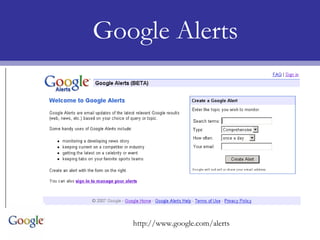
Google Alerts


   http://www.google.com/alerts
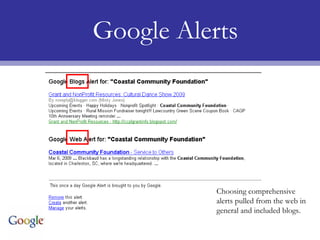
Google Alerts


           Choosing comprehensive
           alerts pulled from the web in
           general and included blogs.
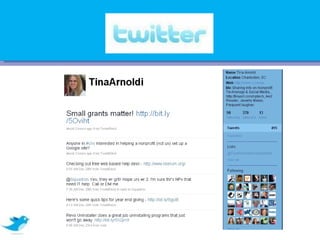
Twitter is a social networking and micro-blogging service that
enables its users to send and read other users' updates known
  as tweets. Tweets are text-based posts of up to 140 bytes in
 length. Updates are displayed on the user's profile page and
delivered to other users who have signed up to receive them.
               http://en.wikipedia.org/wiki/Twitter

 According to a Pew report, 19% of online Americans use twitter.
                         As of October 2009.
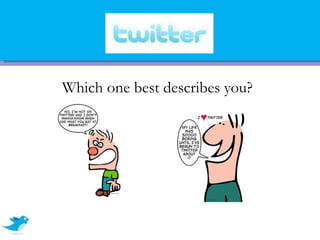
Which one best describes you?
Before we talk about How, let’s talk about
            Why and When….
•Short snippets of information
•Wanting to send out regular updates
•Easy to share responsibility among staff
•To get quick news updates
•Learn how other organizations are using it
•You have 15 minutes available several days a week.
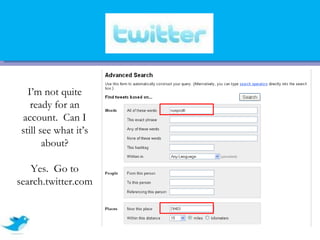
I’m not quite
    ready for an
 account. Can I
 still see what it’s
        about?

   Yes. Go to
search.twitter.com
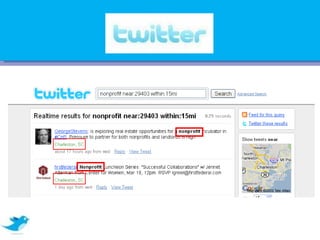
I’m still not quite ready for an account. Can I still see what it’s about?
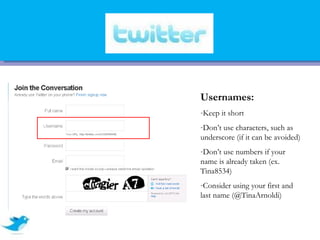
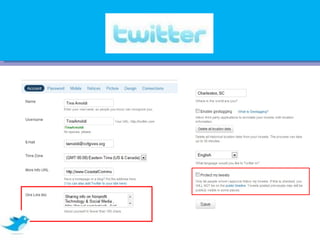
Usernames:
-Keep it short
-Don’t use characters, such as
underscore (if it can be avoided)
-Don’t use numbers if your
name is already taken (ex.
Tina8534)
-Consider using your first and
last name (@TinaArnoldi)
A blog (a contraction of the term weblog) is a type of
website, usually maintained by an individual with regular
entries of commentary, descriptions of events, or other
material such as graphics or video. Entries are
commonly displayed in reverse-chronological order.
"Blog" can also be used as a verb, meaning to maintain or
add content to a blog.

           http://en.wikipedia.org/wiki/Blog
Before we talk about How, let’s talk about
                  Why and When….
•You can commit to posting at least once a month.
•You have stories to tell or expertise to share.
•You have more than one person willing to commit.
•You have quietly practiced blogging for a month.
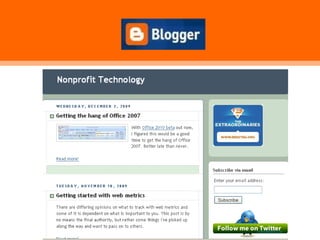
•Someone on staff can spend an hour a week writing and responding to comments.
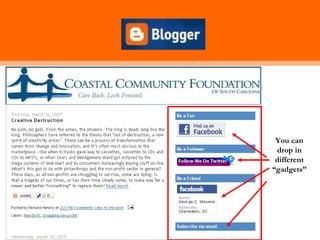
You can
 drop in
 different
“gadgets”
Getting Started
•   Read and comment on other blogs. It is about
    the message you are spreading more than where
    you are spreading it.

•   Decide on authors

•   Practice first before going live!
Well…. What do I write about?
3. What have I read lately? What points were interesting? Can I add
   more to it?

5. Who do I admire? Can I write something about them that explains
   how to emulate those traits?

7. What kinds of thoughts will inspire my audience to contact me (or
   support a cause, or buy your product, or support your interests)?

9. What do I want to know that I can ask my community?        Chrisbrogan.com
Facebook is a free-access social networking website that is operated
and privately owned by Facebook, Inc.[1] Users can join networks
organized by city, workplace, school, and region to connect and
interact with other people. People can also add friends and send
them messages, and update their personal profiles to notify friends
about themselves.
              http://en.wikipedia.org/wiki/Facebook

    Facebook is the 2th most trafficked web site in the world!!
                            Source: Alexa.com, 12/09
Before we talk about How, let’s talk about
                   Why and When….
•Someone on staff is already on Facebook, or is willing to set up an account.
•If you are already blogging or tweeting, you can easily tie those posts into your Facebook page.
•Are your customers and prospects on Facebook? Then you should be too.
•Can someone spend 10 minutes on most days checking your page for new comments from
“fans”?
•There is a large number of potential prospects who may not know you exist.
•You can invite people to events for free.
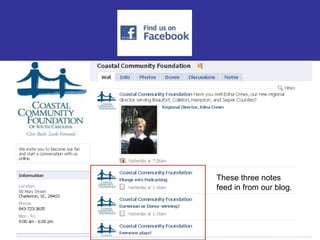
These three notes
feed in from our blog.
Pages (Coastal Community Foundation)
   • Page category can not be changed *******
   • Pages can be customized with different applications (“widgets”), which
      can't be added to groups.
   • Pulls in blog posts

Groups (Center for Women)
   •   Groups make it a little easier to send out “bulk invite” & are a little better for
       viral marketing (meaning that group members can also send bulk invites to their
       friends).

Both
   •Allow discussions
   •Let you message all members (groups) and fans (page)
   •Allow picture exchange
Measuring Return on Investment (ROI)
1. # of comments
2. # of friends, fans, followers, etc…
3. # of hits/views (Google analytics)
4. # of donations
5. # of new donors
6. # of new volunteers
7. # of new email addresses collected
8. $ raised
Now what…? I’m not sure I have time!
2. Set up a Google alert on your organization.
3. “Listen” to people on twitter by going to search.twitter.com
4. Read blogs that interest you and comment where appropriate.
5. If you don’t already have a Facebook account, set one up, and
   see what others are doing with pages and groups.
6. Call Tina with questions…. 843-723-3635.
Social media for AITP

Social media for AITP

  • 3.
    Social media presentation • Web 2.0 overview • Google Alerts • Twitter • Blog • Facebook • Now what?
  • 4.
    What is Web2.0? • Facilitating communication • Information sharing • Collaboration • Social-networking • Video-sharing • Wikis • Blogs http://en.wikipedia.org/wiki/Web_2.0
  • 5.
    … and WhyBother? • Increase in time, but not (necessarily) money. • Connect to people interested in your organization. • Invite conversation instead of simply sending out press releases. • Encourage your customers to really engage with you.
  • 6.
    But will Ilose control of my message? • You cannot CONTROL what people say about you. • However, you can INFLUENCE what people are saying. •Once you decide on your social media outlet, consider setting a policy and deciding which staff can speak on behalf of your organization.
  • 7.
  • 8.
    Google Alerts http://www.google.com/alerts
  • 9.
    Google Alerts Choosing comprehensive alerts pulled from the web in general and included blogs.
  • 10.
    Twitter is asocial networking and micro-blogging service that enables its users to send and read other users' updates known as tweets. Tweets are text-based posts of up to 140 bytes in length. Updates are displayed on the user's profile page and delivered to other users who have signed up to receive them. http://en.wikipedia.org/wiki/Twitter According to a Pew report, 19% of online Americans use twitter. As of October 2009.
  • 11.
    Which one bestdescribes you?
  • 12.
    Before we talkabout How, let’s talk about Why and When…. •Short snippets of information •Wanting to send out regular updates •Easy to share responsibility among staff •To get quick news updates •Learn how other organizations are using it •You have 15 minutes available several days a week.
  • 14.
    I’m not quite ready for an account. Can I still see what it’s about? Yes. Go to search.twitter.com
  • 15.
    I’m still notquite ready for an account. Can I still see what it’s about?
  • 16.
    Usernames: -Keep it short -Don’tuse characters, such as underscore (if it can be avoided) -Don’t use numbers if your name is already taken (ex. Tina8534) -Consider using your first and last name (@TinaArnoldi)
  • 18.
    A blog (acontraction of the term weblog) is a type of website, usually maintained by an individual with regular entries of commentary, descriptions of events, or other material such as graphics or video. Entries are commonly displayed in reverse-chronological order. "Blog" can also be used as a verb, meaning to maintain or add content to a blog. http://en.wikipedia.org/wiki/Blog
  • 19.
    Before we talkabout How, let’s talk about Why and When…. •You can commit to posting at least once a month. •You have stories to tell or expertise to share. •You have more than one person willing to commit. •You have quietly practiced blogging for a month. •Someone on staff can spend an hour a week writing and responding to comments.
  • 20.
    You can dropin different “gadgets”
  • 22.
    Getting Started • Read and comment on other blogs. It is about the message you are spreading more than where you are spreading it. • Decide on authors • Practice first before going live!
  • 23.
    Well…. What doI write about? 3. What have I read lately? What points were interesting? Can I add more to it? 5. Who do I admire? Can I write something about them that explains how to emulate those traits? 7. What kinds of thoughts will inspire my audience to contact me (or support a cause, or buy your product, or support your interests)? 9. What do I want to know that I can ask my community? Chrisbrogan.com
  • 24.
    Facebook is afree-access social networking website that is operated and privately owned by Facebook, Inc.[1] Users can join networks organized by city, workplace, school, and region to connect and interact with other people. People can also add friends and send them messages, and update their personal profiles to notify friends about themselves. http://en.wikipedia.org/wiki/Facebook Facebook is the 2th most trafficked web site in the world!! Source: Alexa.com, 12/09
  • 25.
    Before we talkabout How, let’s talk about Why and When…. •Someone on staff is already on Facebook, or is willing to set up an account. •If you are already blogging or tweeting, you can easily tie those posts into your Facebook page. •Are your customers and prospects on Facebook? Then you should be too. •Can someone spend 10 minutes on most days checking your page for new comments from “fans”? •There is a large number of potential prospects who may not know you exist. •You can invite people to events for free.
  • 26.
    These three notes feedin from our blog.
  • 27.
    Pages (Coastal CommunityFoundation) • Page category can not be changed ******* • Pages can be customized with different applications (“widgets”), which can't be added to groups. • Pulls in blog posts Groups (Center for Women) • Groups make it a little easier to send out “bulk invite” & are a little better for viral marketing (meaning that group members can also send bulk invites to their friends). Both •Allow discussions •Let you message all members (groups) and fans (page) •Allow picture exchange
  • 28.
    Measuring Return onInvestment (ROI) 1. # of comments 2. # of friends, fans, followers, etc… 3. # of hits/views (Google analytics) 4. # of donations 5. # of new donors 6. # of new volunteers 7. # of new email addresses collected 8. $ raised
  • 29.
    Now what…? I’mnot sure I have time! 2. Set up a Google alert on your organization. 3. “Listen” to people on twitter by going to search.twitter.com 4. Read blogs that interest you and comment where appropriate. 5. If you don’t already have a Facebook account, set one up, and see what others are doing with pages and groups. 6. Call Tina with questions…. 843-723-3635.