DISTRICT 7120
         ASSEMBLY
Social Media Networking
Introduction

This PowerPoint Presentation will be available
       at Cornerstone Solutions Website
     www.CornerstoneSolutionsofNY.com
Agenda
1.        What is Social Media and Why is it important
2.        Five key Social Networks
     1.       Twitter
     2.       Blogging
     3.       LinkedIn
     4.       Facebook
     5.       YouTube
3.        Social Media Tips
4.        Case Study – LinkedIn Rotary Guest Speakers
5.        Monitoring & Analytics
6.        Questions
Is This Your Club?
What is Social Media?
 Wikipedia:
           “Social Media are media for social interaction, using highly
 accessible and scalable communication techniques. Social media is the
 use of web-based and mobile technologies to turn communication into
 interactive dialogue.”

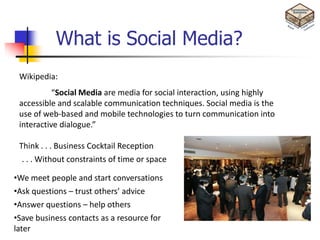
 Think . . . Business Cocktail Reception
  . . . Without constraints of time or space

•We meet people and start conversations
•Ask questions – trust others’ advice
•Answer questions – help others
•Save business contacts as a resource for
later
Why You Should Care
     Quick 2 minute video


            Socialnomics 3
      http://youtu.be/nPYrbSUqr2k
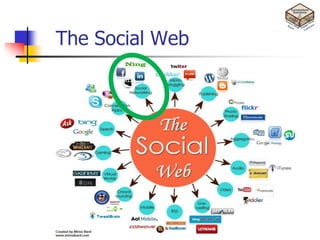
The Social Web
Some Social Media Features
Sharing: Allows you to distribute content to your social networks in batches.
Profiles: Allow you to position your expertise and qualifications to the social networks. The
keywords in your profile(s) are vitally important. They have a strong impact on your search results.
Pages: Allow you to create specific content based on interest. This helps when you want to build
targeted campaigns.
Groups: Allow you to engage with your potential clients based on their areas of interest. A great
way to target specific markets for any campaign.
Search: Allows you to find and rank for specific keywords. Keywords are indexed by the search
engines.
Messages: Allow you to privately engage with specific prospects with excellent response rates
(typically 6% to 30% depending on message format and goal.)
Events: Allow you to promote events and see attendees to create follow-up strategies. Helps to
create the ‗viralness‘ desired by having attendees also promote the event through sharing.
Voting: Allows you to take the pulse of your market place, at little or no cost.
Applications: A wide variety of applications exist to customize almost any aspect of your Social
Media strategy.
What is Twitter?


    http://www.youtube.com/watch?v=ddO9idmax0o
Quick Look at the Basics
   140 characters
   Concept of “Followers”
   @name
   # tags (hash tags)
   Short URLs (http://bit.ly or http://ow.ly)
   RT (Re-Tweets)
   DM (direct message) – only to followers
   Etiquette
   Thank You is important.
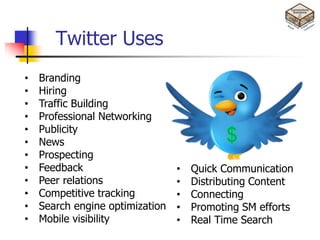
Twitter Uses
•   Branding
•   Hiring
•   Traffic Building
•   Professional Networking
•   Publicity
•   News
•   Prospecting
•   Feedback                     •   Quick Communication
•   Peer relations               •   Distributing Content
•   Competitive tracking         •   Connecting
•   Search engine optimization   •   Promoting SM efforts
•   Mobile visibility            •   Real Time Search
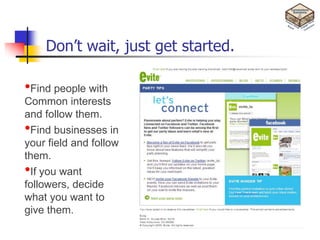
Don’t wait, just get started.

•Find people with
Common interests
and follow them.
•Find businesses in
your field and follow
them.
•If you want
followers, decide
what you want to
give them.
Twitter Tips & Tricks
 Follow key players in your industry
 Read some of the posts daily
 When you follow someone or they follow you, read their
  bio completely and maybe do a bit more searching
 Twellow.com is “The Twitter of Yellow Pages.”
 Select a good Twitter name, preferably business name
 Connect your Twitter updates to your other Social Media
  accounts.
 Search for more Tips & Tricks on the internet
What is Blogging?


    http://www.youtube.com/watch?v=NN2I1pWXjXI
About Your Blog
•   Pick the right tool – i.e. Wordpress
•   Get your own URL (www.TomBrownBlog.com)
•   Set up RSS (Rich Site Summary, a format for delivering regularly changing web content)
•   Write about WHAT YOU KNOW
•   Pick the Right headline or title
     •   The Secret of . . .
     •   Top 10 tips for . . .
     •   The best way to . . .
     •   A new way to . . .

•   Join in the conversation
•   Follow a few blogs yourself – Think industry magazines
•   Keep a schedule. Blog regularly. Once a week, Bi-monthly
•   Spend more time talking about the culture that SURROUNDS people
    that buy your products, instead of the product(s) itself.
Blog Etiquette
   Attribute your sources (called Trackbacks). Hot links are great. Don’t
    copy someone else’s blog verbatim and attribute it as a source.
   Allow comments. When you comment, stay relevant. You can
    disagree with the message without attacking the blogger. Don’t Spam
   Respond to your commenters.
   Only speak the truth. And beware what you speak. It is all searchable
    and permanent.
   Check your facts, don’t just repost.
   Keep it simple and short. 250 – 600 words is great.
   Promote regularly on Twitter. Use hash tags.
What is LinkedIn?


 http://www.youtube.com/watch?v=IzT3JVUGUzM
Quick Look at the Basics
      101 Million members
      Targeted toward the business professional
      Resume
      Recommendations / Referrals
      Connections
      Expertise
      Executive Level Search
      Link to your company and blog

Connecting with people you don’t know is
not as important as connecting with people
you NEED to know.
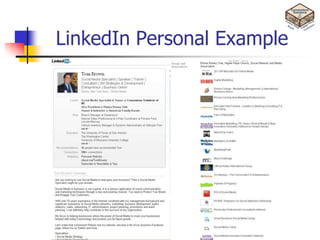
LinkedIn Personal Example
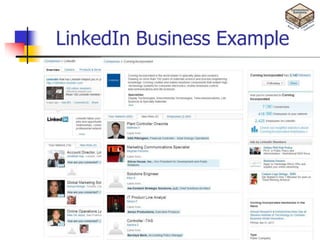
LinkedIn Business Example
LinkedIn Tips & Tricks
 Complete your ENTIRE profile, make it PUBLIC
 Have a good profile picture
 Start your connection collection with your Email addresses
 Looked at your connections’ connections
 Absolutely join groups (min 5), and be active in at least one
 Get Your RECOMMENDATIONS
 Ask questions to start conversations
 Answer LinkedIn questions, it builds your credibility & leadership
 Search for business profiles / pages, see if anyone is within your
  network already
 Use Keywords in your status updates
 It’s OK to ask for help from your contacts
 Search for more Tips & Tricks on the internet
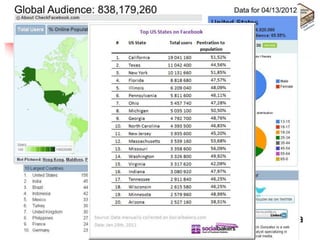
Facebook!!
•838 million users world wide
•Average person is on Facebook :55 minutes per day
•People spend over 700 billion minutes per month on
Facebook
•Average user has 130 friends
•Over 900 million pages/groups/events/community
pages
•70+ language translations available
•Over 250 million active users access Facebook from a
mobile device
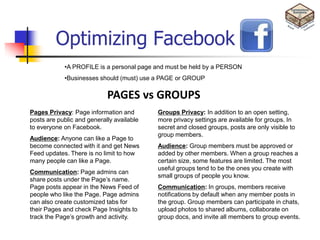
Optimizing Facebook
            •A PROFILE is a personal page and must be held by a PERSON
            •Businesses should (must) use a PAGE or GROUP

                            PAGES vs GROUPS
Pages Privacy: Page information and        Groups Privacy: In addition to an open
posts are public and generally available   setting, more privacy settings are available for
to everyone on Facebook.                   groups. In secret and closed groups, posts are only
                                           visible to group members.
Audience: Anyone can like a Page to
become connected with it and get News      Audience: Group members must be approved or
Feed updates. There is no limit to how     added by other members. When a group reaches a
many people can like a Page.               certain size, some features are limited. The most
                                           useful groups tend to be the ones you create with
Communication: Page admins can
                                           small groups of people you know.
share posts under the Page‘s name.
Page posts appear in the News Feed of      Communication: In groups, members receive
people who like the Page. Page admins      notifications by default when any member posts in
can also create customized tabs for        the group. Group members can participate in
their Pages and check Page Insights to     chats, upload photos to shared albums, collaborate
track the Page‘s growth and activity.      on group docs, and invite all members to group
                                           events.
Facebook Tips
•   Choose a good vanity URL. It can never be changed
•   Beware, Facebook blurs the line between personal and professional.
•   Audit your Facebook profile and security settings
•   Facebook can be used for more than connecting with friends or people you
    know from now or your past
•   Use the NOTE screen for more detailed stuff. You can write more and it
    stay’s on peoples screens a bit longer.
•   Post content 2-3 times per week.
•   When posting, use images as much as possible.
•   Anything posted, can and will be available on the internet forever.
•   Analyze & optimize using Facebook’s, Insight Tool.
•   To be effective, you MUST have a Social Media Strategy or calendar.
YouTube?
YouTube is the largest worldwide video-sharing website which users can
upload, share, view, comment, and rate videos. Created in February 2005.

         •YouTube Statistics here, (http://www.youtube.com/t/press_statistics)
                                                        &
                                   (http://www.reelseo.com/youtube-statistics/)
         •Google owns YouTube, so posted videos are almost immediately
         searchable and it improves your rankings .
         •Approximate 10% of your traffic will generate sales.
         •What is a Viral Video? (http://www.TomBrownBlog.com)
YouTube Tips & Tricks.
•Create a YouTube account. Be sure you pick a business related username.
•Create and customize your Channel. You channel is your Username and can NOT be changed
•Create a video. Do NOT go too professional.
•Have a gimmick. Be entertaining. ―Will it Blend, 1:37‖
(http://youtu.be/qg1ckCkm8YI )
•Videos typically fall into three categories: Informational, Educational, Entertainment
•Get your channel/video noticed
      •Participate in the YouTube community
      •Direct viewers to your website
      •Have a good script, keyword heavy
      •Invest in a decent microphone
      •Twitter/LinkedIn/Blog/Facebook
•Use Tags - keywords
•Remove offensive comments
•Measure – YouTube has free analytics tools.
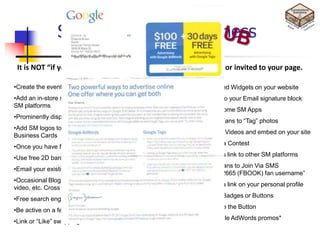
SM tips for Your Business
                                   No-Cost Marketing Ideas

 It is NOT “if you build it, they will come.” People must be lured or invited to your page.

•Create the event. Share it. Publicize it everywhere.            •Embed Widgets on your website
•Add an in-store sign that says ―Become a fan of Company Name on •Add to your Email signature block
SM platforms
                                                                 •Try some SM Apps
•Prominently display your SM logos on your website
                                                                 •Get Fans to ―Tag‖ photos
•Add SM logos to all your printed marketing material, including
                                                                 •Load Videos and embed on your site
Business Cards
                                                                 •Run a Contest
•Once you have fans, start offering promotions/incentives
                                                                 •Cross link to other SM platforms
•Use free 2D barcodes
                                                                 •Get fans to Join Via SMS
•Email your existing email list
                                                                    (―32665 (FBOOK) fan username‖
•Occasional Blog about your Facebook page, Tweet about your
                                                                 •Add a link on your personal profile
video, etc. Cross promote.
                                                                 •Use Badges or Buttons
•Free search engine submission tools
                                                                 •Share the Button
•Be active on a few Social Media forums.
                                                                 •Google AdWords promos*
•Link or ―Like‖ swapping
SM Tips for Your Business
                                         Paid Advertising


                                            TIPS
•Use Facebook Ads
                                            •Set up campaign goals
•Google Advertising Programs (2 types)
                                            •Targeting demographics
•Twitter Business Site
                                            •Buy direct from Social Networks and not search engines
•LinkedIn Direct Ads
                                            •Set a budget
•Paid Discovery on StumbleUpon
                                            •Run two or more ads simultaneously
•Digg Ads
                                            •Test CPM (cost per 1000 impressions) vs.
•Mobile Advertising                           CPC (cost per click bidding) to find best value
                                            •Monitor, track, analyze and optimize
                                            •Continually tweak
Monitoring & Analytics
     There are multiple free tools to start

•Google Analytics (http://www.google.com/analytics/)
•Google Alerts (http://www.google.com/alerts)
•10 free social media monitoring sites you should try (http://bit.ly/mJxd70)
•11 Leading Tools for Free Website Analytics (http://bit.ly/jP5Shr)
Recap
So, let’s recap the reasons why your business benefits from Social Media:
•Economical
•Great additional way to build relationships
•Extends consumer reach beyond your local region
•Aids word-of-mouth referrals
•Easy to track – metrics!
•New tools to build rapport
•Builds up reputation
•Lets you put your business face in front of more customers
•Although using social media can be scary at first, once you realize the benefits, I
bet you‘ll wonder what took you so long!
•Your customers are already there, it is time you joined them
•To get you started, here are 10 reasons for participating in social media to
benefit your business.
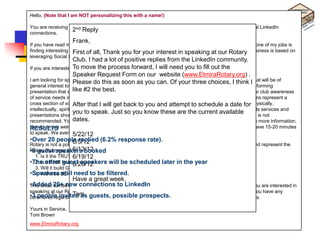
Hello,

You are receiving this open Speaker Invitation Request specifically because you are one on my fairly local LinkedIn
connections.
            2nd Reply

          Case Study – LinkedIn Rotary Speaker
           Frank,
If you have read my profile, you might be aware that I am currently the VP of the Elmira Rotary Club and one of my jobs is
finding interesting guest speakers for ourfor your interest inI speaking at our Rotary and my business is based on
              First of all, Thank you lunch program. Since am a big fan of Social Media
leveraging Social Media I thought I would try using LinkedIn to find a few guest speakers.
              Club. I had a lot of positive replies from the LinkedIn community.
If you are interested in being process forward, Iare a need you to to consider.
              To move the a guest speaker, here will few guidelines fill out the
              Speaker Request Form on our website (www.ElmiraRotary.org) .
•Needed to get newwith a topic of informational, educational, motivational or entertainment value that will be of
              for speakers and fresh speakers.
I am looking Please do this as soon as you can. Of your three choices, I think I
general interest to all club members. Our Club is always seeking speakers that have an interesting and informing
•Decided likesend a best.
presentation to enhances our mission of philanthropic giving. We welcome speakers who can further our club awareness
               that #2 the geographically targeted email to EVERYONE.
of service needs in our community, the national, or international community at-large. Additionally, Rotarians represent a
         •500+ Total People in network
cross section of vocations will contribute to the health and well being of our community; economically, physically,
              After that I that get back to you and attempt to schedule a date for
intellectually, spiritually, socially andwithin 50 mile geographic radius (325+) business or its services and
         •Only sentspeak. Just so you know these are thenot promote a specific
              you to to people creatively. Presentations should current available
presentations should be mostly non-political and non-sectarian. Directly soliciting purchases or donations is not
              dates.
recommended. You are welcome to stay after the meeting and speak with interested Rotarians and share more information.
Handouts are welcome. We meet every Tuesday, noon to 1:00pm at the Elmira Holiday Inn. You would have 15-20 minutes
RESULTS
to speak. We average about 45 members at each meeting.
              5/22/12
•Over 20 people replied (6.2% response rate).
         6/5/12
Rotary is not a political or religious organization, therefore your topic should appeal to a wide audience and represent the
Rotary "four 6/12/12 of booked
•8 guest speakers all we say and do:
               way test"
  1. Is it the 6/19/12
               TRUTH?
•The other guest speakers will be scheduled later in the year
  2. Is it FAIR to all concerned?
               6/26/12
  3. Will it build GOODWILL and BETTER FRIENDSHIPS?
•Speakers BENEFICIAL toall concerned?
  4. Will it be still need to be filtered.
             Have a great week.
•Added 20+ newto be a little longer to LinkedIn so if you are still reading this, Thank You. If you are interested in
This email turned out connections than I anticipated,
speaking at our Rotary Club, please reply or fill out the application at http://bit.ly/GSakA7 . And finally, if you have any
•3 peopleTom using LinkedIn aspossible prospects.
comments regarding as guests, venue to obtain guest speakers, I would love to hear your thoughts.
             invited

Yours in Service,
Tom Brown
www.ElmiraRotary.org
Recap
10 (Business) Reasons to Participate in Social Media
by Christine Whittemore
1. You demonstrate to potential customers that you are human and care about their world.
2. You bring to life an externally focused mindset. (See Retail Outward Not Inward: Time To Refocus.)
3. Social media allows you to bring to life your otherwise static brochure-like website with a dynamic presence.
4. You address in a public forum the questions and concerns your customers have about your products and services—
which are being asked anyway without your participation.
5. You participate in the conversations taking place that relate to your business, products, industry … and have the
opportunity to shape the agenda.
6. You manage your reputation.
7. You build a customer community
8. You direct prequalified prospects—with whom you‘ve already established a relationship—to your website, so you can
engage in business.
9. You build your digital visibility and online presence.
10. You remain relevant to customers.
Whereas traditional advertising attempts to bypass the brain and go straight to the heart, social media addresses
potential buyers‘ needs for intellectual satisfaction with specific knowledge (i.e., content and context). The result: You
build a business brand that customers not only feel is great, but know it is, too.
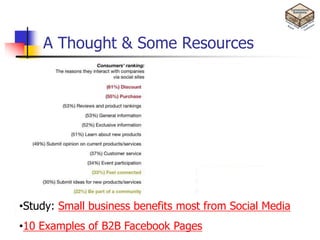
A Thought & Some Resources


•Study: Small business benefits most from Social Media
•10 Examples of B2B Facebook Pages
Sneak Preview 2012-2013
Your Turn To . . .
   http://www.yourturnto.com
   District 7120 project
   What is Rotary doing in your area?
   Just Shoot and post
   Contest(s) coming
   Have Fun With it
   Facebook Page coming soon!
Next Steps

1.   Create/update LinkedIn Profile
2.   Invite everyone you have an email for
3.   Join some Rotary & your business groups
4.   Create/update Facebook profile
5.   Like/Friend/Subscribe to areas of interest
6.   Create a video for YourTurnTo
7.   As for the club site(s), just do it
Links of Interest
   Your Turn To                                                  Personal Links – This is about
    http://www.yourturnto.com                                     networking! 
   Rotary District 7120                                          •This is Me on Facebook
    https://www.facebook.com/groups/326628367381646/?ref=ts       https://www.facebook.com/tombrown69
   Rotarians on Social Networks Fellowship (ROSNF)
                                                                  •LinkedIn
    https://www.facebook.com/groups/rosnf/
                                                                  http://www.linkedin.com/in/tombrownjr
   Elmira Rotary Club
    https://www.facebook.com/ElmiraRotaryClub                     •About.Me gets you a LOT more
   Rotary District 5130 Rotary Leadership Institute              http://about.me/tombrownjr
    https://www.facebook.com/pages/Rotary-District-5130-Rotary-
    Leadership-Institute/117007538311421?ref=ts
   Rotaract
    Rotoract https://www.facebook.com/rotaractor?ref=ts
   Dancing with our Stars (DWOS)
    https://www.facebook.com/Elmira.Rotary.DWOS?
   Rotary International
    http://www.linkedin.com/company/10422
   ROSNF: Rotarians On Social Networks Fellowship
     http://www.linkedin.com/groups?gid=2398355
   Official Rotary International Group
     http://www.linkedin.com/groups?gid=858557
Final Thoughts
•A successful Social Media presence for businesses is more than
creating a presence on the Internet.
•It requires a strategy fully integrated with your business
goals, including your marketing plan, implementation, ongoing
maintenance, monitoring, analyzing metrics & repeat.
•Facebook OWNS the website and can make ANY change at ANY time.
It should NOT replace your company website.
•Connecting with people you don’t know is not as important as
connecting with people you NEED to know.

•“Once you start down this path, forever will
         it dominate your destiny.”
Mark Twain Quote


“The secret of getting ahead is getting
  started. The secret of getting started is
  breaking your complex overwhelming
  tasks into small manageable tasks, and
  then starting on the first one.”
                   -Mark Twain
Welcome to the world of
         Socialnomics


“Social Media is overthrowing governments.
  You don’t think it’s gonna impact your
  business? You idiot!”
    -Gary Vaynerchuk, Author, “The Thank You Economy”
Thank You & Questions
                Tom Brown
  Owner & Social Media Specialist

Social media networking

  • 1.
    DISTRICT 7120 ASSEMBLY Social Media Networking
  • 2.
    Introduction This PowerPoint Presentationwill be available at Cornerstone Solutions Website www.CornerstoneSolutionsofNY.com
  • 3.
    Agenda 1. What is Social Media and Why is it important 2. Five key Social Networks 1. Twitter 2. Blogging 3. LinkedIn 4. Facebook 5. YouTube 3. Social Media Tips 4. Case Study – LinkedIn Rotary Guest Speakers 5. Monitoring & Analytics 6. Questions
  • 4.
  • 5.
    What is SocialMedia? Wikipedia: “Social Media are media for social interaction, using highly accessible and scalable communication techniques. Social media is the use of web-based and mobile technologies to turn communication into interactive dialogue.” Think . . . Business Cocktail Reception . . . Without constraints of time or space •We meet people and start conversations •Ask questions – trust others’ advice •Answer questions – help others •Save business contacts as a resource for later
  • 6.
    Why You ShouldCare Quick 2 minute video Socialnomics 3 http://youtu.be/nPYrbSUqr2k
  • 7.
  • 8.
    Some Social MediaFeatures Sharing: Allows you to distribute content to your social networks in batches. Profiles: Allow you to position your expertise and qualifications to the social networks. The keywords in your profile(s) are vitally important. They have a strong impact on your search results. Pages: Allow you to create specific content based on interest. This helps when you want to build targeted campaigns. Groups: Allow you to engage with your potential clients based on their areas of interest. A great way to target specific markets for any campaign. Search: Allows you to find and rank for specific keywords. Keywords are indexed by the search engines. Messages: Allow you to privately engage with specific prospects with excellent response rates (typically 6% to 30% depending on message format and goal.) Events: Allow you to promote events and see attendees to create follow-up strategies. Helps to create the ‗viralness‘ desired by having attendees also promote the event through sharing. Voting: Allows you to take the pulse of your market place, at little or no cost. Applications: A wide variety of applications exist to customize almost any aspect of your Social Media strategy.
  • 9.
    What is Twitter? http://www.youtube.com/watch?v=ddO9idmax0o
  • 10.
    Quick Look atthe Basics  140 characters  Concept of “Followers”  @name  # tags (hash tags)  Short URLs (http://bit.ly or http://ow.ly)  RT (Re-Tweets)  DM (direct message) – only to followers  Etiquette  Thank You is important.
  • 11.
    Twitter Uses • Branding • Hiring • Traffic Building • Professional Networking • Publicity • News • Prospecting • Feedback • Quick Communication • Peer relations • Distributing Content • Competitive tracking • Connecting • Search engine optimization • Promoting SM efforts • Mobile visibility • Real Time Search
  • 12.
    Don’t wait, justget started. •Find people with Common interests and follow them. •Find businesses in your field and follow them. •If you want followers, decide what you want to give them.
  • 13.
    Twitter Tips &Tricks  Follow key players in your industry  Read some of the posts daily  When you follow someone or they follow you, read their bio completely and maybe do a bit more searching  Twellow.com is “The Twitter of Yellow Pages.”  Select a good Twitter name, preferably business name  Connect your Twitter updates to your other Social Media accounts.  Search for more Tips & Tricks on the internet
  • 14.
    What is Blogging? http://www.youtube.com/watch?v=NN2I1pWXjXI
  • 15.
    About Your Blog • Pick the right tool – i.e. Wordpress • Get your own URL (www.TomBrownBlog.com) • Set up RSS (Rich Site Summary, a format for delivering regularly changing web content) • Write about WHAT YOU KNOW • Pick the Right headline or title • The Secret of . . . • Top 10 tips for . . . • The best way to . . . • A new way to . . . • Join in the conversation • Follow a few blogs yourself – Think industry magazines • Keep a schedule. Blog regularly. Once a week, Bi-monthly • Spend more time talking about the culture that SURROUNDS people that buy your products, instead of the product(s) itself.
  • 16.
    Blog Etiquette  Attribute your sources (called Trackbacks). Hot links are great. Don’t copy someone else’s blog verbatim and attribute it as a source.  Allow comments. When you comment, stay relevant. You can disagree with the message without attacking the blogger. Don’t Spam  Respond to your commenters.  Only speak the truth. And beware what you speak. It is all searchable and permanent.  Check your facts, don’t just repost.  Keep it simple and short. 250 – 600 words is great.  Promote regularly on Twitter. Use hash tags.
  • 17.
    What is LinkedIn? http://www.youtube.com/watch?v=IzT3JVUGUzM
  • 18.
    Quick Look atthe Basics  101 Million members  Targeted toward the business professional  Resume  Recommendations / Referrals  Connections  Expertise  Executive Level Search  Link to your company and blog Connecting with people you don’t know is not as important as connecting with people you NEED to know.
  • 19.
  • 20.
  • 21.
    LinkedIn Tips &Tricks  Complete your ENTIRE profile, make it PUBLIC  Have a good profile picture  Start your connection collection with your Email addresses  Looked at your connections’ connections  Absolutely join groups (min 5), and be active in at least one  Get Your RECOMMENDATIONS  Ask questions to start conversations  Answer LinkedIn questions, it builds your credibility & leadership  Search for business profiles / pages, see if anyone is within your network already  Use Keywords in your status updates  It’s OK to ask for help from your contacts  Search for more Tips & Tricks on the internet
  • 22.
    Facebook!! •838 million usersworld wide •Average person is on Facebook :55 minutes per day •People spend over 700 billion minutes per month on Facebook •Average user has 130 friends •Over 900 million pages/groups/events/community pages •70+ language translations available •Over 250 million active users access Facebook from a mobile device
  • 23.
    Optimizing Facebook •A PROFILE is a personal page and must be held by a PERSON •Businesses should (must) use a PAGE or GROUP PAGES vs GROUPS Pages Privacy: Page information and Groups Privacy: In addition to an open posts are public and generally available setting, more privacy settings are available for to everyone on Facebook. groups. In secret and closed groups, posts are only visible to group members. Audience: Anyone can like a Page to become connected with it and get News Audience: Group members must be approved or Feed updates. There is no limit to how added by other members. When a group reaches a many people can like a Page. certain size, some features are limited. The most useful groups tend to be the ones you create with Communication: Page admins can small groups of people you know. share posts under the Page‘s name. Page posts appear in the News Feed of Communication: In groups, members receive people who like the Page. Page admins notifications by default when any member posts in can also create customized tabs for the group. Group members can participate in their Pages and check Page Insights to chats, upload photos to shared albums, collaborate track the Page‘s growth and activity. on group docs, and invite all members to group events.
  • 24.
    Facebook Tips • Choose a good vanity URL. It can never be changed • Beware, Facebook blurs the line between personal and professional. • Audit your Facebook profile and security settings • Facebook can be used for more than connecting with friends or people you know from now or your past • Use the NOTE screen for more detailed stuff. You can write more and it stay’s on peoples screens a bit longer. • Post content 2-3 times per week. • When posting, use images as much as possible. • Anything posted, can and will be available on the internet forever. • Analyze & optimize using Facebook’s, Insight Tool. • To be effective, you MUST have a Social Media Strategy or calendar.
  • 25.
    YouTube? YouTube is thelargest worldwide video-sharing website which users can upload, share, view, comment, and rate videos. Created in February 2005. •YouTube Statistics here, (http://www.youtube.com/t/press_statistics) & (http://www.reelseo.com/youtube-statistics/) •Google owns YouTube, so posted videos are almost immediately searchable and it improves your rankings . •Approximate 10% of your traffic will generate sales. •What is a Viral Video? (http://www.TomBrownBlog.com)
  • 26.
    YouTube Tips &Tricks. •Create a YouTube account. Be sure you pick a business related username. •Create and customize your Channel. You channel is your Username and can NOT be changed •Create a video. Do NOT go too professional. •Have a gimmick. Be entertaining. ―Will it Blend, 1:37‖ (http://youtu.be/qg1ckCkm8YI ) •Videos typically fall into three categories: Informational, Educational, Entertainment •Get your channel/video noticed •Participate in the YouTube community •Direct viewers to your website •Have a good script, keyword heavy •Invest in a decent microphone •Twitter/LinkedIn/Blog/Facebook •Use Tags - keywords •Remove offensive comments •Measure – YouTube has free analytics tools.
  • 27.
    SM tips forYour Business No-Cost Marketing Ideas It is NOT “if you build it, they will come.” People must be lured or invited to your page. •Create the event. Share it. Publicize it everywhere. •Embed Widgets on your website •Add an in-store sign that says ―Become a fan of Company Name on •Add to your Email signature block SM platforms •Try some SM Apps •Prominently display your SM logos on your website •Get Fans to ―Tag‖ photos •Add SM logos to all your printed marketing material, including •Load Videos and embed on your site Business Cards •Run a Contest •Once you have fans, start offering promotions/incentives •Cross link to other SM platforms •Use free 2D barcodes •Get fans to Join Via SMS •Email your existing email list (―32665 (FBOOK) fan username‖ •Occasional Blog about your Facebook page, Tweet about your •Add a link on your personal profile video, etc. Cross promote. •Use Badges or Buttons •Free search engine submission tools •Share the Button •Be active on a few Social Media forums. •Google AdWords promos* •Link or ―Like‖ swapping
  • 28.
    SM Tips forYour Business Paid Advertising TIPS •Use Facebook Ads •Set up campaign goals •Google Advertising Programs (2 types) •Targeting demographics •Twitter Business Site •Buy direct from Social Networks and not search engines •LinkedIn Direct Ads •Set a budget •Paid Discovery on StumbleUpon •Run two or more ads simultaneously •Digg Ads •Test CPM (cost per 1000 impressions) vs. •Mobile Advertising CPC (cost per click bidding) to find best value •Monitor, track, analyze and optimize •Continually tweak
  • 29.
    Monitoring & Analytics There are multiple free tools to start •Google Analytics (http://www.google.com/analytics/) •Google Alerts (http://www.google.com/alerts) •10 free social media monitoring sites you should try (http://bit.ly/mJxd70) •11 Leading Tools for Free Website Analytics (http://bit.ly/jP5Shr)
  • 30.
    Recap So, let’s recapthe reasons why your business benefits from Social Media: •Economical •Great additional way to build relationships •Extends consumer reach beyond your local region •Aids word-of-mouth referrals •Easy to track – metrics! •New tools to build rapport •Builds up reputation •Lets you put your business face in front of more customers •Although using social media can be scary at first, once you realize the benefits, I bet you‘ll wonder what took you so long! •Your customers are already there, it is time you joined them •To get you started, here are 10 reasons for participating in social media to benefit your business.
  • 31.
    Hello, You are receivingthis open Speaker Invitation Request specifically because you are one on my fairly local LinkedIn connections. 2nd Reply Case Study – LinkedIn Rotary Speaker Frank, If you have read my profile, you might be aware that I am currently the VP of the Elmira Rotary Club and one of my jobs is finding interesting guest speakers for ourfor your interest inI speaking at our Rotary and my business is based on First of all, Thank you lunch program. Since am a big fan of Social Media leveraging Social Media I thought I would try using LinkedIn to find a few guest speakers. Club. I had a lot of positive replies from the LinkedIn community. If you are interested in being process forward, Iare a need you to to consider. To move the a guest speaker, here will few guidelines fill out the Speaker Request Form on our website (www.ElmiraRotary.org) . •Needed to get newwith a topic of informational, educational, motivational or entertainment value that will be of for speakers and fresh speakers. I am looking Please do this as soon as you can. Of your three choices, I think I general interest to all club members. Our Club is always seeking speakers that have an interesting and informing •Decided likesend a best. presentation to enhances our mission of philanthropic giving. We welcome speakers who can further our club awareness that #2 the geographically targeted email to EVERYONE. of service needs in our community, the national, or international community at-large. Additionally, Rotarians represent a •500+ Total People in network cross section of vocations will contribute to the health and well being of our community; economically, physically, After that I that get back to you and attempt to schedule a date for intellectually, spiritually, socially andwithin 50 mile geographic radius (325+) business or its services and •Only sentspeak. Just so you know these are thenot promote a specific you to to people creatively. Presentations should current available presentations should be mostly non-political and non-sectarian. Directly soliciting purchases or donations is not dates. recommended. You are welcome to stay after the meeting and speak with interested Rotarians and share more information. Handouts are welcome. We meet every Tuesday, noon to 1:00pm at the Elmira Holiday Inn. You would have 15-20 minutes RESULTS to speak. We average about 45 members at each meeting. 5/22/12 •Over 20 people replied (6.2% response rate). 6/5/12 Rotary is not a political or religious organization, therefore your topic should appeal to a wide audience and represent the Rotary "four 6/12/12 of booked •8 guest speakers all we say and do: way test" 1. Is it the 6/19/12 TRUTH? •The other guest speakers will be scheduled later in the year 2. Is it FAIR to all concerned? 6/26/12 3. Will it build GOODWILL and BETTER FRIENDSHIPS? •Speakers BENEFICIAL toall concerned? 4. Will it be still need to be filtered. Have a great week. •Added 20+ newto be a little longer to LinkedIn so if you are still reading this, Thank You. If you are interested in This email turned out connections than I anticipated, speaking at our Rotary Club, please reply or fill out the application at http://bit.ly/GSakA7 . And finally, if you have any •3 peopleTom using LinkedIn aspossible prospects. comments regarding as guests, venue to obtain guest speakers, I would love to hear your thoughts. invited Yours in Service, Tom Brown www.ElmiraRotary.org
  • 32.
    Recap 10 (Business) Reasonsto Participate in Social Media by Christine Whittemore 1. You demonstrate to potential customers that you are human and care about their world. 2. You bring to life an externally focused mindset. (See Retail Outward Not Inward: Time To Refocus.) 3. Social media allows you to bring to life your otherwise static brochure-like website with a dynamic presence. 4. You address in a public forum the questions and concerns your customers have about your products and services— which are being asked anyway without your participation. 5. You participate in the conversations taking place that relate to your business, products, industry … and have the opportunity to shape the agenda. 6. You manage your reputation. 7. You build a customer community 8. You direct prequalified prospects—with whom you‘ve already established a relationship—to your website, so you can engage in business. 9. You build your digital visibility and online presence. 10. You remain relevant to customers. Whereas traditional advertising attempts to bypass the brain and go straight to the heart, social media addresses potential buyers‘ needs for intellectual satisfaction with specific knowledge (i.e., content and context). The result: You build a business brand that customers not only feel is great, but know it is, too.
  • 33.
    A Thought &Some Resources •Study: Small business benefits most from Social Media •10 Examples of B2B Facebook Pages
  • 34.
    Sneak Preview 2012-2013 YourTurn To . . .  http://www.yourturnto.com  District 7120 project  What is Rotary doing in your area?  Just Shoot and post  Contest(s) coming  Have Fun With it  Facebook Page coming soon!
  • 35.
    Next Steps 1. Create/update LinkedIn Profile 2. Invite everyone you have an email for 3. Join some Rotary & your business groups 4. Create/update Facebook profile 5. Like/Friend/Subscribe to areas of interest 6. Create a video for YourTurnTo 7. As for the club site(s), just do it
  • 36.
    Links of Interest  Your Turn To Personal Links – This is about http://www.yourturnto.com networking!   Rotary District 7120 •This is Me on Facebook https://www.facebook.com/groups/326628367381646/?ref=ts https://www.facebook.com/tombrown69  Rotarians on Social Networks Fellowship (ROSNF) •LinkedIn https://www.facebook.com/groups/rosnf/ http://www.linkedin.com/in/tombrownjr  Elmira Rotary Club https://www.facebook.com/ElmiraRotaryClub •About.Me gets you a LOT more  Rotary District 5130 Rotary Leadership Institute http://about.me/tombrownjr https://www.facebook.com/pages/Rotary-District-5130-Rotary- Leadership-Institute/117007538311421?ref=ts  Rotaract Rotoract https://www.facebook.com/rotaractor?ref=ts  Dancing with our Stars (DWOS) https://www.facebook.com/Elmira.Rotary.DWOS?  Rotary International http://www.linkedin.com/company/10422  ROSNF: Rotarians On Social Networks Fellowship http://www.linkedin.com/groups?gid=2398355  Official Rotary International Group http://www.linkedin.com/groups?gid=858557
  • 37.
    Final Thoughts •A successfulSocial Media presence for businesses is more than creating a presence on the Internet. •It requires a strategy fully integrated with your business goals, including your marketing plan, implementation, ongoing maintenance, monitoring, analyzing metrics & repeat. •Facebook OWNS the website and can make ANY change at ANY time. It should NOT replace your company website. •Connecting with people you don’t know is not as important as connecting with people you NEED to know. •“Once you start down this path, forever will it dominate your destiny.”
  • 38.
    Mark Twain Quote “Thesecret of getting ahead is getting started. The secret of getting started is breaking your complex overwhelming tasks into small manageable tasks, and then starting on the first one.” -Mark Twain
  • 39.
    Welcome to theworld of Socialnomics “Social Media is overthrowing governments. You don’t think it’s gonna impact your business? You idiot!” -Gary Vaynerchuk, Author, “The Thank You Economy”
  • 40.
    Thank You &Questions Tom Brown Owner & Social Media Specialist