Board Meeting May 18, 2011 Jennifer Chisnell Social Media and Booklyn 2.0
Social media: what once seemed silly or frivolous has become sophisticated, an integrated part of daily life Social media offers new tools and opens up new paths for building your audience and communicating/interacting with them Organizational processes must adapt to the new flow of information generated through the effective use of social media An overall strategy is necessary—one that covers all parts of the organization Social media should provide visible, measurable results Don’t hesitate to take advantage of others’ strategies and projects, remixing and further developing them
It can be hard to keep up with the pace of change… I know this is how  I  feel, at times. … but the rewards are worth the effort, I promise.
Online presence and the act of ‘just being there’ Any posting is “good” posting—up to a point You want your org to be part of the fabric of your audience’s online experience—coming across on their feed will remind them you’re still alive and kickin’, even if they’re too busy to give it more than a passing glance at the time Bad use of social media— now, “shameless self-promotion” is the name of the game, and expected, but if too pointed or persistent, leaves a bad taste in the mouth “ Good” self-promotion includes reciprocity with ally organizations and creative outreach to audience
The art of the post Granularity and embedding: fit the pieces together in various ways Tweet link (manually) to a new blog post or flickr post, have twitter (automatically) send it directly to facebook Blog an entry with a selection of favorite recent tweets by self and friends, link to the blog on facebook Auto-funnel tumblr posts directly into both facebook and twitter Blog  it Tweet  it Facebook-update  it Tumblr  it YouTube  it
Kinds of posts Recurrent feature (weekly, monthly…but better to stay vague about periodicity than to repeatedly apologize for lagging behind in posting) Announcement (event or achievement) Topical response (e.g. holidays) Follow-up to an event What other categories come to mind?
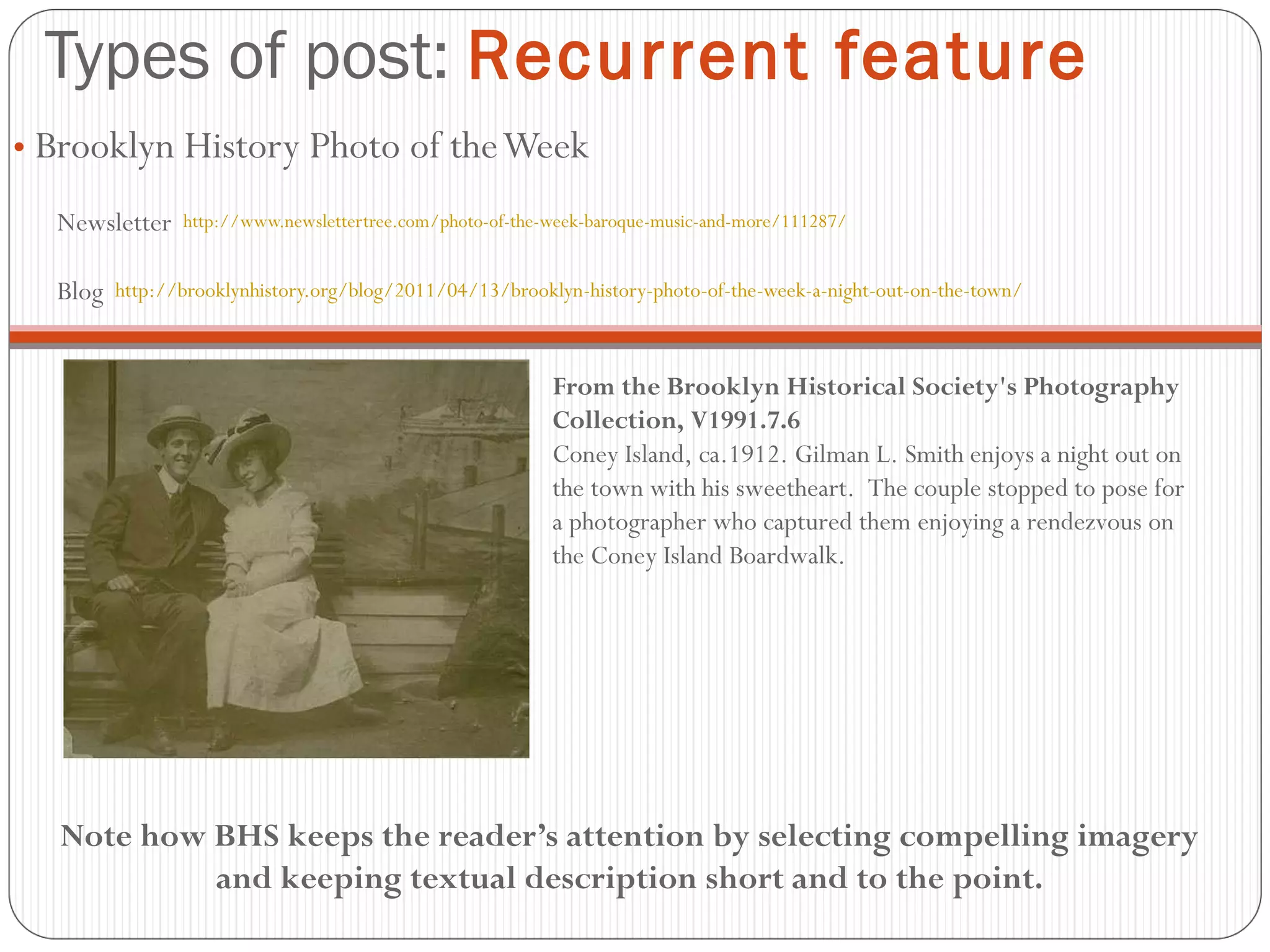
Types of post:  Recurrent feature Brooklyn History Photo of the Week Newsletter  http://www.newslettertree.com/photo-of-the-week-baroque-music-and-more/111287/ Blog  http://brooklynhistory.org/blog/2011/04/13/brooklyn-history-photo-of-the-week-a-night-out-on-the-town/ From the Brooklyn Historical Society's Photography Collection, V1991.7.6 Coney Island, ca.1912. Gilman L. Smith enjoys a night out on the town with his sweetheart.  The couple stopped to pose for a photographer who captured them enjoying a rendezvous on the Coney Island Boardwalk. Note how BHS keeps the reader’s attention by selecting compelling imagery and keeping textual description short and to the point.
Types of post:  Announcement  (e.g. event or achievement)
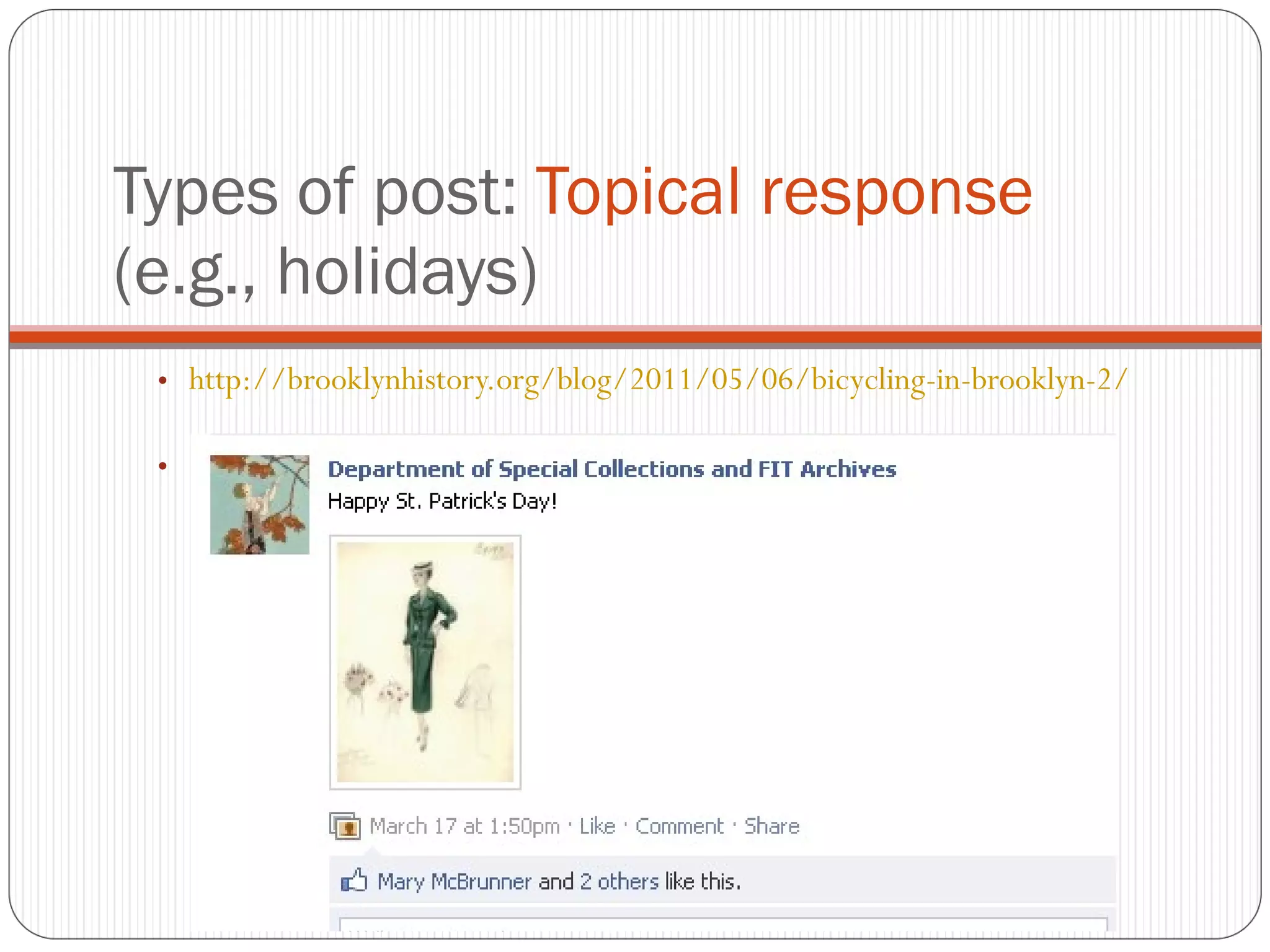
Types of post:  Topical response  (e.g., holidays)  http://brooklynhistory.org/blog/2011/05/06/bicycling-in-brooklyn-2/
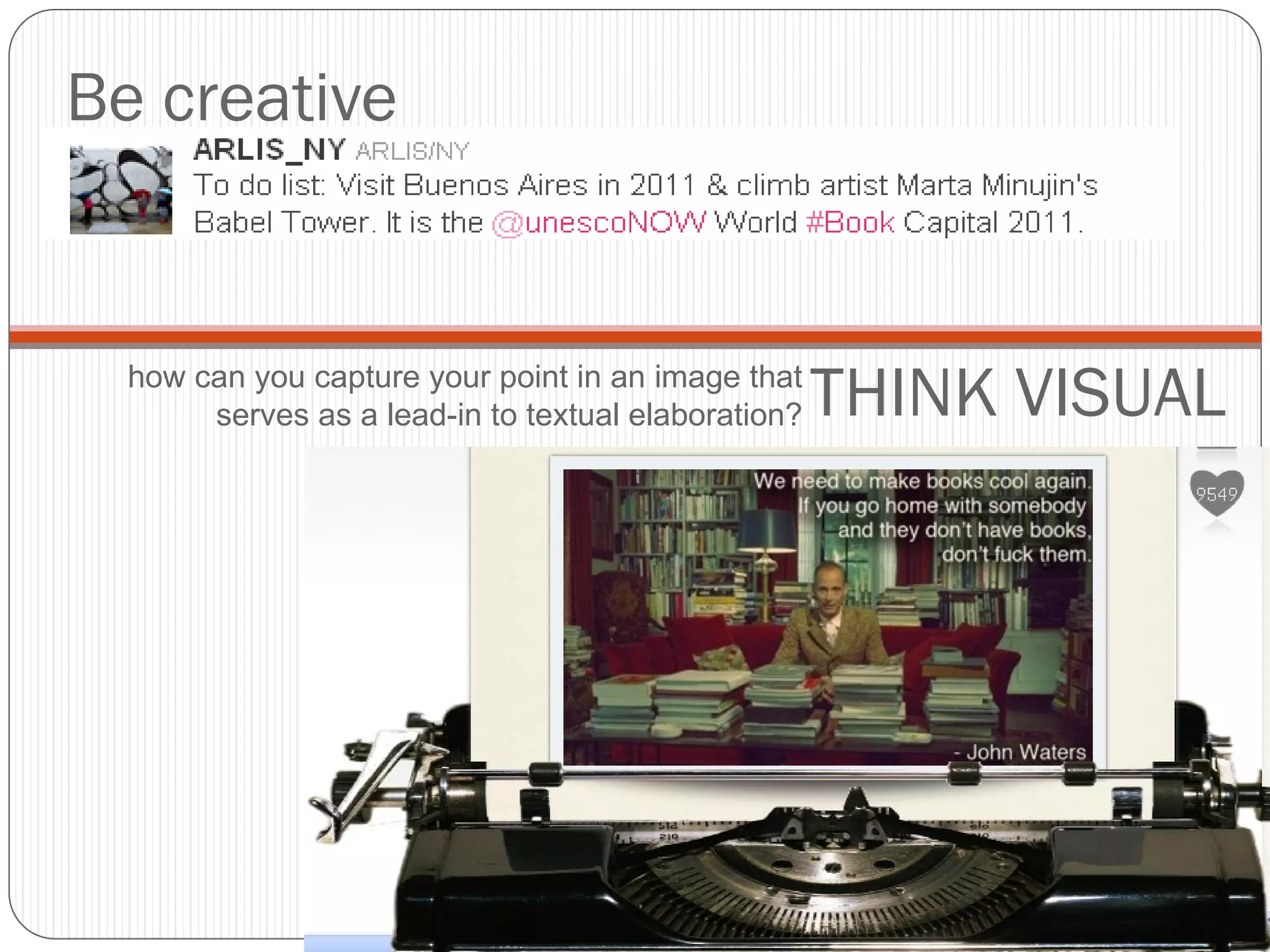
Be creative THINK VISUAL how can you capture your point in an image that serves as a lead-in to textual elaboration?
Engage your community Retweet (RT, or MT—Modifed Tweet) when a user mentions you Promote your ally organizations—in the example up top, MoMA jumped on the bandwagon started by the VanGogh Museum and followed by the Met RT-ing a post by an ally org is one strategy for generating content
Content generation strategies: Original content Collaborative  Rotational Thematic—prompted by news or upcoming events Designated poster? Members of Booklyn send interesting content they come across online to this individual, who is responsible for vetting, aggregating, and disseminating content (with consistent pacing as opposed to intense, clotted blasts) Guest posts Link to content sympathetic to organization’s mission and meaning Link to content generated by organizational allies Creating interesting content to share can be a full-time job  unless you strategize for efficiency.
The guest blog:  get someone else to do it for you! (ha)  http://wordbrooklyn.tumblr.com/post/5576971534/out-of-office-e-mails-that-might-not-fly-with
Organizational allies Informal, friendly, yet strategic, alliances Organizations with like interests, mission Collaboration is all the buzz—fueled by economic downturn and spirit of Open Source Movement and Remix Culture Who do we perceive to be our current allies? Who would we like to build relationships with going forward? Cross-pollination
Ugly Ducking Presse Proteus Gowanus Reanimation Library Central Booking Center for Book Arts The Arm WORD bookstore Spoonbill & Sugartown Brooklyn Arts Press Desert Island Unnameable Books others?
Applications of selected soc media tools WordPress Tumblr Twitter Flickr YouTube Facebook
Enhance with quick-share functionality Article-length commentary Flyers for events You can build an entire website on it, or just use the blogging platform Hundreds of options for customization Plug-ins make publishing to popular social media sites easy and instantaneous.
 
 
Tumblr Mine:  http://booklike.tumblr.com/ Images Links Brief quotations There are a growing number of book art enthusiasts on tumblr
Individual: navel-gazing Institutional: connection-making In just 3 tweets, BMA accomplishes the following:  Links to third-party content written about itself Curator’s “personal” tweets links to object in collection Responds to follower’s question/announces event … yawn.
Twitter  lingo RT=Retweet. This tweet was originally created by a different user MT=Modified tweet. This means the tweet you're looking at is a  paraphrase  of a tweet originally written by someone else # = Hashtag. Use to generate searchable keywords.  #Booklyn
Image sets (as opposed to one-shot posts ala Tumblr)—usually. Beyond just posting your own snapshots, can be a good place to find (and store) illustrative and compelling found images (with attribution--fair use (educational vs. commercial) Users set protection levels determining usage (Creative Commons) Take camera everywhere--who here is a great photographer? Never directly upload photos without necessary intervention (remove red-eye, don't post 20 of the same boring pictures of a crowd milling about) Tag judiciously [this is actually more relevant to facebook]--a good way to draw people in and/or alienate them (“ack my hair looks awful!”)
Probably don’t need our own channel (unless: Education?  ) Need-to-know: how to share and embed (see Jennifer for more info) A good way to share an event after-the-fact, on a variety of platforms Right:  “3000 photographs (-ish), 35 books,  2 months at the Women's Studio Workshop.”
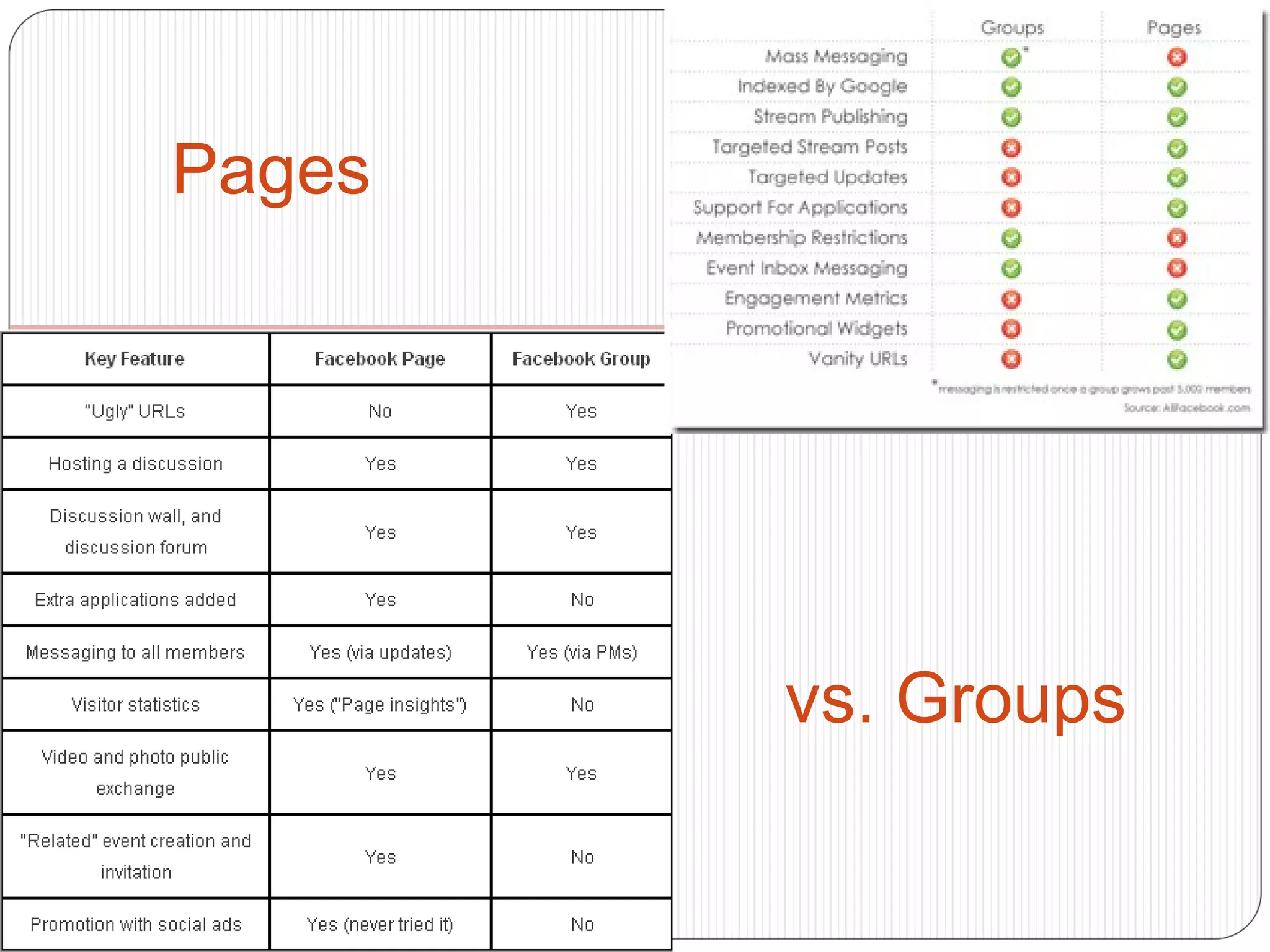
Pages vs. Groups Facebook Pages Like a friend's profile,  Facebook Pages  enable public figures, businesses, organizations and other entities to create an authentic and public presence on Facebook. Unlike your profile, Pages are visible to everyone on the internet by default. You, and every person on Facebook, can connect with these Pages by becoming a fan and then receive their updates in your News Feed and interact with them.
Pages vs. Groups  Facebook Groups While Pages were designed to be the official profiles for entities, such as celebrities, brands or businesses,  Facebook Groups  are the place for small group communication and for people to share their common interests and express their opinion. Groups allow people to come together around a common cause, issue or activity to organize, express objectives, discuss issues, post photos and share related content.   When you create a group, you can decide whether to make it publicly available for anyone to join, require administrator approval for members to join or keep it private and by invitation only. Like with Pages, new posts by a group are included in the News Feeds of its members and members can interact and share with one another from the group.
pages vs. groups cont. With Groups, you can invite your friends to join your Group.  You don’t have that ability with a Page; however, you can “share” your Page with your Facebook friends.  That means that your Facebook friends don’t get directly notified that you have a Facebook Page. They have to see that you’re a fan of a certain page by looking at your profile or news feed. Pages are visible to people outside of Facebook while Groups are only visible to logged in Facebook members.
Pages vs. Groups
Build a Facebook  Group  if you… Want to build a community around your product or company Want your group messages to land directly in your group members’ Inboxes Want to make it easier to for group members to invite other potential members Want to create an exclusive membership Prefer the “Profile” look for your group page Expect that you’ll have less than 5,000 members that you want to contact at the same time
Build a Facebook  Page  if you.. Want to build brand rather than community Want your pages to be seen by people outside of Facebook as well as inside Like stats on how many people visit your Page and demographic data Prefer the cleaner “look” of a Page Want to use Facebook Applications on your page Don’t want any limits on how many people you can contact IF page THEN: skip to slide 34; IF group, THEN: conclude with next slide
Enhanced Facebook Groups:  What they mean for your non-profit’s cause  (adapted from: http://www.johnhaydon.com/2009/10/enhanced-facebook-groups/) Recently, Facebook quietly announced a few tweaks to Facebook Groups that will make it easier for Group members to connect with each other.
The Facebook Group Wall Groups will have a Wall summarizing all the activities of people within the group and a Publishing bar similar to profiles and Pages. As soon as a Facebook user joins the Group, the wall updates with a Publisher allowing them to share video, links, photos or just a status.
The Facebook Group News Feed The other big tweak to Facebook Groups is the News Feed. As with Pages, you will now be able to see your friends activity within specific Groups. What do these changes mean? These enhancements to Facebook Groups will make it easier for members to connect with each other and keep up with the latest activity in the group. Group members will be able to connect back to the Group page through links in their News Feed. They’ll also be able like, comment and share posts on the Groups wall. For non-profits, this means better tools to build community – and a bigger community than just your supporters. It means more opportunities to connect with the members of many Groups on Facebook. In sum, this means a bigger platform for the causes for which you’re fighting. How will WE use the new Facebook Groups? More info at:  http://blog.facebook.com/blog.php?post=156031977130
Self-assessment: what do we have? what do we want to keep/discard? what do we want to add? Facebook presence (“Like”-able Page) Mailing list (email) ? HAVE Other suggestions: Organize photos on facebook into  discrete categories Establish twitter account Establish blog on platform of choice “ Measureable results” e.g. “Increase number of  Facebook fans to 3000 by August.” ADD? WAN  T
I will post this presentation to SlideShare.com and email you all the link. Thanks! [email_address]   347.366.2946 Questions?

Social media and Booklyn 2.0

  • 1.
    Board Meeting May18, 2011 Jennifer Chisnell Social Media and Booklyn 2.0
  • 2.
    Social media: whatonce seemed silly or frivolous has become sophisticated, an integrated part of daily life Social media offers new tools and opens up new paths for building your audience and communicating/interacting with them Organizational processes must adapt to the new flow of information generated through the effective use of social media An overall strategy is necessary—one that covers all parts of the organization Social media should provide visible, measurable results Don’t hesitate to take advantage of others’ strategies and projects, remixing and further developing them
  • 3.
    It can behard to keep up with the pace of change… I know this is how I feel, at times. … but the rewards are worth the effort, I promise.
  • 4.
    Online presence andthe act of ‘just being there’ Any posting is “good” posting—up to a point You want your org to be part of the fabric of your audience’s online experience—coming across on their feed will remind them you’re still alive and kickin’, even if they’re too busy to give it more than a passing glance at the time Bad use of social media— now, “shameless self-promotion” is the name of the game, and expected, but if too pointed or persistent, leaves a bad taste in the mouth “ Good” self-promotion includes reciprocity with ally organizations and creative outreach to audience
  • 5.
    The art ofthe post Granularity and embedding: fit the pieces together in various ways Tweet link (manually) to a new blog post or flickr post, have twitter (automatically) send it directly to facebook Blog an entry with a selection of favorite recent tweets by self and friends, link to the blog on facebook Auto-funnel tumblr posts directly into both facebook and twitter Blog it Tweet it Facebook-update it Tumblr it YouTube it
  • 6.
    Kinds of postsRecurrent feature (weekly, monthly…but better to stay vague about periodicity than to repeatedly apologize for lagging behind in posting) Announcement (event or achievement) Topical response (e.g. holidays) Follow-up to an event What other categories come to mind?
  • 7.
    Types of post: Recurrent feature Brooklyn History Photo of the Week Newsletter http://www.newslettertree.com/photo-of-the-week-baroque-music-and-more/111287/ Blog http://brooklynhistory.org/blog/2011/04/13/brooklyn-history-photo-of-the-week-a-night-out-on-the-town/ From the Brooklyn Historical Society's Photography Collection, V1991.7.6 Coney Island, ca.1912. Gilman L. Smith enjoys a night out on the town with his sweetheart. The couple stopped to pose for a photographer who captured them enjoying a rendezvous on the Coney Island Boardwalk. Note how BHS keeps the reader’s attention by selecting compelling imagery and keeping textual description short and to the point.
  • 8.
    Types of post: Announcement (e.g. event or achievement)
  • 9.
    Types of post: Topical response (e.g., holidays) http://brooklynhistory.org/blog/2011/05/06/bicycling-in-brooklyn-2/
  • 10.
    Be creative THINKVISUAL how can you capture your point in an image that serves as a lead-in to textual elaboration?
  • 11.
    Engage your communityRetweet (RT, or MT—Modifed Tweet) when a user mentions you Promote your ally organizations—in the example up top, MoMA jumped on the bandwagon started by the VanGogh Museum and followed by the Met RT-ing a post by an ally org is one strategy for generating content
  • 12.
    Content generation strategies:Original content Collaborative Rotational Thematic—prompted by news or upcoming events Designated poster? Members of Booklyn send interesting content they come across online to this individual, who is responsible for vetting, aggregating, and disseminating content (with consistent pacing as opposed to intense, clotted blasts) Guest posts Link to content sympathetic to organization’s mission and meaning Link to content generated by organizational allies Creating interesting content to share can be a full-time job unless you strategize for efficiency.
  • 13.
    The guest blog: get someone else to do it for you! (ha) http://wordbrooklyn.tumblr.com/post/5576971534/out-of-office-e-mails-that-might-not-fly-with
  • 14.
    Organizational allies Informal,friendly, yet strategic, alliances Organizations with like interests, mission Collaboration is all the buzz—fueled by economic downturn and spirit of Open Source Movement and Remix Culture Who do we perceive to be our current allies? Who would we like to build relationships with going forward? Cross-pollination
  • 15.
    Ugly Ducking PresseProteus Gowanus Reanimation Library Central Booking Center for Book Arts The Arm WORD bookstore Spoonbill & Sugartown Brooklyn Arts Press Desert Island Unnameable Books others?
  • 16.
    Applications of selectedsoc media tools WordPress Tumblr Twitter Flickr YouTube Facebook
  • 17.
    Enhance with quick-sharefunctionality Article-length commentary Flyers for events You can build an entire website on it, or just use the blogging platform Hundreds of options for customization Plug-ins make publishing to popular social media sites easy and instantaneous.
  • 18.
  • 19.
  • 20.
    Tumblr Mine: http://booklike.tumblr.com/ Images Links Brief quotations There are a growing number of book art enthusiasts on tumblr
  • 21.
    Individual: navel-gazing Institutional:connection-making In just 3 tweets, BMA accomplishes the following: Links to third-party content written about itself Curator’s “personal” tweets links to object in collection Responds to follower’s question/announces event … yawn.
  • 22.
    Twitter lingoRT=Retweet. This tweet was originally created by a different user MT=Modified tweet. This means the tweet you're looking at is a paraphrase of a tweet originally written by someone else # = Hashtag. Use to generate searchable keywords. #Booklyn
  • 23.
    Image sets (asopposed to one-shot posts ala Tumblr)—usually. Beyond just posting your own snapshots, can be a good place to find (and store) illustrative and compelling found images (with attribution--fair use (educational vs. commercial) Users set protection levels determining usage (Creative Commons) Take camera everywhere--who here is a great photographer? Never directly upload photos without necessary intervention (remove red-eye, don't post 20 of the same boring pictures of a crowd milling about) Tag judiciously [this is actually more relevant to facebook]--a good way to draw people in and/or alienate them (“ack my hair looks awful!”)
  • 24.
    Probably don’t needour own channel (unless: Education? ) Need-to-know: how to share and embed (see Jennifer for more info) A good way to share an event after-the-fact, on a variety of platforms Right: “3000 photographs (-ish), 35 books, 2 months at the Women's Studio Workshop.”
  • 25.
    Pages vs. GroupsFacebook Pages Like a friend's profile, Facebook Pages enable public figures, businesses, organizations and other entities to create an authentic and public presence on Facebook. Unlike your profile, Pages are visible to everyone on the internet by default. You, and every person on Facebook, can connect with these Pages by becoming a fan and then receive their updates in your News Feed and interact with them.
  • 26.
    Pages vs. Groups Facebook Groups While Pages were designed to be the official profiles for entities, such as celebrities, brands or businesses, Facebook Groups are the place for small group communication and for people to share their common interests and express their opinion. Groups allow people to come together around a common cause, issue or activity to organize, express objectives, discuss issues, post photos and share related content. When you create a group, you can decide whether to make it publicly available for anyone to join, require administrator approval for members to join or keep it private and by invitation only. Like with Pages, new posts by a group are included in the News Feeds of its members and members can interact and share with one another from the group.
  • 27.
    pages vs. groupscont. With Groups, you can invite your friends to join your Group. You don’t have that ability with a Page; however, you can “share” your Page with your Facebook friends. That means that your Facebook friends don’t get directly notified that you have a Facebook Page. They have to see that you’re a fan of a certain page by looking at your profile or news feed. Pages are visible to people outside of Facebook while Groups are only visible to logged in Facebook members.
  • 28.
  • 29.
    Build a Facebook Group if you… Want to build a community around your product or company Want your group messages to land directly in your group members’ Inboxes Want to make it easier to for group members to invite other potential members Want to create an exclusive membership Prefer the “Profile” look for your group page Expect that you’ll have less than 5,000 members that you want to contact at the same time
  • 30.
    Build a Facebook Page if you.. Want to build brand rather than community Want your pages to be seen by people outside of Facebook as well as inside Like stats on how many people visit your Page and demographic data Prefer the cleaner “look” of a Page Want to use Facebook Applications on your page Don’t want any limits on how many people you can contact IF page THEN: skip to slide 34; IF group, THEN: conclude with next slide
  • 31.
    Enhanced Facebook Groups: What they mean for your non-profit’s cause (adapted from: http://www.johnhaydon.com/2009/10/enhanced-facebook-groups/) Recently, Facebook quietly announced a few tweaks to Facebook Groups that will make it easier for Group members to connect with each other.
  • 32.
    The Facebook GroupWall Groups will have a Wall summarizing all the activities of people within the group and a Publishing bar similar to profiles and Pages. As soon as a Facebook user joins the Group, the wall updates with a Publisher allowing them to share video, links, photos or just a status.
  • 33.
    The Facebook GroupNews Feed The other big tweak to Facebook Groups is the News Feed. As with Pages, you will now be able to see your friends activity within specific Groups. What do these changes mean? These enhancements to Facebook Groups will make it easier for members to connect with each other and keep up with the latest activity in the group. Group members will be able to connect back to the Group page through links in their News Feed. They’ll also be able like, comment and share posts on the Groups wall. For non-profits, this means better tools to build community – and a bigger community than just your supporters. It means more opportunities to connect with the members of many Groups on Facebook. In sum, this means a bigger platform for the causes for which you’re fighting. How will WE use the new Facebook Groups? More info at: http://blog.facebook.com/blog.php?post=156031977130
  • 34.
    Self-assessment: what dowe have? what do we want to keep/discard? what do we want to add? Facebook presence (“Like”-able Page) Mailing list (email) ? HAVE Other suggestions: Organize photos on facebook into discrete categories Establish twitter account Establish blog on platform of choice “ Measureable results” e.g. “Increase number of Facebook fans to 3000 by August.” ADD? WAN T
  • 35.
    I will postthis presentation to SlideShare.com and email you all the link. Thanks! [email_address] 347.366.2946 Questions?

Editor's Notes

  • #5 Examples of which we will see today
  • #10 From their flickr account of digitized fashion sketches You can take almost anything and use it to theme your post
  • #11 Instead of just announcing that Buenos Aires is World Book Capital 2011, they said… This example is actually both text and image—but I personally think that the age of intermedia has been fully realized, and we should see image as text and text as image and every other conceivable iteration
  • #12 Which brings us to…
  • #13 Sympathetic content—what Booklyn thinks is cool and would expect likeminded folks to think is cool as well. When you turn someone on to something really neat, the reward mechanism that fires off in their brain creates a positive association with you
  • #18 And these sharing plug-ins can be applied to any number of sites, not just WordPress
  • #21 Like everything else, tumblr employs tagging—which is how we get to content we like, when we’re starting from scratch—by looking to see what’s out there One-click reblogging is what makes tumblr so easy and so viral
  • #22 @handle—can indicate which member of your org is posting if you have multiple users responsible for content generation (will link back to their own account)
  • #23 Does everybody know what it means to “follow?” Any other questions about twitter?
  • #26 Least fun part of the presentation