SNORT
Topics
• Background
– What is Snort?
• Using Snort
• Snort Architecture
SNORT
• Snort is an open source network intrusion
prevention system, capable of performing real-
time traffic analysis and packet logging on IP
networks.
Background – Policy
• Successful intrusion detection depends on policy and management as
much as technology
– Security Policy (defining what is acceptable and what is being
defended) is the first step
– Notification
• Who, how fast?
– Response Coordination
Intro to Snort
• What is Snort?
– Snort is a multi-mode packet analysis tool
• Sniffer
• Packet Logger
• Forensic Data Analysis tool
• Network Intrusion Detection System
• Where did it come from?
– Developed out of the evolving need to perform network
traffic analysis in both real-time and for forensic post
processing
Snort “Metrics”
• Small (~800k source download)
• Portable (Linux, Windows, MacOS X, Solaris, BSD, IRIX, Tru64, HP-
UX, etc)
• Fast (High probability of detection for a given attack on 100Mbps
networks)
• Configurable (Easy rules language, many reporting/logging options
• Free (GPL/Open Source Software)
Snort Design
• Packet sniffing “lightweight” network intrusion detection system
• Libpcap-based sniffing interface
• Rules-based detection engine
• Plug-in system allows endless flexibility
Detection Engine
• Rules form “signatures”
• Modular detection elements are combined to form these
signatures
• Wide range of detection capabilities
– Stealth scans, OS fingerprinting, buffer overflows, back
doors, CGI exploits, etc.
• Rules system is very flexible, and creation of new rules is
relatively simple
Plug-Ins
• Preprocessor
– Packets are examined/manipulated before being handed
to the detection engine
• Detection
– Perform single, simple tests on a single aspect/field of
the packet
• Output
– Report results from the other plug-ins
Using Snort
• Three main operational modes
– Sniffer Mode
– Packet Logger Mode
– NIDS Mode
– (Forensic Data Analysis Mode)
• Operational modes are configured via command line
switches
– Snort automatically tries to go into NIDS mode if no
command line switches are given, looks for snort.conf
configuration file in /etc
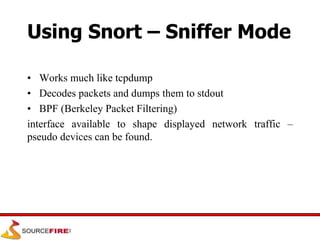
Using Snort – Sniffer Mode
• Works much like tcpdump
• Decodes packets and dumps them to stdout
• BPF (Berkeley Packet Filtering)
interface available to shape displayed network traffic –
pseudo devices can be found.
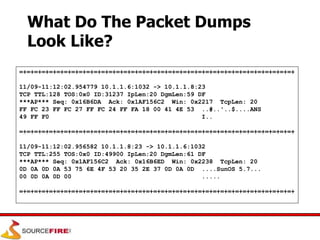
What Do The Packet Dumps
Look Like?
=+=+=+=+=+=+=+=+=+=+=+=+=+=+=+=+=+=+=+=+=+=+=+=+=+=+=+=+=+=+=+=+=+=+=+=+=+
11/09-11:12:02.954779 10.1.1.6:1032 -> 10.1.1.8:23
TCP TTL:128 TOS:0x0 ID:31237 IpLen:20 DgmLen:59 DF
***AP*** Seq: 0x16B6DA Ack: 0x1AF156C2 Win: 0x2217 TcpLen: 20
FF FC 23 FF FC 27 FF FC 24 FF FA 18 00 41 4E 53 ..#..'..$....ANS
49 FF F0 I..
=+=+=+=+=+=+=+=+=+=+=+=+=+=+=+=+=+=+=+=+=+=+=+=+=+=+=+=+=+=+=+=+=+=+=+=+=+
11/09-11:12:02.956582 10.1.1.8:23 -> 10.1.1.6:1032
TCP TTL:255 TOS:0x0 ID:49900 IpLen:20 DgmLen:61 DF
***AP*** Seq: 0x1AF156C2 Ack: 0x16B6ED Win: 0x2238 TcpLen: 20
0D 0A 0D 0A 53 75 6E 4F 53 20 35 2E 37 0D 0A 0D ....SunOS 5.7...
00 0D 0A 0D 00 .....
=+=+=+=+=+=+=+=+=+=+=+=+=+=+=+=+=+=+=+=+=+=+=+=+=+=+=+=+=+=+=+=+=+=+=+=+=+
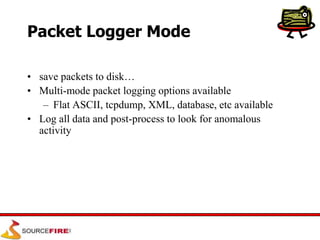
Packet Logger Mode
• save packets to disk…
• Multi-mode packet logging options available
– Flat ASCII, tcpdump, XML, database, etc available
• Log all data and post-process to look for anomalous
activity
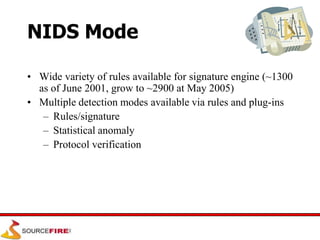
NIDS Mode
• Wide variety of rules available for signature engine (~1300
as of June 2001, grow to ~2900 at May 2005)
• Multiple detection modes available via rules and plug-ins
– Rules/signature
– Statistical anomaly
– Protocol verification
Snort Rules
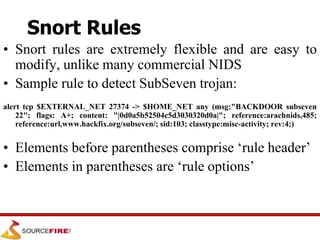
Snort Rules
• Snort rules are extremely flexible and are easy to
modify, unlike many commercial NIDS
• Sample rule to detect SubSeven trojan:
alert tcp $EXTERNAL_NET 27374 -> $HOME_NET any (msg:"BACKDOOR subseven
22"; flags: A+; content: "|0d0a5b52504c5d3030320d0a|"; reference:arachnids,485;
reference:url,www.hackfix.org/subseven/; sid:103; classtype:misc-activity; rev:4;)
• Elements before parentheses comprise ‘rule header’
• Elements in parentheses are ‘rule options’
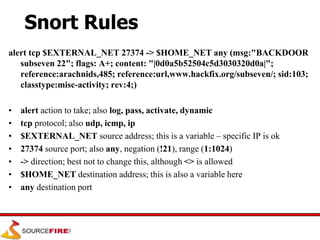
Snort Rules
alert tcp $EXTERNAL_NET 27374 -> $HOME_NET any (msg:"BACKDOOR
subseven 22"; flags: A+; content: "|0d0a5b52504c5d3030320d0a|";
reference:arachnids,485; reference:url,www.hackfix.org/subseven/; sid:103;
classtype:misc-activity; rev:4;)
• alert action to take; also log, pass, activate, dynamic
• tcp protocol; also udp, icmp, ip
• $EXTERNAL_NET source address; this is a variable – specific IP is ok
• 27374 source port; also any, negation (!21), range (1:1024)
• -> direction; best not to change this, although <> is allowed
• $HOME_NET destination address; this is also a variable here
• any destination port
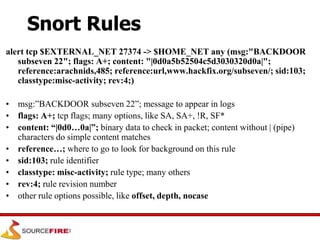
Snort Rules
alert tcp $EXTERNAL_NET 27374 -> $HOME_NET any (msg:"BACKDOOR
subseven 22"; flags: A+; content: "|0d0a5b52504c5d3030320d0a|";
reference:arachnids,485; reference:url,www.hackfix.org/subseven/; sid:103;
classtype:misc-activity; rev:4;)
• msg:”BACKDOOR subseven 22”; message to appear in logs
• flags: A+; tcp flags; many options, like SA, SA+, !R, SF*
• content: “|0d0…0a|”; binary data to check in packet; content without | (pipe)
characters do simple content matches
• reference…; where to go to look for background on this rule
• sid:103; rule identifier
• classtype: misc-activity; rule type; many others
• rev:4; rule revision number
• other rule options possible, like offset, depth, nocase
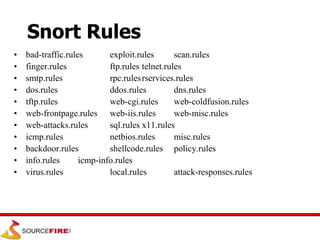
Snort Rules
• bad-traffic.rules exploit.rules scan.rules
• finger.rules ftp.rules telnet.rules
• smtp.rules rpc.rulesrservices.rules
• dos.rules ddos.rules dns.rules
• tftp.rules web-cgi.rules web-coldfusion.rules
• web-frontpage.rules web-iis.rules web-misc.rules
• web-attacks.rules sql.rules x11.rules
• icmp.rules netbios.rules misc.rules
• backdoor.rules shellcode.rules policy.rules
• info.rules icmp-info.rules
• virus.rules local.rules attack-responses.rules
Snort Rules
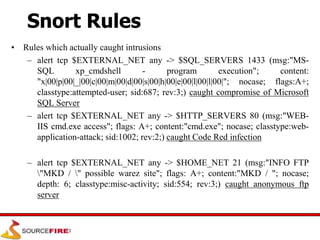
• Rules which actually caught intrusions
– alert tcp $EXTERNAL_NET any -> $SQL_SERVERS 1433 (msg:"MS-
SQL xp_cmdshell - program execution"; content:
"x|00|p|00|_|00|c|00|m|00|d|00|s|00|h|00|e|00|l|00|l|00|"; nocase; flags:A+;
classtype:attempted-user; sid:687; rev:3;) caught compromise of Microsoft
SQL Server
– alert tcp $EXTERNAL_NET any -> $HTTP_SERVERS 80 (msg:"WEB-
IIS cmd.exe access"; flags: A+; content:"cmd.exe"; nocase; classtype:web-
application-attack; sid:1002; rev:2;) caught Code Red infection
– alert tcp $EXTERNAL_NET any -> $HOME_NET 21 (msg:"INFO FTP
"MKD / " possible warez site"; flags: A+; content:"MKD / "; nocase;
depth: 6; classtype:misc-activity; sid:554; rev:3;) caught anonymous ftp
server
Snort Architecture
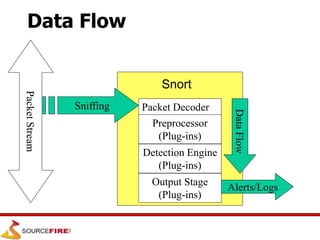
Data Flow
Packet Decoder
Preprocessor
(Plug-ins)
Detection Engine
(Plug-ins)
Output Stage
(Plug-ins)
Packet
Stream
Sniffing
Snort
Data
Flow
Alerts/Logs
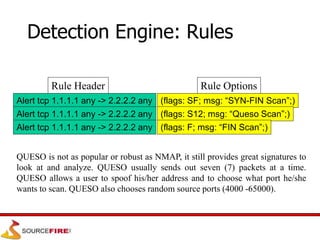
Rule Header
Alert tcp 1.1.1.1 any -> 2.2.2.2 any
Rule Options
(flags: SF; msg: “SYN-FIN Scan”;)
Alert tcp 1.1.1.1 any -> 2.2.2.2 any
(flags: S12; msg: “Queso Scan”;)
(flags: F; msg: “FIN Scan”;)
Detection Engine: Rules
QUESO is not as popular or robust as NMAP, it still provides great signatures to
look at and analyze. QUESO usually sends out seven (7) packets at a time.
QUESO allows a user to spoof his/her address and to choose what port he/she
wants to scan. QUESO also chooses random source ports (4000 -65000).
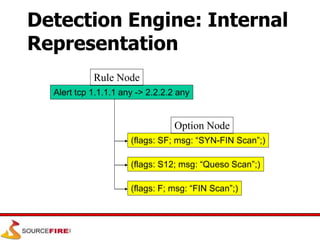
Alert tcp 1.1.1.1 any -> 2.2.2.2 any
Rule Node
(flags: SF; msg: “SYN-FIN Scan”;)
(flags: S12; msg: “Queso Scan”;)
(flags: F; msg: “FIN Scan”;)
Option Node
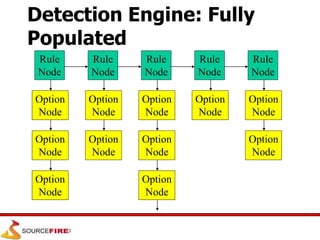
Detection Engine: Internal
Representation
Rule
Node
Rule
Node
Rule
Node
Rule
Node
Rule
Node
Option
Node
Option
Node
Option
Node
Option
Node
Option
Node
Option
Node
Option
Node
Option
Node
Option
Node
Option
Node
Option
Node
Detection Engine: Fully
Populated
Link:
• https://www.youtube.com/watch?v=HW
uUW4XGxHo
Conclusion
• Snort is a powerful tool, but maximizing its usefulness requires a
trained operator
• Becoming proficient with network intrusion detection takes 12
months; “expert” 24-36?
• Snort is considered a superior NIDS when compared to most
commercial systems
• Managed network security providers should collect enough
information to make decisions without calling clients to ask what
happened

snort.ppt

  • 1.
  • 2.
    Topics • Background – Whatis Snort? • Using Snort • Snort Architecture
  • 3.
    SNORT • Snort isan open source network intrusion prevention system, capable of performing real- time traffic analysis and packet logging on IP networks.
  • 4.
    Background – Policy •Successful intrusion detection depends on policy and management as much as technology – Security Policy (defining what is acceptable and what is being defended) is the first step – Notification • Who, how fast? – Response Coordination
  • 5.
    Intro to Snort •What is Snort? – Snort is a multi-mode packet analysis tool • Sniffer • Packet Logger • Forensic Data Analysis tool • Network Intrusion Detection System • Where did it come from? – Developed out of the evolving need to perform network traffic analysis in both real-time and for forensic post processing
  • 6.
    Snort “Metrics” • Small(~800k source download) • Portable (Linux, Windows, MacOS X, Solaris, BSD, IRIX, Tru64, HP- UX, etc) • Fast (High probability of detection for a given attack on 100Mbps networks) • Configurable (Easy rules language, many reporting/logging options • Free (GPL/Open Source Software)
  • 7.
    Snort Design • Packetsniffing “lightweight” network intrusion detection system • Libpcap-based sniffing interface • Rules-based detection engine • Plug-in system allows endless flexibility
  • 8.
    Detection Engine • Rulesform “signatures” • Modular detection elements are combined to form these signatures • Wide range of detection capabilities – Stealth scans, OS fingerprinting, buffer overflows, back doors, CGI exploits, etc. • Rules system is very flexible, and creation of new rules is relatively simple
  • 9.
    Plug-Ins • Preprocessor – Packetsare examined/manipulated before being handed to the detection engine • Detection – Perform single, simple tests on a single aspect/field of the packet • Output – Report results from the other plug-ins
  • 10.
    Using Snort • Threemain operational modes – Sniffer Mode – Packet Logger Mode – NIDS Mode – (Forensic Data Analysis Mode) • Operational modes are configured via command line switches – Snort automatically tries to go into NIDS mode if no command line switches are given, looks for snort.conf configuration file in /etc
  • 11.
    Using Snort –Sniffer Mode • Works much like tcpdump • Decodes packets and dumps them to stdout • BPF (Berkeley Packet Filtering) interface available to shape displayed network traffic – pseudo devices can be found.
  • 12.
    What Do ThePacket Dumps Look Like? =+=+=+=+=+=+=+=+=+=+=+=+=+=+=+=+=+=+=+=+=+=+=+=+=+=+=+=+=+=+=+=+=+=+=+=+=+ 11/09-11:12:02.954779 10.1.1.6:1032 -> 10.1.1.8:23 TCP TTL:128 TOS:0x0 ID:31237 IpLen:20 DgmLen:59 DF ***AP*** Seq: 0x16B6DA Ack: 0x1AF156C2 Win: 0x2217 TcpLen: 20 FF FC 23 FF FC 27 FF FC 24 FF FA 18 00 41 4E 53 ..#..'..$....ANS 49 FF F0 I.. =+=+=+=+=+=+=+=+=+=+=+=+=+=+=+=+=+=+=+=+=+=+=+=+=+=+=+=+=+=+=+=+=+=+=+=+=+ 11/09-11:12:02.956582 10.1.1.8:23 -> 10.1.1.6:1032 TCP TTL:255 TOS:0x0 ID:49900 IpLen:20 DgmLen:61 DF ***AP*** Seq: 0x1AF156C2 Ack: 0x16B6ED Win: 0x2238 TcpLen: 20 0D 0A 0D 0A 53 75 6E 4F 53 20 35 2E 37 0D 0A 0D ....SunOS 5.7... 00 0D 0A 0D 00 ..... =+=+=+=+=+=+=+=+=+=+=+=+=+=+=+=+=+=+=+=+=+=+=+=+=+=+=+=+=+=+=+=+=+=+=+=+=+
  • 13.
    Packet Logger Mode •save packets to disk… • Multi-mode packet logging options available – Flat ASCII, tcpdump, XML, database, etc available • Log all data and post-process to look for anomalous activity
  • 14.
    NIDS Mode • Widevariety of rules available for signature engine (~1300 as of June 2001, grow to ~2900 at May 2005) • Multiple detection modes available via rules and plug-ins – Rules/signature – Statistical anomaly – Protocol verification
  • 15.
  • 16.
    Snort Rules • Snortrules are extremely flexible and are easy to modify, unlike many commercial NIDS • Sample rule to detect SubSeven trojan: alert tcp $EXTERNAL_NET 27374 -> $HOME_NET any (msg:"BACKDOOR subseven 22"; flags: A+; content: "|0d0a5b52504c5d3030320d0a|"; reference:arachnids,485; reference:url,www.hackfix.org/subseven/; sid:103; classtype:misc-activity; rev:4;) • Elements before parentheses comprise ‘rule header’ • Elements in parentheses are ‘rule options’
  • 17.
    Snort Rules alert tcp$EXTERNAL_NET 27374 -> $HOME_NET any (msg:"BACKDOOR subseven 22"; flags: A+; content: "|0d0a5b52504c5d3030320d0a|"; reference:arachnids,485; reference:url,www.hackfix.org/subseven/; sid:103; classtype:misc-activity; rev:4;) • alert action to take; also log, pass, activate, dynamic • tcp protocol; also udp, icmp, ip • $EXTERNAL_NET source address; this is a variable – specific IP is ok • 27374 source port; also any, negation (!21), range (1:1024) • -> direction; best not to change this, although <> is allowed • $HOME_NET destination address; this is also a variable here • any destination port
  • 18.
    Snort Rules alert tcp$EXTERNAL_NET 27374 -> $HOME_NET any (msg:"BACKDOOR subseven 22"; flags: A+; content: "|0d0a5b52504c5d3030320d0a|"; reference:arachnids,485; reference:url,www.hackfix.org/subseven/; sid:103; classtype:misc-activity; rev:4;) • msg:”BACKDOOR subseven 22”; message to appear in logs • flags: A+; tcp flags; many options, like SA, SA+, !R, SF* • content: “|0d0…0a|”; binary data to check in packet; content without | (pipe) characters do simple content matches • reference…; where to go to look for background on this rule • sid:103; rule identifier • classtype: misc-activity; rule type; many others • rev:4; rule revision number • other rule options possible, like offset, depth, nocase
  • 19.
    Snort Rules • bad-traffic.rulesexploit.rules scan.rules • finger.rules ftp.rules telnet.rules • smtp.rules rpc.rulesrservices.rules • dos.rules ddos.rules dns.rules • tftp.rules web-cgi.rules web-coldfusion.rules • web-frontpage.rules web-iis.rules web-misc.rules • web-attacks.rules sql.rules x11.rules • icmp.rules netbios.rules misc.rules • backdoor.rules shellcode.rules policy.rules • info.rules icmp-info.rules • virus.rules local.rules attack-responses.rules
  • 20.
    Snort Rules • Ruleswhich actually caught intrusions – alert tcp $EXTERNAL_NET any -> $SQL_SERVERS 1433 (msg:"MS- SQL xp_cmdshell - program execution"; content: "x|00|p|00|_|00|c|00|m|00|d|00|s|00|h|00|e|00|l|00|l|00|"; nocase; flags:A+; classtype:attempted-user; sid:687; rev:3;) caught compromise of Microsoft SQL Server – alert tcp $EXTERNAL_NET any -> $HTTP_SERVERS 80 (msg:"WEB- IIS cmd.exe access"; flags: A+; content:"cmd.exe"; nocase; classtype:web- application-attack; sid:1002; rev:2;) caught Code Red infection – alert tcp $EXTERNAL_NET any -> $HOME_NET 21 (msg:"INFO FTP "MKD / " possible warez site"; flags: A+; content:"MKD / "; nocase; depth: 6; classtype:misc-activity; sid:554; rev:3;) caught anonymous ftp server
  • 21.
  • 22.
    Data Flow Packet Decoder Preprocessor (Plug-ins) DetectionEngine (Plug-ins) Output Stage (Plug-ins) Packet Stream Sniffing Snort Data Flow Alerts/Logs
  • 23.
    Rule Header Alert tcp1.1.1.1 any -> 2.2.2.2 any Rule Options (flags: SF; msg: “SYN-FIN Scan”;) Alert tcp 1.1.1.1 any -> 2.2.2.2 any Alert tcp 1.1.1.1 any -> 2.2.2.2 any (flags: S12; msg: “Queso Scan”;) (flags: F; msg: “FIN Scan”;) Detection Engine: Rules QUESO is not as popular or robust as NMAP, it still provides great signatures to look at and analyze. QUESO usually sends out seven (7) packets at a time. QUESO allows a user to spoof his/her address and to choose what port he/she wants to scan. QUESO also chooses random source ports (4000 -65000).
  • 24.
    Alert tcp 1.1.1.1any -> 2.2.2.2 any Rule Node (flags: SF; msg: “SYN-FIN Scan”;) (flags: S12; msg: “Queso Scan”;) (flags: F; msg: “FIN Scan”;) Option Node Detection Engine: Internal Representation
  • 25.
  • 26.
  • 27.
    Conclusion • Snort isa powerful tool, but maximizing its usefulness requires a trained operator • Becoming proficient with network intrusion detection takes 12 months; “expert” 24-36? • Snort is considered a superior NIDS when compared to most commercial systems • Managed network security providers should collect enough information to make decisions without calling clients to ask what happened