Smart Cards
Smart Cards
Future Life………
Future Life………
Santosh Khadsare
Santosh Khadsare
Aim of my ppt is to just give you a brief
idea about the smart card technology
being one of the best steps towards the
advancement of science and technology ,
making our life faster and obviously
easier.
Plastic Cards
Plastic Cards
 Visual identity application
Visual identity application
 Plain plastic card is enough
Plain plastic card is enough
 Magnetic strip (e.g. credit cards)
Magnetic strip (e.g. credit cards)
 Visual data also available in machine readable form
Visual data also available in machine readable form
 No security of data
No security of data
 Electronic memory cards
Electronic memory cards
 Machine readable data
Machine readable data
 Some security (vendor specific)
Some security (vendor specific)
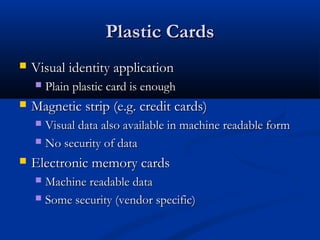
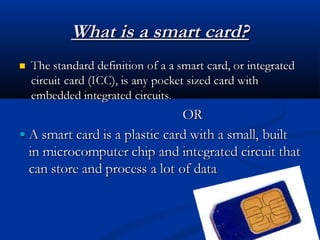
What is a Smart Card?
A Smart card is a plastic card about
the size of a credit card, with an
embedded microchip that can be
loaded with data, used for telephone
calling, cash payments , and other
applications, and then periodically
refreshed for additional use.
What is a smart card?
History
History
70’s
70’s
Smart Card First Patent in Germany and later in
France and Japan.
France and Japan.
80’s
80’s
Mass usage in Pay Phones and Debit Cards.
90’s
90’s
Smart Card based Mobiles Chips & Sim Cards.
History
History
2000’s
2000’s
Payment and Ticketing Applications
Credit cards, Mass transit (Smartrip)
Healthcare and Identification
Insurance information, Drivers license
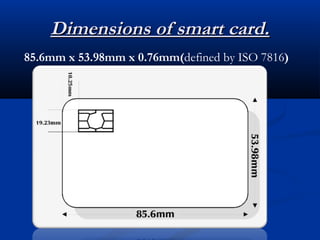
Dimensions of smart card.
85.6mm x 53.98mm x 0.76mm(defined by ISO 7816)
Why use smart cards?
 Can store currently up to 7000 times more data than a magnetic stripe card.
Can store currently up to 7000 times more data than a magnetic stripe card.
 Information that is stored on the card can be updated.
Information that is stored on the card can be updated.
 Magnetic stripe cards are vulnerable to many types of fraud.
Magnetic stripe cards are vulnerable to many types of fraud.
 Lost/Stolen Cards
Lost/Stolen Cards
 Skimming
Skimming
 Carding/ Phishing
Carding/ Phishing
 Greatly enhances security by communicating with card readers using PKI
Greatly enhances security by communicating with card readers using PKI
algorithms.
algorithms.
 A single card can be used for multiple applications (cash, identification,
A single card can be used for multiple applications (cash, identification,
building access, etc.)
 Smart cards provide a 3-fold approach to authentic identification:
Smart cards provide a 3-fold approach to authentic identification:
• Pin
Pin
• Smartcard
Smartcard
• Biometrics
Biometrics
Card Elements
Card Elements
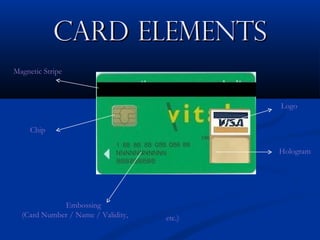
Magnetic Stripe
Chip
Embossing
(Card Number / Name / Validity, etc.)
Logo
Hologram
Smart Cards devices
Smart Cards devices
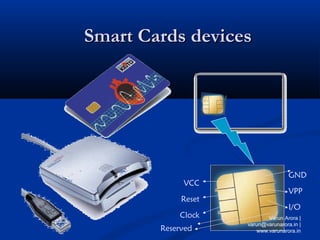
VCC
Reset
Clock
GND
VPP
I/O
Reserved
Varun Arora |
varun@varunarora.in |
www.varunarora.in
What’s in a Card?
What’s in a Card?
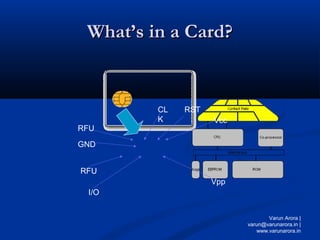
Vcc
RST
CL
K
RFU
Vpp
I/O
GND
RFU
Varun Arora |
varun@varunarora.in |
www.varunarora.in
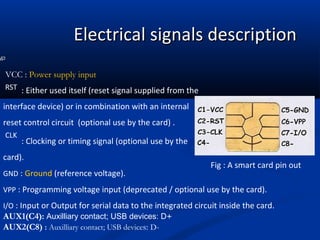
Electrical signals description
: Clocking or timing signal (optional use by the
card).
GND : Ground (reference voltage).
VPP : Programming voltage input (deprecated / optional use by the card).
I/O : Input or Output for serial data to the integrated circuit inside the card.
AUX1(C4): Auxilliary contact; USB devices: D+
AUX2(C8) : Auxilliary contact; USB devices: D-
VCC : Power supply input
: Either used itself (reset signal supplied from the
interface device) or in combination with an internal
reset control circuit (optional use by the card) .
Fig : A smart card pin out
RST
CLK
CARD STRUCTURE
CARD STRUCTURE
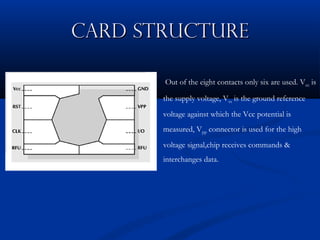
Out of the eight contacts only six are used. Vcc is
the supply voltage, Vss is the ground reference
voltage against which the Vcc potential is
measured, Vpp connector is used for the high
voltage signal,chip receives commands &
interchanges data.
Typical Configurations
 256 bytes to 4KB RAM.
256 bytes to 4KB RAM.
 8KB to 32KB ROM.
8KB to 32KB ROM.
 1KB to 32KB EEPROM.
1KB to 32KB EEPROM.
 8-bit to 16-bit CPU. 8051 based designs
8-bit to 16-bit CPU. 8051 based designs
are common.
are common.
Smart Card Readers
Smart Card Readers
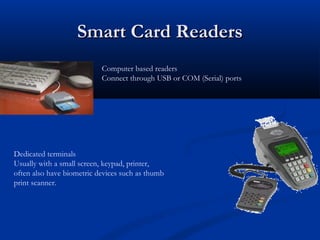
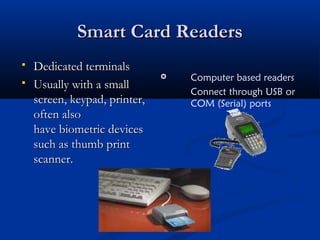
Computer based readers
Connect through USB or COM (Serial) ports
Dedicated terminals
Usually with a small screen, keypad, printer,
often also have biometric devices such as thumb
print scanner.
Terminal/PC Card Interaction
 The terminal/PC sends commands to the card
The terminal/PC sends commands to the card
(through the serial line).
 The card executes the command and sends back
The card executes the command and sends back
the reply.
the reply.
 The terminal/PC cannot directly access memory
The terminal/PC cannot directly access memory
of the card so
of the card so
data in the card is protected from
unauthorized access. This is what makes the
card
card smart.
smart.
Why Smart Cards?
Why Smart Cards?
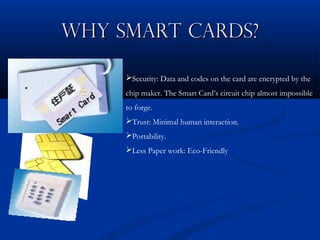
Security: Data and codes on the card are encrypted by the
chip maker. The Smart Card’s circuit chip almost impossible
to forge.
Trust: Minimal human interaction.
Portability.
Less Paper work: Eco-Friendly
Two Types of Chips
Two Types of Chips
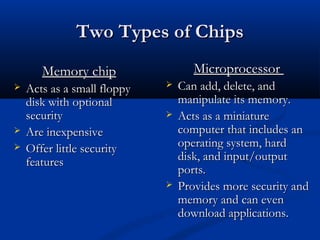
Memory chip
Memory chip
 Acts as a small floppy
Acts as a small floppy
disk with optional
disk with optional
security
security
 Are inexpensive
Are inexpensive
 Offer little security
Offer little security
features
features
Microprocessor
Microprocessor
 Can add, delete, and
Can add, delete, and
manipulate its memory.
 Acts as a miniature
Acts as a miniature
computer that includes an
operating system, hard
disk, and input/output
ports.
ports.
 Provides more security and
Provides more security and
memory and can even
memory and can even
download applications.
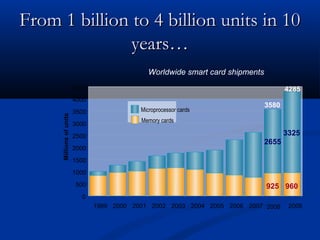
From 1 billion to 4 billion units in 10
years…
years…
Worldwide smart card shipments
925 960
2655
3325
0
500
1000
1500
2000
2500
3000
3500
4000
4500
Millions
of
units
Microprocessor cards
Memory cards
4285
3580
1999 2000 2001 2002 2003 2004 2005 2006 2007 2008 2009
925 960
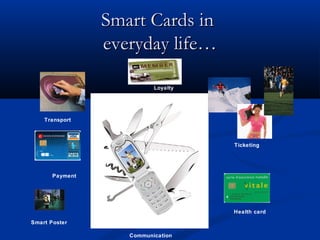
Smart Cards in
Smart Cards in
everyday life…
everyday life…
Ticketing
Payment
Loyalty
Transport
Smart Poster
Health card
Communication
Contact Smart Cards
Contact Smart Cards
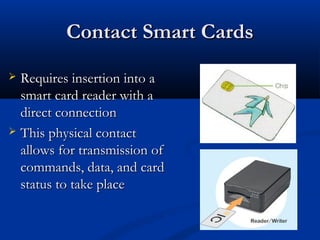
 Requires insertion into a
Requires insertion into a
smart card reader with a
direct connection
direct connection
 This physical contact
This physical contact
allows for transmission of
commands, data, and card
status to take place
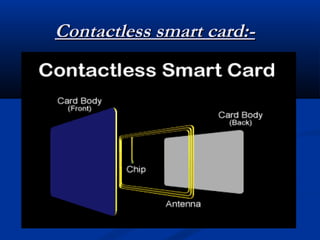
Contactless smart card:-
Contactless Smart Cards
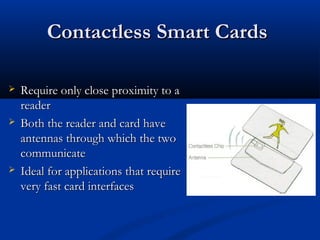
 Require only close proximity to a
Require only close proximity to a
reader
reader
 Both the reader and card have
Both the reader and card have
antennas through which the two
communicate
communicate
 Ideal for applications that require
Ideal for applications that require
very fast card interfaces
ISO
ISO 14443.
14443.
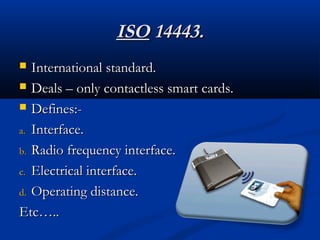
 International standard.
International standard.
 Deals – only contactless smart cards.
Deals – only contactless smart cards.
 Defines:-
Defines:-
a.
a. Interface.
Interface.
b.
b. Radio frequency interface.
Radio frequency interface.
c.
c. Electrical interface.
Electrical interface.
d.
d. Operating distance.
Operating distance.
Etc…..
Etc…..
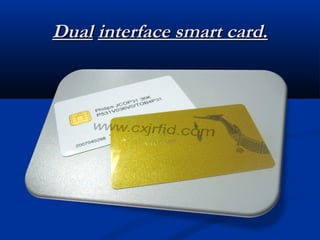
Dual interface smart cards.
 Also called
Also called Combi card
Combi card.
.
 Has a single chip over it.
Has a single chip over it.
 Has both contact as well as contactless
Has both contact as well as contactless
interfaces.
interfaces.
 We can use the same chip using either contact or
We can use the same chip using either contact or
contactless interface with a high level of security.
Dual
Dual interface smart card
interface smart card.
.
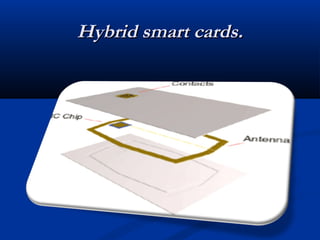
Hybrid smart card.
Hybrid smart card.
 Two chips.
Two chips.
 One with contact interface.
One with contact interface.
 Other with contactless interface.
Other with contactless interface.
 No connection between the two chips.
No connection between the two chips.
Hybrid smart cards.
Hybrid smart cards.
Categories of Smart Cards
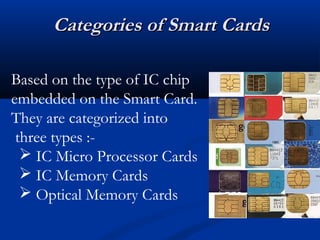
Based on the type of IC chip
embedded on the Smart Card.
They are categorized into
three types :-
 IC Micro Processor Cards
 IC Memory Cards
 Optical Memory Cards
Key Attributes
Key Attributes
Security
to make the Digital Life safe and enjoyable
Ease of Use
to enable all of us to access to the Digital World
Privacy
to respect each individual’s freedom and intimacy
SAFE
Biometric techniques
 Finger print identification.
Finger print identification.
 Features of finger prints can be kept on the card
Features of finger prints can be kept on the card
(even verified on the card)
 Photograph/IRIS pattern etc.
Photograph/IRIS pattern etc.
 Such information is to be verified by a person. The
Such information is to be verified by a person. The
information can be stored in the card securely
Smart Card Readers
Smart Card Readers
 Dedicated terminals
Dedicated terminals
 Usually with a small
Usually with a small
screen, keypad, printer,
often also
often also
have biometric devices
such as thumb print
such as thumb print
scanner.
scanner.
 Computer based readers
Connect through USB or
COM (Serial) ports
Terminal/PC Card Interaction
 The terminal/PC sends commands to the card
The terminal/PC sends commands to the card
(through the serial line).
 The card executes the command and sends back
The card executes the command and sends back
the reply.
the reply.
 The terminal/PC cannot directly access memory
The terminal/PC cannot directly access memory
of the card
of the card
 data in the card is protected from unauthorized
data in the card is protected from unauthorized
access. This is what makes the card smart.
Communication mechanisms
 Communication between smart card and reader is
Communication between smart card and reader is
standardized
standardized
 ISO 7816 standard
ISO 7816 standard
 Commands are initiated by the terminal
Commands are initiated by the terminal
 Interpreted by the card OS
Interpreted by the card OS
 Card state is updated
Card state is updated
 Response is given by the card.
Response is given by the card.
 Commands have the following structure
Commands have the following structure
 Response from the card include 1..Le bytes followed by
Response from the card include 1..Le bytes followed by
Response Code
Response Code
CLA INS P1 P2 Lc 1..Lc Le
Security Mechanisms
Security Mechanisms
 Password
Password
 Card holder’s protection
Card holder’s protection
 Cryptographic challenge Response
Cryptographic challenge Response
 Entity authentication
Entity authentication
 Biometric information
Biometric information
 Person’s identification
Person’s identification
 A combination of one or more
A combination of one or more
Password Verification
 Terminal asks the user to provide a password.
Terminal asks the user to provide a password.
 Password is sent to Card for verification.
Password is sent to Card for verification.
 Scheme can be used to permit user
Scheme can be used to permit user
authentication.
authentication.
 Not a person identification scheme
Not a person identification scheme
Varun Arora |
varun@varunarora.in |
www.varunarora.in
Cryptographic verification
 Terminal verify card (INTERNAL AUTH)
Terminal verify card (INTERNAL AUTH)
 Terminal sends a random number to card to be hashed
Terminal sends a random number to card to be hashed
or encrypted using a key.
 Card provides the hash or cyphertext.
Card provides the hash or cyphertext.
 Terminal can know that the card is authentic.
Terminal can know that the card is authentic.
 Card needs to verify (EXTERNAL AUTH)
Card needs to verify (EXTERNAL AUTH)
 Terminal asks for a challenge and sends the response to
Terminal asks for a challenge and sends the response to
card to verify
card to verify
 Card thus know that terminal is authentic.
Card thus know that terminal is authentic.
 Primarily for the “Entity Authentication”
Primarily for the “Entity Authentication”
Varun Arora |
varun@varunarora.in |
www.varunarora.in
Biometric techniques
 Finger print identification.
Finger print identification.
 Features of finger prints can be kept on the card
Features of finger prints can be kept on the card
(even verified on the card)
 Photograph/IRIS pattern etc.
Photograph/IRIS pattern etc.
 Such information is to be verified by a person. The
Such information is to be verified by a person. The
information can be stored in the card securely.
Data storage
Data storage
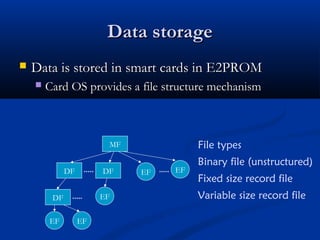
 Data is stored in smart cards in E2PROM
Data is stored in smart cards in E2PROM
 Card OS provides a file structure mechanism
Card OS provides a file structure mechanism
MF
DF DF
DF
EF EF
EF
EF EF
File types
Binary file (unstructured)
Fixed size record file
Variable size record file
File Naming and Selection
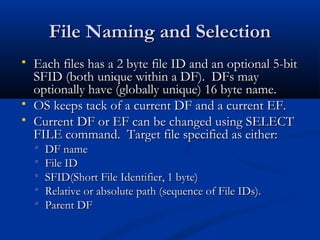
 Each files has a 2 byte file ID and an optional 5-bit
Each files has a 2 byte file ID and an optional 5-bit
SFID (both unique within a DF). DFs may
optionally have (globally unique) 16 byte name.
 OS keeps tack of a current DF and a current EF.
OS keeps tack of a current DF and a current EF.
 Current DF or EF can be changed using SELECT
Current DF or EF can be changed using SELECT
FILE command. Target file specified as either:
 DF name
DF name
 File ID
File ID
 SFID(Short File Identifier, 1 byte)
SFID(Short File Identifier, 1 byte)
 Relative or absolute path (sequence of File IDs).
Relative or absolute path (sequence of File IDs).
 Parent DF
Parent DF
Basic File Related Commands
 Commands for file creation, deletion etc., File size
Commands for file creation, deletion etc., File size
and security attributes specified at creation time.
 Commands for reading, writing, appending records,
Commands for reading, writing, appending records,
updating etc.
updating etc.
 Commands work on the current EF.
Commands work on the current EF.
 Execution only if security conditions are met.
Execution only if security conditions are met.
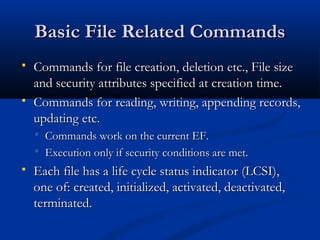
 Each file has a life cycle status indicator (LCSI),
Each file has a life cycle status indicator (LCSI),
one of: created, initialized, activated, deactivated,
terminated.
terminated.
Access control on the files
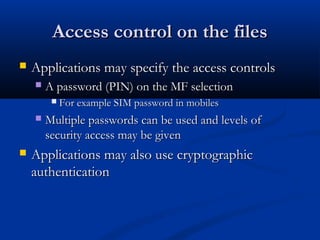
 Applications may specify the access controls
Applications may specify the access controls
 A password (PIN) on the MF selection
A password (PIN) on the MF selection
 For example SIM password in mobiles
For example SIM password in mobiles
 Multiple passwords can be used and levels of
Multiple passwords can be used and levels of
security access may be given
 Applications may also use cryptographic
Applications may also use cryptographic
authentication
authentication
An example scenario (institute ID
card)
card)
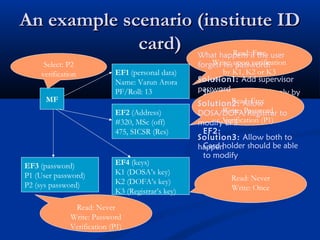
MF
EF1 (personal data)
Name: Varun Arora
PF/Roll: 13
EF3 (password)
P1 (User password)
EF4 (keys)
K1 (DOSA’s key)
K2 (DOFA’s key)
K3 (Registrar’s key)
EF2 (Address)
#320, MSc (off)
475, SICSR (Res)
Security requirements:
EF1:
Should be modified only by
the DOSA/DOFA/Registrar
Readable to all
EF2:
Card holder should be able
to modify
Read: Free
Write: upon verification
by K1, K2 or K3
Read: Free
Write: Password
Verification (P1)
Read: Never
Write: Password
Verification (P1)
Read: Never
Write: Once
What happens if the user
forgets his password?
Solution1: Add supervisor
password
Solution2: Allow
DOSA/DOFA/Registrar to
modify EF3
Solution3: Allow both to
happen
EF3 (password)
P1 (User password)
P2 (sys password)
Select: P2
verification
An example scenario (institute ID
card)
card)
MF
EF1 (personal data)
EF4 (keys)
EF2 (Address)
EF3 (password)
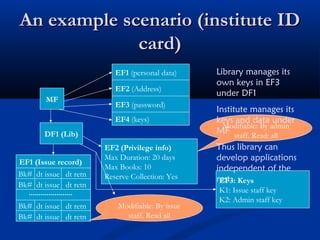
DF1 (Lib)
EF1 (Issue record)
Bk# dt issue dt retn
EF2 (Privilege info)
Max Duration: 20 days
Max Books: 10
Reserve Collection: Yes
Modifiable: By issue
staff. Read all
Modifiable: By admin
staff. Read: all
EF3: Keys
K1: Issue staff key
K2: Admin staff key
Library manages its
own keys in EF3
under DF1
Institute manages its
keys and data under
MF
Thus library can
develop applications
independent of the
rest.
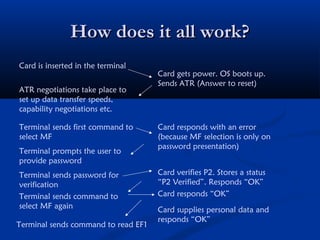
How does it all work?
Card is inserted in the terminal
Card gets power. OS boots up.
Sends ATR (Answer to reset)
ATR negotiations take place to
set up data transfer speeds,
capability negotiations etc.
Terminal sends first command to
select MF
Card responds with an error
(because MF selection is only on
password presentation)
Terminal prompts the user to
provide password
Terminal sends password for
verification
Card verifies P2. Stores a status
“P2 Verified”. Responds “OK”
Terminal sends command to
select MF again
Terminal sends command to read EF1
Card supplies personal data and
responds “OK”
Card responds “OK”
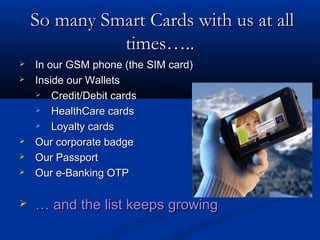
So many Smart Cards with us at all
times…..
times…..
 In our GSM phone (the SIM card)
In our GSM phone (the SIM card)
 Inside our Wallets
Inside our Wallets
 Credit/Debit cards
Credit/Debit cards
 HealthCare cards
HealthCare cards
 Loyalty cards
Loyalty cards
 Our corporate badge
Our corporate badge
 Our Passport
Our Passport
 Our e-Banking OTP
Our e-Banking OTP
 …
… and the list keeps growing
and the list keeps growing
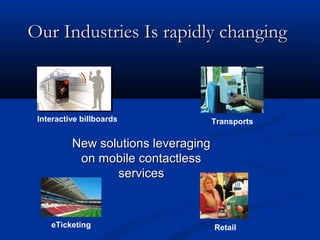
Our Industries Is rapidly changing
eTicketing
Interactive billboards Transports
Retail
New solutions leveraging
on mobile contactless
services
services
Smart Card Applications
Government programs
Government programs
 Banking & Finance
Banking & Finance
 Mobile Communication
Mobile Communication
 Pay Phone Cards
Pay Phone Cards
 Transportation
Transportation
 Electronic Tolls
Electronic Tolls
 Passports
Passports
 Electronic Cash
Electronic Cash
 Retailer Loyalty Programs
Retailer Loyalty Programs
 Information security
Information security
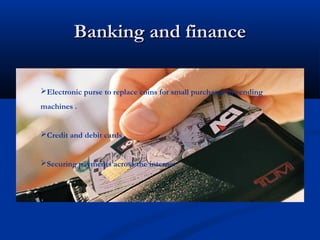
Banking and finance
Banking and finance
Electronic purse to replace coins for small purchases in vending
machines .
Credit and debit cards
Securing payments across the internet
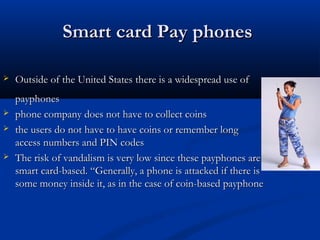
Smart card Pay phones
 Outside of the United States there is a widespread use of
Outside of the United States there is a widespread use of
payphones
payphones
 phone company does not have to collect coins
phone company does not have to collect coins
 the users do not have to have coins or remember long
the users do not have to have coins or remember long
access numbers and PIN codes
 The risk of vandalism is very low since these payphones are
The risk of vandalism is very low since these payphones are
smart card-based. “Generally, a phone is attacked if there is
some money inside it, as in the case of coin-based payphone
Transportation
Transportation
 Driver’s license
Driver’s license
 Mass transit fare collection system
Mass transit fare collection system
 Electronic toll collection system
Electronic toll collection system
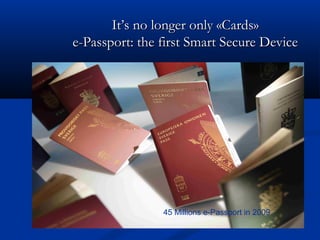
It’s no longer only «Cards»
e-Passport: the first Smart Secure Device
45 Millions e-Passport in 2009
E Governance
E Governance
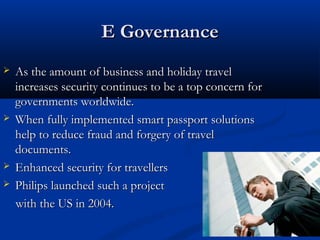
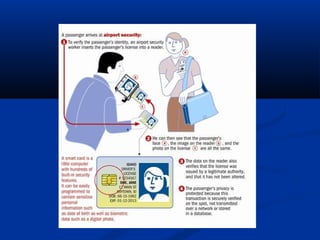
 As the amount of business and holiday travel
As the amount of business and holiday travel
increases security continues to be a top concern for
governments worldwide.
 When fully implemented smart passport solutions
When fully implemented smart passport solutions
help to reduce fraud and forgery of travel
documents.
documents.
 Enhanced security for travellers
Enhanced security for travellers
 Philips launched such a project
Philips launched such a project
with the US in 2004.
Student id card
Student id card
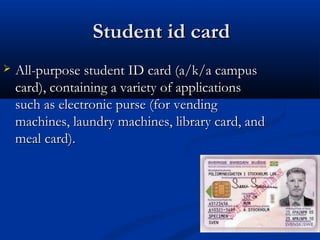
 All-purpose student ID card (a/k/a campus
All-purpose student ID card (a/k/a campus
card), containing a variety of applications
such as electronic purse (for vending
machines, laundry machines, library card, and
meal card).
meal card).
Threats in Using Smart
Cards
Cards
failure rate
probability of breaking: keeping in wallets may
damage the chip on the card.
malware attacks: active malwares on systems
may result in modifying the transactions.
OS Based Classification
 Smart cards are also classified on the basis of their Operating System. There
Smart cards are also classified on the basis of their Operating System. There
are many Smart Card Operating Systems available in the market, the main
ones being:
ones being:
1. MultOS
1. MultOS
2. JavaCard
2. JavaCard
3. Cyberflex
3. Cyberflex
4. StarCOS
4. StarCOS
5. MFC
5. MFC
Smart Card Operating Systems or SCOS as they are commonly called, are
placed on the ROM and usually occupy lesser than 16 KB. SCOS handle:
• File Handling and Manipulation.
• Memory Management
• Memory Management
• Data Transmission Protocols.
ADVANTAGES
ADVANTAGES
 Proven to be more reliable than the magnetic stripe card.
Proven to be more reliable than the magnetic stripe card.
 Can store up to thousands of times of the information than the magnetic stripe card.
Can store up to thousands of times of the information than the magnetic stripe card.
 Reduces tampering and counterfeiting through high security mechanisms such as
Reduces tampering and counterfeiting through high security mechanisms such as
advanced encryption and biometrics.
 Can be disposable or reusable.
Can be disposable or reusable.
 Performs multiple functions.
Performs multiple functions.
 Has wide range of applications (e.g., banking, transportation, healthcare...)
Has wide range of applications (e.g., banking, transportation, healthcare...)
 Compatible with portable electronics (e.g., PCs, telephones...)
Compatible with portable electronics (e.g., PCs, telephones...)
 Evolves rapidly applying semi-conductor technology
Evolves rapidly applying semi-conductor technology
Disadvantages
Disadvantages
Smart cards used for client-side identification and
authentication are the most secure way for eg. internet banking
applications, but the security is never 100% sure.
In the example of internet banking, if the PC is infected with
any kind of malware, the security model is broken. Malware
can override the communication (both input via keyboard and
output via application screen) between the user and the
internet banking application (eg. browser). This would result in
modifying transactions by the malware and unnoticed by the
user. There is malware in the wild with this capability (eg.
Trojan. Silentbanker).
Remedies…
Remedies…
Banks like Fortis and Dexia in Belgium combine a Smart card with an unconnected card reader to
avoid this problem. The customer enters a challenge received from the bank's website, his PIN and
the transaction amount into the card reader, the card reader returns an 8-digit signature. This
signature is manually copied to the PC and verified by the bank. This method prevents malware from
changing the transaction amount.
Future Aspects
Future Aspects
 Soon it will be possible to access the data in Smart cards by the use of Biometrics.
 Smart card Readers can be built into future computers or peripherals
which will enable the users to pay for goods purchased on the internet.
 In the near future, the multifunctional smart card will replace the
traditional magnetic swipe card.
 Smart Card is not only a data store, but also a programmable, portable,
tamper resistant memory storage.
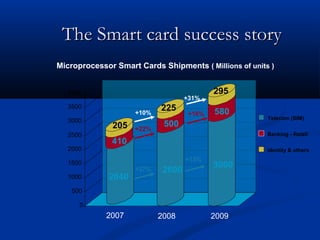
The Smart card success story
2040
410
205
2600
500
225
3000
580
295
0
500
1000
1500
2000
2500
3000
3500
4000
Identity & others
Banking - Retail
Telecom (SIM)
+15%
+27%
+22%
+16%
+31%
+10%
2007 2008 2009
Microprocessor Smart Cards Shipments ( Millions of units )
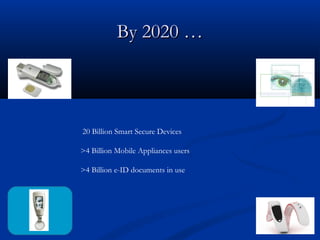
By 2020 …
By 2020 …
20 Billion Smart Secure Devices
>4 Billion Mobile Appliances users
>4 Billion e-ID documents in use
Conclusion…
Conclusion…
• Smart Cards will evolve into a broader family of Devices
• More new shapes for new applications
• Our virtual « digital personal attributes »
• Embedded software and ultra-embedded nanotechnologies
• The only mistake to avoid for our Industry is to entertain an endless
debate about fears.
• We will build the best solutions and the best value for people to enjoy many new
services
• Political ownership and communication will be key to success
• Education … more Education
• Preparing people to use those Smart Secure Devices is as important as teaching them
how to read and write
• Smart Cards will evolve into a broader family of Devices
• More new shapes for new applications
• Embedded software and ultra-embedded nanotechnologies
• The only mistake to avoid for our Industry is to entertain an endless
debate about fears.
• We will build the best solutions and the best value for people to enjoy
many new services
• Education … more Education
• Preparing people to use those Smart Secure Devices is as important as
teaching them how to read and write
Conclusion:
• Smart Cards will evolve into a broader family of Devices
• More new shapes for new applications
• Our virtual « digital personal attributes »
• Embedded software and ultra-embedded nanotechnologies
• The only mistake to avoid for our Industry is to entertain an
endless debate about fears.
• We will build the best solutions and the best value for people to enjoy many new
services
• Political ownership and communication will be key to success
• Education … more Education
• Preparing people to use those Smart Secure Devices is as important as teaching
them how to read and write
Conclusion:
Security of Smart Cards
 Public Key Infrastructure (PKI) algorithms such
Public Key Infrastructure (PKI) algorithms such
as DES, 3DES, RSA and ECC.
 Key pair generation.
Key pair generation.
 Variable timing/clock fluctuation.
Variable timing/clock fluctuation.
 0.6 micron components.
0.6 micron components.
 Data stored on the card is encrypted.
Data stored on the card is encrypted.
 Pin Blocking.
Pin Blocking.
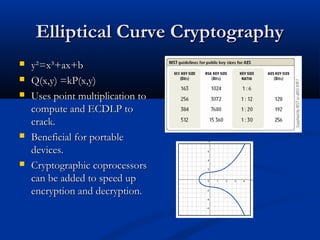
Elliptical Curve Cryptography
 y²=x³+ax+b
y²=x³+ax+b
 Q(x,y) =kP(x,y)
Q(x,y) =kP(x,y)
 Uses point multiplication to
Uses point multiplication to
compute and ECDLP to
crack.
crack.
 Beneficial for portable
Beneficial for portable
devices.
devices.
 Cryptographic coprocessors
Cryptographic coprocessors
can be added to speed up
encryption and decryption.
CAIN
CAIN
 Confidentiality is obtained by the encryption of
Confidentiality is obtained by the encryption of
the information on the card.
 Authenticity is gained by using the PKI
Authenticity is gained by using the PKI
algorithm and the two/three factor
authentication.
authentication.
 Integrity is maintained through error-checking
Integrity is maintained through error-checking
and enhanced firmware.
 Repudiation is lower because each transaction is
Repudiation is lower because each transaction is
authenticated and recorded.
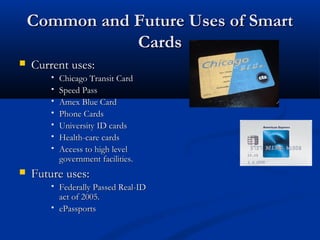
Common and Future Uses of Smart
Cards
Cards
 Current uses:
Current uses:
 Chicago Transit Card
Chicago Transit Card
 Speed Pass
Speed Pass
 Amex Blue Card
Amex Blue Card
 Phone Cards
Phone Cards
 University ID cards
University ID cards
 Health-care cards
Health-care cards
 Access to high level
Access to high level
government facilities.
 Future uses:
Future uses:
 Federally Passed Real-ID
Federally Passed Real-ID
act of 2005.
act of 2005.
 ePassports
ePassports
Data Structure
Data Structure
 Data on Smart Cards is organized into a tree
Data on Smart Cards is organized into a tree
hierarchy. This has one master file (MF or root)
which contains several elementary files (EF) and
several dedicated files (DF).
 DFs and MF correspond to directories and EFs
DFs and MF correspond to directories and EFs
correspond to files, analogous to the hierarchy in
any common OS for PCs.
Data Structure
Data Structure
 However, these two hierarchies differ in that
However, these two hierarchies differ in that
DFs can also contain data. DF's, EF's and MF's
header contains security attributes resembling
user rights associated with a file/directory in a
common OS.
common OS.
 Any application can traverse the file tree, but it
Any application can traverse the file tree, but it
can only move to a node if it has the appropriate
rights.
rights.
 The PIN is also stored in an EF but only the
The PIN is also stored in an EF but only the
card has access permission to this file.

smartcard-120830090352-phpapp02.pdf

  • 1.
    Smart Cards Smart Cards FutureLife……… Future Life……… Santosh Khadsare Santosh Khadsare
  • 2.
    Aim of myppt is to just give you a brief idea about the smart card technology being one of the best steps towards the advancement of science and technology , making our life faster and obviously easier.
  • 3.
    Plastic Cards Plastic Cards Visual identity application Visual identity application  Plain plastic card is enough Plain plastic card is enough  Magnetic strip (e.g. credit cards) Magnetic strip (e.g. credit cards)  Visual data also available in machine readable form Visual data also available in machine readable form  No security of data No security of data  Electronic memory cards Electronic memory cards  Machine readable data Machine readable data  Some security (vendor specific) Some security (vendor specific)
  • 4.
    What is aSmart Card? What is a Smart Card? A Smart card is a plastic card about the size of a credit card, with an embedded microchip that can be loaded with data, used for telephone calling, cash payments , and other applications, and then periodically refreshed for additional use.
  • 5.
    What is asmart card? What is a smart card?
  • 6.
    History History 70’s 70’s Smart Card FirstPatent in Germany and later in Smart Card First Patent in Germany and later in France and Japan. France and Japan. 80’s 80’s Mass usage in Pay Phones and Debit Cards. Mass usage in Pay Phones and Debit Cards. 90’s 90’s Smart Card based Mobiles Chips & Sim Cards. Smart Card based Mobiles Chips & Sim Cards.
  • 7.
    History History 2000’s 2000’s Payment and TicketingApplications Payment and Ticketing Applications Credit cards, Mass transit (Smartrip) Credit cards, Mass transit (Smartrip) Healthcare and Identification Healthcare and Identification Insurance information, Drivers license Insurance information, Drivers license
  • 8.
    Dimensions of smartcard. Dimensions of smart card. 85.6mm x 53.98mm x 0.76mm(defined by ISO 7816)
  • 9.
    Why use smartcards? Why use smart cards?  Can store currently up to 7000 times more data than a magnetic stripe card. Can store currently up to 7000 times more data than a magnetic stripe card.  Information that is stored on the card can be updated. Information that is stored on the card can be updated.  Magnetic stripe cards are vulnerable to many types of fraud. Magnetic stripe cards are vulnerable to many types of fraud.  Lost/Stolen Cards Lost/Stolen Cards  Skimming Skimming  Carding/ Phishing Carding/ Phishing  Greatly enhances security by communicating with card readers using PKI Greatly enhances security by communicating with card readers using PKI algorithms. algorithms.  A single card can be used for multiple applications (cash, identification, A single card can be used for multiple applications (cash, identification, building access, etc.) building access, etc.)  Smart cards provide a 3-fold approach to authentic identification: Smart cards provide a 3-fold approach to authentic identification: • Pin Pin • Smartcard Smartcard • Biometrics Biometrics
  • 10.
    Card Elements Card Elements MagneticStripe Chip Embossing (Card Number / Name / Validity, etc.) Logo Hologram
  • 11.
    Smart Cards devices SmartCards devices VCC Reset Clock GND VPP I/O Reserved Varun Arora | varun@varunarora.in | www.varunarora.in
  • 12.
    What’s in aCard? What’s in a Card? Vcc RST CL K RFU Vpp I/O GND RFU Varun Arora | varun@varunarora.in | www.varunarora.in
  • 13.
    Electrical signals description Electricalsignals description : Clocking or timing signal (optional use by the card). GND : Ground (reference voltage). VPP : Programming voltage input (deprecated / optional use by the card). I/O : Input or Output for serial data to the integrated circuit inside the card. AUX1(C4): Auxilliary contact; USB devices: D+ AUX2(C8) : Auxilliary contact; USB devices: D- VCC : Power supply input : Either used itself (reset signal supplied from the interface device) or in combination with an internal reset control circuit (optional use by the card) . Fig : A smart card pin out RST CLK
  • 14.
    CARD STRUCTURE CARD STRUCTURE Outof the eight contacts only six are used. Vcc is the supply voltage, Vss is the ground reference voltage against which the Vcc potential is measured, Vpp connector is used for the high voltage signal,chip receives commands & interchanges data.
  • 15.
    Typical Configurations Typical Configurations 256 bytes to 4KB RAM. 256 bytes to 4KB RAM.  8KB to 32KB ROM. 8KB to 32KB ROM.  1KB to 32KB EEPROM. 1KB to 32KB EEPROM.  8-bit to 16-bit CPU. 8051 based designs 8-bit to 16-bit CPU. 8051 based designs are common. are common.
  • 16.
    Smart Card Readers SmartCard Readers Computer based readers Connect through USB or COM (Serial) ports Dedicated terminals Usually with a small screen, keypad, printer, often also have biometric devices such as thumb print scanner.
  • 17.
    Terminal/PC Card Interaction Terminal/PCCard Interaction  The terminal/PC sends commands to the card The terminal/PC sends commands to the card (through the serial line). (through the serial line).  The card executes the command and sends back The card executes the command and sends back the reply. the reply.  The terminal/PC cannot directly access memory The terminal/PC cannot directly access memory of the card so of the card so data in the card is protected from data in the card is protected from unauthorized access. This is what makes the unauthorized access. This is what makes the card card smart. smart.
  • 18.
    Why Smart Cards? WhySmart Cards? Security: Data and codes on the card are encrypted by the chip maker. The Smart Card’s circuit chip almost impossible to forge. Trust: Minimal human interaction. Portability. Less Paper work: Eco-Friendly
  • 19.
    Two Types ofChips Two Types of Chips Memory chip Memory chip  Acts as a small floppy Acts as a small floppy disk with optional disk with optional security security  Are inexpensive Are inexpensive  Offer little security Offer little security features features Microprocessor Microprocessor  Can add, delete, and Can add, delete, and manipulate its memory. manipulate its memory.  Acts as a miniature Acts as a miniature computer that includes an computer that includes an operating system, hard operating system, hard disk, and input/output disk, and input/output ports. ports.  Provides more security and Provides more security and memory and can even memory and can even download applications. download applications.
  • 20.
    From 1 billionto 4 billion units in 10 From 1 billion to 4 billion units in 10 years… years… Worldwide smart card shipments 925 960 2655 3325 0 500 1000 1500 2000 2500 3000 3500 4000 4500 Millions of units Microprocessor cards Memory cards 4285 3580 1999 2000 2001 2002 2003 2004 2005 2006 2007 2008 2009 925 960
  • 21.
    Smart Cards in SmartCards in everyday life… everyday life… Ticketing Payment Loyalty Transport Smart Poster Health card Communication
  • 22.
    Contact Smart Cards ContactSmart Cards  Requires insertion into a Requires insertion into a smart card reader with a smart card reader with a direct connection direct connection  This physical contact This physical contact allows for transmission of allows for transmission of commands, data, and card commands, data, and card status to take place status to take place
  • 23.
  • 24.
    Contactless Smart Cards ContactlessSmart Cards  Require only close proximity to a Require only close proximity to a reader reader  Both the reader and card have Both the reader and card have antennas through which the two antennas through which the two communicate communicate  Ideal for applications that require Ideal for applications that require very fast card interfaces very fast card interfaces
  • 25.
    ISO ISO 14443. 14443.  Internationalstandard. International standard.  Deals – only contactless smart cards. Deals – only contactless smart cards.  Defines:- Defines:- a. a. Interface. Interface. b. b. Radio frequency interface. Radio frequency interface. c. c. Electrical interface. Electrical interface. d. d. Operating distance. Operating distance. Etc….. Etc…..
  • 26.
    Dual interface smartcards. Dual interface smart cards.  Also called Also called Combi card Combi card. .  Has a single chip over it. Has a single chip over it.  Has both contact as well as contactless Has both contact as well as contactless interfaces. interfaces.  We can use the same chip using either contact or We can use the same chip using either contact or contactless interface with a high level of security. contactless interface with a high level of security.
  • 27.
    Dual Dual interface smartcard interface smart card. .
  • 28.
    Hybrid smart card. Hybridsmart card.  Two chips. Two chips.  One with contact interface. One with contact interface.  Other with contactless interface. Other with contactless interface.  No connection between the two chips. No connection between the two chips.
  • 29.
  • 30.
    Categories of SmartCards Categories of Smart Cards Based on the type of IC chip embedded on the Smart Card. They are categorized into three types :-  IC Micro Processor Cards  IC Memory Cards  Optical Memory Cards
  • 31.
    Key Attributes Key Attributes Security tomake the Digital Life safe and enjoyable Ease of Use to enable all of us to access to the Digital World Privacy to respect each individual’s freedom and intimacy SAFE
  • 32.
    Biometric techniques Biometric techniques Finger print identification. Finger print identification.  Features of finger prints can be kept on the card Features of finger prints can be kept on the card (even verified on the card) (even verified on the card)  Photograph/IRIS pattern etc. Photograph/IRIS pattern etc.  Such information is to be verified by a person. The Such information is to be verified by a person. The information can be stored in the card securely information can be stored in the card securely
  • 33.
    Smart Card Readers SmartCard Readers  Dedicated terminals Dedicated terminals  Usually with a small Usually with a small screen, keypad, printer, screen, keypad, printer, often also often also have biometric devices have biometric devices such as thumb print such as thumb print scanner. scanner.  Computer based readers Connect through USB or COM (Serial) ports
  • 34.
    Terminal/PC Card Interaction Terminal/PCCard Interaction  The terminal/PC sends commands to the card The terminal/PC sends commands to the card (through the serial line). (through the serial line).  The card executes the command and sends back The card executes the command and sends back the reply. the reply.  The terminal/PC cannot directly access memory The terminal/PC cannot directly access memory of the card of the card  data in the card is protected from unauthorized data in the card is protected from unauthorized access. This is what makes the card smart. access. This is what makes the card smart.
  • 35.
    Communication mechanisms Communication mechanisms Communication between smart card and reader is Communication between smart card and reader is standardized standardized  ISO 7816 standard ISO 7816 standard  Commands are initiated by the terminal Commands are initiated by the terminal  Interpreted by the card OS Interpreted by the card OS  Card state is updated Card state is updated  Response is given by the card. Response is given by the card.  Commands have the following structure Commands have the following structure  Response from the card include 1..Le bytes followed by Response from the card include 1..Le bytes followed by Response Code Response Code CLA INS P1 P2 Lc 1..Lc Le
  • 36.
    Security Mechanisms Security Mechanisms Password Password  Card holder’s protection Card holder’s protection  Cryptographic challenge Response Cryptographic challenge Response  Entity authentication Entity authentication  Biometric information Biometric information  Person’s identification Person’s identification  A combination of one or more A combination of one or more
  • 37.
    Password Verification Password Verification Terminal asks the user to provide a password. Terminal asks the user to provide a password.  Password is sent to Card for verification. Password is sent to Card for verification.  Scheme can be used to permit user Scheme can be used to permit user authentication. authentication.  Not a person identification scheme Not a person identification scheme Varun Arora | varun@varunarora.in | www.varunarora.in
  • 38.
    Cryptographic verification Cryptographic verification Terminal verify card (INTERNAL AUTH) Terminal verify card (INTERNAL AUTH)  Terminal sends a random number to card to be hashed Terminal sends a random number to card to be hashed or encrypted using a key. or encrypted using a key.  Card provides the hash or cyphertext. Card provides the hash or cyphertext.  Terminal can know that the card is authentic. Terminal can know that the card is authentic.  Card needs to verify (EXTERNAL AUTH) Card needs to verify (EXTERNAL AUTH)  Terminal asks for a challenge and sends the response to Terminal asks for a challenge and sends the response to card to verify card to verify  Card thus know that terminal is authentic. Card thus know that terminal is authentic.  Primarily for the “Entity Authentication” Primarily for the “Entity Authentication” Varun Arora | varun@varunarora.in | www.varunarora.in
  • 39.
    Biometric techniques Biometric techniques Finger print identification. Finger print identification.  Features of finger prints can be kept on the card Features of finger prints can be kept on the card (even verified on the card) (even verified on the card)  Photograph/IRIS pattern etc. Photograph/IRIS pattern etc.  Such information is to be verified by a person. The Such information is to be verified by a person. The information can be stored in the card securely. information can be stored in the card securely.
  • 40.
    Data storage Data storage Data is stored in smart cards in E2PROM Data is stored in smart cards in E2PROM  Card OS provides a file structure mechanism Card OS provides a file structure mechanism MF DF DF DF EF EF EF EF EF File types Binary file (unstructured) Fixed size record file Variable size record file
  • 41.
    File Naming andSelection File Naming and Selection  Each files has a 2 byte file ID and an optional 5-bit Each files has a 2 byte file ID and an optional 5-bit SFID (both unique within a DF). DFs may SFID (both unique within a DF). DFs may optionally have (globally unique) 16 byte name. optionally have (globally unique) 16 byte name.  OS keeps tack of a current DF and a current EF. OS keeps tack of a current DF and a current EF.  Current DF or EF can be changed using SELECT Current DF or EF can be changed using SELECT FILE command. Target file specified as either: FILE command. Target file specified as either:  DF name DF name  File ID File ID  SFID(Short File Identifier, 1 byte) SFID(Short File Identifier, 1 byte)  Relative or absolute path (sequence of File IDs). Relative or absolute path (sequence of File IDs).  Parent DF Parent DF
  • 42.
    Basic File RelatedCommands Basic File Related Commands  Commands for file creation, deletion etc., File size Commands for file creation, deletion etc., File size and security attributes specified at creation time. and security attributes specified at creation time.  Commands for reading, writing, appending records, Commands for reading, writing, appending records, updating etc. updating etc.  Commands work on the current EF. Commands work on the current EF.  Execution only if security conditions are met. Execution only if security conditions are met.  Each file has a life cycle status indicator (LCSI), Each file has a life cycle status indicator (LCSI), one of: created, initialized, activated, deactivated, one of: created, initialized, activated, deactivated, terminated. terminated.
  • 43.
    Access control onthe files Access control on the files  Applications may specify the access controls Applications may specify the access controls  A password (PIN) on the MF selection A password (PIN) on the MF selection  For example SIM password in mobiles For example SIM password in mobiles  Multiple passwords can be used and levels of Multiple passwords can be used and levels of security access may be given security access may be given  Applications may also use cryptographic Applications may also use cryptographic authentication authentication
  • 44.
    An example scenario(institute ID An example scenario (institute ID card) card) MF EF1 (personal data) Name: Varun Arora PF/Roll: 13 EF3 (password) P1 (User password) EF4 (keys) K1 (DOSA’s key) K2 (DOFA’s key) K3 (Registrar’s key) EF2 (Address) #320, MSc (off) 475, SICSR (Res) Security requirements: EF1: Should be modified only by the DOSA/DOFA/Registrar Readable to all EF2: Card holder should be able to modify Read: Free Write: upon verification by K1, K2 or K3 Read: Free Write: Password Verification (P1) Read: Never Write: Password Verification (P1) Read: Never Write: Once What happens if the user forgets his password? Solution1: Add supervisor password Solution2: Allow DOSA/DOFA/Registrar to modify EF3 Solution3: Allow both to happen EF3 (password) P1 (User password) P2 (sys password) Select: P2 verification
  • 45.
    An example scenario(institute ID An example scenario (institute ID card) card) MF EF1 (personal data) EF4 (keys) EF2 (Address) EF3 (password) DF1 (Lib) EF1 (Issue record) Bk# dt issue dt retn Bk# dt issue dt retn Bk# dt issue dt retn Bk# dt issue dt retn EF2 (Privilege info) Max Duration: 20 days Max Books: 10 Reserve Collection: Yes Modifiable: By issue staff. Read all Modifiable: By admin staff. Read: all EF3: Keys K1: Issue staff key K2: Admin staff key Library manages its own keys in EF3 under DF1 Institute manages its keys and data under MF Thus library can develop applications independent of the rest.
  • 46.
    How does itall work? How does it all work? Card is inserted in the terminal Card gets power. OS boots up. Sends ATR (Answer to reset) ATR negotiations take place to set up data transfer speeds, capability negotiations etc. Terminal sends first command to select MF Card responds with an error (because MF selection is only on password presentation) Terminal prompts the user to provide password Terminal sends password for verification Card verifies P2. Stores a status “P2 Verified”. Responds “OK” Terminal sends command to select MF again Terminal sends command to read EF1 Card supplies personal data and responds “OK” Card responds “OK”
  • 47.
    So many SmartCards with us at all So many Smart Cards with us at all times….. times…..  In our GSM phone (the SIM card) In our GSM phone (the SIM card)  Inside our Wallets Inside our Wallets  Credit/Debit cards Credit/Debit cards  HealthCare cards HealthCare cards  Loyalty cards Loyalty cards  Our corporate badge Our corporate badge  Our Passport Our Passport  Our e-Banking OTP Our e-Banking OTP  … … and the list keeps growing and the list keeps growing
  • 48.
    Our Industries Israpidly changing Our Industries Is rapidly changing eTicketing Interactive billboards Transports Retail New solutions leveraging New solutions leveraging on mobile contactless on mobile contactless services services
  • 49.
    Smart Card Applications SmartCard Applications Government programs Government programs  Banking & Finance Banking & Finance  Mobile Communication Mobile Communication  Pay Phone Cards Pay Phone Cards  Transportation Transportation  Electronic Tolls Electronic Tolls  Passports Passports  Electronic Cash Electronic Cash  Retailer Loyalty Programs Retailer Loyalty Programs  Information security Information security
  • 50.
    Banking and finance Bankingand finance Electronic purse to replace coins for small purchases in vending machines . Credit and debit cards Securing payments across the internet
  • 51.
    Smart card Payphones Smart card Pay phones  Outside of the United States there is a widespread use of Outside of the United States there is a widespread use of payphones payphones  phone company does not have to collect coins phone company does not have to collect coins  the users do not have to have coins or remember long the users do not have to have coins or remember long access numbers and PIN codes access numbers and PIN codes  The risk of vandalism is very low since these payphones are The risk of vandalism is very low since these payphones are smart card-based. “Generally, a phone is attacked if there is smart card-based. “Generally, a phone is attacked if there is some money inside it, as in the case of coin-based payphone some money inside it, as in the case of coin-based payphone
  • 52.
    Transportation Transportation  Driver’s license Driver’slicense  Mass transit fare collection system Mass transit fare collection system  Electronic toll collection system Electronic toll collection system
  • 53.
    It’s no longeronly «Cards» It’s no longer only «Cards» e-Passport: the first Smart Secure Device e-Passport: the first Smart Secure Device 45 Millions e-Passport in 2009
  • 54.
    E Governance E Governance As the amount of business and holiday travel As the amount of business and holiday travel increases security continues to be a top concern for increases security continues to be a top concern for governments worldwide. governments worldwide.  When fully implemented smart passport solutions When fully implemented smart passport solutions help to reduce fraud and forgery of travel help to reduce fraud and forgery of travel documents. documents.  Enhanced security for travellers Enhanced security for travellers  Philips launched such a project Philips launched such a project with the US in 2004. with the US in 2004.
  • 55.
    Student id card Studentid card  All-purpose student ID card (a/k/a campus All-purpose student ID card (a/k/a campus card), containing a variety of applications card), containing a variety of applications such as electronic purse (for vending such as electronic purse (for vending machines, laundry machines, library card, and machines, laundry machines, library card, and meal card). meal card).
  • 57.
    Threats in UsingSmart Threats in Using Smart Cards Cards failure rate probability of breaking: keeping in wallets may damage the chip on the card. malware attacks: active malwares on systems may result in modifying the transactions.
  • 58.
    OS Based Classification OSBased Classification  Smart cards are also classified on the basis of their Operating System. There Smart cards are also classified on the basis of their Operating System. There are many Smart Card Operating Systems available in the market, the main are many Smart Card Operating Systems available in the market, the main ones being: ones being: 1. MultOS 1. MultOS 2. JavaCard 2. JavaCard 3. Cyberflex 3. Cyberflex 4. StarCOS 4. StarCOS 5. MFC 5. MFC Smart Card Operating Systems or SCOS as they are commonly called, are Smart Card Operating Systems or SCOS as they are commonly called, are placed on the ROM and usually occupy lesser than 16 KB. SCOS handle: placed on the ROM and usually occupy lesser than 16 KB. SCOS handle: • File Handling and Manipulation. • File Handling and Manipulation. • Memory Management • Memory Management • Data Transmission Protocols. • Data Transmission Protocols.
  • 59.
    ADVANTAGES ADVANTAGES  Proven tobe more reliable than the magnetic stripe card. Proven to be more reliable than the magnetic stripe card.  Can store up to thousands of times of the information than the magnetic stripe card. Can store up to thousands of times of the information than the magnetic stripe card.  Reduces tampering and counterfeiting through high security mechanisms such as Reduces tampering and counterfeiting through high security mechanisms such as advanced encryption and biometrics. advanced encryption and biometrics.  Can be disposable or reusable. Can be disposable or reusable.  Performs multiple functions. Performs multiple functions.  Has wide range of applications (e.g., banking, transportation, healthcare...) Has wide range of applications (e.g., banking, transportation, healthcare...)  Compatible with portable electronics (e.g., PCs, telephones...) Compatible with portable electronics (e.g., PCs, telephones...)  Evolves rapidly applying semi-conductor technology Evolves rapidly applying semi-conductor technology
  • 60.
    Disadvantages Disadvantages Smart cards usedfor client-side identification and authentication are the most secure way for eg. internet banking applications, but the security is never 100% sure. In the example of internet banking, if the PC is infected with any kind of malware, the security model is broken. Malware can override the communication (both input via keyboard and output via application screen) between the user and the internet banking application (eg. browser). This would result in modifying transactions by the malware and unnoticed by the user. There is malware in the wild with this capability (eg. Trojan. Silentbanker).
  • 61.
    Remedies… Remedies… Banks like Fortisand Dexia in Belgium combine a Smart card with an unconnected card reader to avoid this problem. The customer enters a challenge received from the bank's website, his PIN and the transaction amount into the card reader, the card reader returns an 8-digit signature. This signature is manually copied to the PC and verified by the bank. This method prevents malware from changing the transaction amount.
  • 62.
    Future Aspects Future Aspects Soon it will be possible to access the data in Smart cards by the use of Biometrics.  Smart card Readers can be built into future computers or peripherals which will enable the users to pay for goods purchased on the internet.  In the near future, the multifunctional smart card will replace the traditional magnetic swipe card.  Smart Card is not only a data store, but also a programmable, portable, tamper resistant memory storage.
  • 63.
    The Smart cardsuccess story The Smart card success story 2040 410 205 2600 500 225 3000 580 295 0 500 1000 1500 2000 2500 3000 3500 4000 Identity & others Banking - Retail Telecom (SIM) +15% +27% +22% +16% +31% +10% 2007 2008 2009 Microprocessor Smart Cards Shipments ( Millions of units )
  • 64.
    By 2020 … By2020 … 20 Billion Smart Secure Devices >4 Billion Mobile Appliances users >4 Billion e-ID documents in use
  • 65.
    Conclusion… Conclusion… • Smart Cardswill evolve into a broader family of Devices • More new shapes for new applications • Our virtual « digital personal attributes » • Embedded software and ultra-embedded nanotechnologies • The only mistake to avoid for our Industry is to entertain an endless debate about fears. • We will build the best solutions and the best value for people to enjoy many new services • Political ownership and communication will be key to success • Education … more Education • Preparing people to use those Smart Secure Devices is as important as teaching them how to read and write • Smart Cards will evolve into a broader family of Devices • More new shapes for new applications • Embedded software and ultra-embedded nanotechnologies • The only mistake to avoid for our Industry is to entertain an endless debate about fears. • We will build the best solutions and the best value for people to enjoy many new services • Education … more Education • Preparing people to use those Smart Secure Devices is as important as teaching them how to read and write Conclusion:
  • 66.
    • Smart Cardswill evolve into a broader family of Devices • More new shapes for new applications • Our virtual « digital personal attributes » • Embedded software and ultra-embedded nanotechnologies • The only mistake to avoid for our Industry is to entertain an endless debate about fears. • We will build the best solutions and the best value for people to enjoy many new services • Political ownership and communication will be key to success • Education … more Education • Preparing people to use those Smart Secure Devices is as important as teaching them how to read and write Conclusion:
  • 68.
    Security of SmartCards Security of Smart Cards  Public Key Infrastructure (PKI) algorithms such Public Key Infrastructure (PKI) algorithms such as DES, 3DES, RSA and ECC. as DES, 3DES, RSA and ECC.  Key pair generation. Key pair generation.  Variable timing/clock fluctuation. Variable timing/clock fluctuation.  0.6 micron components. 0.6 micron components.  Data stored on the card is encrypted. Data stored on the card is encrypted.  Pin Blocking. Pin Blocking.
  • 69.
    Elliptical Curve Cryptography EllipticalCurve Cryptography  y²=x³+ax+b y²=x³+ax+b  Q(x,y) =kP(x,y) Q(x,y) =kP(x,y)  Uses point multiplication to Uses point multiplication to compute and ECDLP to compute and ECDLP to crack. crack.  Beneficial for portable Beneficial for portable devices. devices.  Cryptographic coprocessors Cryptographic coprocessors can be added to speed up can be added to speed up encryption and decryption. encryption and decryption.
  • 70.
    CAIN CAIN  Confidentiality isobtained by the encryption of Confidentiality is obtained by the encryption of the information on the card. the information on the card.  Authenticity is gained by using the PKI Authenticity is gained by using the PKI algorithm and the two/three factor algorithm and the two/three factor authentication. authentication.  Integrity is maintained through error-checking Integrity is maintained through error-checking and enhanced firmware. and enhanced firmware.  Repudiation is lower because each transaction is Repudiation is lower because each transaction is authenticated and recorded. authenticated and recorded.
  • 71.
    Common and FutureUses of Smart Common and Future Uses of Smart Cards Cards  Current uses: Current uses:  Chicago Transit Card Chicago Transit Card  Speed Pass Speed Pass  Amex Blue Card Amex Blue Card  Phone Cards Phone Cards  University ID cards University ID cards  Health-care cards Health-care cards  Access to high level Access to high level government facilities. government facilities.  Future uses: Future uses:  Federally Passed Real-ID Federally Passed Real-ID act of 2005. act of 2005.  ePassports ePassports
  • 72.
    Data Structure Data Structure Data on Smart Cards is organized into a tree Data on Smart Cards is organized into a tree hierarchy. This has one master file (MF or root) hierarchy. This has one master file (MF or root) which contains several elementary files (EF) and which contains several elementary files (EF) and several dedicated files (DF). several dedicated files (DF).  DFs and MF correspond to directories and EFs DFs and MF correspond to directories and EFs correspond to files, analogous to the hierarchy in correspond to files, analogous to the hierarchy in any common OS for PCs. any common OS for PCs.
  • 73.
    Data Structure Data Structure However, these two hierarchies differ in that However, these two hierarchies differ in that DFs can also contain data. DF's, EF's and MF's DFs can also contain data. DF's, EF's and MF's header contains security attributes resembling header contains security attributes resembling user rights associated with a file/directory in a user rights associated with a file/directory in a common OS. common OS.  Any application can traverse the file tree, but it Any application can traverse the file tree, but it can only move to a node if it has the appropriate can only move to a node if it has the appropriate rights. rights.  The PIN is also stored in an EF but only the The PIN is also stored in an EF but only the card has access permission to this file. card has access permission to this file.