Enterprise Single Sign on 
TECHNICAL INTERNSHIP PROGRAM 2014 
ARCHIT SHARMA 
MBA TECH IT 
(C) ARCHIT SHARMA
About the Company 
•Synapse India extends end-to-end IT-enabled solutions and services to a broad spectrum of 
industry 
•Synapse India is an IT solution provider and one of the largest providers of software 
development in India. They offer offshore web and software application development, online 
marketing and web design solutions that help small and medium scale businesses to perform, 
profit and grow. 
•Synapse India is a CMMI level-3 certified, Microsoft Gold Certified Partner with accreditation of 
Microsoft small business specialist and trusted by more than 2000 clients spread worldwide. 
(C) ARCHIT SHARMA
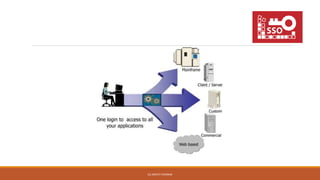
What is Single sign on (SSO)? 
Single sign-on (SSO) is a property of access control of multiple related, but 
independent software systems. 
With this property a user logs in once and gains access to all systems without being prompted to 
log in again at each of them. 
As different applications and resources support different authentication mechanisms, single 
sign-on has to internally translate to and store different credentials compared to what is used for 
initial authentication. 
(C) ARCHIT SHARMA
Why Single sign on? 
•Saves time and effort 
•Fewer passwords to remember 
•Reduce IT support cost 
•Speeds up development 
•Reducing password fatigue from different user name and password combinations 
•Reducing time spent re-entering passwords for the same identity 
(C) ARCHIT SHARMA
(C) ARCHIT SHARMA
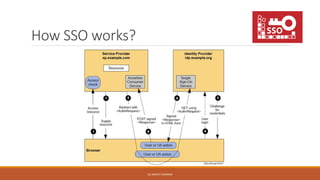
How SSO works? 
(C) ARCHIT SHARMA
What is SAML 
•SAML (Security Assertion Markup Language) is a protocol defined for implementing the single 
sign on in enterprise environment 
•SAML specification defines three roles: the principal (typically a user), the identity provider 
(IDP), and the service provider (SP) 
•The service provider requests and obtains an identity assertion from the identity provider 
(Active Directory). 
• On the basis of this assertion, the service provider can make an access control decision. 
(C) ARCHIT SHARMA
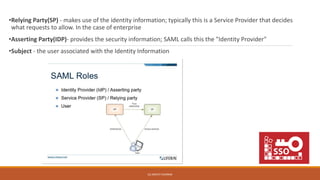
•Relying Party(SP) - makes use of the identity information; typically this is a Service Provider that decides 
what requests to allow. In the case of enterprise 
•Asserting Party(IDP)- provides the security information; SAML calls this the "Identity Provider" 
•Subject - the user associated with the Identity Information 
(C) ARCHIT SHARMA
How to implement SSO? 
Server (SP) 
• CRM 
• MANTIS 
• SYNAWIKI 
• WHOSIN 
Server (IDP) 
User Credentials 
Cloud Storage 
Users 
• LDAP 
• AD 
(C) ARCHIT SHARMA
SETTING UP SAML (UNIX SERVER) 
Step 1. Installing the SAML 
Step 2. Configure apache server (Linking the <www> directory and apacheserver) 
Step 3. SAML configuration (config/config.php) 
(C) ARCHIT SHARMA
SET SAML AS SERVICE PROVIDER 
Step 1. Configure the SP 
Step 2. Adding Service provider to Identity provider 
Step 3. Setting the default IdP 
Step 4. Exchange Metadata with idp 
(C) ARCHIT SHARMA
SET SAML AS IDENTITY PROVIDER 
Step1. Enabling the Identity Provider functionality 
Step2. Configure the Authentication module 
Step 3. Configuring the IdP open metadata 
Step 4. Adding SPs to the IdP 
(C) ARCHIT SHARMA
(C) ARCHIT SHARMA

Enterprise single sign on

  • 1.
    Enterprise Single Signon TECHNICAL INTERNSHIP PROGRAM 2014 ARCHIT SHARMA MBA TECH IT (C) ARCHIT SHARMA
  • 2.
    About the Company •Synapse India extends end-to-end IT-enabled solutions and services to a broad spectrum of industry •Synapse India is an IT solution provider and one of the largest providers of software development in India. They offer offshore web and software application development, online marketing and web design solutions that help small and medium scale businesses to perform, profit and grow. •Synapse India is a CMMI level-3 certified, Microsoft Gold Certified Partner with accreditation of Microsoft small business specialist and trusted by more than 2000 clients spread worldwide. (C) ARCHIT SHARMA
  • 3.
    What is Singlesign on (SSO)? Single sign-on (SSO) is a property of access control of multiple related, but independent software systems. With this property a user logs in once and gains access to all systems without being prompted to log in again at each of them. As different applications and resources support different authentication mechanisms, single sign-on has to internally translate to and store different credentials compared to what is used for initial authentication. (C) ARCHIT SHARMA
  • 4.
    Why Single signon? •Saves time and effort •Fewer passwords to remember •Reduce IT support cost •Speeds up development •Reducing password fatigue from different user name and password combinations •Reducing time spent re-entering passwords for the same identity (C) ARCHIT SHARMA
  • 5.
  • 6.
    How SSO works? (C) ARCHIT SHARMA
  • 7.
    What is SAML •SAML (Security Assertion Markup Language) is a protocol defined for implementing the single sign on in enterprise environment •SAML specification defines three roles: the principal (typically a user), the identity provider (IDP), and the service provider (SP) •The service provider requests and obtains an identity assertion from the identity provider (Active Directory). • On the basis of this assertion, the service provider can make an access control decision. (C) ARCHIT SHARMA
  • 8.
    •Relying Party(SP) -makes use of the identity information; typically this is a Service Provider that decides what requests to allow. In the case of enterprise •Asserting Party(IDP)- provides the security information; SAML calls this the "Identity Provider" •Subject - the user associated with the Identity Information (C) ARCHIT SHARMA
  • 9.
    How to implementSSO? Server (SP) • CRM • MANTIS • SYNAWIKI • WHOSIN Server (IDP) User Credentials Cloud Storage Users • LDAP • AD (C) ARCHIT SHARMA
  • 10.
    SETTING UP SAML(UNIX SERVER) Step 1. Installing the SAML Step 2. Configure apache server (Linking the <www> directory and apacheserver) Step 3. SAML configuration (config/config.php) (C) ARCHIT SHARMA
  • 11.
    SET SAML ASSERVICE PROVIDER Step 1. Configure the SP Step 2. Adding Service provider to Identity provider Step 3. Setting the default IdP Step 4. Exchange Metadata with idp (C) ARCHIT SHARMA
  • 12.
    SET SAML ASIDENTITY PROVIDER Step1. Enabling the Identity Provider functionality Step2. Configure the Authentication module Step 3. Configuring the IdP open metadata Step 4. Adding SPs to the IdP (C) ARCHIT SHARMA
  • 13.