OAuth 2
Some witty subtitle here if anyone can read this
Chris Wood - https://chriswoodcodes.net
Basic overview of things to cover
 What is OAuth
 Grant Types
 Tokens
Chris Wood - https://chriswoodcodes.net
OAuth
 OAuth is an authorisation framework, allowing an application to access details
about you or perform operations on your behalf
 It defines various flows for that application to request access
 The application is provided a limited and short lived credential to do what it
requested of you
 This means that the application doesn’t need to know your credentials
 For example can create an account with an application using an account from
another application simplifying the signup process. Can also benefit from SSO.
Chris Wood - https://chriswoodcodes.net
OAuth Roles
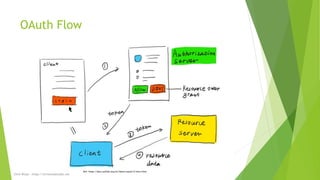
 Resource Owner: typically the User.
 Resource Server: the API the Client wants to access.
 Client: the application requesting access to the Resource Server, on behalf of
the Resource Owner.
 Authorization Server: authenticates the Resource Owner and issues tokens.
May be the same service as the Resource Server.
Chris Wood - https://chriswoodcodes.net
OAuth Flow
Ref: https://docs.authlib.org/en/latest/oauth/2/intro.html
Chris Wood - https://chriswoodcodes.net
Client
 In Azure, configured as an App Registration
 Defines Redirect URI
 Allowed Response Types
 Permissions required of a user (i.e. to access their profile photo)
 Public or Confidential
 Public, usually for SPAs or mobile apps. Where the Client Secret can’t be secured
 Confidential, where the Client Secret can be secured
 Type of app, web app (server side, spa, mobile app, native)
 Demo: App Registration in the Azure Portal
Chris Wood - https://chriswoodcodes.net
Grant Type
 Also called ‘authorization flows’
 It’s how the Client receives the token from the Authorization Server
 Either ‘interactive’ or ‘non-interactive’
 Examples include:
 Implicit
 ROPC/Password Grant
 Device Code
 Client Credential
 Refresh Token
 Authorisation Code
 Authorisation Code + PKCE
Chris Wood - https://chriswoodcodes.net
Grant Type – Components
 Common components of using the different Grant Types
 Client Id: generated by the App Registration
 Redirect URI: specified on the App Registration
 Scope: What the Client is requesting (appears as permissions for the User to approve)
 Response Type: the Grant Type to use
 Response Mode
 Query: i.e. url?token=ASDFG
 Fragment: url#token=ASDFG
 Form Post: POST url, Body: ASDFG
 State/Nonce: to help validate the request when returned
 Endpoints: /authorize and /token
Chris Wood - https://chriswoodcodes.net
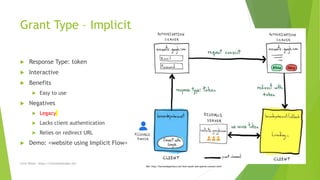
Grant Type – Implicit
 Response Type: token
 Interactive
 Benefits
 Easy to use
 Negatives
 Legacy
 Lacks client authentication
 Relies on redirect URL
 Demo: <website using Implicit Flow>
Ref: http://bernardopacheco.net/how-oauth-and-openid-connect-work
Chris Wood - https://chriswoodcodes.net
Grant Type – ROPC/Password Grant
 Resource Owner Password Credential
 Allows us to get the users credentials and send them to a 3rd party to authenticate
 Legacy
 Might/might not be interactive
 Benefits
 Simple
 Negatives
 Ideally, we should never handle credentials, we don’t want the responsibility
 Need to make sure the details aren’t leaked somewhere (i.e. logs)
 Most services don’t support this anymore
Chris Wood - https://chriswoodcodes.net
Grant Type – Device Code
 Interactive
 Device displays a code that you enter into a web browser, after logging in
 Device is given a code to authenticate going forward
Chris Wood - https://chriswoodcodes.net
Grant Type – Client Credential
 Not interactive
 Used by Service Principals
 The application itself requesting access to a resource which it has been
authorized
 Primarily through credentials such as Client Id and Client Secret
 Alternatively certificates can be used
Chris Wood - https://chriswoodcodes.net
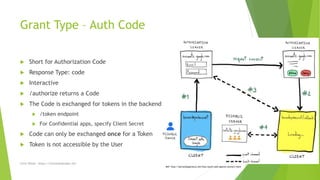
Grant Type – Auth Code
 Short for Authorization Code
 Response Type: code
 Interactive
 /authorize returns a Code
 The Code is exchanged for tokens in the backend
 /token endpoint
 For Confidential apps, specify Client Secret
 Code can only be exchanged once for a Token
 Token is not accessible by the User
Ref: http://bernardopacheco.net/how-oauth-and-openid-connect-work
Chris Wood - https://chriswoodcodes.net
Grant Type – Auth Code + PKCE
 Same as Auth Code, but more awesome
 Short for Proof Key Code Exchange
 Code Verifier: Cryptographically-random string
 Code Challenge: SHA256 Hash of the Code Verifier
 As part of request to /authorize, the Code Challenge is provided
 In the backend as part of exchanging the Code for a Token, we also provide the Code Verifier
 The Authorization Server will hash the Code Verifier and see that it matches the Code Challenge we sent earlier, this
confirms on their side that we are the one that initiated the authorize request
 Pros
 So even if someone malicious was able to see the Code, they wouldn’t be able to exchange the Code for a Token without
knowing the Code Verifier
 When using the Client Secret, the Authorization Server can authenticate the Client
 Cons
 More complex to setup compared to other Grant Types
 Demo: <website using Auth Code + PKCE>
Chris Wood - https://chriswoodcodes.net
Tokens
 These flows by default return Access and Refresh tokens
 Access token
 Can access an API on the User’s behalf, i.e. access to their profile photo
 Usually a JWT but doesn’t have to be
 Refresh token
 Only used to get newer Access and Id Tokens
 Are longer lived
 Usually a JWT but doesn’t have to be
 To request an Id Token, must specify ‘openid’ in the ‘scope’ of the /authorize
request. (OIDC)
Chris Wood - https://chriswoodcodes.net
OIDC (OpenID Connect)
 Identity layer on top of OAuth
 Defines an Id Token, containing information about the User
 Is a JWT (JSON Web Tokens)
 Contains a standard set of claims
 Can be extend with other claims (configured on the App Registration/Client)
 The Id Token can be used to verify information about the User, compared to
an Access Token which can perform an operation on behalf of the User
 If you only need to confirm someone's identity, the Access/Refresh tokens can
be ignored
 Demo: JWT
Chris Wood - https://chriswoodcodes.net
Tokens – Validation
 Need to validate the Tokens to make sure it comes from who we were
expecting, and not someone pretending to be them
 Confirm the authenticity of the token
 Signed by the Authorization Server
 Not expired
 Correct Issuer
 Correct Audience
 After that, can authorize the user (if they are signing in)
 Includes what Role or Groups they are assigned to
 Or using an identifier (i.e. UPN) lookup their permissions in the Client
Chris Wood - https://chriswoodcodes.net
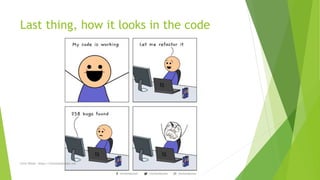
Last thing, how it looks in the code
Chris Wood - https://chriswoodcodes.net
Questions?
Chris Wood - https://chriswoodcodes.net
Resources
 https://oauth.net/
 https://docs.microsoft.com/en-us/azure/active-directory/develop/active-
directory-v2-protocols
 https://auth0.com/docs/protocols/protocol-oauth2
Chris Wood - https://chriswoodcodes.net

OAuth 2

  • 1.
    OAuth 2 Some wittysubtitle here if anyone can read this Chris Wood - https://chriswoodcodes.net
  • 2.
    Basic overview ofthings to cover  What is OAuth  Grant Types  Tokens Chris Wood - https://chriswoodcodes.net Chris Wood - https://chriswoodcodes.net
  • 3.
    OAuth  OAuth isan authorisation framework, allowing an application to access details about you or perform operations on your behalf  It defines various flows for that application to request access  The application is provided a limited and short lived credential to do what it requested of you  This means that the application doesn’t need to know your credentials  For example can create an account with an application using an account from another application simplifying the signup process. Can also benefit from SSO. Chris Wood - https://chriswoodcodes.net
  • 4.
    OAuth Roles  ResourceOwner: typically the User.  Resource Server: the API the Client wants to access.  Client: the application requesting access to the Resource Server, on behalf of the Resource Owner.  Authorization Server: authenticates the Resource Owner and issues tokens. May be the same service as the Resource Server. Chris Wood - https://chriswoodcodes.net
  • 5.
  • 6.
    Client  In Azure,configured as an App Registration  Defines Redirect URI  Allowed Response Types  Permissions required of a user (i.e. to access their profile photo)  Public or Confidential  Public, usually for SPAs or mobile apps. Where the Client Secret can’t be secured  Confidential, where the Client Secret can be secured  Type of app, web app (server side, spa, mobile app, native)  Demo: App Registration in the Azure Portal Chris Wood - https://chriswoodcodes.net
  • 7.
    Grant Type  Alsocalled ‘authorization flows’  It’s how the Client receives the token from the Authorization Server  Either ‘interactive’ or ‘non-interactive’  Examples include:  Implicit  ROPC/Password Grant  Device Code  Client Credential  Refresh Token  Authorisation Code  Authorisation Code + PKCE Chris Wood - https://chriswoodcodes.net
  • 8.
    Grant Type –Components  Common components of using the different Grant Types  Client Id: generated by the App Registration  Redirect URI: specified on the App Registration  Scope: What the Client is requesting (appears as permissions for the User to approve)  Response Type: the Grant Type to use  Response Mode  Query: i.e. url?token=ASDFG  Fragment: url#token=ASDFG  Form Post: POST url, Body: ASDFG  State/Nonce: to help validate the request when returned  Endpoints: /authorize and /token Chris Wood - https://chriswoodcodes.net
  • 9.
    Grant Type –Implicit  Response Type: token  Interactive  Benefits  Easy to use  Negatives  Legacy  Lacks client authentication  Relies on redirect URL  Demo: <website using Implicit Flow> Ref: http://bernardopacheco.net/how-oauth-and-openid-connect-work Chris Wood - https://chriswoodcodes.net
  • 10.
    Grant Type –ROPC/Password Grant  Resource Owner Password Credential  Allows us to get the users credentials and send them to a 3rd party to authenticate  Legacy  Might/might not be interactive  Benefits  Simple  Negatives  Ideally, we should never handle credentials, we don’t want the responsibility  Need to make sure the details aren’t leaked somewhere (i.e. logs)  Most services don’t support this anymore Chris Wood - https://chriswoodcodes.net
  • 11.
    Grant Type –Device Code  Interactive  Device displays a code that you enter into a web browser, after logging in  Device is given a code to authenticate going forward Chris Wood - https://chriswoodcodes.net
  • 12.
    Grant Type –Client Credential  Not interactive  Used by Service Principals  The application itself requesting access to a resource which it has been authorized  Primarily through credentials such as Client Id and Client Secret  Alternatively certificates can be used Chris Wood - https://chriswoodcodes.net
  • 13.
    Grant Type –Auth Code  Short for Authorization Code  Response Type: code  Interactive  /authorize returns a Code  The Code is exchanged for tokens in the backend  /token endpoint  For Confidential apps, specify Client Secret  Code can only be exchanged once for a Token  Token is not accessible by the User Ref: http://bernardopacheco.net/how-oauth-and-openid-connect-work Chris Wood - https://chriswoodcodes.net
  • 14.
    Grant Type –Auth Code + PKCE  Same as Auth Code, but more awesome  Short for Proof Key Code Exchange  Code Verifier: Cryptographically-random string  Code Challenge: SHA256 Hash of the Code Verifier  As part of request to /authorize, the Code Challenge is provided  In the backend as part of exchanging the Code for a Token, we also provide the Code Verifier  The Authorization Server will hash the Code Verifier and see that it matches the Code Challenge we sent earlier, this confirms on their side that we are the one that initiated the authorize request  Pros  So even if someone malicious was able to see the Code, they wouldn’t be able to exchange the Code for a Token without knowing the Code Verifier  When using the Client Secret, the Authorization Server can authenticate the Client  Cons  More complex to setup compared to other Grant Types  Demo: <website using Auth Code + PKCE> Chris Wood - https://chriswoodcodes.net
  • 15.
    Tokens  These flowsby default return Access and Refresh tokens  Access token  Can access an API on the User’s behalf, i.e. access to their profile photo  Usually a JWT but doesn’t have to be  Refresh token  Only used to get newer Access and Id Tokens  Are longer lived  Usually a JWT but doesn’t have to be  To request an Id Token, must specify ‘openid’ in the ‘scope’ of the /authorize request. (OIDC) Chris Wood - https://chriswoodcodes.net
  • 16.
    OIDC (OpenID Connect) Identity layer on top of OAuth  Defines an Id Token, containing information about the User  Is a JWT (JSON Web Tokens)  Contains a standard set of claims  Can be extend with other claims (configured on the App Registration/Client)  The Id Token can be used to verify information about the User, compared to an Access Token which can perform an operation on behalf of the User  If you only need to confirm someone's identity, the Access/Refresh tokens can be ignored  Demo: JWT Chris Wood - https://chriswoodcodes.net
  • 17.
    Tokens – Validation Need to validate the Tokens to make sure it comes from who we were expecting, and not someone pretending to be them  Confirm the authenticity of the token  Signed by the Authorization Server  Not expired  Correct Issuer  Correct Audience  After that, can authorize the user (if they are signing in)  Includes what Role or Groups they are assigned to  Or using an identifier (i.e. UPN) lookup their permissions in the Client Chris Wood - https://chriswoodcodes.net
  • 18.
    Last thing, howit looks in the code Chris Wood - https://chriswoodcodes.net
  • 19.
    Questions? Chris Wood -https://chriswoodcodes.net
  • 20.