SIMULATION
LANGUAGE
.
Simulation and Modeling / 1
Simulation Language
• A simulation language is a special purpose language
structured to meet the programming requirements of the
simulation models of a specific class of situations.
• The analyst develops the simulation model, employing
this special purpose language, which is applicable over a
class of applications.
• For example, the simulation language GPSS is applicable
to queuing like situations while SIMAN (SIMulation
and SLAM II are more appropriate for
the manufacturing and material handling
ANalysis)
simulating
systems.
Simulation and Modeling 2
Simulation Language..
Simulation software packages are designed to meet the
following objectives:
• To conveniently describe the elements, which commonly
appear in simulation, such as the generation of random
deviates.
• Flexibility of changing the design configuration of the
system so as to consider alternate configuration.
• Internal timing and control mechanism, for book keeping of
the vital information during the simulation run.
• To obtain conveniently, the data and statistics on the
behavior of the system.
4
Merits of Simulation Language
• Since most of the features to be programmed are in-built,
simulation languages take comparatively less
programming time and effort.
• Since simulation language consists of blocks, specially
constructed to simulate the common features, they
provide a natural framework for simulation modelling.
• The simulation models coded in simulation language can
easily be changed and modified.
• The error detection and analysis is done automatically
in simulation languages.
• The simulation models developed in simulation
languages, especially the specific application packages,
called simulators, are very easy to use.
5
Desirable Features of Simulation Software
1. Modelling Flexibility
2. Ease of Modelling
3. Fast Execution Speed
4. Compatibility of various Computer Systems
5. Statistical Capabilities
6. Capability of Animation
7. Report Presentation Capabilities
6
GPSS (General Purpose Simulation System)
• GPSS, which stands for General Purpose Simulation
System. This language was developed primarily by Geoffrey
Gordon at IBM around 1960, and has contributed important
concepts to every commercial discrete event Computer
Simulation Language developed ever since.
• GPSS is a discrete time simulation general-purpose
programming language, where a simulation clock advances in
discrete steps. A system is modeled as transactions enter the
system and are passed from one service (represented by
blocs) to another.
• This is particularly well-suited for problems such as a factory.
GPSS is less flexible than simulation languages such as
Simulate and SIMSCRIPT but it is easier to use and more
popular.
7
GPSS (General Purpose Simulation System)..
• GPSS was designed especially for analysis who were not
necessarily computer programmer. It is particularly suited for
modeling traffic and queuing systems.
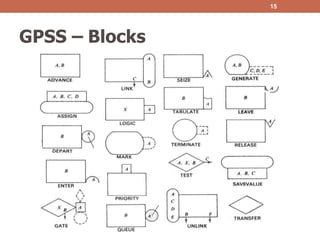
• A GPSS programmer does not write a program in the same
sense as SIMSCRIPT programmer does instead, he construct
a block diagram – a network of interconnected blocks, each
performing a special simulation oriented function.
• GPSS provides a set of 48 different blocks to choose from each
of which can be used repeatedly.
• Each block has a name and specific task to perform. Moving
through the system of block are entities called transaction are
customer, messenger, machine parts, vehicle, etc.
8
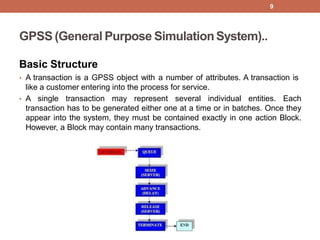
GPSS (General Purpose SimulationSystem)..
Basic Structure
• A transaction is a GPSS object with a number of attributes. A transaction is
like a customer entering into the process for service.
• A single transaction may represent several individual entities. Each
transaction has to be generated either one at a time or in batches. Once they
appear into the system, they must be contained exactly in one action Block.
However, a Block may contain many transactions.
9
Basic Structure
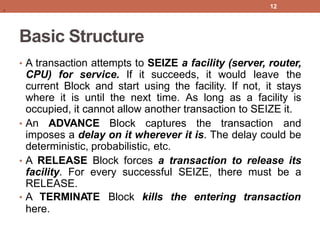
• A GENERATE Block generates
transactions with a specific set
a stream of
of behavior. No
transaction may again enter this block. Behavior could be
deterministic, stochastic, functional, etc. A Transaction
leaving a GENERATE Block fall away into the next
available Block it finds. The entering Block shouldn’t deny
entries to transactions. Otherwise, system backups may
result.
• A QUEUE Block never refuses any transaction. If a
transaction cannot enter into the next Block, it stays at the
current Block. Therefore, a QUEUE simulates an infinitely
long buffer.
11
.
Basic Structure
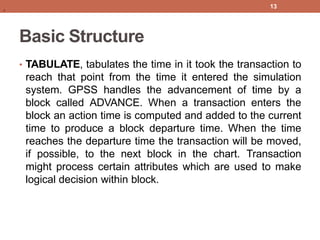
• A transaction attempts to SEIZE a facility (server, router,
CPU) for service. If it succeeds, it would leave the
current Block and start using the facility. If not, it stays
where it is until the next time. As long as a facility is
occupied, it cannot allow another transaction to SEIZE it.
• An ADVANCE Block captures the transaction and
imposes a delay on it wherever it is. The delay could be
deterministic, probabilistic, etc.
• A RELEASE Block forces a transaction to release its
facility. For every successful SEIZE, there must be a
RELEASE.
• A TERMINATE Block kills the entering transaction
here.
12
.
Basic Structure
• TABULATE, tabulates the time in it took the transaction to
reach that point from the time it entered the simulation
system. GPSS handles the advancement of time by a
block called ADVANCE. When a transaction enters the
block an action time is computed and added to the current
time to produce a block departure time. When the time
reaches the departure time the transaction will be moved,
if possible, to the next block in the chart. Transaction
might process certain attributes which are used to make
logical decision within block.
13
.
GPSS – Blocks
15
GPSS
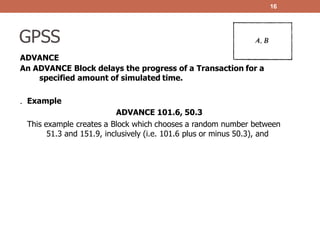
ADVANCE
An ADVANCE Block delays the progress of a Transaction for a
specified amount of simulated time.
16
. Example
ADVANCE 101.6, 50.3
This example creates a Block which chooses a random number between
51.3 and 151.9, inclusively (i.e. 101.6 plus or minus 50.3), and
17
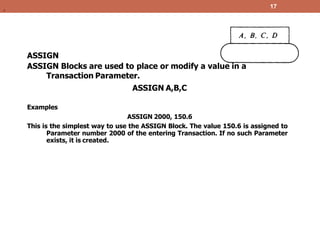
ASSIGN
ASSIGN Blocks are used to place or modify a value in a
Transaction Parameter.
ASSIGN A,B,C
Examples
ASSIGN 2000, 150.6
This is the simplest way to use the ASSIGN Block. The value 150.6 is assigned to
Parameter number 2000 of the entering Transaction. If no such Parameter
exists, it is created.
.
18
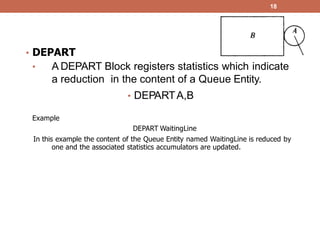
• DEPART
• A DEPART Block registers statistics which indicate
a reduction in the content of a Queue Entity.
• DEPARTA,B
Example
DEPART WaitingLine
In this example the content of the Queue Entity named WaitingLine is reduced by
one and the associated statistics accumulators are updated.
19
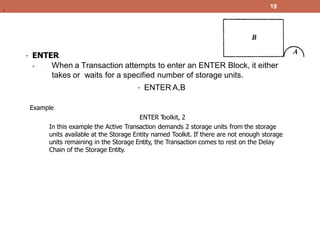
• ENTER
• When a Transaction attempts to enter an ENTER Block, it either
takes or waits for a specified number of storage units.
• ENTER A,B
Example
ENTER T
oolkit, 2
In this example the Active Transaction demands 2 storage units from the storage
units available at the Storage Entity named Toolkit. If there are not enough storage
units remaining in the Storage Entity, the Transaction comes to rest on the Delay
Chain of the Storage Entity.
.
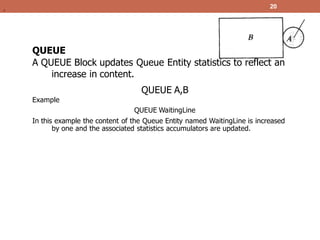
QUEUE
A QUEUE Block updates Queue Entity statistics to reflect an
increase in content.
QUEUE A,B
Example
QUEUE WaitingLine
In this example the content of the Queue Entity named WaitingLine is increased
by one and the associated statistics accumulators are updated.
20
.
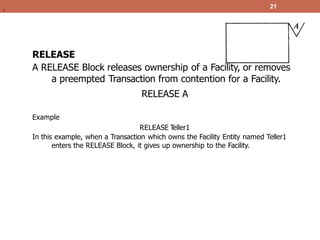
RELEASE
A RELEASE Block releases ownership of a Facility, or removes
a preempted Transaction from contention for a Facility.
RELEASE A
Example
RELEASE T
eller1
In this example, when a Transaction which owns the Facility Entity named Teller1
enters the RELEASE Block, it gives up ownership to the Facility.
21
.
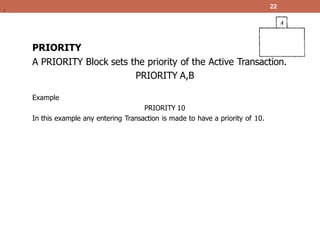
PRIORITY
A PRIORITY Block sets the priority of the Active Transaction.
PRIORITY A,B
Example
PRIORITY 10
In this example any entering Transaction is made to have a priority of 10.
22
.
23
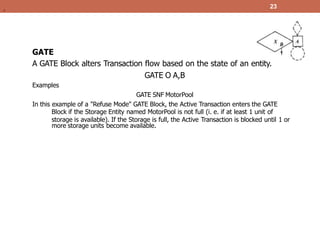
GATE
A GATE Block alters Transaction flow based on the state of an entity.
GATE O A,B
Examples
GATE SNF MotorPool
In this example of a "Refuse Mode" GATE Block, the Active Transaction enters the GATE
Block if the Storage Entity named MotorPool is not full (i. e. if at least 1 unit of
storage is available). If the Storage is full, the Active Transaction is blocked until 1 or
more storage units become available.
.
24
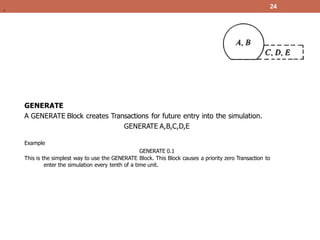
GENERATE
A GENERATE Block creates Transactions for future entry into the simulation.
GENERATE A,B,C,D,E
Example
GENERATE 0.1
This is the simplest way to use the GENERATE Block. This Block causes a priority zero Transaction to
enter the simulation every tenth of a time unit.
.
25
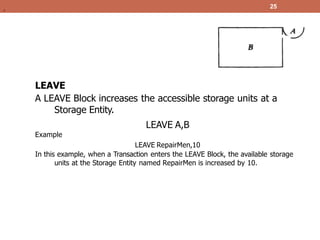
LEAVE
A LEAVE Block increases the accessible storage units at a
Storage Entity.
LEAVE A,B
Example
LEAVE RepairMen,10
In this example, when a Transaction enters the LEAVE Block, the available storage
units at the Storage Entity named RepairMen is increased by 10.
.
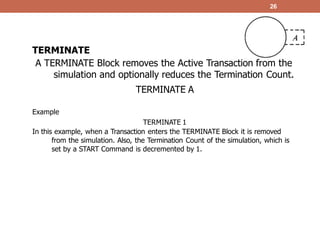
TERMINATE
A TERMINATE Block removes the Active Transaction from the
simulation and optionally reduces the Termination Count.
TERMINATE A
Example
TERMINATE 1
In this example, when a Transaction enters the TERMINATE Block it is removed
from the simulation. Also, the Termination Count of the simulation, which is
set by a START Command is decremented by 1.
26
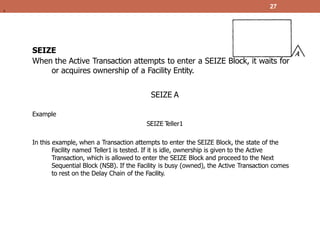
SEIZE
When the Active Transaction attempts to enter a SEIZE Block, it waits for
or acquires ownership of a Facility Entity.
SEIZE A
Example
SEIZE T
eller1
In this example, when a Transaction attempts to enter the SEIZE Block, the state of the
Facility named Teller1 is tested. If it is idle, ownership is given to the Active
Transaction, which is allowed to enter the SEIZE Block and proceed to the Next
Sequential Block (NSB). If the Facility is busy (owned), the Active Transaction comes
to rest on the Delay Chain of the Facility.
27
,
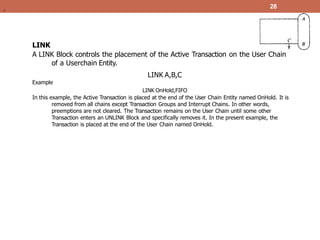
LINK
A LINK Block controls the placement of the Active Transaction on the User Chain
of a Userchain Entity.
LINK A,B,C
Example
LINK OnHold,FIFO
In this example, the Active Transaction is placed at the end of the User Chain Entity named OnHold. It is
removed from all chains except Transaction Groups and Interrupt Chains. In other words,
preemptions are not cleared. The Transaction remains on the User Chain until some other
Transaction enters an UNLINK Block and specifically removes it. In the present example, the
Transaction is placed at the end of the User Chain named OnHold.
28
.
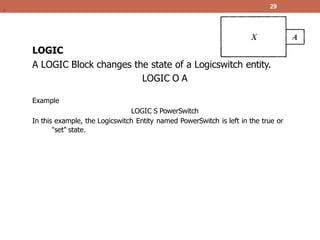
LOGIC
A LOGIC Block changes the state of a Logicswitch entity.
LOGIC O A
Example
LOGIC S PowerSwitch
In this example, the Logicswitch Entity named PowerSwitch is left in the true or
"set" state.
29
.
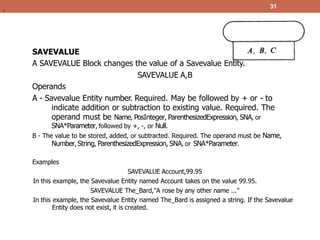
SAVEVALUE
A SAVEVALUE Block changes the value of a Savevalue Entity.
SAVEVALUE A,B
Operands
A - Savevalue Entity number. Required. May be followed by + or - to
indicate addition or subtraction to existing value. Required. The
operand must be Name, PosInteger, ParenthesizedExpression, SNA, or
SNA*Parameter, followed by +, -, or Null.
B - The value to be stored, added, or subtracted. Required. The operand must be Name,
Number, String, ParenthesizedExpression, SNA, or SNA*Parameter.
Examples
SAVEVALUE Account,99.95
In this example, the Savevalue Entity named Account takes on the value 99.95.
SAVEVALUE The_Bard,"A rose by any other name ..."
In this example, the Savevalue Entity named The_Bard is assigned a string. If the Savevalue
Entity does not exist, it is created.
31
.
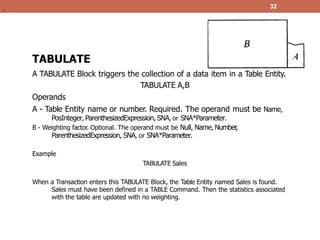
TABULATE
A TABULATE Block triggers the collection of a data item in a Table Entity.
TABULATE A,B
Operands
A - Table Entity name or number. Required. The operand must be Name,
PosInteger, ParenthesizedExpression, SNA, or SNA*Parameter.
B - Weighting factor. Optional. The operand must be Null, Name, Number
,
ParenthesizedExpression, SNA, or SNA*Parameter.
Example
TABULATE Sales
When a Transaction enters this TABULATE Block, the Table Entity named Sales is found.
Sales must have been defined in a TABLE Command. Then the statistics associated
with the table are updated with no weighting.
32
.
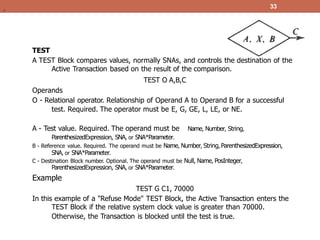
TEST
A TEST Block compares values, normally SNAs, and controls the destination of the
Active Transaction based on the result of the comparison.
TEST O A,B,C
Operands
O - Relational operator. Relationship of Operand A to Operand B for a successful
test. Required. The operator must be E, G, GE, L, LE, or NE.
Name, Number, String,
A - Test value. Required. The operand must be
ParenthesizedExpression, SNA, or SNA*Parameter.
B - Reference value. Required. The operand must be Name, Number, String, ParenthesizedExpression,
SNA, or SNA*Parameter.
C - Destination Block number. Optional. The operand must be Null, Name, PosInteger,
ParenthesizedExpression, SNA, or SNA*Parameter.
Example
TEST G C1, 70000
In this example of a "Refuse Mode" TEST Block, the Active Transaction enters the
TEST Block if the relative system clock value is greater than 70000.
Otherwise, the Transaction is blocked until the test is true.
33
.
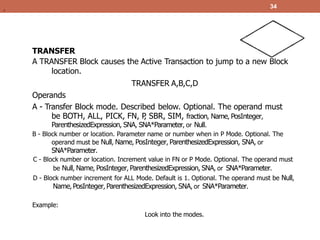
TRANSFER
A TRANSFER Block causes the Active Transaction to jump to a new Block
location.
TRANSFER A,B,C,D
Operands
A - Transfer Block mode. Described below. Optional. The operand must
be BOTH, ALL, PICK, FN, P
, SBR, SIM, fraction, Name, PosInteger,
ParenthesizedExpression, SNA, SNA*Parameter, or Null.
B - Block number or location. Parameter name or number when in P Mode. Optional. The
operand must be Null, Name, PosInteger, ParenthesizedExpression, SNA, or
SNA*Parameter.
C - Block number or location. Increment value in FN or P Mode. Optional. The operand must
be Null, Name, PosInteger, ParenthesizedExpression, SNA, or SNA*Parameter.
D - Block number increment for ALL Mode. Default is 1. Optional. The operand must be Null,
Name, PosInteger, ParenthesizedExpression, SNA, or SNA*Parameter.
Example:
Look into the modes.
34
.
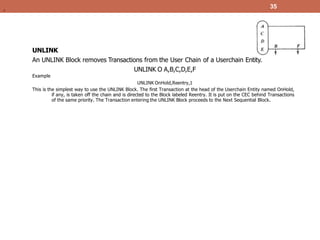
UNLINK
An UNLINK Block removes Transactions from the User Chain of a Userchain Entity.
UNLINK O A,B,C,D,E,F
Example
UNLINK OnHold,Reentry,1
This is the simplest way to use the UNLINK Block. The first Transaction at the head of the Userchain Entity named OnHold,
if any, is taken off the chain and is directed to the Block labeled Reentry. It is put on the CEC behind Transactions
of the same priority. The Transaction entering the UNLINK Block proceeds to the Next Sequential Block.
35
.
Simulation and Modeling / [Chapter 8] Nipun Thapa 44
https://genuinenotes.com

Simulation-Language.pptx

  • 1.
  • 2.
    Simulation Language • Asimulation language is a special purpose language structured to meet the programming requirements of the simulation models of a specific class of situations. • The analyst develops the simulation model, employing this special purpose language, which is applicable over a class of applications. • For example, the simulation language GPSS is applicable to queuing like situations while SIMAN (SIMulation and SLAM II are more appropriate for the manufacturing and material handling ANalysis) simulating systems. Simulation and Modeling 2
  • 3.
    Simulation Language.. Simulation softwarepackages are designed to meet the following objectives: • To conveniently describe the elements, which commonly appear in simulation, such as the generation of random deviates. • Flexibility of changing the design configuration of the system so as to consider alternate configuration. • Internal timing and control mechanism, for book keeping of the vital information during the simulation run. • To obtain conveniently, the data and statistics on the behavior of the system. 4
  • 4.
    Merits of SimulationLanguage • Since most of the features to be programmed are in-built, simulation languages take comparatively less programming time and effort. • Since simulation language consists of blocks, specially constructed to simulate the common features, they provide a natural framework for simulation modelling. • The simulation models coded in simulation language can easily be changed and modified. • The error detection and analysis is done automatically in simulation languages. • The simulation models developed in simulation languages, especially the specific application packages, called simulators, are very easy to use. 5
  • 5.
    Desirable Features ofSimulation Software 1. Modelling Flexibility 2. Ease of Modelling 3. Fast Execution Speed 4. Compatibility of various Computer Systems 5. Statistical Capabilities 6. Capability of Animation 7. Report Presentation Capabilities 6
  • 6.
    GPSS (General PurposeSimulation System) • GPSS, which stands for General Purpose Simulation System. This language was developed primarily by Geoffrey Gordon at IBM around 1960, and has contributed important concepts to every commercial discrete event Computer Simulation Language developed ever since. • GPSS is a discrete time simulation general-purpose programming language, where a simulation clock advances in discrete steps. A system is modeled as transactions enter the system and are passed from one service (represented by blocs) to another. • This is particularly well-suited for problems such as a factory. GPSS is less flexible than simulation languages such as Simulate and SIMSCRIPT but it is easier to use and more popular. 7
  • 7.
    GPSS (General PurposeSimulation System).. • GPSS was designed especially for analysis who were not necessarily computer programmer. It is particularly suited for modeling traffic and queuing systems. • A GPSS programmer does not write a program in the same sense as SIMSCRIPT programmer does instead, he construct a block diagram – a network of interconnected blocks, each performing a special simulation oriented function. • GPSS provides a set of 48 different blocks to choose from each of which can be used repeatedly. • Each block has a name and specific task to perform. Moving through the system of block are entities called transaction are customer, messenger, machine parts, vehicle, etc. 8
  • 8.
    GPSS (General PurposeSimulationSystem).. Basic Structure • A transaction is a GPSS object with a number of attributes. A transaction is like a customer entering into the process for service. • A single transaction may represent several individual entities. Each transaction has to be generated either one at a time or in batches. Once they appear into the system, they must be contained exactly in one action Block. However, a Block may contain many transactions. 9
  • 9.
    Basic Structure • AGENERATE Block generates transactions with a specific set a stream of of behavior. No transaction may again enter this block. Behavior could be deterministic, stochastic, functional, etc. A Transaction leaving a GENERATE Block fall away into the next available Block it finds. The entering Block shouldn’t deny entries to transactions. Otherwise, system backups may result. • A QUEUE Block never refuses any transaction. If a transaction cannot enter into the next Block, it stays at the current Block. Therefore, a QUEUE simulates an infinitely long buffer. 11 .
  • 10.
    Basic Structure • Atransaction attempts to SEIZE a facility (server, router, CPU) for service. If it succeeds, it would leave the current Block and start using the facility. If not, it stays where it is until the next time. As long as a facility is occupied, it cannot allow another transaction to SEIZE it. • An ADVANCE Block captures the transaction and imposes a delay on it wherever it is. The delay could be deterministic, probabilistic, etc. • A RELEASE Block forces a transaction to release its facility. For every successful SEIZE, there must be a RELEASE. • A TERMINATE Block kills the entering transaction here. 12 .
  • 11.
    Basic Structure • TABULATE,tabulates the time in it took the transaction to reach that point from the time it entered the simulation system. GPSS handles the advancement of time by a block called ADVANCE. When a transaction enters the block an action time is computed and added to the current time to produce a block departure time. When the time reaches the departure time the transaction will be moved, if possible, to the next block in the chart. Transaction might process certain attributes which are used to make logical decision within block. 13 .
  • 12.
  • 13.
    GPSS ADVANCE An ADVANCE Blockdelays the progress of a Transaction for a specified amount of simulated time. 16 . Example ADVANCE 101.6, 50.3 This example creates a Block which chooses a random number between 51.3 and 151.9, inclusively (i.e. 101.6 plus or minus 50.3), and
  • 14.
    17 ASSIGN ASSIGN Blocks areused to place or modify a value in a Transaction Parameter. ASSIGN A,B,C Examples ASSIGN 2000, 150.6 This is the simplest way to use the ASSIGN Block. The value 150.6 is assigned to Parameter number 2000 of the entering Transaction. If no such Parameter exists, it is created. .
  • 15.
    18 • DEPART • ADEPART Block registers statistics which indicate a reduction in the content of a Queue Entity. • DEPARTA,B Example DEPART WaitingLine In this example the content of the Queue Entity named WaitingLine is reduced by one and the associated statistics accumulators are updated.
  • 16.
    19 • ENTER • Whena Transaction attempts to enter an ENTER Block, it either takes or waits for a specified number of storage units. • ENTER A,B Example ENTER T oolkit, 2 In this example the Active Transaction demands 2 storage units from the storage units available at the Storage Entity named Toolkit. If there are not enough storage units remaining in the Storage Entity, the Transaction comes to rest on the Delay Chain of the Storage Entity. .
  • 17.
    QUEUE A QUEUE Blockupdates Queue Entity statistics to reflect an increase in content. QUEUE A,B Example QUEUE WaitingLine In this example the content of the Queue Entity named WaitingLine is increased by one and the associated statistics accumulators are updated. 20 .
  • 18.
    RELEASE A RELEASE Blockreleases ownership of a Facility, or removes a preempted Transaction from contention for a Facility. RELEASE A Example RELEASE T eller1 In this example, when a Transaction which owns the Facility Entity named Teller1 enters the RELEASE Block, it gives up ownership to the Facility. 21 .
  • 19.
    PRIORITY A PRIORITY Blocksets the priority of the Active Transaction. PRIORITY A,B Example PRIORITY 10 In this example any entering Transaction is made to have a priority of 10. 22 .
  • 20.
    23 GATE A GATE Blockalters Transaction flow based on the state of an entity. GATE O A,B Examples GATE SNF MotorPool In this example of a "Refuse Mode" GATE Block, the Active Transaction enters the GATE Block if the Storage Entity named MotorPool is not full (i. e. if at least 1 unit of storage is available). If the Storage is full, the Active Transaction is blocked until 1 or more storage units become available. .
  • 21.
    24 GENERATE A GENERATE Blockcreates Transactions for future entry into the simulation. GENERATE A,B,C,D,E Example GENERATE 0.1 This is the simplest way to use the GENERATE Block. This Block causes a priority zero Transaction to enter the simulation every tenth of a time unit. .
  • 22.
    25 LEAVE A LEAVE Blockincreases the accessible storage units at a Storage Entity. LEAVE A,B Example LEAVE RepairMen,10 In this example, when a Transaction enters the LEAVE Block, the available storage units at the Storage Entity named RepairMen is increased by 10. .
  • 23.
    TERMINATE A TERMINATE Blockremoves the Active Transaction from the simulation and optionally reduces the Termination Count. TERMINATE A Example TERMINATE 1 In this example, when a Transaction enters the TERMINATE Block it is removed from the simulation. Also, the Termination Count of the simulation, which is set by a START Command is decremented by 1. 26
  • 24.
    SEIZE When the ActiveTransaction attempts to enter a SEIZE Block, it waits for or acquires ownership of a Facility Entity. SEIZE A Example SEIZE T eller1 In this example, when a Transaction attempts to enter the SEIZE Block, the state of the Facility named Teller1 is tested. If it is idle, ownership is given to the Active Transaction, which is allowed to enter the SEIZE Block and proceed to the Next Sequential Block (NSB). If the Facility is busy (owned), the Active Transaction comes to rest on the Delay Chain of the Facility. 27 ,
  • 25.
    LINK A LINK Blockcontrols the placement of the Active Transaction on the User Chain of a Userchain Entity. LINK A,B,C Example LINK OnHold,FIFO In this example, the Active Transaction is placed at the end of the User Chain Entity named OnHold. It is removed from all chains except Transaction Groups and Interrupt Chains. In other words, preemptions are not cleared. The Transaction remains on the User Chain until some other Transaction enters an UNLINK Block and specifically removes it. In the present example, the Transaction is placed at the end of the User Chain named OnHold. 28 .
  • 26.
    LOGIC A LOGIC Blockchanges the state of a Logicswitch entity. LOGIC O A Example LOGIC S PowerSwitch In this example, the Logicswitch Entity named PowerSwitch is left in the true or "set" state. 29 .
  • 27.
    SAVEVALUE A SAVEVALUE Blockchanges the value of a Savevalue Entity. SAVEVALUE A,B Operands A - Savevalue Entity number. Required. May be followed by + or - to indicate addition or subtraction to existing value. Required. The operand must be Name, PosInteger, ParenthesizedExpression, SNA, or SNA*Parameter, followed by +, -, or Null. B - The value to be stored, added, or subtracted. Required. The operand must be Name, Number, String, ParenthesizedExpression, SNA, or SNA*Parameter. Examples SAVEVALUE Account,99.95 In this example, the Savevalue Entity named Account takes on the value 99.95. SAVEVALUE The_Bard,"A rose by any other name ..." In this example, the Savevalue Entity named The_Bard is assigned a string. If the Savevalue Entity does not exist, it is created. 31 .
  • 28.
    TABULATE A TABULATE Blocktriggers the collection of a data item in a Table Entity. TABULATE A,B Operands A - Table Entity name or number. Required. The operand must be Name, PosInteger, ParenthesizedExpression, SNA, or SNA*Parameter. B - Weighting factor. Optional. The operand must be Null, Name, Number , ParenthesizedExpression, SNA, or SNA*Parameter. Example TABULATE Sales When a Transaction enters this TABULATE Block, the Table Entity named Sales is found. Sales must have been defined in a TABLE Command. Then the statistics associated with the table are updated with no weighting. 32 .
  • 29.
    TEST A TEST Blockcompares values, normally SNAs, and controls the destination of the Active Transaction based on the result of the comparison. TEST O A,B,C Operands O - Relational operator. Relationship of Operand A to Operand B for a successful test. Required. The operator must be E, G, GE, L, LE, or NE. Name, Number, String, A - Test value. Required. The operand must be ParenthesizedExpression, SNA, or SNA*Parameter. B - Reference value. Required. The operand must be Name, Number, String, ParenthesizedExpression, SNA, or SNA*Parameter. C - Destination Block number. Optional. The operand must be Null, Name, PosInteger, ParenthesizedExpression, SNA, or SNA*Parameter. Example TEST G C1, 70000 In this example of a "Refuse Mode" TEST Block, the Active Transaction enters the TEST Block if the relative system clock value is greater than 70000. Otherwise, the Transaction is blocked until the test is true. 33 .
  • 30.
    TRANSFER A TRANSFER Blockcauses the Active Transaction to jump to a new Block location. TRANSFER A,B,C,D Operands A - Transfer Block mode. Described below. Optional. The operand must be BOTH, ALL, PICK, FN, P , SBR, SIM, fraction, Name, PosInteger, ParenthesizedExpression, SNA, SNA*Parameter, or Null. B - Block number or location. Parameter name or number when in P Mode. Optional. The operand must be Null, Name, PosInteger, ParenthesizedExpression, SNA, or SNA*Parameter. C - Block number or location. Increment value in FN or P Mode. Optional. The operand must be Null, Name, PosInteger, ParenthesizedExpression, SNA, or SNA*Parameter. D - Block number increment for ALL Mode. Default is 1. Optional. The operand must be Null, Name, PosInteger, ParenthesizedExpression, SNA, or SNA*Parameter. Example: Look into the modes. 34 .
  • 31.
    UNLINK An UNLINK Blockremoves Transactions from the User Chain of a Userchain Entity. UNLINK O A,B,C,D,E,F Example UNLINK OnHold,Reentry,1 This is the simplest way to use the UNLINK Block. The first Transaction at the head of the Userchain Entity named OnHold, if any, is taken off the chain and is directed to the Block labeled Reentry. It is put on the CEC behind Transactions of the same priority. The Transaction entering the UNLINK Block proceeds to the Next Sequential Block. 35 .
  • 32.
    Simulation and Modeling/ [Chapter 8] Nipun Thapa 44 https://genuinenotes.com