Android Application Development
M. Mukesh Kannan
Android Developer
Nplus Technologies
Presented By
Venue: Bharathiar University
Department of Computer Application
Time:
Android Application Development
M. Mukesh Kannan
Android Developer
Nplus Technologies
Presented ByVenue: Bharathiar University
Department of Computer Application
Time:
Thanks TO
Assistant Professor
Department of Computer Applications
Mr. S.PALANISAMY
Assistant Professor
Department of Computer Applications
Dr. M. Punithavalli
Assistant Professor
Department of Computer Applications
Dr. T. Amudha
CONTENTS
• History
• Introduction to Android
• Android Versions
• Android Architecture
• Android Installation Procedures
• Fundamental Components
• Understanding Hello World Program
• Widgets, Layouts, Designing Android UI with Basic views
• Tour on Android Studio
• Build Generation
• Google Play-store
• Google Play-store privacy and guidelines
History of Android
• Android Inc. was found in 2003 Oct in Palo Alto, California by
❑ Andy Rubin
❑ Rich Miner
❑ Nick Sears
❑ Chris White
• Early, the company were to develop an advanced operating
system for Digital Cameras
• When companies realized that the market was not large enough,
the company diverted its focus towards Mobile Operating System
• It was in an intention to be an open competitor for Symbian OS,
iPhone OS, Blackberry OS
• In July 2005, Google acquired Android Inc. for $50million,
and including the Founders(3)Andy Rubin, Rich Miner, Chris White
stayed after the acquisition.
Introduction to Android
• Open source software platform and an operating system form
mobile devices based on Linux Kernel
• Developed by Google and later OHA(Open Handset Alliance)
• Allows writing managed code in Java Language
• Android has its own virtual machine knows as Dalvik Virtual
Machine (DVM) which is used for executing the android app
• As of July 2013, Google play-store had over 1million android apps
published& 50billion apps downloaded
• Now Google Play-store has 2.9 M apps ready to Download
• Best-selling OS worldwide on smartphones since 2011
• and on tablets since 2013.
• it has over two billion monthly active users
Android Versions
• Android began with Android Beta in Nov 2007.
• First Commercial Phone launched in Sep 2008 Android 1.0
❑ HTC Dream aka T-Mobile G1
Which went against Apple’s iPhone OS 2
• The latest Android Versions Android 11.0 in beta and the
Stable version is Android 10
• Android 4.4 also saw the first version of "OK, Google“
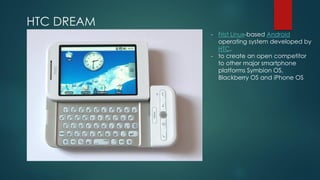
HTC DREAM
- Frist Linux-based Android
operating system developed by
HTC.
- to create an open competitor
to other major smartphone
platforms Symbion OS,
Blackberry OS and iPhone OS
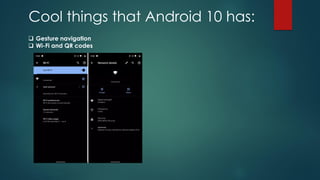
Cool things that Android 10 has:
❑ Gesture navigation
❑ Wi-Fi and QR codes
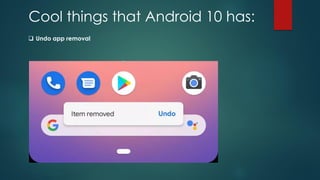
Cool things that Android 10 has:
❑ Undo app removal
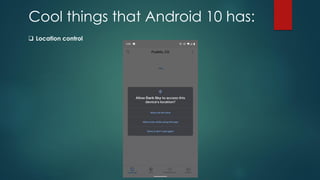
Cool things that Android 10 has:
❑ Location control
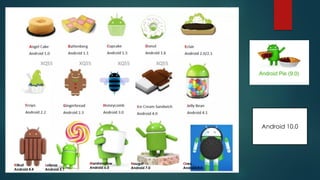
Oreo
Android 8.0
Lolipop
Android 5.1
Marshmallow
Android 6.0
Nougat
Android 7.0
Kitkat
Android 4.4
Android 10.0
ANDROID
ARCHITECTURE
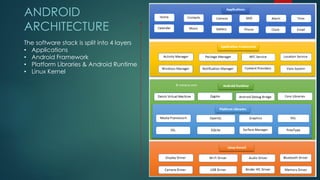
The software stack is split into 4 layers
• Applications
• Android Framework
• Platform Libraries & Android Runtime
• Linux Kernel
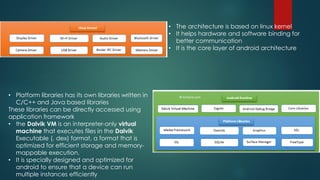
• The architecture is based on linux kernel
• It helps hardware and software binding for
better communication
• It is the core layer of android architecture
• Platform libraries has its own libraries written in
C/C++ and Java based libraries
These libraries can be directly accessed using
application framework
• the Dalvik VM is an interpreter-only virtual
machine that executes files in the Dalvik
Executable (. dex) format, a format that is
optimized for efficient storage and memory-
mappable execution.
• It is specially designed and optimized for
android to ensure that a device can run
multiple instances efficiently
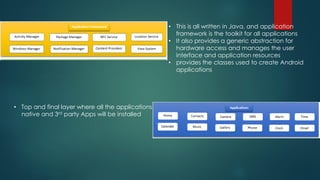
• This is all written in Java, and application
framework is the toolkit for all applications
• It also provides a generic abstraction for
hardware access and manages the user
interface and application resources
• provides the classes used to create Android
applications
• Top and final layer where all the applications
native and 3rd party Apps will be installed
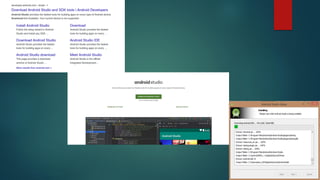
INSTALLATION PROCEDURE
Required Tools for Android Development
- Java
- Android Studio
- Phone or Android Emulator
- USB cable
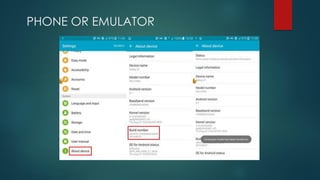
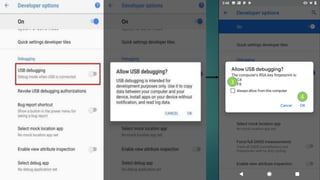
PHONE OR EMULATOR
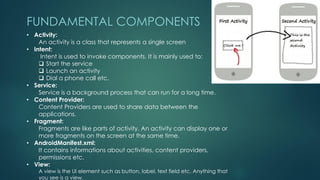
FUNDAMENTAL COMPONENTS
• Activity:
An activity is a class that represents a single screen
• Intent:
Intent is used to invoke components. It is mainly used to:
❑ Start the service
❑ Launch an activity
❑ Dial a phone call etc.
• Service:
Service is a background process that can run for a long time.
• Content Provider:
Content Providers are used to share data between the
applications.
• Fragment:
Fragments are like parts of activity. An activity can display one or
more fragments on the screen at the same time.
• AndroidManifest.xml:
It contains informations about activities, content providers,
permissions etc.
• View:
A view is the UI element such as button, label, text field etc. Anything that
you see is a view.
HELLO WORLD PROGRAM
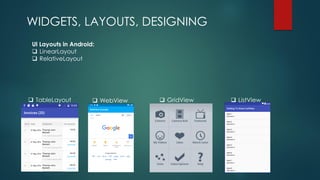
WIDGETS, LAYOUTS, DESIGNING
UI Layouts in Android:
❑ LinearLayout
❑ RelativeLayout
❑ GridView ❑ ListView❑ WebView❑ TableLayout
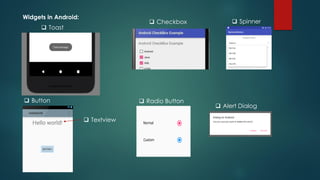
Widgets in Android:
❑ Checkbox ❑ Spinner
❑ Button
❑ Toast
❑ Textview
❑ Radio Button
❑ Alert Dialog
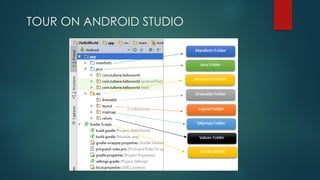
TOUR ON ANDROID STUDIO
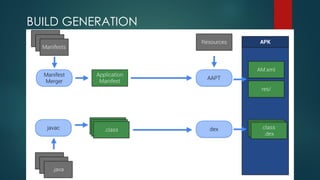
BUILD GENERATION
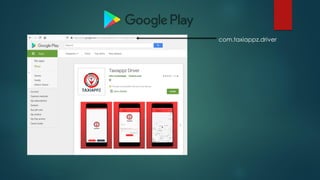
com.taxiappz.driver
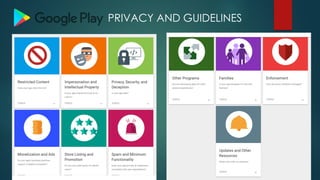
PRIVACY AND GUIDELINES
Q &A

Android Application Development Presentation

  • 2.
    Android Application Development M.Mukesh Kannan Android Developer Nplus Technologies Presented By Venue: Bharathiar University Department of Computer Application Time:
  • 3.
    Android Application Development M.Mukesh Kannan Android Developer Nplus Technologies Presented ByVenue: Bharathiar University Department of Computer Application Time:
  • 4.
    Thanks TO Assistant Professor Departmentof Computer Applications Mr. S.PALANISAMY Assistant Professor Department of Computer Applications Dr. M. Punithavalli Assistant Professor Department of Computer Applications Dr. T. Amudha
  • 5.
    CONTENTS • History • Introductionto Android • Android Versions • Android Architecture • Android Installation Procedures • Fundamental Components • Understanding Hello World Program • Widgets, Layouts, Designing Android UI with Basic views • Tour on Android Studio • Build Generation • Google Play-store • Google Play-store privacy and guidelines
  • 6.
    History of Android •Android Inc. was found in 2003 Oct in Palo Alto, California by ❑ Andy Rubin ❑ Rich Miner ❑ Nick Sears ❑ Chris White • Early, the company were to develop an advanced operating system for Digital Cameras • When companies realized that the market was not large enough, the company diverted its focus towards Mobile Operating System • It was in an intention to be an open competitor for Symbian OS, iPhone OS, Blackberry OS • In July 2005, Google acquired Android Inc. for $50million, and including the Founders(3)Andy Rubin, Rich Miner, Chris White stayed after the acquisition.
  • 7.
    Introduction to Android •Open source software platform and an operating system form mobile devices based on Linux Kernel • Developed by Google and later OHA(Open Handset Alliance) • Allows writing managed code in Java Language • Android has its own virtual machine knows as Dalvik Virtual Machine (DVM) which is used for executing the android app • As of July 2013, Google play-store had over 1million android apps published& 50billion apps downloaded • Now Google Play-store has 2.9 M apps ready to Download • Best-selling OS worldwide on smartphones since 2011 • and on tablets since 2013. • it has over two billion monthly active users
  • 8.
    Android Versions • Androidbegan with Android Beta in Nov 2007. • First Commercial Phone launched in Sep 2008 Android 1.0 ❑ HTC Dream aka T-Mobile G1 Which went against Apple’s iPhone OS 2 • The latest Android Versions Android 11.0 in beta and the Stable version is Android 10 • Android 4.4 also saw the first version of "OK, Google“
  • 9.
    HTC DREAM - FristLinux-based Android operating system developed by HTC. - to create an open competitor to other major smartphone platforms Symbion OS, Blackberry OS and iPhone OS
  • 10.
    Cool things thatAndroid 10 has: ❑ Gesture navigation ❑ Wi-Fi and QR codes
  • 11.
    Cool things thatAndroid 10 has: ❑ Undo app removal
  • 12.
    Cool things thatAndroid 10 has: ❑ Location control
  • 13.
    Oreo Android 8.0 Lolipop Android 5.1 Marshmallow Android6.0 Nougat Android 7.0 Kitkat Android 4.4 Android 10.0
  • 14.
    ANDROID ARCHITECTURE The software stackis split into 4 layers • Applications • Android Framework • Platform Libraries & Android Runtime • Linux Kernel
  • 15.
    • The architectureis based on linux kernel • It helps hardware and software binding for better communication • It is the core layer of android architecture • Platform libraries has its own libraries written in C/C++ and Java based libraries These libraries can be directly accessed using application framework • the Dalvik VM is an interpreter-only virtual machine that executes files in the Dalvik Executable (. dex) format, a format that is optimized for efficient storage and memory- mappable execution. • It is specially designed and optimized for android to ensure that a device can run multiple instances efficiently
  • 16.
    • This isall written in Java, and application framework is the toolkit for all applications • It also provides a generic abstraction for hardware access and manages the user interface and application resources • provides the classes used to create Android applications • Top and final layer where all the applications native and 3rd party Apps will be installed
  • 17.
    INSTALLATION PROCEDURE Required Toolsfor Android Development - Java - Android Studio - Phone or Android Emulator - USB cable
  • 19.
  • 21.
    FUNDAMENTAL COMPONENTS • Activity: Anactivity is a class that represents a single screen • Intent: Intent is used to invoke components. It is mainly used to: ❑ Start the service ❑ Launch an activity ❑ Dial a phone call etc. • Service: Service is a background process that can run for a long time. • Content Provider: Content Providers are used to share data between the applications. • Fragment: Fragments are like parts of activity. An activity can display one or more fragments on the screen at the same time. • AndroidManifest.xml: It contains informations about activities, content providers, permissions etc. • View: A view is the UI element such as button, label, text field etc. Anything that you see is a view.
  • 22.
  • 23.
    WIDGETS, LAYOUTS, DESIGNING UILayouts in Android: ❑ LinearLayout ❑ RelativeLayout ❑ GridView ❑ ListView❑ WebView❑ TableLayout
  • 24.
    Widgets in Android: ❑Checkbox ❑ Spinner ❑ Button ❑ Toast ❑ Textview ❑ Radio Button ❑ Alert Dialog
  • 25.
  • 26.
  • 27.
  • 30.
  • 31.