ObjectivesAt the end of this presentation you should be able to:Understand what SharePoint isUnderstand what SharePoint Can do.Understand what Google Apps is.List the components that make up Google Apps.Understand when to useSharePoint and when to use Google Apps.
AgendaIntroduction to SharePointList capabilities of SharePointIntroduction to Google AppsWhen to use each.Additional resourcesQuestions
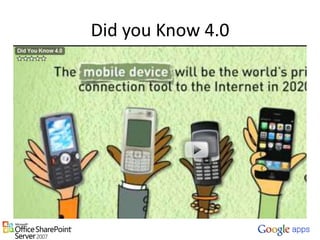
Did you Know 4.0
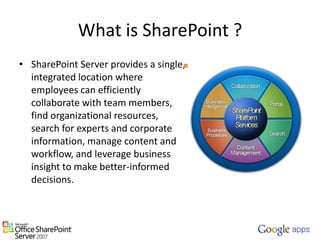
What is SharePoint ?SharePoint Server provides a single, integrated location where employees can efficiently collaborate with team members, find organizational resources, search for experts and corporate information, manage content and workflow, and leverage business insight to make better-informed decisions.
SharePoint Can…Bring Teams Together (Demo Here)Provided Executive Dashboards with Business Intelligence (Demo Here)Automate ProcessesIntranet Content Management SystemEnterprise SearchOnline Collaboration, Blogs, Wikis.
AgendaIntroduction to SharePointList capabilities of SharePointIntroduction to Google AppsWhen to use each.Additional resourcesQuestions
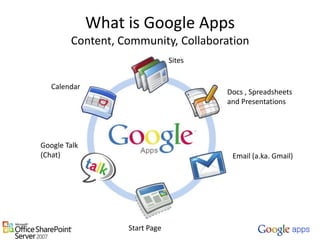
What is Google AppsContent, Community, CollaborationSitesCalendarDocs , Spreadsheets and PresentationsGoogle Talk (Chat)Email (a.ka. Gmail)Start Page
Why are we going GoogleOur research showed our users were already there. 72% of all users already had their email forward to a Gmail account.Cost and resource savings.Built in mobile capabilities.Becoming and Industry standard.60% of all fortune 100 companies have already gone Google.Tremendous user community to share ideas and collaborate with.
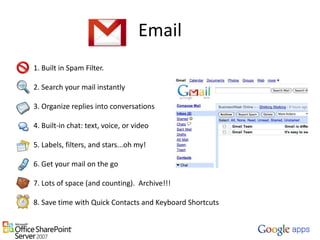
Email1. Built in Spam Filter.   2. Search your mail instantly   3. Organize replies into conversations   4. Built-in chat: text, voice, or video   5. Labels, filters, and stars...oh my!   6. Get your mail on the go   7. Lots of space (and counting).  Archive!!!   8. Save time with Quick Contacts and Keyboard Shortcuts
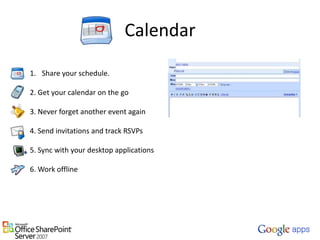
CalendarShare your schedule.2. Get your calendar on the go 3. Never forget another event again 4. Send invitations and track RSVPs 5. Sync with your desktop applications6. Work offline
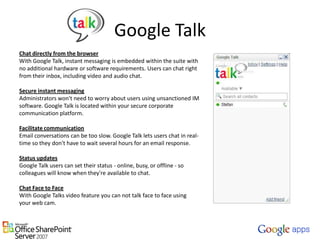
Google TalkChat directly from the browserWith Google Talk, instant messaging is embedded within the suite with no additional hardware or software requirements. Users can chat right from their inbox, including video and audio chat. Secure instant messagingAdministrators won't need to worry about users using unsanctioned IM software. Google Talk is located within your secure corporate communication platform. Facilitate communicationEmail conversations can be too slow. Google Talk lets users chat in real-time so they don't have to wait several hours for an email response. Status updatesGoogle Talk users can set their status - online, busy, or offline - so colleagues will know when they're available to chat.Chat Face to FaceWith Google Talks video feature you can not talk face to face using your web cam.
Google Docs
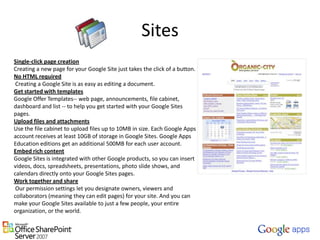
SitesSingle-click page creationCreating a new page for your Google Site just takes the click of a button.No HTML required Creating a Google Site is as easy as editing a document.Get started with templatesGoogle Offer Templates-- web page, announcements, file cabinet, dashboard and list -- to help you get started with your Google Sites pages.Upload files and attachmentsUse the file cabinet to upload files up to 10MB in size. Each Google Apps account receives at least 10GB of storage in Google Sites. Google Apps Education editions get an additional 500MB for each user account.Embed rich contentGoogle Sites is integrated with other Google products, so you can insert videos, docs, spreadsheets, presentations, photo slide shows, and calendars directly onto your Google Sites pages.Work together and share Our permission settings let you designate owners, viewers and collaborators (meaning they can edit pages) for your site. And you can make your Google Sites available to just a few people, your entire organization, or the world.
Startpagehttps://my.georgiasouthern.edu
AgendaIntroduction to SharePointList capabilities of SharePointIntroduction to Google AppsWhen to use each.Additional resourcesQuestions
So when do I use what ?  		      = Business Productivity, Committees and Team Collaboration, and Internal content. 		= Student Collaboration and Public content
AgendaIntroduction to SharePointList capabilities of SharePointIntroduction to Google AppsWhen to use each.Additional resourcesQuestions
Additional ResourceSharePoint online tutorialshttp://www.sharepointhosting.com/video_tutorials.htmlhttp://communityclips.officelabs.com/Default.aspxGoogle Training Videoshttp://google.com/support/a/users/?hl=en YouTube ResourceYouTubehttp://www.youtube.com/Common Craft http://www.commoncraft.comPresentation Slideshttp://www.slideshare.net/rstalnakerGeorgia Southern Google Apps Bloghttp://blogs.georgiasouthern.edu/googleapps/
QuestionsMe First.  We are looking for Pilot users for Faculty and Staff.  If you are interested please send me an email at rstalnaker@georgiasouthern.edu

Share Point and Google Apps

  • 2.
    ObjectivesAt the endof this presentation you should be able to:Understand what SharePoint isUnderstand what SharePoint Can do.Understand what Google Apps is.List the components that make up Google Apps.Understand when to useSharePoint and when to use Google Apps.
  • 3.
    AgendaIntroduction to SharePointListcapabilities of SharePointIntroduction to Google AppsWhen to use each.Additional resourcesQuestions
  • 4.
  • 5.
    What is SharePoint?SharePoint Server provides a single, integrated location where employees can efficiently collaborate with team members, find organizational resources, search for experts and corporate information, manage content and workflow, and leverage business insight to make better-informed decisions.
  • 6.
    SharePoint Can…Bring TeamsTogether (Demo Here)Provided Executive Dashboards with Business Intelligence (Demo Here)Automate ProcessesIntranet Content Management SystemEnterprise SearchOnline Collaboration, Blogs, Wikis.
  • 7.
    AgendaIntroduction to SharePointListcapabilities of SharePointIntroduction to Google AppsWhen to use each.Additional resourcesQuestions
  • 8.
    What is GoogleAppsContent, Community, CollaborationSitesCalendarDocs , Spreadsheets and PresentationsGoogle Talk (Chat)Email (a.ka. Gmail)Start Page
  • 9.
    Why are wegoing GoogleOur research showed our users were already there. 72% of all users already had their email forward to a Gmail account.Cost and resource savings.Built in mobile capabilities.Becoming and Industry standard.60% of all fortune 100 companies have already gone Google.Tremendous user community to share ideas and collaborate with.
  • 10.
    Email1. Built inSpam Filter.  2. Search your mail instantly  3. Organize replies into conversations  4. Built-in chat: text, voice, or video  5. Labels, filters, and stars...oh my!  6. Get your mail on the go  7. Lots of space (and counting). Archive!!!  8. Save time with Quick Contacts and Keyboard Shortcuts
  • 11.
    CalendarShare your schedule.2.Get your calendar on the go 3. Never forget another event again 4. Send invitations and track RSVPs 5. Sync with your desktop applications6. Work offline
  • 12.
    Google TalkChat directlyfrom the browserWith Google Talk, instant messaging is embedded within the suite with no additional hardware or software requirements. Users can chat right from their inbox, including video and audio chat. Secure instant messagingAdministrators won't need to worry about users using unsanctioned IM software. Google Talk is located within your secure corporate communication platform. Facilitate communicationEmail conversations can be too slow. Google Talk lets users chat in real-time so they don't have to wait several hours for an email response. Status updatesGoogle Talk users can set their status - online, busy, or offline - so colleagues will know when they're available to chat.Chat Face to FaceWith Google Talks video feature you can not talk face to face using your web cam.
  • 13.
  • 14.
    SitesSingle-click page creationCreatinga new page for your Google Site just takes the click of a button.No HTML required Creating a Google Site is as easy as editing a document.Get started with templatesGoogle Offer Templates-- web page, announcements, file cabinet, dashboard and list -- to help you get started with your Google Sites pages.Upload files and attachmentsUse the file cabinet to upload files up to 10MB in size. Each Google Apps account receives at least 10GB of storage in Google Sites. Google Apps Education editions get an additional 500MB for each user account.Embed rich contentGoogle Sites is integrated with other Google products, so you can insert videos, docs, spreadsheets, presentations, photo slide shows, and calendars directly onto your Google Sites pages.Work together and share Our permission settings let you designate owners, viewers and collaborators (meaning they can edit pages) for your site. And you can make your Google Sites available to just a few people, your entire organization, or the world.
  • 15.
  • 16.
    AgendaIntroduction to SharePointListcapabilities of SharePointIntroduction to Google AppsWhen to use each.Additional resourcesQuestions
  • 17.
    So when doI use what ? = Business Productivity, Committees and Team Collaboration, and Internal content. = Student Collaboration and Public content
  • 18.
    AgendaIntroduction to SharePointListcapabilities of SharePointIntroduction to Google AppsWhen to use each.Additional resourcesQuestions
  • 19.
    Additional ResourceSharePoint onlinetutorialshttp://www.sharepointhosting.com/video_tutorials.htmlhttp://communityclips.officelabs.com/Default.aspxGoogle Training Videoshttp://google.com/support/a/users/?hl=en YouTube ResourceYouTubehttp://www.youtube.com/Common Craft http://www.commoncraft.comPresentation Slideshttp://www.slideshare.net/rstalnakerGeorgia Southern Google Apps Bloghttp://blogs.georgiasouthern.edu/googleapps/
  • 20.
    QuestionsMe First. We are looking for Pilot users for Faculty and Staff. If you are interested please send me an email at rstalnaker@georgiasouthern.edu